light INFINITI FX 2013 Workshop Manual
[x] Cancel search | Manufacturer: INFINITI, Model Year: 2013, Model line: FX, Model: INFINITI FX 2013Pages: 522, PDF Size: 7.53 MB
Page 138 of 522

JVI0428X
2.Using both hands, simultaneously
press and hold the desired HomeLink®
button and handheld transmitter but-
ton. DO NOT release until the
HomeLink
®indicator light*1flashes
slowly and then rapidly. When the
indicator light flashes rapidly, both
buttons may be released. (The rapid
flashing indicates successful program-
ming.)
NOTE:
Some devices to be programmed may
require you to replace Step 2 with the
cycling procedure noted in the “Pro-
gramming HomeLink
®for Canadian customers and gate openers”
(P.2-68).
JVI0429X
3.Press and hold the programmed
HomeLink®button and observe the
indicator light.
.If the indicator light*1is solid/
continuous, programming is com-
plete and your device should acti-
vate when the HomeLink
®button is
pressed and released.
.If the indicator light*1blinks
rapidly for two seconds and then
turns to a solid/continuous light,
continue with Steps 4-6 for a rolling
code device. A second person may
make the following steps easier. Use
a ladder or other device. Do not
Instruments and controls2-67
Page 147 of 522
3-6Pre-driving checks and adjustments
position (UNLOCK) for
more than 5 seconds.
4. When activated, the hazard indicator will flash twice. When deactivated, the
hazard indicator will flash once.
5. The ignition switch must be placed in the OFF and ON position again between
each setting change.
When the automatic door unlock system is
deactivated, the doors do not unlock when
the ignition switch is placed in the OFF
position. To unlock the door manually, use
the inside lock knob or the power door lock
switch (driver’s or front passenger’s side).
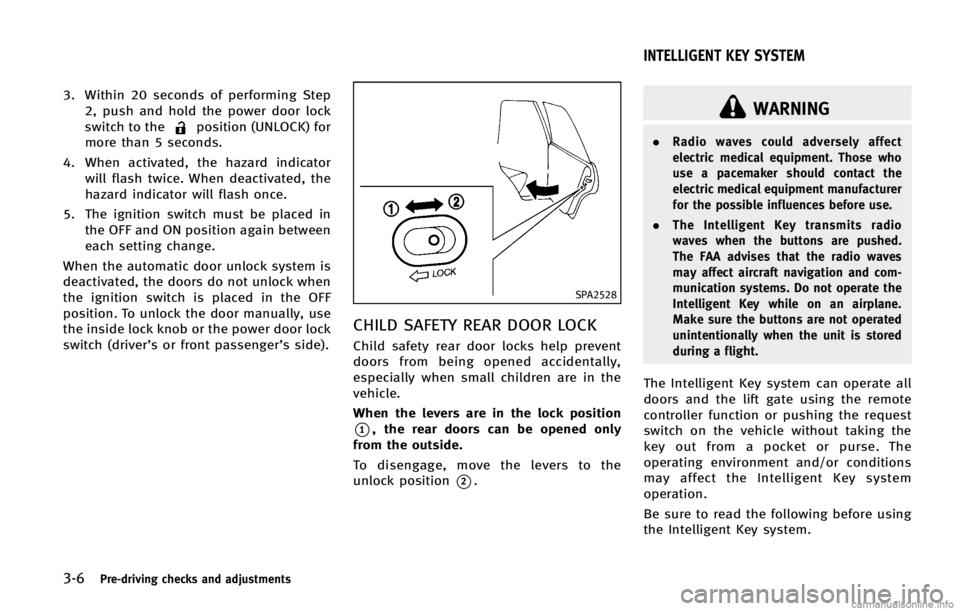
SPA2528
CHILD SAFETY REAR DOOR LOCKGUID-F725FE82-FC76-4F5A-97F1-EC80C2874E3A
WARNING
. Radio waves could adversely affect
electric medical equipment. Those who
use a pacemaker should contact the
electric medical equipment manufacturer
for the possible influences before use.
. The Intelligent Key transmits radio
waves when the buttons are pushed.
The FAA advises that the radio waves
may affect aircraft navigation and com-
munication systems. Do not operate the
Intelligent Key while on an airplane.
Make sure the buttons are not operated
unintentionally when the unit is stored
during a flight.
The Intelligent Key system can operate all
doors and the lift gate using the remote
controller function or pushing the request
switch on the vehicle without taking the
key out from a pocket or purse. The
operating environment and/or conditions
may affect the Intelligent Key system
operation.
Be sure to read the following before using
the Intelligent Key system.
INTELLIGENT KEY SYSTEM
Page 154 of 522

TROUBLESHOOTING GUIDEGUID-71D02555-16BF-4091-AA2F-FBA43C0FB588
button on the
Intelligent Key to lock the door The outside chime sounds for a few seconds. The Intelligent Key is inside the vehicle
or cargo area.
Carry the Intelligent Key with you.
A door is not closed securely. Close the door securely.
When pushing the ignition switch
to start the engine The Intelligent Key system warning light in the
meter blinks in green.
The battery charge is low.
Replace the battery with a new one. (See
“Battery”
(P.8-17).)
The Intelligent Key system warning light in the
meter blinks in yellow and the inside warning
chime sounds for a few seconds. The Intelligent Key is not in the vehicle. Carry the Intelligent Key with you.
The Intelligent Key system warning light in the
meter illuminates in yellow. It warns of a malfunction with the
Intelligent Key system.
Contact an INFINITI retailer.
Pre-driving checks and adjustments3-13
Page 155 of 522

3-14Pre-driving checks and adjustments
GUID-DE778BCF-B99A-4DA7-94C5-DF2F772B0219
WARNING
The Intelligent Key transmits radio waves
when the buttons are pushed. The FAA
advises that radio waves may affect aircraft
navigation and communication systems. Do
not operate the Intelligent Key while on an
airplane. Make sure the buttons are not
operated unintentionally when the unit is
stored for a flight.
It is possible to lock/unlock all doors, the
lift gate, fuel-filler door, activate the panic
alarm and open the windows by pushing
the buttons on the Intelligent Key from
outside the vehicle.
Before locking the doors, make sure the
Intelligent Key is not left in the vehicle.
The LOCK/UNLOCK button on the Intelli-
gent Key can operate at a distance of
approximately 33 ft (10 m) from the
vehicle. (The effective distance depends
upon the conditions around the vehicle.)
As many as 4 Intelligent Keys can be used
with one vehicle. For information concern-
ing the purchase and use of additional
Intelligent Keys, contact an INFINITI retai-
ler.The lock and unlock buttons on the
Intelligent Key will not operate when:
.
the distance between the Intelligent Key
and the vehicle is over 33 ft (10 m).
. the Intelligent Key battery runs down.
After locking with the remote keyless entry
function, pull the door handle to make sure
the doors are securely locked.
The LOCK/UNLOCK operating range varies
depending on the environment. To securely
operate the lock and unlock buttons,
approach the vehicle to about 3 ft (1 m)
from the door.SPA2436
*1LOCK button
*2UNLOCK button
*3Power lift gate button
*4PANIC button
HOW TO USE REMOTE KEYLESS
ENTRY SYSTEM
GUID-205165BB-2A56-43C8-A3FA-94508FF93C3D
Page 156 of 522

Locking doors and fuel-filler doorGUID-69AC6A3D-261B-4C88-9BC9-DD3A27C88837
button*1on the
Intelligent Key.
4. All the doors, the lift gate and fuel-filler door will lock.
5. The hazard indicator flashes twice and the horn chirps once.
*: Doors will lock with the Intelligent Key
while the ignition switch is in the ACC or
ON position.
Unlocking doors and fuel-filler doorGUID-9284B5C9-8524-4541-80AC-582FCA19DB27button*2on the
Intelligent Key once.
2. The hazard indicator flashes once. The driver’s door and fuel-filler door will
unlock.
The puddle light and the passenger
cabin illumination will illuminate and
stay on for a short period of time.
3. Push the UNLOCK
button on the
Intelligent Key again within 60 sec- onds.
4. The hazard indicator flashes once
again. All the doors will unlock.
All doors will be locked automatically
unless one of the following operations is
performed within 1 minute after pushing
the UNLOCK button on the Intelligent Key
while the doors are locked. If during this 1-
minute time period, the UNLOCK button on
the Intelligent Key is pushed, all doors will
be locked automatically after another 1
minute.
. Opening any door
. Pushing the ignition switch
Opening windows (if so equipped)GUID-4A7A15C1-BACE-48D8-A263-4BD80EDB0191button*2operation also
allows you to open a window that is
equipped with the automatic open func-
tion. This function will not operate while
the window timer is activated or the
windows need to be initialized. (See
“Power windows” (P.2-59).)
To open the windows, push the UNLOCK
button*2on the Intelligent Key for
about 3 seconds after the door is unlocked.
To stop opening, release the UNLOCK
button. If the window open operation is stopped
on the way while pushing the UNLOCK
button, release and push the UNLOCKbutton again until the window opens
completely.
Window cannot be closed using the In-
telligent Key.
The door window can also be operated by
turning the mechanical key in a door lock.
(See
“Doors” (P.3-4).)
Opening/closing lift gateGUID-7A7A1DC1-7C0E-4FD5-9826-A823A7700946
*3for more than 1 second.
2. The lift gate will automatically open.
The hazard indicator flashes 4 times and
the outside chime sounds for approxi-
mately 3 seconds.
Closing:
GUID-D73A39BF-43C8-459F-9C24-47B7F579C407
*3.
2. The lift gate will automatically close.
If the button
*3is pushed while the
lift gate is being opened or closed, the lift
gate will reverse.
The power lift gate button
*3cannot
Pre-driving checks and adjustments3-15
Page 157 of 522

3-16Pre-driving checks and adjustments
be operated when the ignition switch is in
the ON position.
Using panic alarmGUID-9452550C-005D-4C29-9F19-31ED802F61C3
button*4on the
Intelligent Key for more than 1 second.
2. The theft warning alarm and headlights will stay on for 25 seconds.
3. The panic alarm stops when:
.It has run for 25 seconds, or.Any of the buttons on the Intelligent Key is pushed. (Note: Panic button
should be pushed for more than 1
second.)
Setting hazard indicator and horn
mode
GUID-6D7D657E-6950-47DE-AA61-DC0F16C51E9E
button*1is pushed, the
hazard indicator flashes twice and the horn
chirps once. When the UNLOCK
button
*2is pushed, the hazard indicator flashes
once. If horns are not necessary, the system can
be switched to the hazard indicator mode.
In hazard indicator mode, when the LOCK
button is pushed, the hazard indicator
flashes twice. When the UNLOCK
button is pushed, neither the hazard
indicator nor the horn operates.
Page 159 of 522

3-18Pre-driving checks and adjustments
GUID-FE000314-D7F0-4AD6-AF71-5B82F75F04B0
JVP0103X
1. Pull the hood lock release handle*1
located below the instrument panel;
the hood will then spring up slightly.
2. Pull the lever
*2up at the front of the
hood with your fingertips and raise the
hood.
3. When closing the hood, slowly close the hood down to latch both the right
and left locks. Push the hood down to
lock the hood securely into place.
WARNING
. Make sure the hood is completely closed
and latched before driving. Failure to do
so could cause the hood to fly open and
result in an accident.
. If you see steam or smoke coming from
the engine compartment, to avoid injury
do not open the hood.
GUID-EC94A04A-3559-4474-821D-9E1BE1DBE3F1
WARNING
.Always be sure the lift gate has been
closed securely to prevent it from open-
ing while driving.
. Do not drive with the lift gate open. This
could allow dangerous exhaust gases to
be drawn into the vehicle. See “Exhaust
gas (carbon monoxide)” (P.5-3) of this
manual.
. Do not leave children unattended inside
the vehicle. They could unknowingly
activate switches or controls. Unat-
tended children could become involved
in serious accidents.
. Always be sure that hands and feet are
clear of the door frame to avoid injury
while closing the lift gate.
HOOD LIFT GATE
Page 166 of 522
CAUTION
.If fuel is spilled on the vehicle body,
flush it away with water to avoid paint
damage.
. Insert the cap straight into the fuel-filler
tube, then tighten until a single click is
heard. Failure to tighten the fuel-filler
cap properly may cause the
mal-
function indicator light (MIL) to illumi-
nate. If the
light illuminates
because the fuel-filler cap is loose or
missing, tighten or install the cap and
continue to drive the vehicle. The
light should turn off after a few driving
trips. If thelight does not turn off
after a few driving trips, have the vehicle
inspected by an INFINITI retailer.
For additional information, see “Mal-
function Indicator Light (MIL)” (P.2-19).
. The LOOSE FUEL CAP warning will appear
if the fuel-filler cap is not properly
tightened. It may take a few driving
trips for the message to be displayed.
Failure to tighten the fuel-filler cap
properly after the LOOSE FUEL CAP
warning appears may cause the
Malfunction Indicator Light (MIL) to
illuminate.
Pre-driving checks and adjustments3-25
Page 170 of 522

GUID-7EA98A31-E7A3-4913-AD21-96E01843E14F
SPA2447
INSIDE MIRRORGUID-5B83EE67-E9E9-45D0-832E-DF080FD9E09C
SPA2422A
Type A
SPA2450
Type B
Automatic anti-glare typeGUID-03C3FC21-1717-4122-B190-E80C6E9E78DE
switch*Bto make the
inside rearview mirror operate normally
and the indicator light will turn off. Push
the
switch again to turn the system on.
Type B: Push the “*”switch
*Cto make
the inside rearview mirror operate nor-
mally. The indicator light will turn off. Push
the “I”switch
*Dto turn the system on.
Do not allow any object to cover the
sensors
*Eor apply glass cleaner on
them. Doing so will reduce the sensitivity
of the sensor, resulting in improper
operation.
For the compass (if so equipped) opera-
tion, see “Compass” (P.2-9).
Pre-driving checks and adjustments3-29
MIRRORS
Page 175 of 522

3-34Pre-driving checks and adjustments
holding the SET switch for more than 10
seconds while the ignition switch is in the
ACC position.
The indicator lights on the memory
switches (1 and 2) will blink once when
the function is canceled, and the indicator
lights will blink twice when the function is
activated. Note that the indicator lights
may illuminate after 5 seconds while
holding the SET switch. This indicates
readiness for linking the Intelligent Key to
a stored memory position. Keep the SET
switch pushed for more than 10 seconds to
turn on or off the seat synchronization
function.
MEMORY STORAGEGUID-7C0BBA0A-C562-4C67-B0C1-457131FC41EB
button on the
Intelligent Key. If the indicator light
blinks, the Intelligent Key is linked to
that memory setting. Push the ignition switch to the OFF posi-
tion, and then push the
button on the
Intelligent Key. The driver’s seat, steering
wheel and outside mirrors will move to the
memorized position or to the exit position
when the entry/exit function is set to
active.
Confirming memory storageGUID-E77C3565-8BEE-460B-9BBC-75EC608F88AD