light INFINITI FX 2013 Repair Manual
[x] Cancel search | Manufacturer: INFINITI, Model Year: 2013, Model line: FX, Model: INFINITI FX 2013Pages: 522, PDF Size: 7.53 MB
Page 188 of 522

JVH0248X
Models with navigation system
JVH0249X
Models without navigation system
TIRE PRESSURE informationGUID-CF46107C-599A-4D58-858B-D3DD48166CF4
WARNING
.When a spare tire is mounted or a wheel
is replaced, tire pressure will not be
indicated, the TPMS will not function
and the low tire pressure warning light
will flash for approximately 1 minute.
The light will remain on after 1 minute.
Contact your INFINITI retailer as soon as
possible for tire replacement and/or
system resetting.
. Replacing tires with those not originally
specified by INFINITI could affect the
proper operation of the TPMS.
The tire pressure will be displayed for
reference.
The pressure indication “*** kPa”or“***
psi” on the screen means that the pressure
is being measured. After a few driving
trips, the pressure for each tire will be
displayed.
The unit can be converted in the LANGUAGE
& UNITS settings display. (See “How to use
SETTING button” (P.4-15) for details.)
To change the measurement units, select
Monitor, climate, audio, phone and voice recognition systems4-11
Page 202 of 522
SAA1896
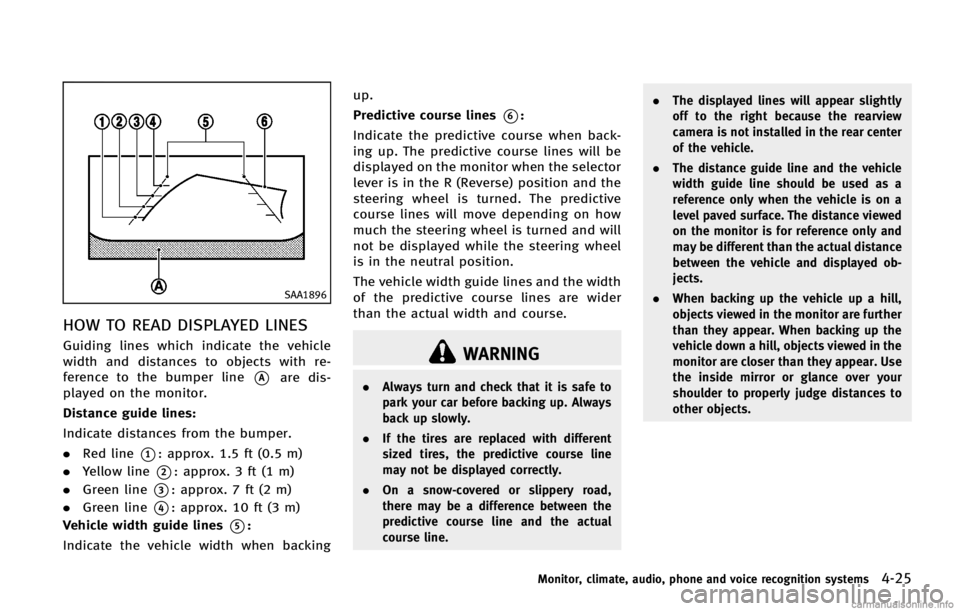
HOW TO READ DISPLAYED LINESGUID-BCFE75B5-C5A1-4F87-B804-CFCA48BAE298
WARNING
.Always turn and check that it is safe to
park your car before backing up. Always
back up slowly.
. If the tires are replaced with different
sized tires, the predictive course line
may not be displayed correctly.
. On a snow-covered or slippery road,
there may be a difference between the
predictive course line and the actual
course line. .
The displayed lines will appear slightly
off to the right because the rearview
camera is not installed in the rear center
of the vehicle.
. The distance guide line and the vehicle
width guide line should be used as a
reference only when the vehicle is on a
level paved surface. The distance viewed
on the monitor is for reference only and
may be different than the actual distance
between the vehicle and displayed ob-
jects.
. When backing up the vehicle up a hill,
objects viewed in the monitor are further
than they appear. When backing up the
vehicle down a hill, objects viewed in the
monitor are closer than they appear. Use
the inside mirror or glance over your
shoulder to properly judge distances to
other objects.
Monitor, climate, audio, phone and voice recognition systems4-25
Page 211 of 522
4-34Monitor, climate, audio, phone and voice recognition systems
WARNING
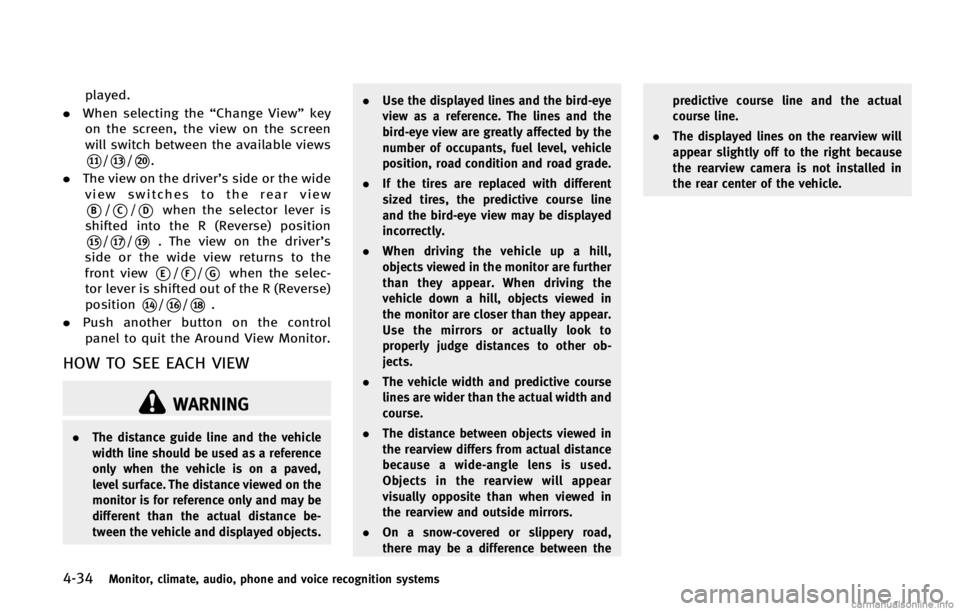
.The distance guide line and the vehicle
width line should be used as a reference
only when the vehicle is on a paved,
level surface. The distance viewed on the
monitor is for reference only and may be
different than the actual distance be-
tween the vehicle and displayed objects. .
Use the displayed lines and the bird-eye
view as a reference. The lines and the
bird-eye view are greatly affected by the
number of occupants, fuel level, vehicle
position, road condition and road grade.
. If the tires are replaced with different
sized tires, the predictive course line
and the bird-eye view may be displayed
incorrectly.
. When driving the vehicle up a hill,
objects viewed in the monitor are further
than they appear. When driving the
vehicle down a hill, objects viewed in
the monitor are closer than they appear.
Use the mirrors or actually look to
properly judge distances to other ob-
jects.
. The vehicle width and predictive course
lines are wider than the actual width and
course.
. The distance between objects viewed in
the rearview differs from actual distance
because a wide-angle lens is used.
Objects in the rearview will appear
visually opposite than when viewed in
the rearview and outside mirrors.
. On a snow-covered or slippery road,
there may be a difference between the predictive course line and the actual
course line.
. The displayed lines on the rearview will
appear slightly off to the right because
the rearview camera is not installed in
the rear center of the vehicle.
Page 213 of 522

4-36Monitor, climate, audio, phone and voice recognition systems
JVH0265X
The bird-eye view shows the overhead view
of the vehicle, which helps confirm the
vehicle position and the predicted course
to a parking space.
The vehicle icon
*1shows the position of
the vehicle. Note that the size of the
vehicle icon on the bird-eye view may
differ somewhat from the actual vehicle.
The areas that the cameras cannot cover
*2
are indicated in black. The non-viewable
area
*2is highlighted in yellow for several
seconds after the bird-eye view is dis-
played. It will be shown only the first time
after the ignition switch is placed in the
“ON” position. When the corner of the vehicle moves
closer to an object, the corner sonar
indicators
*3appears.
The driver can check the direction and
angle of the tire on the display by tire icon
*4when driving the vehicle forward or
backward.
Predictive course lines (
*5and*6)
indicate the predictive course when oper-
ating the vehicle. The predictive course
lines will be displayed on the monitor
when the steering wheel is turned. The
predictive course lines will move depend-
ing on how much the steering wheel is
turned and will not be displayed while the
steering wheel is in the neutral position.
When the monitor displays the front view
and the steering wheel turns about 90
degrees or less from the neutral position,
the two green predictive course lines
*5
are shown in front of the vehicle.
When the steering wheel turns about 90
degrees or more, one green predictive
course line
*6is shown in front of the
vehicle and the other green predictive
course line
*6is shown at side of the
vehicle.
When the monitor displays the rear view,
Page 214 of 522

SAA1842
Front-side viewGUID-DAA5B21F-4CA9-4881-BCF0-35538422B752
CAUTION
The turn signal light may look like with the
side-of-vehicle line. This is not a malfunc-
tion.
Monitor, climate, audio, phone and voice recognition systems4-37
Page 221 of 522
4-44Monitor, climate, audio, phone and voice recognition systems
WARNING
.Do not use the MOD system when
towing a trailer. The system may not
function properly.
. Excessive noise (for example, audio
system volume or open vehicle window)
will interfere with the chime sound, and
it may not be heard.
. The MOD system performance will be
limited according to environmental con-
ditions and surrounding objects such as:
—When there is low contrast between
background and the moving objects.
—When there is blinking source oflight.
—When strong light such as anothervehicle’s headlight or sunlight is
present.
—When camera orientation is not inits usual position, such as when
mirror is folded.
—When there is dirt, water drops orsnow on the camera lens.
—When the position of the movingobjects in the display is not changed.
. The MOD system might detect some-
thing like flowing water droplets on the
camera lens, white smoke from the
muffler, moving shadows, etc.
. The MOD system may not function
properly depending on the speed, direc-
tion, distance or shape of the moving
objects.
. If your vehicle sustains damage to the
parts where the camera is installed,
leaving it misaligned or bent, the sen-
sing zone may be altered and the MOD
system may not detect objects properly.
HOW TO ADJUST THE SCREEN VIEWGUID-A7187DDC-6FEA-465F-97D2-B9E1927DD9EB
Page 228 of 522

AUTOMATIC CLIMATE CONTROLGUID-0BE1694A-DD97-4BA4-BF44-857EEABBA6F7
”front defroster button.
(The indicator light on the button will
illuminate.)
2. Turn the temperature control dial to set the desired temperature.
. To quickly remove ice from the outside
of the windows, push the fan speed
increase button “
”and set it to the
maximum position.
. As soon as possible after the wind-
shield is clean, push the “AUTO”button
to return to the auto mode.
. When the “
”front defroster button
is pushed, the air conditioner will
automatically be turned on at outside
temperatures above 238F (−58C) to
defog the windshield, and the air
recirculate mode will automatically be
turned off.
Outside air is drawn into the passenger
compartment to improve the defogging
performance.
Monitor, climate, audio, phone and voice recognition systems4-51
Page 229 of 522

4-52Monitor, climate, audio, phone and voice recognition systems
Manual operationGUID-98E726A1-B84E-4603-A00E-6B4E72820C32
”or
decrease “”buttons to manually con-
trol the fan speed.
Push the “AUTO”button to return to
automatic control of the fan speed.
Temperature control:
GUID-D73A39BF-43C8-459F-9C24-47B7F579C407
” side will
illuminate.
The air recirculation mode cannot be
activated when the air conditioner is in
the front defrosting mode “
”.
Outside air circulation:
GUID-D73A39BF-43C8-459F-9C24-47B7F579C407
” side will turn off and
“
”(if so equipped) will
illuminate.
Automatic intake air control:
GUID-D73A39BF-43C8-459F-9C24-47B7F579C407
” and outside air circulation
“” sides) will flash twice, and then
the intake air will be controlled auto-
matically.
. With Advanced Climate Control System
(ACCS):
To return to the automatic control
mode, push the intake air control
button until the indicator light on the
“
” side illuminates. The Advanced
Climate Control System (ACCS) turns on
and the intake air will be controlled
automatically. Air flow control:
GUID-D73A39BF-43C8-459F-9C24-47B7F579C407
: Air flows from center and side ventilators.
: Air flows from center and side ventilators and
foot outlets.
: Air flows mainly from foot outlets.
: Air flows from defroster and foot outlets.
To turn the system offGUID-4E10A5E2-07E8-47C9-9D90-88AB79C187D2
Page 230 of 522

SAA2734
Ion control:GUID-D73A39BF-43C8-459F-9C24-47B7F579C407
”is
displayed on the screen and when the air
flow is low, the indication in the screen
changes to “
”.
Plasmacluster®and Plasmacluster®ion
are registered trademarks of Sharp Cor-
poration.
Outside odor and exhaust gas detection
sensor:
GUID-D73A39BF-43C8-459F-9C24-47B7F579C407
” side will
illuminate and the outside odor and
exhaust gas detection sensor will turn on.
. The air flow control is not in the front
defroster mode (the indicator light on
the “
”front defroster button is
turned off). .
The outside temperature is about 328F
(08C) or more.
. The outside odor and exhaust gas
detection sensor detects industrial
odors such as pulp or chemicals, and
exhaust gases such as gasoline or
diesel.
When the automatic intake air control is
ON, for the first 5 minutes, the recircula-
tion mode is selected to prevent dust, dirt
and pollen from entering the vehicle and
cleans the air inside of the vehicle with
positive and negative ions that are emitted
from the ventilator.
After the 5 minutes, the sensor detects
outside odors and exhaust gases and
automatically alternates between the re-
circulation mode and outside air circula-
tion mode.
OPERATING TIPSGUID-41CFEB72-C115-4AD7-8DDA-791C7D439B5C
Page 233 of 522

4-56Monitor, climate, audio, phone and voice recognition systems
cles exist.
Static: Caused by thunderstorms, electrical
power lines, electric signs and even traffic
lights.
Satellite radio reception:
GUID-D73A39BF-43C8-459F-9C24-47B7F579C407
SAA0480
Compact Disc (CD) playerGUID-6AF0CEF7-0537-49F1-93DC-31D7E9697380