starting INFINITI FX 2013 Workshop Manual
[x] Cancel search | Manufacturer: INFINITI, Model Year: 2013, Model line: FX, Model: INFINITI FX 2013Pages: 522, PDF Size: 7.53 MB
Page 385 of 522

5-62Starting and driving
SSD0771
Under the following conditions, the Dis-
tance Control Assist system will not oper-
ate and the Distance Control Assist (DCA)
system switch indicator light will blink:
.When the SNOW mode switch is ON (To
use the DCA system, turn off the SNOW
mode switch, then turn on the dynamic
driver assistance switch.)
For details about the SNOW mode
switch, see “Snow mode switch” (P.2-
47).
. When the VDC system is off (To use the
DCA system, turn on the VDC, then
push the dynamic driver assistance
switch.) For details about the VDC system, see
“Vehicle Dynamic Control (VDC) sys-
tem”
(P.5-83).
. When ABS or VDC (including the trac-
tion control system) is operating
. When driving into a strong light (for
example, sunlight)
When the Conventional (fixed speed) cruise
control mode is operating, the DCA system
will not operate. (To use the DCA system,
turn the Conventional (fixed speed) cruise
control mode off, then push the dynamic
driver assistance switch.)
For details about the Conventional (fixed
speed) cruise control mode, see “Intelli-
gent Cruise Control (ICC) system (FULL
SPEED RANGE)” (P.5-32).
When the engine is turned off, the system
is automatically turned off.
Page 387 of 522

5-64Starting and driving
WARNING
.When the vehicle ahead detection in-
dicator light is not illuminated, system
will not control or warn the driver.
. Never place your foot under the brake
pedal. Your foot may be caught when the
system controls the brake.
. Depending on the position of the accel-
erator pedal, the system may not be able
to assist the driver to release the
accelerator pedal appropriately.
. If the vehicle ahead comes to a stand-
still, the vehicle decelerates to a stand-
still within the limitations of the system.
The system will release brake control
with a warning chime once it judges the
vehicle is at a standstill. To prevent the
vehicle from moving, the driver must
depress the brake pedal. (The system
will resume control automatically once
the system reaches 3 MPH (5 km/h)).
Overriding the system:GUID-D73A39BF-43C8-459F-9C24-47B7F579C407
Page 389 of 522

5-66Starting and driving
.When driving into a strong light (for
example, sunlight)
Action to take:
GUID-D73A39BF-43C8-459F-9C24-47B7F579C407
SSD0772
Condition B:GUID-D73A39BF-43C8-459F-9C24-47B7F579C407
SSD0787
Condition C:GUID-D73A39BF-43C8-459F-9C24-47B7F579C407
Page 390 of 522

conditions, have the vehicle checked at an
INFINITI retailer.
Sensor maintenanceGUID-F63B8BC7-76AF-4CF0-AE7C-656B1B653597
JVS0124X
SSD0749
Vehicle ahead detection light
Starting and driving5-67
FORWARD COLLISION WARNING (FCW)
SYSTEM (if so equipped)
Page 391 of 522

5-68Starting and driving
SSD1156
Warning systems switch
The FCW system uses the distance sensor
*Alocated below the front bumper to
measure the distance to the vehicle ahead.
When the system judges that your vehicle
is getting close to the vehicle ahead in the
travel lane, the vehicle ahead detection
indicator light on the instrument panel
blinks and a warning chime sounds.
The FCW system will be turned on/off by
pushing the warning systems switch. The
warning systems ON indicator light
*1on
the switch will illuminate when the system
turns on.
PRECAUTIONS ON FCW SYSTEMGUID-900DF3B0-1E06-4D16-AD92-2F3F31C98251
WARNING
. The FCW system is intended to warn you
before a collision but will not avoid a
collision. It is the driver’s responsibility
to stay alert, drive safely and be in
control of the vehicle at all times.
. As there is a performance limit, the
system may not provide a warning in
certain conditions.
. The system will not detect the following
objects:
—Pedestrians, animals or obstacles in
the roadway
—Oncoming vehicles in the same lane
. The system will not detect another
vehicle under the following conditions:
—When the sensor gets dirty and it is
impossible to detect the distance
from the vehicle ahead.
—When driving into a strong light (forexample, sunlight)
. The sensor generally detects the signals
returned from the reflectors on a vehicle ahead. Therefore, the system may not
function properly under the following
conditions:
—When the reflectors of the vehicle
ahead are positioned high or close to
each other (including a small vehicle
such as motorcycles).
—When the sensor gets dirty or it isimpossible to detect the distance
from the vehicle ahead.
—When the reflectors on the vehicleahead are missing, damaged or
covered.
—When the reflectors of the vehicle
ahead are covered with dirt, snow or
road spray.
—When visibility is low (such as rain,fog, snow, etc.).
—When snow or road spray fromtraveling vehicles is splashed.
—When dense exhaust or other smoke (black smoke) from vehicles reduces
the visibility of the sensor.
—When excessively heavy baggage isloaded in the rear seat or the
luggage room of your vehicle.
Page 392 of 522
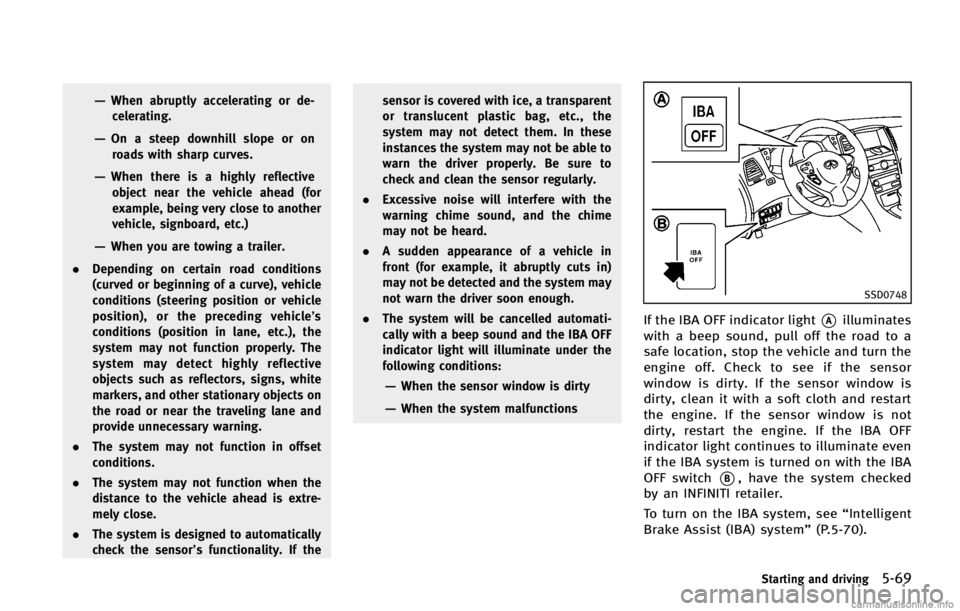
SSD0748
If the IBA OFF indicator light*Ailluminates
with a beep sound, pull off the road to a
safe location, stop the vehicle and turn the
engine off. Check to see if the sensor
window is dirty. If the sensor window is
dirty, clean it with a soft cloth and restart
the engine. If the sensor window is not
dirty, restart the engine. If the IBA OFF
indicator light continues to illuminate even
if the IBA system is turned on with the IBA
OFF switch
*B, have the system checked
by an INFINITI retailer.
To turn on the IBA system, see “Intelligent
Brake Assist (IBA) system” (P.5-70).
Starting and driving5-69
Page 393 of 522

5-70Starting and driving
SSD1156
Warning systems switch
FCW system operationGUID-215D364E-A2AD-4F7B-A3D8-2722CC7F5E69
Page 394 of 522

JVS0124X
SSD0749
Vehicle ahead detection indicator lightThe IBA system uses a distance sensor
*A
located below the front bumper to measure
the distance to the vehicle ahead. When
the system judges that your vehicle is
getting close to the vehicle ahead in the
traveling lane, the vehicle ahead detection
indicator light on the instrument panel
blinks and a warning chime sounds.
The IBA system will be turned on/off by
pushing the IBA OFF switch. The IBA OFF
indicator light display will illuminate when
the system is turned off.
PRECAUTIONS ON IBA SYSTEMGUID-B880B3F4-9156-4E93-89B7-9AB51DF81FA6
WARNING
.
The IBA system is not a collision
avoidance system. It is the driver’s
responsibility to stay alert, drive safely
and be in control of the vehicle at all
times.
. As there is a performance limit, the
system may not provide a warning or
braking in certain conditions.
. The system will not detect the following
objects:
—Pedestrians, animals or obstacles in the roadway
—Oncoming vehicles in the same lane
. The system will not detect another
vehicle under the following conditions:
—When the sensor gets dirty and it is
impossible to detect the distance
from the vehicle ahead.
—When driving into a strong light (forexample, sunlight)
. The sensor generally detects the signals
returned from the reflectors on a vehicle
ahead. Therefore, the system may not
function properly under the following
conditions:
—When the reflectors of the vehicle
ahead are positioned high or close to
each other (including a small vehicle
such as motorcycles).
—When the sensor gets dirty and it isimpossible to detect the distance
from the vehicle ahead.
—When the reflectors on the vehicle
ahead are missing, damaged or
covered.
—When the reflectors of the vehicleahead are covered with dirt, snow or
Starting and driving5-71
Page 395 of 522

5-72Starting and driving
SSD0782
Reflectors on the road
WARNING
.The system may detect highly reflective
objects such as reflectors, signs, white
markers and other stationary objects on
the road or near the traveling lane.
In extreme conditions, detection of these
objects may cause the system to func-
tion.
. The system is designed to automatically
check the sensor’s functionality. If the
sensor is covered with ice, a transparent
or translucent plastic bag, etc., the
Page 397 of 522
5-74Starting and driving
CAUTION
During the first 1,200 miles (2,000 km),
follow these recommendations to obtain
maximum engine performance and ensure
the future reliability and economy of your
new vehicle.
Failure to follow these recommendations
may result in shortened engine life and
reduced engine performance.
.Avoid driving for long periods at con-
stant speed, either fast or slow. Do not
run the engine over 4,000 rpm.
. Do not accelerate at full throttle in any
gear.
. Avoid quick starts.
. Avoid hard braking as much as possi-
ble.
. Do not tow a trailer for the first 500
miles (805 km).
GUID-91069CFD-9E75-4D1E-A165-89DB287A33C0