starting INFINITI FX 2013 Owner's Guide
[x] Cancel search | Manufacturer: INFINITI, Model Year: 2013, Model line: FX, Model: INFINITI FX 2013Pages: 522, PDF Size: 7.53 MB
Page 339 of 522
5-16Starting and driving
CAUTION
.Except in an emergency, do not shift to
the N (Neutral) position while driving.
Coasting with the transmission in the N
(Neutral) position may cause serious
damage to the transmission.
. When stopping the vehicle on an uphill
grade, do not hold the vehicle by
depressing the accelerator pedal. The
foot brake should be used for this
purpose.
. Do not downshift abruptly on slippery
roads. This may cause a loss of control.
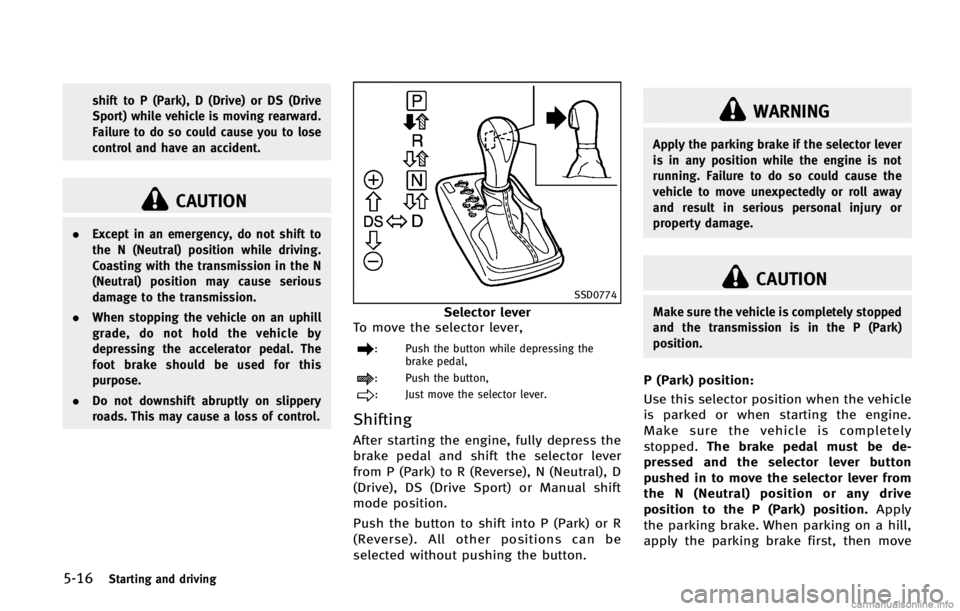
SSD0774
Selector lever
To move the selector lever,
: Push the button while depressing the brake pedal,
: Push the button,
: Just move the selector lever.
ShiftingGUID-9384D3FA-2ECF-4515-8DD6-D10E211170F1
WARNING
Apply the parking brake if the selector lever
is in any position while the engine is not
running. Failure to do so could cause the
vehicle to move unexpectedly or roll away
and result in serious personal injury or
property damage.
CAUTION
Make sure the vehicle is completely stopped
and the transmission is in the P (Park)
position.
P (Park) position:GUID-D73A39BF-43C8-459F-9C24-47B7F579C407
Page 341 of 522

5-18Starting and driving
The transmission shifts to the lower range.
When canceling the manual shift mode,
return the selector lever to the D (Drive)
position. The transmission returns to the
normal driving mode.
When you pull the paddle shifter (if so
equipped) while in the D (Drive) position,
the transmission will shift to the upper or
lower range temporarily. The transmission
will automatically return to the D (Drive)
position after a short period of time. If you
want to return to the D (Drive) position
manually, pull and hold the paddle shifter
for about 1.5 seconds.
In the manual shift mode, the shift range is
displayed on the position indicator in the
meter.
Shift ranges up or down one by one as
follows:
M1?
/M2?
/M3?
/M4?
/M5?
/M6?
/M7
M7 (7th):GUID-D73A39BF-43C8-459F-9C24-47B7F579C407
Page 343 of 522

5-20Starting and driving
WARNING
.Be sure the parking brake is fully
released before driving. Failure to do so
can cause brake failure and lead to an
accident.
. Do not release the parking brake from
outside the vehicle.
. Do not use the gear shift in place of the
parking brake. When parking, be sure
the parking brake is fully engaged.
. Do not leave children unattended in a
vehicle. They could release the parking
brake and cause an accident.
PARKING BRAKE
Page 344 of 522

SPA2331
To apply:Fully depress the parking brake
pedal
*1.
To release:
1. Firmly apply the foot brake
*2.
2. Depress the parking brake pedal
*1
and the parking brake will be released.
3. Before driving, be sure the brake
warning light goes out.
GUID-AB657AC3-44F0-4111-80FB-3866A16BCDB1
JVS0123X
SSD1182
Starting and driving5-21
LANE DEPARTURE WARNING (LDW)
SYSTEM/LANE DEPARTURE PREVENTION
(LDP) SYSTEM (if so equipped)
Page 345 of 522

5-22Starting and driving
WARNING
.This system is only a warning device to
inform the driver of a potential unin-
tended lane departure. It will not steer
the vehicle or prevent loss of control. It
is the driver’s responsibility to stay
alert, drive safely, keep the vehicle in
the traveling lane, and be in control of
the vehicle at all times.
. The system will not operate at speeds
below approximately 45 MPH or if it
cannot detect lane markers.
. If the LDW system malfunctions, it will
cancel automatically, and the lane de-
parture warning light (orange) will illu-
minate.
. If the lane departure warning light
(orange) illuminates, pull off the road
to a safe location and stop the vehicle.
Turn the engine off and restart the
engine. If the lane departure warning
light (orange) continues to illuminate, have the system checked by an INFINITI
retailer.
. Excessive noise will interfere with the
warning chime sound, and the chime
may not be heard.The system may not function properly
under the following conditions:
.On roads where there are multiple
parallel lane markers; lane markers
that are faded or not painted clearly;
yellow painted lane markers; non-stan-
dard lane markers; or lane markers
covered with water, dirt, snow, etc.
. On roads where the discontinued lane
markers are still detectable.
. On roads where there are sharp curves.
. On roads where there are sharply
contrasting objects, such as shadows,
snow, water, wheel ruts, seams or lines
remaining after road repairs. (The LDW
system could detect these items as
lane markers.)
. On roads where the traveling lane
merges or separates.
. When the vehicle’s traveling direction
does not align with the lane marker.
Page 347 of 522

5-24Starting and driving
WARNING
.The LDP system will not steer the vehicle
or prevent loss of control. It is the
driver’s responsibility to stay alert, drive
safely, keep the vehicle in the traveling
lane, and be in control of vehicle at all
times.
. The LDP system is primarily intended for
use on well-developed freeways or high-
ways. It may not detect the lane markers
in certain roads, weather or driving
conditions.
. Using the LDP system under some
conditions of road, lane marker or
weather, or when you change lanes
without using the lane change signal could lead to an unexpected system
operation. In such conditions, you need
to correct the vehicle’s direction with
your steering operation to avoid acci-
dents.
. When the LDP system is operating, avoid
excessive or sudden steering maneu-
vers. Otherwise, you could lose control
of the vehicle.
. The LDP system will not operate at
speeds below approximately 45 MPH
(70 km/h) or if it cannot detect lane
markers.
. The LDP system may not function
properly under the following conditions,
and do not use the LDP system:
—During bad weather (rain, fog, snow,
wind, etc.).
—When driving on slippery roads,such as on ice or snow, etc.
—When driving on winding or uneven roads.
—When there is a lane closure due toroad repairs.
—When driving in a makeshift lane.
Page 349 of 522

5-26Starting and driving
SSD0672
LDP ON indicator light (green)/ Warninglight (orange)
LDP system operationGUID-A0FBDA55-1A13-4B54-8692-FD3F53246940
SSD0912
Dynamic driver assistance switch
To turn on the LDP system, push the
dynamic driver assistance switch on the
steering wheel after starting the engine.
The LDP ON indicator light (green) on the
instrument panel will illuminate. Push the
dynamic driver assistance switch again to
turn off the LDP system. The LDP ON
indicator light will turn off.
The dynamic driver assistance switch is
used as both the LDP and DCA system.
When the dynamic driver assistance switch
is pushed, the DCA system will also turn on
or off simultaneously. The LDP system can
be individually set to on or off on the
display. If the system is set to off, the
Page 351 of 522

5-28Starting and driving
SSD0886
3. To set the LDP system to on or off,highlight the “Lane Departure Preven-
tion” key, select ON or OFF and push
the ENTER
*2button.
If both the LDP and DCA systems are set to
OFF on the display, when the dynamic
driver assistance switch is pushed, the LDP
ON indicator light and the Distance Control
Assist (DCA) system switch indicator light
will blink for approximately 2 seconds. See
“Distance Control Assist (DCA) system”
(P.5-54).
Automatic deactivationGUID-F669BA1F-0061-47C4-AD9A-CA7A381B2E67
Page 353 of 522

5-30Starting and driving
GUID-3AF831C5-B9AE-429C-98EA-DD3D081712CA
WARNING
Do not use the cruise control when driving
under the following conditions:
.when it is not possible to keep the
vehicle at a set speed .
in heavy traffic or in traffic that varies in
speed
. on winding or hilly roads
. on slippery roads (rain, snow, ice, etc.)
. in very windy areas
Doing so could cause a loss of vehicle
control and result in an accident.
SSD0788
1. ACCELERATE/RESUME switch
2. COAST/SET switch
3. CANCEL switch
4. MAIN (ON·OFF) switch
CRUISE CONTROL OPERATIONSGUID-E3CE7F3D-06AD-405D-AC72-5E1139BE8F81
Page 354 of 522

COAST/SET switch and release it. (The
CRUISE SET indicator will come on in the
instrument panel.) Take your foot off the
accelerator pedal. Your vehicle will main-
tain the set speed.
.To pass another vehicle, depress the
accelerator pedal. When you release
the pedal, the vehicle will return to the
previously set speed.
. The vehicle may not maintain the set
speed on winding or hilly roads. If this
happens, drive without the cruise con-
trol.
To cancel the preset speed, follow any of
these methods:
1. Push the CANCEL button. The SET
indicator will go out.
2. Tap the brake pedal. The SET indicator will go out.
3. Move the selector lever to the N
(Neutral) position. The SET indicator
will go out.
4. Turn the MAIN switch off. Both the CRUISE indicator and SET indicator will
go out.
. If you depress the brake pedal while
pushing the ACCELERATE/RESUME or
COAST/SET switch and reset at the cruising speed, the cruise control will
disengage. Turn the MAIN switch off
once and then turn it on again.
. The cruise control will automatically
cancel if the vehicle slows more than
8 MPH (13 km/h) below the set speed.
. If you move the selector lever to the N
(Neutral) position, the cruise control
will be canceled.
To reset at a faster cruising speed, use one
of the following methods:
. Depress the accelerator pedal. When
the vehicle attains the desired speed,
push and release the COAST/SET
switch.
. Push and hold the ACCELERATE/RE-
SUME switch. When the vehicle attains
the speed you desire, release the
switch.
. Push, then quickly release the ACCEL-
ERATE/RESUME switch. Each time you
do this, the set speed will increase by
about 1 MPH (1.6 km/h).
To reset at a slower cruising speed, use
one of the following methods:
. Lightly tap the brake pedal. When the
vehicle attains the desired speed, push
the COAST/SET switch and release it. .
Push and hold the COAST/SET switch.
Release the switch when the vehicle
slows down to the desired speed.
. Push, then quickly release the COAST/
SET switch. Each time you do this, the
set speed will decrease by about 1 MPH
(1.6 km/h).
To resume the preset speed, push and
release the ACCELERATE/RESUME switch.
The vehicle will resume the last set
cruising speed when the vehicle speed is
over 25 MPH (40 km/h).
Starting and driving5-31