air INFINITI FX35 2004 Service Manual
[x] Cancel search | Manufacturer: INFINITI, Model Year: 2004, Model line: FX35, Model: INFINITI FX35 2004Pages: 4449, PDF Size: 99.66 MB
Page 4187 of 4449
SE-58
AUTOMATIC DRIVE POSITIONER
Revision: 2004 November 2004 FX35/FX45
Front Lifting Sensor Circuit CheckAIS002XU
1. CHECK FUNCTION
With CONSULT-II
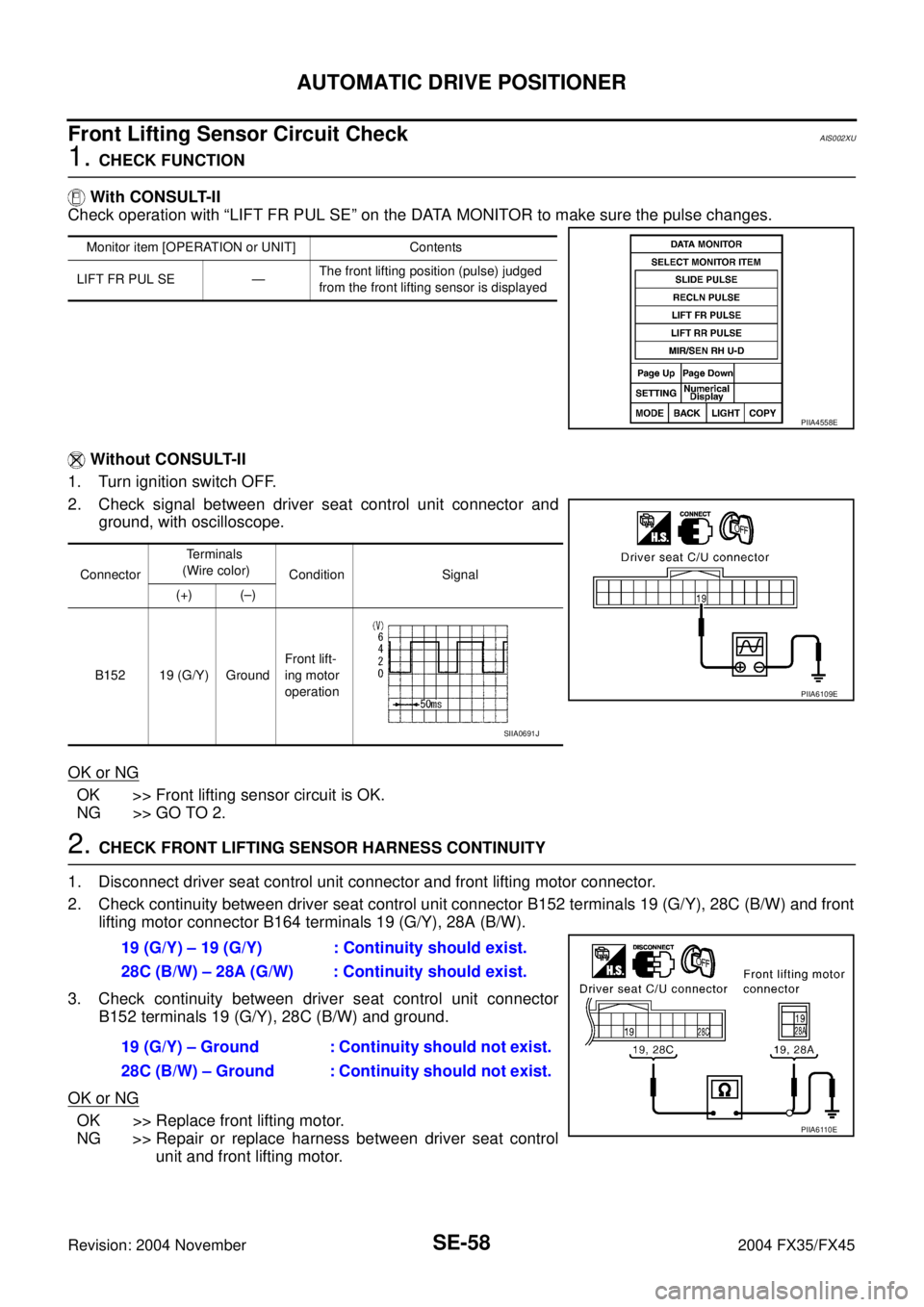
Check operation with “LIFT FR PUL SE” on the DATA MONITOR to make sure the pulse changes.
Without CONSULT-II
1. Turn ignition switch OFF.
2. Check signal between driver seat control unit connector and
ground, with oscilloscope.
OK or NG
OK >> Front lifting sensor circuit is OK.
NG >> GO TO 2.
2. CHECK FRONT LIFTING SENSOR HARNESS CONTINUITY
1. Disconnect driver seat control unit connector and front lifting motor connector.
2. Check continuity between driver seat control unit connector B152 terminals 19 (G/Y), 28C (B/W) and front
lifting motor connector B164 terminals 19 (G/Y), 28A (B/W).
3. Check continuity between driver seat control unit connector
B152 terminals 19 (G/Y), 28C (B/W) and ground.
OK or NG
OK >> Replace front lifting motor.
NG >> Repair or replace harness between driver seat control
unit and front lifting motor.
Monitor item [OPERATION or UNIT] Contents
LIFT FR PUL SE —The front lifting position (pulse) judged
from the front lifting sensor is displayed
PIIA4558E
ConnectorTe r m i n a l s
(Wire color)
Condition Signal
(+) (–)
B152 19 (G/Y) GroundFront lift-
ing motor
operation
PIIA6109E
SIIA0691J
19 (G/Y) – 19 (G/Y) : Continuity should exist.
28C (B/W) – 28A (G/W) : Continuity should exist.
19 (G/Y) – Ground : Continuity should not exist.
28C (B/W) – Ground : Continuity should not exist.
PIIA6110E
Page 4188 of 4449
AUTOMATIC DRIVE POSITIONER
SE-59
C
D
E
F
G
H
J
K
L
MA
B
SE
Revision: 2004 November 2004 FX35/FX45
Rear Lifting Sensor Circuit CheckAIS002XV
1. CHECK REAR END LIFTING SENSOR INPUT/OUTPUT SIGNAL
With CONSULT-II
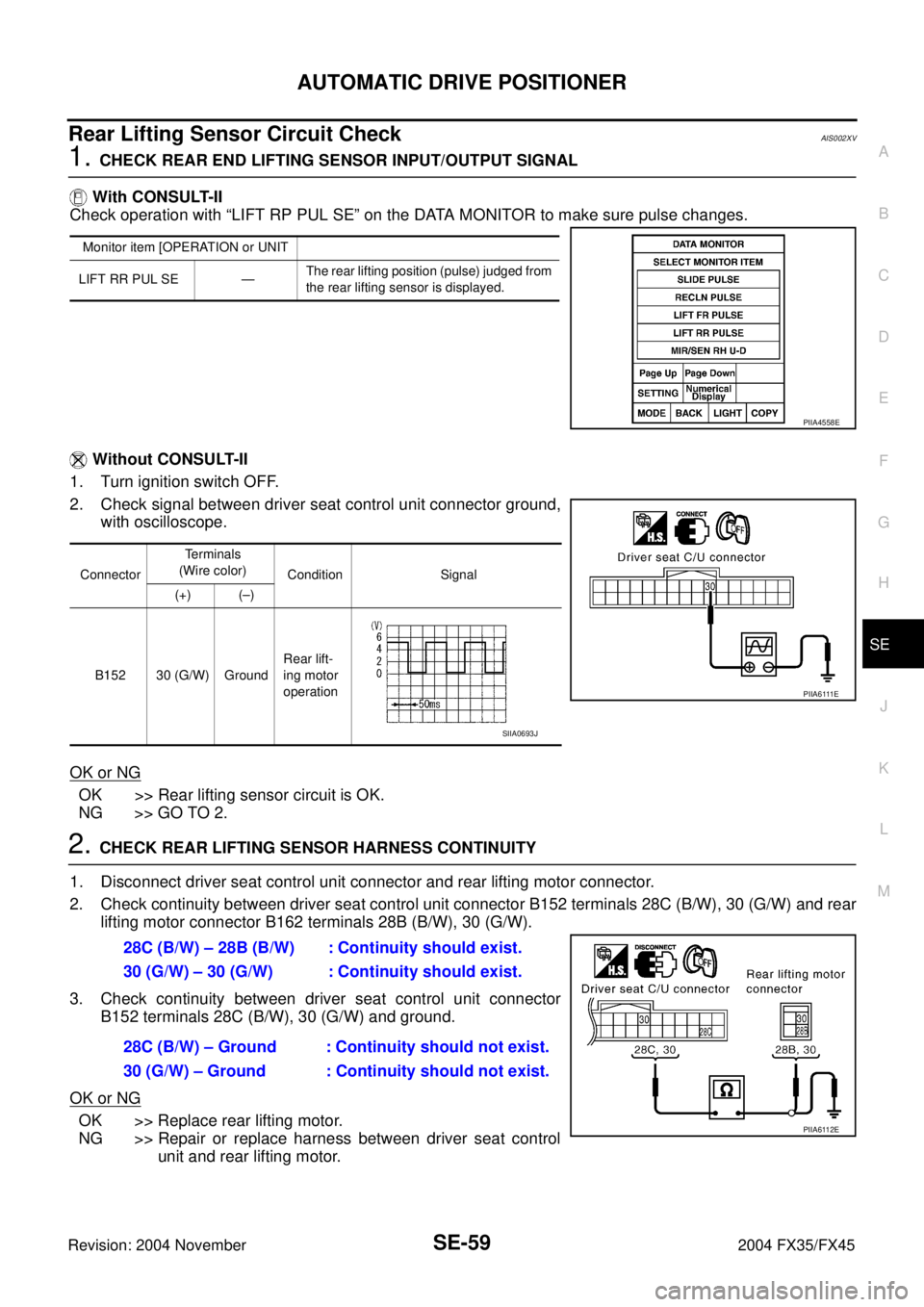
Check operation with “LIFT RP PUL SE” on the DATA MONITOR to make sure pulse changes.
Without CONSULT-II
1. Turn ignition switch OFF.
2. Check signal between driver seat control unit connector ground,
with oscilloscope.
OK or NG
OK >> Rear lifting sensor circuit is OK.
NG >> GO TO 2.
2. CHECK REAR LIFTING SENSOR HARNESS CONTINUITY
1. Disconnect driver seat control unit connector and rear lifting motor connector.
2. Check continuity between driver seat control unit connector B152 terminals 28C (B/W), 30 (G/W) and rear
lifting motor connector B162 terminals 28B (B/W), 30 (G/W).
3. Check continuity between driver seat control unit connector
B152 terminals 28C (B/W), 30 (G/W) and ground.
OK or NG
OK >> Replace rear lifting motor.
NG >> Repair or replace harness between driver seat control
unit and rear lifting motor.
Monitor item [OPERATION or UNIT
LIFT RR PUL SE —The rear lifting position (pulse) judged from
the rear lifting sensor is displayed.
PIIA4558E
ConnectorTe r m i n a l s
(Wire color)
Condition Signal
(+) (–)
B152 30 (G/W) GroundRear lift-
ing motor
operation
P I I A 6 111 E
SIIA0693J
28C (B/W) – 28B (B/W) : Continuity should exist.
30 (G/W) – 30 (G/W) : Continuity should exist.
28C (B/W) – Ground : Continuity should not exist.
30 (G/W) – Ground : Continuity should not exist.
PIIA6112E
Page 4189 of 4449
SE-60
AUTOMATIC DRIVE POSITIONER
Revision: 2004 November 2004 FX35/FX45
Telescopic Sensor Circuit CheckAIS002YB
1. CHECK FUNCTION
With CONSULT-II
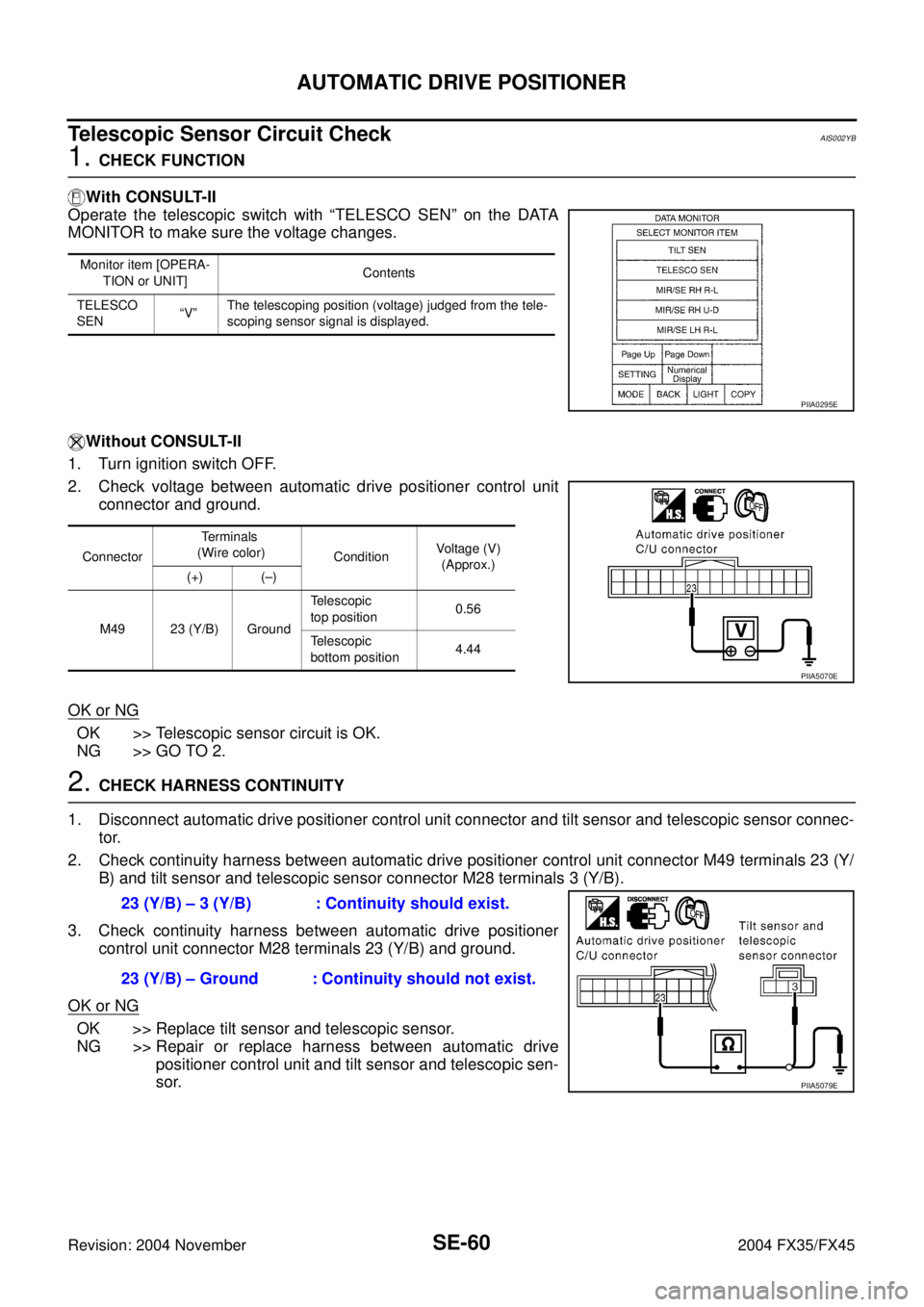
Operate the telescopic switch with “TELESCO SEN” on the DATA
MONITOR to make sure the voltage changes.
Without CONSULT-II
1. Turn ignition switch OFF.
2. Check voltage between automatic drive positioner control unit
connector and ground.
OK or NG
OK >> Telescopic sensor circuit is OK.
NG >> GO TO 2.
2. CHECK HARNESS CONTINUITY
1. Disconnect automatic drive positioner control unit connector and tilt sensor and telescopic sensor connec-
tor.
2. Check continuity harness between automatic drive positioner control unit connector M49 terminals 23 (Y/
B) and tilt sensor and telescopic sensor connector M28 terminals 3 (Y/B).
3. Check continuity harness between automatic drive positioner
control unit connector M28 terminals 23 (Y/B) and ground.
OK or NG
OK >> Replace tilt sensor and telescopic sensor.
NG >> Repair or replace harness between automatic drive
positioner control unit and tilt sensor and telescopic sen-
sor.
Monitor item [OPERA-
TION or UNIT]Contents
TELESCO
SEN“V”The telescoping position (voltage) judged from the tele-
scoping sensor signal is displayed.
PIIA0295E
ConnectorTe r m i n a l s
(Wire color)
ConditionVoltage (V)
(Approx.)
(+) (–)
M49 23 (Y/B) GroundTelescopic
top position0.56
Telescopic
bottom position4.44
PIIA5070E
23 (Y/B) – 3 (Y/B) : Continuity should exist.
23 (Y/B) – Ground : Continuity should not exist.
PIIA5079E
Page 4190 of 4449
AUTOMATIC DRIVE POSITIONER
SE-61
C
D
E
F
G
H
J
K
L
MA
B
SE
Revision: 2004 November 2004 FX35/FX45
Tilt Sensor Circuit CheckAIS002YC
1. CHECK TILT SENSOR
With CONSULT-II
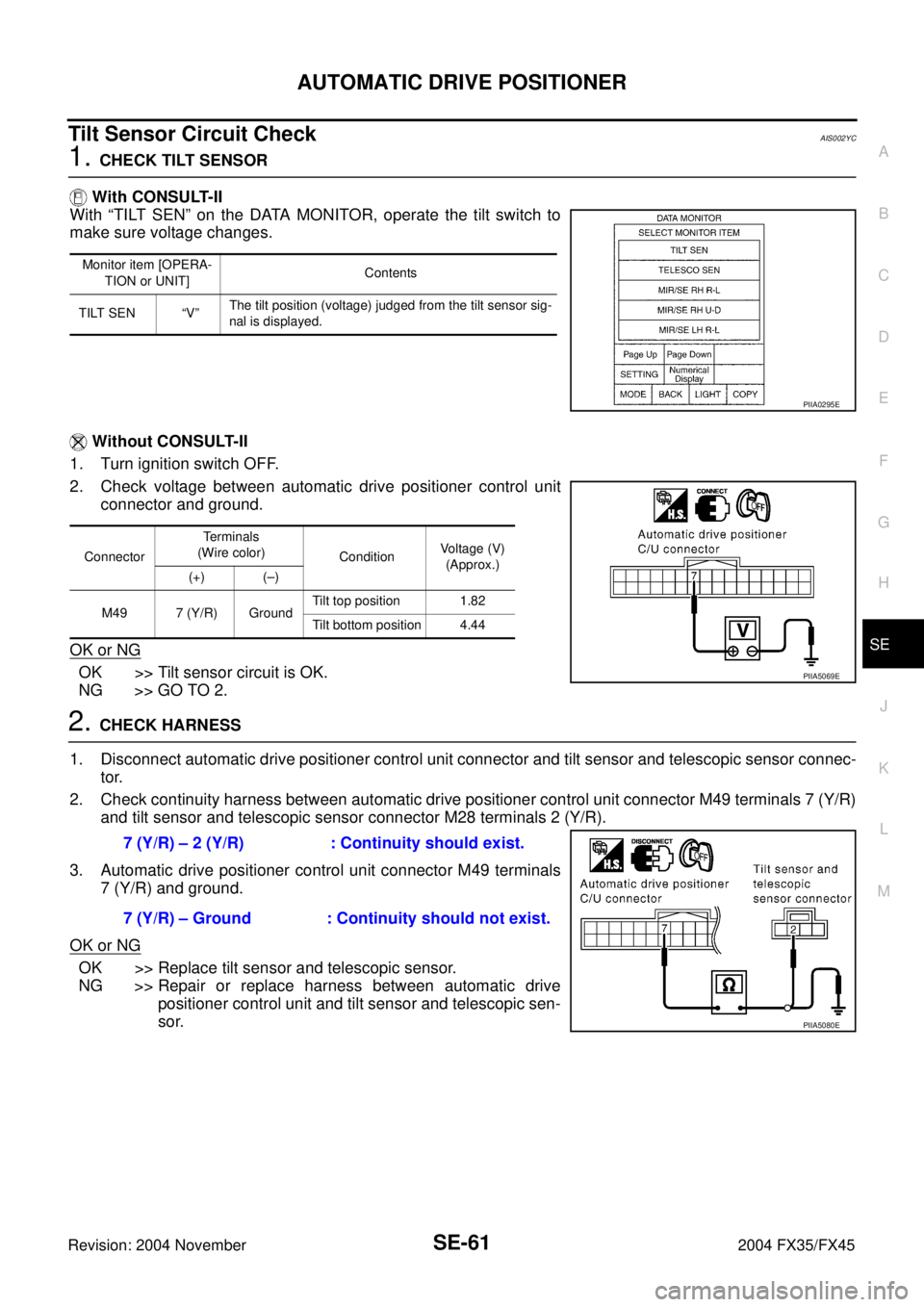
With “TILT SEN” on the DATA MONITOR, operate the tilt switch to
make sure voltage changes.
Without CONSULT-II
1. Turn ignition switch OFF.
2. Check voltage between automatic drive positioner control unit
connector and ground.
OK or NG
OK >> Tilt sensor circuit is OK.
NG >> GO TO 2.
2. CHECK HARNESS
1. Disconnect automatic drive positioner control unit connector and tilt sensor and telescopic sensor connec-
tor.
2. Check continuity harness between automatic drive positioner control unit connector M49 terminals 7 (Y/R)
and tilt sensor and telescopic sensor connector M28 terminals 2 (Y/R).
3. Automatic drive positioner control unit connector M49 terminals
7 (Y/R) and ground.
OK or NG
OK >> Replace tilt sensor and telescopic sensor.
NG >> Repair or replace harness between automatic drive
positioner control unit and tilt sensor and telescopic sen-
sor.
Monitor item [OPERA-
TION or UNIT]Contents
TILT SEN “V”The tilt position (voltage) judged from the tilt sensor sig-
nal is displayed.
PIIA0295E
ConnectorTerminals
(Wire color)
ConditionVoltage (V)
(Approx.)
(+) (–)
M49 7 (Y/R) GroundTilt top position 1.82
Tilt bottom position 4.44
PIIA5069E
7 (Y/R) – 2 (Y/R) : Continuity should exist.
7 (Y/R) – Ground : Continuity should not exist.
PIIA5080E
Page 4191 of 4449
SE-62
AUTOMATIC DRIVE POSITIONER
Revision: 2004 November 2004 FX35/FX45
Driver Side Mirror Sensor Circuit Check AIS003BW
1. CHECK DOOR MIRROR FUNCTION
Check the following.
Operation malfunction in memory control
NOTE:
If a door mirror face position is set to an implausible angle, the set position may not be reproduced.
OK or NG
OK >> GO TO 2.
NG >> Repair the malfunctioning parts, and check the symptom again.
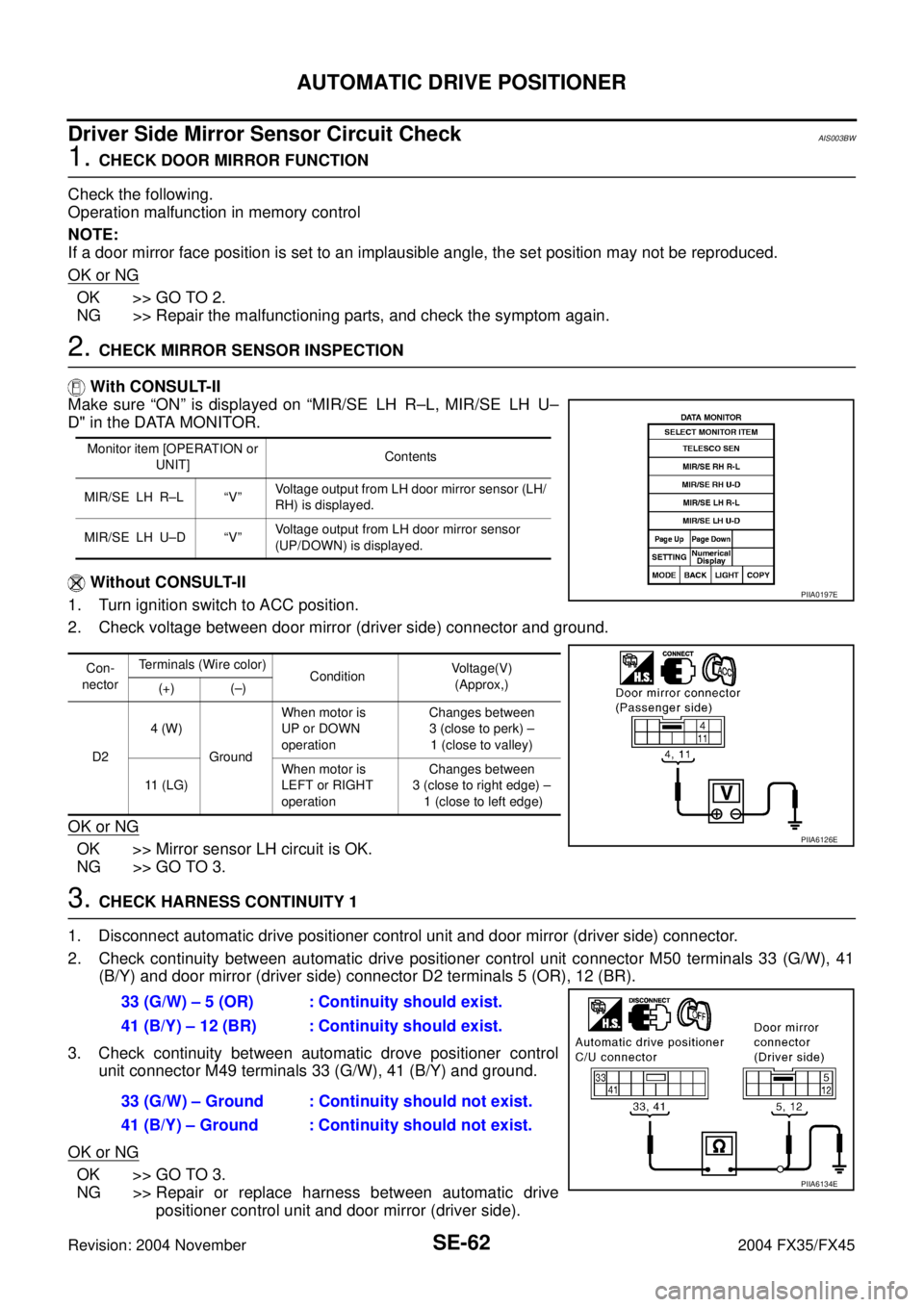
2. CHECK MIRROR SENSOR INSPECTION
With CONSULT-II
Make sure “ON” is displayed on “MIR/SE LH R–L, MIR/SE LH U–
D" in the DATA MONITOR.
Without CONSULT-II
1. Turn ignition switch to ACC position.
2. Check voltage between door mirror (driver side) connector and ground.
OK or NG
OK >> Mirror sensor LH circuit is OK.
NG >> GO TO 3.
3. CHECK HARNESS CONTINUITY 1
1. Disconnect automatic drive positioner control unit and door mirror (driver side) connector.
2. Check continuity between automatic drive positioner control unit connector M50 terminals 33 (G/W), 41
(B/Y) and door mirror (driver side) connector D2 terminals 5 (OR), 12 (BR).
3. Check continuity between automatic drove positioner control
unit connector M49 terminals 33 (G/W), 41 (B/Y) and ground.
OK or NG
OK >> GO TO 3.
NG >> Repair or replace harness between automatic drive
positioner control unit and door mirror (driver side).
Monitor item [OPERATION or
UNIT]Contents
MIR/SE LH R–L “V”Voltage output from LH door mirror sensor (LH/
RH) is displayed.
MIR/SE LH U–D “V”Voltage output from LH door mirror sensor
(UP/DOWN) is displayed.
Con-
nectorTerminals (Wire color)
ConditionVoltage(V)
(Approx,)
(+) (–)
D24 (W)
GroundWhen motor is
UP or DOWN
operationChanges between
3 (close to perk) –
1 (close to valley)
11 (LG)When motor is
LEFT or RIGHT
operation Changes between
3 (close to right edge) –
1 (close to left edge)
PIIA0197E
PIIA6126E
33 (G/W) – 5 (OR) : Continuity should exist.
41 (B/Y) – 12 (BR) : Continuity should exist.
33 (G/W) – Ground : Continuity should not exist.
41 (B/Y) – Ground : Continuity should not exist.
PIIA6134E
Page 4192 of 4449
AUTOMATIC DRIVE POSITIONER
SE-63
C
D
E
F
G
H
J
K
L
MA
B
SE
Revision: 2004 November 2004 FX35/FX45
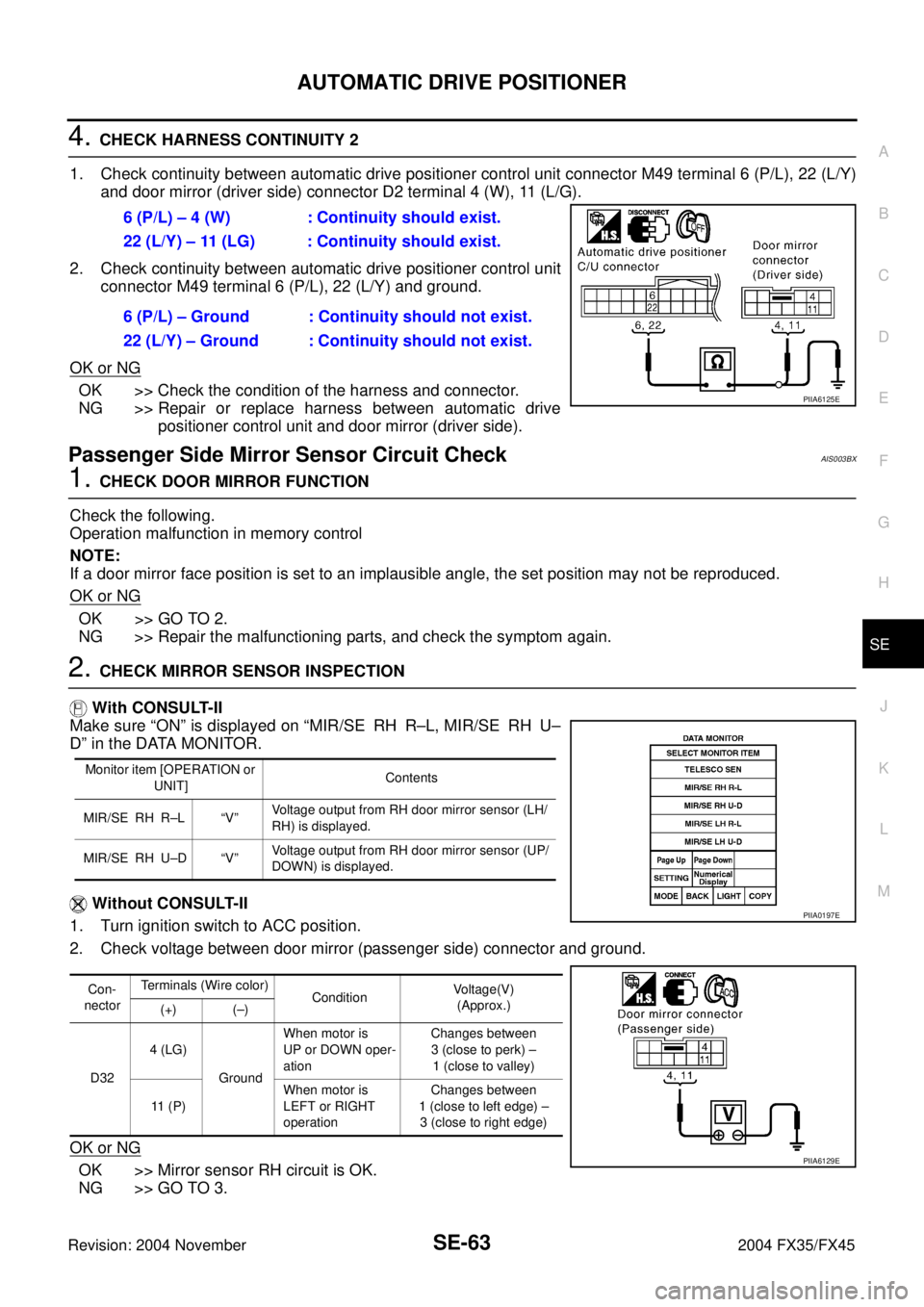
4. CHECK HARNESS CONTINUITY 2
1. Check continuity between automatic drive positioner control unit connector M49 terminal 6 (P/L), 22 (L/Y)
and door mirror (driver side) connector D2 terminal 4 (W), 11 (L/G).
2. Check continuity between automatic drive positioner control unit
connector M49 terminal 6 (P/L), 22 (L/Y) and ground.
OK or NG
OK >> Check the condition of the harness and connector.
NG >> Repair or replace harness between automatic drive
positioner control unit and door mirror (driver side).
Passenger Side Mirror Sensor Circuit Check AIS003BX
1. CHECK DOOR MIRROR FUNCTION
Check the following.
Operation malfunction in memory control
NOTE:
If a door mirror face position is set to an implausible angle, the set position may not be reproduced.
OK or NG
OK >> GO TO 2.
NG >> Repair the malfunctioning parts, and check the symptom again.
2. CHECK MIRROR SENSOR INSPECTION
With CONSULT-II
Make sure “ON” is displayed on “MIR/SE RH R–L, MIR/SE RH U–
D” in the DATA MONITOR.
Without CONSULT-II
1. Turn ignition switch to ACC position.
2. Check voltage between door mirror (passenger side) connector and ground.
OK or NG
OK >> Mirror sensor RH circuit is OK.
NG >> GO TO 3.6 (P/L) – 4 (W) : Continuity should exist.
22 (L/Y) – 11 (LG) : Continuity should exist.
6 (P/L) – Ground : Continuity should not exist.
22 (L/Y) – Ground : Continuity should not exist.
PIIA6125E
Monitor item [OPERATION or
UNIT]Contents
MIR/SE RH R–L “V”Voltage output from RH door mirror sensor (LH/
RH) is displayed.
MIR/SE RH U–D “V”Voltage output from RH door mirror sensor (UP/
DOWN) is displayed.
Con-
nectorTerminals (Wire color)
ConditionVoltage(V)
(Approx.)
(+) (–)
D324 (LG)
GroundWhen motor is
UP or DOWN oper-
ationChanges between
3 (close to perk) –
1 (close to valley)
11 ( P )When motor is
LEFT or RIGHT
operation Changes between
1 (close to left edge) –
3 (close to right edge)
PIIA0197E
PIIA6129E
Page 4193 of 4449

SE-64
AUTOMATIC DRIVE POSITIONER
Revision: 2004 November 2004 FX35/FX45
3. CHECK HARNESS CONTINUITY 1
1. Disconnect automatic drive positioner control unit and door mirror (passenger side) connector.
2. Check continuity between automatic drive positioner control unit connector M50 terminal 33 (G/W), 41 (B/
Y) and door mirror (passenger side) connector D32 terminal 5 (BR), 12 (G).
3. Check continuity between automatic drive positioner control unit
connector M50 terminals 33 (G/W), 41 (B/P) and ground.
OK or NG
OK >> GO TO 3.
NG >> Repair or replace harness between automatic drive
positioner control unit and door mirror (passenger side).
4. CHECK HARNESS CONTINUITY 2
1. Check continuity between automatic drive positioner control unit connector M49 terminal 5 (OR), 21 (G/Y)
and door mirror (passenger side) connector D32 terminal 4 (LG), 11 (P).
2. Check continuity between automatic drive positioner control unit
connector M49 terminal 5 (OR), 21 (G/Y) and ground.
OK or NG
OK >> Check the condition of the harness and connector.
NG >> Repair or replace harness between automatic drive
positioner control unit and door mirror (passenger side).
Steering and Door Mirror Sensor Power and Ground Circuit CheckAIS003GA
1. CHECK MIRROR SENSOR POWER SUPPLY
1. Turn ignition switch OFF.
2. Check voltage between automatic drive positioner control unit connector M50 terminal 33 and ground.
OK or NG
OK >> GO TO 2.
NG >> Replace automatic drive positioner control unit.33 (G/W) – 5 (BR) : Continuity should exist.
41 (B/Y) – 12 (G) : Continuity should exist.
33 (G/W) – Ground : Continuity should not exist.
41 (B/Y) – Ground : Continuity should not exist.
PIIA6127E
5 (OR) – 4 (LG) : Continuity should exist.
21 (G/Y) – 11 (P) : Continuity should exist.
5 (OR) – Ground : Continuity should not exist.
21 (G/Y) – Ground : Continuity should not exist.
PIIA6128E
33 (G/W) – Ground : Approx. 5V
PIIA4778E
Page 4194 of 4449
AUTOMATIC DRIVE POSITIONER
SE-65
C
D
E
F
G
H
J
K
L
MA
B
SE
Revision: 2004 November 2004 FX35/FX45
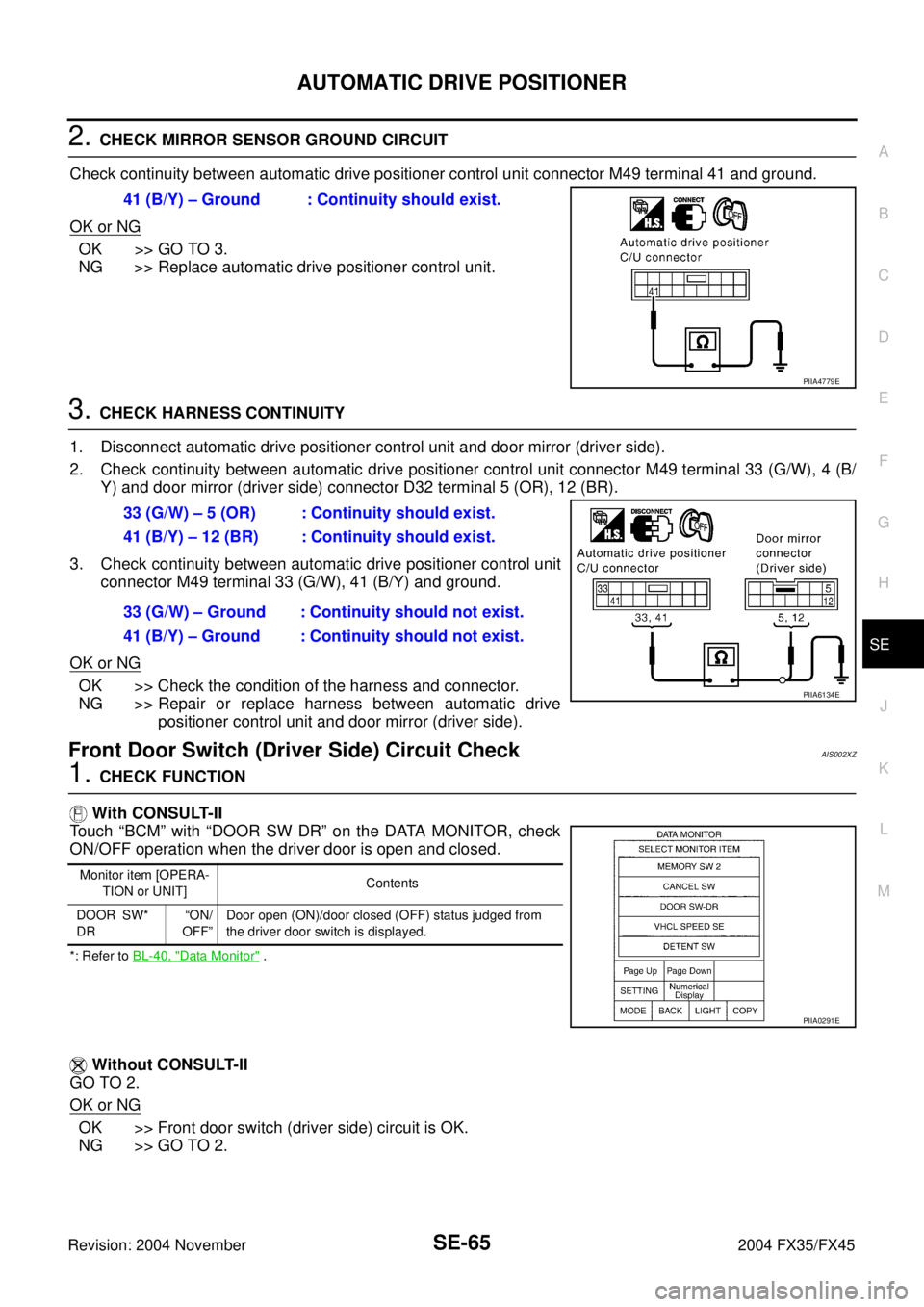
2. CHECK MIRROR SENSOR GROUND CIRCUIT
Check continuity between automatic drive positioner control unit connector M49 terminal 41 and ground.
OK or NG
OK >> GO TO 3.
NG >> Replace automatic drive positioner control unit.
3. CHECK HARNESS CONTINUITY
1. Disconnect automatic drive positioner control unit and door mirror (driver side).
2. Check continuity between automatic drive positioner control unit connector M49 terminal 33 (G/W), 4 (B/
Y) and door mirror (driver side) connector D32 terminal 5 (OR), 12 (BR).
3. Check continuity between automatic drive positioner control unit
connector M49 terminal 33 (G/W), 41 (B/Y) and ground.
OK or NG
OK >> Check the condition of the harness and connector.
NG >> Repair or replace harness between automatic drive
positioner control unit and door mirror (driver side).
Front Door Switch (Driver Side) Circuit CheckAIS002XZ
1. CHECK FUNCTION
With CONSULT-II
Touch “BCM” with “DOOR SW DR” on the DATA MONITOR, check
ON/OFF operation when the driver door is open and closed.
*: Refer to BL-40, "Data Monitor" .
Without CONSULT-II
GO TO 2.
OK or NG
OK >> Front door switch (driver side) circuit is OK.
NG >> GO TO 2.41 (B/Y) – Ground : Continuity should exist.
PIIA4779E
33 (G/W) – 5 (OR) : Continuity should exist.
41 (B/Y) – 12 (BR) : Continuity should exist.
33 (G/W) – Ground : Continuity should not exist.
41 (B/Y) – Ground : Continuity should not exist.
PIIA6134E
Monitor item [OPERA-
TION or UNIT]Contents
DOOR SW*
DR“ON/
OFF”Door open (ON)/door closed (OFF) status judged from
the driver door switch is displayed.
PIIA0291E
Page 4195 of 4449
SE-66
AUTOMATIC DRIVE POSITIONER
Revision: 2004 November 2004 FX35/FX45
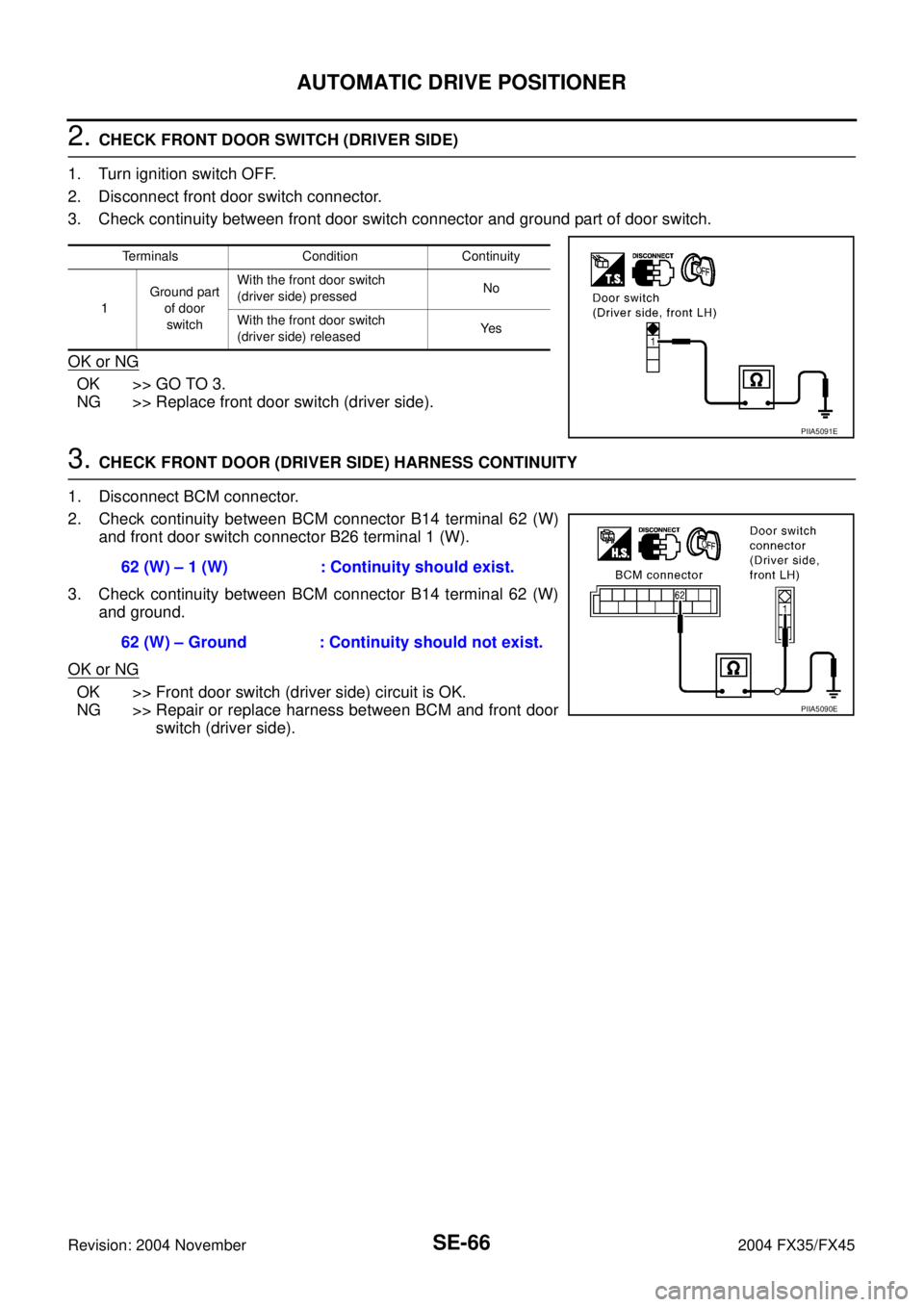
2. CHECK FRONT DOOR SWITCH (DRIVER SIDE)
1. Turn ignition switch OFF.
2. Disconnect front door switch connector.
3. Check continuity between front door switch connector and ground part of door switch.
OK or NG
OK >> GO TO 3.
NG >> Replace front door switch (driver side).
3. CHECK FRONT DOOR (DRIVER SIDE) HARNESS CONTINUITY
1. Disconnect BCM connector.
2. Check continuity between BCM connector B14 terminal 62 (W)
and front door switch connector B26 terminal 1 (W).
3. Check continuity between BCM connector B14 terminal 62 (W)
and ground.
OK or NG
OK >> Front door switch (driver side) circuit is OK.
NG >> Repair or replace harness between BCM and front door
switch (driver side).
Terminals Condition Continuity
1Ground part
of door
switchWith the front door switch
(driver side) pressedNo
With the front door switch
(driver side) releasedYe s
PIIA5091E
62 (W) – 1 (W) : Continuity should exist.
62 (W) – Ground : Continuity should not exist.
PIIA5090E
Page 4196 of 4449
AUTOMATIC DRIVE POSITIONER
SE-67
C
D
E
F
G
H
J
K
L
MA
B
SE
Revision: 2004 November 2004 FX35/FX45
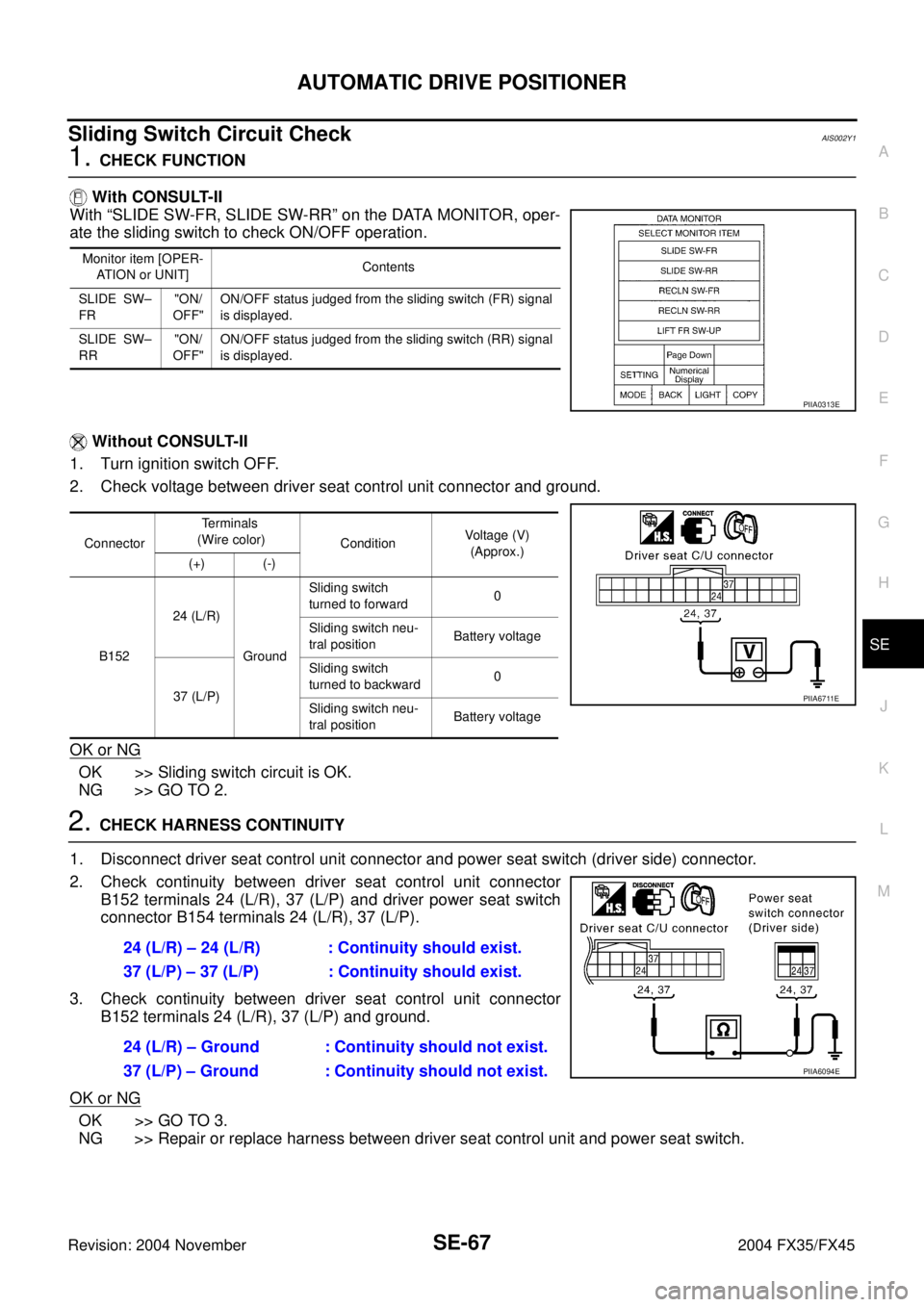
Sliding Switch Circuit CheckAIS002Y1
1. CHECK FUNCTION
With CONSULT-II
With “SLIDE SW-FR, SLIDE SW-RR” on the DATA MONITOR, oper-
ate the sliding switch to check ON/OFF operation.
Without CONSULT-II
1. Turn ignition switch OFF.
2. Check voltage between driver seat control unit connector and ground.
OK or NG
OK >> Sliding switch circuit is OK.
NG >> GO TO 2.
2. CHECK HARNESS CONTINUITY
1. Disconnect driver seat control unit connector and power seat switch (driver side) connector.
2. Check continuity between driver seat control unit connector
B152 terminals 24 (L/R), 37 (L/P) and driver power seat switch
connector B154 terminals 24 (L/R), 37 (L/P).
3. Check continuity between driver seat control unit connector
B152 terminals 24 (L/R), 37 (L/P) and ground.
OK or NG
OK >> GO TO 3.
NG >> Repair or replace harness between driver seat control unit and power seat switch.
Monitor item [OPER-
ATION or UNIT]Contents
SLIDE SW–
FR"ON/
OFF"ON/OFF status judged from the sliding switch (FR) signal
is displayed.
SLIDE SW–
RR"ON/
OFF"ON/OFF status judged from the sliding switch (RR) signal
is displayed.
PIIA0313E
ConnectorTe r m i n a l s
(Wire color)
ConditionVoltage (V)
(Approx.)
(+) (-)
B15224 (L/R)
GroundSliding switch
turned to forward0
Sliding switch neu-
tral positionBattery voltage
37 (L/P)Sliding switch
turned to backward0
Sliding switch neu-
tral positionBattery voltage
PIIA6711E
24 (L/R) – 24 (L/R) : Continuity should exist.
37 (L/P) – 37 (L/P) : Continuity should exist.
24 (L/R) – Ground : Continuity should not exist.
37 (L/P) – Ground : Continuity should not exist.
PIIA6094E