air INFINITI FX35 2004 Service Manual
[x] Cancel search | Manufacturer: INFINITI, Model Year: 2004, Model line: FX35, Model: INFINITI FX35 2004Pages: 4449, PDF Size: 99.66 MB
Page 538 of 4449

TROUBLE DIAGNOSIS
ATC-109
C
D
E
F
G
H
I
K
L
MA
B
AT C
Revision: 2004 November 2004 FX35/FX45
4. CHECK CIRCUIT CONTINUITY BETWEEN IN-VEHICLE SENSOR AND UNIFIED METER AND A/C
AMP.
1. Turn ignition switch OFF.
2. Disconnect unified meter and A/C amp. connector.
3. Check continuity between in-vehicle sensor harness connector
M46 terminal 1 (BR/W) and unified meter and A/C amp. harness
connector M57 terminal 40 (BR/W).
4. Check continuity between in-vehicle sensor harness connector
M46 terminal 1 (BR/W) and ground.
OK or NG
OK >> 1. Replace unified meter and A/C amp.
2. Go to self-diagnosis AT C - 5 4 , "
FUNCTION CONFIRMATION PROCEDURE" and perform self-
diagnosis STEP-2. Confirm that code No. 20 is displayed.
NG >> Repair harness or connector.
COMPONENT INSPECTION
In-vehicle Sensor
After disconnecting in-vehicle sensor connector M46, measure resis-
tance between terminals 1 and 2 at sensor side, using the table
below.
If NG, replace in-vehicle sensor.1 – 40 : Continuity should exist.
1 – Ground : Continuity should not exist.
RJIA2024E
Temperature °C (°F) Resistance kΩ
−15 (5) 12.73
−10 (14) 9.92
−5 (23) 7.80
0 (32) 6.19
5 (41) 4.95
10 (50) 3.99
15 (59) 3.24
20 (68) 2.65
25 (77) 2.19
30 (86) 1.81
35 (95) 1.51
40 (104) 1.27
45 (113) 1.07
RJIA2025E
Page 540 of 4449

TROUBLE DIAGNOSIS
ATC-111
C
D
E
F
G
H
I
K
L
MA
B
AT C
Revision: 2004 November 2004 FX35/FX45
2. CHECK CIRCUIT CONTINUITY BETWEEN SUNLOAD SENSOR AND UNIFIED METER AND A/C AMP.
1. Turn ignition switch OFF.
2. Disconnect unified meter and A/C amp. connector.
3. Check continuity between sunload sensor harness connector
M87 terminal 2 (W/G) and unified meter and A/C amp. harness
connector M57 terminal 49 (W/G).
OK or NG
OK >> GO TO 3.
NG >> Repair harness or connector.
3. CHECK SUNLOAD SENSOR
Refer to AT C - 11 2 , "
Sunload Sensor" .
OK or NG
OK >> 1. Replace unified meter and A/C amp.
2. Go to self-diagnosis AT C - 5 4 , "
FUNCTION CONFIRMATION PROCEDURE" and perform self-
diagnosis STEP-2. Confirm that code No. 20 is displayed.
NG >> 1. Replace sunload sensor.
2. Go to self-diagnosis AT C - 5 4 , "
FUNCTION CONFIRMATION PROCEDURE" and perform self-
diagnosis STEP-2. Confirm that code No. 20 is displayed.
4. CHECK CIRCUIT CONTINUITY BETWEEN SUNLOAD SENSOR AND UNIFIED METER AND A/C AMP.
1. Turn ignition switch OFF.
2. Disconnect unified meter and A/C amp. connector.
3. Check continuity between sunload sensor harness connector
M87 terminal 1 (LG) and unified meter and A/C amp. harness
connector M57 terminal 50 (LG).
4. Check continuity between sunload sensor harness connector
M87 terminal 1 (LG) and ground.
OK or NG
OK >> 1. Replace unified meter and A/C amp.
2. Go to self-diagnosis AT C - 5 4 , "
FUNCTION CONFIRMATION PROCEDURE" and perform self-
diagnosis STEP-2. Confirm that code No. 20 is displayed.
NG >> Repair harness or connector.2 – 49 : Continuity should exist.
RJIA2028E
1 – 50 : Continuity should exist.
1 – Ground : Continuity should not exist.
RJIA2029E
Page 542 of 4449

TROUBLE DIAGNOSIS
ATC-113
C
D
E
F
G
H
I
K
L
MA
B
AT C
Revision: 2004 November 2004 FX35/FX45
Intake Sensor CircuitAJS00157
COMPONENT DESCRIPTION
Intake Sensor
The intake sensor is located on the heater & cooling unit. It converts
temperature of air after it passes through the evaporator into a resis-
tance value which is then input to the unified meter and A/C amp.
DIAGNOSTIC PROCEDURE FOR INTAKE SENSOR
SYMPTOM: Intake sensor circuit is open or shorted. (24 or −24 is
indicated on unified meter and A/C amp. as a result of performing
Self-diagnosis STEP-2.)
1. CHECK VOLTAGE BETWEEN INTAKE SENSOR AND GROUND
1. Disconnect intake sensor connector.
2. Turn ignition switch ON.
3. Check voltage between intake sensor harness connector M254
terminal 2 (R) and ground.
OK or NG
OK >> GO TO 2.
NG >> GO TO 4.
2. CHECK CIRCUIT CONTINUITY BETWEEN INTAKE SENSOR AND UNIFIED METER AND A/C AMP.
1. Turn ignition switch OFF.
2. Disconnect unified meter and A/C amp. connector.
3. Check continuity between intake sensor harness connector
M254 terminal 1 (W) and unified meter and A/C amp. harness
connector M57 terminal 49 (W/G).
OK or NG
OK >> GO TO 3.
NG >> Repair harness or connector.
RJIA0928E
RJIA1458E
2 – Ground : Approx. 5V
RJIA2031E
1 – 49 : Continuity should exist.
RJIA2032E
Page 543 of 4449

ATC-114
TROUBLE DIAGNOSIS
Revision: 2004 November 2004 FX35/FX45
3. CHECK INTAKE SENSOR
Refer to AT C - 11 4 , "
Intake Sensor" .
OK or NG
OK >> 1. Replace unified meter and A/C amp.
2. Go to self-diagnosis AT C - 5 4 , "
FUNCTION CONFIRMATION PROCEDURE" and perform self-
diagnosis STEP-2. Confirm that code No. 20 is displayed.
NG >> 1. Replace intake sensor.
2. Go to self-diagnosis AT C - 5 4 , "
FUNCTION CONFIRMATION PROCEDURE" and perform self-
diagnosis STEP-2. Confirm that code No. 20 is displayed.
4. CHECK CIRCUIT CONTINUITY BETWEEN INTAKE SENSOR AND UNIFIED METER AND A/C AMP.
1. Turn ignition switch OFF.
2. Disconnect unified meter and A/C amp. connector.
3. Check continuity between intake sensor harness connector
M254 terminal 2 (R) and unified meter and A/C amp. harness
connector M57 terminal 41 (P).
4. Check continuity between intake sensor harness connector
M254 terminal 2 (R) and ground.
OK or NG
OK >> 1. Replace unified meter and A/C amp.
2. Go to self-diagnosis AT C - 5 4 , "
FUNCTION CONFIRMATION PROCEDURE" and perform self-
diagnosis STEP-2. Confirm that code No. 20 is displayed.
NG >> Repair harness or connector.
COMPONENT INSPECTION
Intake Sensor
After disconnecting intake sensor connector M254, measure resis-
tance between terminals 1 and 2 at sensor side, using the table
below.
If NG, replace intake sensor.2 – 41 : Continuity should exist.
2 – Ground : Continuity should not exist.
RJIA2033E
Temperature °C (°F) Resistance kΩ
−15 (5) 12.34
−10 (14) 9.62
−5 (23) 7.56
0 (32) 6.00
5 (41) 4.80
10 (50) 3.87
15 (59) 3.15
20 (68) 2.57
25 (77) 2.12
30 (86) 1.76
35 (95) 1.47
40 (104) 1.23
45 (113) 1.04
RJIA2034E
Page 554 of 4449
IN-CABIN MICROFILTER
ATC-125
C
D
E
F
G
H
I
K
L
MA
B
AT C
Revision: 2004 November 2004 FX35/FX45
IN-CABIN MICROFILTERPFP:27277
Removal and InstallationAJS001FC
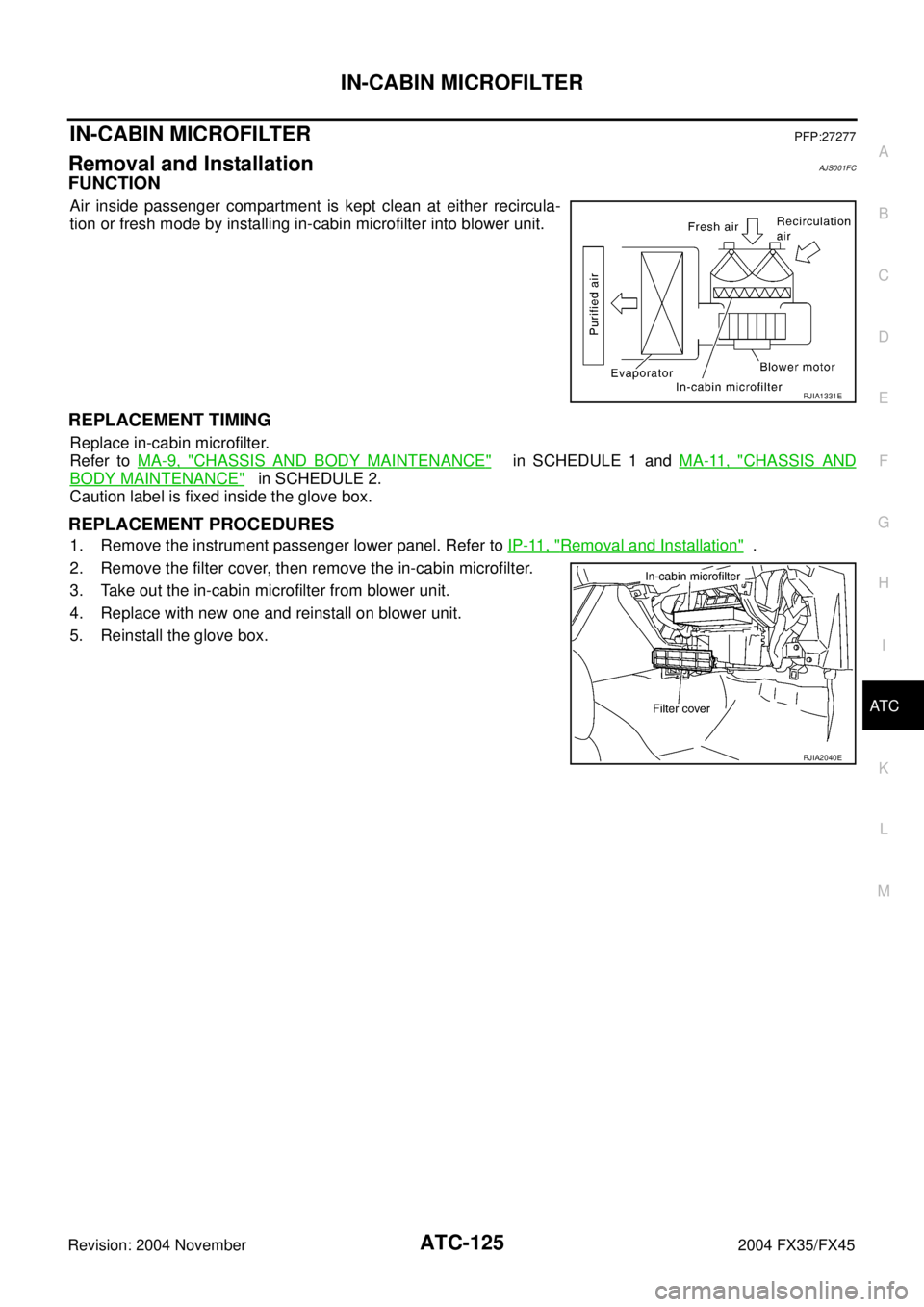
FUNCTION
Air inside passenger compartment is kept clean at either recircula-
tion or fresh mode by installing in-cabin microfilter into blower unit.
REPLACEMENT TIMING
Replace in-cabin microfilter.
Refer to MA-9, "
CHASSIS AND BODY MAINTENANCE" in SCHEDULE 1 and MA-11, "CHASSIS AND
BODY MAINTENANCE" in SCHEDULE 2.
Caution label is fixed inside the glove box.
REPLACEMENT PROCEDURES
1. Remove the instrument passenger lower panel. Refer to IP-11, "Removal and Installation" .
2. Remove the filter cover, then remove the in-cabin microfilter.
3. Take out the in-cabin microfilter from blower unit.
4. Replace with new one and reinstall on blower unit.
5. Reinstall the glove box.
RJIA1331E
RJIA2040E
Page 557 of 4449

ATC-128
HEATER & COOLING UNIT ASSEMBLY
Revision: 2004 November 2004 FX35/FX45
Disassembly and AssemblyAJS0015K
1. Heater pipe grommet 2. Heater core 3. Heater pipe cover
4. Aspirator 5. Aspirator hose 6. Air mix door motor (driver side)
7. Air mix door (slide door) 8. Max. cool door link 9. Max. cool door lever
10. Ventilator door lever 11. Ventilator door link 12. Air mix door motor (passenger side)
13. Intake sensor bracket 14. Intake sensor 15. Foot duct (right)
16. Evaporator cover 17. Evaporator cover adaptor 18. Heater pipe bracket
RJIA2045E
Page 560 of 4449
AIR MIX DOOR MOTOR
ATC-131
C
D
E
F
G
H
I
K
L
MA
B
AT C
Revision: 2004 November 2004 FX35/FX45
AIR MIX DOOR MOTOR PFP:27732
Removal and InstallationAJS0015M
REMOVAL
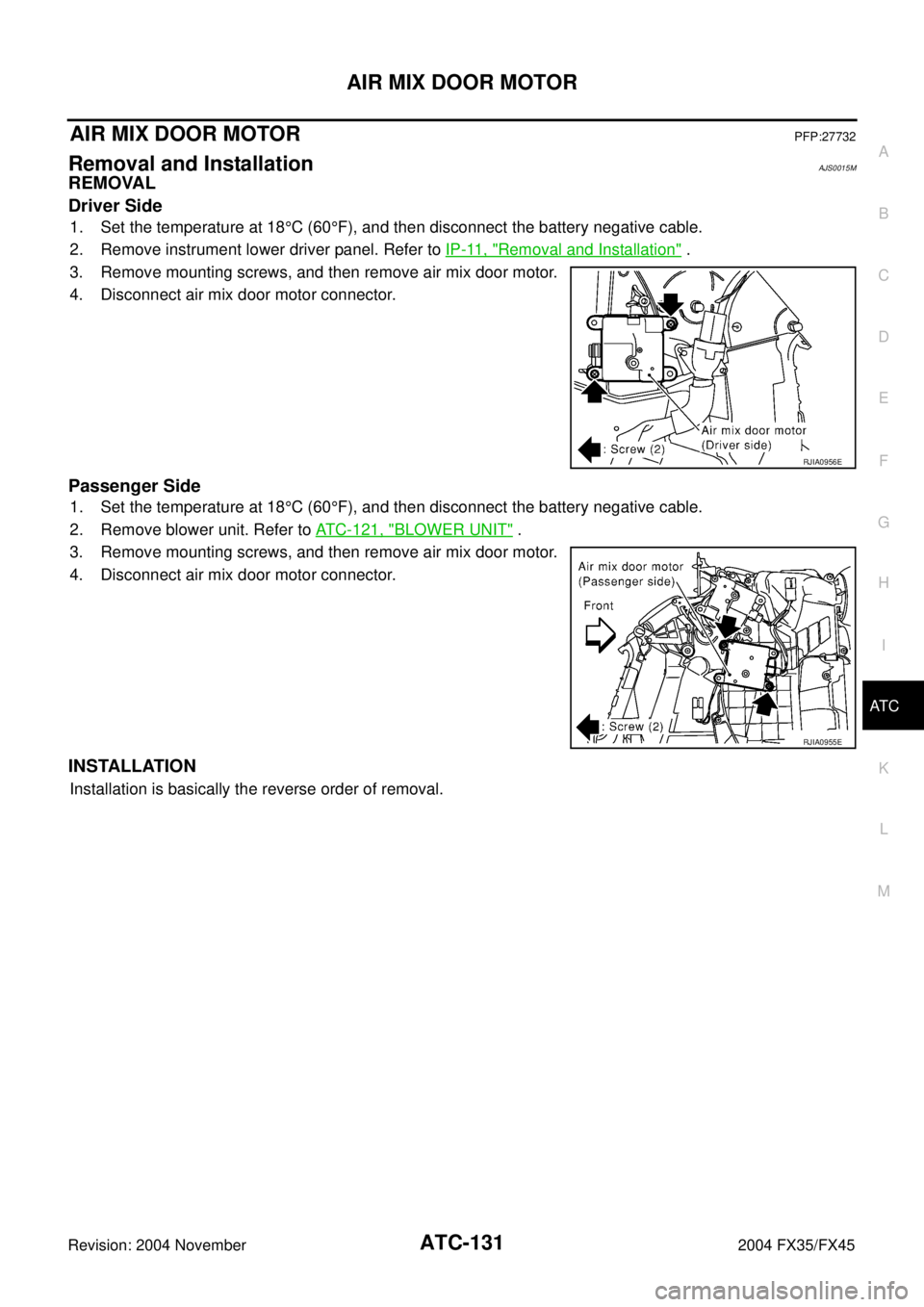
Driver Side
1. Set the temperature at 18°C (60°F), and then disconnect the battery negative cable.
2. Remove instrument lower driver panel. Refer to IP-11, "
Removal and Installation" .
3. Remove mounting screws, and then remove air mix door motor.
4. Disconnect air mix door motor connector.
Passenger Side
1. Set the temperature at 18°C (60°F), and then disconnect the battery negative cable.
2. Remove blower unit. Refer to ATC-121, "
BLOWER UNIT" .
3. Remove mounting screws, and then remove air mix door motor.
4. Disconnect air mix door motor connector.
INSTALLATION
Installation is basically the reverse order of removal.
RJIA0956E
RJIA0955E
Page 570 of 4449
REFRIGERANT LINES
ATC-141
C
D
E
F
G
H
I
K
L
MA
B
AT C
Revision: 2004 November 2004 FX35/FX45
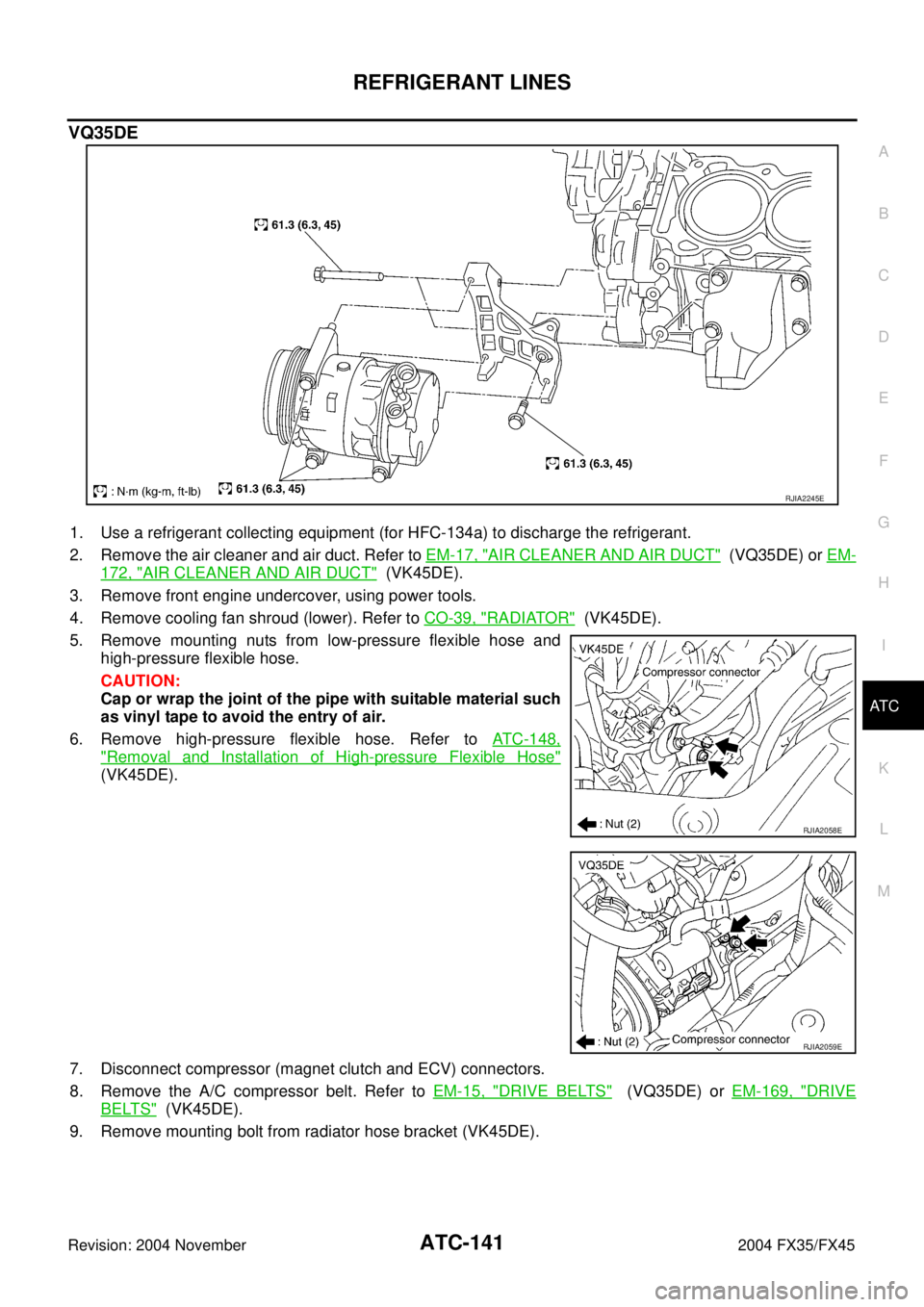
VQ35DE
1. Use a refrigerant collecting equipment (for HFC-134a) to discharge the refrigerant.
2. Remove the air cleaner and air duct. Refer to EM-17, "
AIR CLEANER AND AIR DUCT" (VQ35DE) or EM-
172, "AIR CLEANER AND AIR DUCT" (VK45DE).
3. Remove front engine undercover, using power tools.
4. Remove cooling fan shroud (lower). Refer to CO-39, "
RADIATOR" (VK45DE).
5. Remove mounting nuts from low-pressure flexible hose and
high-pressure flexible hose.
CAUTION:
Cap or wrap the joint of the pipe with suitable material such
as vinyl tape to avoid the entry of air.
6. Remove high-pressure flexible hose. Refer to ATC-148,
"Removal and Installation of High-pressure Flexible Hose"
(VK45DE).
7. Disconnect compressor (magnet clutch and ECV) connectors.
8. Remove the A/C compressor belt. Refer to EM-15, "
DRIVE BELTS" (VQ35DE) or EM-169, "DRIVE
BELTS" (VK45DE).
9. Remove mounting bolt from radiator hose bracket (VK45DE).
RJIA2245E
RJIA2058E
RJIA2059E
Page 573 of 4449
ATC-144
REFRIGERANT LINES
Revision: 2004 November 2004 FX35/FX45
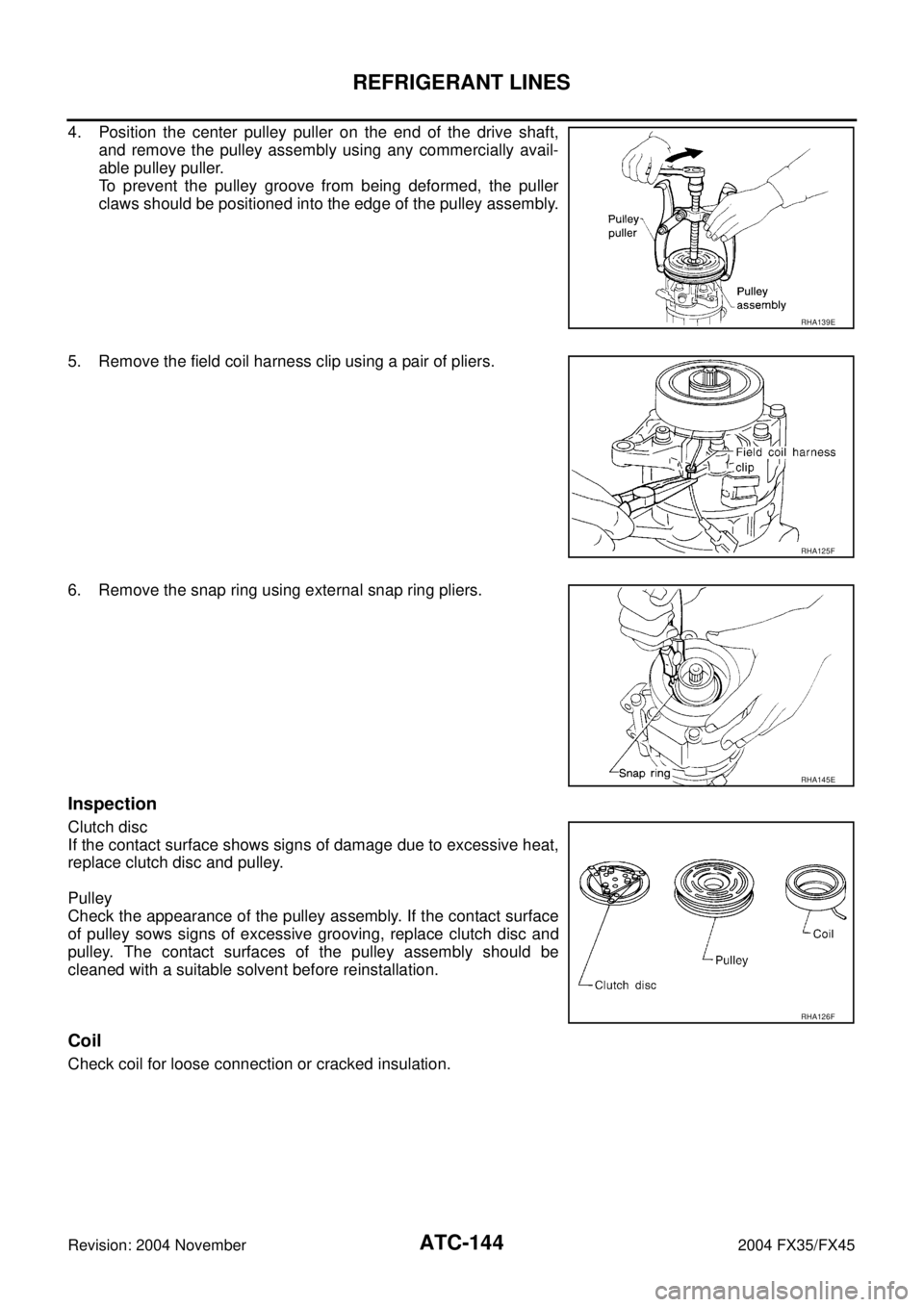
4. Position the center pulley puller on the end of the drive shaft,
and remove the pulley assembly using any commercially avail-
able pulley puller.
To prevent the pulley groove from being deformed, the puller
claws should be positioned into the edge of the pulley assembly.
5. Remove the field coil harness clip using a pair of pliers.
6. Remove the snap ring using external snap ring pliers.
Inspection
Clutch disc
If the contact surface shows signs of damage due to excessive heat,
replace clutch disc and pulley.
Pulley
Check the appearance of the pulley assembly. If the contact surface
of pulley sows signs of excessive grooving, replace clutch disc and
pulley. The contact surfaces of the pulley assembly should be
cleaned with a suitable solvent before reinstallation.
Coil
Check coil for loose connection or cracked insulation.
RHA139E
RHA125F
RHA145E
RHA126F
Page 576 of 4449

REFRIGERANT LINES
ATC-147
C
D
E
F
G
H
I
K
L
MA
B
AT C
Revision: 2004 November 2004 FX35/FX45
Removal and Installation of Low-pressure Flexible HoseAJS001BG
REMOVAL
1. Use a refrigerant collecting equipment (for HFC-134a) to discharge the refrigerant.
2. Remove the air cleaner and air duct. Refer to EM-17, "
AIR CLEANER AND AIR DUCT" (VQ35DE) or EM-
172, "AIR CLEANER AND AIR DUCT" (VK45DE).
3. Remove mounting bolt for low-pressure flexible hose bracket.
4. Disconnect one-touch joint between low-pressure flexible hose
and low-pressure pipe 1.
a. Set a disconnector (92530-89916) on A/C piping.
b. Slide a disconnector toward vehicle front until it clicks.
c. Slide A/C piping toward vehicle front and disconnect it.
CAUTION:
Cap or wrap the joint of the pipe with suitable material such
as vinyl tape to avoid the entry of air.
5. Remove mounting nut from low-pressure flexible hose.
6. Remove low-pressure flexible hose.
CAUTION:
Cap or wrap the joint of the pipe with suitable material such
as vinyl tape to avoid the entry of air.
7. Remove low-pressure pipe (VK45DE).
RJIA2062E
RJIA2069E
RJIA2063E
RJIA2064E