seat INFINITI FX35 2006 Service Manual
[x] Cancel search | Manufacturer: INFINITI, Model Year: 2006, Model line: FX35, Model: INFINITI FX35 2006Pages: 4462, PDF Size: 57.74 MB
Page 4206 of 4462
SE-68
AUTOMATIC DRIVE POSITIONER
Revision: 2006 December 2006 FX35/FX45
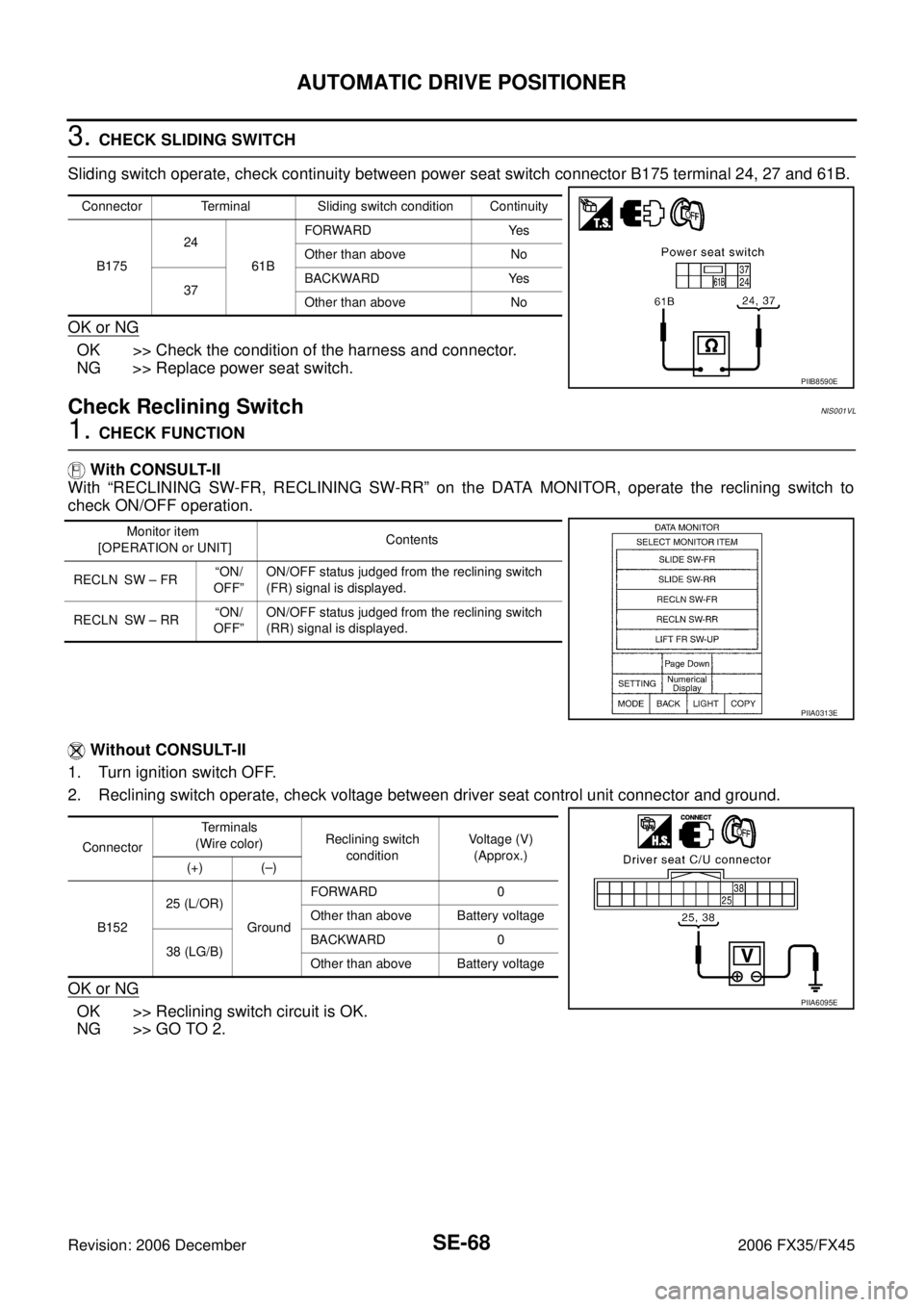
3. CHECK SLIDING SWITCH
Sliding switch operate, check continuity between power seat switch connector B175 terminal 24, 27 and 61B.
OK or NG
OK >> Check the condition of the harness and connector.
NG >> Replace power seat switch.
Check Reclining SwitchNIS001VL
1. CHECK FUNCTION
With CONSULT-II
With “RECLINING SW-FR, RECLINING SW-RR” on the DATA MONITOR, operate the reclining switch to
check ON/OFF operation.
Without CONSULT-II
1. Turn ignition switch OFF.
2. Reclining switch operate, check voltage between driver seat control unit connector and ground.
OK or NG
OK >> Reclining switch circuit is OK.
NG >> GO TO 2.
Connector Terminal Sliding switch condition Continuity
B175 24
61B FORWARD Yes
Other than above No
37 BACKWARD Yes
Other than above No
PIIB8590E
Monitor item
[OPERATION or UNIT] Contents
RECLN SW – FR “ON/
OFF” ON/OFF status judged from the reclining switch
(FR) signal is displayed.
RECLN SW – RR “ON/
OFF” ON/OFF status judged from the reclining switch
(RR) signal is displayed.
PIIA0313E
Connector Te r m i n a l s
(Wire color) Reclining switch
condition Voltage (V)
(Approx.)
(+) (–)
B152 25 (L/OR)
Ground FORWARD 0
Other than above Battery voltage
38 (LG/B) BACKWARD 0
Other than above Battery voltage
PIIA6095E
Page 4207 of 4462
AUTOMATIC DRIVE POSITIONER SE-69
C
D E
F
G H
J
K L
M A
B
SE
Revision: 2006 December 2006 FX35/FX45
2. CHECK HARNESS CONTINUITY
1. Disconnect driver seat control unit connector and power seat switch connector.
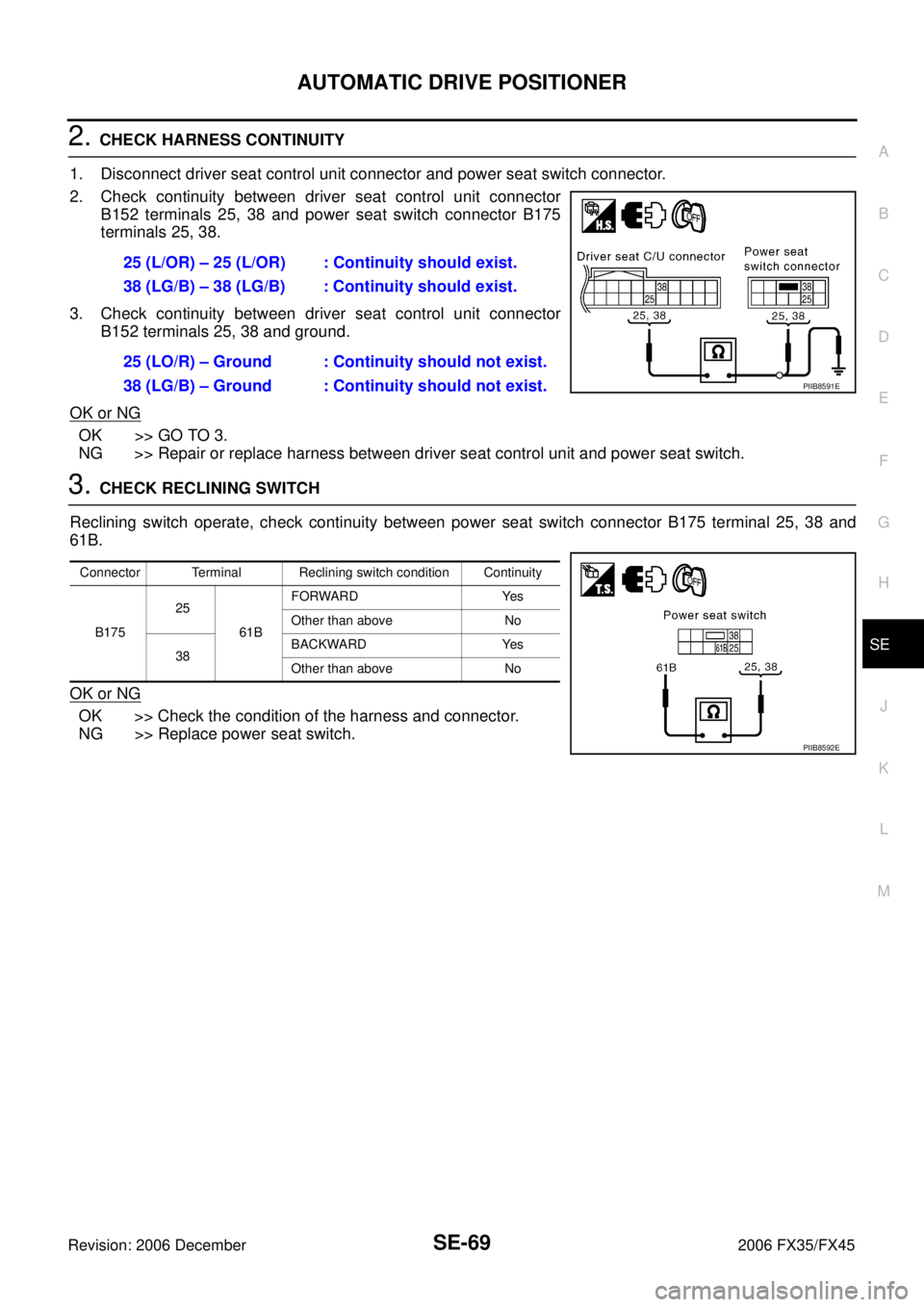
2. Check continuity between driver seat control unit connector B152 terminals 25, 38 and power seat switch connector B175
terminals 25, 38.
3. Check continuity between driver seat control unit connector B152 terminals 25, 38 and ground.
OK or NG
OK >> GO TO 3.
NG >> Repair or replace harness between driver seat control unit and power seat switch.
3. CHECK RECLINING SWITCH
Reclining switch operate, check continuity between power seat switch connector B175 terminal 25, 38 and
61B.
OK or NG
OK >> Check the condition of the harness and connector.
NG >> Replace power seat switch. 25 (L/OR) – 25 (L/OR) : Continuity should exist.
38 (LG/B) – 38 (LG/B) : Continuity should exist.
25 (LO/R) – Ground : Continuity should not exist.
38 (LG/B) – Ground : Continuity should not exist.
PIIB8591E
Connector Terminal Reclining switch condition Continuity
B175 25
61B FORWARD Yes
Other than above No
38 BACKWARD Yes
Other than above No
PIIB8592E
Page 4208 of 4462
SE-70
AUTOMATIC DRIVE POSITIONER
Revision: 2006 December 2006 FX35/FX45
Check Front Lifting Switch CircuitNIS001VM
1. CHECK FUNCTION
With CONSULT-II
With “LIFT FR SW-UP, LIFT FR SW-DN” on the DATA MONITOR, operate the front lifting switch to check ON/
OFF operation.
Without CONSULT-II
1. Turn ignition switch OFF.
2. Front lifting switch operate, check voltage between driver seat control unit connector and ground.
OK or NG
OK >> Front lifting switch circuit is OK.
NG >> GO TO 2.
2. CHECK HARNESS CONTINUITY
1. Disconnect driver seat control unit connector and power seat switch connector.
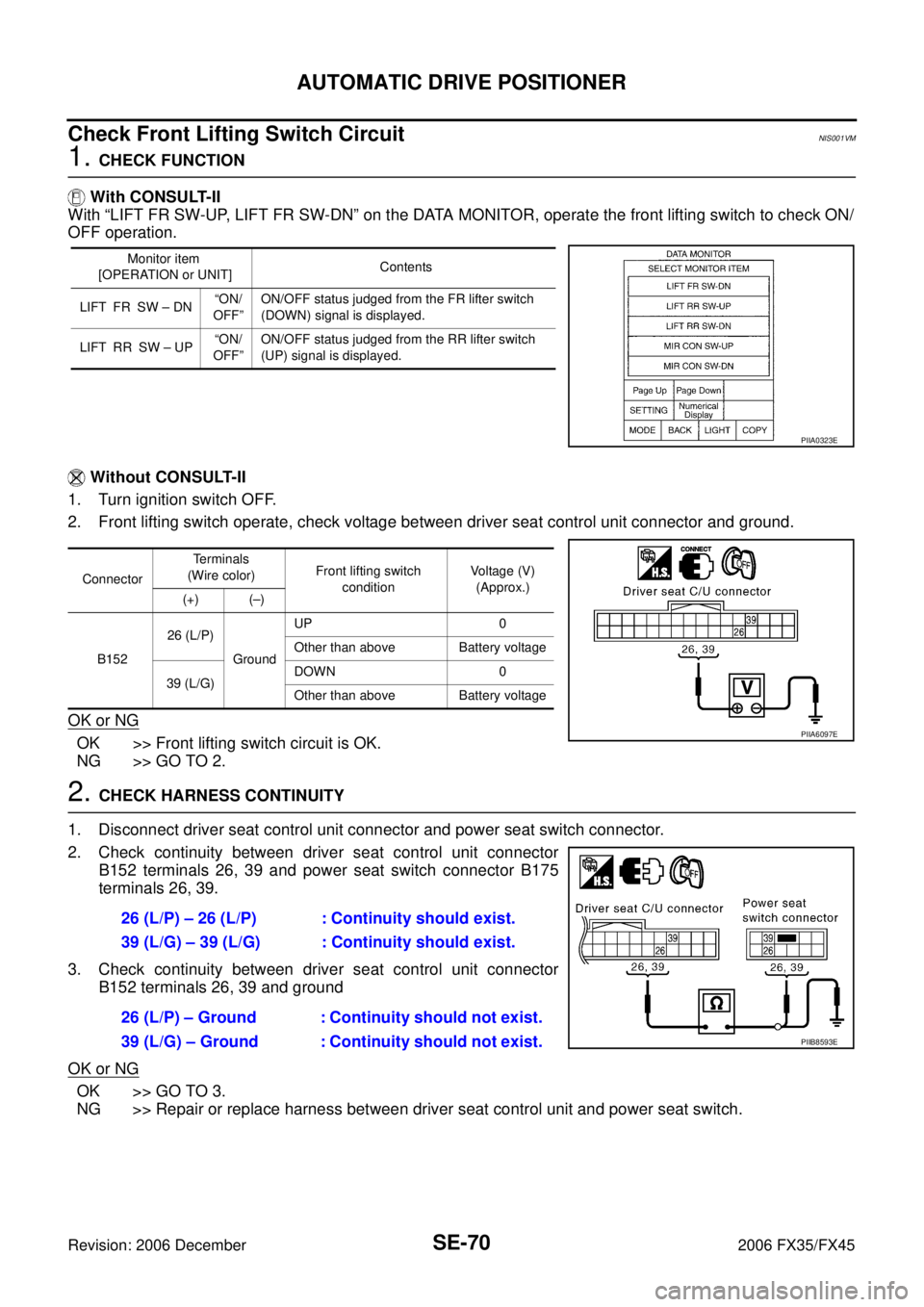
2. Check continuity between driver seat control unit connector B152 terminals 26, 39 and power seat switch connector B175
terminals 26, 39.
3. Check continuity between driver seat control unit connector B152 terminals 26, 39 and ground
OK or NG
OK >> GO TO 3.
NG >> Repair or replace harness between driver seat control unit and power seat switch.
Monitor item
[OPERATION or UNIT] Contents
LIFT FR SW – DN “ON/
OFF” ON/OFF status judged from the FR lifter switch
(DOWN) signal is displayed.
LIFT RR SW – UP “ON/
OFF” ON/OFF status judged from the RR lifter switch
(UP) signal is displayed.
PIIA0323E
Connector Terminals
(Wire color) Front lifting switch
condition Voltage (V)
(Approx.)
(+) (–)
B152 26 (L/P)
Ground UP 0
Other than above Battery voltage
39 (L/G) DOWN 0
Other than above Battery voltage
PIIA6097E
26 (L/P) – 26 (L/P) : Continuity should exist.
39 (L/G) – 39 (L/G) : Continuity should exist.
26 (L/P) – Ground : Continuity should not exist.
39 (L/G) – Ground : Continuity should not exist.
PIIB8593E
Page 4209 of 4462
AUTOMATIC DRIVE POSITIONER SE-71
C
D E
F
G H
J
K L
M A
B
SE
Revision: 2006 December 2006 FX35/FX45
3. CHECK FRONT LIFTING SWITCH
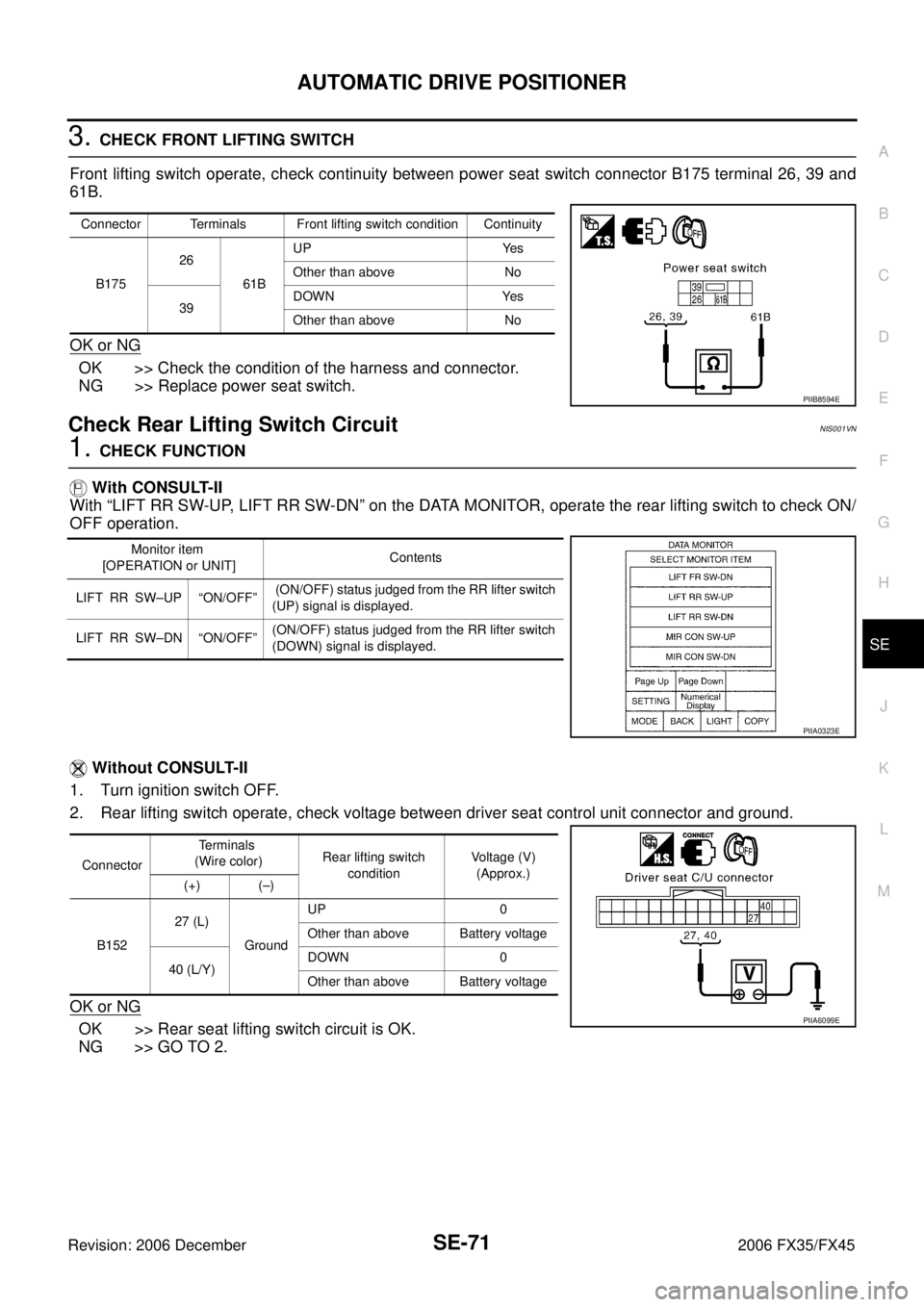
Front lifting switch operate, check continuity between power seat switch connector B175 terminal 26, 39 and
61B.
OK or NG
OK >> Check the condition of the harness and connector.
NG >> Replace power seat switch.
Check Rear Lifting Switch CircuitNIS001VN
1. CHECK FUNCTION
With CONSULT-II
With “LIFT RR SW-UP, LIFT RR SW-DN” on the DATA MONITOR, operate the rear lifting switch to check ON/
OFF operation.
Without CONSULT-II
1. Turn ignition switch OFF.
2. Rear lifting switch operate, check voltage between driver seat control unit connector and ground.
OK or NG
OK >> Rear seat lifting switch circuit is OK.
NG >> GO TO 2.
Connector Terminals Front lifting switch condition Continuity
B175 26
61B UP Yes
Other than above No
39 DOWN Yes
Other than above No
PIIB8594E
Monitor item
[OPERATION or UNIT] Contents
LIFT RR SW–UP “ON/OFF” (ON/OFF) status judged from the RR lifter switch
(UP) signal is displayed.
LIFT RR SW–DN “ON/OFF” (ON/OFF) status judged from the RR lifter switch
(DOWN) signal is displayed.
PIIA0323E
Connector Terminals
(Wire color) Rear lifting switch
condition Voltage (V)
(Approx.)
(+) (–)
B152 27 (L)
Ground UP 0
Other than above Battery voltage
40 (L/Y) DOWN 0
Other than above Battery voltage
PIIA6099E
Page 4210 of 4462
SE-72
AUTOMATIC DRIVE POSITIONER
Revision: 2006 December 2006 FX35/FX45
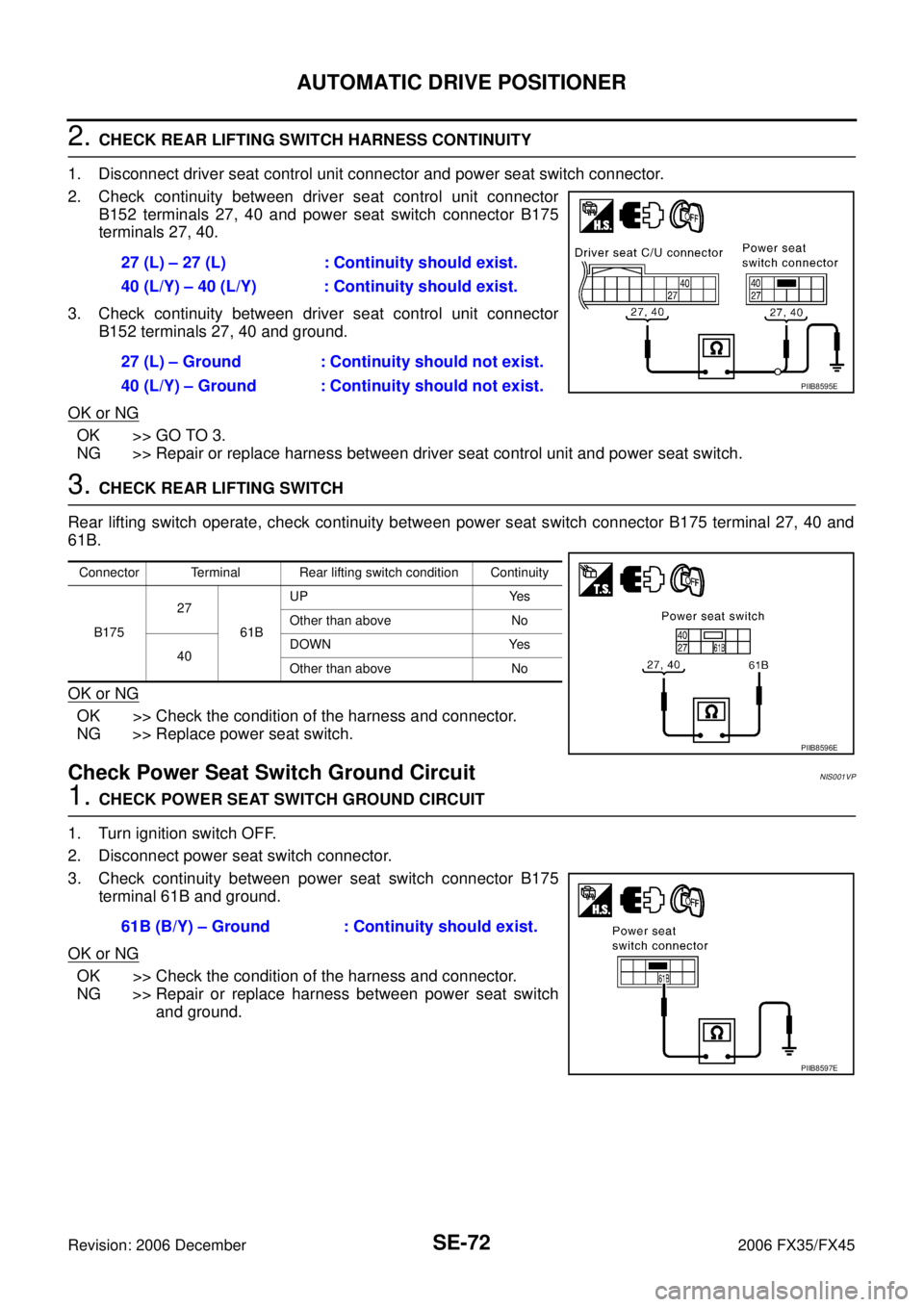
2. CHECK REAR LIFTING SWITCH HARNESS CONTINUITY
1. Disconnect driver seat control unit connector and power seat switch connector.
2. Check continuity between driver seat control unit connector B152 terminals 27, 40 and power seat switch connector B175
terminals 27, 40.
3. Check continuity between driver seat control unit connector B152 terminals 27, 40 and ground.
OK or NG
OK >> GO TO 3.
NG >> Repair or replace harness between driver seat control unit and power seat switch.
3. CHECK REAR LIFTING SWITCH
Rear lifting switch operate, check continuity between power seat switch connector B175 terminal 27, 40 and
61B.
OK or NG
OK >> Check the condition of the harness and connector.
NG >> Replace power seat switch.
Check Power Seat Switch Ground CircuitNIS001VP
1. CHECK POWER SEAT SWITCH GROUND CIRCUIT
1. Turn ignition switch OFF.
2. Disconnect power seat switch connector.
3. Check continuity between power seat switch connector B175 terminal 61B and ground.
OK or NG
OK >> Check the condition of the harness and connector.
NG >> Repair or replace harness between power seat switch and ground.
27 (L) – 27 (L) : Continuity should exist.
40 (L/Y) – 40 (L/Y) : Continuity should exist.
27 (L) – Ground : Continuity should not exist.
40 (L/Y) – Ground : Continuity should not exist.
PIIB8595E
Connector Terminal Rear lifting switch condition Continuity
B175 27
61B UP Yes
Other than above No
40 DOWN Yes
Other than above No
PIIB8596E
61B (B/Y) – Ground : Continuity should exist.
PIIB8597E
Page 4219 of 4462
AUTOMATIC DRIVE POSITIONER SE-81
C
D E
F
G H
J
K L
M A
B
SE
Revision: 2006 December 2006 FX35/FX45
Check Detention Switch (P Range Switch) CircuitNIS001VU
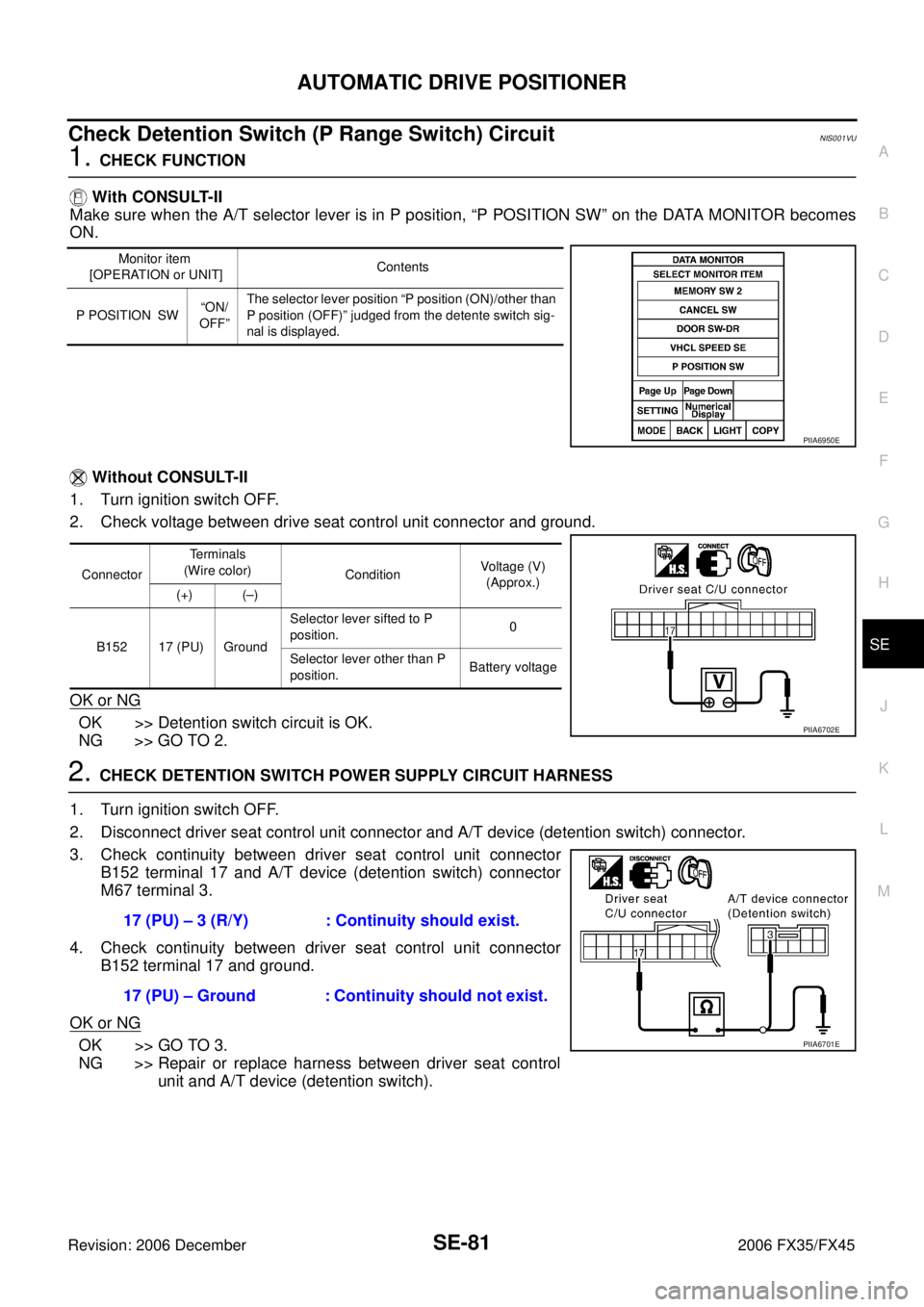
1. CHECK FUNCTION
With CONSULT-II
Make sure when the A/T selector lever is in P position, “P POSITION SW” on the DATA MONITOR becomes
ON.
Without CONSULT-II
1. Turn ignition switch OFF.
2. Check voltage between drive seat control unit connector and ground.
OK or NG
OK >> Detention switch circuit is OK.
NG >> GO TO 2.
2. CHECK DETENTION SWITCH POWER SUPPLY CIRCUIT HARNESS
1. Turn ignition switch OFF.
2. Disconnect driver seat control unit connector and A/T device (detention switch) connector.
3. Check continuity between driver seat control unit connector B152 terminal 17 and A/T device (detention switch) connector
M67 terminal 3.
4. Check continuity between driver seat control unit connector B152 terminal 17 and ground.
OK or NG
OK >> GO TO 3.
NG >> Repair or replace harness between driver seat control unit and A/T device (detention switch).
Monitor item
[OPERATION or UNIT] Contents
P POSITION SW “ON/
OFF” The selector lever position “P position (ON)/other than
P position (OFF)” judged from the detente switch sig-
nal is displayed.
PIIA6950E
Connector Terminals
(Wire color) Condition Voltage (V)
(Approx.)
(+) (–)
B152 17 (PU) Ground Selector lever sifted to P
position. 0
Selector lever other than P
position. Battery voltage
PIIA6702E
17 (PU) – 3 (R/Y) : Continuity should exist.
17 (PU) – Ground : Continuity should not exist.
PIIA6701E
Page 4223 of 4462

AUTOMATIC DRIVE POSITIONER SE-85
C
D E
F
G H
J
K L
M A
B
SE
Revision: 2006 December 2006 FX35/FX45
4. CHECK HARNESS CONTINUITY
1. Disconnect key switch connector and BCM connector.
2. Check continuity between key switch connector M23 terminal 1 and BCM connector M3 terminal 37.
3. Check continuity between key switch connector M23 terminal 1 and ground.
OK or NG
OK >> Key switch circuit is OK.
NG >> Repair or replace harness between key switch and
BCM.
Check Seat Memory Switch CircuitNIS001VX
1. CHECK FUNCTION (WITH CONSULT-II)
With CONSULT-II
With “SET SW, MEMORY SW1, MEMORY SW2” on the DATA MONITOR, operate the switch to check ON/
OFF operation.
OK or NG
OK >> Seat memory switch circuit is OK.
NG >> GO TO 2. 1 (B/W) – 37 (B/W) : Continuity should exist.
1 (B/W) – Ground : Continuity should not exist.
PIIA5094E
Monitor item
[OPERATION or UNIT] Contents
MEMORY SW1 “ON/OFF” ON/OFF status judged from the seat memory
switch 1 signal is displayed.
MEMORY SW2 “ON/OFF” ON/OFF status judged from the seat memory
switch 2 signal is displayed.
SET SW “ON/OFF” ON/OFF status judged from the setting switch
signal is displayed.
PIIA0309E
Page 4224 of 4462
SE-86
AUTOMATIC DRIVE POSITIONER
Revision: 2006 December 2006 FX35/FX45
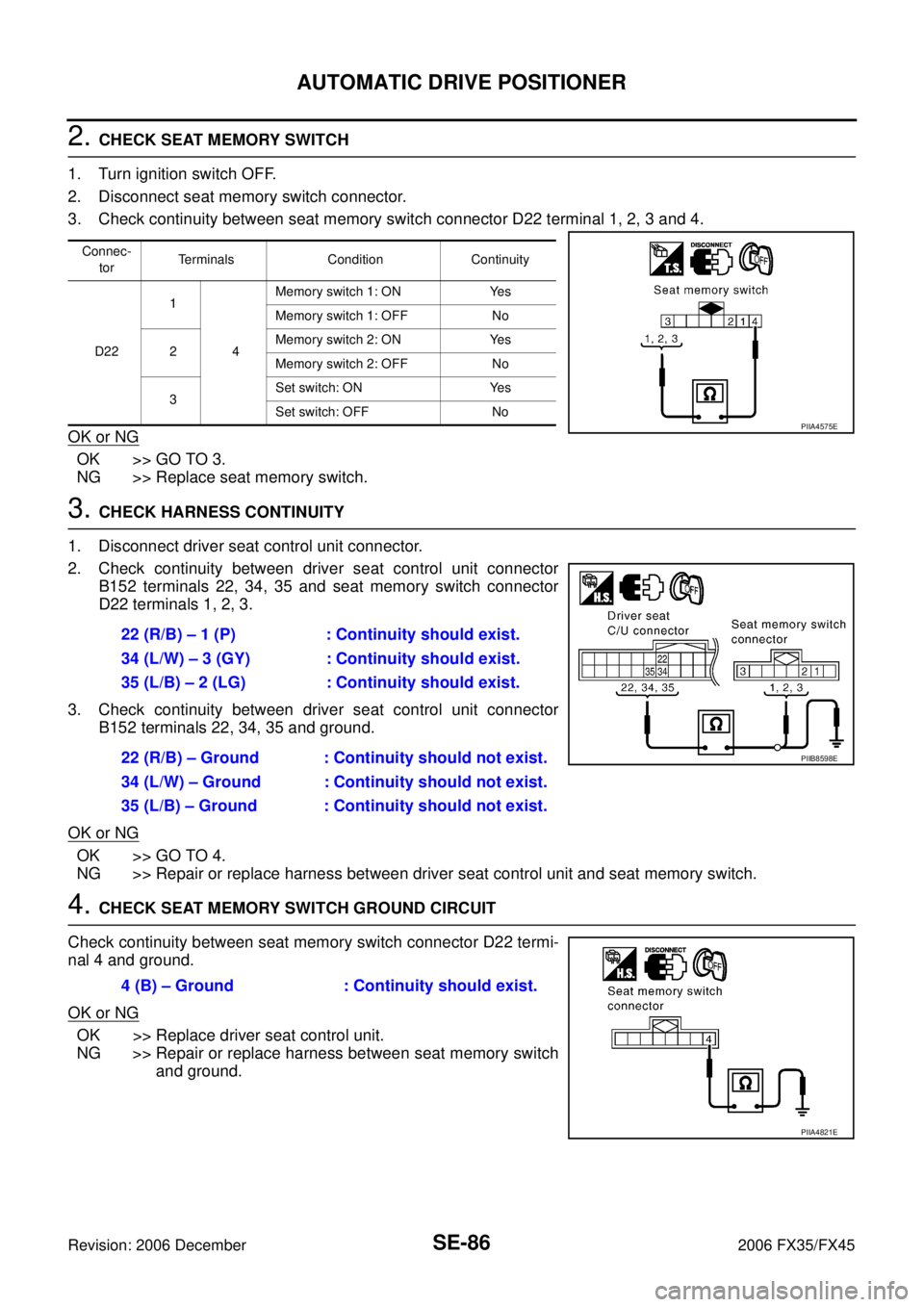
2. CHECK SEAT MEMORY SWITCH
1. Turn ignition switch OFF.
2. Disconnect seat memory switch connector.
3. Check continuity between seat memory switch connector D22 terminal 1, 2, 3 and 4.
OK or NG
OK >> GO TO 3.
NG >> Replace seat memory switch.
3. CHECK HARNESS CONTINUITY
1. Disconnect driver seat control unit connector.
2. Check continuity between driver seat control unit connector B152 terminals 22, 34, 35 and seat memory switch connector
D22 terminals 1, 2, 3.
3. Check continuity between driver seat control unit connector B152 terminals 22, 34, 35 and ground.
OK or NG
OK >> GO TO 4.
NG >> Repair or replace harness between driver seat control unit and seat memory switch.
4. CHECK SEAT MEMORY SWITCH GROUND CIRCUIT
Check continuity between seat memory switch connector D22 termi-
nal 4 and ground.
OK or NG
OK >> Replace driver seat control unit.
NG >> Repair or replace harness between seat memory switch and ground.
Connec-
tor Terminals Condition Continuity
D22 1
4 Memory switch 1: ON Yes
Memory switch 1: OFF No
2 Memory switch 2: ON Yes
Memory switch 2: OFF No
3 Set switch: ON Yes
Set switch: OFF No
PIIA4575E
22 (R/B) – 1 (P) : Continuity should exist.
34 (L/W) – 3 (GY) : Continuity should exist.
35 (L/B) – 2 (LG) : Continuity should exist.
22 (R/B) – Ground : Continuity should not exist.
34 (L/W) – Ground : Continuity should not exist.
35 (L/B) – Ground : Continuity should not exist.
PIIB8598E
4 (B) – Ground : Continuity should exist.
PIIA4821E
Page 4225 of 4462
AUTOMATIC DRIVE POSITIONER SE-87
C
D E
F
G H
J
K L
M A
B
SE
Revision: 2006 December 2006 FX35/FX45
Check Seat Memory Indicator Lamp CircuitNIS001VY
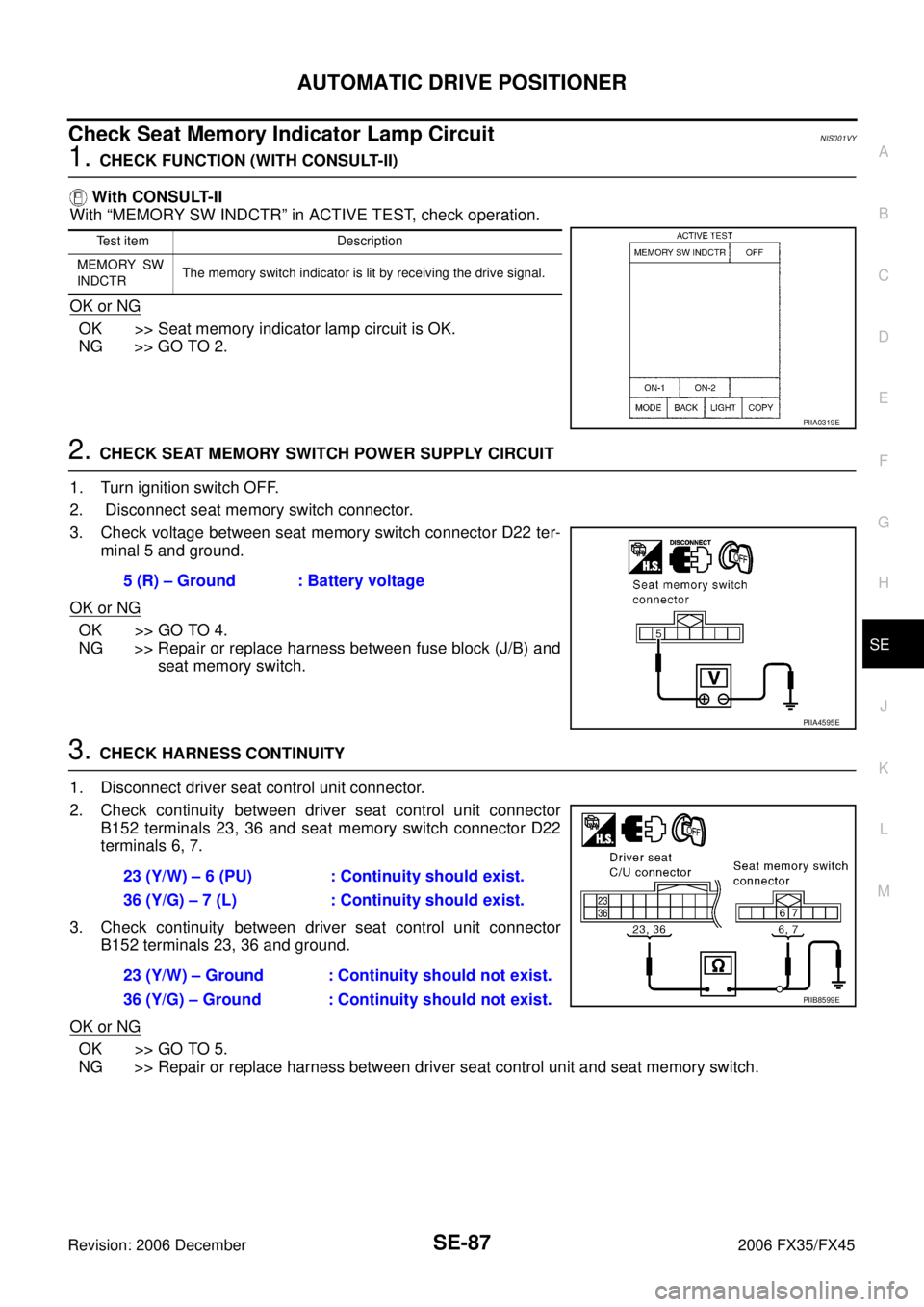
1. CHECK FUNCTION (WITH CONSULT-II)
With CONSULT-II
With “MEMORY SW INDCTR” in ACTIVE TEST, check operation.
OK or NG
OK >> Seat memory indicator lamp circuit is OK.
NG >> GO TO 2.
2. CHECK SEAT MEMORY SWITCH POWER SUPPLY CIRCUIT
1. Turn ignition switch OFF.
2. Disconnect seat memory switch connector.
3. Check voltage between seat memory switch connector D22 ter- minal 5 and ground.
OK or NG
OK >> GO TO 4.
NG >> Repair or replace harness between fuse block (J/B) and seat memory switch.
3. CHECK HARNESS CONTINUITY
1. Disconnect driver seat control unit connector.
2. Check continuity between driver seat control unit connector B152 terminals 23, 36 and seat memory switch connector D22
terminals 6, 7.
3. Check continuity between driver seat control unit connector B152 terminals 23, 36 and ground.
OK or NG
OK >> GO TO 5.
NG >> Repair or replace harness between driver seat control unit and seat memory switch.
Test item Description
MEMORY SW
INDCTR The memory switch indicator is lit by receiving the drive signal.
PIIA0319E
5 (R) – Ground : Battery voltage
PIIA4595E
23 (Y/W) – 6 (PU) : Continuity should exist.
36 (Y/G) – 7 (L) : Continuity should exist.
23 (Y/W) – Ground : Continuity should not exist.
36 (Y/G) – Ground : Continuity should not exist.
PIIB8599E
Page 4226 of 4462
SE-88
AUTOMATIC DRIVE POSITIONER
Revision: 2006 December 2006 FX35/FX45
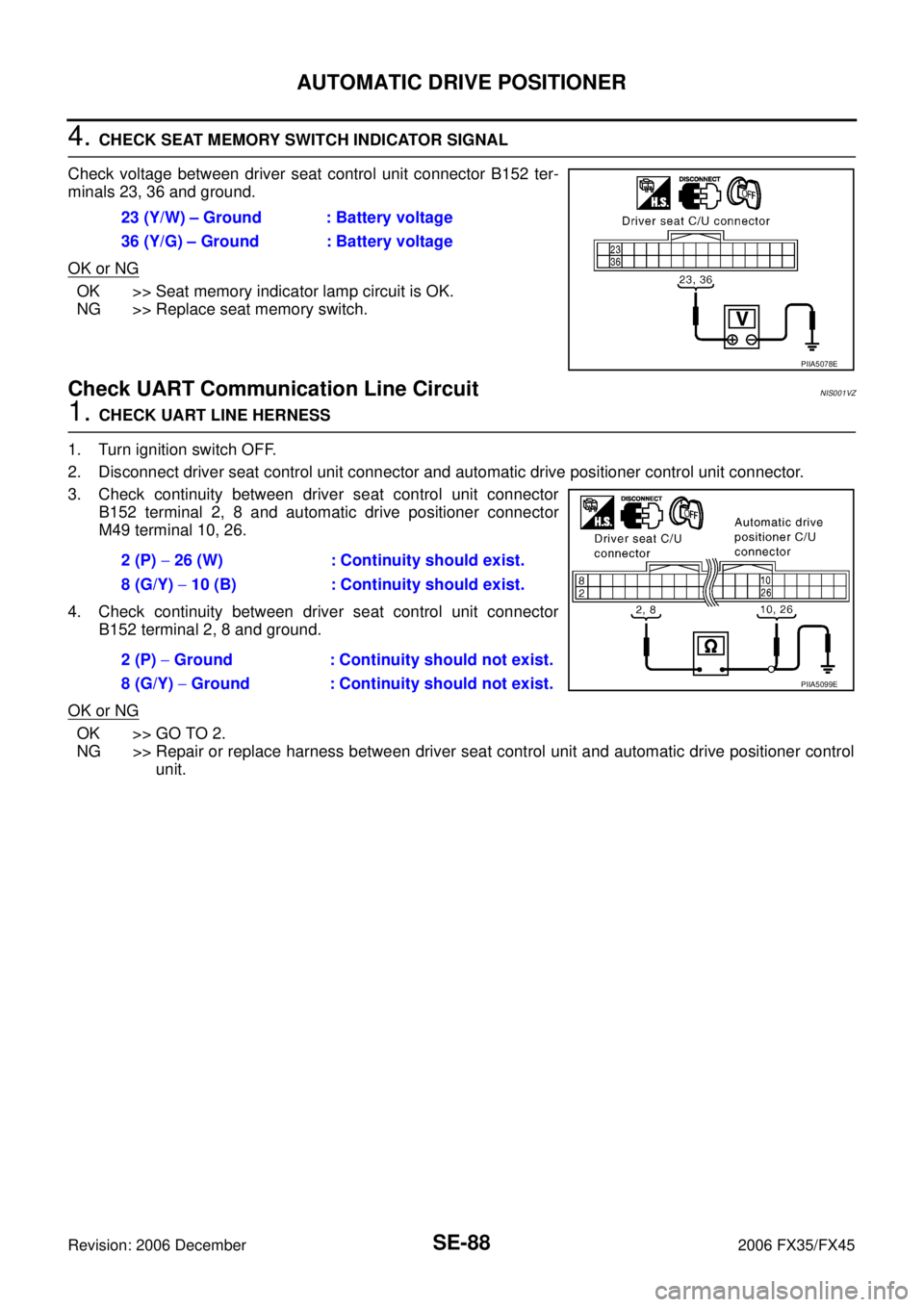
4. CHECK SEAT MEMORY SWITCH INDICATOR SIGNAL
Check voltage between driver seat control unit connector B152 ter-
minals 23, 36 and ground.
OK or NG
OK >> Seat memory indicator lamp circuit is OK.
NG >> Replace seat memory switch.
Check UART Communication Line CircuitNIS001VZ
1. CHECK UART LINE HERNESS
1. Turn ignition switch OFF.
2. Disconnect driver seat control unit connector and automatic drive positioner control unit connector.
3. Check continuity between driver seat control unit connector B152 terminal 2, 8 and automatic drive positioner connector
M49 terminal 10, 26.
4. Check continuity between driver seat control unit connector B152 terminal 2, 8 and ground.
OK or NG
OK >> GO TO 2.
NG >> Repair or replace harness between driver seat control unit and automatic drive positioner control unit.
23 (Y/W) – Ground : Battery voltage
36 (Y/G) – Ground : Battery voltage
PIIA5078E
2 (P) − 26 (W) : Continuity should exist.
8 (G/Y) − 10 (B) : Continuity should exist.
2 (P) − Ground : Continuity should not exist.
8 (G/Y) − Ground : Continuity should not exist.
PIIA5099E