change time INFINITI FX35 2008 User Guide
[x] Cancel search | Manufacturer: INFINITI, Model Year: 2008, Model line: FX35, Model: INFINITI FX35 2008Pages: 3924, PDF Size: 81.37 MB
Page 632 of 3924

INTEGRATED DISPLAY SYSTEMAV-85
< SERVICE INFORMATION >
C
DE
F
G H
I
J
L
M A
B
AV
N
O P
3. When displaying RGB image, check voltage waveform between display control unit harness connector M76 terminal 56 and
ground with CONSULT-III or oscilloscope.
OK or NG
OK >> Replace display.
NG >> Replace display control unit.
Value for All Item in the TRIP Screen Do Not ChangeINFOID:0000000001328732
Symptom: Values for items, “Elapsed Time”, “Drivi ng Distance” and “Average Speed” in the TRIP screen do
not change. FUEL ECONOMY screen is not displayed when pressing “TRIP” button.
1. CHECK DISPLAY CONTROL UNIT IGNITION SIGNAL
Select “Vehicle Signals” in Confirmation/Adjustment mode, and check the ignition signal inputting to display
control unit. Refer to AV-75, "
Confirmation/Adjustment Mode".
OK or NG
OK >> Replace display control unit.
NG >> Check display control unit ignition signal circuit, and repair malfunctioning part.
Value for Item, "Driving Distance" a nd "Average Speed" Do Not ChangeINFOID:0000000001328733
Symptom: Values for Items, "Driving Distance" and "Average Speed" do not change. (The Value for "Elapsed
Time" Changes.)
1.CHECK DISPLAY CONTROL UNIT VEHICLE SPEED SIGNAL
Select “Vehicle Signals” in Confirmation/Adjustment mode, and check the vehicle speed signal inputting to dis-
play control unit. Refer to AV-75, "
Confirmation/Adjustment Mode".
OK or NG
OK >> Replace display control unit.
NG >> Check display control unit vehicle speed signal circuit, and repair malfunctioning part.
Value for All Item in the FUEL ECONOMY Screen Do Not ChangeINFOID:0000000001328734
Symptom: Values for items, “Average Fuel Economy” and “Distance to Empty” in the FUEL ECONOMY screen
do not change.
1.CHECK CONDITION
Check if values for all items in the TRIP screen change properly.
OK or NG
OK >> GO TO 2.
NG >> Repair malfunctioning part. Refer to AV-85, "
Value for All Item in the TRIP Screen Do Not Change"
or AV-85, "Value for Item, "Driving Distance" and "Average Speed" Do Not Change".
2.CHECK CAN COMMUNICATION
Check CAN communication. Refer to AV-79, "
CAN Communication Check".
OK or NG
OK >> Replace display control unit.
NG >> After filling out CAN DIAG SUPPORT MONITOR check sheet, Go to LAN-43, "
CAN System Spec-
ification Chart".
56 – Ground:
SKIB7864ESKIB3603E
3AA93ABC3ACD3AC03ACA3AC03AC63AC53A913A773A893A873A873A8E3A773A983AC73AC93AC03AC3
3A893A873A873A8F3A773A9D3AAF3A8A3A8C3A863A9D3AAF3A8B3A8C
Page 635 of 3924

AV-88
< SERVICE INFORMATION >
NAVIGATION SYSTEM
The navigation system periodically calculates the vehicle's current
position according to the following three signals:
Travel distance of the vehicle as determined by the vehicle speed sensor
Turning angle of the vehicle as determined by the gyroscope (angular velocity sensor)
Direction of vehicle travel as determined by the GPS antenna (GPS information)
The current position of the vehicle is then identified by comparing the
calculated vehicle position with map data read from the DVD-ROM,
which is stored in the DVD-ROM drive (map-matching), and indi-
cated on the screen as a current-loc ation mark. More accurate data
is judged and used by comparing vehicle position detecti on results found by the GPS with the result by map-
matching.
The current vehicle position will be calculated by detecting the dis-
tance the vehicle moved from the previous calculation point and its
direction.
Travel distance Travel distance calculations are based on the vehicle speed sen-
sor input signal. Therefore, the calculation may become incorrect
as the tires wear down. To prevent this, an automatic distance cor-
rection function has been adopted.
Travel direction Change in the travel direction of the vehicle is calculated by a gyro-
scope (angular velocity sensor) and a GPS antenna (GPS informa-
tion). They have both advantages and disadvantages.
More accurate traveling direction is selected because pr iorities are set for the signals from these two devices
according to the situation.
Map-Matching
Map-matching compares a current location detected by the method
in the “Location Detection Principle” with a road map data from DVD-
ROM stored in DVD-ROM drive.
NOTE:
The road map data is based on data stored in the DVD-ROM.
The vehicle position may not be corrected under the following circumstances and after driving for a certain
time when GPS information is difficult to receive. In th is case, the current-location mark on the display must be
corrected manually.
SKIB1058E
SEL684V
Type Advantage Disadvantage
Gyroscope (angular velocity sen-
sor) Can detect the vehicle's turning angle quite
accurately. Direction errors
may accumulate when vehicle is
driven for long distances without stopping.
GPS antenna (GPS information) Can detect the vehicle's travel direction
(North/South/East/West). Correct direction cannot be detected when vehicle
speed is low.
SEL685V
3AA93ABC3ACD3AC03ACA3AC03AC63AC53A913A773A893A873A873A8E3A773A983AC73AC93AC03AC3
3A893A873A873A8F3A773A9D3AAF3A8A3A8C3A863A9D3AAF3A8B3A8C
Page 636 of 3924

NAVIGATION SYSTEMAV-89
< SERVICE INFORMATION >
C
DE
F
G H
I
J
L
M A
B
AV
N
O P
In map-matching, alternative routes are prepared and prioritized in addition to the road judged currently driven. Due to the distance
and/or direction error, the incorrect road may be prioritized and
current-location mark may be repositioned to the wrong road.
When two roads are running in parallel, they are judged to the
same priority. Therefore, the current-location mark may appear on
either of them alternately, depending on maneuvering of the steer-
ing wheel and configuration of the road.
Map-matching does not function correctly when a road on which the vehicle is driving is new and not recorded in the DVD-ROM, or
when road pattern stored in the map data and the actual road pat-
tern are different due to repair.
When driving on a road not present in the map, the map-matching
function may find another road and position the current-location
mark on it. Then, when the correc t road is detected, the current-
location mark may change to it.
Effective range for comparing the vehicle position and travel direc-
tion calculated by the distance and direction with the road data
read from the DVD-ROM is limited. Therefore, when there is an
excessive gap between current vehicle position and the position on
the map, correction by map-matching is not possible.
GPS (Global Positioning System)
GPS (Global Positioning System) was developed for and is con-
trolled by the US Department of Defense. The system utilizes GPS
satellites (NAVSTAR), sending out radio waves while flying on an
orbit around the earth at an altitude of approximately 21,000 km
(13,100 miles).
The GPS receiver calculates the vehicle's position in three dimen-
sions (latitude/longitude/altitude) ac cording to the time lag of the
radio waves received from four or more GPS satellites (three-dimen-
sional positioning). If radio waves were received only from three
GPS satellites, the GPS receiver ca lculates the vehicle's position in
two dimensions (latitude/longitude) , and utilize the altitude data cal-
culated previously with radio waves from four or more GPS satellites
(two-dimensional positioning).
Position correction by GPS is not available while the vehicle is stopped.
Accuracy of GPS will deteriorate under the following conditions:
In two-dimensional positioning, GPS accuracy will deter iorate when altitude of the vehicle position changes.
The accuracy can be even lower depending on the arrangement of the GPS satellites utilized for the posi-
tioning.
Position detection is not possible when vehicle is in an area where radio waves from the GPS satellite do not
reach, such as in a tunnel, parking lot in a building, and under an elevated highway. Radio waves from the
GPS satellites may not be received when so me object is located over the GPS antenna.
NOTE:
Even a high-precision three dimensional positioning, the detection result has an error about 10 m (30ft).
Because the signals of GPS satellite is controlled by the Tracking and Control Center in the United States,
the accuracy may be degraded lower intentionally or the radio waves may stop.
Component DescriptionINFOID:0000000001328740
NAVI CONTROL UNIT
SEL686V
SKIA0613E
SEL526V
3AA93ABC3ACD3AC03ACA3AC03AC63AC53A913A773A893A873A873A8E3A773A983AC73AC93AC03AC3
3A893A873A873A8F3A773A9D3AAF3A8A3A8C3A863A9D3AAF3A8B3A8C
Page 670 of 3924

NAVIGATION SYSTEMAV-123
< SERVICE INFORMATION >
C
DE
F
G H
I
J
L
M A
B
AV
N
O P
The steering angle output value detected by the gyroscope can be
adjusted.
Speed Calibration
Usually the automatic distance correction function adjusts the mal-
function in distance caused by the tires wearing down or the tire
pressure change. If prompt adjus tment is necessary when the tire
chains are installed, et c., perform this procedure.
Error History
Diagnosis results of self-diagnosis depend on if any error occurred during the time after selecting “Self Diag-
nosis” until self-diagnosis results is displayed.
Meanwhile, when an error occurs before selecting “Sel f Diagnosis”, and if an error does not occur until self-
diagnosis results is displayed, a diagnosis result is judged as normal.
Consequently, a diagnosis needs to be performed with “Error His tory” for the past error that is not available
with self-diagnosis.
“Error History” displays the time and place of the most re cent occurrence of that error. However, take note of
the following points.
Correct time of the error occurrence may not be displayed when the GPS antenna substrate within the NAVI
control unit has malfunctioned.
Place of the error occurrence is represented by the pos ition of the vehicle mark at the time when the error
occurred. If the vehicle mark has deviated from the co rrect position, then the place of the error occurrence
may not be located correctly.
When the ignition switch is turned ON if the error is det ected, the counter increases 1. Even if it is normal
when the ignition switch is turned ON t he next time, the counter does not decrease.
The upper limit of the counter is 50. 51 or more is displayed as 50. It can be reset to 0 by “Delete log” switch.
SKIB3684E
SKIB3685E
SKIB6978E
3AA93ABC3ACD3AC03ACA3AC03AC63AC53A913A773A893A873A873A8E3A773A983AC73AC93AC03AC3
3A893A873A873A8F3A773A9D3AAF3A8A3A8C3A863A9D3AAF3A8B3A8C
Page 684 of 3924

NAVIGATION SYSTEMAV-137
< SERVICE INFORMATION >
C
DE
F
G H
I
J
L
M A
B
AV
N
O P
3. When displaying RGB image, check voltage waveform between display control unit harness connector M76 terminal 56 and
ground with CONSULT-III or oscilloscope.
OK or NG
OK >> Replace display.
NG >> Replace display control unit.
Value for All Item in the TRIP Screen Do Not ChangeINFOID:0000000001328766
Symptom: Values for items, “Elapsed Time”, “Drivi ng Distance” and “Average Speed” in the TRIP screen do
not change. FUEL ECONOMY screen is not displayed when pressing “TRIP” button.
1. CHECK DISPLAY CONTROL UNIT IGNITION SIGNAL
Select “Vehicle Signals” in Confirmation/Adjustment mode, and check the ignition signal inputting to display
control unit. Refer to AV-119, "
Confirmation/Adjustment Mode".
OK or NG
OK >> Replace display control unit.
NG >> Check display control unit ignition signal circuit, and repair malfunctioning part.
Value for Item, "Driving Distance" a nd "Average Speed" Do Not ChangeINFOID:0000000001328767
Symptom: Values for Items, "Driving Distance" and "Average Speed" do not change. (The Value for "Elapsed
Time" Changes.)
1.CHECK DISPLAY CONTROL UNIT VEHICLE SPEED SIGNAL
Select “Vehicle Signals” in Confirmation/Adjustment mode, and check the vehicle speed signal inputting to dis-
play control unit. Refer to AV-119, "
Confirmation/Adjustment Mode".
OK or NG
OK >> Replace display control unit.
NG >> Check display control unit vehicle speed signal circuit, and repair malfunctioning part.
Value for All Item in the FUEL ECONOMY Screen Do Not ChangeINFOID:0000000001328768
Symptom: Values for items, “Average Fuel Economy” and “Distance to Empty” in the FUEL ECONOMY screen
do not change.
1.CHECK CONDITION
Check if values for all items in the TRIP screen change properly.
OK or NG
OK >> GO TO 2.
NG >> Repair malfunctioning part. Refer to AV-137, "
Value for All Item in the TRIP Screen Do Not
Change" or AV-137, "Value for Item, "Driving Distance" and "Average Speed" Do Not Change".
2.CHECK CAN COMMUNICATION
Check CAN communication. Refer to AV-126, "
CAN Communication Check".
OK or NG
OK >> Replace display control unit.
NG >> After filling out CAN DIAG SUPPORT MONITOR check sheet, Go to LAN-43, "
CAN System Spec-
ification Chart".
56 – Ground:
SKIB7864ESKIB3603E
3AA93ABC3ACD3AC03ACA3AC03AC63AC53A913A773A893A873A873A8E3A773A983AC73AC93AC03AC3
3A893A873A873A8F3A773A9D3AAF3A8A3A8C3A863A9D3AAF3A8B3A8C
Page 724 of 3924
BCS-4
< SERVICE INFORMATION >
BCM (BODY CONTROL MODULE)
BCM (BODY CONTROL MODULE)
System DescriptionINFOID:0000000001328608
BCM (Body Control Module) controls the operation of various electrical units installed on the vehicle.
BCM FUNCTION
BCM has combination switch reading function for reading the operation of combination switches (light, wiper,
washer and turn signal) in addition to a function for cont rolling the operation of various electrical components.
Also it has an interface function allowing it to receive signals from the unified meter and A/C amp., and send
signals to ECM using CAN communication.
COMBINATION SWITCH READING FUNCTION
Description
BCM reads combination switch (lighting switch, wiper switch) status, and controls various electrical compo-
nent according to the result.
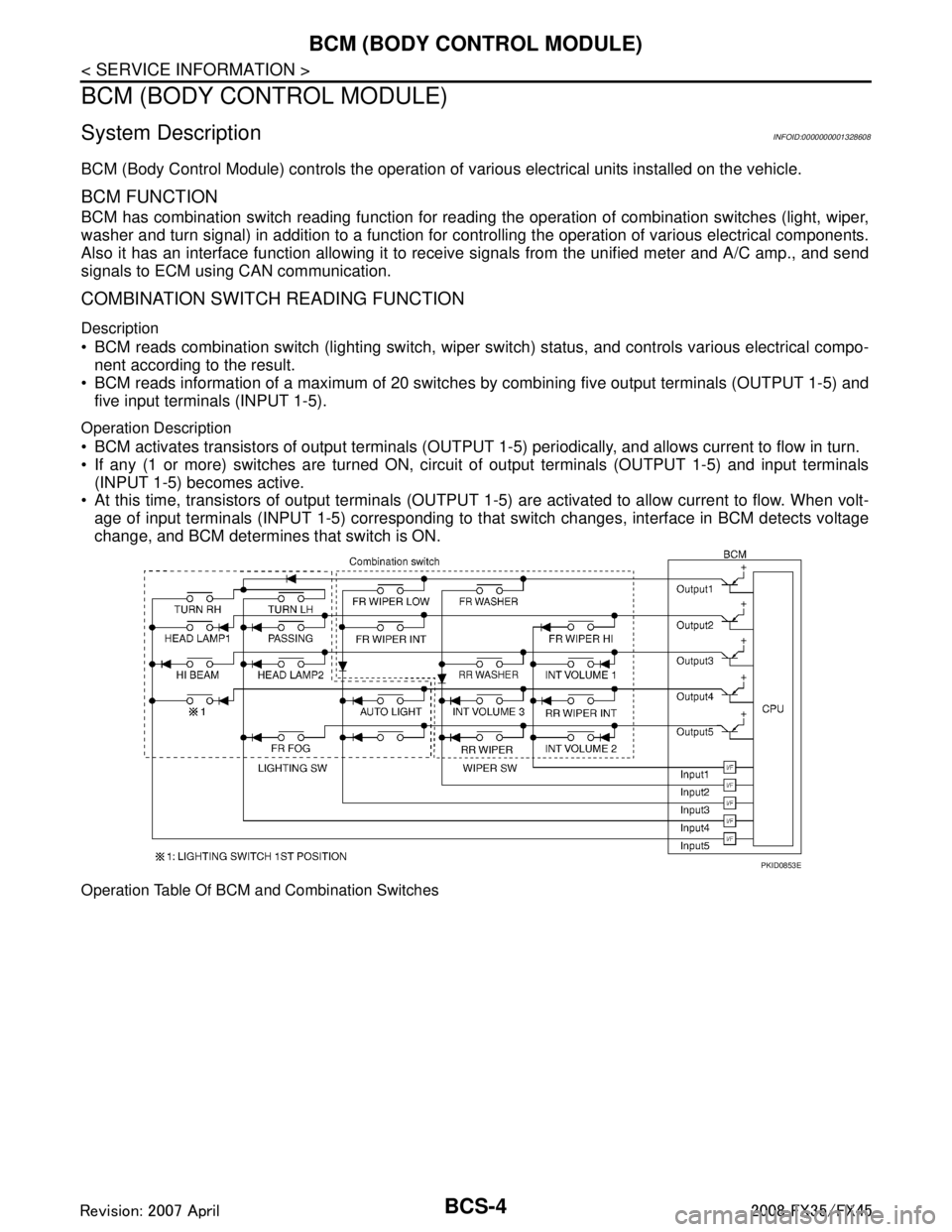
BCM reads information of a maximum of 20 switches by combining five output terminals (OUTPUT 1-5) and
five input terminals (INPUT 1-5).
Operation Description
BCM activates transistors of output terminals (OUTPUT 1-5) periodically, and allows current to flow in turn.
If any (1 or more) switches are turned ON, circui t of output terminals (OUTPUT 1-5) and input terminals
(INPUT 1-5) becomes active.
At this time, transistors of output terminals (OUTPUT 1- 5) are activated to allow current to flow. When volt-
age of input terminals (INPUT 1-5) corresponding to t hat switch changes, interface in BCM detects voltage
change, and BCM determines that switch is ON.
Operation Table Of BCM and Combination Switches
PKID0853E
3AA93ABC3ACD3AC03ACA3AC03AC63AC53A913A773A893A873A873A8E3A773A983AC73AC93AC03AC3
3A893A873A873A8F3A773A9D3AAF3A8A3A8C3A863A9D3AAF3A8B3A8C
Page 725 of 3924

BCM (BODY CONTROL MODULE)BCS-5
< SERVICE INFORMATION >
C
DE
F
G H
I
J
L
M A
B
BCS
N
O P
BCM reads operation status of combination swit ch using combinations shown in table below.
NOTE:
Headlamp system has a dual switch.
Sample Operation: (When Lighting Switch 1ST Position Turned ON)
When lighting switch 1ST position is turned ON, contact in combination switch turns ON. At this time if OUT-
PUT 4 transistor is activated, BCM detects that voltage changes in INPUT 5.
When OUTPUT 4 transistor is ON, BCM detects that voltage changes in INPUT 5, and judges that lighting
switch 1ST position is ON. Then BCM sends tail lamp and clearance lamp request signal to IPDM E/R using
CAN communication.
When OUTPUT 4 transistor is activated again, BCM detects that voltage changes in INPUT 5, and recog-
nizes that lighting switch 1S T position is continuously ON.
NOTE:
Each OUTPUT terminal transistor is activated at 10 ms intervals. Therefore after switch is turned ON, electri-
cal loads are activated with time delay. But this time delay is so short that it cannot be detected by human
senses.
Operation Mode
Combination switch reading function has operation modes shown below.
1. Normal status When BCM is not in sleep status, OUTPUT terminals (1-5) send out ON signal every 10 ms.
2. Sleep status
SKIA4959E
PKID0854E
3AA93ABC3ACD3AC03ACA3AC03AC63AC53A913A773A893A873A873A8E3A773A983AC73AC93AC03AC3
3A893A873A873A8F3A773A9D3AAF3A8A3A8C3A863A9D3AAF3A8B3A8C
Page 727 of 3924
BCM (BODY CONTROL MODULE)BCS-7
< SERVICE INFORMATION >
C
DE
F
G H
I
J
L
M A
B
BCS
N
O P
- Door lock/unlock switch
- Front door switch (driver side, passenger side)
- Rear door switch (LH, RH)
- Back door opener switch
- Combination switch (passing, lighting switch 1ST position, front fog lamp)
- Key fob (lock/unlock signal)
- Key cylinder switch
When control performed only by BCM is required by switch, it shifts to CAN communication inactive mode.
Operation mode of combination switch reading function is changed.
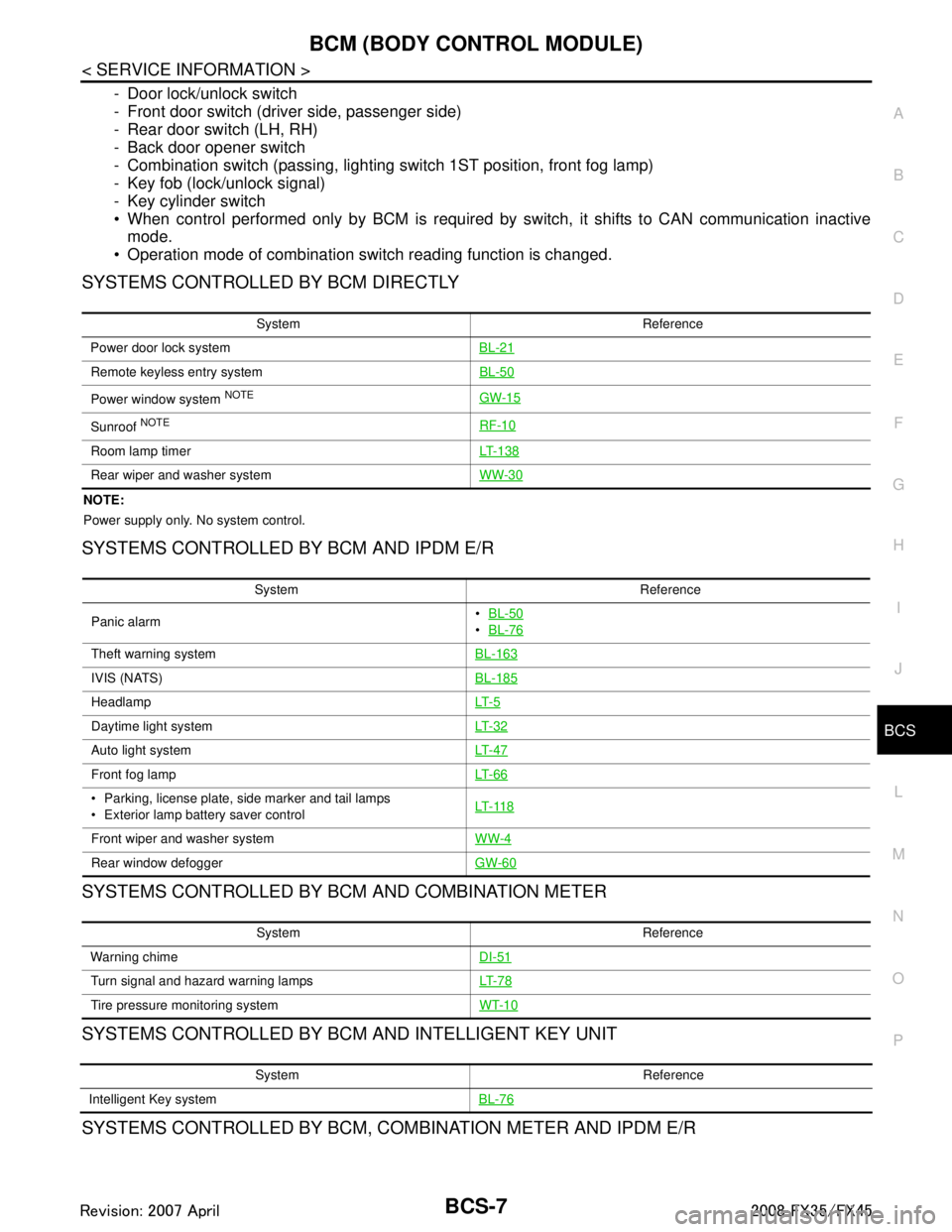
SYSTEMS CONTROLLED BY BCM DIRECTLY
NOTE:
Power supply only. No system control.
SYSTEMS CONTROLLED BY BCM AND IPDM E/R
SYSTEMS CONTROLLED BY BCM AND COMBINATION METER
SYSTEMS CONTROLLED BY BCM AND INTELLIGENT KEY UNIT
SYSTEMS CONTROLLED BY BCM, CO MBINATION METER AND IPDM E/R
System Reference
Power door lock system BL-21
Remote keyless entry systemBL-50
Power window system NOTEGW-15
Sunroof NOTERF-10
Room lamp timerLT- 1 3 8
Rear wiper and washer systemWW-30
System Reference
Panic alarm
BL-50
BL-76
Theft warning system BL-163
IVIS (NATS)BL-185
HeadlampLT- 5
Daytime light systemLT- 3 2
Auto light systemLT- 4 7
Front fog lampLT- 6 6
Parking, license plate, side marker and tail lamps
Exterior lamp battery saver control LT- 11 8
Front wiper and washer system
WW-4
Rear window defoggerGW-60
System Reference
Warning chime DI-51
Turn signal and hazard warning lampsLT- 7 8
Tire pressure monitoring systemWT-10
System Reference
Intelligent Key system BL-76
3AA93ABC3ACD3AC03ACA3AC03AC63AC53A913A773A893A873A873A8E3A773A983AC73AC93AC03AC3
3A893A873A873A8F3A773A9D3AAF3A8A3A8C3A863A9D3AAF3A8B3A8C
Page 732 of 3924

BCS-12
< SERVICE INFORMATION >
BCM (BODY CONTROL MODULE)
ITEMS OF EACH PART
BCM can perform the following functions for each system.
NOTE:
CONSULT-III displays systems equipped in the vehicle.
×:Applicable
NOTE:
*1: Vehicle with remote keyless entry system display this item.
*2: Vehicle with Intelligent Key system display this item.
*3: This item is displayed, but does not function.
WORK SUPPORT
Display Item List
BCM Diagnostic test item Check item, diagnostic test mode Content
Inspection by part WORK SUPPORT Changes setting of each function.
SELF-DIAG RESULTS BCM performs self-diagnosis of CAN communication.
DATA MONITOR Displays the input data of BCM in real time.
CAN DIAG SUPPORT MNTR
The transmit/receive diagnosis result of CAN communication can be
read.
ACTIVE TEST Gives a drive signal to a load to check the operation.
ECU PART NUMBER ECM part number can be read.
CONFIGURATION (Not be used)
System and item CONSULT-III display Diagnostic test mode (Inspection by part)
WORK SUPPORT DATA MONITOR ACTIVE TEST
BCM BCM ×
Power door lock system DOOR LOCK ×××
Rear window defogger REAR DEFOGGER ××
Warning chime BUZZER ××
Room lamp timer INT LAMP ×××
Remote keyless entry system*
1MULTI REMOTE ENT ×××
Headlamp HEAD LAMP ×××
Wiper WIPER ×××
Turn signal lamp
Hazard lamp FLASHER
××
Blower fan switch signal
A/C switch signal AIR CONDITONER
×
Intelligent Key system*
2INTELLIGENT KEY ×
Combination switch COMB SW ×
NVIS IMMU ××
Room lamp battery saver BATTERY SAVER ×× ×
Trunk lid TRUNK*
3××
Vehicle security system THEFT ALM ×××
Retained power control RETAINED PWR ×××
Oil pressure swit ch SIGNAL BUFFER ××
Low tire pressure warning system AIR PRESSURE MONITOR ×××
Panic system PANIC ALARM ×
3AA93ABC3ACD3AC03ACA3AC03AC63AC53A913A773A893A873A873A8E3A773A983AC73AC93AC03AC3
3A893A873A873A8F3A773A9D3AAF3A8A3A8C3A863A9D3AAF3A8B3A8C
Page 744 of 3924

BL-10
< SERVICE INFORMATION >
SQUEAK AND RATTLE TROUBLE DIAGNOSIS
Most of these incidents can be repaired by adjusting, securing or insulating the item(s) or component(s) caus-
ing the noise.
SUNROOF/HEADLINING
Noises in the sunroof/headlining area c an often be traced to one of the following:
1. Sunroof lid, rail, linkage or seals making a rattle or light knocking noise
2. Sunvisor shaft shaking in the holder
3. Front or rear windshield touching headlining and squeaking
Again, pressing on the components to stop the noise while duplicating the conditions can isolate most of these
incidents. Repairs usually consist of insulating with felt cloth tape.
SEATS
When isolating seat noise it's important to note the pos ition the seat is in and the load placed on the seat when
the noise is present. These conditions should be dupl icated when verifying and isolating the cause of the
noise.
Cause of seat noise include:
1. Headrest rods and holder
2. A squeak between the seat pad cushion and frame
3. The rear seatback lock and bracket
These noises can be isolated by moving or pressing on the suspected components while duplicating the con-
ditions under which the noise occurs. Most of thes e incidents can be repaired by repositioning the component
or applying urethane tape to the contact area.
UNDERHOOD
Some interior noise may be caused by components under the hood or on the engine wall. The noise is then
transmitted into the passenger room.
Causes of transmitted underhood noise include:
1. Any component mounted to the engine wall
2. Components that pass through the engine wall
3. Engine wall mounts and connectors
4. Loose radiator mounting pins
5. Hood bumpers out of adjustment
6. Hood striker out of adjustment
These noises can be difficult to isolate since they cannot be reached from the interior of the vehicle. The best
method is to secure, move or insulate one component at a time and test drive the \
vehicle. Also, engine RPM
or load can be changed to isolate the noise. Repairs can usually be made by moving, adjusting, securing, or
insulating the component causing the noise.
3AA93ABC3ACD3AC03ACA3AC03AC63AC53A913A773A893A873A873A8E3A773A983AC73AC93AC03AC3
3A893A873A873A8F3A773A9D3AAF3A8A3A8C3A863A9D3AAF3A8B3A8C