instrument INFINITI FX35 2008 User Guide
[x] Cancel search | Manufacturer: INFINITI, Model Year: 2008, Model line: FX35, Model: INFINITI FX35 2008Pages: 3924, PDF Size: 81.37 MB
Page 513 of 3924

ATC-108
< SERVICE INFORMATION >
HEATER & COOLING UNIT ASSEMBLY
HEATER & COOLING UNIT ASSEMBLY
Removal and InstallationINFOID:0000000001328211
REMOVAL
1. Use a refrigerant collecting equipment (for HFC-134a) to discharge the refrigerant.
2. Drain coolant from cooling system. Refer to CO-10, "
Changing Engine Coolant" (VQ35DE) or CO-37,
"Changing Engine Coolant" (VK45DE).
3. Remove cowl top cover. Refer to EI-23
.
4. Remove high-pressure pipe 2 mounting clip.
5. Remove low-pressure flexible hose bracket mounting bolt. Refer to ATC-128, "
Removal and Installation of
Low-Pressure Flexible Hose".
6. Disconnect low-pressure pipe 1 and high-pressure pipe 2 from evaporator.
a. Set a disconnector [high-pressure side (SST: 9253089908), low- pressure side (SST: 9253089916)] on A/C piping.
b. Slide a disconnector toward vehicle front until it clicks.
c. Slide A/C piping toward vehicle front and disconnect it. CAUTION:
Cap or wrap the joint of low- pressure pipe 1, 2 and high-
pressure pipe 2, 3 with suitab le material such as vinyl tape
to avoid the entry of air.
7. Remove electric throttle control actuator (VQ35DE). Refer to EM-19
.
8. Disconnect two heater hoses from heater core.
9. Remove instrument panel and pad. Refer to IP-10
.
10. Remove blower unit. Refer to ATC-103
.
RJIA2037E
RJIA2077E
RJIA2041E
3AA93ABC3ACD3AC03ACA3AC03AC63AC53A913A773A893A873A873A8E3A773A983AC73AC93AC03AC3
3A893A873A873A8F3A773A9D3AAF3A8A3A8C3A863A9D3AAF3A8B3A8C
Page 514 of 3924
HEATER & COOLING UNIT ASSEMBLYATC-109
< SERVICE INFORMATION >
C
DE
F
G H
I
K L
M A
B
AT C
N
O P
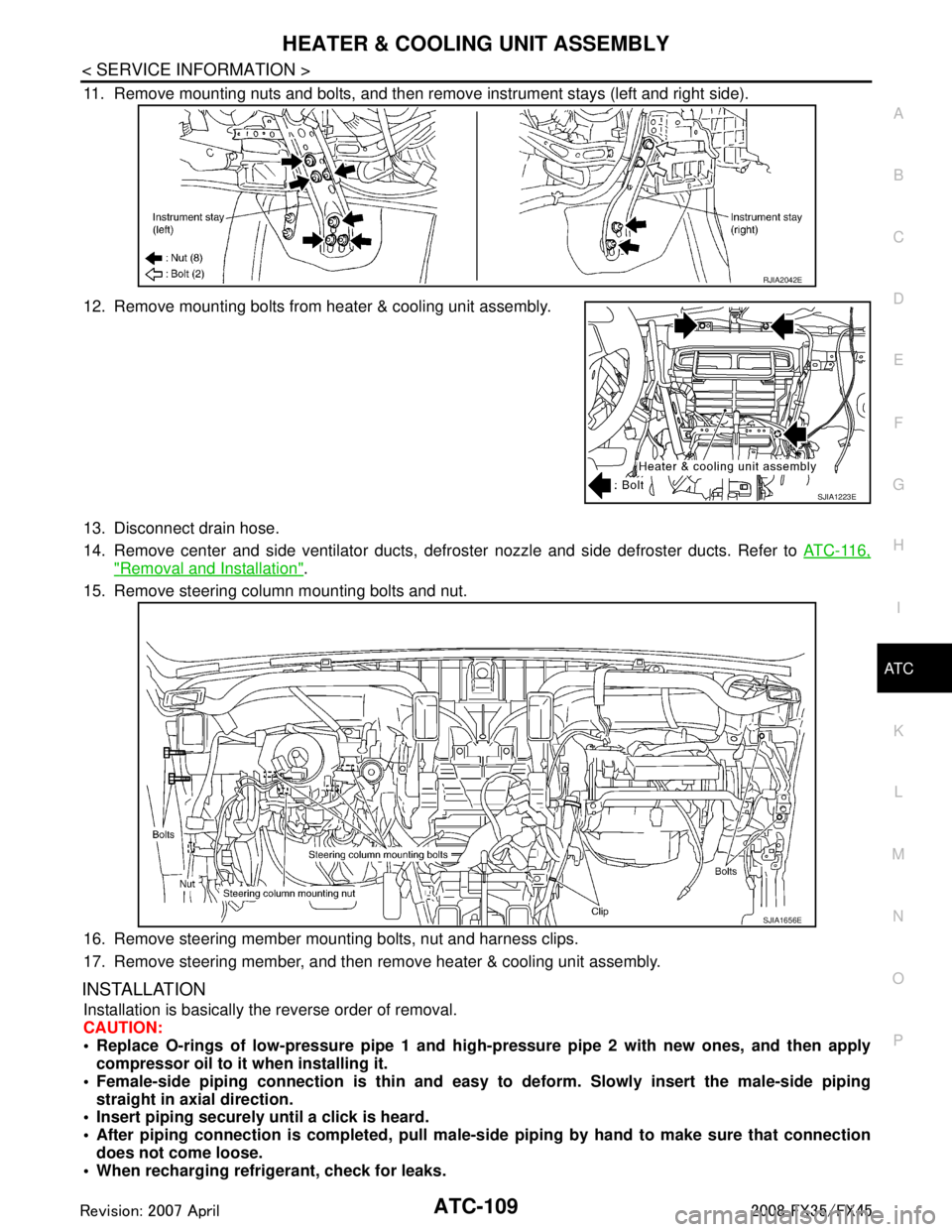
11. Remove mounting nuts and bolts, and then remove instrument stays (left and right side).
12. Remove mounting bolts from heater & cooling unit assembly.
13. Disconnect drain hose.
14. Remove center and side ventilator ducts, defroster nozzle and side defroster ducts. Refer to ATC-116,
"Removal and Installation".
15. Remove steering column mounting bolts and nut.
16. Remove steering member mounting bolts, nut and harness clips.
17. Remove steering member, and then remove heater & cooling unit assembly.
INSTALLATION
Installation is basically the reverse order of removal.
CAUTION:
Replace O-rings of low-pressure pipe 1 and high- pressure pipe 2 with new ones, and then apply
compressor oil to it when installing it.
Female-side piping c onnection is thin and easy to deform. Slowly insert the male-side piping
straight in axial direction.
Insert piping securely until a click is heard.
After piping connection is comple ted, pull male-side piping by hand to make sure that connection
does not come loose.
When recharging refrigerant, check for leaks.
RJIA2042E
SJIA1223E
SJIA1656E
3AA93ABC3ACD3AC03ACA3AC03AC63AC53A913A773A893A873A873A8E3A773A983AC73AC93AC03AC3
3A893A873A873A8F3A773A9D3AAF3A8A3A8C3A863A9D3AAF3A8B3A8C
Page 519 of 3924
ATC-114
< SERVICE INFORMATION >
AIR MIX DOOR MOTOR
AIR MIX DOOR MOTOR
Removal and InstallationINFOID:0000000001328214
REMOVAL
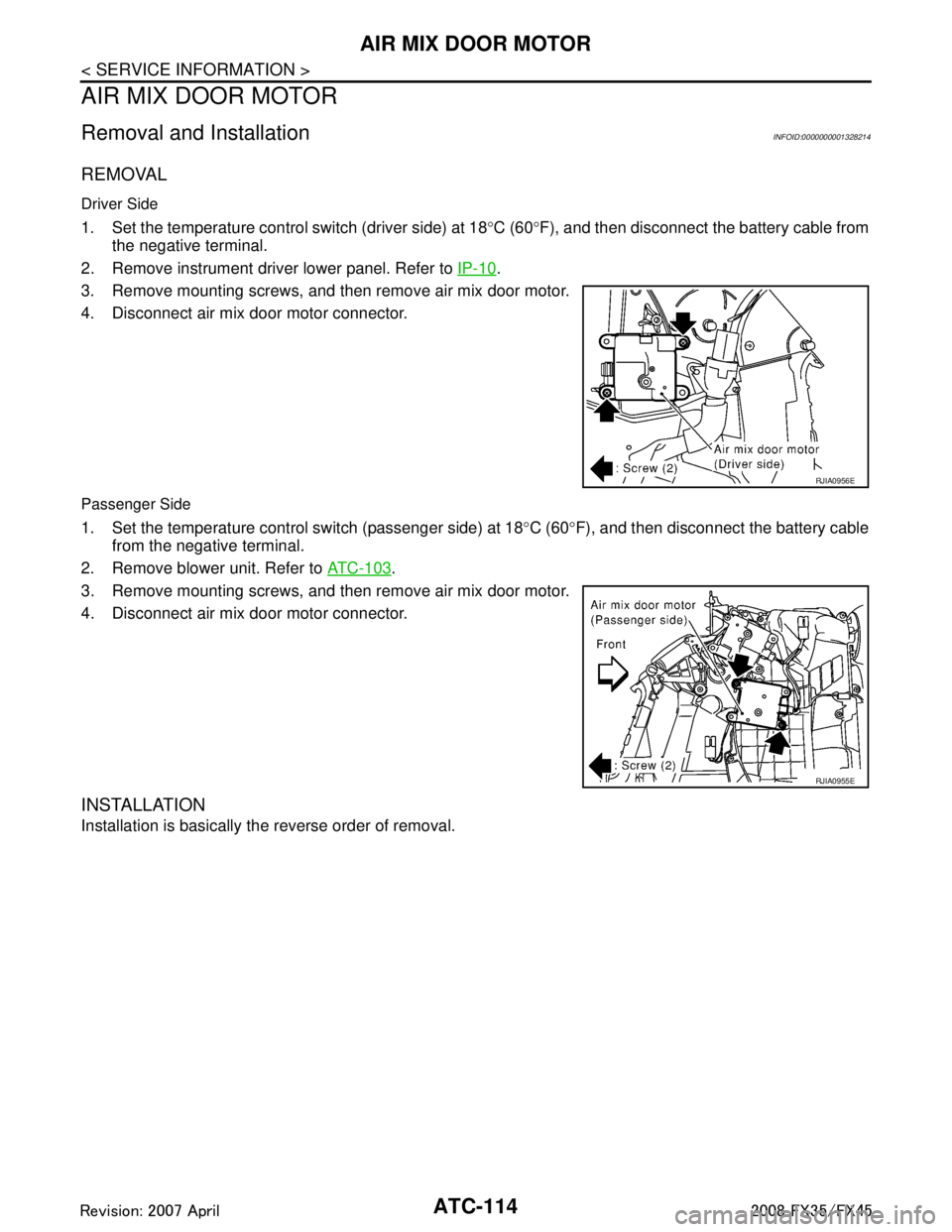
Driver Side
1. Set the temperature control switch (driver side) at 18°C (60 °F), and then disconnect the battery cable from
the negative terminal.
2. Remove instrument driver lower panel. Refer to IP-10
.
3. Remove mounting screws, and then remove air mix door motor.
4. Disconnect air mix door motor connector.
Passenger Side
1. Set the temperature control switch (passenger side) at 18 °C (60 °F), and then disconnect the battery cable
from the negative terminal.
2. Remove blower unit. Refer to ATC-103
.
3. Remove mounting screws, and then remove air mix door motor.
4. Disconnect air mix door motor connector.
INSTALLATION
Installation is basically the reverse order of removal.
RJIA0956E
RJIA0955E
3AA93ABC3ACD3AC03ACA3AC03AC63AC53A913A773A893A873A873A8E3A773A983AC73AC93AC03AC3
3A893A873A873A8F3A773A9D3AAF3A8A3A8C3A863A9D3AAF3A8B3A8C
Page 521 of 3924

ATC-116
< SERVICE INFORMATION >
DUCTS AND GRILLES
DUCTS AND GRILLES
Removal and InstallationINFOID:0000000001328216
COMPONENT LAYOUT
REMOVAL
Removal of Center Ventilator Grilles
1. Remove cluster lid C. Refer to IP-10.
2. Remove mounting screws, and then remove center ventilator grilles.
Removal of Side Ventilation
Remove side ventilation. Refer to IP-10.
Removal of Rear Ventilator Grilles
1. Remove center pillar lower garnish. Refer to IP-10.
1. Defroster nozzle 2. Side defroster duct (left) 3. Side ventilator duct (left)
4. Instrument panel 5. Side ventilation (left) 6. Center ventilator grille (left)
7. Center ventilator grille (right) 8. Side ventilation (right) 9. Center ventilator duct (right)
10. Side ventilator duct (right) 11. Side defroster duct (right) 12. Center ventilator duct
13. Center ventilator duct (left)
PJIA0166E
RJIA2048E
3AA93ABC3ACD3AC03ACA3AC03AC63AC53A913A773A893A873A873A8E3A773A983AC73AC93AC03AC3
3A893A873A873A8F3A773A9D3AAF3A8A3A8C3A863A9D3AAF3A8B3A8C
Page 522 of 3924
DUCTS AND GRILLESATC-117
< SERVICE INFORMATION >
C
DE
F
G H
I
K L
M A
B
AT C
N
O P
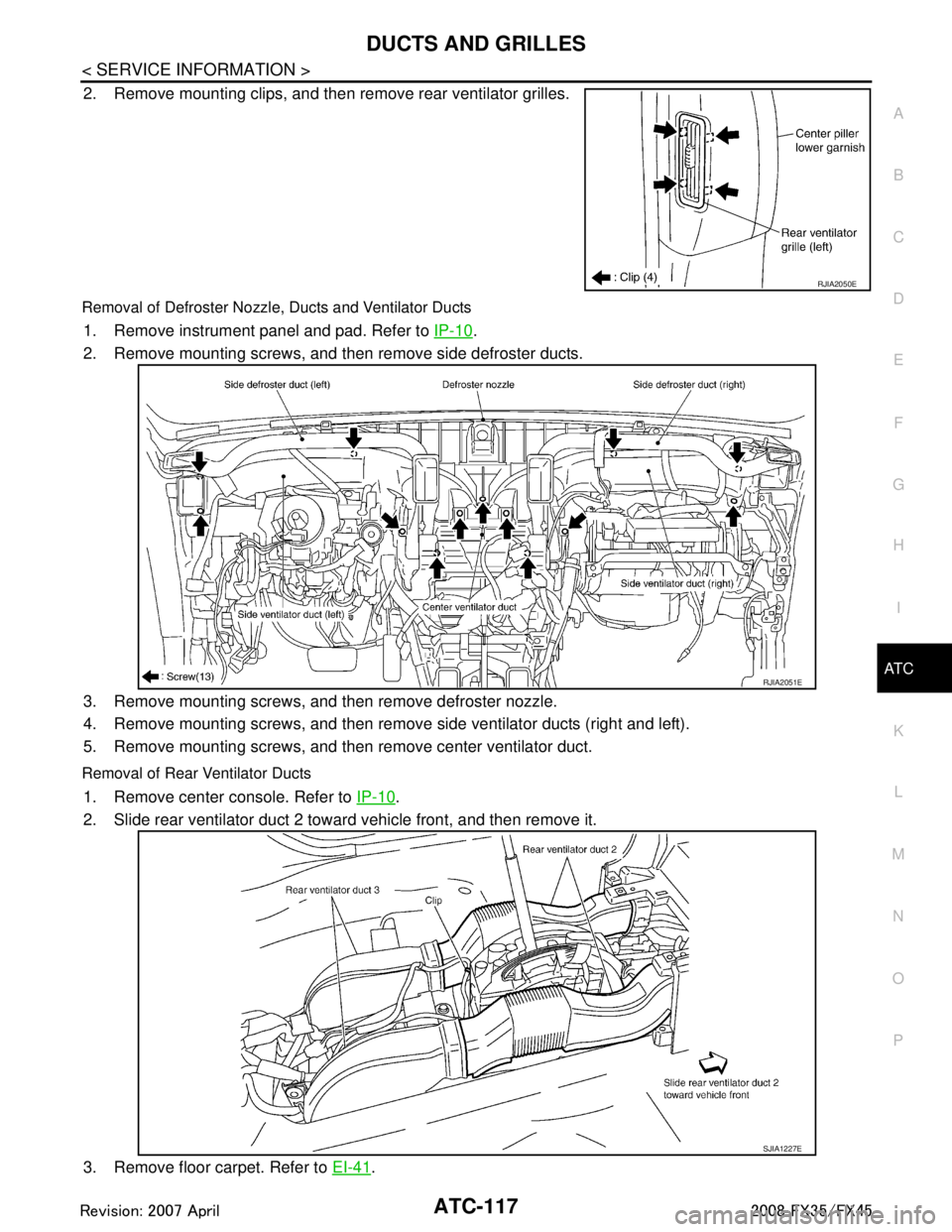
2. Remove mounting clips, and then remove rear ventilator grilles.
Removal of Defroster Nozzle, Ducts and Ventilator Ducts
1. Remove instrument panel and pad. Refer to IP-10.
2. Remove mounting screws, and then remove side defroster ducts.
3. Remove mounting screws, and then remove defroster nozzle.
4. Remove mounting screws, and then remove side ventilator ducts (right and left).
5. Remove mounting screws, and then remove center ventilator duct.
Removal of Rear Ventilator Ducts
1. Remove center console. Refer to IP-10.
2. Slide rear ventilator duct 2 toward vehicle front, and then remove it.
3. Remove floor carpet. Refer to EI-41
.
RJIA2050E
RJIA2051E
SJIA1227E
3AA93ABC3ACD3AC03ACA3AC03AC63AC53A913A773A893A873A873A8E3A773A983AC73AC93AC03AC3
3A893A873A873A8F3A773A9D3AAF3A8A3A8C3A863A9D3AAF3A8B3A8C
Page 523 of 3924
ATC-118
< SERVICE INFORMATION >
DUCTS AND GRILLES
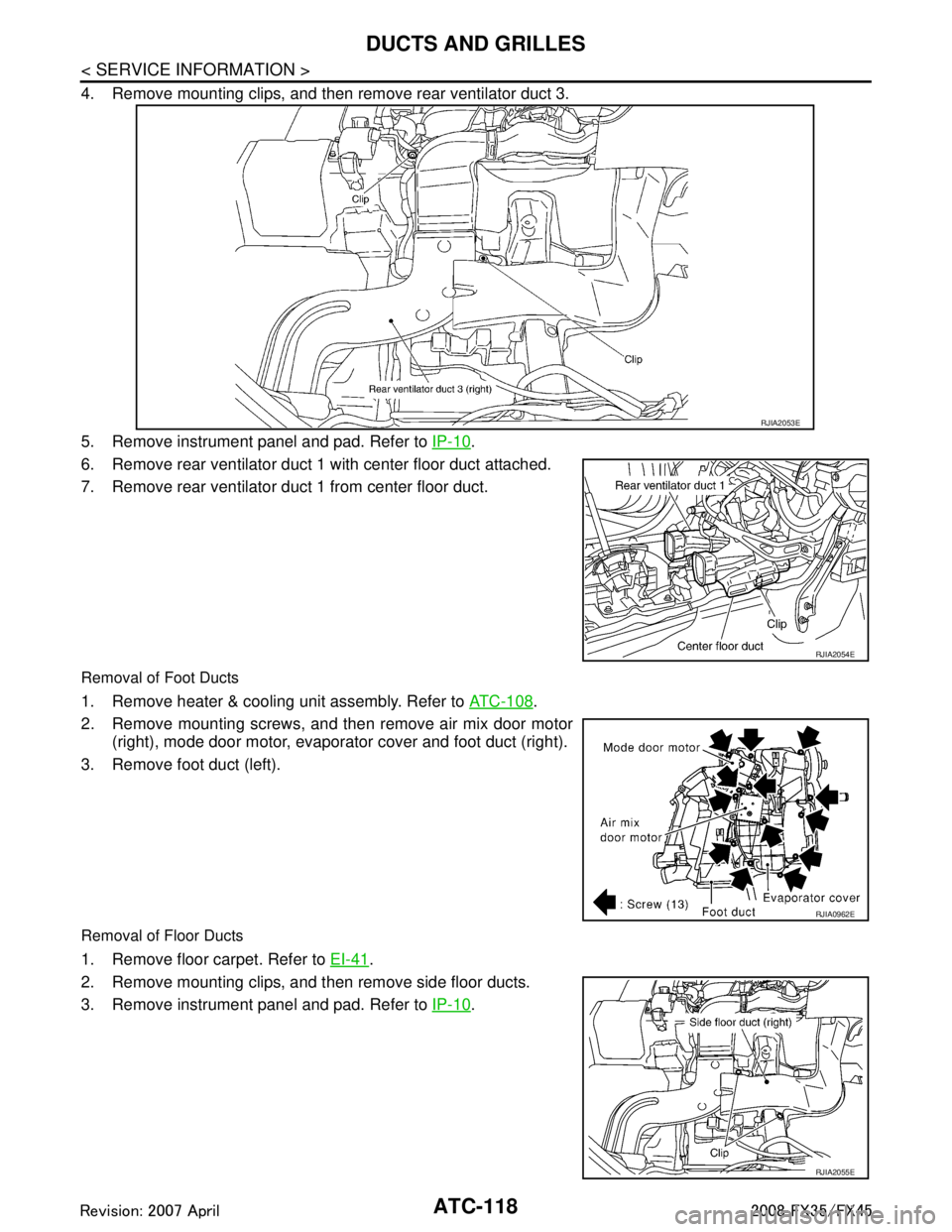
4. Remove mounting clips, and then remove rear ventilator duct 3.
5. Remove instrument panel and pad. Refer to IP-10
.
6. Remove rear ventilator duct 1 with center floor duct attached.
7. Remove rear ventilator duct 1 from center floor duct.
Removal of Foot Ducts
1. Remove heater & cooling unit assembly. Refer to ATC-108.
2. Remove mounting screws, and then remove air mix door motor (right), mode door motor, evaporator cover and foot duct (right).
3. Remove foot duct (left).
Removal of Floor Ducts
1. Remove floor carpet. Refer to EI-41.
2. Remove mounting clips, and then remove side floor ducts.
3. Remove instrument panel and pad. Refer to IP-10
.
RJIA2053E
RJIA2054E
RJIA0962E
RJIA2055E
3AA93ABC3ACD3AC03ACA3AC03AC63AC53A913A773A893A873A873A8E3A773A983AC73AC93AC03AC3
3A893A873A873A8F3A773A9D3AAF3A8A3A8C3A863A9D3AAF3A8B3A8C
Page 544 of 3924

REFRIGERANT LINESATC-139
< SERVICE INFORMATION >
C
DE
F
G H
I
K L
M A
B
AT C
N
O P
4. Perform a system performance check and verify the l eak repair with an approved electrical leak detector.
NOTE:
Other gases in the work area or substances on the A/C components, for example, anti-freeze, windshield
washer fluid, solvents and lubricants, may falsely trigger the leak detector. Make sure the surfaces to be
checked are clean.
Clean with a dry cloth or blow off with shop air.
Do not allow the sensor tip of the detector to contact with any substance. This can also cause false readings
and may damage the detector.
Dye InjectionINFOID:0000000001328233
(This procedure is only necessary when recharging t he system or when the compressor has seized and was
replaced.)
1. Check A/C system static (at rest) pressure. Pressure must be at least 345 kPa (3.52 kg/cm
2, 50 psi).
2. Pour one bottle (1/4 ounce / 7.4 cc) of the A/C refr igerant dye into the injector tool (SST: J-41459).
3. Connect the injector tool to the A/C low-pressure side service valve.
4. Start the engine and switch A/C ON.
5. When the A/C operating (compressor running), inject one bottle (1/4 ounce / 7.4 cc) of fluorescent dye
through the low-pressure service valve using dye inje ctor tool (SST: J-41459) (refer to the manufacture’s
operating instructions).
6. With the engine still running, disconnect the injector tool from the service valve. CAUTION:
Be careful the A/C system or replacing a componen t, pour the dye directly into the open system
connection and proceed wi th the service procedures.
7. Operate the A/C system for a minimum of 20 minutes to mix the dye with the system oil. Depending on the
leak size, operating conditions and location of the leak , it may take from minutes to days for the dye to
penetrate a leak and become visible.
8. Attach a blue label as necessary.
Electrical Leak DetectorINFOID:0000000001328234
PRECAUTIONS FOR HANDLING LEAK DETECTOR
When performing a refrigerant leak check, use an A/C electrical leak
detector (SST) or equivalent. Ensure that the instrument is calibrated
and set properly per the operating instructions.
The leak detector is a delicate device. In order to use the leak detec-
tor properly, read the operating instructions and perform any speci-
fied maintenance.
1. Position probe approximately 5 mm (3/16 in) away from point to
be checked.
SHA196FA
SHA707EA
3AA93ABC3ACD3AC03ACA3AC03AC63AC53A913A773A893A873A873A8E3A773A983AC73AC93AC03AC3
3A893A873A873A8F3A773A9D3AAF3A8A3A8C3A863A9D3AAF3A8B3A8C
Page 548 of 3924

AV-1
ELECTRICAL
C
DE
F
G H
I
J
L
M
SECTION AV
A
B
AV
N
O P
CONTENTS
AUDIO VISUAL, NAVIGATION & TELEPHONE SYS- TEM
SERVICE INFORMATION ............................3
PRECAUTIONS .............................................. .....3
Precaution for Supplemental Restraint System
(SRS) "AIR BAG" and "SEAT BELT PRE-TEN-
SIONER" ............................................................. ......
3
PREPARATION ...................................................4
Commercial Service Tool .................................... ......4
AUDIO .................................................................5
System Description ............................................. ......5
Component Parts Location ........................................6
Schematic - AUDIO - / with Navigation System ........7
Wiring Diagram - AUDIO - / with Navigation Sys-
tem ............................................................................
8
Schematic - AUDIO - without Navigation System ....18
Wiring Diagram - AUDIO - / without Navigation
System ....................................................................
19
Terminal and Reference Value for Audio Unit .........28
Terminal and Reference Value for BOSE Speaker
Amp .........................................................................
30
Terminal and Reference Value for A/C and AV
Switch ......................................................................
32
Terminal and Reference Value for Woofer ..............33
Terminal and Reference Value for Satellite Radio
Tuner ................................................................... ....
34
A/C and AV Switch Self-Diagnosis Function ...........34
Trouble Diagnosis ...................................................35
Power Supply Circuit Inspection .............................36
Audio Steering Wheel Switch Inspection ................37
A/C and AV Switch Inspection ................................39
BOSE Speaker Amp. Inspection .............................39
Vehicle Speed Signal Inspection .............................40
Locking CD Auto-Changer Mechanism ...................41
Removal and Installation of Audio Unit ...................41
Disassembly and Assembly of Audio Unit ...............42
Removal and Installation for A/C and AV Switch ....42
Removal and Installation for Front Door Speaker ....43
Removal and Installation for Rear Door Speaker ....43
Removal and Installation for Instrument Speaker ....43
Removal and Installation for Tweeter .................. ....44
Removal and Installation for Woofer (BOSE Sys-
tem) .........................................................................
44
Removal and Installation for BOSE Speaker Amp ....44
Removal and Installation of Satellite Radio Tuner ....45
Removal and Installation of Satellite Radio Anten-
na ......................................................................... ....
45
ANTENNA .........................................................46
System Description ..................................................46
Wiring Diagram - M/ANT - .......................................47
Terminal and Reference Value for Audio Unit .........48
Antenna Amp. Inspection ........................................48
Location of Antenna .................................................49
Window Antenna Repair ..........................................49
Removal and Installation of Roof Antenna ..............51
Removal and Installation of Satellite Radio Anten-
na ......................................................................... ....
51
INTEGRATED DISPLAY SYSTEM ...................52
System Description ..................................................52
Component Description ...........................................52
CAN Communication Unit ........................................53
Component Parts Location ......................................53
Schematic - INF/D - .................................................54
Wiring Diagram - INF/D - .........................................55
Schematic - COMM - ...............................................61
Wiring Diagram - COMM - .......................................62
Terminal and Reference Value for Display Control
Unit ...................................................................... ....
67
Terminal and Reference Value for Display ..............69
Terminal and Reference Value for A/C and AV
Switch ......................................................................
71
Special Note for Trouble Diagnosis .........................72
On Board Self-Diagnosis Function ..........................72
Self-Diagnosis Mode (DCU) ....................................73
Confirmation/Adjustment Mode ...............................75
CAN Diagnostic Support Monitor .............................77
A/C and AV Switch Self-Diagnosis Function ...........78
CAN Communication Check ....................................79
3AA93ABC3ACD3AC03ACA3AC03AC63AC53A913A773A893A873A873A8E3A773A983AC73AC93AC03AC3
3A893A873A873A8F3A773A9D3AAF3A8A3A8C3A863A9D3AAF3A8B3A8C
Page 552 of 3924

AUDIOAV-5
< SERVICE INFORMATION >
C
DE
F
G H
I
J
L
M A
B
AV
N
O P
AUDIO
System DescriptionINFOID:0000000001328672
AUDIO SYSTEM
Refer to Owner's Manual for audio system operating instructions.
Power is supplied at all times
through 15A fuse (No. 32, located in the fuse and fusible link block)
to audio unit terminal 6
to A/C and AV switch terminal 1
to display control unit terminal 1
to woofer terminal 1
to satellite radio tuner terminal 12 (With satellite radio) and
to option connector–2 for satellite radio tuner terminal 12 (Without satellite radio),
through 20A fuse [No.17, located in the fuse block (J/B)]
to BOSE speaker amp. terminal 1.
With the ignition switch in the ACC or ON position, power is supplied
through 10A fuse [No. 6, located in the fuse block (J/B)]
to audio unit terminal 10
to A/C and AV switch terminal 2
to display control unit terminal 10
to satellite radio tuner terminal 16 (With satellite radio) and
to option connector–2 for satellite radio t uner terminal 11 (Without satellite radio).
Ground is supplied through the case of the audio unit.
Ground is also supplied
to BOSE speaker amp. terminal 17
to woofer terminal 2
to satellite radio tuner terminal 15 (With satellite radio) and
to option connector–2 for satellite radio receiver terminal 10 (Without satellite radio)
through body ground B203 and B210,
to A/C and AV switch terminal 5
to display control unit terminals 3,13 and
to display terminal 1
through body ground M35, M45 and M85.
Audio unit, A/C and audio controller are c onnected by FPC (Flexible Print Circuit).
A/C and audio controller integrates A/C switches and audio switches.
When A/C and audio controller is pressed to audio swit ch, it sends audio signal to audio unit. Then audio sig-
nals are supplied
through audio unit terminals 1, 2, 3, 4, 13, 14, 15, and 16
to BOSE speaker amp. terminals 23, 24, 25, 26, 27, 28, 29, and 30.
Audio signals are amplified by the BOSE speaker amp.
The amplified audio signals are supplied
through BOSE speaker amp. terminals 2, 3, 4, 9,10,11,12, 13, 14, 15, 16, 18, 19 and 20
to terminals 1 and 2 of front door speaker LH and RH
to terminals 1 and 2 of rear door speaker LH and RH
to terminals 1 and 2 of tweeter LH and RH
to terminals 1 and 2 of instrument speaker LH, RH, and CENTER, and
to terminals 7 and 8 of woofer.
When one of audio steering wheel switch is press ed to ON (With telephone system), mode ON (Without
telephone system), seek up, or volume up, resistanc e in steering switch circuit changes depending on which
button is pressed.
When one of audio steering wheel switch is pressed to mode ON (With telephone system), power ON (Without
telephone system), seek down, or volume down, resi stance in audio steering wheel switch circuit changes
depending on which button is pressed.
SPEED SENSITIVE VOLUME SYSTEM
Volume level of this system gone up and down automatical ly in proportion to the vehicle speed. And the con-
trol level can be selected by the customer.
3AA93ABC3ACD3AC03ACA3AC03AC63AC53A913A773A893A873A873A8E3A773A983AC73AC93AC03AC3
3A893A873A873A8F3A773A9D3AAF3A8A3A8C3A863A9D3AAF3A8B3A8C
Page 588 of 3924

AUDIOAV-41
< SERVICE INFORMATION >
C
DE
F
G H
I
J
L
M A
B
AV
N
O P
3. Check the signal between audio unit harness connector M60 terminal 22 and ground with CONSULT-III or oscilloscope.
OK or NG
OK >> INSPECTION END (System is OK.)
NG >> Replace unified meter and A/C amp.
Locking CD Auto-Changer MechanismINFOID:0000000001328690
CAUTION:
Prior to removing a malfunctioning CD auto-changer unit that will be shipped for repair, the changer mechanism MUST BE LOCKED to prevent the mech anism from being damaged during shipping.
If a CD is jammed or unable to be removed from th e unit, do NOT lock the changer mechanism. If the
unit is to be shipped for repair, carefully package the unit to prevent vibration and shock.
DAMPER LOCK PROCEDURE
1. Eject and remove any CDs from the audio unit.
2. Turn ignition switch OFF. Wait until audio unit display is off and mechanism stops moving (mechanism
sound stops).
3. Press any one of the disc selection buttons once. When a display shows on the audio unit, press the
same disc selection button again within 5 seconds.
The changer mechanism will lock itself within 10 seconds.
4. After mechanism stops moving (mechanism s ound stops), open the driver and passenger window, and
then disconnect negative battery cable.
NOTE:
After installing a new or remanufactured audio unit, switching the audio unit ON will automatically unlock the
mechanism. A special unlocking procedure is not required.
Removal and Installation of Audio UnitINFOID:0000000001328691
REMOVAL
1. Perform damper lock operation. Refer to AV-41, "Locking CD Auto-Changer Mechanism".
2. Remove cluster lid C. Refer to IP-10
.
3. Remove screws (6) with power tool, and remove audio unit with display and unified meter and A/C amp. from instrument panel.
4. Remove screws and remove audio unit.
INSTALLATION
Te r m i n a l Condition Reference
signal
(+) (–)
22 Ground When vehicle speed is ap-
prox. 40 km/h (25 MPH)
SKIA6809E
ELF1080D
SKIA5800E
3AA93ABC3ACD3AC03ACA3AC03AC63AC53A913A773A893A873A873A8E3A773A983AC73AC93AC03AC3
3A893A873A873A8F3A773A9D3AAF3A8A3A8C3A863A9D3AAF3A8B3A8C