wheel INFINITI G-CONVERTIBLE 2012 User Guide
[x] Cancel search | Manufacturer: INFINITI, Model Year: 2012, Model line: G-CONVERTIBLE, Model: INFINITI G-CONVERTIBLE 2012Pages: 474, PDF Size: 3.63 MB
Page 109 of 474
2-38Instruments and controls
GUID-04921CB0-1CCD-4C7F-8AB7-03840CFD9788
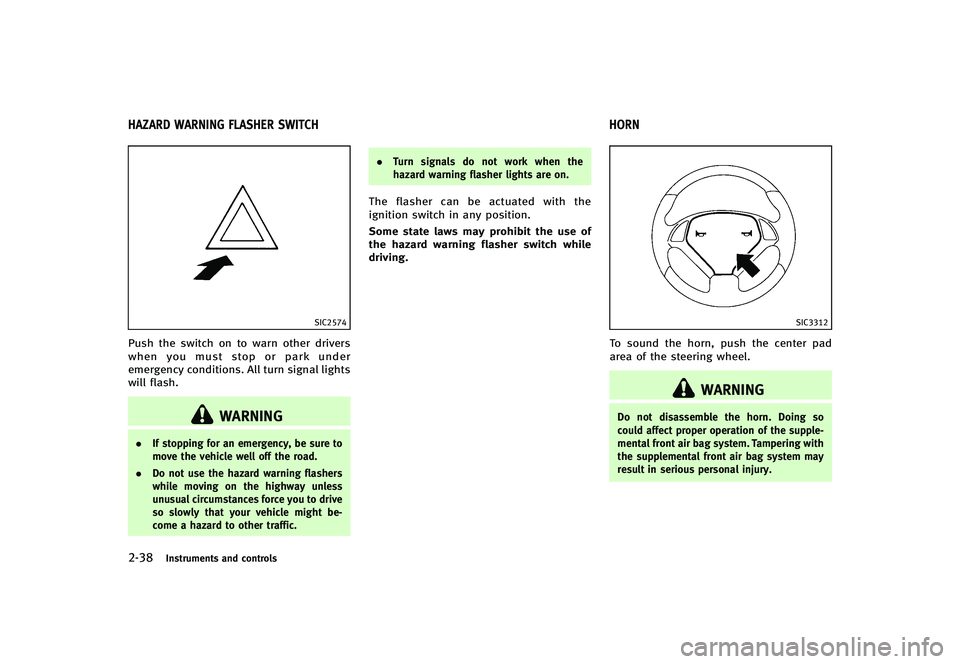
SIC2574
Push the switch on to warn other drivers
when you must stop or park under
emergency conditions. All turn signal lights
will flash.
WARNING
.If stopping for an emergency, be sure to
move the vehicle well off the road.
. Do not use the hazard warning flashers
while moving on the highway unless
unusual circumstances force you to drive
so slowly that your vehicle might be-
come a hazard to other traffic. .
Turn signals do not work when the
hazard warning flasher lights are on.
The flasher can be actuated with the
ignition switch in any position.
Some state laws may prohibit the use of
the hazard warning flasher switch while
driving.
GUID-E7A43C51-4F83-42C0-AD74-E095C4A99974
SIC3312
To sound the horn, push the center pad
area of the steering wheel.
WARNING
Do not disassemble the horn. Doing so
could affect proper operation of the supple-
mental front air bag system. Tampering with
the supplemental front air bag system may
result in serious personal injury.
HAZARD WARNING FLASHER SWITCH HORN
Page 112 of 474

insulates heat, such as a blanket,
cushion, seat cover, etc. Otherwise, the
seat may become overheated.
. Do not place anything hard or heavy on
the seat or pierce it with a pin or similar
object. This may result in damage to the
climate controlled seat.
. Any liquid spilled on the seat should be
removed immediately with a dry cloth.
. The climate controlled seat has air
filters. Do not operate the climate con-
trolled seat without the air filters. This
may result in damage to the system.
. When cleaning the seat, never use
gasoline, thinner, or any similar materi-
als.
. If any malfunctions are found or the
climate controlled seat does not operate,
turn the switch off and have the system
checked by an INFINITI retailer.
GUID-584B657A-0F37-4350-8866-F1158281D142
JVS0022X
The vehicle should be driven with the
Vehicle Dynamic Control (VDC) system on
for most driving conditions.
If the vehicle is stuck in mud or snow, the
VDC system reduces the engine output to
reduce wheel spin. The engine speed will
be reduced even if the accelerator is
depressed to the floor. If maximum engine
power is needed to free a stuck vehicle,
turn the VDC system off.
To turn off the VDC system, push the VDC
OFF switch. The
indicator will illumi-
nate.
Push the VDC OFF switch again or restart
the engine to turn on the system. (See “Vehicle Dynamic Control (VDC) system”
(P.5-54).)
Instruments and controls2-41
VEHICLE DYNAMIC CONTROL (VDC) OFF
SWITCH
Page 163 of 474
3-34Pre-driving checks and adjustments
GUID-D74D92D8-C9A4-480A-8FA0-9DF260AEBCDE
WARNING
.Do not adjust the steering wheel while
driving. You could lose control of your
vehicle and cause an accident.
. Do not adjust the steering wheel any
closer to you than is necessary for
proper steering operation and comfort.
The driver’s air bag inflates with great
force. If you are unrestrained, leaning
forward, sitting sideways or out of
position in any way, you are at greater
risk of injury or death in a crash. You
may also receive serious or fatal injuries
from the air bag if you are up against it
when it inflates. Always sit back against
the seatback and as far away as practical
from the steering wheel. Always use the
seat belts.
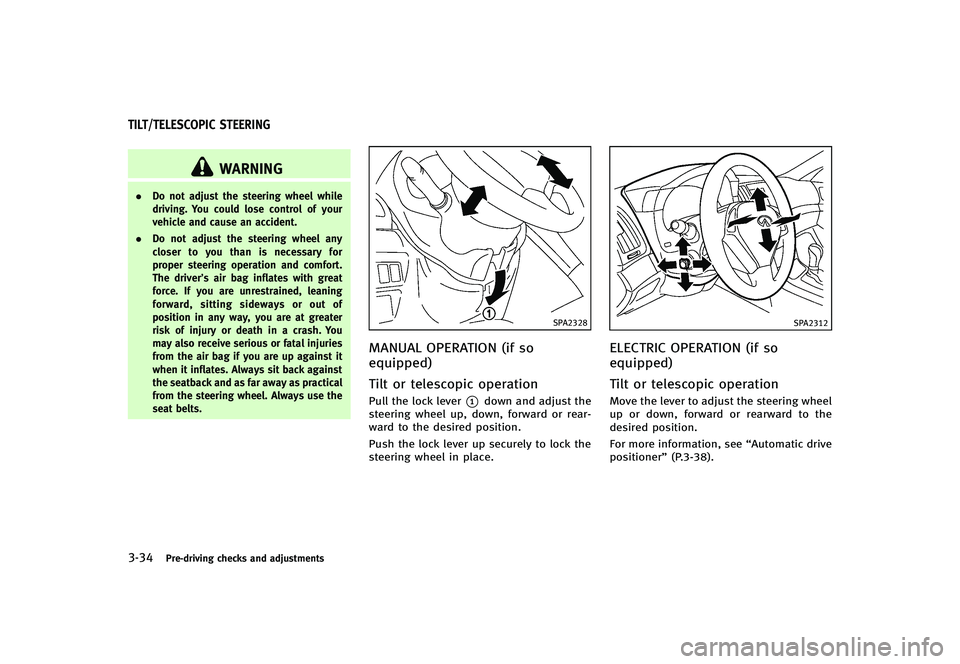
SPA2328
MANUAL OPERATION (if so
equipped)
GUID-0BB1C5DD-DBC9-4899-9880-CB9E3EA04D15
Tilt or telescopic operationGUID-2D33B99D-6D59-4F5B-A2F5-EEE166241F74Pull the lock lever*1down and adjust the
steering wheel up, down, forward or rear-
ward to the desired position.
Push the lock lever up securely to lock the
steering wheel in place.
SPA2312
ELECTRIC OPERATION (if so
equipped)
GUID-DDE06E44-8882-46DB-A8EA-EC2DAA0D802C
Tilt or telescopic operationGUID-8EE95B85-786C-4BFF-9E75-864BF7BD090FMove the lever to adjust the steering wheel
up or down, forward or rearward to the
desired position.
For more information, see “Automatic drive
positioner” (P.3-38).
TILT/TELESCOPIC STEERING
Page 167 of 474
3-38Pre-driving checks and adjustments
GUID-AC446E91-1F9B-43A2-9329-094E9765C780The automatic drive positioner system has
two features:
.Seat synchronization function
. Memory storage
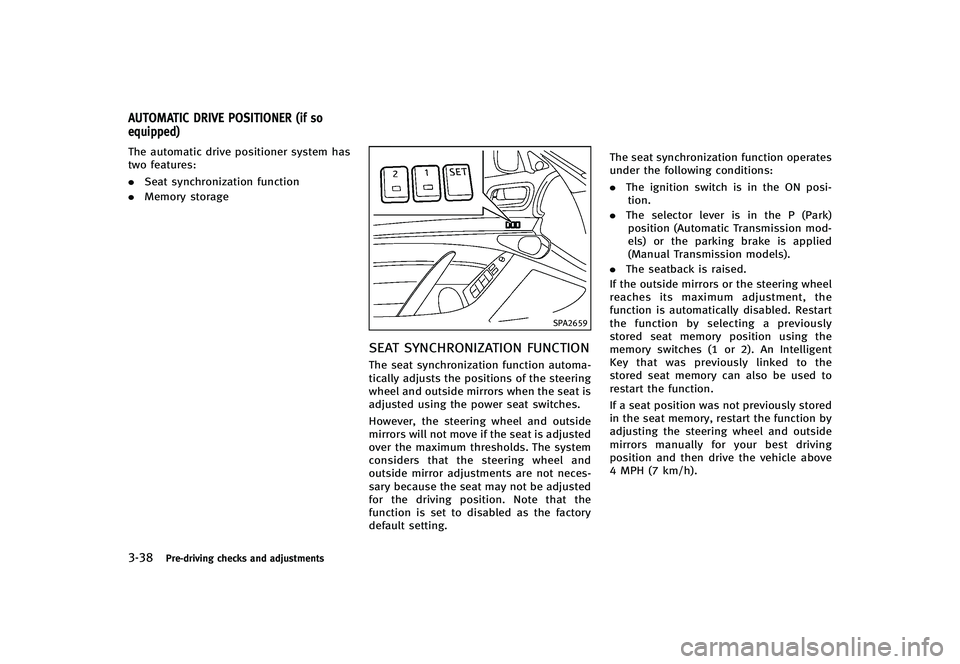
SPA2659
SEAT SYNCHRONIZATION FUNCTIONGUID-CC5EAD91-1CB1-41A4-AE89-0E4A71BE361FThe seat synchronization function automa-
tically adjusts the positions of the steering
wheel and outside mirrors when the seat is
adjusted using the power seat switches.
However, the steering wheel and outside
mirrors will not move if the seat is adjusted
over the maximum thresholds. The system
considers that the steering wheel and
outside mirror adjustments are not neces-
sary because the seat may not be adjusted
for the driving position. Note that the
function is set to disabled as the factory
default setting. The seat synchronization function operates
under the following conditions:
.
The ignition switch is in the ON posi-
tion.
. The selector lever is in the P (Park)
position (Automatic Transmission mod-
els) or the parking brake is applied
(Manual Transmission models).
. The seatback is raised.
If the outside mirrors or the steering wheel
reaches its maximum adjustment, the
function is automatically disabled. Restart
the function by selecting a previously
stored seat memory position using the
memory switches (1 or 2). An Intelligent
Key that was previously linked to the
stored seat memory can also be used to
restart the function.
If a seat position was not previously stored
in the seat memory, restart the function by
adjusting the steering wheel and outside
mirrors manually for your best driving
position and then drive the vehicle above
4 MPH (7 km/h).
AUTOMATIC DRIVE POSITIONER (if so
equipped)
Page 168 of 474
Cancel or activate seat synchroni-
zation function
GUID-8DECD39E-AC7D-4729-ACFB-A937B6048CF2For Automatic Transmission models:
The selector lever must be in the P (Park)
position with the ignition switch in the ACC
position.
For Manual Transmission models:
The parking brake must be applied with
the ignition switch in the ACC position.
The seat synchronization function can be
activated or canceled by pushing and
holding the SET switch for more than 10
seconds while the ignition switch is in the
ACC position.
The indicator lights on the memory
switches (1 and 2) will blink once when
the function is canceled, and the indicator
lights will blink twice when the function is
activated. Note that the indicator lights
may illuminate after 5 seconds while
holding the SET switch. This indicates
readiness for linking the Intelligent Key to
a stored memory position. Keep the SET
switch pushed for more than 10 seconds to
turn on or off the seat synchronization
function.
MEMORY STORAGEGUID-476C2856-A4A1-4174-8516-4637D097B016Two positions for the driver’s seat, steering
column and outside mirrors can be stored
in the automatic drive positioner memory.
Follow these procedures to use the mem-
ory system.
1.Automatic transmission models:
Move the selector lever to the P (Park)
position.
Manual transmission models:
Apply the parking brake.
2. Raise the seatback.
3. Push the ignition switch to the ON position.
4. Adjust the driver’s seat, steering col- umn and outside mirrors to the desired
positions by manually operating each
adjusting switch. For additional infor-
mation, see “Seats”(P.1-2) and “Tilt/
telescopic steering” (P.3-34) and“Out-
side mirrors” (P.3-36).
5. Push the SET switch and, within 5
seconds, push the memory switch (1
or 2) fully for at least 1 second.
The indicator light for the pushed
memory switch will stay on for approxi-
mately 5 seconds after pushing the switch.
If memory is stored in the same
memory switch, the previous memory
will be deleted.
Linking Intelligent Key to a stored
memory position
GUID-B42750B2-32B8-4F63-911A-31754F14E4C8The Intelligent Key can be linked to a
stored memory position with the following
procedure.
1. Follow the steps for storing a memory
position.
2. While the indicator light for the memory switch being set is illuminated for 5
seconds, push the
button on the
Intelligent Key. If the indicator light
blinks, the Intelligent Key is linked to
that memory setting.
Push the ignition switch to the OFF posi-
tion, and then push the
button on the
Intelligent Key. The driver’s seat, steering
wheel and outside mirrors will move to the
memorized position.
Confirming memory storageGUID-6E1221EC-C865-4145-BB90-6DE497A8E201. Push the ignition switch to the ON
position and push the SET switch. If
the main memory has not been stored,
the indicator light will come on for
Pre-driving checks and adjustments3-39
Page 169 of 474
3-40Pre-driving checks and adjustments
approximately 0.5 second. When the
memory has stored in position, the
indicator light will stay on for approxi-
mately 5 seconds.
. If the battery cable is disconnected, or if
the fuse opens, the memory will be
canceled. In this case, reset the desired
position using the previous procedure.
. If optional Intelligent Keys are added to
your vehicle, the memory storage pro-
cedure to switch 1 or 2 and linking
Intelligent Key procedure to a stored
memory position should be performed
again for each Intelligent Key. For
additional Intelligent Key information,
see “Keys” (P.3-3).
Selecting the memorized positionGUID-B4225C04-5594-4362-9498-D7E86BCA5C7E1.Automatic transmission models:
Move the selector lever to the P (Park)
position.
Manual transmission models:
Apply the parking brake.
2. Raise the seatback.
3. Use one of the following methods to move the driver’s seat, the outside
mirrors and the steering wheel.
.Push the ignition switch to the ONposition and push the memory
switch (1 or 2) fully for at least 1
second.
.Within 45 seconds of opening the
driver’s door, push the memory
switch (1 or 2) fully for at least 1
second.
The driver’s seat, steering column
and outside mirrors will move to the
memorized position with the indica-
tor light flashing, and then the light
will stay on for approximately 5
seconds.
For manual transmission models, the
memory positions can be selected even
when the engine is running. In this case,
move the shift lever to the N (Neutral)
position and apply the parking brake.
Then, perform step 2.
SYSTEM OPERATIONGUID-3F1DB0D1-D958-41C0-A873-328B8F9FBECBThe automatic drive positioner system will
not work or will stop operating under the
following conditions:
. When the vehicle speed is above 4 MPH
(7 km/h).
. When the adjusting switch for the
driver’s seat and steering column is
turned on while the automatic drive positioner is operating.
. When the memory switch 1 or 2 is not
pushed for at least 1 second.
. When the seat, steering column and
outside mirrors have already been
moved to the memorized position.
. When no position is stored in the
memory switch.
. When the parking brake is released (MT
models).
. When the speed is above 4 MPH (7
km/h) while the parking brake is
applied (MT models).
. To restart the drive positioner system,
move the parking brake to off and on.
. When the engine is started while
moving the automatic drive positioner.
. When the driver’s door remains open
for more than 45 seconds and the
ignition switch is not in the ON posi-
tion.
. When the seatback is folded.
. While the walk-in function operates.
. The seat synchronization function is
automatically disabled if the outside
mirrors or steering wheel reaches its
maximum adjustment.
Page 172 of 474
4 Monitor, climate, audio, phone and voice recogni-tion systems
Safety note ...
.......................................................... 4-3
Center multi-function control panel ...
...................... 4-3
How to use INFINITI controller ...
.......................... 4-5
How to use touch screen (models with
navigation system) ...
.......................................... 4-5
Menu options (models with
navigation system) ...
.......................................... 4-7
How to select menus on the screen ...
................. 4-8
Vehicle information and settings ...
.......................... 4-9
How to use STATUS button ...
.............................. 4-9
How to use brightness control and display
on/off button ...
.................................................. 4-9
How to use INFO button ...
.................................. 4-9
How to use SETTING button ...
........................... 4-13
Rearview monitor ...
............................................... 4-23
How to read displayed lines ...
.......................... 4-23
How to park with predicted course lines ...
........ 4-24
Difference between predicted and
actual distances ...
............................................ 4-25
Predictive course line settings ...
....................... 4-28
How to adjust screen ...
.................................... 4-28
Operating tips ...
............................................... 4-29
Ventilators ...
......................................................... 4-29
Automatic climate control ...
.................................. 4-30
Automatic climate control (Type A) ...
................. 4-31 Automatic climate control (Type B)
...
............... 4-34
Operating tips ...
.............................................. 4-38
In-cabin microfilter ...
....................................... 4-38
Servicing climate control ...
.............................. 4-39
Audio system ...
.................................................... 4-39
Audio operation precautions ...
........................ 4-39
FM-AM-SAT radio with Compact Disc
(CD) player ...
................................................... 4-53
DVD (Digital Versatile Disc) player operation
(models with navigation system) ...
.................. 4-58
USB input operation ...
.................................... 4-61
Bluetooth
®streaming audio (models with
navigation system) ...
....................................... 4-66
iPod
®player operation ...
................................ 4-71
Music Box®(if so equipped) ...
........................ 4-73
CD/DVD/USB memory care and cleaning ...
...... 4-80
Steering-wheel-mounted controls
for audio ...
..................................................... 4-81
Antenna ...
....................................................... 4-83
Car phone or CB radio ...
...................................... 4-83
Bluetooth
®Hands-Free Phone System
(models with navigation system) ...
....................... 4-84
Regulatory information ...
................................. 4-85
Voice commands ...
.......................................... 4-86
Control buttons ...
............................................ 4-86
Page 178 of 474
.Delete:
Deletes the last character that has been
input with one touch. Push and hold
the button to delete all of the char-
acters.
. OK:
Completes character inputs.
Touch screen maintenanceGUID-0C1BF520-32CE-4096-A2D6-21F372D72408If you clean the display screen, use a dry,
soft cloth. If additional cleaning is neces-
sary, use a small amount of neutral
detergent with a soft cloth. Never spray
the screen with water or detergent. Dam-
pen the cloth first, and then wipe the
screen.
SAA1525
MENU OPTIONS (models with navi-
gation system)
GUID-D755F660-1E85-48C4-8DF1-E90940B22B77The start menu can be displayed using the
menu control switch on the steering-wheel-
mounted controls.
1. While the MAP or STATUS screen is displayed, push and hold the menu
control switch until the “Menu Options”
screen appears.
2. Highlight the preferred item by tilting the menu control switch up or down,
and then push the menu control switch
to select it.
SAA2476
Available itemsGUID-8890C3E0-37BA-4DDB-AA3F-D8FA89C03296Destination/Route:GUID-D73A39BF-43C8-459F-9C24-47B7F579C407These items are for the navigation system.
See the separate Navigation System Own-
er’s Manual for details.
Info:
GUID-D73A39BF-43C8-459F-9C24-47B7F579C407Displays the information screen. It is the
same screen that appears when you push
the INFO button.
Settings:
GUID-D73A39BF-43C8-459F-9C24-47B7F579C407Displays the settings screen. It is the same
screen that appears when you push the
SETTING button.
Monitor, climate, audio, phone and voice recognition systems4-7
Page 195 of 474

4-24Monitor, climate, audio, phone and voice recognition systems
up.
Predicted course lines
*6:
Indicate the predicted course when back-
ing up. The predicted course lines will be
displayed on the monitor when the selec-
tor/shift lever is in the R (Reverse) position
and the steering wheel is turned. The
predicted course lines will move depend-
ing on how much the steering wheel is
turned and will not be displayed while the
steering wheel is in the neutral position.
HOW TO PARK WITH PREDICTED
COURSE LINES
GUID-CAF0F865-CEBD-48A9-9D4B-E5FF3C8B14DE
WARNING
. Always turn and check that it is safe to
park your car before backing up. Always
back up slowly.
. Use the displayed lines as a reference.
The lines are highly affected by the
number of occupants, fuel level, vehicle
position, road condition and road grade.
. If the tires are replaced with different
sized tires, the predicted course line
may not be displayed correctly. .
On a snow-covered or slippery road,
there may be a difference between the
predicted course line and the actual
course line.
. If the battery is disconnected or be-
comes discharged, the predicted course
lines may be displayed incorrectly. If this
occurs, drive the vehicle on a straight
road for more than 5 minutes.
. The displayed lines will appear slightly
off to the right because the rearview
camera is not installed in the rear center
of the vehicle.
. The distance guide line and the vehicle
width guide line should be used as a
reference only when the vehicle is on a
level paved surface. The distance viewed
on the monitor is for reference only and
may be different than the actual distance
between the vehicle and displayed ob-
jects.
. When backing up the vehicle up a hill,
objects viewed in the monitor are further
than they appear. When backing up the
vehicle down a hill, objects viewed in the
monitor are closer than they appear. Use
the inside mirror or glance over your
shoulder to properly judge distances to other objects.
The vehicle width and predicted course
lines are wider than the actual width and
course.
Page 196 of 474

SAA1897
1. Visually check that the parking space issafe before parking your vehicle.
2. The rearview of the vehicle is displayed on the screen
*Aas illustrated when
the selector/shift lever is moved to the
R (Reverse) position.
SAA1898
3. Slowly back up the vehicle adjusting the steering wheel so that the predicted
course lines
*Benter the parking
space
*C.
4. Maneuver the steering wheel to make the vehicle width guide lines
*Dparallel to the parking space*Cwhile referring to the predicted course lines.
5. When the vehicle is parked in the space completely, move the selector/shift
lever to the P (Park) position (Automatic
Transmission models) or in an appro-
priate gear (Manual Transmission mod-
els) and apply the parking brake.
DIFFERENCE BETWEEN PREDICTED
AND ACTUAL DISTANCES
GUID-4555B680-37BD-4BB7-AB9B-ACB406A409D9The distance guide line and the vehicle
width guide line should be used as a
reference only when the vehicle is on a
level, paved surface. The distance viewed
on the monitor is for reference only and
may be different from the actual distance
between the vehicle and displayed objects.
Monitor, climate, audio, phone and voice recognition systems4-25