lights INFINITI G-CONVERTIBLE 2012 Owner's Manual
[x] Cancel search | Manufacturer: INFINITI, Model Year: 2012, Model line: G-CONVERTIBLE, Model: INFINITI G-CONVERTIBLE 2012Pages: 474, PDF Size: 3.63 MB
Page 144 of 474
Locking doors and fuel-filler doorGUID-09809553-3B07-4862-B215-A1FF242834CD1. Push the ignition switch to the OFFposition and make sure you carry the
Intelligent Key with you.*
2. Close all the doors.
3. Push the LOCK
button*1on the
Intelligent Key.
4. All the doors and fuel-filler door will lock.
5. The hazard indicator flashes twice and the horn chirps once.
*: Doors will lock with the Intelligent Key
while the ignition switch is in the ACC or
ON position.
Unlocking doors and fuel-filler doorGUID-B7124241-FD3A-4997-9928-A746875E388B1. Push the UNLOCKbutton*2on the
Intelligent Key once.
2. The hazard indicator flashes once. The driver’s door and fuel-filler door will
unlock.
3. Push the UNLOCK
button on the
Intelligent Key again within 5 seconds.
4. The hazard indicator flashes once
again. All the doors will unlock.
All doors will be locked automatically
unless one of the following operations is performed within 1 minute after pushing
the UNLOCK button on the Intelligent Key
while the doors are locked. If during this 1-
minute time period, the UNLOCK button on
the Intelligent Key is pushed, all doors will
be locked automatically after another 1
minute.
.
Opening any door
. Pushing the ignition switch
. Inserting the Intelligent Key into the
Intelligent Key port. During this 1
minute time period, if the UNLOCK
button on the Intelligent key is
pushed, all doors will be locked auto-
matically after another 1 minute.
Opening windowsGUID-3A460518-A39A-4053-97C5-4C9A78B9DAC6The UNLOCKbutton*2operation also
allows you to open the window that is
equipped with the automatic open func-
tion. This function will not operate while
the window timer is activated or the
windows need to be initialized. (See
“Power windows” (P.2-48).)
To open the window, push the UNLOCK
button on the Intelligent Key for about 3
seconds after the door is unlocked.
To stop opening, release the UNLOCK
button. If the window open operation is stopped
on the way while pushing the UNLOCK
button, release and push the UNLOCKbutton again until the window opens
completely.
Window cannot be closed using the In-
telligent Key.
The door window can also be operated by
turning the mechanical key in a door lock.
(See
“Doors” (P.3-5).)
Opening trunk lidGUID-A58D9955-697C-486A-B1F1-A517923ECD681. Push the TRUNK*3button on the
Intelligent key for more than 1 second.
2. The trunk will unlatch.
3. Raise the trunk lid to open the trunk.
Using panic alarmGUID-F5755412-6D53-4825-A62F-7FCB9A73C172If you are near your vehicle and feel
threatened, you may activate the alarm to
call attention as follows:
1. Push the PANIC
button*4on the
key for more than 1 second.
2. The theft warning alarm and headlights will stay on for 25 seconds.
3. The panic alarm stops when:
.It has run for 25 seconds, or
Pre-driving checks and adjustments3-15
Page 164 of 474
GUID-95DBDC4C-B7C5-4BD4-B212-E2F2144241F5
SPA2587
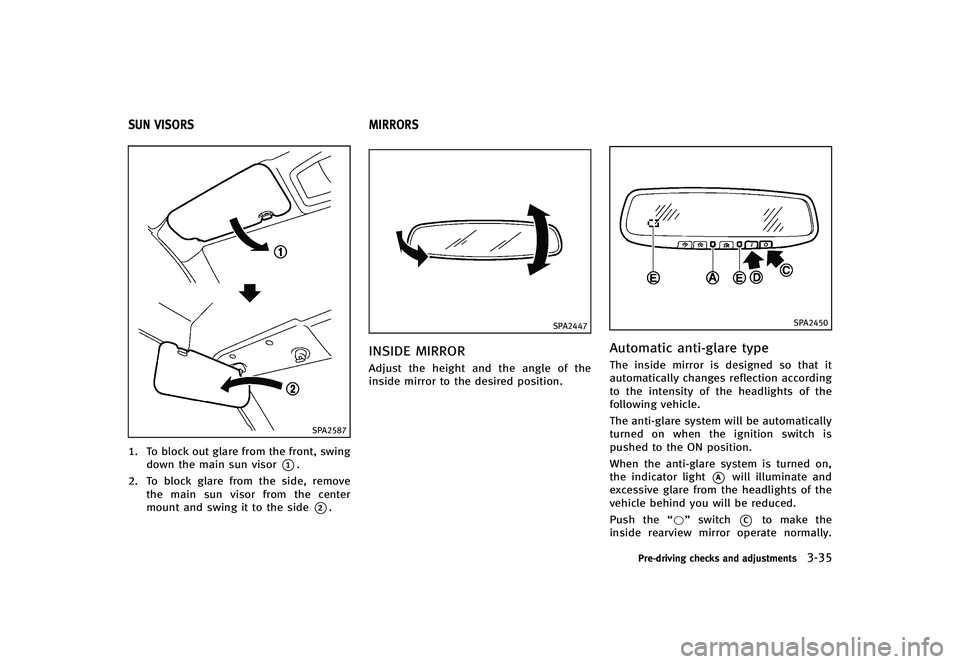
1. To block out glare from the front, swingdown the main sun visor
*1.
2. To block glare from the side, remove the main sun visor from the center
mount and swing it to the side
*2.
GUID-236C458B-C0EB-4F6A-887E-AC58AA52A278
SPA2447
INSIDE MIRRORGUID-8102A481-5CC8-4CAD-89DD-96B7D386E14DAdjust the height and the angle of the
inside mirror to the desired position.
SPA2450
Automatic anti-glare typeGUID-861C9C42-727A-4805-B7A4-97707F49F9E7The inside mirror is designed so that it
automatically changes reflection according
to the intensity of the headlights of the
following vehicle.
The anti-glare system will be automatically
turned on when the ignition switch is
pushed to the ON position.
When the anti-glare system is turned on,
the indicator light
*Awill illuminate and
excessive glare from the headlights of the
vehicle behind you will be reduced.
Push the “*”switch
*Cto make the
inside rearview mirror operate normally.
Pre-driving checks and adjustments3-35
SUN VISORS MIRRORS
Page 168 of 474
Cancel or activate seat synchroni-
zation function
GUID-8DECD39E-AC7D-4729-ACFB-A937B6048CF2For Automatic Transmission models:
The selector lever must be in the P (Park)
position with the ignition switch in the ACC
position.
For Manual Transmission models:
The parking brake must be applied with
the ignition switch in the ACC position.
The seat synchronization function can be
activated or canceled by pushing and
holding the SET switch for more than 10
seconds while the ignition switch is in the
ACC position.
The indicator lights on the memory
switches (1 and 2) will blink once when
the function is canceled, and the indicator
lights will blink twice when the function is
activated. Note that the indicator lights
may illuminate after 5 seconds while
holding the SET switch. This indicates
readiness for linking the Intelligent Key to
a stored memory position. Keep the SET
switch pushed for more than 10 seconds to
turn on or off the seat synchronization
function.
MEMORY STORAGEGUID-476C2856-A4A1-4174-8516-4637D097B016Two positions for the driver’s seat, steering
column and outside mirrors can be stored
in the automatic drive positioner memory.
Follow these procedures to use the mem-
ory system.
1.Automatic transmission models:
Move the selector lever to the P (Park)
position.
Manual transmission models:
Apply the parking brake.
2. Raise the seatback.
3. Push the ignition switch to the ON position.
4. Adjust the driver’s seat, steering col- umn and outside mirrors to the desired
positions by manually operating each
adjusting switch. For additional infor-
mation, see “Seats”(P.1-2) and “Tilt/
telescopic steering” (P.3-34) and“Out-
side mirrors” (P.3-36).
5. Push the SET switch and, within 5
seconds, push the memory switch (1
or 2) fully for at least 1 second.
The indicator light for the pushed
memory switch will stay on for approxi-
mately 5 seconds after pushing the switch.
If memory is stored in the same
memory switch, the previous memory
will be deleted.
Linking Intelligent Key to a stored
memory position
GUID-B42750B2-32B8-4F63-911A-31754F14E4C8The Intelligent Key can be linked to a
stored memory position with the following
procedure.
1. Follow the steps for storing a memory
position.
2. While the indicator light for the memory switch being set is illuminated for 5
seconds, push the
button on the
Intelligent Key. If the indicator light
blinks, the Intelligent Key is linked to
that memory setting.
Push the ignition switch to the OFF posi-
tion, and then push the
button on the
Intelligent Key. The driver’s seat, steering
wheel and outside mirrors will move to the
memorized position.
Confirming memory storageGUID-6E1221EC-C865-4145-BB90-6DE497A8E201. Push the ignition switch to the ON
position and push the SET switch. If
the main memory has not been stored,
the indicator light will come on for
Pre-driving checks and adjustments3-39
Page 190 of 474
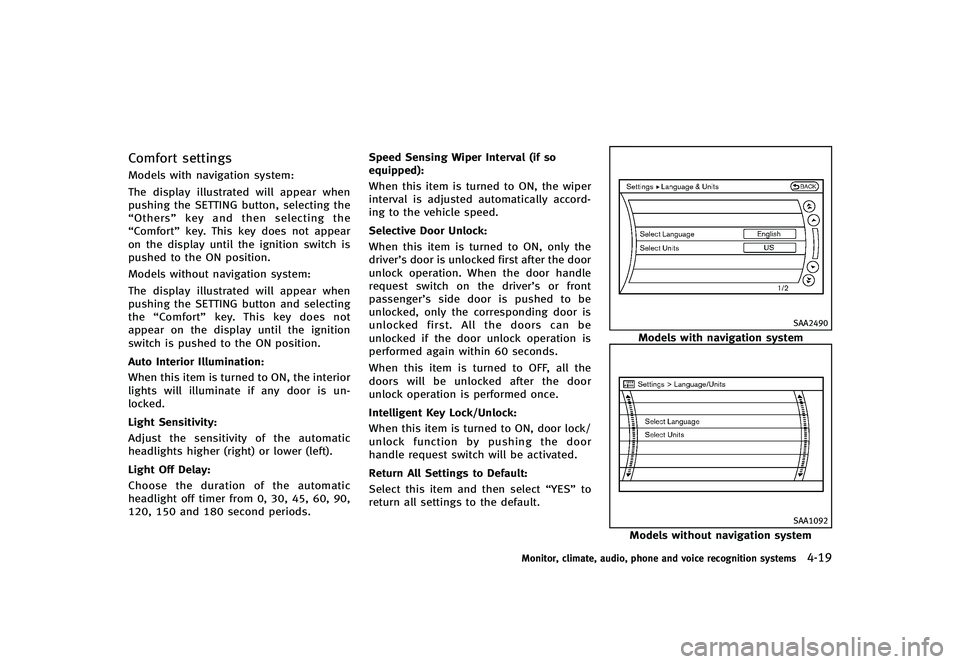
Comfort settingsGUID-3238AFF2-4EEA-463B-A0F0-08AEDDEF52CCModels with navigation system:
The display illustrated will appear when
pushing the SETTING button, selecting the
“Others”key and then selecting the
“Comfort” key. This key does not appear
on the display until the ignition switch is
pushed to the ON position.
Models without navigation system:
The display illustrated will appear when
pushing the SETTING button and selecting
the “Comfort” key. This key does not
appear on the display until the ignition
switch is pushed to the ON position.
Auto Interior Illumination:
GUID-D73A39BF-43C8-459F-9C24-47B7F579C407When this item is turned to ON, the interior
lights will illuminate if any door is un-
locked.
Light Sensitivity:
GUID-D73A39BF-43C8-459F-9C24-47B7F579C407Adjust the sensitivity of the automatic
headlights higher (right) or lower (left).
Light Off Delay:
GUID-D73A39BF-43C8-459F-9C24-47B7F579C407Choose the duration of the automatic
headlight off timer from 0, 30, 45, 60, 90,
120, 150 and 180 second periods. Speed Sensing Wiper Interval (if so
equipped):
GUID-D73A39BF-43C8-459F-9C24-47B7F579C407When this item is turned to ON, the wiper
interval is adjusted automatically accord-
ing to the vehicle speed.
Selective Door Unlock:
GUID-D73A39BF-43C8-459F-9C24-47B7F579C407When this item is turned to ON, only the
driver’s door is unlocked first after the door
unlock operation. When the door handle
request switch on the driver’s or front
passenger’s side door is pushed to be
unlocked, only the corresponding door is
unlocked first. All the doors can be
unlocked if the door unlock operation is
performed again within 60 seconds.
When this item is turned to OFF, all the
doors will be unlocked after the door
unlock operation is performed once.
Intelligent Key Lock/Unlock:
GUID-D73A39BF-43C8-459F-9C24-47B7F579C407When this item is turned to ON, door lock/
unlock function by pushing the door
handle request switch will be activated.
Return All Settings to Default:
GUID-D73A39BF-43C8-459F-9C24-47B7F579C407Select this item and then select
“YES”to
return all settings to the default.
SAA2490
Models with navigation system
SAA1092
Models without navigation system
Monitor, climate, audio, phone and voice recognition systems4-19
Page 204 of 474
Air recirculation:GUID-D73A39BF-43C8-459F-9C24-47B7F579C407Push the intake air control button“”to recirculate interior air inside the
vehicle. The indicator light on the “”
side will come on.
The air recirculation mode cannot be
activated when the air conditioner is in
the front defrosting mode “
”.
Outside air circulation:
GUID-D73A39BF-43C8-459F-9C24-47B7F579C407Push the intake air control button “”to draw outside air into the passen-
ger compartment. The indicator light on the
“
” side will come on.
Automatic intake air control:
GUID-D73A39BF-43C8-459F-9C24-47B7F579C407In the AUTO mode, the intake air will be
controlled automatically. To manually con-
trol the intake air, push the intake air
control button “
”. To return to the
automatic control mode, push the intake
air control button “
”for about 2
seconds. The indicator lights (both air
recirculation and outside air circulation
sides) will flash twice, and then the intake
air will be controlled automatically.
Air flow control:
GUID-D73A39BF-43C8-459F-9C24-47B7F579C407Pushing the “MODE”manual air flow
control button selects the air outlet to:
: Air flows from center and side ventilators.
: Air flows from center and side ventilators and foot outlets.
: Air flows mainly from foot outlets.
: Air flows from defroster and foot outlets.
To turn the system offGUID-7CDFA6D3-83EF-45EF-AA86-8ADF9C5F081EPush the OFF button.
Monitor, climate, audio, phone and voice recognition systems4-33
Page 211 of 474
4-40Monitor, climate, audio, phone and voice recognition systems
SAA0306
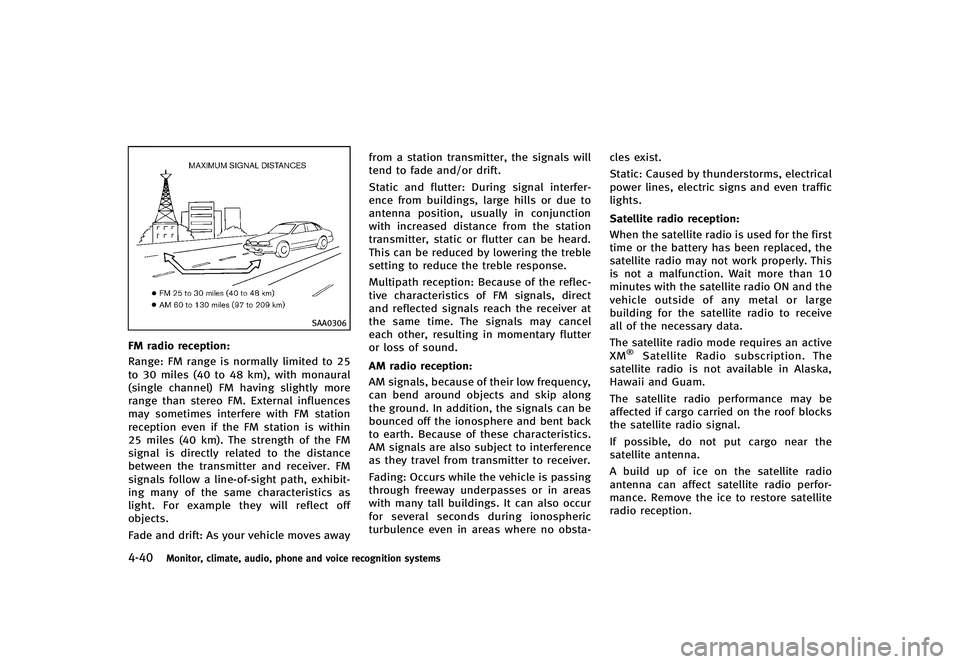
FM radio reception:GUID-D73A39BF-43C8-459F-9C24-47B7F579C407Range: FM range is normally limited to 25
to 30 miles (40 to 48 km), with monaural
(single channel) FM having slightly more
range than stereo FM. External influences
may sometimes interfere with FM station
reception even if the FM station is within
25 miles (40 km). The strength of the FM
signal is directly related to the distance
between the transmitter and receiver. FM
signals follow a line-of-sight path, exhibit-
ing many of the same characteristics as
light. For example they will reflect off
objects.
Fade and drift: As your vehicle moves awayfrom a station transmitter, the signals will
tend to fade and/or drift.
Static and flutter: During signal interfer-
ence from buildings, large hills or due to
antenna position, usually in conjunction
with increased distance from the station
transmitter, static or flutter can be heard.
This can be reduced by lowering the treble
setting to reduce the treble response.
Multipath reception: Because of the reflec-
tive characteristics of FM signals, direct
and reflected signals reach the receiver at
the same time. The signals may cancel
each other, resulting in momentary flutter
or loss of sound.
AM radio reception:GUID-D73A39BF-43C8-459F-9C24-47B7F579C407AM signals, because of their low frequency,
can bend around objects and skip along
the ground. In addition, the signals can be
bounced off the ionosphere and bent back
to earth. Because of these characteristics.
AM signals are also subject to interference
as they travel from transmitter to receiver.
Fading: Occurs while the vehicle is passing
through freeway underpasses or in areas
with many tall buildings. It can also occur
for several seconds during ionospheric
turbulence even in areas where no obsta-
cles exist.
Static: Caused by thunderstorms, electrical
power lines, electric signs and even traffic
lights.
Satellite radio reception:
GUID-D73A39BF-43C8-459F-9C24-47B7F579C407When the satellite radio is used for the first
time or the battery has been replaced, the
satellite radio may not work properly. This
is not a malfunction. Wait more than 10
minutes with the satellite radio ON and the
vehicle outside of any metal or large
building for the satellite radio to receive
all of the necessary data.
The satellite radio mode requires an active
XM
®Satellite Radio subscription. The
satellite radio is not available in Alaska,
Hawaii and Guam.
The satellite radio performance may be
affected if cargo carried on the roof blocks
the satellite radio signal.
If possible, do not put cargo near the
satellite antenna.
A build up of ice on the satellite radio
antenna can affect satellite radio perfor-
mance. Remove the ice to restore satellite
radio reception.
Page 321 of 474

5-12Starting and driving
GUID-D003D094-8840-4736-B337-1485A661FC0B.Make sure the area around the vehicle
is clear.
. Check fluid levels such as engine oil,
coolant, brake fluid and window
washer fluid as frequently as possible,
or at least whenever you refuel.
. Check that all windows and lights are
clean.
. Visually inspect tires for their appear-
ance and condition. Also check tires for
proper inflation.
. Lock all doors.
. Position seat and adjust head re-
straints.
. Adjust inside and outside mirrors.
. Fasten seat belts and ask all passen-
gers to do likewise.
. Check the operation of warning lights
when the ignition switch is pushed to
the ON position. (See “Warning/indica-
tor lights and audible reminders” (P.2-
10).)GUID-50357232-D4C2-4AE6-8431-0F23544AEC8E1. Apply the parking brake.
2. Automatic Transmission (AT) model:
Move the selector lever to the P (Park)
or N (Neutral) position. (P is recom-
mended.)
The starter is designed not to operate
unless the selector lever is in either of
the above positions.
Manual Transmission (MT) model:
Move the shift lever to the N (Neutral)
position. Depress the clutch pedal fully
to the floor.
The starter is designed not to operate
unless the clutch pedal is fully de-
pressed.
The Intelligent Key must be carried
when operating the ignition switch.
3. Push the ignition switch to the ON position. Depress the brake pedal (AT
model) or the clutch pedal (MT model)
and push the ignition switch to start
the engine.
To start the engine immediately, push
and release the ignition switch while
depressing the brake pedal or the
clutch pedal (MT model) with the
ignition switch in any position..If the engine is very hard to start inextremely cold weather or when
restarting, depress the accelerator
pedal a little (approximately 1/3 to
the floor) and while holding, crank
the engine. Release the accelerator
pedal when the engine starts.
.If the engine is very hard to startbecause it is flooded, depress the
accelerator pedal all the way to the
floor and hold it. Push the ignition
switch to the ON position to start
cranking the engine. After 5 or 6
seconds, stop cranking by pushing
the ignition switch to OFF. After
cranking the engine, release the
accelerator pedal. Crank the engine
with your foot off the accelerator
pedal by depressing the brake pedal
and the clutch pedal (MT model) and
pushing the push-button ignition
switch to start the engine. If the
engine starts, but fails to run, repeat
the above procedure.
CAUTION
Do not operate the starter for more than 15
seconds at a time. If the engine does not
BEFORE STARTING THE ENGINE STARTING THE ENGINE
Page 343 of 474

5-34Starting and driving
SSD0610
1. System set display with vehicle ahead
2. System set display without vehicleahead
System operationGUID-2AEC33D4-891E-4359-B765-5C15FEE227B3
WARNING
Normally when controlling the distance to a
vehicle ahead, this system automatically
accelerates or decelerates your vehicle
according to the speed of the vehicle ahead.
Depress the accelerator to properly accel-
erate your vehicle when acceleration is
required for a lane change. Depress the brake pedal when deceleration is required to
maintain a safe distance to the vehicle
ahead due to its sudden braking or if a
vehicle cuts in. Always stay alert when
using the ICC system.
The driver sets the desired vehicle speed
based on the road conditions. The ICC
system maintains the set vehicle speed,
similar to standard cruise control, as long
as no vehicle is detected in the lane ahead.
The ICC system displays the set speed.Vehicle detected ahead:
GUID-D73A39BF-43C8-459F-9C24-47B7F579C407When a vehicle is detected in the lane
ahead, the ICC system decelerates the
vehicle by controlling the throttle and
applying the brakes to match the speed
of a slower vehicle ahead. The system then
controls the vehicle speed based on the
speed of the vehicle ahead to maintain the
driver selected distance.
The stoplights of the vehicle come on
when braking is performed by the ICC
system.
When the brake operates, a noise may be
heard. This is not a malfunction.
When a vehicle ahead is detected, the
vehicle ahead detection indicator comes
on. The ICC system will also display the set
speed and selected distance.
Vehicle ahead not detected:
GUID-D73A39BF-43C8-459F-9C24-47B7F579C407When a vehicle is no longer detected
ahead, the ICC system gradually acceler-
ates your vehicle to resume the previously
set vehicle speed. The ICC system then
maintains the set speed.
When a vehicle is no longer detected the
vehicle ahead detection indicator turns off.
If a vehicle ahead appears during accel-
eration to the set vehicle speed or any time
Page 369 of 474

6-2In case of emergency
GUID-F6D33B3B-089A-4D1D-9FE1-0840E20C9E24In the event of a roadside emergency,
Roadside Assistance Service is available to
you. Please refer to your Warranty Informa-
tion Booklet (U.S.) or Warranty & Roadside
Assistance Information Booklet (Canada)
for details.
GUID-5CB01D30-F3C9-424F-BADF-06867B0B06CDTo shut off the engine in an emergency
situation while driving, perform the follow-
ing procedure:
.Rapidly push the push-button ignition
switch 3 consecutive times in less than
1.5 seconds, or
. Push and hold the push-button ignition
switch for more than 2 seconds.GUID-77B6068C-531C-4817-874F-A81F63FC9DFE
TIRE PRESSURE MONITORING SYS-
TEM (TPMS)
GUID-F2A30E25-6F86-4A74-8B34-2A1D7AE536C6This vehicle is equipped with the Tire
Pressure Monitoring System (TPMS). It
monitors tire pressure of all tires except
the spare. When the low tire pressure
warning light is lit and the CHECK TIRE
PRESSURE warning appears on the dot
matrix crystal display, one or more of your
tires is significantly under-inflated. If the
vehicle is being driven with low tire
pressure, the TPMS will activate and warn
you of it by the low tire pressure warning
light. This system will activate only when
the vehicle is driven at speeds above 16
MPH (25 km/h). For more details, see
“Warning/indicator lights and audible re-
minders” (P.2-10) and “Tire Pressure Mon-
itoring System (TPMS)” (P.5-4).
WARNING
.If the low tire pressure warning light
illuminates while driving, avoid sudden
steering maneuvers or abrupt braking,
reduce vehicle speed, pull off the road to
a safe location and stop the vehicle as
soon as possible. Driving with under-
inflated tires may permanently damage
ROADSIDE ASSISTANCE PROGRAM EMERGENCY ENGINE SHUT OFF FLAT TIRE
Page 381 of 474
6-14In case of emergency
.Whenever working on or near a battery,
always wear suitable eye protectors (for
example, goggles or industrial safety
spectacles) and remove rings, metal
bands, or any other jewelry. Do not lean
over the battery when jump starting.
. Do not attempt to jump start a frozen
battery. It could explode and cause
serious injury.
. Your vehicle has an automatic engine
cooling fan. It could come on at any time.
Keep hands and other objects away from
it.
If needed, Roadside Assistance is avail-
able. Please see your Warranty Information
Booklet or Roadside Assistance I.D. Card
for the toll-free number to call (U.S.) or
Warranty Information Booklet (Canada).
SCE0653
WARNING
Always follow the instructions below. Failure
to do so could result in damage to the
charging system and cause personal injury.
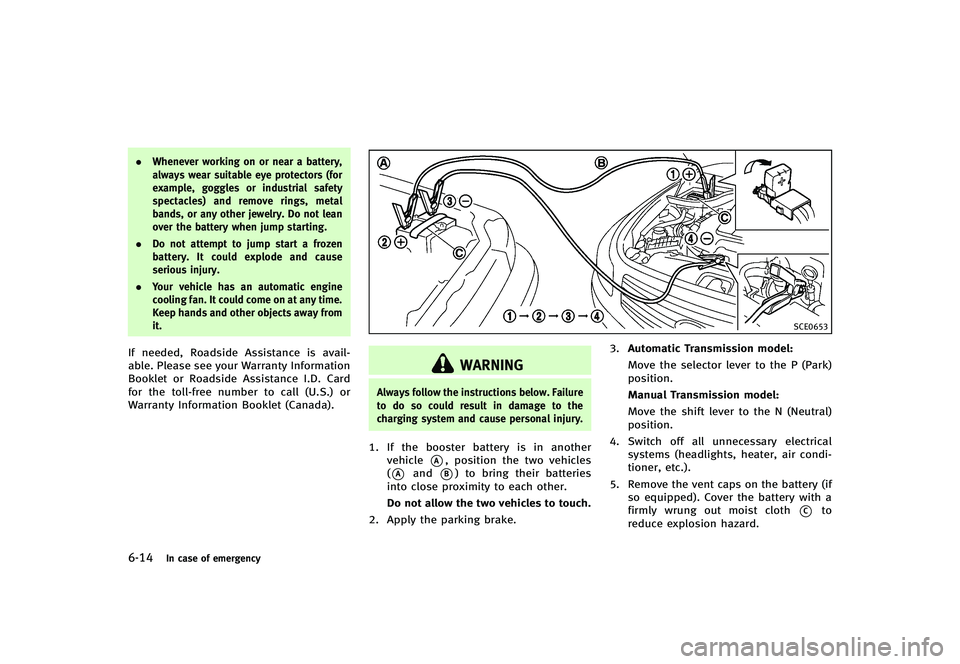
1. If the booster battery is in another
vehicle
*A, position the two vehicles
(
*Aand*B) to bring their batteries
into close proximity to each other.
Do not allow the two vehicles to touch.
2. Apply the parking brake. 3.
Automatic Transmission model:
Move the selector lever to the P (Park)
position.
Manual Transmission model:
Move the shift lever to the N (Neutral)
position.
4. Switch off all unnecessary electrical
systems (headlights, heater, air condi-
tioner, etc.).
5. Remove the vent caps on the battery (if so equipped). Cover the battery with a
firmly wrung out moist cloth
*Cto
reduce explosion hazard.