climate control INFINITI G-CONVERTIBLE 2012 Owner's Guide
[x] Cancel search | Manufacturer: INFINITI, Model Year: 2012, Model line: G-CONVERTIBLE, Model: INFINITI G-CONVERTIBLE 2012Pages: 474, PDF Size: 3.63 MB
Page 207 of 474
4-36Monitor, climate, audio, phone and voice recognition systems
perature is above 238F (−58C) to
defog the windshield. The air recir-
culation mode will automatically
turn off. The outside air circulation
mode will be selected to improve the
defogging performance.
Manual operationGUID-04AA3772-8A3E-4810-97DF-F91772D228AFThe manual mode can be used to control
the heater and air conditioner to your
desired settings.
To turn off the heater and air conditioner,
push the“OFF”button.
Fan speed control:
GUID-D73A39BF-43C8-459F-9C24-47B7F579C407Push the fan speed control button “”to
increase the fan speed.
Push the fan speed control button “
”to
decrease the fan speed.
Push the “AUTO”button to change the fan
speed to the automatic mode. Air flow control:
GUID-D73A39BF-43C8-459F-9C24-47B7F579C407Push the
“MODE”button to change the air
flow mode.
: Air flows from the center and side ventila- tors.
: Air flows from the center and side ventila-tors, and foot outlets.
: Air flows mainly from the foot outlets.
: Air flows from the defroster and footoutlets.
Temperature control:GUID-D73A39BF-43C8-459F-9C24-47B7F579C407Turn the temperature control dial to set the
desired temperature.
.The temperature can be set within the
following range.
— For U.S.: 60 to 908F (16 to 328C)
— For Canada: 64 to 908F (18 to 328C)
Air recirculation:
GUID-D73A39BF-43C8-459F-9C24-47B7F579C407Push the intake air control button to
recirculate interior air inside the vehicle.
The indicator light on the “
”side will
illuminate.
The air recirculation mode cannot be
activated when the air conditioner is in
the front defrosting mode “
”.Outside air circulation:
GUID-D73A39BF-43C8-459F-9C24-47B7F579C407Push the intake air control button to draw
outside air into the passenger compart-
ment.
The indicator light on the
“
”side and
“” side will turn off.
Automatic intake air control:
GUID-D73A39BF-43C8-459F-9C24-47B7F579C407In the AUTO mode, the intake air will be
controlled automatically. To manually con-
trol the intake air, push the intake air
control button.
To return to the automatic control mode,
push the intake air control button until the
indicator light on the “
”side illumi-
nates. The advanced climate control sys-
tem turns on and the intake air will be
controlled automatically.
To turn system offGUID-4BE2C565-51C3-4AA2-91D6-69A80D4BEE3EPush the OFF button.
Advanced climate control systemGUID-5F68BE68-BCD7-4189-97D3-A21DBC936BB0The advanced climate control system keeps
the air inside of the vehicle clean, using
the ion control and the automatic air intake
control with outside odor and exhaust gas
detecting sensor.
Page 208 of 474
SAA2734
Models with navigation system
SAA2735
Models without navigation systemIon control:
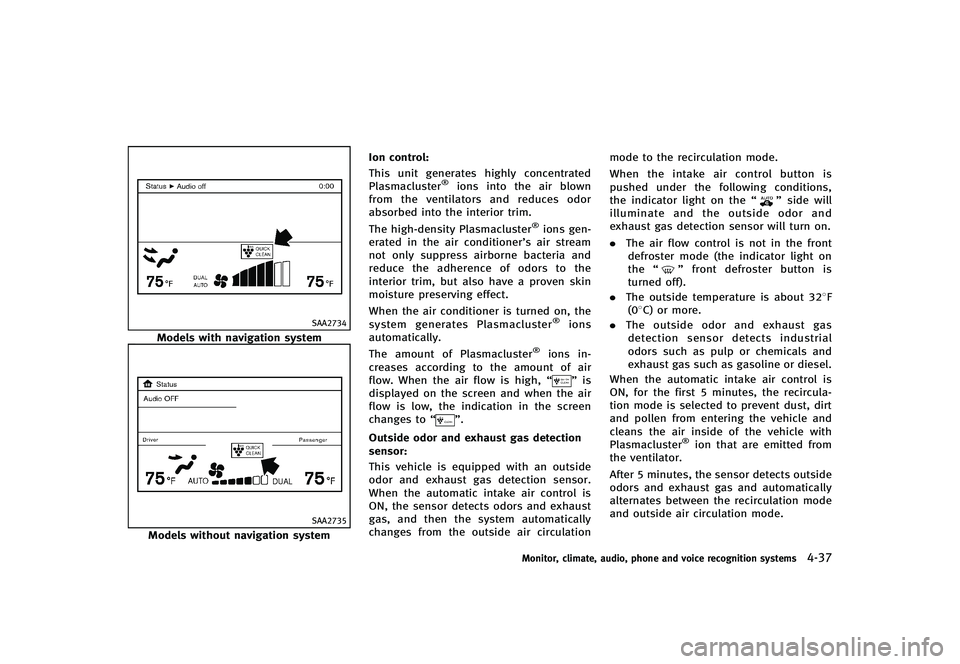
GUID-D73A39BF-43C8-459F-9C24-47B7F579C407This unit generates highly concentrated
Plasmacluster®ions into the air blown
from the ventilators and reduces odor
absorbed into the interior trim.
The high-density Plasmacluster
®ions gen-
erated in the air conditioner’s air stream
not only suppress airborne bacteria and
reduce the adherence of odors to the
interior trim, but also have a proven skin
moisture preserving effect.
When the air conditioner is turned on, the
system generates Plasmacluster
®ions
automatically.
The amount of Plasmacluster
®ions in-
creases according to the amount of air
flow. When the air flow is high, “
”is
displayed on the screen and when the air
flow is low, the indication in the screen
changes to “
”.
Outside odor and exhaust gas detection
sensor:
GUID-D73A39BF-43C8-459F-9C24-47B7F579C407This vehicle is equipped with an outside
odor and exhaust gas detection sensor.
When the automatic intake air control is
ON, the sensor detects odors and exhaust
gas, and then the system automatically
changes from the outside air circulation mode to the recirculation mode.
When the intake air control button is
pushed under the following conditions,
the indicator light on the
“
”side will
illuminate and the outside odor and
exhaust gas detection sensor will turn on.
. The air flow control is not in the front
defroster mode (the indicator light on
the “
”front defroster button is
turned off).
. The outside temperature is about 328F
(08C) or more.
. The outside odor and exhaust gas
detection sensor detects industrial
odors such as pulp or chemicals and
exhaust gas such as gasoline or diesel.
When the automatic intake air control is
ON, for the first 5 minutes, the recircula-
tion mode is selected to prevent dust, dirt
and pollen from entering the vehicle and
cleans the air inside of the vehicle with
Plasmacluster
®ion that are emitted from
the ventilator.
After 5 minutes, the sensor detects outside
odors and exhaust gas and automatically
alternates between the recirculation mode
and outside air circulation mode.
Monitor, climate, audio, phone and voice recognition systems4-37
Page 209 of 474
4-38Monitor, climate, audio, phone and voice recognition systems
OPERATING TIPSGUID-49AF0854-A2A0-4F7D-B7F0-98CA4B08BF2EWhen the engine coolant temperature and
outside air temperature are low, the air
flow from the foot outlets may not operate
for a maximum of 150 seconds. This is not
a malfunction. After the coolant tempera-
ture warms up, air will flow normally from
the foot outlets.
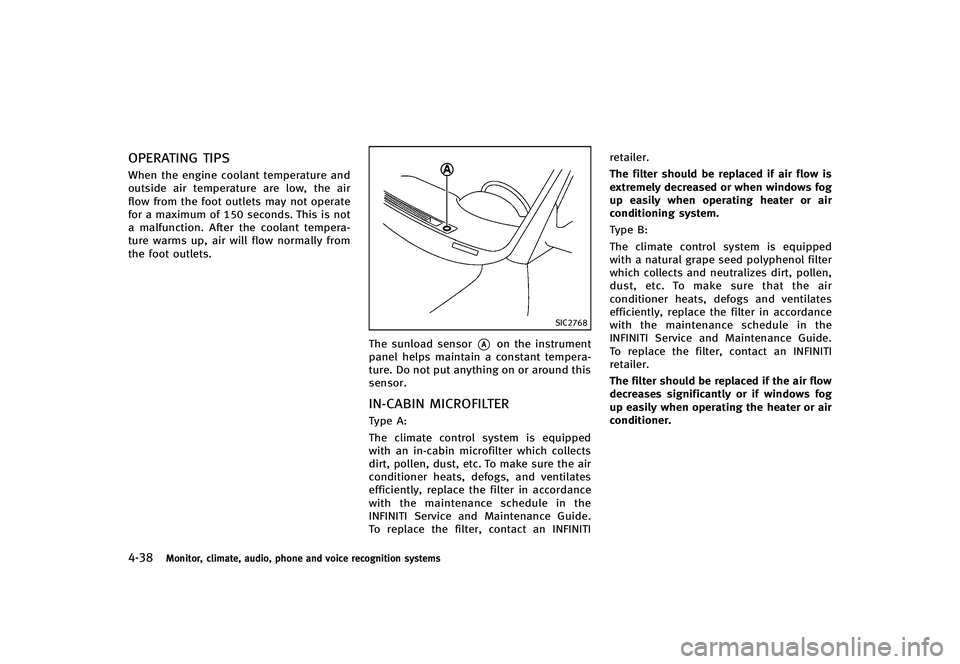
SIC2768
The sunload sensor*Aon the instrument
panel helps maintain a constant tempera-
ture. Do not put anything on or around this
sensor.
IN-CABIN MICROFILTERGUID-070CF22D-F703-4656-9B6D-17B643627103Type A:
The climate control system is equipped
with an in-cabin microfilter which collects
dirt, pollen, dust, etc. To make sure the air
conditioner heats, defogs, and ventilates
efficiently, replace the filter in accordance
with the maintenance schedule in the
INFINITI Service and Maintenance Guide.
To replace the filter, contact an INFINITI retailer.
The filter should be replaced if air flow is
extremely decreased or when windows fog
up easily when operating heater or air
conditioning system.
Type B:
The climate control system is equipped
with a natural grape seed polyphenol filter
which collects and neutralizes dirt, pollen,
dust, etc. To make sure that the air
conditioner heats, defogs and ventilates
efficiently, replace the filter in accordance
with the maintenance schedule in the
INFINITI Service and Maintenance Guide.
To replace the filter, contact an INFINITI
retailer.
The filter should be replaced if the air flow
decreases significantly or if windows fog
up easily when operating the heater or air
conditioner.
Page 210 of 474
SERVICING CLIMATE CONTROLGUID-7B9D0A3E-E813-4349-9F89-91822264DE30The climate control system in your INFINITI
is charged with a refrigerant designed with
the environment in mind.This refrigerant
will not harm the earth’s ozone layer.
However, special charging equipment and
lubricant are required when servicing your
INFINITI air conditioner. Using improper
refrigerants or lubricants will cause severe
damage to your climate control system.
(See “Capacities and recommended fuel/
lubricants” (P.9-2) for climate control sys-
tem refrigerant and lubricant recommenda-
tions.)
Your INFINITI retailer will be able to service
your environmentally friendly climate con-
trol system.
WARNING
The system contains refrigerant under high
pressure. To avoid personal injury, any air
conditioner service should be done only by
an experienced technician with the proper
equipment.
GUID-8AF547EE-8FE1-4B00-82D0-25D51C8783CD
AUDIO OPERATION PRECAUTIONSGUID-2BCFEDF1-5731-4F7B-BB70-46909940FEBD
RadioGUID-61B065D4-D54B-431E-B591-30ACC9D10E3FPush the ignition switch to the ACC or ON
position and push the radio band select
button to turn on the radio. If you listen to
the radio with the engine not running, the
ignition switch should be pushed to the
ACC position.
Radio reception is affected by station
signal strength, distance from radio trans-
mitter, buildings, bridges, mountains and
other external influences. Intermittent
changes in reception quality normally are
caused by these external influences.
Using a cellular phone in or near the
vehicle may influence radio reception
quality.
Radio reception:
GUID-D73A39BF-43C8-459F-9C24-47B7F579C407Your INFINITI radio system is equipped with
state-of-the-art electronic circuits to en-
hance radio reception. These circuits are
designed to extend reception range, and to
enhance the quality of that reception.
However there are some general character-
istics of both FM and AM radio signals that
can affect radio reception quality in a
moving vehicle, even when the finest equipment is used. These characteristics
are completely normal in a given reception
area, and do not indicate any malfunction
in your INFINITI radio system.
Reception conditions will constantly
change because of vehicle movement.
Buildings, terrain, signal distance and
interference from other vehicles can work
against ideal reception. Described below
are some of the factors that can affect your
radio reception.
Some cellular phones or other devices may
cause interference or a buzzing noise to
come from the audio system speakers.
Storing the device in a different location
may reduce or eliminate the noise.
Monitor, climate, audio, phone and voice recognition systems4-39
AUDIO SYSTEM
Page 212 of 474
SAA0480
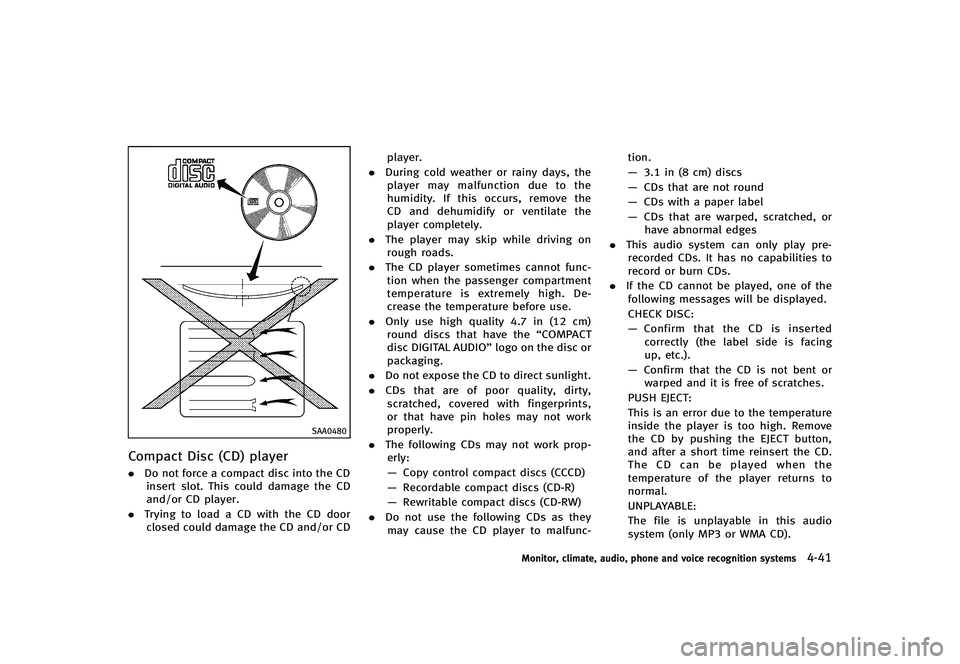
Compact Disc (CD) playerGUID-6BB564FF-E691-4BA5-8A67-4E42D532AD36.Do not force a compact disc into the CD
insert slot. This could damage the CD
and/or CD player.
. Trying to load a CD with the CD door
closed could damage the CD and/or CD player.
. During cold weather or rainy days, the
player may malfunction due to the
humidity. If this occurs, remove the
CD and dehumidify or ventilate the
player completely.
. The player may skip while driving on
rough roads.
. The CD player sometimes cannot func-
tion when the passenger compartment
temperature is extremely high. De-
crease the temperature before use.
. Only use high quality 4.7 in (12 cm)
round discs that have the “COMPACT
disc DIGITAL AUDIO” logo on the disc or
packaging.
. Do not expose the CD to direct sunlight.
. CDs that are of poor quality, dirty,
scratched, covered with fingerprints,
or that have pin holes may not work
properly.
. The following CDs may not work prop-
erly:
— Copy control compact discs (CCCD)
— Recordable compact discs (CD-R)
— Rewritable compact discs (CD-RW)
. Do not use the following CDs as they
may cause the CD player to malfunc- tion.
—
3.1 in (8 cm) discs
— CDs that are not round
— CDs with a paper label
— CDs that are warped, scratched, or
have abnormal edges
. This audio system can only play pre-
recorded CDs. It has no capabilities to
record or burn CDs.
. If the CD cannot be played, one of the
following messages will be displayed.
CHECK DISC:
— Confirm that the CD is inserted
correctly (the label side is facing
up, etc.).
— Confirm that the CD is not bent or
warped and it is free of scratches.
PUSH EJECT:
This is an error due to the temperature
inside the player is too high. Remove
the CD by pushing the EJECT button,
and after a short time reinsert the CD.
The CD can be played when the
temperature of the player returns to
normal.
UNPLAYABLE:
The file is unplayable in this audio
system (only MP3 or WMA CD).
Monitor, climate, audio, phone and voice recognition systems4-41
Page 213 of 474
4-42Monitor, climate, audio, phone and voice recognition systems
LHA0484
DVD (Digital Versatile Disc) player
(models with navigation system)
GUID-79FCB0CC-8C98-48C2-A229-368E7133E68C.Do not force a compact disc into the
CD/DVD insert slot. This could damage
the CD/DVD player.
. During cold weather or rainy days, the
player may malfunction due to humid- ity. If this occurs, remove the CD/DVD
and dehumidify or ventilate the player
completely.
. The player may skip while driving on
rough roads.
. The CD/DVD player sometimes cannot
function when the passenger compart-
ment temperature is extremely high.
Decrease the temperature before use.
. Only use high quality 4.7 in (12 cm)
round discs that have the “COMPACT
disc DIGITAL AUDIO” or“DVD Video”
logo on the disc or packaging.
. Do not expose the CD/DVD to direct
sunlight.
. CD/DVDs that are of poor quality, dirty,
scratched, covered with fingerprints, or
that have pinholes may not work
properly.
. The following CD/DVDs are not guaran-
teed to play:
— Copy control compact discs (CCCD)
— Recordable compact discs (CD-R)
— Rewritable compact discs (CD-RW)
— Recordable DVDs (DVD±R, DVD±R
DL)
— Rewritable DVDs (DVD±RW, DVD±RW
DL) .
Do not use the following CD/DVDs as
they may cause the CD/DVD player to
malfunction.
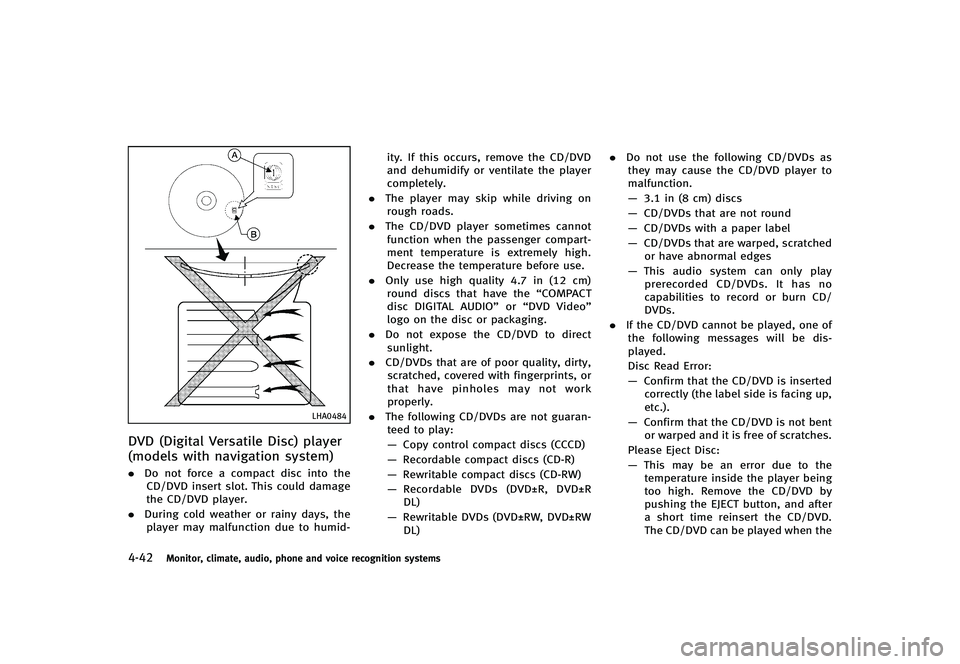
— 3.1 in (8 cm) discs
— CD/DVDs that are not round
— CD/DVDs with a paper label
— CD/DVDs that are warped, scratched
or have abnormal edges
— This audio system can only play
prerecorded CD/DVDs. It has no
capabilities to record or burn CD/
DVDs.
. If the CD/DVD cannot be played, one of
the following messages will be dis-
played.
Disc Read Error:
— Confirm that the CD/DVD is inserted
correctly (the label side is facing up,
etc.).
— Confirm that the CD/DVD is not bent
or warped and it is free of scratches.
Please Eject Disc:
— This may be an error due to the
temperature inside the player being
too high. Remove the CD/DVD by
pushing the EJECT button, and after
a short time reinsert the CD/DVD.
The CD/DVD can be played when the
Page 214 of 474
temperature of the player returns to
normal. If the error persists, consult
your local retailer.
Unplayable File:
— The file may be copy protected.
— The file is not MP3, WMA, AAC, M4A
or DivX
®type.
Region Invalid:
— The DVD is not for region 1 or all
regions. Use DVDs with a region
code “1”,“ALL” or“1 included” for
your DVD entertainment system.
(The region code
*Ais displayed
as a small symbol printed on the top
of the DVD
*B.) This vehicle-in-
stalled DVD player cannot play DVDs
with a region code other than “1”or
“ALL”.
Copyright and trademark:
GUID-D73A39BF-43C8-459F-9C24-47B7F579C407. The technology protected by the U.S.
patent and other intellectual property
rights owned by Macrovision Corpora-
tion and other right holders is adopted
for this system.
. This copyright protected technology
cannot be used without a permit from
Macrovision Corporation. It is limited to
be personal use, etc., as long as the permit from Macrovision Corporation is
not issued.
. Modifying or disassembling is prohib-
ited.
. Dolby digital is manufactured under
license from Dolby Laboratories, Inc.
. Dolby and the double D mark “
”are
trademarks of Dolby Laboratories, Inc.
. DTS and DTS Digital Surround “
”are
registered trademarks of Digital Theater
Systems, Inc.
Parental level (parental control):
GUID-D73A39BF-43C8-459F-9C24-47B7F579C407DVDs with the parental control setting can
be played with this system. Please use
your own judgement to set the parental
control with the system.
Disc selection:
GUID-D73A39BF-43C8-459F-9C24-47B7F579C407The following disc formats can be played
with the DVD drive.
. DVD-VIDEO
. VIDEO-CD
. CD-DA (Conventional Compact Disc)
. DTS-CD
USB (Universal Serial Bus)GUID-FD5C9B59-3FBD-4041-BB0D-1A12CAFB978DThis system supports various USB memory
sticks, USB hard drives and iPod®players. There are some USB devices which may not
be supported with this system.
.
Make sure that the USB device is
connected correctly into the USB con-
nector.
. Do not force the memory stick or USB
cable into the USB connector. This
could damage the connector.
. During cold weather or rainy days, the
player may malfunction due to humid-
ity. If this occurs, remove the USB
device and dehumidify or ventilate the
USB player completely.
. The USB player sometimes cannot
function when the passenger compart-
ment temperature is extremely high.
Decrease the temperature before use.
. Do not leave USB memory in a place
prone to static electricity or where the
air conditioner blows directly. The data
in the USB memory may be damaged.
. The vehicle is not equipped with a USB
memory stick.
. A USB device cannot be formatted with
this system. To format a USB device,
use a personal computer.
. Partitioned USB devices may not be
played correctly.
Monitor, climate, audio, phone and voice recognition systems4-43
Page 223 of 474
4-52Monitor, climate, audio, phone and voice recognition systems
SAA2724
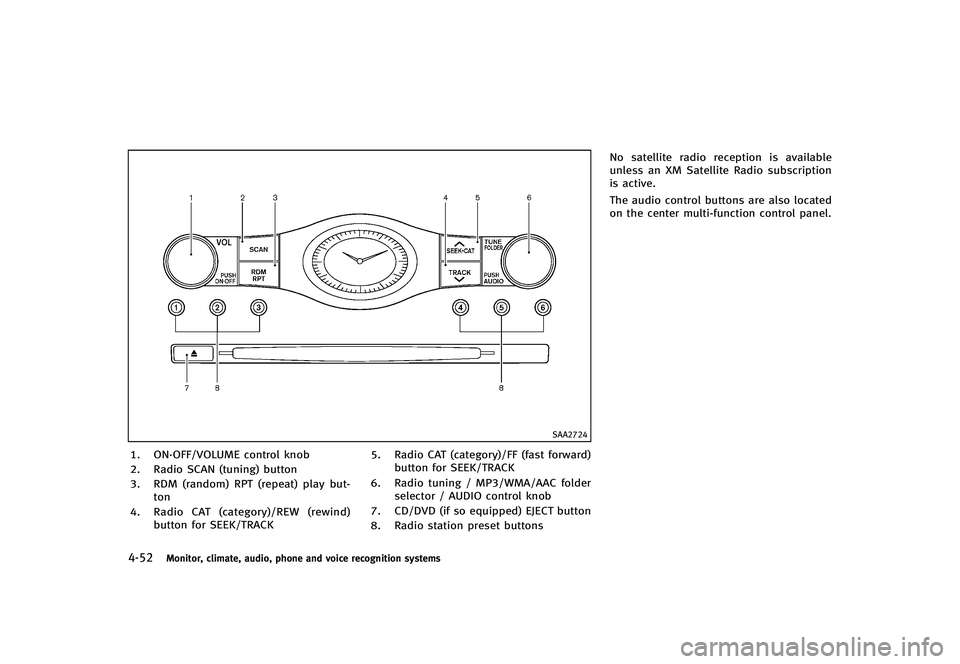
1. ON·OFF/VOLUME control knob
2. Radio SCAN (tuning) button
3. RDM (random) RPT (repeat) play but-ton
4. Radio CAT (category)/REW (rewind)
button for SEEK/TRACK 5. Radio CAT (category)/FF (fast forward)
button for SEEK/TRACK
6. Radio tuning / MP3/WMA/AAC folder selector / AUDIO control knob
7. CD/DVD (if so equipped) EJECT button
8. Radio station preset buttons No satellite radio reception is available
unless an XM Satellite Radio subscription
is active.
The audio control buttons are also located
on the center multi-function control panel.
Page 224 of 474
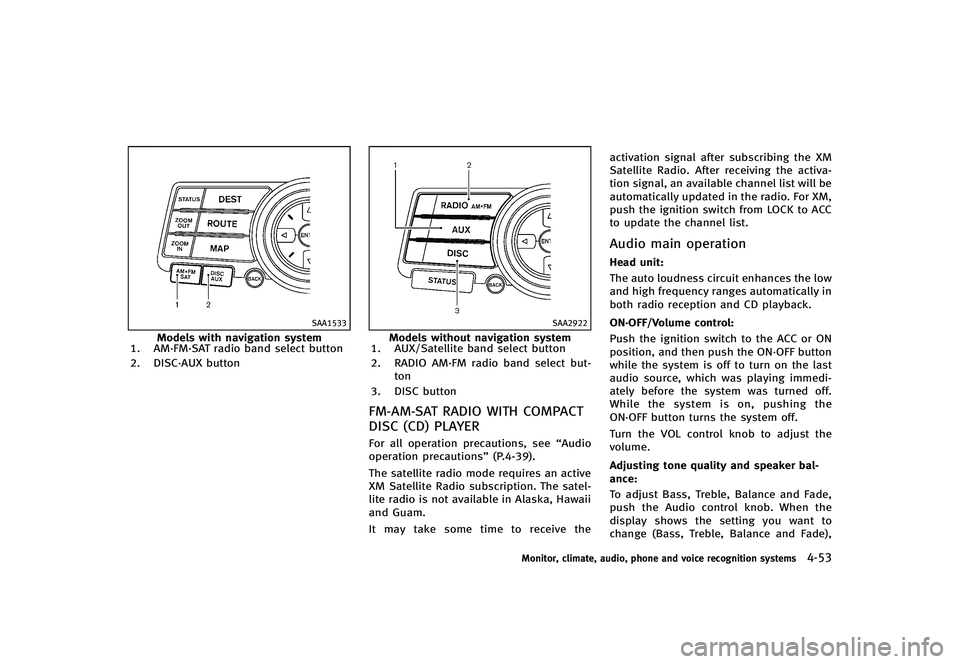
SAA1533
Models with navigation system
1. AM·FM·SAT radio band select button
2. DISC·AUX button
SAA2922
Models without navigation system
1. AUX/Satellite band select button
2. RADIO AM·FM radio band select but-
ton
3. DISC button
FM-AM-SAT RADIO WITH COMPACT
DISC (CD) PLAYER
GUID-A8D248EB-6B03-444F-9184-74B5AD0A3E52For all operation precautions, see “Audio
operation precautions” (P.4-39).
The satellite radio mode requires an active
XM Satellite Radio subscription. The satel-
lite radio is not available in Alaska, Hawaii
and Guam.
It may take some time to receive the activation signal after subscribing the XM
Satellite Radio. After receiving the activa-
tion signal, an available channel list will be
automatically updated in the radio. For XM,
push the ignition switch from LOCK to ACC
to update the channel list.
Audio main operationGUID-12E9E908-9A26-4A2D-8254-200EA72F37F0Head unit:GUID-D73A39BF-43C8-459F-9C24-47B7F579C407The auto loudness circuit enhances the low
and high frequency ranges automatically in
both radio reception and CD playback.
ON·OFF/Volume control:
GUID-D73A39BF-43C8-459F-9C24-47B7F579C407Push the ignition switch to the ACC or ON
position, and then push the ON·OFF button
while the system is off to turn on the last
audio source, which was playing immedi-
ately before the system was turned off.
While the system is on, pushing the
ON·OFF button turns the system off.
Turn the VOL control knob to adjust the
volume.
Adjusting tone quality and speaker bal-
ance:
GUID-D73A39BF-43C8-459F-9C24-47B7F579C407To adjust Bass, Treble, Balance and Fade,
push the Audio control knob. When the
display shows the setting you want to
change (Bass, Treble, Balance and Fade),
Monitor, climate, audio, phone and voice recognition systems4-53
Page 225 of 474
4-54Monitor, climate, audio, phone and voice recognition systems
rotate the Audio control knob to set the
desired setting. For the other setting
methods, see“How to use SETTING button”
(P.4-13).
This vehicle has some sound effect func-
tions as follows:
. Speed Sensitive Vol. (if so equipped)
. Precision Phased Audio (if so equipped)
. BOSE
®AudioPilot®(if so equipped)
For more details, see “How to use SETTING
button” (P.4-13).
For models with BOSE Sound System, tone
qualities are adjusted automatically ac-
cording to the roof condition (open/close).
The output from the audio system may be
interrupted during adjustment. This is not a
malfunction.
Switching the display:
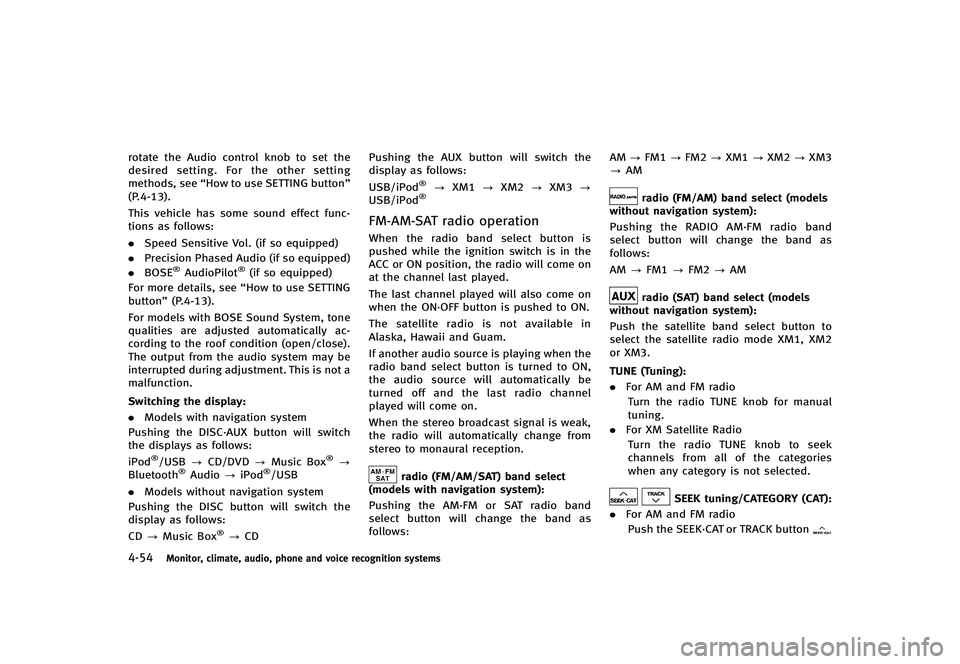
GUID-D73A39BF-43C8-459F-9C24-47B7F579C407. Models with navigation system
Pushing the DISC·AUX button will switch
the displays as follows:
iPod
®/USB ?CD/DVD ?Music Box®?
Bluetooth®Audio ?iPod®/USB
. Models without navigation system
Pushing the DISC button will switch the
display as follows:
CD ?Music Box
®?CD Pushing the AUX button will switch the
display as follows:
USB/iPod
®?
XM1 ?XM2 ?XM3 ?
USB/iPod®
FM-AM-SAT radio operationGUID-8CCC0D99-C92F-489F-8CF0-BF1E682C17DDWhen the radio band select button is
pushed while the ignition switch is in the
ACC or ON position, the radio will come on
at the channel last played.
The last channel played will also come on
when the ON·OFF button is pushed to ON.
The satellite radio is not available in
Alaska, Hawaii and Guam.
If another audio source is playing when the
radio band select button is turned to ON,
the audio source will automatically be
turned off and the last radio channel
played will come on.
When the stereo broadcast signal is weak,
the radio will automatically change from
stereo to monaural reception.
radio (FM/AM/SAT) band select
(models with navigation system):
GUID-D73A39BF-43C8-459F-9C24-47B7F579C407Pushing the AM·FM or SAT radio band
select button will change the band as
follows: AM
?FM1 ?FM2 ?XM1 ?XM2 ?XM3
? AM
radio (FM/AM) band select (models
without navigation system):
GUID-D73A39BF-43C8-459F-9C24-47B7F579C407Pushing the RADIO AM·FM radio band
select button will change the band as
follows:
AM ?FM1 ?FM2 ?AM
radio (SAT) band select (models
without navigation system):
GUID-D73A39BF-43C8-459F-9C24-47B7F579C407Push the satellite band select button to
select the satellite radio mode XM1, XM2
or XM3.
TUNE (Tuning):
GUID-D73A39BF-43C8-459F-9C24-47B7F579C407. For AM and FM radio
Turn the radio TUNE knob for manual
tuning.
. For XM Satellite Radio
Turn the radio TUNE knob to seek
channels from all of the categories
when any category is not selected.
SEEK tuning/CATEGORY (CAT):GUID-D73A39BF-43C8-459F-9C24-47B7F579C407. For AM and FM radio
Push the SEEK·CAT or TRACK button