lock INFINITI G-CONVERTIBLE 2012 Workshop Manual
[x] Cancel search | Manufacturer: INFINITI, Model Year: 2012, Model line: G-CONVERTIBLE, Model: INFINITI G-CONVERTIBLE 2012Pages: 474, PDF Size: 3.63 MB
Page 146 of 474
Hazard indicator and horn mode:GUID-D73A39BF-43C8-459F-9C24-47B7F579C407
DOOR LOCKDOOR UNLOCK TRUNK UNLOCK
Intelligent Key system
(Using door handle or trunk open request switch) HAZARD -
twice
OUTSIDE CHIME - twiceHAZARD -
once
OUTSIDE CHIME - onceHAZARD - none
OUTSIDE CHIME -
4
times
Remote keyless entry system
(Using
,orbutton) HAZARD -
twice
HORN - once HAZARD -
once
HORN - none HAZARD - none
HORN - none
Hazard indicator mode:GUID-D73A39BF-43C8-459F-9C24-47B7F579C407
DOOR LOCK
DOOR UNLOCK TRUNK UNLOCK
Intelligent Key system
(Using door handle or trunk open request switch) HAZARD -
twice
OUTSIDE CHIME - none HAZARD - none
OUTSIDE CHIME - noneHAZARD - none
OUTSIDE CHIME - none
Remote keyless entry system
(Using
,orbutton) HAZARD -
twice
HORN - none HAZARD - none
HORN - noneHAZARD - none
HORN - none
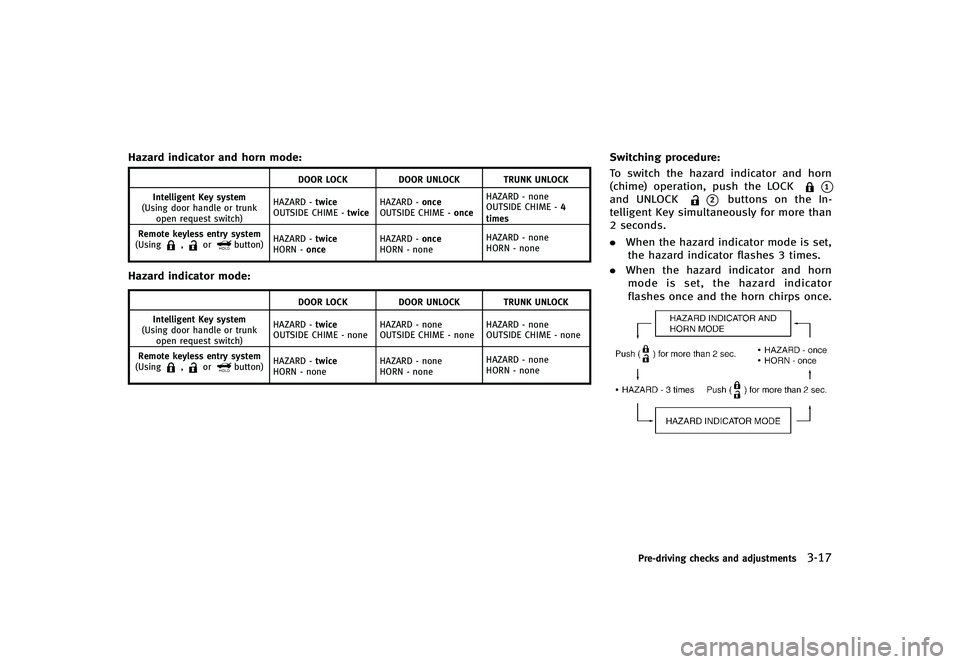
Switching procedure:GUID-D73A39BF-43C8-459F-9C24-47B7F579C407To switch the hazard indicator and horn
(chime) operation, push the LOCK
*1and UNLOCK*2buttons on the In-
telligent Key simultaneously for more than
2 seconds.
. When the hazard indicator mode is set,
the hazard indicator flashes 3 times.
. When the hazard indicator and horn
mode is set, the hazard indicator
flashes once and the horn chirps once.
NOS1695
Pre-driving checks and adjustments3-17
Page 147 of 474

3-18Pre-driving checks and adjustments
GUID-6FD342D9-5391-4063-A924-1963761E8ECE
SPA2318
1. Pull the hood lock release handle*1located below the instrument panel;
the hood will then spring up slightly.
2. Pull the lever
*2up at the front of the
hood with your fingertips and raise the
hood.
3. When closing the hood, slowly close the hood down to latch both the right
and left locks. Push the hood down to
lock the hood securely into place.
WARNING
. Make sure the hood is completely closed
and latched before driving. Failure to do
so could cause the hood to fly open and
result in an accident.
. If you see steam or smoke coming from
the engine compartment, to avoid injury
do not open the hood.
HOOD
Page 158 of 474
GUID-7326FBF6-ABFC-4BB4-8292-5DA49FC422AC
WARNING
.Do not drive with the trunk lid open. This
could allow dangerous exhaust gases to
be drawn into the vehicle. See “Exhaust
gas (carbon monoxide)” (P.5-3) of this
manual.
. Closely supervise children when they are
around cars to prevent them from play-
ing and becoming locked in the trunk
where they could be seriously injured.
Keep the car locked, with the trunk
closed, when not in use, and prevent
children’s access to Intelligent Keys.
CAUTION
The mechanisms that operate the retract-
able hard top are installed in the trunk lid.
For this reason, the trunk lid is heavier than
those on most vehicles. Opening and clos-
ing the trunk may take more effort than
conventional trunk lids. The additional effort
is normal for this vehicle.
SPA2307
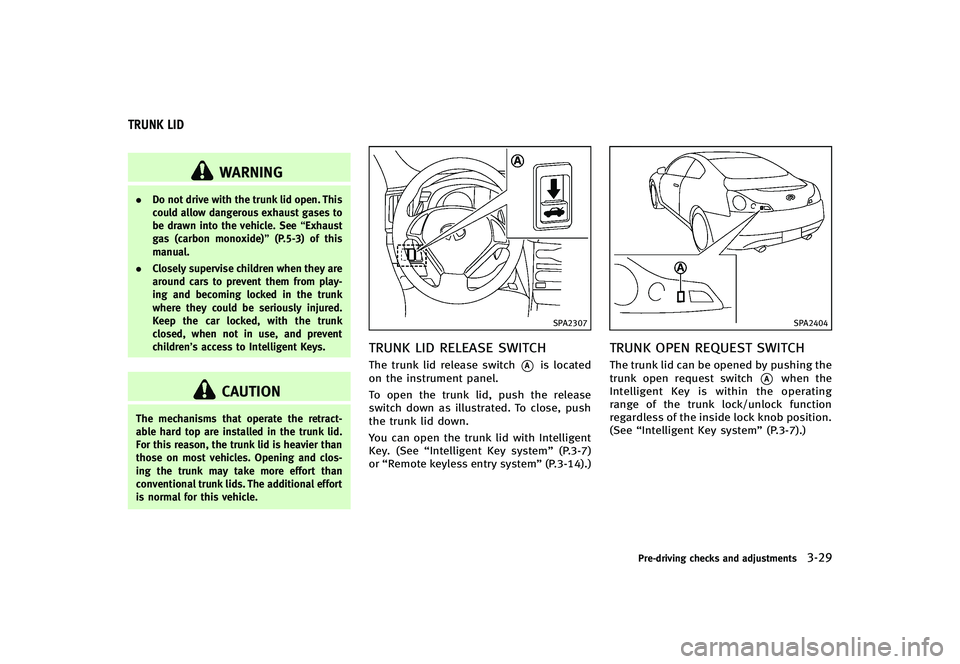
TRUNK LID RELEASE SWITCHGUID-9E05D69E-2362-40D3-B128-1CD113FDA480The trunk lid release switch*Ais located
on the instrument panel.
To open the trunk lid, push the release
switch down as illustrated. To close, push
the trunk lid down.
You can open the trunk lid with Intelligent
Key. (See “Intelligent Key system” (P.3-7)
or “Remote keyless entry system” (P.3-14).)
SPA2404
TRUNK OPEN REQUEST SWITCHGUID-28BEAACC-C636-443B-8FC1-1A6A4AB5072EThe trunk lid can be opened by pushing the
trunk open request switch
*Awhen the
Intelligent Key is within the operating
range of the trunk lock/unlock function
regardless of the inside lock knob position.
(See “Intelligent Key system” (P.3-7).)
Pre-driving checks and adjustments3-29
TRUNK LID
Page 159 of 474
3-30Pre-driving checks and adjustments
AUTO CLOSUREGUID-1509EC35-766C-489E-ADFD-DC3E1579EE96If the trunk lid is pulled down to a partly
open position, the trunk lid will pull itself
to the closed position.
Do not apply excessive force when the
auto closure is operating. Excessive force
applied may cause the mechanism to
malfunction.
CAUTION
.The trunk lid will automatically close
from a partly open position. To avoid
pinching, keep hands and fingers away
from trunk lid opening.
. Do not let children operate the trunk lid.SPA2308
TRUNK RELEASE POWER CANCEL
SWITCH
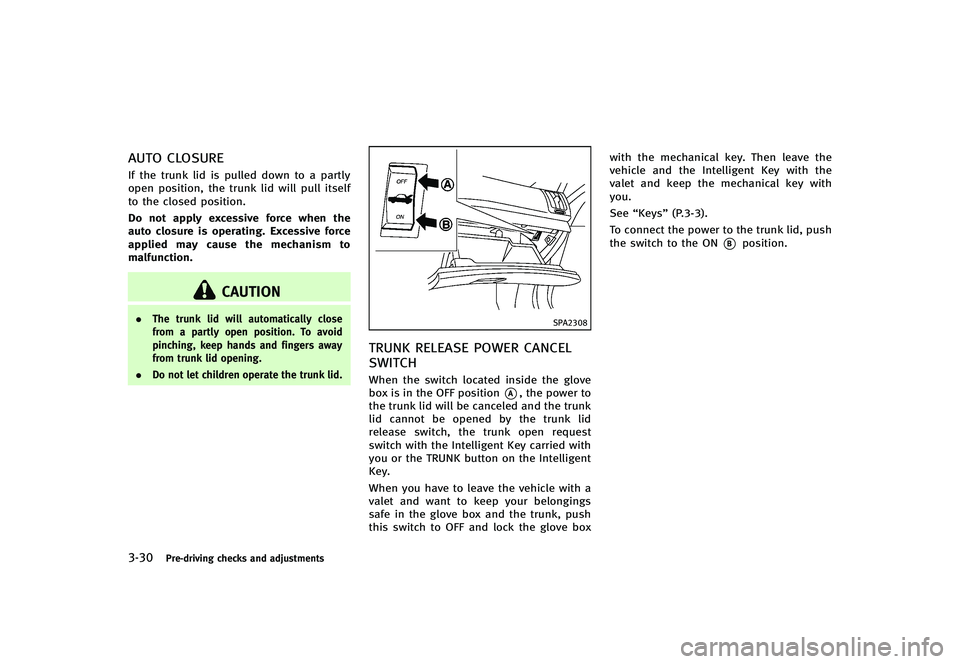
GUID-0C2E9B21-7B25-41C0-86C9-90CADD2F6322When the switch located inside the glove
box is in the OFF position
*A, the power to
the trunk lid will be canceled and the trunk
lid cannot be opened by the trunk lid
release switch, the trunk open request
switch with the Intelligent Key carried with
you or the TRUNK button on the Intelligent
Key.
When you have to leave the vehicle with a
valet and want to keep your belongings
safe in the glove box and the trunk, push
this switch to OFF and lock the glove box with the mechanical key. Then leave the
vehicle and the Intelligent Key with the
valet and keep the mechanical key with
you.
See
“Keys” (P.3-3).
To connect the power to the trunk lid, push
the switch to the ON
*Bposition.
Page 160 of 474
SPA2634
INTERIOR TRUNK LID RELEASEGUID-43118355-A2BE-47B2-AE4B-C9EDBD8FE3F1
WARNING
Closely supervise children when they are
around cars to prevent them from playing
and becoming locked in the trunk where
they could be seriously injured. Keep the car
locked, with the trunk lid securely latched,
when not in use, and prevent children’s
access to Intelligent Keys.
The interior trunk lid release mechanism
allows opening of the trunk lid in the eventthat people become locked inside the trunk
or in the event of the loss of electrical
power such as a discharged battery.
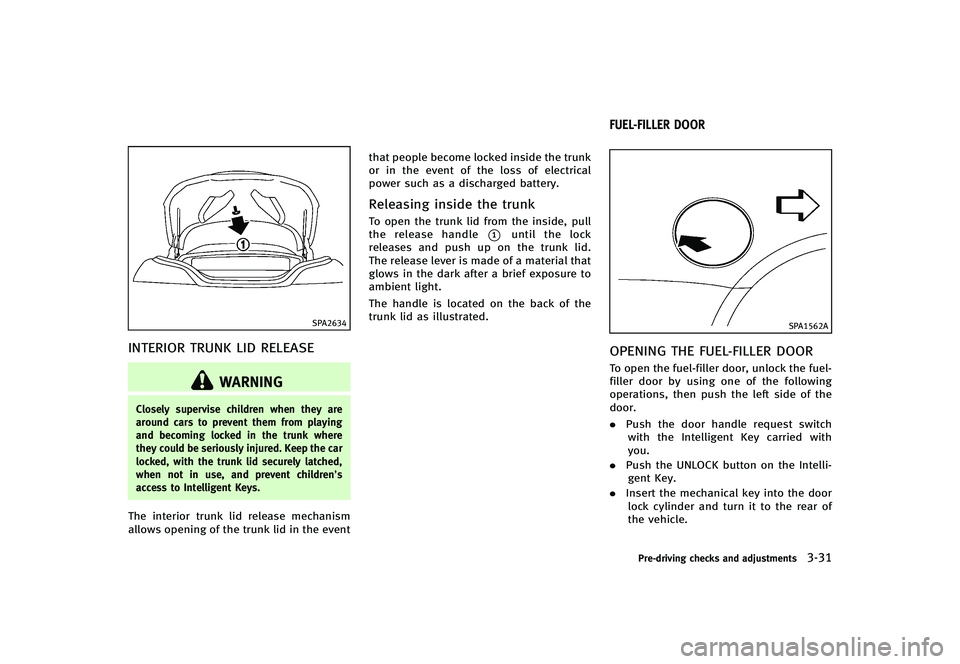
Releasing inside the trunkGUID-8700F542-4FA5-4066-91EE-6957D524695DTo open the trunk lid from the inside, pull
the release handle
*1until the lock
releases and push up on the trunk lid.
The release lever is made of a material that
glows in the dark after a brief exposure to
ambient light.
The handle is located on the back of the
trunk lid as illustrated.
GUID-C93CB90B-FCA1-4E06-9CF0-901012CD5248
SPA1562A
OPENING THE FUEL-FILLER DOORGUID-8DEF451E-464E-42B1-BD5E-8B67AD064BE3To open the fuel-filler door, unlock the fuel-
filler door by using one of the following
operations, then push the left side of the
door.
. Push the door handle request switch
with the Intelligent Key carried with
you.
. Push the UNLOCK button on the Intelli-
gent Key.
. Insert the mechanical key into the door
lock cylinder and turn it to the rear of
the vehicle.
Pre-driving checks and adjustments3-31
FUEL-FILLER DOOR
Page 161 of 474

3-32Pre-driving checks and adjustments
.Push the power door lock switch to the
UNLOCK position.
To lock, close the fuel-filler door securely
and lock all doors by operating the door
handle request switch, the LOCK button on
the Intelligent Key, the mechanical key or
the power door lock switch.
FUEL-FILLER CAPGUID-89BF0D62-77EE-4D19-9216-2EC6C908A6D1
WARNING
. Gasoline is extremely flammable and
highly explosive under certain condi-
tions. You could be burned or seriously
injured if it is misused or mishandled.
Always stop engine and do not smoke or
allow open flames or sparks near the
vehicle when refueling.
. Do not attempt to top off the fuel tank
after the fuel pump nozzle shuts off
automatically. Continued refueling may
cause fuel overflow, resulting in fuel
spray and possibly a fire.
. Use only an original equipment type
fuel-filler cap as a replacement. It has a
built-in safety valve needed for proper
operation of the fuel system and emis-
sion control system. An incorrect cap can result in a serious malfunction and
possible injury. It could also cause the
malfunction indicator light to come on.
. Never pour fuel into the throttle body to
attempt to start your vehicle.
. Do not fill a portable fuel container in
the vehicle or trailer. Static electricity
can cause an explosion of flammable
liquid, vapor or gas in any vehicle or
trailer. To reduce the risk of serious
injury or death when filling portable fuel
containers:—Always place the container on the
ground when filling.
—Do not use electronic devices whenfilling.
—Keep the pump nozzle in contactwith the container while you are
filling it.
—Use only approved portable fuelcontainers for flammable liquid.
CAUTION
. If fuel is spilled on the vehicle body,
flush it away with water to avoid paint damage.
. Insert the cap straight into the fuel-filler
tube, then tighten until a single click is
heard. Failure to tighten the fuel-filler
cap properly may cause the
mal-
function indicator light (MIL) to illumi-
nate. If the
light illuminates
because the fuel-filler cap is loose or
missing, tighten or install the cap and
continue to drive the vehicle. The
light should turn off after a few driving
trips. If thelight does not turn off
after a few driving trips, have the vehicle
inspected by an INFINITI retailer.
. The LOOSE FUEL CAP warning will appear
if the fuel-filler cap is not properly
tightened. It may take a few driving
trips for the message to be displayed.
Failure to tighten the fuel-filler cap
properly after the LOOSE FUEL CAP
warning appears may cause the
Malfunction Indicator Light (MIL) to
illuminate.
Page 162 of 474
SPA2838
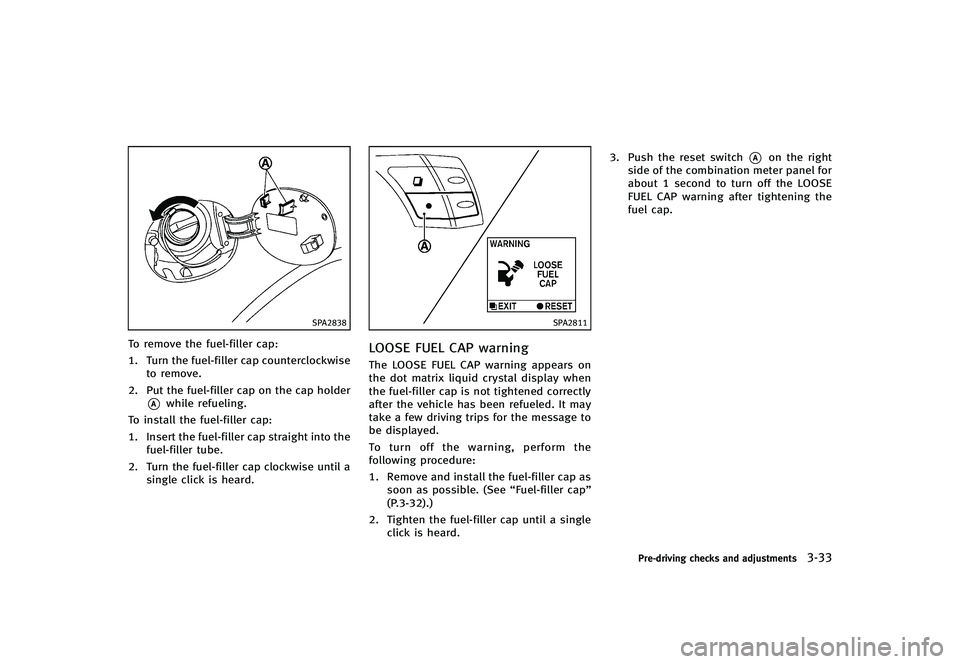
To remove the fuel-filler cap:
1. Turn the fuel-filler cap counterclockwiseto remove.
2. Put the fuel-filler cap on the cap holder
*Awhile refueling.
To install the fuel-filler cap:
1. Insert the fuel-filler cap straight into the fuel-filler tube.
2. Turn the fuel-filler cap clockwise until a single click is heard.
SPA2811
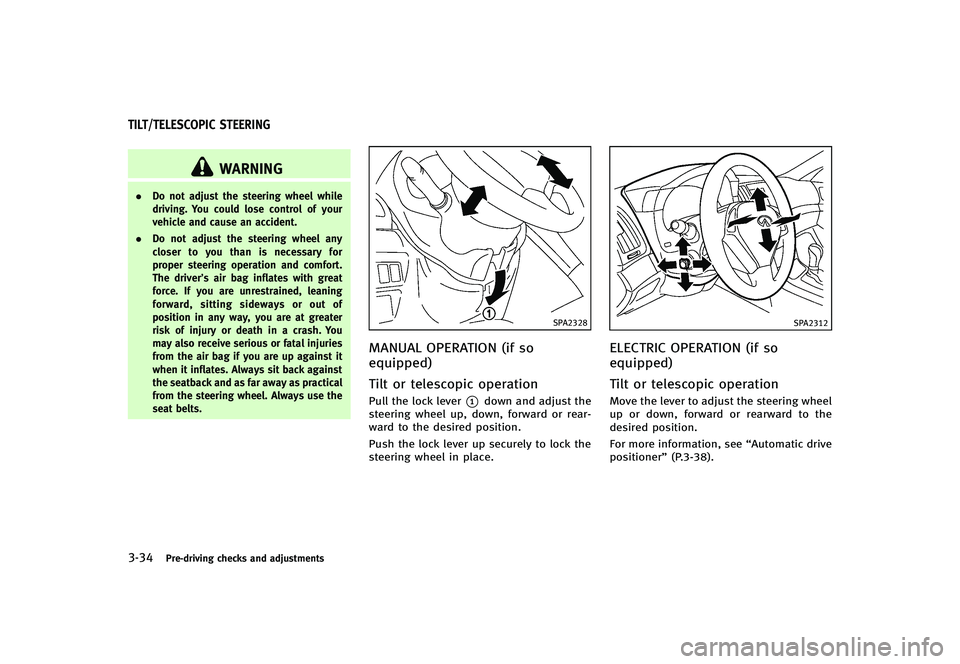
LOOSE FUEL CAP warningGUID-EF714EE4-DB8F-4C22-86CD-3102E7BE7F1CThe LOOSE FUEL CAP warning appears on
the dot matrix liquid crystal display when
the fuel-filler cap is not tightened correctly
after the vehicle has been refueled. It may
take a few driving trips for the message to
be displayed.
To turn off the warning, perform the
following procedure:
1. Remove and install the fuel-filler cap assoon as possible. (See “Fuel-filler cap”
(P.3-32).)
2. Tighten the fuel-filler cap until a single click is heard. 3. Push the reset switch
*Aon the right
side of the combination meter panel for
about 1 second to turn off the LOOSE
FUEL CAP warning after tightening the
fuel cap.
Pre-driving checks and adjustments3-33
Page 163 of 474
3-34Pre-driving checks and adjustments
GUID-D74D92D8-C9A4-480A-8FA0-9DF260AEBCDE
WARNING
.Do not adjust the steering wheel while
driving. You could lose control of your
vehicle and cause an accident.
. Do not adjust the steering wheel any
closer to you than is necessary for
proper steering operation and comfort.
The driver’s air bag inflates with great
force. If you are unrestrained, leaning
forward, sitting sideways or out of
position in any way, you are at greater
risk of injury or death in a crash. You
may also receive serious or fatal injuries
from the air bag if you are up against it
when it inflates. Always sit back against
the seatback and as far away as practical
from the steering wheel. Always use the
seat belts.
SPA2328
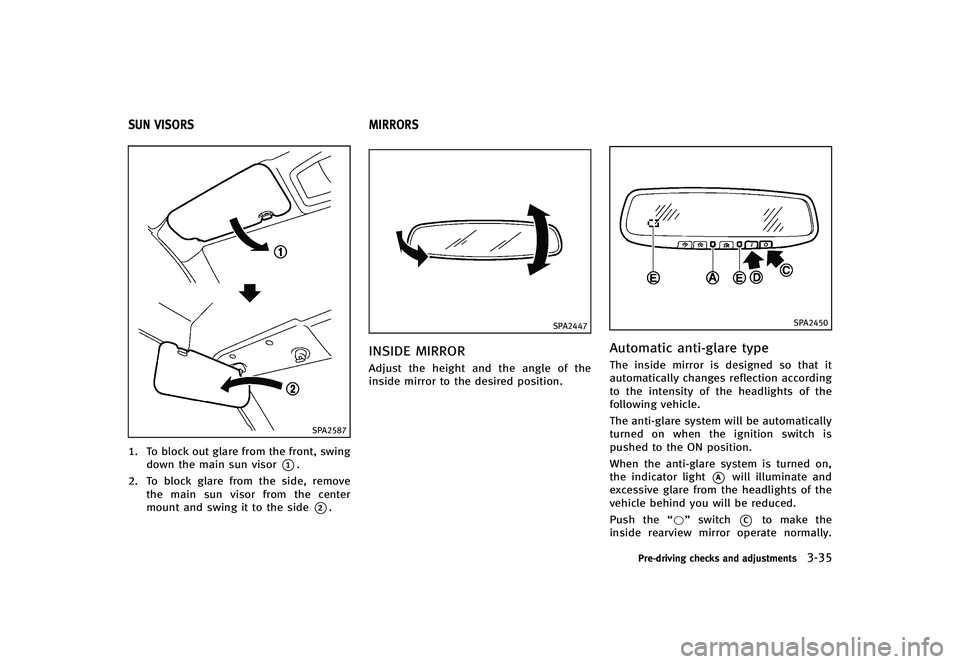
MANUAL OPERATION (if so
equipped)
GUID-0BB1C5DD-DBC9-4899-9880-CB9E3EA04D15
Tilt or telescopic operationGUID-2D33B99D-6D59-4F5B-A2F5-EEE166241F74Pull the lock lever*1down and adjust the
steering wheel up, down, forward or rear-
ward to the desired position.
Push the lock lever up securely to lock the
steering wheel in place.
SPA2312
ELECTRIC OPERATION (if so
equipped)
GUID-DDE06E44-8882-46DB-A8EA-EC2DAA0D802C
Tilt or telescopic operationGUID-8EE95B85-786C-4BFF-9E75-864BF7BD090FMove the lever to adjust the steering wheel
up or down, forward or rearward to the
desired position.
For more information, see “Automatic drive
positioner” (P.3-38).
TILT/TELESCOPIC STEERING
Page 164 of 474
GUID-95DBDC4C-B7C5-4BD4-B212-E2F2144241F5
SPA2587
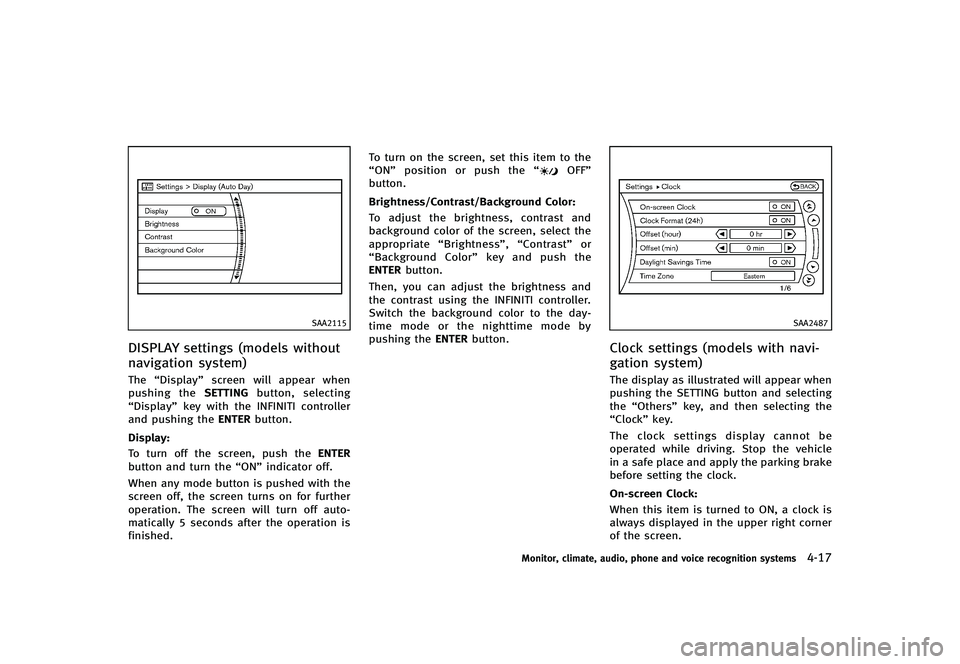
1. To block out glare from the front, swingdown the main sun visor
*1.
2. To block glare from the side, remove the main sun visor from the center
mount and swing it to the side
*2.
GUID-236C458B-C0EB-4F6A-887E-AC58AA52A278
SPA2447
INSIDE MIRRORGUID-8102A481-5CC8-4CAD-89DD-96B7D386E14DAdjust the height and the angle of the
inside mirror to the desired position.
SPA2450
Automatic anti-glare typeGUID-861C9C42-727A-4805-B7A4-97707F49F9E7The inside mirror is designed so that it
automatically changes reflection according
to the intensity of the headlights of the
following vehicle.
The anti-glare system will be automatically
turned on when the ignition switch is
pushed to the ON position.
When the anti-glare system is turned on,
the indicator light
*Awill illuminate and
excessive glare from the headlights of the
vehicle behind you will be reduced.
Push the “*”switch
*Cto make the
inside rearview mirror operate normally.
Pre-driving checks and adjustments3-35
SUN VISORS MIRRORS
Page 188 of 474
SAA2115
DISPLAY settings (models without
navigation system)
GUID-A02BF618-E334-4CDF-9F21-9D53DB065CEBThe“Display” screen will appear when
pushing the SETTINGbutton, selecting
“Display” key with the INFINITI controller
and pushing the ENTERbutton.
Display:
GUID-D73A39BF-43C8-459F-9C24-47B7F579C407To turn off the screen, push the ENTER
button and turn the “ON”indicator off.
When any mode button is pushed with the
screen off, the screen turns on for further
operation. The screen will turn off auto-
matically 5 seconds after the operation is
finished. To turn on the screen, set this item to the
“ON”
position or push the “
OFF”
button.
Brightness/Contrast/Background Color:
GUID-D73A39BF-43C8-459F-9C24-47B7F579C407To adjust the brightness, contrast and
background color of the screen, select the
appropriate “Brightness”, “Contrast”or
“Background Color” key and push the
ENTER button.
Then, you can adjust the brightness and
the contrast using the INFINITI controller.
Switch the background color to the day-
time mode or the nighttime mode by
pushing the ENTERbutton.
SAA2487
Clock settings (models with navi-
gation system)
GUID-483D7699-0206-435F-A04E-5F827DC3C709The display as illustrated will appear when
pushing the SETTING button and selecting
the“Others” key, and then selecting the
“Clock” key.
The clock settings display cannot be
operated while driving. Stop the vehicle
in a safe place and apply the parking brake
before setting the clock.
On-screen Clock:
GUID-D73A39BF-43C8-459F-9C24-47B7F579C407When this item is turned to ON, a clock is
always displayed in the upper right corner
of the screen.
Monitor, climate, audio, phone and voice recognition systems4-17