lock INFINITI G-CONVERTIBLE 2012 Repair Manual
[x] Cancel search | Manufacturer: INFINITI, Model Year: 2012, Model line: G-CONVERTIBLE, Model: INFINITI G-CONVERTIBLE 2012Pages: 474, PDF Size: 3.63 MB
Page 189 of 474
4-18Monitor, climate, audio, phone and voice recognition systems
This clock will indicate the time almost
exactly because it is always adjusted by
the GPS system.
Clock Format (24h):
GUID-D73A39BF-43C8-459F-9C24-47B7F579C407When this item is turned to ON, the 24-
hour clock is displayed. When this item is
not turned to ON, the 12-hour clock is
displayed.
Offset (hour)/(min) :
GUID-D73A39BF-43C8-459F-9C24-47B7F579C407Adjust the time by increasing or decreasing
per hour or per minute.
Daylight Saving Time:
GUID-D73A39BF-43C8-459F-9C24-47B7F579C407Turn this item to ON for daylight saving
time application.
Time Zone:
GUID-D73A39BF-43C8-459F-9C24-47B7F579C407Choose the time zone from the following.
.Pacific
. Mountain
. Central
. Eastern
. Atlantic
. Newfoundland
. Hawaii
. Alaska
SAA3019
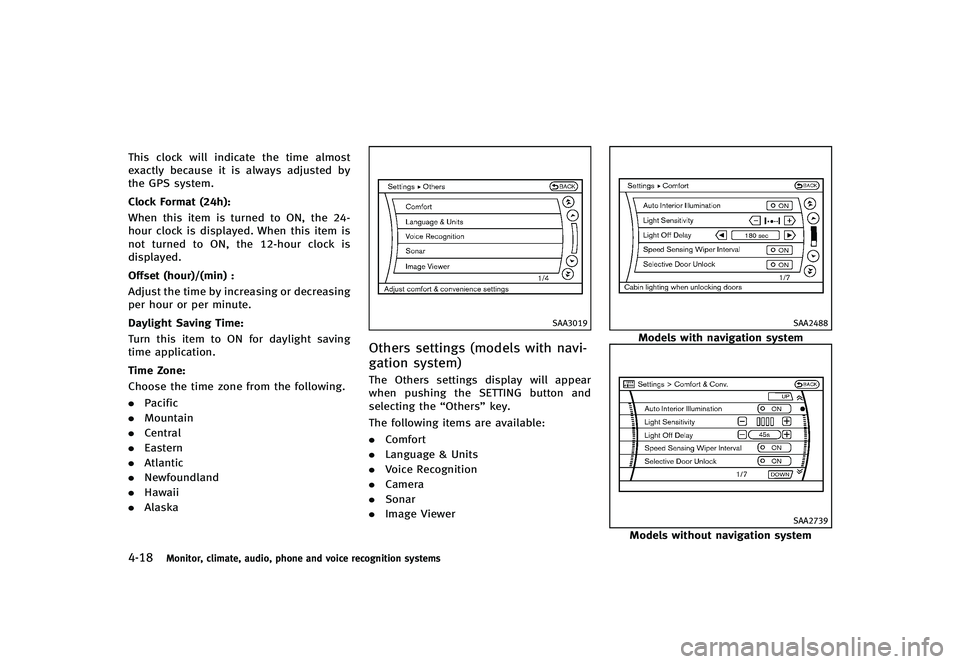
Others settings (models with navi-
gation system)
GUID-BDC5A15D-5CE1-41CE-A30B-B3836DB2A1D8The Others settings display will appear
when pushing the SETTING button and
selecting the “Others”key.
The following items are available:
. Comfort
. Language & Units
. Voice Recognition
. Camera
. Sonar
. Image Viewer
SAA2488
Models with navigation system
SAA2739
Models without navigation system
Page 190 of 474
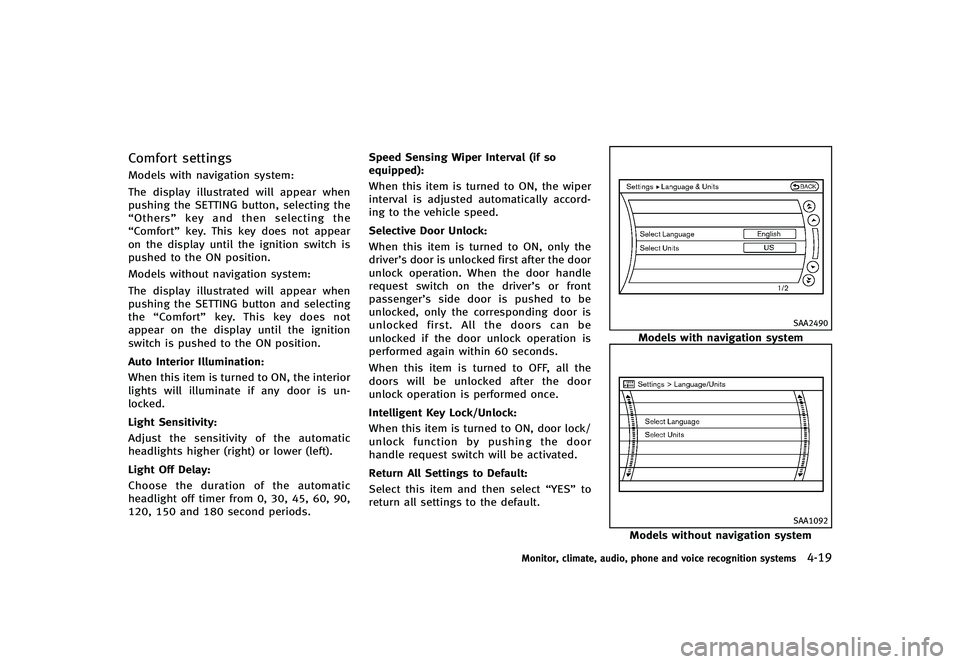
Comfort settingsGUID-3238AFF2-4EEA-463B-A0F0-08AEDDEF52CCModels with navigation system:
The display illustrated will appear when
pushing the SETTING button, selecting the
“Others”key and then selecting the
“Comfort” key. This key does not appear
on the display until the ignition switch is
pushed to the ON position.
Models without navigation system:
The display illustrated will appear when
pushing the SETTING button and selecting
the “Comfort” key. This key does not
appear on the display until the ignition
switch is pushed to the ON position.
Auto Interior Illumination:
GUID-D73A39BF-43C8-459F-9C24-47B7F579C407When this item is turned to ON, the interior
lights will illuminate if any door is un-
locked.
Light Sensitivity:
GUID-D73A39BF-43C8-459F-9C24-47B7F579C407Adjust the sensitivity of the automatic
headlights higher (right) or lower (left).
Light Off Delay:
GUID-D73A39BF-43C8-459F-9C24-47B7F579C407Choose the duration of the automatic
headlight off timer from 0, 30, 45, 60, 90,
120, 150 and 180 second periods. Speed Sensing Wiper Interval (if so
equipped):
GUID-D73A39BF-43C8-459F-9C24-47B7F579C407When this item is turned to ON, the wiper
interval is adjusted automatically accord-
ing to the vehicle speed.
Selective Door Unlock:
GUID-D73A39BF-43C8-459F-9C24-47B7F579C407When this item is turned to ON, only the
driver’s door is unlocked first after the door
unlock operation. When the door handle
request switch on the driver’s or front
passenger’s side door is pushed to be
unlocked, only the corresponding door is
unlocked first. All the doors can be
unlocked if the door unlock operation is
performed again within 60 seconds.
When this item is turned to OFF, all the
doors will be unlocked after the door
unlock operation is performed once.
Intelligent Key Lock/Unlock:
GUID-D73A39BF-43C8-459F-9C24-47B7F579C407When this item is turned to ON, door lock/
unlock function by pushing the door
handle request switch will be activated.
Return All Settings to Default:
GUID-D73A39BF-43C8-459F-9C24-47B7F579C407Select this item and then select
“YES”to
return all settings to the default.
SAA2490
Models with navigation system
SAA1092
Models without navigation system
Monitor, climate, audio, phone and voice recognition systems4-19
Page 211 of 474
4-40Monitor, climate, audio, phone and voice recognition systems
SAA0306
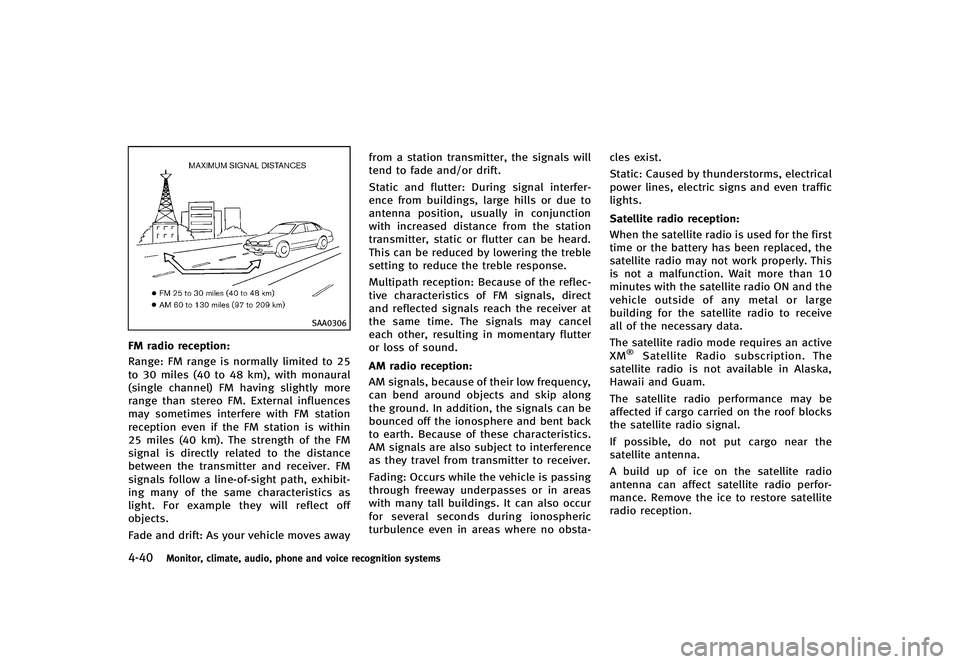
FM radio reception:GUID-D73A39BF-43C8-459F-9C24-47B7F579C407Range: FM range is normally limited to 25
to 30 miles (40 to 48 km), with monaural
(single channel) FM having slightly more
range than stereo FM. External influences
may sometimes interfere with FM station
reception even if the FM station is within
25 miles (40 km). The strength of the FM
signal is directly related to the distance
between the transmitter and receiver. FM
signals follow a line-of-sight path, exhibit-
ing many of the same characteristics as
light. For example they will reflect off
objects.
Fade and drift: As your vehicle moves awayfrom a station transmitter, the signals will
tend to fade and/or drift.
Static and flutter: During signal interfer-
ence from buildings, large hills or due to
antenna position, usually in conjunction
with increased distance from the station
transmitter, static or flutter can be heard.
This can be reduced by lowering the treble
setting to reduce the treble response.
Multipath reception: Because of the reflec-
tive characteristics of FM signals, direct
and reflected signals reach the receiver at
the same time. The signals may cancel
each other, resulting in momentary flutter
or loss of sound.
AM radio reception:GUID-D73A39BF-43C8-459F-9C24-47B7F579C407AM signals, because of their low frequency,
can bend around objects and skip along
the ground. In addition, the signals can be
bounced off the ionosphere and bent back
to earth. Because of these characteristics.
AM signals are also subject to interference
as they travel from transmitter to receiver.
Fading: Occurs while the vehicle is passing
through freeway underpasses or in areas
with many tall buildings. It can also occur
for several seconds during ionospheric
turbulence even in areas where no obsta-
cles exist.
Static: Caused by thunderstorms, electrical
power lines, electric signs and even traffic
lights.
Satellite radio reception:
GUID-D73A39BF-43C8-459F-9C24-47B7F579C407When the satellite radio is used for the first
time or the battery has been replaced, the
satellite radio may not work properly. This
is not a malfunction. Wait more than 10
minutes with the satellite radio ON and the
vehicle outside of any metal or large
building for the satellite radio to receive
all of the necessary data.
The satellite radio mode requires an active
XM
®Satellite Radio subscription. The
satellite radio is not available in Alaska,
Hawaii and Guam.
The satellite radio performance may be
affected if cargo carried on the roof blocks
the satellite radio signal.
If possible, do not put cargo near the
satellite antenna.
A build up of ice on the satellite radio
antenna can affect satellite radio perfor-
mance. Remove the ice to restore satellite
radio reception.
Page 224 of 474
SAA1533
Models with navigation system
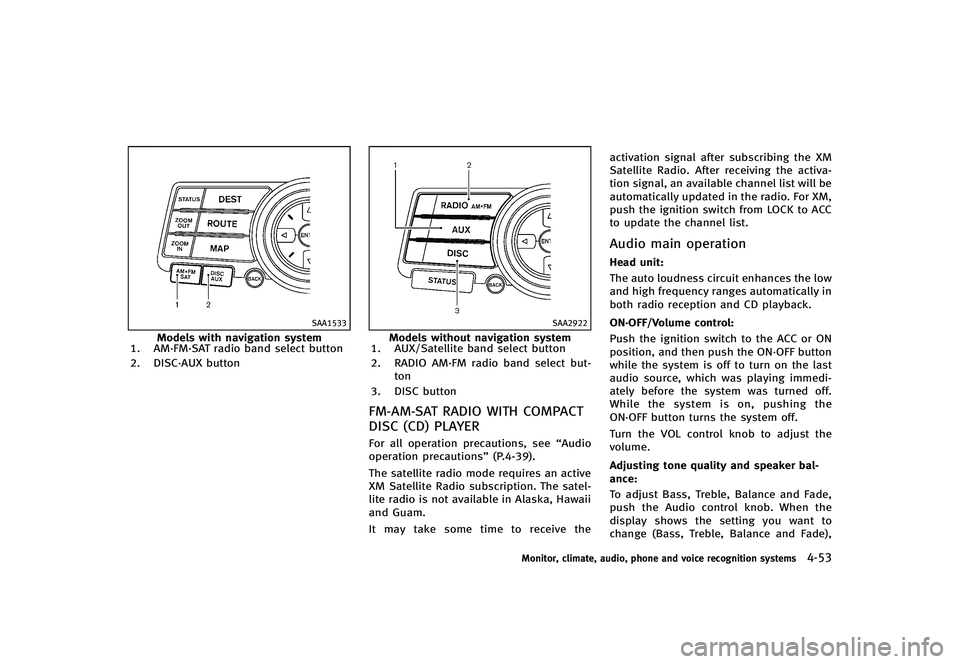
1. AM·FM·SAT radio band select button
2. DISC·AUX button
SAA2922
Models without navigation system
1. AUX/Satellite band select button
2. RADIO AM·FM radio band select but-
ton
3. DISC button
FM-AM-SAT RADIO WITH COMPACT
DISC (CD) PLAYER
GUID-A8D248EB-6B03-444F-9184-74B5AD0A3E52For all operation precautions, see “Audio
operation precautions” (P.4-39).
The satellite radio mode requires an active
XM Satellite Radio subscription. The satel-
lite radio is not available in Alaska, Hawaii
and Guam.
It may take some time to receive the activation signal after subscribing the XM
Satellite Radio. After receiving the activa-
tion signal, an available channel list will be
automatically updated in the radio. For XM,
push the ignition switch from LOCK to ACC
to update the channel list.
Audio main operationGUID-12E9E908-9A26-4A2D-8254-200EA72F37F0Head unit:GUID-D73A39BF-43C8-459F-9C24-47B7F579C407The auto loudness circuit enhances the low
and high frequency ranges automatically in
both radio reception and CD playback.
ON·OFF/Volume control:
GUID-D73A39BF-43C8-459F-9C24-47B7F579C407Push the ignition switch to the ACC or ON
position, and then push the ON·OFF button
while the system is off to turn on the last
audio source, which was playing immedi-
ately before the system was turned off.
While the system is on, pushing the
ON·OFF button turns the system off.
Turn the VOL control knob to adjust the
volume.
Adjusting tone quality and speaker bal-
ance:
GUID-D73A39BF-43C8-459F-9C24-47B7F579C407To adjust Bass, Treble, Balance and Fade,
push the Audio control knob. When the
display shows the setting you want to
change (Bass, Treble, Balance and Fade),
Monitor, climate, audio, phone and voice recognition systems4-53
Page 246 of 474
SAA2515
Models with navigation system
SAA2614
Models without navigation system
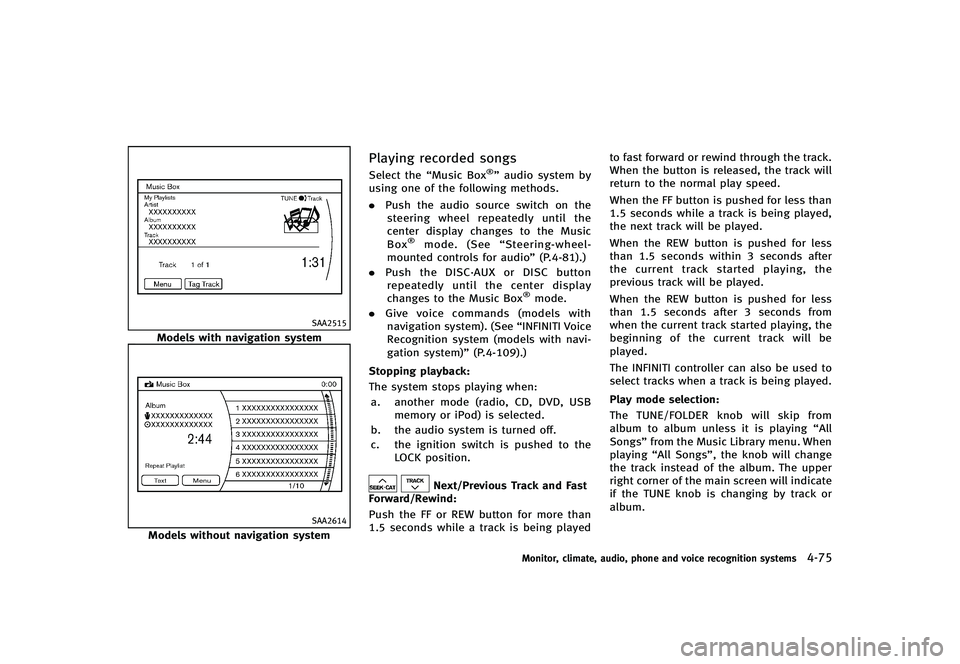
Playing recorded songsGUID-688F5E88-EFD4-493E-B96C-8101CF23633CSelect the“Music Box®”audio system by
using one of the following methods.
. Push the audio source switch on the
steering wheel repeatedly until the
center display changes to the Music
Box
®mode. (See “Steering-wheel-
mounted controls for audio” (P.4-81).)
. Push the DISC·AUX or DISC button
repeatedly until the center display
changes to the Music Box
®mode.
. Give voice commands (models with
navigation system). (See “INFINITI Voice
Recognition system (models with navi-
gation system)” (P.4-109).)
Stopping playback:
GUID-D73A39BF-43C8-459F-9C24-47B7F579C407The system stops playing when: a. another mode (radio, CD, DVD, USB memory or iPod) is selected.
b. the audio system is turned off.
c. the ignition switch is pushed to the LOCK position.
Next/Previous Track and Fast
Forward/Rewind:
GUID-D73A39BF-43C8-459F-9C24-47B7F579C407Push the FF or REW button for more than
1.5 seconds while a track is being played to fast forward or rewind through the track.
When the button is released, the track will
return to the normal play speed.
When the FF button is pushed for less than
1.5 seconds while a track is being played,
the next track will be played.
When the REW button is pushed for less
than 1.5 seconds within 3 seconds after
the current track started playing, the
previous track will be played.
When the REW button is pushed for less
than 1.5 seconds after 3 seconds from
when the current track started playing, the
beginning of the current track will be
played.
The INFINITI controller can also be used to
select tracks when a track is being played.
Play mode selection:
GUID-D73A39BF-43C8-459F-9C24-47B7F579C407The TUNE/FOLDER knob will skip from
album to album unless it is playing
“All
Songs” from the Music Library menu. When
playing “All Songs”, the knob will change
the track instead of the album. The upper
right corner of the main screen will indicate
if the TUNE knob is changing by track or
album.
Monitor, climate, audio, phone and voice recognition systems4-75
Page 254 of 474
SAA2374
ANTENNAGUID-E929A074-E922-4F6F-8C6B-5ACD93B76C87
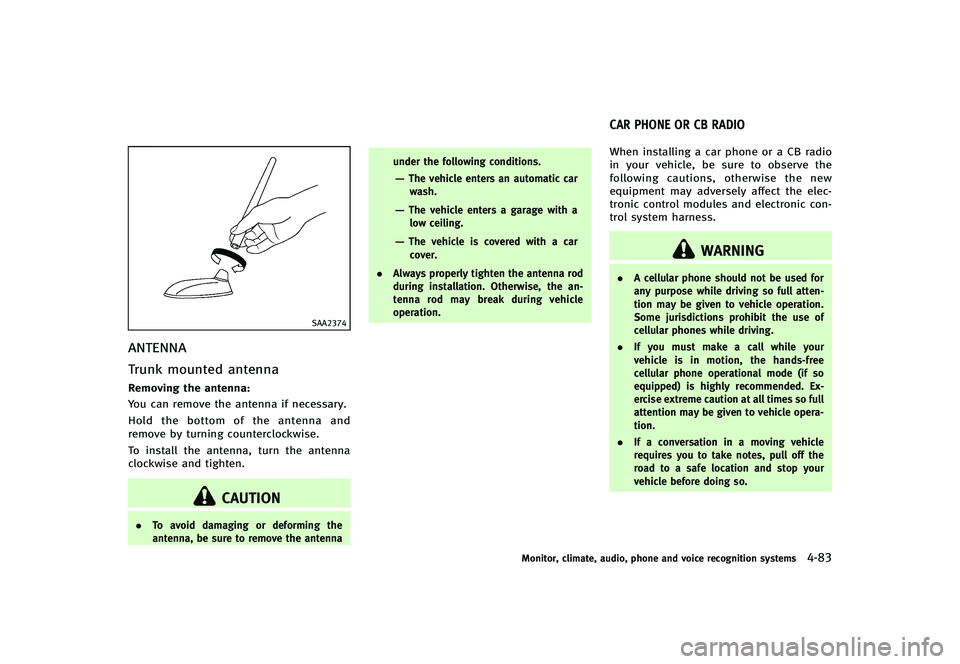
Trunk mounted antennaGUID-3430BA38-0248-4AD5-BFEB-31F654C06665Removing the antenna:GUID-D73A39BF-43C8-459F-9C24-47B7F579C407You can remove the antenna if necessary.
Hold the bottom of the antenna and
remove by turning counterclockwise.
To install the antenna, turn the antenna
clockwise and tighten.
CAUTION
.To avoid damaging or deforming the
antenna, be sure to remove the antenna under the following conditions.
—The vehicle enters an automatic car
wash.
—The vehicle enters a garage with alow ceiling.
—The vehicle is covered with a car
cover.
. Always properly tighten the antenna rod
during installation. Otherwise, the an-
tenna rod may break during vehicle
operation.
GUID-83EDA816-F1DE-40F3-B4B3-6A62A8CA567BWhen installing a car phone or a CB radio
in your vehicle, be sure to observe the
following cautions, otherwise the new
equipment may adversely affect the elec-
tronic control modules and electronic con-
trol system harness.
WARNING
.A cellular phone should not be used for
any purpose while driving so full atten-
tion may be given to vehicle operation.
Some jurisdictions prohibit the use of
cellular phones while driving.
. If you must make a call while your
vehicle is in motion, the hands-free
cellular phone operational mode (if so
equipped) is highly recommended. Ex-
ercise extreme caution at all times so full
attention may be given to vehicle opera-
tion.
. If a conversation in a moving vehicle
requires you to take notes, pull off the
road to a safe location and stop your
vehicle before doing so.
Monitor, climate, audio, phone and voice recognition systems4-83
CAR PHONE OR CB RADIO
Page 256 of 474
tions.
. Set up the wireless connection between
a compatible cellular phone and the in-
vehicle phone module before using the
Bluetooth
®Hands-Free Phone System.
. Some Bluetooth®enabled cellular
phones may not be recognized by the
in-vehicle phone module. Please visit
www.InfinitiUSA.com/bluetooth for a
recommended phone list.
. You will not be able to use a hands-free
phone under the following conditions:
— Your vehicle is outside of the tele-
phone service area.
— Your vehicle is in an area where it is
difficult to receive radio waves; such
as in a tunnel, in an underground
parking garage, behind a tall build-
ing or in a mountainous area.
— Your cellular phone is locked in
order not to be dialed.
. When the radio wave condition is not
ideal or ambient sound is too loud, it
may be difficult to hear the other
person’s voice during a call.
. Immediately after the ignition switch is
pushed to the ON position, it may be
impossible to receive a call for a short
period of time. .
Do not place the cellular phone in an
area surrounded by metal or far away
from the in-vehicle phone module to
prevent tone quality degradation and
wireless connection disruption.
. While a cellular phone is connected
through the Bluetooth®wireless con-
nection, the battery power of the
cellular phone may discharge quicker
than usual.
. If the Bluetooth
®Hands-Free Phone
System seems to be malfunctioning,
please visit www.InfinitiUSA.com/blue-
tooth for troubleshooting help.
. Some cellular phones or other devices
may cause interference or a buzzing
noise to come from the audio system
speakers. Storing the device in a
different location may reduce or elim-
inate the noise.
. Refer to the cellular phone Owner’s
Manual regarding the telephone pairing
procedure specific to your phone,
battery charging, cellular phone anten-
na, etc.
. The antenna display on the monitor will
not coincide with the antenna display
of some cellular phones. .
Keep the interior of the vehicle as quiet
as possible to hear the caller ’s voice
clearly as well as to minimize its
echoes.
. If reception between callers is unclear,
adjusting the incoming or outgoing call
volume may improve the clarity.
REGULATORY INFORMATIONGUID-49BB3921-8EAE-431C-BCBB-D9EB05EBA15C
FCC Regulatory informationGUID-4A9AA894-E2FD-4071-B175-B2E63B9BEA96. CAUTION: To maintain compliance with
FCC’s RF exposure guidelines, use only
the supplied antenna. Unauthorized
antenna, modification, or attachments
could damage the transmitter and may
violate FCC regulations.
. Operation is subject to the following
two conditions:
1. this device may not cause interference and
2. this device must accept any interfer- ence, including interference that may
cause undesired operation of the de-
vice
IC Regulatory informationGUID-D483B9DE-B0D8-4C3C-B96F-2C882ED246B4.Operation is subject to the following
two conditions: (1) this device may not
cause interference, and (2) this device
Monitor, climate, audio, phone and voice recognition systems4-85
Page 266 of 474
GUID-BAA627FB-6E3C-4128-9FC3-8BE95D79BD95
WARNING
.Use a phone after stopping your vehicle
in a safe location. If you have to use a
phone while driving, exercise extreme
caution at all times so full attention may
be given to vehicle operation.
. If you find yourself unable to devote full
attention to vehicle operation while
talking on the phone, pull off the road
to a safe location and stop your vehicle
before doing so.
CAUTION
To avoid draining the vehicle battery, use a
phone after starting the engine.
Your vehicle is equipped with Bluetooth®
Hands-Free Phone System. If you are an
owner of a Bluetooth®enabled cellular
phone, you can set up the wireless
connection between your cellular phone
and the in-vehicle phone module. With
Bluetooth
®wireless technology, you can
make or receive a telephone call with your
cellular phone in your pocket. Once your cellular phone is paired to the
in-vehicle phone module, no phone con-
necting procedure is required. Your phone
is automatically connected with the in-
vehicle phone module when the ignition
switch is pushed to the
“ON”position with
the registered cellular phone turned on
and carried in the vehicle.
You can register up to 5 different Blue-
tooth
®cellular phones in the in-vehicle
phone module. However, you can talk on
only one cellular phone at a time.
When a call is active, the audio system and
microphone (located in the ceiling in front
of the rearview mirror) are used for the
handsfree communications.
If the audio system is being used at the
time, the audio mode will mute and will
stay muted until the active call is ended.
The INFINITI Voice Recognition system
supports the phone commands, so dialing
a phone number using your voice is
possible.
Before using the Bluetooth
®Hands-Free
Phone System, refer to the following notes.
. Wireless LAN (Wi-Fi) and the Bluetooth
®
functions share the same frequency
band (2.4 GHz). Using the Bluetooth®
and the wireless LAN functions at the
same time may slow down or discon-
nect the communication and cause
undesired noise. It is recommended
that you turn off the wireless LAN (Wi-
Fi) when using the Bluetooth
®func-
tions.
. Set up the wireless connection between
a cellular phone and the in-vehicle
phone module before using the Blue-
tooth
®Hands-Free Phone System.
. Some Bluetooth®enabled cellular
phones may not be recognized by the
in-vehicle phone module.
. You will not be able to use a hands-free
phone under the following conditions:
— Your vehicle is outside of the tele-
phone service area.
— Your vehicle is in an area where it is
difficult to receive radio waves; such
as in a tunnel, in an underground
parking garage, behind a tall build-
ing or in a mountainous area.
— Your cellular phone is locked in
order not to be dialed.
. When the radio wave condition is not
ideal or ambient sound is too loud, it
may be difficult to hear the other
person’s voice during a call.
Monitor, climate, audio, phone and voice recognition systems4-95
Bluetooth®HANDS-FREE PHONE SYSTEM
(models without navigation system)
Page 270 of 474
SAA2574
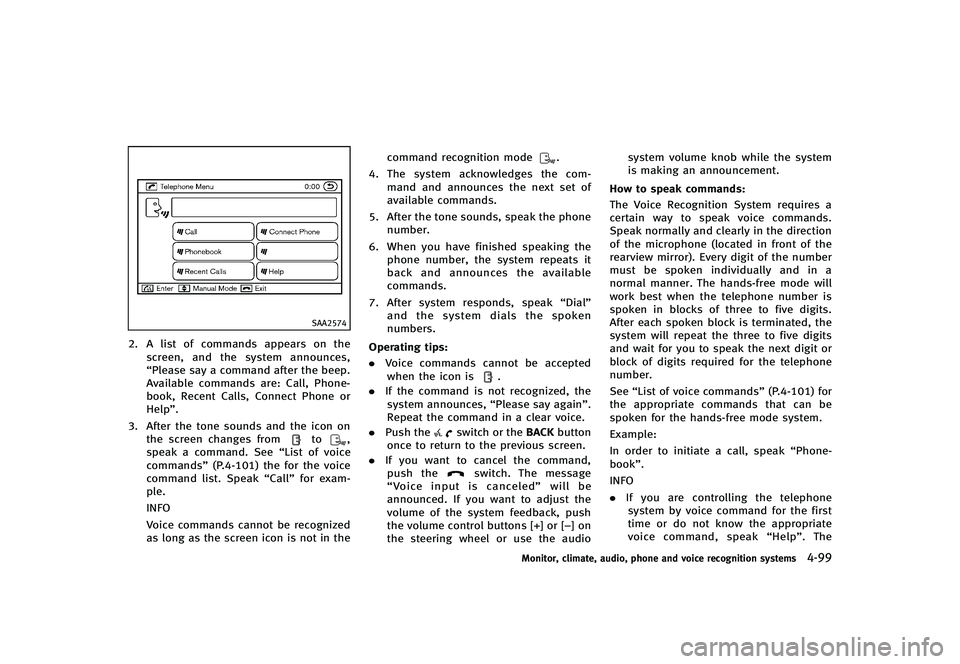
2. A list of commands appears on thescreen, and the system announces,
“Please say a command after the beep.
Available commands are: Call, Phone-
book, Recent Calls, Connect Phone or
Help”.
3. After the tone sounds and the icon on the screen changes from
to,
speak a command. See “List of voice
commands” (P.4-101) the for the voice
command list. Speak “Call”for exam-
ple.
INFO
Voice commands cannot be recognized
as long as the screen icon is not in the command recognition mode
.
4. The system acknowledges the com-
mand and announces the next set of
available commands.
5. After the tone sounds, speak the phone number.
6. When you have finished speaking the phone number, the system repeats it
back and announces the available
commands.
7. After system responds, speak “Dial”
and the system dials the spoken
numbers.
Operating tips:
GUID-D73A39BF-43C8-459F-9C24-47B7F579C407. Voice commands cannot be accepted
when the icon is.
. If the command is not recognized, the
system announces, “Please say again”.
Repeat the command in a clear voice.
. Push the
switch or the BACKbutton
once to return to the previous screen.
. If you want to cancel the command,
push the
switch. The message
“Voice input is canceled” will be
announced. If you want to adjust the
volume of the system feedback, push
the volume control buttons [+] or [−] on
the steering wheel or use the audio system volume knob while the system
is making an announcement.
How to speak commands:
GUID-D73A39BF-43C8-459F-9C24-47B7F579C407The Voice Recognition System requires a
certain way to speak voice commands.
Speak normally and clearly in the direction
of the microphone (located in front of the
rearview mirror). Every digit of the number
must be spoken individually and in a
normal manner. The hands-free mode will
work best when the telephone number is
spoken in blocks of three to five digits.
After each spoken block is terminated, the
system will repeat the three to five digits
and wait for you to speak the next digit or
block of digits required for the telephone
number.
See “List of voice commands” (P.4-101) for
the appropriate commands that can be
spoken for the hands-free mode system.
Example:
In order to initiate a call, speak “Phone-
book”.
INFO
. If you are controlling the telephone
system by voice command for the first
time or do not know the appropriate
voice command, speak “Help”. The
Monitor, climate, audio, phone and voice recognition systems4-99
Page 280 of 474
transmission in Park.
3. Press the
button.
4. Speak: “Help”. The system acknowl-
edges the command and announces
the next set of available commands.
5. Speak: "Voice Adaptation". The system acknowledges the command and dis-
plays the voice adaptation mode
screen.
6. Voice memory A or memory B is
selected automatically. If both memory
locations are already in use, the system
will prompt you to overwrite one.
Follow the instructions provided by
the system.
7. When preparation is complete and you are ready to begin, press the
button.
8. The voice adaptation mode will be
explained. Follow the instructions pro-
vided by the system.
9. When training is finished, the system will tell you an adequate number of
phrases have been recorded.
10. The system will ask you to say your name. Follow the instructions to regis-
ter your name. 11. The system will announce that voice
adaptation has been completed and
the system is ready.
The voice adaptation mode will stop if:
. The
button is pressed in voice
adaptation mode.
. The vehicle is driven during voice
adaptation mode.
. The ignition switch is placed in the OFF
or LOCK position.
GUID-9482D93A-37E1-4228-9ED9-F243DD54E8F2INFINITI Voice Recognition allows hands-
free operation of the Phone, Navigation,
Information and Audio systems in one of
two modes, Standard Mode or Alternate
Command Mode.
In Standard Mode, commands that are
available are always shown on the display
and announced by the system. You can
complete your desired operation by simply
following the prompts given by the system.
(See “INFINITI Voice Recognition Standard
Mode” (P.4-110) for details.)
For advanced operation, you can use the
Alternate Command Mode. (See “INFINITI
Voice Recognition Alternate Command
Mode” (P.4-123) for details.) When this
mode is active, an expanded list of
commands can be spoken after pushing
the TALK
switch, and the voice
command menu prompts are turned off.
Review the expanded command list, which
is available when this mode is active. Note
that in this mode the recognition success
rate may be affected as the number of
available commands and the ways of
speaking each command are increased.
To switch one mode to another, see each
mode description later in this section.
To improve the recognition success rate
Monitor, climate, audio, phone and voice recognition systems4-109
INFINITI VOICE RECOGNITION SYSTEM
(models with navigation system)