navigation system INFINITI G CONVERTIBLE 2013 Owner's Guide
[x] Cancel search | Manufacturer: INFINITI, Model Year: 2013, Model line: G CONVERTIBLE, Model: INFINITI G CONVERTIBLE 2013Pages: 466
Page 185 of 466

4-16Monitor, climate, audio, phone and voice recognition systems
JVH0176M
Switch beeps settings (models
without navigation system)
GUID-A803EAFD-720F-4B97-BB9E-657548A922BDThe“Switch Beeps” screen will appear
when pushing the SETTINGbutton, select-
ing the “Switch Beeps” key with the
INFINITI controller and pushing the ENTER
button.
Switch Beeps:
GUID-D73A39BF-43C8-459F-9C24-47B7F579C407When this item is turned to ON, you will
hear a beep sound when you use a button.
SAA2486
Display settings (models with na-
vigation system)
GUID-7BD4869A-A8CF-4C03-8764-77E943485D54The display as illustrated will appear when
pushing the SETTING button and selecting
the “Display” key.
Display Adjustment:
GUID-D73A39BF-43C8-459F-9C24-47B7F579C407To adjust the display settings, select the
“Display Adjustment” key. The following
settings are available.
. Display
To turn off the screen, push the ENTER
button and turn the “Display”indicator off.
The other method is to push and hold the
“
OFF” button for more than 2 seconds. When any mode button is pushed with the
screen off, the screen turns on for further
operation. The screen will turn off auto-
matically 5 seconds after the operation is
finished.
To turn on the screen, set this item to the
ON position, or push and hold the
“
OFF”button.
. Brightness/Contrast/Background Color
To adjust the brightness and contrast of
the screen, select the “Brightness”or
“Contrast” key.
Then, you can adjust the brightness and
the contrast using the INFINITI controller.
For information on the “Background Color”
key, refer to the separate Navigation
System Owner’s Manual.
Operating tips:
Depending on the driver’s seat positions or
the weather conditions, the display could
be hard to read. Adjust the brightness and
contrast of the display on the setting
screen.
Color Theme:
GUID-D73A39BF-43C8-459F-9C24-47B7F579C407Choose the theme color of the menu screen
from “Black”, “Brown” or“Silver”.
Page 186 of 466

SAA2115
DISPLAY settings (models without
navigation system)
GUID-A02BF618-E334-4CDF-9F21-9D53DB065CEBThe“Display” screen will appear when
pushing the SETTINGbutton, selecting
“Display” key with the INFINITI controller
and pushing the ENTERbutton.
Display:
GUID-D73A39BF-43C8-459F-9C24-47B7F579C407To turn off the screen, push the ENTER
button and turn the “ON”indicator off.
When any mode button is pushed with the
screen off, the screen turns on for further
operation. The screen will turn off auto-
matically 5 seconds after the operation is
finished. To turn on the screen, set this item to the
“ON”
position or push the “
OFF”
button.
Brightness/Contrast/Background Color:
GUID-D73A39BF-43C8-459F-9C24-47B7F579C407To adjust the brightness, contrast and
background color of the screen, select the
appropriate “Brightness”, “Contrast”or
“Background Color” key and push the
ENTER button.
Then, you can adjust the brightness and
the contrast using the INFINITI controller.
Switch the background color to the day-
time mode or the nighttime mode by
pushing the ENTERbutton.
SAA2487
Clock settings (models with navi-
gation system)
GUID-483D7699-0206-435F-A04E-5F827DC3C709The display as illustrated will appear when
pushing the SETTING button and selecting
the“Others” key, and then selecting the
“Clock” key.
The clock settings display cannot be
operated while driving. Stop the vehicle
in a safe place and apply the parking brake
before setting the clock.
On-screen Clock:
GUID-D73A39BF-43C8-459F-9C24-47B7F579C407When this item is turned to ON, a clock is
always displayed in the upper right corner
of the screen.
Monitor, climate, audio, phone and voice recognition systems4-17
Page 187 of 466

4-18Monitor, climate, audio, phone and voice recognition systems
This clock will indicate the time almost
exactly because it is always adjusted by
the GPS system.
Clock Format (24h):
GUID-D73A39BF-43C8-459F-9C24-47B7F579C407When this item is turned to ON, the 24-
hour clock is displayed. When this item is
not turned to ON, the 12-hour clock is
displayed.
Offset (hour)/(min) :
GUID-D73A39BF-43C8-459F-9C24-47B7F579C407Adjust the time by increasing or decreasing
per hour or per minute.
Daylight Saving Time:
GUID-D73A39BF-43C8-459F-9C24-47B7F579C407Turn this item to ON for daylight saving
time application.
Time Zone:
GUID-D73A39BF-43C8-459F-9C24-47B7F579C407Choose the time zone from the following.
.Pacific
. Mountain
. Central
. Eastern
. Atlantic
. Newfoundland
. Hawaii
. Alaska
SAA3019
Others settings (models with navi-
gation system)
GUID-BDC5A15D-5CE1-41CE-A30B-B3836DB2A1D8The Others settings display will appear
when pushing the SETTING button and
selecting the “Others”key.
The following items are available:
. Comfort
. Language & Units
. Voice Recognition
. Camera
. Sonar
. Image Viewer
SAA2488
Models with navigation system
JVH0262M
Models without navigation system
Page 188 of 466

Comfort settingsGUID-3238AFF2-4EEA-463B-A0F0-08AEDDEF52CCModels with navigation system:
The display illustrated will appear when
pushing the SETTING button, selecting the
“Others”key and then selecting the
“Comfort” key. This key does not appear
on the display until the ignition switch is
pushed to the ON position.
Models without navigation system:
The display illustrated will appear when
pushing the SETTING button and selecting
the “Comfort” key. This key does not
appear on the display until the ignition
switch is pushed to the ON position.
Auto Interior Illumination:
GUID-D73A39BF-43C8-459F-9C24-47B7F579C407When this item is turned to ON, the interior
lights will illuminate if any door is un-
locked.
Light Sensitivity:
GUID-D73A39BF-43C8-459F-9C24-47B7F579C407Adjust the sensitivity of the automatic
headlights higher (right) or lower (left).
Light Off Delay:
GUID-D73A39BF-43C8-459F-9C24-47B7F579C407Choose the duration of the automatic
headlight off timer from 0, 30, 45, 60, 90,
120, 150 and 180 second periods. Speed Sensing Wiper Interval (if so
equipped):
GUID-D73A39BF-43C8-459F-9C24-47B7F579C407When this item is turned to ON, the wiper
interval is adjusted automatically accord-
ing to the vehicle speed.
Selective Door Unlock:
GUID-D73A39BF-43C8-459F-9C24-47B7F579C407When this item is turned to ON, only the
driver’s door is unlocked first after the door
unlock operation. When the door handle
request switch on the driver’s or front
passenger’s side door is pushed to be
unlocked, only the corresponding door is
unlocked first. All the doors can be
unlocked if the door unlock operation is
performed again within 60 seconds.
When this item is turned to OFF, all the
doors will be unlocked after the door
unlock operation is performed once.
Intelligent Key Lock/Unlock:
GUID-D73A39BF-43C8-459F-9C24-47B7F579C407When this item is turned to ON, door lock/
unlock function by pushing the door
handle request switch will be activated.
Return All Settings to Default:
GUID-D73A39BF-43C8-459F-9C24-47B7F579C407Select this item and then select
“YES”to
return all settings to the default.
SAA2490
Models with navigation system
SAA1092
Models without navigation system
Monitor, climate, audio, phone and voice recognition systems4-19
Page 189 of 466

4-20Monitor, climate, audio, phone and voice recognition systems
Language & Units settingsGUID-E98A2D50-40AB-4094-BFF7-DEDA7425A04BThe Language & Units settings display will
appear when pushing the SETTING button,
selecting the“Language & Units” key with
the INFINITI controller and pushing the
ENTER button.
For models with the navigation system,
select the “Others”key to show the
“Language & Units” key.
Select Language:
GUID-D73A39BF-43C8-459F-9C24-47B7F579C407Select the “Select Language” key. Choose
“English”, “Français” or“Español” for your
favorite display appearance.
If you select the “Français”key, the French
language will be displayed, so please use
the French Owner’s Manual. To obtain a
French Owner’s Manual, see “Owner’s
manual/service manual order information”
(P.9-24).
Select Units:
GUID-D73A39BF-43C8-459F-9C24-47B7F579C407Select the “Select Units” key. Choose“US”
(Mile, 8F, MPG) or “Metric”(km,8C, L/100
km) for your favorite display appearance.
Voice Recognition settings (models
with navigation system)
GUID-BAC79DAD-7051-4BC9-B626-5346FD2A2EF9For details about the “Voice Recognition”
settings, see “INFINITI Voice Recognition system (models with navigation system)”
(P.4-103).
CAMERA settingsGUID-B7A2E6F7-CC74-41C8-AFB9-BDAC65679A9BThe
“CAMERA” screen will appear when
selecting the “Camera”key.
For the details about the camera system
operation, see “Rearview monitor” (P.4-
23).
JVH0141M
Models with navigation system
JVH0142M
Models without navigation system
Page 190 of 466
SONAR settings (if so equipped)GUID-6C6605B9-9B7E-4709-AEB4-341DEC2AEC71The“Sonar” screen will appear when
selecting the “Sonar”key with the INFINITI
controller and pushing the ENTERbutton.
For models with the navigation system,
select the “Others”key to show the
“Sonar” key.
For the details about the sonar system
operation, see “Sonar system” (P.5-48).
Sonar Display:
GUID-D73A39BF-43C8-459F-9C24-47B7F579C407When this item is turned ON, the corner/
center sonar indicator will appear when the
sonar detects rear obstacles near the
bumper.
Corner Sonar Sensitivity:
GUID-D73A39BF-43C8-459F-9C24-47B7F579C407Adjust the sensitivity level of the corner
sonar higher (right) or lower (left).
Center Sonar Sensitivity:
GUID-D73A39BF-43C8-459F-9C24-47B7F579C407Adjust the sensitivity level of the center
sonar higher (right) or lower (left).
SAA2491
Image Viewer (models with naviga-
tion system)
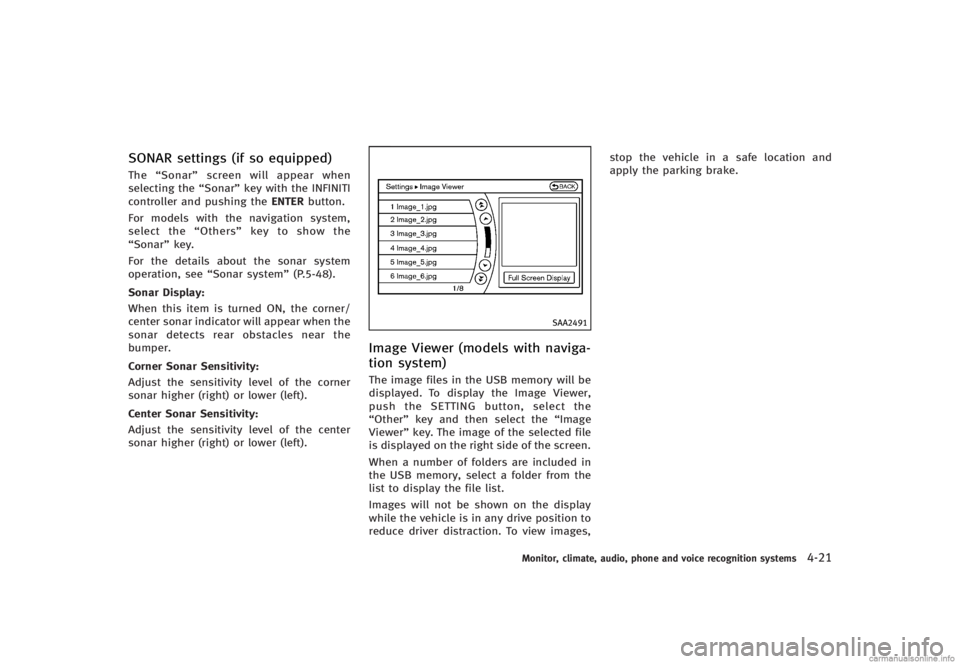
GUID-EFE3D40C-6D2C-4150-A2A4-47FD1A4C9E2FThe image files in the USB memory will be
displayed. To display the Image Viewer,
push the SETTING button, select the
“Other” key and then select the “Image
Viewer” key. The image of the selected file
is displayed on the right side of the screen.
When a number of folders are included in
the USB memory, select a folder from the
list to display the file list.
Images will not be shown on the display
while the vehicle is in any drive position to
reduce driver distraction. To view images, stop the vehicle in a safe location and
apply the parking brake.
Monitor, climate, audio, phone and voice recognition systems4-21
Page 197 of 466

4-28Monitor, climate, audio, phone and voice recognition systems
may hit the object when backing up to the
position
*Aif the object projects over the
actual backing up course.
SAA2404
Models with navigation system
SAA2606
Models without navigation system
PREDICTIVE COURSE LINE SETTINGSGUID-E5C9D048-FCE8-46BA-92C6-A0A4276A282BTo turn ON or OFF the predictive course line
display, push the SETTING button, select
the “Camera” key and push the ENTER
button.
For models with the navigation system,
select the “Others”key to show the
“Camera” key.
. Predictive Course Lines
When this item is turned to ON, the
predicted course lines will be displayed
on the monitor when the selector/shift
lever is in the “R”(Reverse) position.
HOW TO ADJUST SCREENGUID-58052633-8178-4228-807E-090B3C9AC6ACTo adjust the Display ON/OFF, Brightness,
Tint, Color, Contrast and Black Level of the
rearview monitor, push the SETTINGbutton
with the rearview monitor on, select the
“Display” key on the screen and select the
item key and adjust the level using the
INFINITI controller.
Do not adjust the Brightness, Tint, Color,
Contrast and Black Level of the rearview
monitor while the vehicle is moving. Make
sure the parking brake is firmly applied
and the engine is not running.
Page 200 of 466

SAA2723
Models with navigation system
SAA1520
Models without navigation systemYou can individually set the driver and front
passenger side temperature using each
temperature control button.
Monitor, climate, audio, phone and voice recognition systems4-31
Page 212 of 466
Gracenote and CDDB are registered trade-
marks of Gracenote. The Gracenote logo
and logotype, and the“Powered by Grace-
note” logo are trademarks of Gracenote.
LHA0484
DVD (Digital Versatile Disc) player
(models with navigation system)
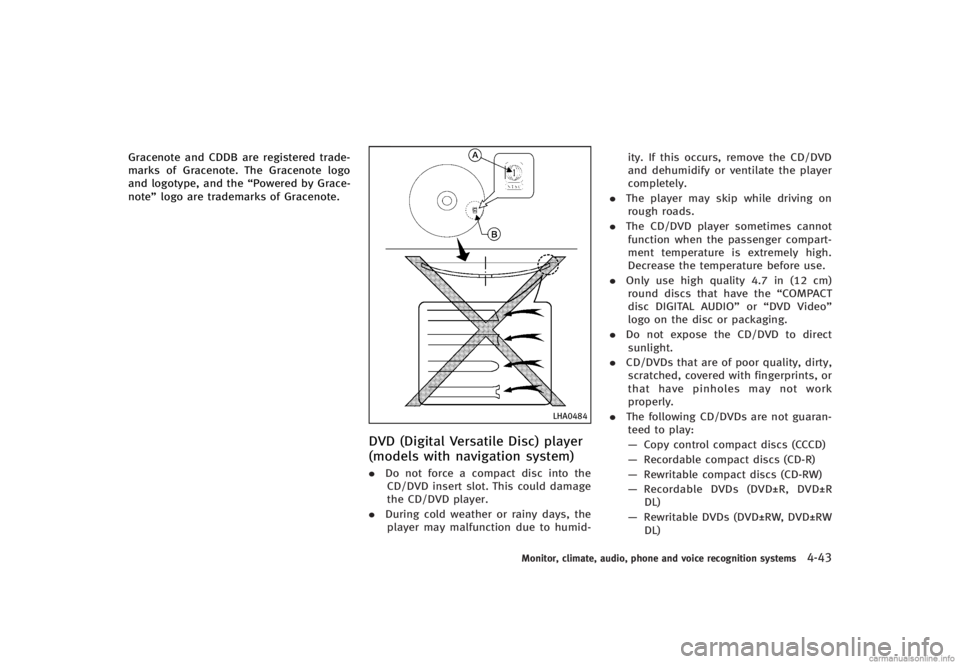
GUID-79FCB0CC-8C98-48C2-A229-368E7133E68C.Do not force a compact disc into the
CD/DVD insert slot. This could damage
the CD/DVD player.
. During cold weather or rainy days, the
player may malfunction due to humid- ity. If this occurs, remove the CD/DVD
and dehumidify or ventilate the player
completely.
. The player may skip while driving on
rough roads.
. The CD/DVD player sometimes cannot
function when the passenger compart-
ment temperature is extremely high.
Decrease the temperature before use.
. Only use high quality 4.7 in (12 cm)
round discs that have the “COMPACT
disc DIGITAL AUDIO” or“DVD Video”
logo on the disc or packaging.
. Do not expose the CD/DVD to direct
sunlight.
. CD/DVDs that are of poor quality, dirty,
scratched, covered with fingerprints, or
that have pinholes may not work
properly.
. The following CD/DVDs are not guaran-
teed to play:
— Copy control compact discs (CCCD)
— Recordable compact discs (CD-R)
— Rewritable compact discs (CD-RW)
— Recordable DVDs (DVD±R, DVD±R
DL)
— Rewritable DVDs (DVD±RW, DVD±RW
DL)
Monitor, climate, audio, phone and voice recognition systems4-43
Page 217 of 466
4-48Monitor, climate, audio, phone and voice recognition systems
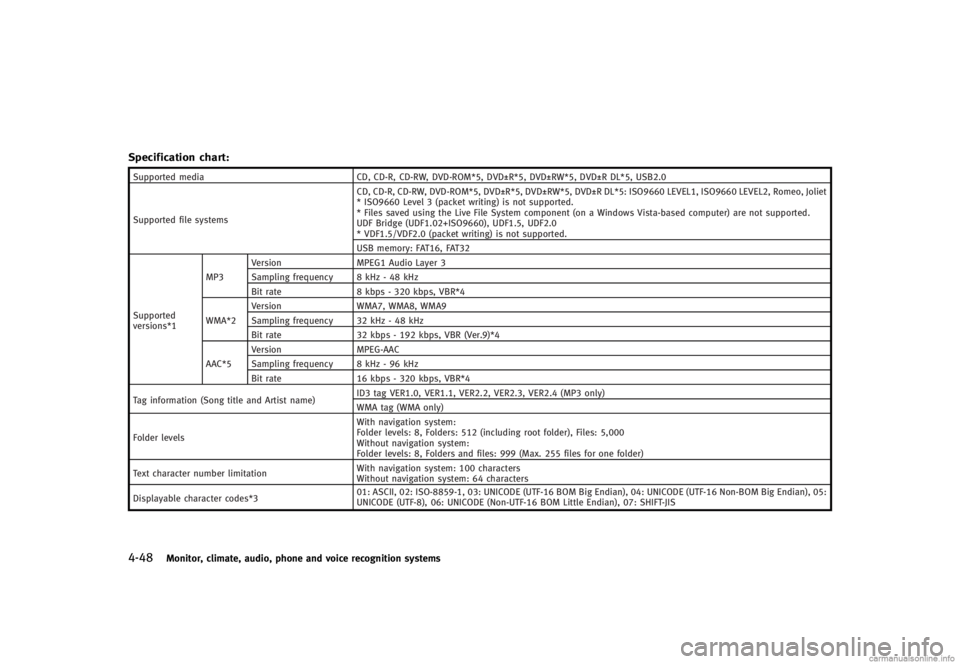
Specification chart:GUID-D73A39BF-43C8-459F-9C24-47B7F579C407
Supported mediaCD, CD-R, CD-RW, DVD-ROM*5, DVD±R*5, DVD±RW*5, DVD±R DL*5, USB2.0
Supported file systems CD, CD-R, CD-RW, DVD-ROM*5, DVD±R*5, DVD±RW*5, DVD±R DL*5: ISO9660 LEVEL1, ISO9660 LEVEL2, Romeo, Joliet
* ISO9660 Level 3 (packet writing) is not supported.
* Files saved using the Live File System component (on a Windows Vista-based computer) are not supported.
UDF Bridge (UDF1.02+ISO9660), UDF1.5, UDF2.0
* VDF1.5/VDF2.0 (packet writing) is not supported.
USB memory: FAT16, FAT32
Supported
versions*1 MP3
Version
MPEG1 Audio Layer 3
Sampling frequency 8 kHz - 48 kHz
Bit rate 8 kbps - 320 kbps, VBR*4
WMA*2 Version
WMA7, WMA8, WMA9
Sampling frequency 32 kHz - 48 kHz
Bit rate 32 kbps - 192 kbps, VBR (Ver.9)*4
AAC*5 Version
MPEG-AAC
Sampling frequency 8 kHz - 96 kHz
Bit rate 16 kbps - 320 kbps, VBR*4
Tag information (Song title and Artist name) ID3 tag VER1.0, VER1.1, VER2.2, VER2.3, VER2.4 (MP3 only)
WMA tag (WMA only)
Folder levels With navigation system:
Folder levels: 8, Folders: 512 (including root folder), Files: 5,000
Without navigation system:
Folder levels: 8, Folders and files: 999 (Max. 255 files for one folder)
Text character number limitation With navigation system: 100 characters
Without navigation system: 64 characters
Displayable character codes*3 01: ASCII, 02: ISO-8859-1, 03: UNICODE (UTF-16 BOM Big Endian), 04: UNICODE (UTF-16 Non-BOM Big Endian), 05:
UNICODE (UTF-8), 06: UNICODE (Non-UTF-16 BOM Little Endian), 07: SHIFT-JIS