ECU INFINITI G CONVERTIBLE 2013 Owner's Guide
[x] Cancel search | Manufacturer: INFINITI, Model Year: 2013, Model line: G CONVERTIBLE, Model: INFINITI G CONVERTIBLE 2013Pages: 466
Page 136 of 466

SPA2627
INTELLIGENT KEY OPERATING
RANGE
GUID-E5B325F3-D92E-46C8-977E-060661BBFAD8The Intelligent Key functions can only be
used when the Intelligent Key is within the
specified operating range from the request
switch
*1.When the Intelligent Key battery is dis-
charged or strong radio waves are present
near the operating location, the Intelligent
Key system’s operating range becomes
narrower, and the Intelligent Key may not
function properly.
The operating range is within 31.50 in (80
cm) from each request switch
*1.
If the Intelligent Key is too close to the door
glass, handle or rear bumper the request
switches may not function.
When the Intelligent Key is within the
operating range, it is possible for anyone
who does not carry the Intelligent Key to
push the request switch to lock/unlock the
doors and open the trunk lid.
SPA2407
DOOR LOCKS/UNLOCKS PRECAU-
TION
GUID-538EB34A-DF9E-48CD-9C8A-013FE3EB6AA1. Do not push the door handle request
switch with the Intelligent Key held in
your hand as illustrated. The close
distance to the door handle will cause
the Intelligent Key system to have
difficulty recognizing that the Intelli-
gent Key is outside the vehicle.
. After locking with the door handle
request switch, verify the doors are
securely locked by testing them.
. To prevent the Intelligent Key from
being left inside the vehicle or the
Pre-driving checks and adjustments3-9
Page 140 of 466

TROUBLESHOOTING GUIDEGUID-29A7D79F-A173-46A6-B8DB-EC3F296650B3
SymptomPossible causeAction to take
When pushing the ignition switch
to stop the engine The SHIFT P warning appears on the display
and the inside warning chime sounds con-
tinuously (Automatic Transmission models).
The selector lever is not in the P (Park)
position.
Shift the selector lever to the P (Park)
position.
When shifting the selector lever
to the P (Park) position. The inside warning chime sounds continu-
ously. The ignition switch is in the ACC or ON
position.
Push the ignition switch to the OFF position.
When opening the driver’s door to
get out of the vehicle The inside warning chime sounds continu-
ously. The ignition switch is in the ACC
position.
Push the ignition switch to the OFF position.
The Intelligent Key is in the Intelligent
Key port. Remove the Intelligent Key from the Intel-
ligent Key port.
When closing the door after get-
ting out of the vehicle The NO KEY warning appears on the display,
the outside chime sounds 3 times and the
inside warning chime sounds for a few
seconds.
The ignition switch is in the ACC or ON
position.
Push the ignition switch to the OFF position.
The SHIFT P warning appears on the display
and the outside chime sounds continuously
(Automatic Transmission models). The ignition switch is in the ACC or OFF
position and the selector lever is not in
the P (Park) position.Move the selector lever to the P (Park)
position and push the ignition switch to the
OFF position.
When closing the door with the
inside lock knob turned to LOCK The outside chime sounds for a few seconds
and all the doors unlock. The Intelligent Key is inside the vehicle
or trunk.
Carry the Intelligent Key with you.
When pushing the request switch
or LOCK
button on the
Intelligent Key to lock the door The outside chime sounds for a few seconds. The Intelligent Key is inside the vehicle
or trunk.
Carry the Intelligent Key with you.
A door is not closed securely. Close the door securely.
When closing the trunk lid The outside chime sounds for approximately
10 seconds and the trunk lid opens.
The Intelligent Key is inside the trunk.
Carry the Intelligent Key with you.
Pre-driving checks and adjustments3-13
Page 141 of 466

3-14Pre-driving checks and adjustments
GUID-5B7CF9BF-7A03-41EA-88AC-291D9B5AABFA
WARNING
The Intelligent Key transmits radio waves
when the buttons are pushed. The FAA
advises that the radio waves may affect
aircraft navigation and communication sys-
tems. Do not operate the Intelligent Key
while on an airplane. Make sure the buttons
are not operated unintentionally when the
unit is stored during a flight.
It is possible to lock/unlock all doors, fuel-
filler door, activate the panic alarm and
open the windows by pushing the buttons
on the Intelligent Key from outside the
vehicle.
Before locking the doors, make sure the
Intelligent Key is not left in the vehicle.
The LOCK/UNLOCK button on the Intelli-
gent Key can operate at a distance of
approximately 33 ft (10 m) from the
vehicle. (The effective distance depends
upon the conditions around the vehicle.)
As many as 4 Intelligent Keys can be used
with one vehicle. For information concern-
ing the purchase and use of additional
Intelligent Keys, contact an INFINITI retai-
ler.The lock and unlock buttons on the
Intelligent Key will not operate when:
.
the distance between the Intelligent Key
and the vehicle is over 33 ft (10 m).
. the Intelligent Key battery is dis-
charged.
After locking with the remote keyless entry
function, pull the door handle to make sure
the doors are securely locked.
The LOCK/UNLOCK operating range varies
depending on the environment. To securely
operate the lock and unlock buttons,
approach the vehicle to about 3 ft (1 m)
from the door.SPA2100
*1LOCK button
*2UNLOCK button
*3TRUNK button
*4PANIC button
HOW TO USE REMOTE KEYLESS
ENTRY SYSTEM
GUID-72F7A347-AFCB-4D69-AB0F-2AD301315111When you lock or unlock the doors or the
trunk lid, the hazard indicator will flash
and the horn (or the outside chime) will
sound as a confirmation. For details, see
“Setting hazard indicator and horn mode”
(P.3-16).
REMOTE KEYLESS ENTRY SYSTEM
Page 142 of 466

Locking doors and fuel-filler doorGUID-09809553-3B07-4862-B215-A1FF242834CD1. Push the ignition switch to the OFFposition and make sure you carry the
Intelligent Key with you.*
2. Close all the doors.
3. Push the LOCK
button*1on the
Intelligent Key.
4. All the doors and fuel-filler door will lock.
5. The hazard indicator flashes twice and the horn chirps once.
*: Doors will lock with the Intelligent Key
while the ignition switch is in the ACC or
ON position.
Operate the door handles to confirm that
the doors have been securely locked.
Unlocking doors and fuel-filler doorGUID-B7124241-FD3A-4997-9928-A746875E388B1. Push the UNLOCKbutton*2on the
Intelligent Key once.
2. The hazard indicator flashes once. The driver’s door and fuel-filler door will
unlock.
3. Push the UNLOCK
button on the
Intelligent Key again within 5 seconds.
4. The hazard indicator flashes once
again. All the doors will unlock. All doors will be locked automatically
unless one of the following operations is
performed within 1 minute after pushing
the UNLOCK button on the Intelligent Key
while the doors are locked. If during this 1-
minute time period, the UNLOCK button on
the Intelligent Key is pushed, all doors will
be locked automatically after another 1
minute.
.
Opening any door
. Pushing the ignition switch
. Inserting the Intelligent Key into the
Intelligent Key port. During this 1
minute time period, if the UNLOCK
button on the Intelligent Key is
pushed, all doors will be locked auto-
matically after another 1 minute.
Opening windowsGUID-3A460518-A39A-4053-97C5-4C9A78B9DAC6The UNLOCKbutton*2operation also
allows you to open the window that is
equipped with the automatic open func-
tion. This function will not operate while
the window timer is activated or the
windows need to be initialized. (See
“Power windows” (P.2-48).)
To open the window, push the UNLOCK
button on the Intelligent Key for about 3
seconds after the door is unlocked. To stop opening, release the UNLOCK
button.
If the window open operation is stopped
on the way while pushing the UNLOCK
button, release and push the UNLOCKbutton again until the window opens
completely.
Window cannot be closed using the In-
telligent Key.
The door window can also be operated by
turning the mechanical key in a door lock.
(See
“Doors” (P.3-5).)
Opening trunk lidGUID-A58D9955-697C-486A-B1F1-A517923ECD681. Push the TRUNK*3button on the
Intelligent Key for more than 1 second.
2. The trunk will unlatch.
3. Raise the trunk lid to open the trunk.
Using panic alarmGUID-F5755412-6D53-4825-A62F-7FCB9A73C172If you are near your vehicle and feel
threatened, you may activate the alarm to
call attention as follows:
1. Push the PANIC
button*4on the
key for more than 1 second.
2. The theft warning alarm and headlights will stay on for 25 seconds.
Pre-driving checks and adjustments3-15
Page 144 of 466
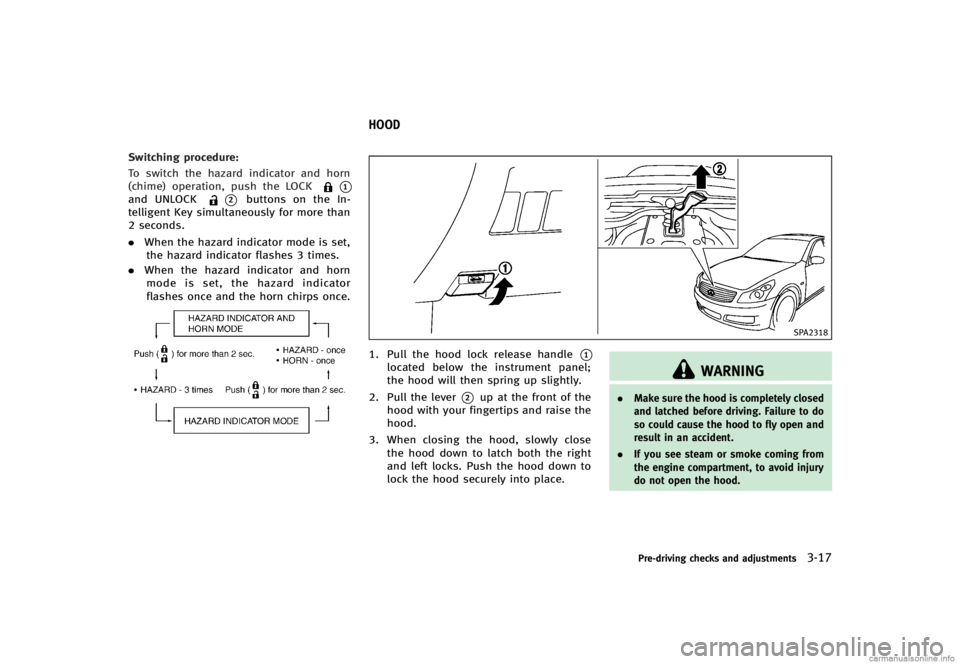
Switching procedure:GUID-D73A39BF-43C8-459F-9C24-47B7F579C407To switch the hazard indicator and horn
(chime) operation, push the LOCK
*1and UNLOCK*2buttons on the In-
telligent Key simultaneously for more than
2 seconds.
. When the hazard indicator mode is set,
the hazard indicator flashes 3 times.
. When the hazard indicator and horn
mode is set, the hazard indicator
flashes once and the horn chirps once.
NOS1695
GUID-6FD342D9-5391-4063-A924-1963761E8ECE
SPA2318
1. Pull the hood lock release handle*1located below the instrument panel;
the hood will then spring up slightly.
2. Pull the lever
*2up at the front of the
hood with your fingertips and raise the
hood.
3. When closing the hood, slowly close the hood down to latch both the right
and left locks. Push the hood down to
lock the hood securely into place.
WARNING
. Make sure the hood is completely closed
and latched before driving. Failure to do
so could cause the hood to fly open and
result in an accident.
. If you see steam or smoke coming from
the engine compartment, to avoid injury
do not open the hood.
Pre-driving checks and adjustments3-17
HOOD
Page 147 of 466

3-20Pre-driving checks and adjustments
.Do not sit or place excessive weight on
the top, rear parcel shelf, side flaps and
trunk lid, especially when the retractable
hard top is being operated. The retract-
able hard top may be damaged.
. Do not drive the vehicle with the
retractable hard top partially opened.
Always make sure the retractable hard
top is either fully opened or closed
before driving.
. Secure items so that they cannot be
blown from the vehicle while driving
with the retractable hard top open.
. Do not install a roof rack or a roof carrier
on the retractable hard top. The retract-
able hard top or the roof rack or both
may be damaged when the retractable
hard top is operated.
WHEN OPERATING THE RETRACT-
ABLE HARD TOP
GUID-AA5AF5D3-9820-4D1A-9A9F-5E4E3E83A5A1
WARNING
Keep hands and other parts of the body
away from moving parts such as the
retractable hard top, rear parcel shelf, side flaps, trunk lid and power windows.
CAUTION
Do not place any items in the storage space
for the retractable hard top. A caution label
is attached on the floor in the retractable
hard top storage space. Cargo that contacts
the retractable hard top may damage the
retractable hard top or cargo.
NOTE:
In case of low battery or low temperature,
the retractable hard top may temporarily
stop moving during the operation. This
functions to protect the retractable hard
top control mechanism, and it is not a
malfunction.
If the retractable hard top is opened and
closed repeatedly in a short period of time,
it may stop moving to protect the retract-
able hard top motor. Wait for approxi-
mately 20 minutes before operating the
retractable hard top again.
SPA2629
SeparatorGUID-83A92634-945B-453E-8C58-67DD737CA829The retractable hard top can be operated
only when the trunk room is separated.
1.
Pull the strap
*Aand open the
separator.
Page 150 of 466

SPA2632
OPENING THE RETRACTABLE HARD
TOP
GUID-00A58FA9-FC69-4FF9-9EA5-89D8C203F4DF1. Make sure the trunk lid is securelyclosed before operating the retractable
hard top.
2. Apply the parking brake and move the selector lever to the P (Park) position
(for the automatic transmission mod-
els) or the shift lever to the N (Neutral)
position (for the manual transmission
models).
3. Start the engine.
4. Push the OPEN side of the retractable hard top operating switch and hold it until the retractable hard top is fully
opened.
.When the OPEN side of the retract-
able hard top operating switch is
pushed a beep sounds.
.“ROOF IN OPERATION” is displayed
on the dot matrix liquid crystal
display while the retractable hard
top is in motion.
.The windows will automatically be fully opened.
5. Release the switch when the retractable hard top is fully opened.
.When the retractable hard top isfully opened, a beep sounds.
.“ROOF OPEN” is displayed on the
dot matrix liquid crystal display
when the retractable hard top is
fully opened.
CAUTION
Be sure to fully open or fully close the
retractable hard top and do not stop using
the operating switch half way through the
roof opening or closing process. If the
retractable hard top is only partially opened,
significant damage to the retractable hard top could occur.
Pre-driving checks and adjustments3-23
Page 151 of 466

3-24Pre-driving checks and adjustments
SPA2633
CLOSING THE RETRACTABLE HARD
TOP
GUID-6380BF2E-AD66-4E24-BB7B-723C7144E5A51. Make sure the trunk lid is securelyclosed before operating the retractable
hard top.
2. Apply the parking brake and move the selector lever to the P (Park) position
(for the automatic transmission mod-
els) or the shift lever to the N (Neutral)
position (for the manual transmission
models).
3. Start the engine.
4. Push the CLOSE side of the retractable hard top operating switch and hold it until the retractable hard top is fully
closed.
.When the CLOSE side of the retract-
able hard top operating switch is
pushed a beep sounds.
.“ROOF IN OPERATION” is displayed
on the dot matrix liquid crystal
display while the retractable hard
top is in motion.
.The windows will automatically be fully opened.
5. Release the switch when the retractable hard top is fully closed.
.When the retractable hard top isfully closed, a beep sounds.
.“ROOF CLOSED” is displayed on the
dot matrix liquid crystal display
when the retractable hard top is
fully closed.
IF THE RETRACTABLE HARD TOP
DOES NOT OPEN OR CLOSE ELEC-
TRICALLY
GUID-CA52037D-865A-4730-AF0F-BCB66DFF1FA1If you cannot operate the retractable hard
top with the operating switch, first check
whether all the following operating condi-
tions are satisfied.
. The vehicle is stopped .
The engine is running
. The separator is fixed in the position
separating the roof storage area and
the trunk room
. Make sure that no objects interfere with
the rear parcel shelf, the side flaps and
the retractable hard top.
. The trunk lid is closed
If the retractable hard top still does not
move under the above conditions or has
any system malfunction, see an INFINITI
retailer as soon as possible.
WARNING
. Do not drive with the retractable hard
top partially opened.
. When the buzzer continuously sounds
while the vehicle is being driven, im-
mediately park the car in a safe location
and check that the retractable hard top
is not partially open
. If the retractable hard top cannot be
operated properly, see an INFINITI retai-
ler as soon as possible to have your
vehicle checked.
Page 157 of 466

3-30Pre-driving checks and adjustments
SPA2634
INTERIOR TRUNK LID RELEASEGUID-43118355-A2BE-47B2-AE4B-C9EDBD8FE3F1
WARNING
Closely supervise children when they are
around cars to prevent them from playing
and becoming locked in the trunk where
they could be seriously injured. Keep the car
locked, with the trunk lid securely latched,
when not in use, and prevent children’s
access to Intelligent Keys.
The interior trunk lid release mechanism
allows opening of the trunk lid in the eventthat people become locked inside the trunk
or in the event of the loss of electrical
power such as a discharged battery.
Releasing inside the trunkGUID-8700F542-4FA5-4066-91EE-6957D524695DTo open the trunk lid from the inside, pull
the release handle
*1until the lock
releases and push up on the trunk lid.
The release lever is made of a material that
glows in the dark after a brief exposure to
ambient light.
The handle is located on the back of the
trunk lid as illustrated.
GUID-0B58B360-FD80-4B88-B0A2-7C0660E6CFD7
JVP0104X
INFINITI Performance Line model
The INFINITI Performance Line model has
unique exhaust pipes. These parts are
close to the ground and may be damaged
if they contact objects such as parking
blocks, etc.
CAUTION
Reduce vehicle speed to decrease the
possibility of damaging these parts when:
. driving on bumpy or rutted roads
. entering or exiting parking garages and
driveways
UNIQUE REAR PARTS (INFINITI Performance
Line model)
Page 159 of 466

3-32Pre-driving checks and adjustments
.Push the power door lock switch to the
UNLOCK position.
To lock, close the fuel-filler door securely
and lock all doors by operating the door
handle request switch, the LOCK button on
the Intelligent Key, the mechanical key or
the power door lock switch.
FUEL-FILLER CAPGUID-89BF0D62-77EE-4D19-9216-2EC6C908A6D1
WARNING
. Gasoline is extremely flammable and
highly explosive under certain condi-
tions. You could be burned or seriously
injured if it is misused or mishandled.
Always stop engine and do not smoke or
allow open flames or sparks near the
vehicle when refueling.
. Do not attempt to top off the fuel tank
after the fuel pump nozzle shuts off
automatically. Continued refueling may
cause fuel overflow, resulting in fuel
spray and possibly a fire.
. Use only an original equipment type
fuel-filler cap as a replacement. It has a
built-in safety valve needed for proper
operation of the fuel system and emis-
sion control system. An incorrect cap can result in a serious malfunction and
possible injury. It could also cause the
malfunction indicator light to come on.
. Never pour fuel into the throttle body to
attempt to start your vehicle.
. Do not fill a portable fuel container in
the vehicle or trailer. Static electricity
can cause an explosion of flammable
liquid, vapor or gas in any vehicle or
trailer. To reduce the risk of serious
injury or death when filling portable fuel
containers:—Always place the container on the
ground when filling.
—Do not use electronic devices whenfilling.
—Keep the pump nozzle in contactwith the container while you are
filling it.
—Use only approved portable fuelcontainers for flammable liquid.
CAUTION
. If fuel is spilled on the vehicle body,
flush it away with water to avoid paint damage.
. Insert the cap straight into the fuel-filler
tube, then tighten until a single click is
heard. Failure to tighten the fuel-filler
cap properly may cause the
mal-
function indicator light (MIL) to illumi-
nate. If the
light illuminates
because the fuel-filler cap is loose or
missing, tighten or install the cap and
continue to drive the vehicle. The
light should turn off after a few driving
trips. If thelight does not turn off
after a few driving trips, have the vehicle
inspected by an INFINITI retailer.
. The LOOSE FUEL CAP warning will appear
if the fuel-filler cap is not properly
tightened. It may take a few driving
trips for the message to be displayed.
Failure to tighten the fuel-filler cap
properly after the LOOSE FUEL CAP
warning appears may cause the
Malfunction Indicator Light (MIL) to
illuminate.