trunk INFINITI G COUPE 2013 Owner's Manual
[x] Cancel search | Manufacturer: INFINITI, Model Year: 2013, Model line: G COUPE, Model: INFINITI G COUPE 2013Pages: 490, PDF Size: 7.25 MB
Page 17 of 490

0-10Illustrated table of contents
GUID-6A5E5003-C9B2-4452-B103-DD9F44DAD191
SIC4683
1. Vehicle Dynamic Control (VDC) OFFswitch (P.5-56)
2. Trunk lid release switch (P.3-18)
3. Sonar system off switch (if so
equipped) (P.5-51) 4. Instrument brightness control switch
(P.2-38)
5. TRIP/RESET switch for twin trip od- ometer (P.2-7)
6. Headlight, fog light and turn signal switch (P.2-34) 7. Paddle shifter (if so equipped) (P.5-16)
8. Steering-wheel-mounted controls (left
side)
—ENTER or tuning switch (P.4-83)
— BACK switch (P.4-83)
— TALK switch (if so equipped)
(P.4-110)/Phone switch (if so
equipped) (P.4-85, 4-96)
— Volume control switches (P.4-83)
— Source select switch (P.4-83)
9. Trip computer switch (P.2-26)
10. Windshield wiper and washer switch (P.2-31)
11. Steering-wheel-mounted controls
(right side)
—Cruise control switches (P.5-22)
— Intelligent Cruise Control (ICC)
switches (if so equipped) (P.5-24)
12. Hood release handle (P.3-17)
13. Intelligent Key port (P.5-12)
14. Electric tilting/telescopic steering
wheel lever (if so equipped) (P.3-25)
15. Manual tilting/telescopic steering
wheel lever (if so equipped) (P.3-25)
16. Steering wheel —Horn (P.2-40)
— Driver supplemental air bag
(P.1-42)
COCKPIT
Page 19 of 490

0-12Illustrated table of contents
19. Glove box lid release handle (P.2-48)
20. Trunk release power cancel switch(P.3-19)
*: Refer to the separate Navigation
System Owner’s Manual.
Page 30 of 490
WARNING
.Never allow anyone to ride in the cargo
area or on the rear seat when it is in the
fold-down position. Use of these areas
by passengers without proper restraints
could result in serious injury in an
accident or sudden stop.
. Properly secure all cargo with ropes or
straps to help prevent it from sliding or
shifting. Do not place cargo higher than
the seatbacks. In a sudden stop or
collision, unsecured cargo could cause
personal injury.
. When returning the seatbacks to the
upright position, be certain they are
completely secured in the latched posi-
tion. If they are not completely secured,
passengers may be injured in an acci-
dent or sudden stop.
. Closely supervise children when they are
around cars to prevent them from play-
ing and becoming locked in the trunk
where they could be seriously injured.
Keep the car locked, with the rear seatback and trunk lid securely latched
when not in use, and prevent children’s
access to car keys.
The rear seatback can be folded according
to the following procedure.
Safety
—Seats, seat belts and supplemental restraint system1-7
Page 31 of 490

1-8Safety—Seats, seat belts and supplemental restraint system
SSS0220A
To fold from the trunk:GUID-D73A39BF-43C8-459F-9C24-47B7F579C407
SSS0219A
3. Fold the rear seatback down*2.
SPA2122
To fold from the rear seat:GUID-D73A39BF-43C8-459F-9C24-47B7F579C407
Page 36 of 490

JVR0094X
HEAD RESTRAINTS (rear seats)GUID-B8D1E43A-60E3-4596-8C90-3AD0A747EA63
Indicates the seating position is
equipped with a head restraint.
SSS0678
ARMREST (if so equipped)GUID-A816B76C-44C8-4E8F-8A10-1B4F0B8E76F2
SSS0677
Trunk pass-throughGUID-799B2734-1032-4868-BF9B-86682A7F09A9
Page 84 of 490

GUID-A9682D04-AAAB-465F-98B6-B6532C9F1362
SIC4683
1. Vehicle Dynamic Control (VDC) OFFswitch (P.5-56)
2. Trunk lid release switch (P.3-18)
3. Sonar system off switch (if so
equipped) (P.5-51) 4. Instrument brightness control switch
(P.2-38)
5. TRIP/RESET switch for twin trip od- ometer (P.2-7)
6. Headlight, fog light and turn signal switch (P.2-34) 7. Paddle shifter (if so equipped) (P.5-16)
8. Steering-wheel-mounted controls (left
side)
—ENTER or tuning switch (P.4-83)
— BACK switch (P.4-83)
— TALK switch (if so equipped)
(P.4-110)/Phone switch (if so
equipped) (P.4-85, 4-96)
— Volume control switches (P.4-83)
— Source select switch (P.4-83)
9. Trip computer switch (P.2-26)
10. Windshield wiper and washer switch (P.2-31)
11. Steering-wheel-mounted controls
(right side)
—Cruise control switches (P.5-22)
— Intelligent Cruise Control (ICC)
switches (if so equipped) (P.5-24)
12. Hood release handle (P.3-17)
13. Intelligent Key port (P.5-12)
14. Electric tilting/telescopic steering
wheel lever (if so equipped) (P.3-25)
15. Manual tilting/telescopic steering
wheel lever (if so equipped) (P.3-25)
16. Steering wheel —Horn (P.2-40)
— Driver supplemental air bag
(P.1-42)
Instruments and controls2-3
COCKPIT
Page 86 of 490

19. Glove box lid release handle (P.2-48)
20. Trunk release power cancel switch(P.3-19)
*: Refer to the separate Navigation
System Owner’s Manual.
Instruments and controls2-5
Page 133 of 490
2-52Instruments and controls
SIC3317
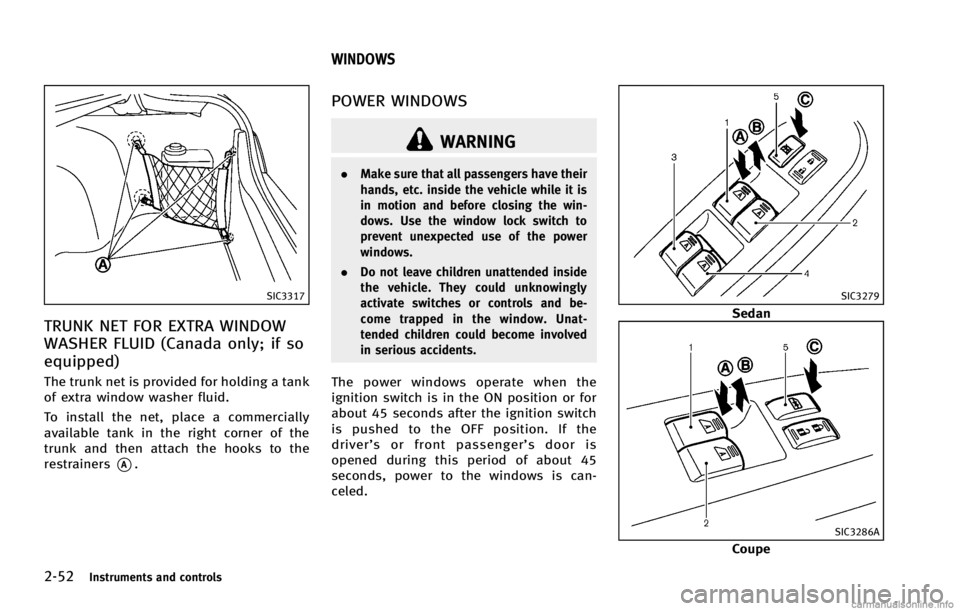
TRUNK NET FOR EXTRA WINDOW
WASHER FLUID (Canada only; if so
equipped)
GUID-C4EA0611-9808-405C-81D9-C1507293FB46
WARNING
.Make sure that all passengers have their
hands, etc. inside the vehicle while it is
in motion and before closing the win-
dows. Use the window lock switch to
prevent unexpected use of the power
windows.
. Do not leave children unattended inside
the vehicle. They could unknowingly
activate switches or controls and be-
come trapped in the window. Unat-
tended children could become involved
in serious accidents.
The power windows operate when the
ignition switch is in the ON position or for
about 45 seconds after the ignition switch
is pushed to the OFF position. If the
driver’s or front passenger’s door is
opened during this period of about 45
seconds, power to the windows is can-
celed.
SIC3279
Sedan
SIC3286A
Coupe
WINDOWS
Page 140 of 490

WARNING
.Do not use the HomeLink®Universal
Transceiver with any garage door opener
that lacks safety stop and reverse
Instruments and controls2-59
TRUNK LIGHT HomeLink®UNIVERSAL TRANSCEIVER (if so
equipped)
Page 152 of 490
GUID-E775A3D7-CE8E-4FE0-9FB8-238232937EE5
WARNING
.Radio waves could adversely affect
electric medical equipment. Those who
use a pacemaker should contact the
electric medical equipment manufacturer
for the possible influences before use.
. The Intelligent Key transmits radio
waves when the buttons are pushed.
The FAA advises that the radio waves
may affect aircraft navigation and com-
munication systems. Do not operate the
Intelligent Key while on an airplane.
Make sure the buttons are not operated
unintentionally when the unit is stored
during a flight.
The Intelligent Key system can operate all
the doors and the trunk lid using the
remote controller function or pushing the
request switch on the vehicle without
taking the key out from a pocket or purse.
The operating environment and/or condi-
tions may affect the Intelligent Key system
operation.
Be sure to read the following before using
the Intelligent Key system.
CAUTION
.Be sure to carry the Intelligent Key with
you when operating the vehicle.
. Never leave the Intelligent Key in the
vehicle when you leave the vehicle.
The Intelligent Key is always communicat-
ing with the vehicle as it receives radio
waves. The Intelligent Key system trans-
mits weak radio waves. Environmental
conditions may interfere with the operation
of the Intelligent Key system under the
following operating conditions.
.When operating near a location where
strong radio waves are transmitted,
such as a TV tower, power station and
broadcasting station.
. When in possession of wireless equip-
ment, such as a cellular telephone,
transceiver, and CB radio.
. When the Intelligent Key is in contact
with or covered by metallic materials.
. When any type of radio wave remote
control is used nearby.
. When the Intelligent Key is placed near
an electric appliance such as a perso- nal computer.
. When the vehicle is parked near a
parking meter.
In such cases, correct the operating condi-
tions before using the Intelligent Key
function or use the mechanical key.
Although the life of the battery varies
depending on the operating conditions,
the battery’s life is approximately 2 years.
If the battery is discharged, replace it with
a new one.
When the Intelligent Key battery is almost
discharged, insert the Intelligent Key into
the Intelligent Key port to start the engine.
Replace the discharged battery with a new
one as soon as possible. For more details,
see “Push-button ignition switch” (P.5-9).
Since the Intelligent Key is continuously
receiving radio waves, if the key is left near
equipment which transmits strong radio
waves, such as signals from a TV and
personal computer, the battery life may
become shorter.
For information regarding replacement of a
battery, see “Intelligent Key battery repla-
cement” (P.8-27).
As many as 4 Intelligent Keys can be
registered and used with one vehicle. For
Pre-driving checks and adjustments3-7
INTELLIGENT KEY SYSTEM