instrument panel INFINITI G35 2003 Owners Manual
[x] Cancel search | Manufacturer: INFINITI, Model Year: 2003, Model line: G35, Model: INFINITI G35 2003Pages: 256, PDF Size: 3.37 MB
Page 17 of 256

PRECAUTIONS ON
SUPPLEMENTAL RESTRAINT
SYSTEM This Supplemental Restraint System (SRS)
section contains important information con-
cerning the driver and passenger front impact
supplemental air bags, front seat side-impact
supplemental air bags, curtain air bags and
front seat pre-tensioner seat belts.
Supplemental front impact air bag system:
This system can help cushion the impact force
to the face and chest of the driver and front
passenger in certain frontal collisions.
Supplemental side-impact air bag system:
This system can help cushion the impact force
to the chest area of the driver and front pas-
senger in certain side impact collisions. The
front seat side-impact supplemental air bags
are designed to inflate on the side where the
vehicle is impacted.
Supplemental curtain side-impact air bag
system: This system can help cushion the
impact force to the head of occupants in front
and rear outboard seating positions in certain
side impact collisions. The curtain side-impact
air bags are designed to inflate on the side
where the vehicle is impacted.
These supplemental restraint systems are de-
signed to supplement the crash protection provided by the driver and passenger seat
belts and are not a substitute for them. Seat
belts should always be correctly worn and the
occupant seated a suitable distance away
from the steering wheel, instrument panel and
door finishers. (See ªSeat beltsº later in this
section for instructions and precautions on
seat belt usage.)
After turning the ignition key to the ON
position, the supplemental air bag warning
light illuminates. The supplemental air bag
warning light will turn off after about 7
seconds if the systems are operational.SUPPLEMENTAL RESTRAINT
SYSTEM
Seats, restraints and supplemental air bag systems
1-11
Z 02.7.29/V35-D/V5.0
X
Page 18 of 256

WARNINGO The supplemental front air bags ordi-
narily will not inflate in the event of a
side impact, rear impact, roll over, or
lower severity frontal collision. Al-
ways wear your seat belts to help
reduce the risk or severity of injury in
various kinds of accidents.
O The seat belts and the supplemental
front air bags are most effective when you are sitting well back and upright
in the seat. Front air bags inflate with
great force. If you are unrestrained,
leaning forward, sitting sideways or
out of position in any way, you are at
greater risk of injury or death in a
crash. You may also receive serious
or fatal injuries from the supplemen-
tal front air bag if you are up against
it when it inflates. Always sit back
against the seatback and as far away
as practical from the steering wheel or instrument panel. Always
use the seat belts.
O The driver and front passenger seat
belt buckles are equipped with sen-
sors that detect if the seat belts are
fastened. The air bag system moni-
tors the severity of a collision and
then inflates the air bags based on
belt usage. Failure to properly wear
seat belts can increase the risk or
severity of injury in an accident.
O Keep hands on the outside of the
steering wheel. Placing them inside
the steering wheel rim could increase
the risk that they are injured when the
supplemental front air bag inflates. SSS0131
1-12 Seats, restraints and supplemental air bag systems
Z 02.7.29/V35-D/V5.0
X
Page 24 of 256

The driver supplemental air bag is located in
the center of the steering wheel; the front
passenger supplemental air bag is mounted in
the instrument panel above the glove box.
These systems are designed to meet optional
certification requirements under U.S. regula- tions. They are also permitted in Canada. The
optional certification allows front air bags to be
designed to inflate somewhat less forcefully
than previously. However, all of the informa-
tion, cautions and warnings in this manual
still apply and must be followed. The front air bags are designed to inflate in higher
severity frontal collisions, although they may
inflate if the forces in another type of collision
are similar to those of a higher severity frontal
impact. They may not inflate in certain frontal
collisions. Vehicle damage (or lack of it) is not
always an indication of proper supplemental
air bag operation.
The supplemental air bag system has dual
stage inflators for both the driver and passen-
ger air bags. The system monitors information
from the crash zone sensor, the diagnosis
sensor unit and seat belt buckle sensors that
detect if the seat belts are fastened, inflator
operation is based on the severity of a collision
and whether the seat belts are being used.
Only one front air bag may inflate in a crash,
depending on the crash severity and whether
the front occupants are belted or unbelted.
This does not indicate improper performance
of the system. If you have any questions about
the performance of your air bag system,
please contact your INFINITI retailer.
When the supplemental front air bag inflates, a
fairly loud noise may be heard, followed by
release of smoke. This smoke is not harmful
and does not indicate a fire. Care should be
taken not to inhale it, as it may cause irritation
and choking. Those with a history of a breath- SSS0221
1-18 Seats, restraints and supplemental air bag systems
Z 02.7.29/V35-D/V5.0
X
Page 25 of 256
ing condition should get fresh air promptly.
Supplemental front air bags, along with the
use of seat belts, helps to cushion the impact
force on the face and chest of the front occu-
pants. They can help save lives and reduce
serious injuries. However, an inflating front air
bag may cause facial abrasions or other inju-
ries. Front air bags do not provide restraint to
the lower body.
The seat belts should be correctly worn and
the driver and passenger seated upright as far
as practical away from the steering wheel or
instrument panel. The supplemental front air
bags inflates quickly in order to help protect
the front occupants. Because of this, the force
of the front air bag inflating can increase the
risk of injury if the occupant is too close to, or
is against, the air bag module during inflation.
The air bag will deflate quickly after the colli-
sion is over.
After turning the ignition key to the ON
position, the supplemental air bag warning
light illuminates. The supplemental air bag
warning light will turn off after about 7
seconds if the system is operational. WARNING O Do not place any objects on the steer-
ing wheel pad or on the instrument
panel. Also, do not place any objects
between any occupant and the steer-
ing wheel or instrument panel. Such
objects may become dangerous pro-
jectiles and cause injury if the supple-
mental front air bag inflates.
O Right after inflation, several air bag
system components will be hot. Do
not touch them; you may severely
burn yourself.
O No unauthorized changes should be
made to any components or wiring of
the supplemental front air bag sys-
tem. This is to prevent accidental
inflation of the air bag or damage to
the air bag system.
O Do not make unauthorized changes
to your vehicle's electrical system,
suspension system or front end
structure. This could affect proper operation of the supplemental air bag
system.
O Tampering with the supplemental
front air bag system may result in
serious personal injury. Tampering
includes changes to the steering
wheel and the instrument panel as-
sembly by placing material over the
steering wheel pad, above the dash-
board, or by installing additional trim
material around the air bag system.
O Work around and on the supplemen-
tal front air bag system should be
done by an authorized INFINITI re-
tailer. Installation of electrical equip-
ment should also be done by an au-
thorized INFINITI retailer. The yellow
and orange Supplemental Restraint
System (SRS) wiring and connectors
should not be modified or discon-
nected. Unauthorized electrical test
equipment and probing devices
should not be used on the air bag
system.
Seats, restraints and supplemental air bag systems
1-19
Z 02.7.29/V35-D/V5.0
X
Page 29 of 256

SUPPLEMENTAL AIR BAG
WARNING LABELS Warning labels about the supplemental air bag
system are placed in the vehicle as shown in
the illustration.
SUPPLEMENTAL AIR BAG
WARNING LIGHT The supplemental air bag warning light, dis-
playing in the instrument panel, monitors
the circuits of the supplemental front air bag,
supplemental side air bag and curtain side-
impact air bag systems, and pre-tensioner
seat belt. The circuits monitored by the air bag
warning light are the diagnosis sensor unit,
satellite sensors, front air bag modules, side
air bag modules, curtain side-impact air bag
modules, pre-tensioner seatbelt and all related
wiring.
After turning the ignition key to the ON posi- SPA0945B SPA1097
Seats, restraints and supplemental air bag systems
1-23
Z 02.7.29/V35-D/V5.0
X
Page 54 of 256
2 Instruments and controls Instrument panel ....................................................... 2-2
Meters and gauges ................................................... 2-3
Speedometer and odometer ................................ 2-4
Tachometer .......................................................... 2-4
Engine coolant temperature gauge ...................... 2-5
Fuel gauge ........................................................... 2-5
Compass display ...................................................... 2-6
Warning/indicator lights and audible reminders ........ 2-9
Checking bulbs ..................................................... 2-9
Warning lights....................................................... 2-9
Indicator lights .................................................... 2-11
Audible reminders .............................................. 2-13
Security systems ..................................................... 2-13
Vehicle security system ...................................... 2-13
Infiniti Vehicle Immobilizer System ................... 2-14
Windshield wiper and washer switch ...................... 2-16
Rear window and outside mirror (if so equipped)
defroster switch ....................................................... 2-16
Headlight and turn signal switch ............................. 2-17
Xenon headlights (if so equipped) ..................... 2-17
Headlight switch ................................................. 2-17
Turn signal switch .............................................. 2-19
Fog light switch ....................................................... 2-20
Hazard warning flasher switch ................................ 2-20 Horn......................................................................... 2-21
Heated seats (if so equipped) ................................. 2-21
Vehicle dynamics control (VDC) off switch ............ 2-22
Clock ....................................................................... 2-23
Adjusting the time............................................... 2-23
Power outlet ............................................................ 2-23
Cigarette lighter and ashtray (accessory) ............... 2-24
Storage .................................................................... 2-25
Instrument pocket (Except for Navigation system
equipped models) ............................................... 2-25
Pocket (Manual transmission model) ................. 2-25
Glasses case ...................................................... 2-26
Cup holder .......................................................... 2-26
Glove box ........................................................... 2-27
Upper glove box (Except for Navigation system
equipped models) ............................................... 2-28
Console box ....................................................... 2-28
Rear armrest pocket ........................................... 2-29
Cargo net............................................................ 2-29
Coat hook (Coupe) ............................................. 2-30
Stowing golf bags ............................................... 2-30
Windows .................................................................. 2-31
Power windows .................................................. 2-31
Automatic adjusting function (Coupe) ................ 2-33
Z 02.7.29/V35-D/V5.0
X
Page 56 of 256
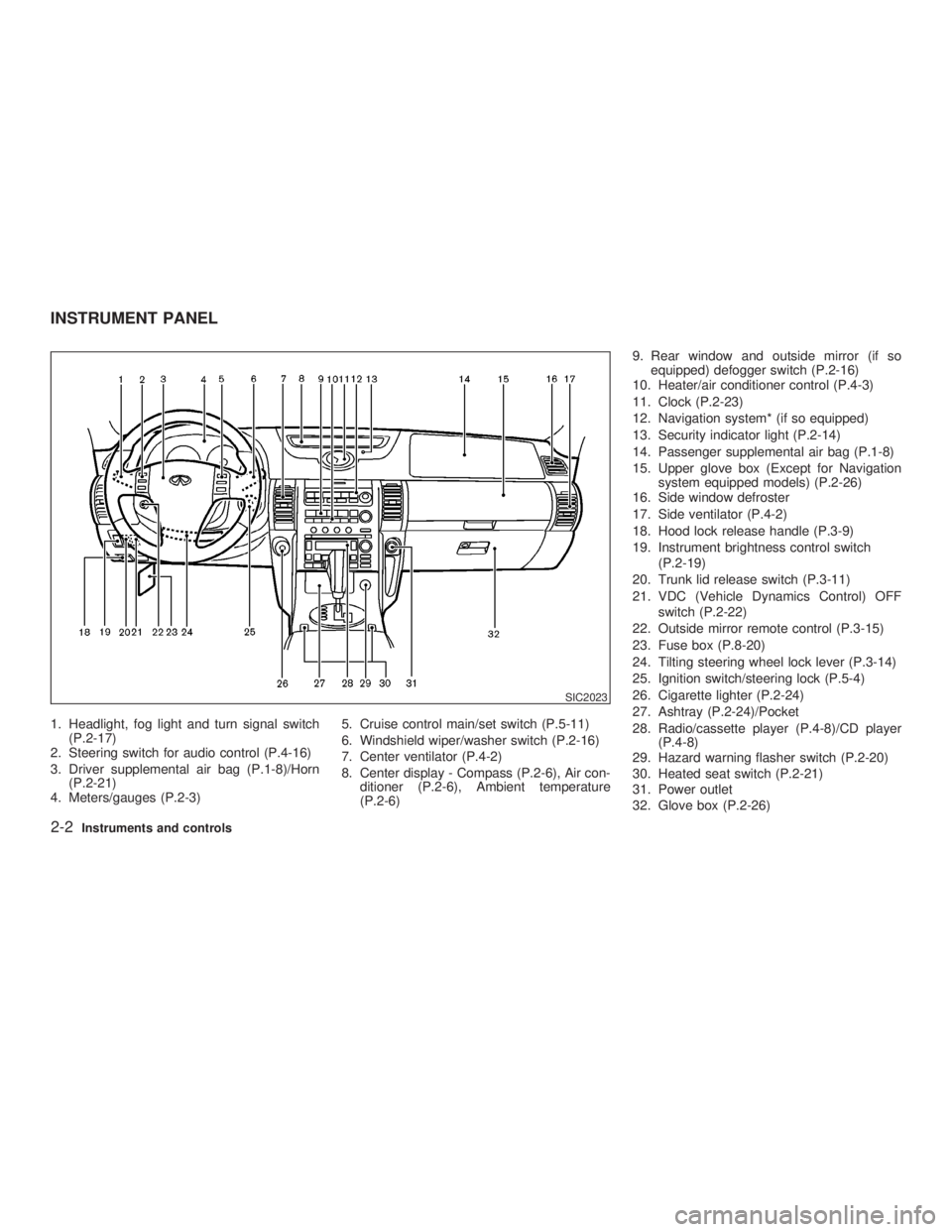
1. Headlight, fog light and turn signal switch
(P.2-17)
2. Steering switch for audio control (P.4-16)
3. Driver supplemental air bag (P.1-8)/Horn
(P.2-21)
4. Meters/gauges (P.2-3) 5. Cruise control main/set switch (P.5-11)
6. Windshield wiper/washer switch (P.2-16)
7. Center ventilator (P.4-2)
8. Center display - Compass (P.2-6), Air con-
ditioner (P.2-6), Ambient temperature
(P.2-6) 9. Rear window and outside mirror (if so
equipped) defogger switch (P.2-16)
10. Heater/air conditioner control (P.4-3)
11. Clock (P.2-23)
12. Navigation system* (if so equipped)
13. Security indicator light (P.2-14)
14. Passenger supplemental air bag (P.1-8)
15. Upper glove box (Except for Navigation
system equipped models) (P.2-26)
16. Side window defroster
17. Side ventilator (P.4-2)
18. Hood lock release handle (P.3-9)
19. Instrument brightness control switch
(P.2-19)
20. Trunk lid release switch (P.3-11)
21. VDC (Vehicle Dynamics Control) OFF
switch (P.2-22)
22. Outside mirror remote control (P.3-15)
23. Fuse box (P.8-20)
24. Tilting steering wheel lock lever (P.3-14)
25. Ignition switch/steering lock (P.5-4)
26. Cigarette lighter (P.2-24)
27. Ashtray (P.2-24)/Pocket
28. Radio/cassette player (P.4-8)/CD player
(P.4-8)
29. Hazard warning flasher switch (P.2-20)
30. Heated seat switch (P.2-21)
31. Power outlet
32. Glove box (P.2-26) SIC2023INSTRUMENT PANEL
2-2 Instruments and controls
Z 02.7.29/V35-D/V5.0
X
Page 62 of 256

If a magnet is located near the driver side
instrument panel (the sensor is located
inside) or the vehicle is driven where the
terrestrial magnetism is disturbed, the
compass display may not indicate the cor-
rect direction.
O The compass may not display correctly at
the following places:
² under a bridge
² among buildings
² on an iron bridge
² inside a tunnel
² above a subway
² on a railway crossing
² in an underground parking lot
² near a huge vehicle
² near a transformer substation
If you carry out correction procedure at one
of the above places, the procedure may not
be completed correctly.
O If air conditioner fan speed is maximum, the
compass display may shake. This is nor-
mal. Reduce the fan speed to avoid shaking
the display.
Correction functions of the compass
display If the direction is not shown correctly, carry out
correction procedure set out below. Correction procedure 1. Push COMP switch for about 10 seconds.
The direction bar starts blinking.
2. Turn off electrical equipment such as lights,
hazard indicator, air conditioner, etc. Then
drive the vehicle slowly (less than 3 MPH (5
km/h)) and turn the vehicle one or more
times in an open and safe area. When the
compass displays the direction, the proce-
dure is completed.
2-8 Instruments and controls
Z 02.7.29/V35-D/V5.0
X
Page 72 of 256

headlights will automatically turn off 5 minutes
after the ignition switch is turned to the OFF
position and the driver's or front passenger's
door is opened.
The headlight will also automatically turn off 45
seconds after a front door is opened and
closed.
When the light switch is turned to the po-
sition, the headlight low or high beam will turn
off.
Turn the switch to the position:
The front clearance, side marker, tail, license
plate and instrument lights will come on.
Turn the switch to the position:
Headlights will come on and all the other lights
remain on. Be sure not to put anything on top of the
photo sensor located on the top left-hand
side of the instrument panel. The photo
sensor controls the autolamp; if it is cov-
ered, the photo sensor reacts as if it is dark
and the headlights will illuminate.
Battery saver system O When the headlight switch is in the or
position while the ignition switch is in
the ON position, the lights (including the
front fog light) will automatically turn off 5
minutes after the ignition switch has been
turned to the OFF position. O When the headlight switch remains in the
or position after the lights auto-
matically turn off, the lights will turn on for 5
minutes when the headlight switch is turned
to the OFF position and turn to the or
position.
CAUTION O Be sure to turn the light switch to the
OFF position when you leave the ve-
hicle for extended periods of time,
otherwise the battery will go dead.
O Never leave the light switch on when
the engine is not running for ex-
tended periods of time even if the
headlights turn off automatically. SIC1230
2-18 Instruments and controls
Z 02.7.29/V35-D/V5.0
X
Page 73 of 256

Instrument brightness control The instrument brightness control operates
when the light switch is in the or
position.
Turn the control to adjust the brightness of
instrument panel lights and clock (except
power window switch lights).
When the control is turned upward until it
stops, the light intensity will be at maximum.
When the control is turned downward until it
stops, the light will be turned off. Headlight beam select To select the high beam, push the lever for-
ward. Pull it back to select the low beam.
Flashing signal Pulling the lever toward you will flash the
headlight high beam.
Daytime running light system
(Canada only) The headlights automatically illuminate at a
reduced intensity when the engine is started
with the parking brake released. The daytime
running lights operate with the headlight switch
in the OFF position or in the position.
Turn the headlight switch to the position
for full illumination when driving at night.
If the parking brake is applied before the
engine is started, the daytime running lights do
not illuminate. The daytime running lights illu-
minate once the parking brake is released.
The daytime running lights will remain on until
the ignition switch is turned off. WARNING When the daytime running light system
is active, tail lights on your vehicle are
not on. It is necessary at dusk to turn on
your headlights. Failure to do so could
cause an accident injuring yourself and
others.
TURN SIGNAL SWITCH
Turn signal Move the lever up or down to signal the turning
direction. When the turn is completed, the turn
signals cancel automatically.
Lane change signal To indicate a lane change, move the lever up
or down to the point where lights begin flash-
ing.SIC0922
Instruments and controls
2-19
Z 02.7.29/V35-D/V5.0
X