change time INFINITI G35 2006 User Guide
[x] Cancel search | Manufacturer: INFINITI, Model Year: 2006, Model line: G35, Model: INFINITI G35 2006Pages: 344, PDF Size: 6.81 MB
Page 201 of 344
ªSelect phoneº
q C
Use the Select Phone command to select
a phone of lesser priority when two or
more phones paired with Bluetooth
Hands-Free Phone System are in the ve-
hicle at the same time.
The system asks you to name the phone
and confirm the selection.
Once the selection is confirmed, the se-
lected phone remains active until the igni-
tion switch is turned OFF or you select a
new phone.
ªChange priorityº
q D
Use the Change Priority command to
change the priority level of the active
phone.
The priority level determines which phone
is active when more than one paired
Bluetooth phone is in the vehicle.
The system states the priority level of the
active phone and asks for a new priority
level (1, 2, 3, 4, 5).
If the new priority level is already being
used for another phone, the two phones
will swap priority levels. For example, if the current priority levels
are:
Priority Level 1 = Phone A
Priority Level 2 = Phone B
Priority Level 3 = Phone C
and you change the priority level of Phone
C to Level 1, then:
Priority Level 1 = Phone C
Priority Level 2 = Phone B
Priority Level 3 = Phone A
ªDelete phoneº
q E
Use the Delete Phone command to delete
a specific phone or all phones from the
Bluetooth Hands-Free Phone System.
The system announces the names of the
phones already paired with the system and
their priority level. The system then gives
you the option to delete a specific phone,
all phones or listen to the list again.
Once you chose to delete a phone or all
phones, the system asks you to confirm
this action.
NOTE:
When you delete a phone, the associated
phone book for that phone will also be de-
leted. ªSelect ringtoneº
q F
Use the Select Ringtone command to se-
lect the tone heard in the vehicle when an
incoming call is received.
The system announces the name of the
active phone and asks you to choose from
the following commands:
O ªRingtoneº Ð The system plays a ring-
tone and asks if you would like to se-
lect that tone. If you say no, the
system plays the next ringtone avail-
able and continues to cycle through
the ringtones until you select one or
quit.
O ªSilentº Ð The system asks you to
confirm your wish to disable the ring-
tone.
ªBluetooth offº
q G
Use the Bluetooth Off command to turn
off the Bluetooth Hands-Free Phone Sys-
tem.
When Bluetooth Hands-Free Phone
System is off, you will not be able to
make or receive calls using INFINITI Voice
Recognition. Also, you will not have ac-
cess to the Phone Book.
Display screen, heater, air conditioner and audio systems
4-41
w 06.1.4/V35-D/V5.0
X
Page 206 of 344
WARNINGO Do not leave children, impaired adults, or
pets alone in your vehicle. They could ac-
cidentally injure themselves or others
through inadvertent operation of the ve-
hicle. Also, on hot, sunny days, tempera-
tures in a closed vehicle could quickly be-
come high enough to cause severe or pos-
sibly fatal injuries to people or animals.
O Closely supervise children when they are
around cars to prevent them from
playing and becoming locked in the
trunk where they could be seriously in-
jured. Keep the car locked, with the rear
seatback and trunk lid securely latched
when not in use, and prevent children's
access to car keys.
EXHAUST GAS (Carbon monoxide)
WARNINGDo not breathe exhaust gases; they contain
colorless and odorless carbon monoxide. Carbon monoxide is dangerous. It can cause
unconsciousness or death.
O If you suspect that exhaust fumes are
entering the vehicle, drive with all win-
dows fully open, and have the vehicle in-
spected immediately.
O Do not run the engine in closed spaces
such as a garage.
O Do not park the vehicle with the engine
running for any extended length of time.
O Keep the trunk lid closed while driving,
otherwise exhaust gases could be drawn
into the passenger compartment. If you
must drive with the trunk lid open, follow
these precautions:
Ð Open all the windows.
Ð Set the air recirculation switch OFF
and the fan control at high to circu-
late the air.
O If electrical wiring or other cable connec-
tions must pass to a trailer through the
seal on the trunk lid or the body, follow
the manufacturer's recommendation to prevent carbon monoxide entry into
the vehicle.
O If a special body, camper, or other equip-
ment is added for recreational or other
usage, follow the manufacturer's recom-
mendation to prevent carbon monoxide
entry into the vehicle. (Some recre-
ational vehicle appliances such as
stoves, refrigerators, heaters, etc. may
also generate carbon monoxide.)
O The exhaust system and body should be
inspected by a qualified mechanic when-
ever:
Ð Your vehicle is raised while being ser-
viced.
Ð You suspect that exhaust fumes are
entering into the passenger compart-
ment.
Ð You notice a change in the sound of
the exhaust system.
Ð You have had an accident involving
damage to the exhaust system, un-
derbody, or rear of the vehicle.PRECAUTIONS WHEN STARTING AND
DRIVING
5-2 Starting and driving
w 06.1.4/V35-D/V5.0
X
Page 209 of 344

CAUTIONDo not place metalized film or any metal
parts (antenna, etc.) on the windows. This
may cause poor reception of the signals from
the tire pressure sensors, and the TPMS will
not function properly.
FCC Notice:
Changes or modifications not expressly
approved by the party responsible for com-
pliance could void the user's authority to
operate the equipment.
This device complies with Part 15 of the
FCC Rules and RSS-210 of Industry Canada.
Operation is subject to the following two
conditions: (1) This device may not cause
harmful interference, and (2) this device
must accept any interference received, in-
cluding interference that may cause un-
desired operation of the device. AVOIDING COLLISION AND
ROLLOVER
WARNING Failure to operate this vehicle in a safe and
prudent manner may result in loss of control
or an accident.
Be alert and drive defensively at all times.
Obey all traffic regulations. Avoid exces-
sive speed, high speed cornering, or sud-
den steering maneuvers. These driving
practices could cause you to lose control
of your vehicle. As with any vehicle, a loss
of control could result in a collision with
other vehicles or objects, or cause the ve-
hicle to rollover, particularly if the loss of
control causes the vehicle to slide side-
ways. Be attentive at all times, and avoid
driving when tired. Never drive under the
influence of alcohol or drugs (including
prescription or over-the-counter drugs
which may cause drowsiness). Always
wear your seat belt as outlined in the ª1.
Safety Ð Seats, seat belts and supple-
mental restraint systemº section and also
instruct your passengers to do so.
Seat belts help reduce the risk of injury in
collisions and rollovers. In a rollover crash, an unbelted or improperly belted
person is significantly more likely to be in-
jured or killed than a person properly
wearing a seat belt.
DRINKING ALCOHOL/DRUGS AND
DRIVING
WARNING Never drive under the influence of alcohol or
drugs. Alcohol in the bloodstream reduces
coordination, delays reaction time and im-
pairs judgement. Driving after drinking alco-
hol increases the likelihood of being in-
volved in an accident injuring yourself and
others. Additionally, if you are injured in an
accident, alcohol can increase the severity of
the injury.
INFINITI is committed to safe driving. You
must not drive under the influence of al-
cohol. Every year thousands of people are
injured or killed in alcohol related acci-
dents. Although the local laws vary on
what is considered to be legally intoxi-
cated, the fact is that alcohol affects all
people differently and most people under-
estimate the effects of alcohol.
Starting and driving
5-5
w 06.1.4/V35-D/V5.0
X
Page 220 of 344
MANUAL TRANSMISSION
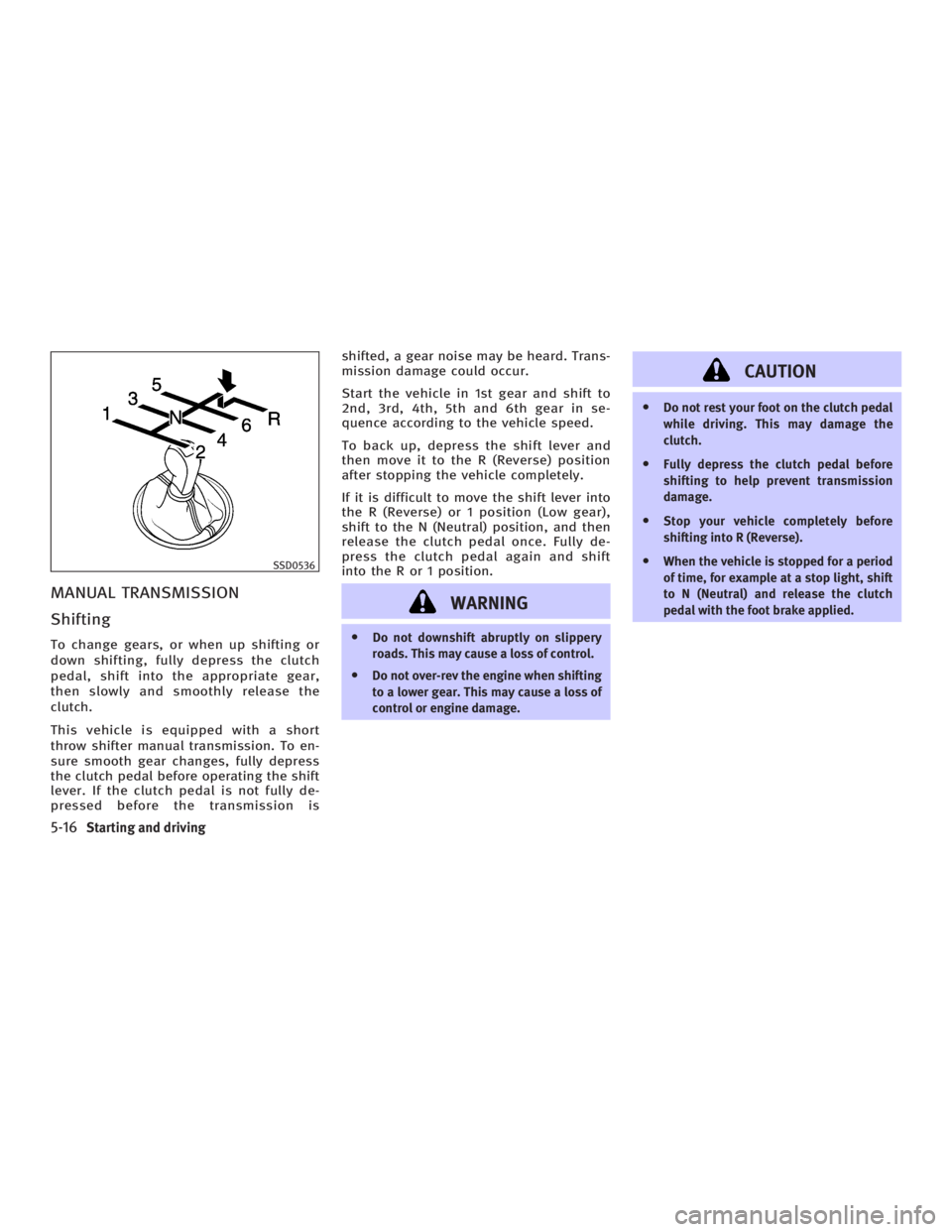
Shifting To change gears, or when up shifting or
down shifting, fully depress the clutch
pedal, shift into the appropriate gear,
then slowly and smoothly release the
clutch.
This vehicle is equipped with a short
throw shifter manual transmission. To en-
sure smooth gear changes, fully depress
the clutch pedal before operating the shift
lever. If the clutch pedal is not fully de-
pressed before the transmission is shifted, a gear noise may be heard. Trans-
mission damage could occur.
Start the vehicle in 1st gear and shift to
2nd, 3rd, 4th, 5th and 6th gear in se-
quence according to the vehicle speed.
To back up, depress the shift lever and
then move it to the R (Reverse) position
after stopping the vehicle completely.
If it is difficult to move the shift lever into
the R (Reverse) or 1 position (Low gear),
shift to the N (Neutral) position, and then
release the clutch pedal once. Fully de-
press the clutch pedal again and shift
into the R or 1 position.
WARNING O Do not downshift abruptly on slippery
roads. This may cause a loss of control.
O Do not over-rev the engine when shifting
to a lower gear. This may cause a loss of
control or engine damage. CAUTION O Do not rest your foot on the clutch pedal
while driving. This may damage the
clutch.
O Fully depress the clutch pedal before
shifting to help prevent transmission
damage.
O Stop your vehicle completely before
shifting into R (Reverse).
O When the vehicle is stopped for a period
of time, for example at a stop light, shift
to N (Neutral) and release the clutch
pedal with the foot brake applied.SSD0536
5-16 Starting and driving
w 06.1.4/V35-D/V5.0
X
Page 227 of 344
The full-time all-wheel drive (AWD) system
automatically changes the driving mode. ALL-WHEEL DRIVE (AWD) WARNING
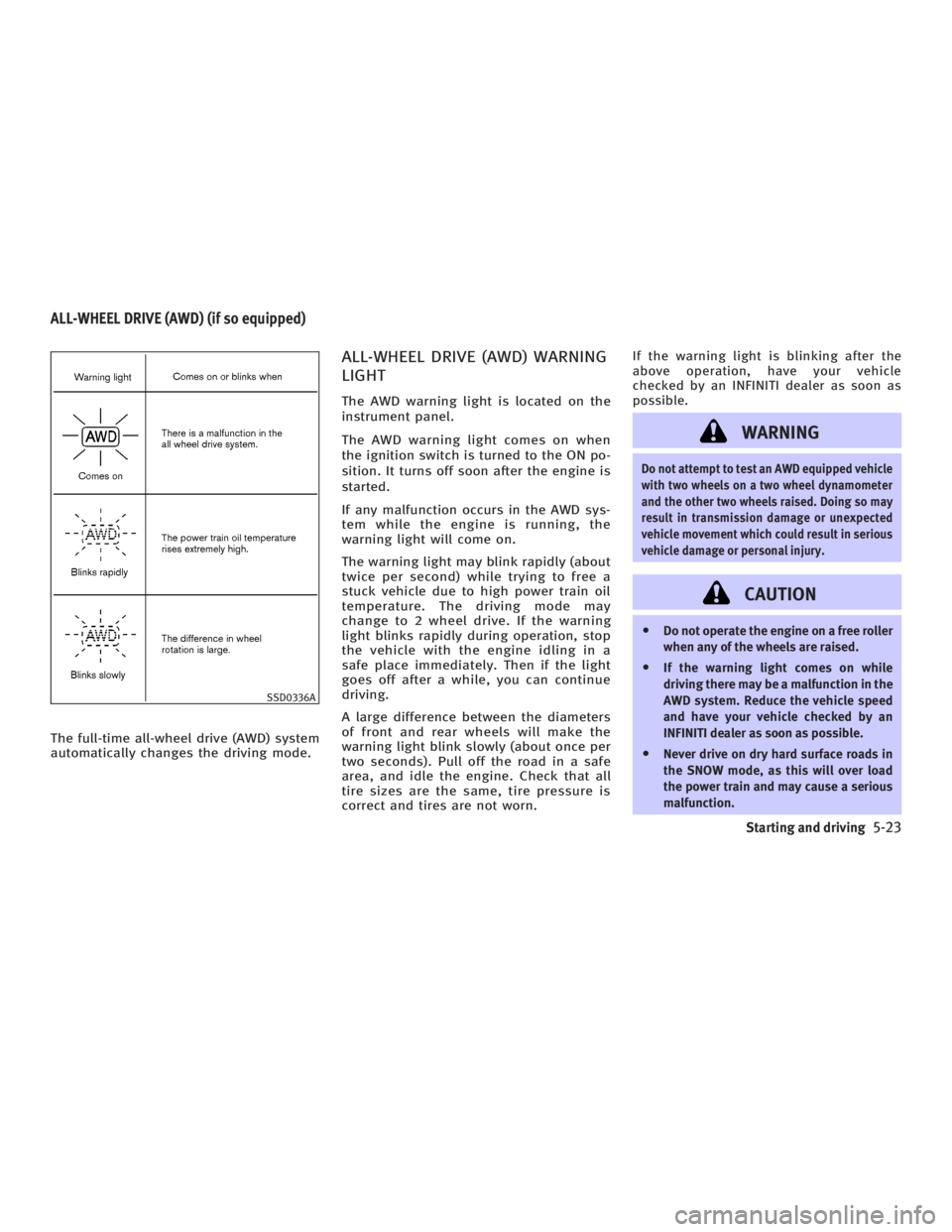
LIGHT The AWD warning light is located on the
instrument panel.
The AWD warning light comes on when
the ignition switch is turned to the ON po-
sition. It turns off soon after the engine is
started.
If any malfunction occurs in the AWD sys-
tem while the engine is running, the
warning light will come on.
The warning light may blink rapidly (about
twice per second) while trying to free a
stuck vehicle due to high power train oil
temperature. The driving mode may
change to 2 wheel drive. If the warning
light blinks rapidly during operation, stop
the vehicle with the engine idling in a
safe place immediately. Then if the light
goes off after a while, you can continue
driving.
A large difference between the diameters
of front and rear wheels will make the
warning light blink slowly (about once per
two seconds). Pull off the road in a safe
area, and idle the engine. Check that all
tire sizes are the same, tire pressure is
correct and tires are not worn. If the warning light is blinking after the
above operation, have your vehicle
checked by an INFINITI dealer as soon as
possible.
WARNING Do not attempt to test an AWD equipped vehicle
with two wheels on a two wheel dynamometer
and the other two wheels raised. Doing so may
result in transmission damage or unexpected
vehicle movement which could result in serious
vehicle damage or personal injury.
CAUTION O Do not operate the engine on a free roller
when any of the wheels are raised.
O If the warning light comes on while
driving there may be a malfunction in the
AWD system. Reduce the vehicle speed
and have your vehicle checked by an
INFINITI dealer as soon as possible.
O Never drive on dry hard surface roads in
the SNOW mode, as this will over load
the power train and may cause a serious
malfunction.SSD0336AALL-WHEEL DRIVE (AWD) (if so equipped)
Starting and driving
5-23
w 06.1.4/V35-D/V5.0
X
Page 262 of 344
Inside the vehicle The maintenance items listed here should
be checked on a regular basis, such as
when performing periodic maintenance,
cleaning the vehicle, etc.
Accelerator pedal: Check the pedal for
smooth operation and make sure the
pedal does not catch or require uneven
effort. Keep the floor mat away from the
pedal.
Automatic transmission P (Park) mecha-
nism: On a fairly steep hill check that your
vehicle is held securely with the selector
lever in the P (Park) position without ap-
plying any brakes.
Brake pedal*: Check the pedal for smooth
operation and make sure it has the proper
distance under it when depressed fully.
Check the brake booster function. Be sure
to keep the floor mat away from the
pedal.
Brakes: Check that the brakes do not pull
the vehicle to one side when applied.
Parking brake*: Check that the pedal/
lever has the proper travel and confirm
that your vehicle is held securely on a
fairly steep hill with only the parking
brake applied. Seats: Check seat position controls such
as seat adjusters, seatback recliner, etc.
to ensure they operate smoothly and that
all latches lock securely in every position.
Check that the head restraints move up
and down smoothly and that the locks (if
so equipped) hold securely in all latched
positions.
Seat belts: Check that all parts of the seat
belt system (For example, buckles, an-
chors, adjusters and retractors) operate
properly and smoothly, and are installed
securely. Check the belt webbing for cuts,
fraying, wear or damage.
Steering wheel: Check for changes in the
steering conditions, such as excessive
free play, hard steering or strange noises.
Warning lights and chimes: Make sure
that all warning lights and chimes are op-
erating properly.
Windshield defroster: Check that the air
comes out of the defroster outlets prop-
erly and in sufficient quantity when oper-
ating the heater or air conditioner.
Windshield wiper and washer*: Check that
the wipers and washer operate properly
and that the wipers do not streak. Under the hood and the vehicle The maintenance items listed here should
be checked periodically (For example,
each time you check the engine oil or re-
fuel).
Battery*: Check the fluid level in each
cell. It should be between the MAX and
MIN lines. Vehicles operated in high tem-
peratures or under severe conditions re-
quire frequent checks of the battery fluid
level.
Brake and clutch fluid level*: Make sure
that the brake and clutch fluid levels are
between the MAX and MIN lines on the
reservoir.
Engine coolant level*: Check the coolant
level when the engine is cold.
Engine drive belts*: Make sure that no
belt is frayed, worn, cracked or oily.
Engine oil level*: Check the level after
parking the vehicle on a level location
and turning off the engine. (Wait at least
10 minutes for the oil to drain back into
the oil pan.)
Exhaust system: Make sure there are no
loose supports, cracks or holes. If the
sound of the exhaust seems unusual or
8-4 Maintenance and do-it-yourself
w 06.1.4/V35-D/V5.0
X
Page 282 of 344
Self-adjusting brakes Your vehicle is equipped with self-
adjusting brakes.
The disc-type brakes self-adjust every
time the brake pedal is applied.
WARNINGSee an INFINITI dealer for a brake system
check if the brake pedal height does not re-
turn to normal.
Brake pad wear indicators The disc brake pads on your vehicle have
audible wear indicators. When a brake pad
requires replacement, it will make a high
pitched scraping or screeching sound when
the vehicle is in motion whether or not the
brake pedal is depressed. Have the brakes
checked as soon as possible if the wear in-
dicator sound is heard.
Under some driving or climate conditions,
occasional brake squeak, squeal or other
noise may be heard. Occasional brake
noise during light to moderate stops is
normal and does not affect the function or
performance of the brake system. Proper brake inspection intervals should
be followed. For additional information,
see the appropriate maintenance log
shown in the INFINITI Service and Mainte-
nance Guide.
High performance sports brake pads oc-
casionally make squeaks, squeals or
other braking noises because of their very
high friction coefficient.
These occasional brake noises are
normal, but if they continue, see an
INFINITI dealer.
BRAKE BOOSTER Check the brake booster function as fol-
lows:
1. With the engine off, press and release
the brake pedal several times. When
brake pedal movement (distance of
travel) remains the same from one
pedal application to the next, continue
on to the next step.
2. While depressing the brake pedal,
start the engine. The pedal height
should drop a little. 3. With the brake pedal depressed, stop
the engine. Keeping the pedal de-
pressed for about 30 seconds, the
pedal height should not change.
4. Run the engine for one minute without
depressing the brake pedal, then turn
it off. Depress the brake pedal several
times. The pedal travel distance will
decrease gradually with each depres-
sion as the vacuum is released from
the booster.
If the brakes do not operate properly, see
an INFINITI dealer.
8-24 Maintenance and do-it-yourself
w 06.1.4/V35-D/V5.0
X
Page 286 of 344
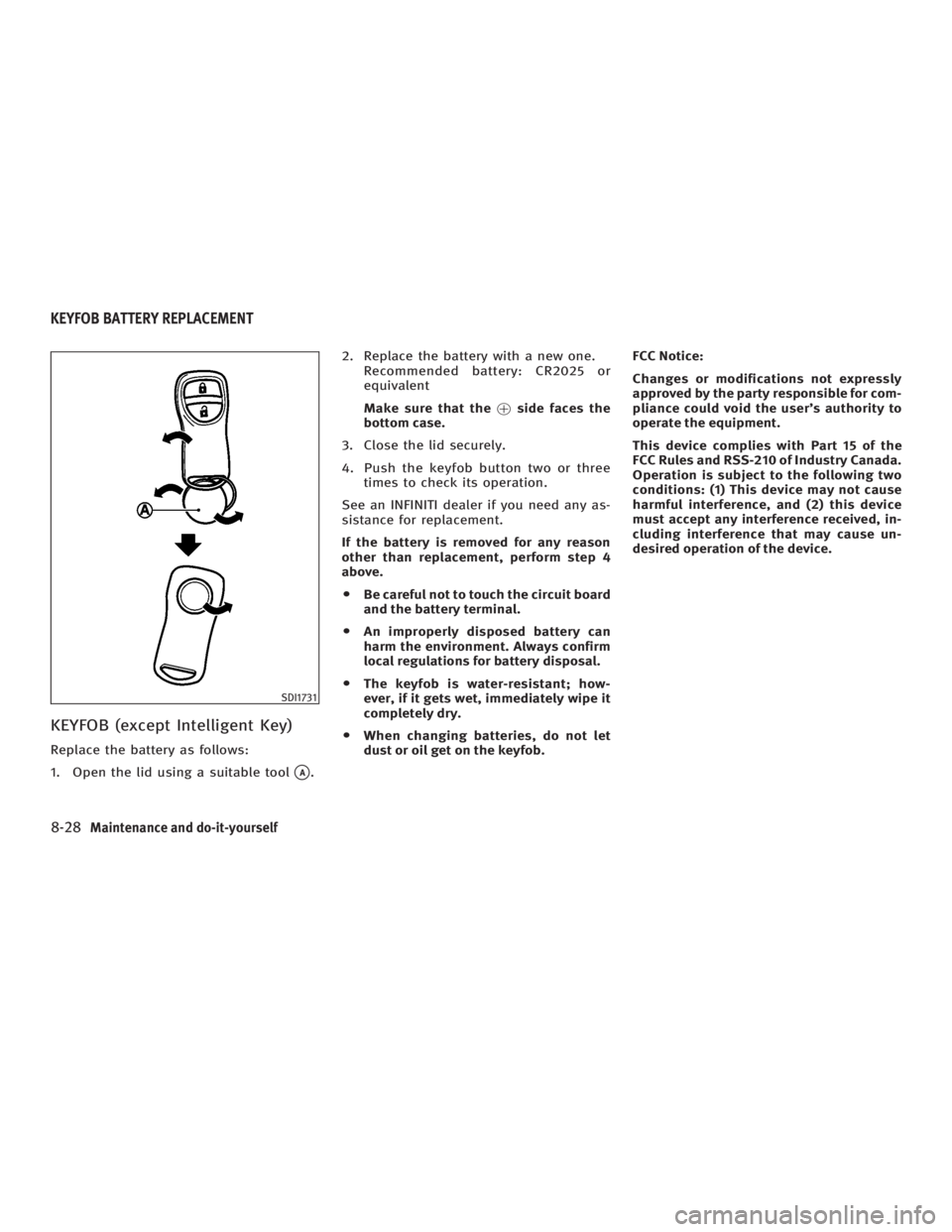
KEYFOB (except Intelligent Key) Replace the battery as follows:
1. Open the lid using a suitable tool
q A
. 2. Replace the battery with a new one.
Recommended battery: CR2025 or
equivalent
Make sure that the ! side faces the
bottom case.
3. Close the lid securely.
4. Push the keyfob button two or three
times to check its operation.
See an INFINITI dealer if you need any as-
sistance for replacement.
If the battery is removed for any reason
other than replacement, perform step 4
above.
O Be careful not to touch the circuit board
and the battery terminal.
O An improperly disposed battery can
harm the environment. Always confirm
local regulations for battery disposal.
O The keyfob is water-resistant; how-
ever, if it gets wet, immediately wipe it
completely dry.
O When changing batteries, do not let
dust or oil get on the keyfob. FCC Notice:
Changes or modifications not expressly
approved by the party responsible for com-
pliance could void the user's authority to
operate the equipment.
This device complies with Part 15 of the
FCC Rules and RSS-210 of Industry Canada.
Operation is subject to the following two
conditions: (1) This device may not cause
harmful interference, and (2) this device
must accept any interference received, in-
cluding interference that may cause un-
desired operation of the device.
SDI1731KEYFOB BATTERY REPLACEMENT
8-28 Maintenance and do-it-yourself
w 06.1.4/V35-D/V5.0
X
Page 310 of 344

performance problems and/or fuel system
damage.
O The fuel must be unleaded and have an
octane rating no lower than that recom-
mended for unleaded gasoline.
O If an oxygenate-blend, excepting a
methanol blend, is used, it should con-
tain no more than 10% oxygenate.
(MTBE may, however, be added up to
15%.)
O If a methanol blend is used, it should
contain no more than 5% methanol
(methyl alcohol, wood alcohol). It
should also contain a suitable amount
of appropriate cosolvents and corro-
sion inhibitors. If not properly formu-
lated with appropriate cosolvents and
corrosion inhibitors, such methanol
blends may cause fuel system damage
and/or vehicle performance problems.
At this time, sufficient data is not avail-
able to ensure that all methanol blends
are suitable for use in INFINITI vehicles.
If any driveability problems such as en-
gine stalling and hard hot starting are ex-
perienced after using oxygenate-blend fu-
els, immediately change to a non-
oxygenate fuel or a fuel with a low blend
of MTBE. Take care not to spill gasoline during refu-
eling. Gasoline containing oxygenates can
cause paint damage.
E-85 fuel E-85 fuel is a mixture of approximately
85% fuel ethanol and 15% unleaded gaso-
line. E-85 can only be used in a Flexible
Fuel Vehicle (FFV). Do not use E-85 fuel in
your vehicle. U.S. government regulations
require fuel ethanol dispensing pumps to
be identified by a small, square, orange
and black label with the common abbre-
viation or the appropriate percentage for
that region.
Aftermarket fuel additives INFINITI does not recommend the use of
any aftermarket fuel additives (i.e. fuel in-
jector cleaner, octane booster, intake
valve deposit removers, etc.) which are
sold commercially. Many of these addi-
tives intended for gum, varnish or deposit
removal may contain active solvent or
similar ingredients that can be harmful to
the fuel system and engine.
Octane rating tips Using unleaded gasoline with an octane
rating lower than recommended can cause persistent, heavy spark knock. (Spark
knock is a metallic rapping noise.) If se-
vere, this can lead to engine damage. If
you detect a persistent heavy spark knock
even when using gasoline of the stated oc-
tane rating, or if you hear steady spark
knock while holding a steady speed on
level roads, have your dealer correct the
condition. Failure to correct the condition
is misuse of the vehicle, for which INFINITI
is not responsible.
Incorrect ignition timing will result in
knocking, after-run or overheating. This in
turn may cause excessive fuel consump-
tion or damage to the engine. If any of the
above symptoms are encountered, have
your vehicle checked at an INFINITI dealer
or other competent service facility.
However, now and then you may notice
light spark knock for a short time while ac-
celerating or driving up hills. This is no
cause for concern, because you get the
greatest fuel benefit when there is light
spark knock for a short time under heavy
engine load.
9-4 Technical and consumer information
w 06.1.4/V35-D/V5.0
X
Page 327 of 344
WARNINGNever connect a trailer brake system directly
to the vehicle brake system.
Pre-towing tips O Be certain your vehicle maintains a
level position when a loaded and/or
unloaded trailer is hitched. Do not
drive the vehicle if it has an abnormal
nose-up or nose-down condition;
check for improper tongue load, over-
load, worn suspension or other pos-
sible causes of either condition.
O Always secure items in the trailer to
prevent load shifts while driving.
O Load the trailer so approximately 60%
of the trailer load is in the front half
and 40% is in the back half.
O Check your hitch, trailer tire pressure,
vehicle tire pressure, trailer light op-
eration, and trailer wheel lug nuts
every time you attach a trailer to the
vehicle.
O Be certain your rear view mirrors con-
form to all federal, state or local regula- tions. If not, install any mirrors required
for towing before driving the vehicle.
Trailer towing tips In order to gain skill and an under-
standing of the vehicle's behavior, you
should practice turning, stopping and
backing up in an area which is free from
traffic. Steering stability, and braking per-
formance will be somewhat different than
under normal driving conditions.
O Always secure items in the trailer to
prevent load shift while driving.
O Avoid abrupt starts, acceleration or
stops.
O Avoid sharp turns or lane changes.
O Always drive your vehicle at a mod-
erate speed. Some states or provinces
have specific speed limits for vehicles
that are towing trailers. Obey the local
speed limits.
O When backing up, hold the bottom of
the steering wheel with one hand.
Move your hand in the direction in
which you want the trailer to go. Make
small corrections and back up slowly.
If possible, have someone guide you
when you are backing up. O Always block the wheels on both vehicle
and trailer when parking. Parking on a
slope is not recommended; however, if
you must do so, and if your vehicle is
equipped with automatic transmission,
first apply the parking brake and block
the wheels, and then move the transmis-
sion selector lever into the P (Park) posi-
tion. If you move the selector lever to
the P (Park) position before applying the
parking brake and blocking the wheels,
transmission damage could occur.
O When going down a hill, shift into a
lower gear and use the engine braking
effect. When going up a long grade,
downshift the transmission to a lower
gear and reduce speed to reduce
chances of engine overloading and/or
overheating.
However, for long steep grades, do
not stay in 1st or 2nd gear when
driving above 35 MPH (56 km/h).
O If the engine coolant rises to an ex-
tremely high temperature when the air
conditioning system is on, turn off the
air conditioner. Coolant heat can be
additionally vented by opening the
windows, switching the fan control to
high and setting the temperature con-
trol to the HOT position.
Technical and consumer information
9-21
w 06.1.4/V35-D/V5.0
X