check engine light INFINITI G35 2006 User Guide
[x] Cancel search | Manufacturer: INFINITI, Model Year: 2006, Model line: G35, Model: INFINITI G35 2006Pages: 344, PDF Size: 6.81 MB
Page 138 of 344

O Slowly turn the ignition switch after
the Intelligent Key warning light
comes on in green. If it is turned
quickly, it may stick and be difficult to
turn.
O The engine may not start if the Intelli-
gent Key is placed:
Ð inside the glove box or the door
pocket
Ð on the instrument panel
Ð in the corner of interior compart-
ment.
O If it is difficult to turn the ignition
switch, perform the following:
Ð Push the ignition switch and turn it
to the left and then to the right.
Ð Turn the ignition switch while
gently turning the steering wheel to
the left or right.
Stopping the engine 1. Shift the selector lever to the P posi-
tion.
2. Turn the ignition switch to the ACC po-
sition. WARNING When you leave the vehicle, be sure to ob-
serve the following:
O Shift the selector lever to P. (In other po-
sitions, the ignition switch will not re-
turn to LOCK.)
O Securely return the ignition switch to
LOCK.
O Set the parking brake. Failure to do so
could result in unexpected vehicle move-
ment and could lead to severe injury.
INTELLIGENT KEY OPERATING
RANGE The Intelligent Key functions can be used
only when you carry the key with you and
operate as specified in the operating
range inside or outside the vehicle.
When the Intelligent Key battery runs
down or where there are strong radio
waves or noise, the operating range may
be narrower or the key may be inopera-
tive.
Operating range of the door or
trunk lock/unlock function The outside sensors are in the front out-
side door handles and the trunk. SPA1900
3-16 Pre-driving checks and adjustments
w 06.1.4/V35-D/V5.0
X
Page 139 of 344
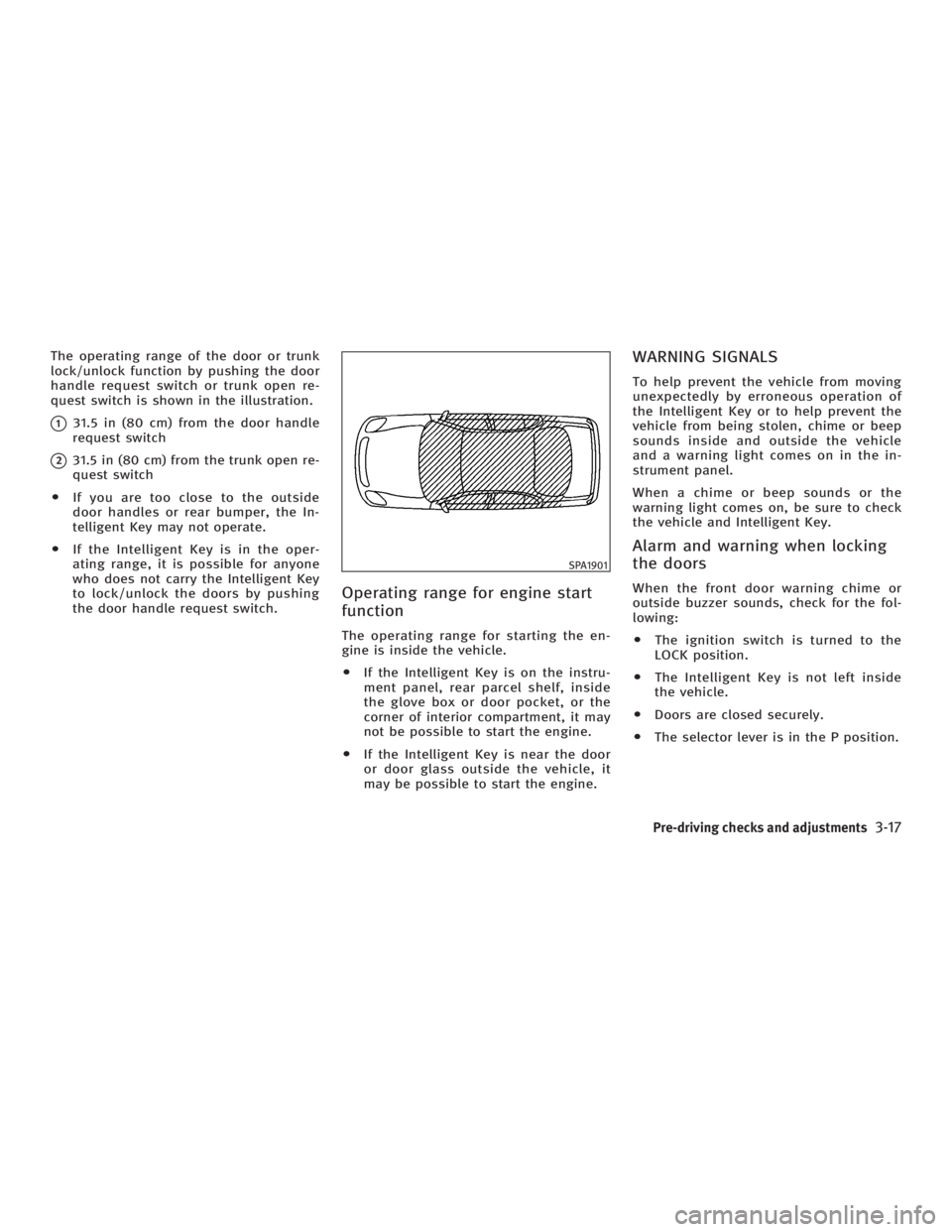
The operating range of the door or trunk
lock/unlock function by pushing the door
handle request switch or trunk open re-
quest switch is shown in the illustration.
q 1
31.5 in (80 cm) from the door handle
request switch
q 2
31.5 in (80 cm) from the trunk open re-
quest switch
O If you are too close to the outside
door handles or rear bumper, the In-
telligent Key may not operate.
O If the Intelligent Key is in the oper-
ating range, it is possible for anyone
who does not carry the Intelligent Key
to lock/unlock the doors by pushing
the door handle request switch.
Operating range for engine start
function The operating range for starting the en-
gine is inside the vehicle.
O If the Intelligent Key is on the instru-
ment panel, rear parcel shelf, inside
the glove box or door pocket, or the
corner of interior compartment, it may
not be possible to start the engine.
O If the Intelligent Key is near the door
or door glass outside the vehicle, it
may be possible to start the engine. WARNING SIGNALS To help prevent the vehicle from moving
unexpectedly by erroneous operation of
the Intelligent Key or to help prevent the
vehicle from being stolen, chime or beep
sounds inside and outside the vehicle
and a warning light comes on in the in-
strument panel.
When a chime or beep sounds or the
warning light comes on, be sure to check
the vehicle and Intelligent Key.
Alarm and warning when locking
the doors When the front door warning chime or
outside buzzer sounds, check for the fol-
lowing:
O The ignition switch is turned to the
LOCK position.
O The Intelligent Key is not left inside
the vehicle.
O Doors are closed securely.
O The selector lever is in the P position. SPA1901
Pre-driving checks and adjustments
3-17
w 06.1.4/V35-D/V5.0
X
Page 140 of 344
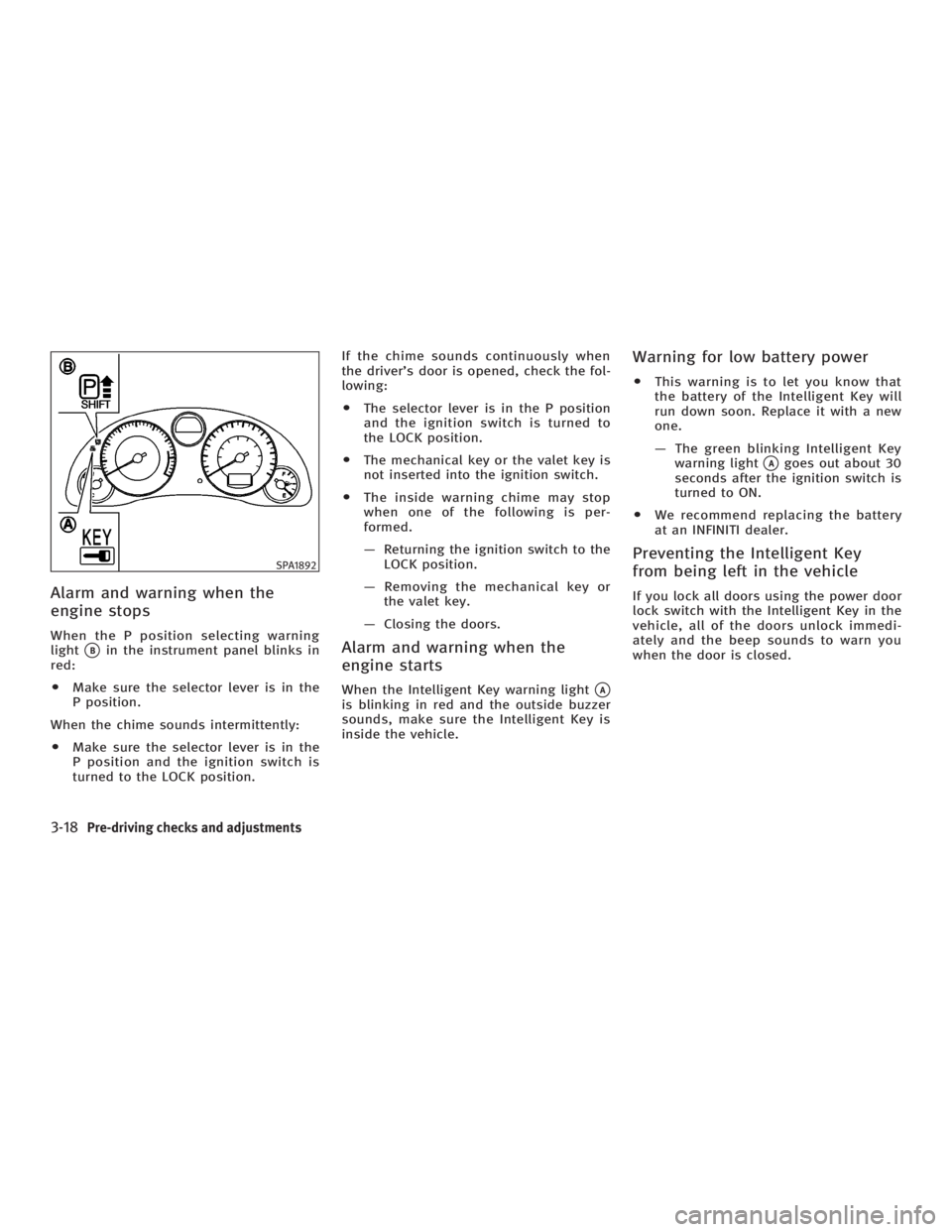
Alarm and warning when the
engine stops When the P position selecting warning
light
q B
in the instrument panel blinks in
red:
O Make sure the selector lever is in the
P position.
When the chime sounds intermittently:
O Make sure the selector lever is in the
P position and the ignition switch is
turned to the LOCK position. If the chime sounds continuously when
the driver's door is opened, check the fol-
lowing:
O The selector lever is in the P position
and the ignition switch is turned to
the LOCK position.
O The mechanical key or the valet key is
not inserted into the ignition switch.
O The inside warning chime may stop
when one of the following is per-
formed.
Ð Returning the ignition switch to the
LOCK position.
Ð Removing the mechanical key or
the valet key.
Ð Closing the doors.
Alarm and warning when the
engine starts When the Intelligent Key warning light
q A
is blinking in red and the outside buzzer
sounds, make sure the Intelligent Key is
inside the vehicle. Warning for low battery power O This warning is to let you know that
the battery of the Intelligent Key will
run down soon. Replace it with a new
one.
Ð The green blinking Intelligent Key
warning light
q A
goes out about 30
seconds after the ignition switch is
turned to ON.
O We recommend replacing the battery
at an INFINITI dealer.
Preventing the Intelligent Key
from being left in the vehicle If you lock all doors using the power door
lock switch with the Intelligent Key in the
vehicle, all of the doors unlock immedi-
ately and the beep sounds to warn you
when the door is closed.SPA1892
3-18 Pre-driving checks and adjustments
w 06.1.4/V35-D/V5.0
X
Page 141 of 344
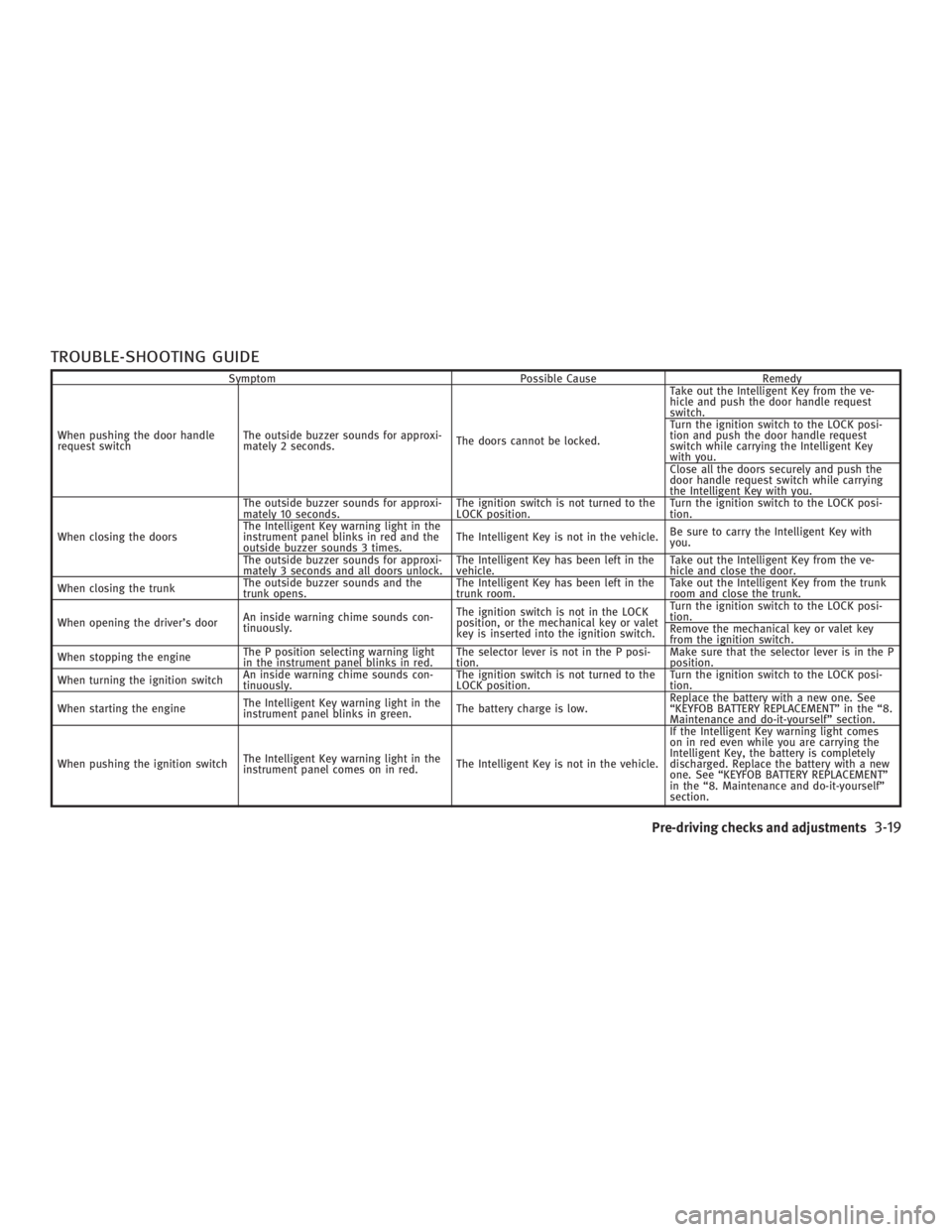
TROUBLE-SHOOTING GUIDE Symptom Possible Cause Remedy
When pushing the door handle
request switch The outside buzzer sounds for approxi-
mately 2 seconds. The doors cannot be locked. Take out the Intelligent Key from the ve-
hicle and push the door handle request
switch.
Turn the ignition switch to the LOCK posi-
tion and push the door handle request
switch while carrying the Intelligent Key
with you.
Close all the doors securely and push the
door handle request switch while carrying
the Intelligent Key with you.
When closing the doors The outside buzzer sounds for approxi-
mately 10 seconds. The ignition switch is not turned to the
LOCK position. Turn the ignition switch to the LOCK posi-
tion.
The Intelligent Key warning light in the
instrument panel blinks in red and the
outside buzzer sounds 3 times. The Intelligent Key is not in the vehicle. Be sure to carry the Intelligent Key with
you.
The outside buzzer sounds for approxi-
mately 3 seconds and all doors unlock. The Intelligent Key has been left in the
vehicle. Take out the Intelligent Key from the ve-
hicle and close the door.
When closing the trunk The outside buzzer sounds and the
trunk opens. The Intelligent Key has been left in the
trunk room. Take out the Intelligent Key from the trunk
room and close the trunk.
When opening the driver's door An inside warning chime sounds con-
tinuously. The ignition switch is not in the LOCK
position, or the mechanical key or valet
key is inserted into the ignition switch. Turn the ignition switch to the LOCK posi-
tion.
Remove the mechanical key or valet key
from the ignition switch.
When stopping the engine The P position selecting warning light
in the instrument panel blinks in red. The selector lever is not in the P posi-
tion. Make sure that the selector lever is in the P
position.
When turning the ignition switch An inside warning chime sounds con-
tinuously. The ignition switch is not turned to the
LOCK position. Turn the ignition switch to the LOCK posi-
tion.
When starting the engine The Intelligent Key warning light in the
instrument panel blinks in green. The battery charge is low. Replace the battery with a new one. See
ªKEYFOB BATTERY REPLACEMENTº in the ª8.
Maintenance and do-it-yourselfº section.
When pushing the ignition switch The Intelligent Key warning light in the
instrument panel comes on in red. The Intelligent Key is not in the vehicle. If the Intelligent Key warning light comes
on in red even while you are carrying the
Intelligent Key, the battery is completely
discharged. Replace the battery with a new
one. See ªKEYFOB BATTERY REPLACEMENTº
in the ª8. Maintenance and do-it-yourselfº
section.
Pre-driving checks and adjustments
3-19
w 06.1.4/V35-D/V5.0
X
Page 146 of 344
3. Turn the ignition switch to the START
position and start the engine.
4. After starting the engine, release the
switch.
When the engine is off, the steering wheel
lock cannot be unlocked.
For important safety information, see the
ª5. Starting and drivingº section.
Windows open/close with the
mechanical key See ªOpening and closing windowsº on
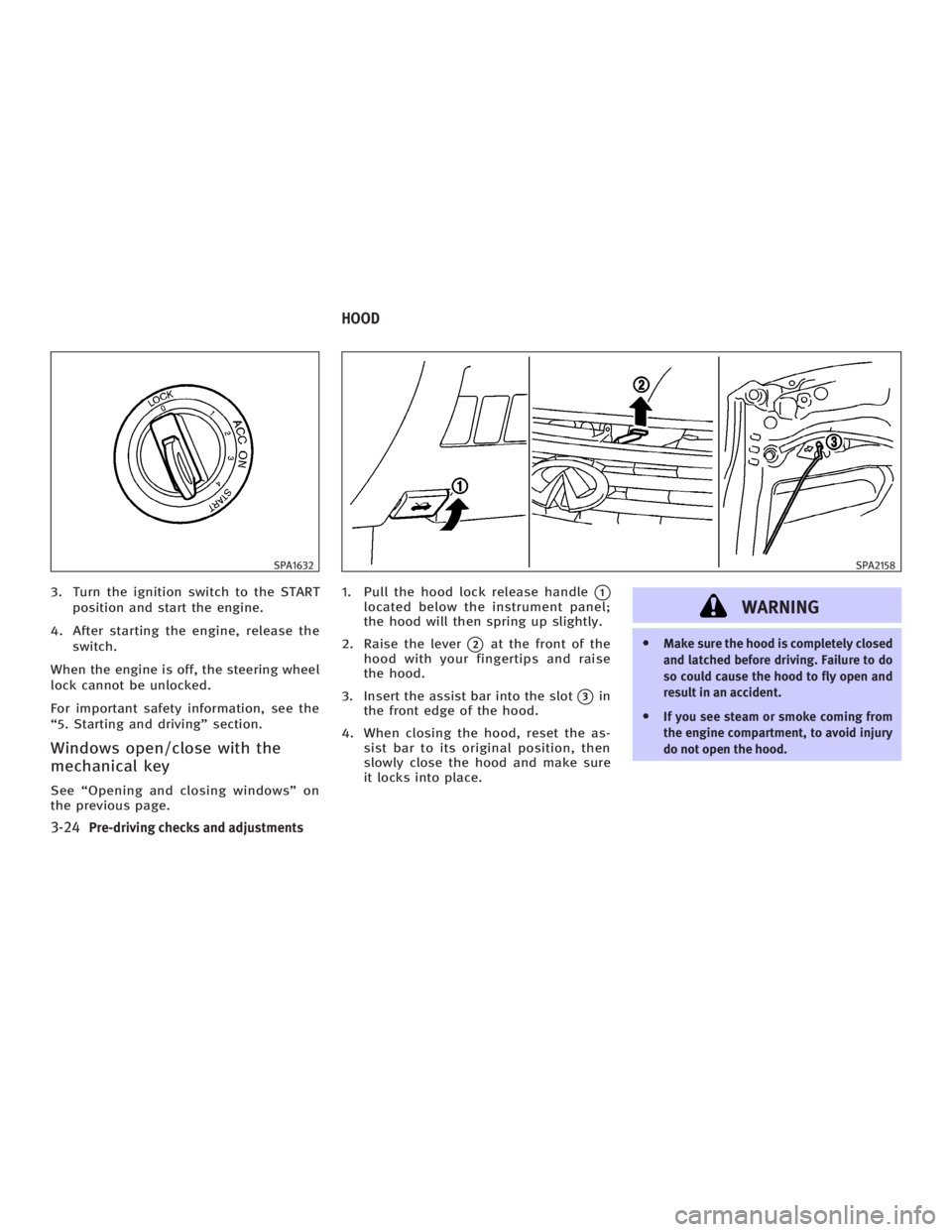
the previous page. 1. Pull the hood lock release handle
q 1
located below the instrument panel;
the hood will then spring up slightly.
2. Raise the lever
q 2
at the front of the
hood with your fingertips and raise
the hood.
3. Insert the assist bar into the slot
q 3
in
the front edge of the hood.
4. When closing the hood, reset the as-
sist bar to its original position, then
slowly close the hood and make sure
it locks into place.
WARNING O Make sure the hood is completely closed
and latched before driving. Failure to do
so could cause the hood to fly open and
result in an accident.
O If you see steam or smoke coming from
the engine compartment, to avoid injury
do not open the hood.SPA1632 SPA2158
HOOD
3-24 Pre-driving checks and adjustments
w 06.1.4/V35-D/V5.0
X
Page 158 of 344
Confirming memory storage O Turn the ignition ON and push the SET
switch. If the main memory has not
been stored, the indicator light will
come on for approximately 0.5 sec-
onds. When the memory has stored in
position, the indicator light will stay
on for approximately 5 seconds.
O If the battery cable is disconnected, or
if the fuse opens, the memory will be
canceled.
Reset the desired position using the
previous procedure.
Selecting the memorized position 1. For vehicles equipped with automatic
transmission, move the selector lever
to the P (Park) position.
For vehicles equipped with manual
transmission, move the shift lever in
the N (Neutral) position and apply the
parking brake.
2. Use one of the following methods to
move the driver's seat and the
steering wheel.
O Turn the ignition switch to the ªONº
position and push the memory switch (1 or 2) fully for at least 1
second.
O Within 45 seconds of opening the
driver's door, push the memory
switch (1 or 2) fully for at least 1
second.
The driver's seat and steering column
will move to the memorized position
with the indicator light flashing, and
then the light will stay on for approxi-
mately 5 seconds.
SYSTEM OPERATION The automatic drive positioner system will
not work or will stop operating under the
following conditions:
O when the vehicle speed is above 4
MPH (7 km/h).
O when the adjusting switch for the driv-
er's seat and steering column is
turned on while the automatic drive
positioner is operating.
O when the cancel switch (if so
equipped) is pushed to the CANCEL
side. (However, it will not be cancelled
if the switch is pushed while the seat
and steering column are returning to the previous positions (entry/exit
function).)
O when the memory switch 1 or 2 is not
pushed and held for at least 1 second.
O when the seat has already been
moved to the memorized position.
O when no seat position is stored in the
memory switch.
O when the parking brake is not applied.
Ð MT models
O when the speed is above 4 MPH (7
km/h) while the parking brake is ap-
plied. Ð MT models
To restart the drive positioner system,
move the parking brake to off and on.
O when the front seat is folded for oper-
ating the walk-in mechanism (if so
equipped).
O when the engine is started while the
automatic drive positioner is operating.
O when the AT selector lever is moved
from the P position to any other posi-
tion. (However, it will not be cancelled
if the switch is pushed while the seat
and steering column are returning to
the previous positions (entry/exit
function).)
3-36 Pre-driving checks and adjustments
w 06.1.4/V35-D/V5.0
X
Page 214 of 344
ON (Normal operating position)
q E
:
This position turns on the ignition system
and electrical accessories.
START
q F
:
This position starts the engine. As soon
as the engine has started, release the
switch immediately. It will automatically
return to the ON position.
For important safety information, see ªIg-
nition switchº in the ª5. Starting and driv-
ingº section.
The ignition switch cannot be turned back
to the LOCK position unless the shift lever
is in P position. (It can be turned to only
q C
.)
CAUTIONDo not leave the vehicle with the ignition
switch in ACC or ON position when the en-
gine is not running for an extended period.
This can discharge the battery. INFINITI VEHICLE IMMOBILIZER
SYSTEM The INFINITI Vehicle Immobilizer System
will not allow the engine to start without
the use of the registered key.
If the engine does not start using a regis-
tered key (for example, when interference
is caused by another registered key, an
automated toll road device or an auto-
mated payment device on the key ring),
restart the engine using the following pro-
cedures:
1. Leave the ignition switch in the ON po-
sition for approximately 5 seconds.
2. Turn the ignition switch to the OFF or
LOCK position and wait approximately
10 seconds.
3. Repeat steps 1 and 2.
4. Restart the engine while holding the
device (which may have caused the in-
terference) separate from the regis-
tered key.
If this procedure allows the engine to
start, INFINITI recommends placing the
registered key on a separate key ring to
avoid interference from other devices. O Make sure the area around the vehicle
is clear.
O Maintenance items should be checked
periodically, for example, each time
you check engine oil.
O Check that all windows and lights are
clean.
O Visually inspect tires for their appear-
ance and condition. Also check tires
for proper inflation.
O Lock all doors.
O Position seat and adjust head re-
straints.
O Adjust inside and outside mirrors.
O Fasten seat belts and ask all passen-
gers to do likewise.
O Check the operation of warning lights
when the ignition key is turned to the
ON position. See ªWarning/indicator
lights and audible remindersº in the
ª2. Instruments and controlsº section.BEFORE STARTING THE ENGINE
5-10 Starting and driving
w 06.1.4/V35-D/V5.0
X
Page 224 of 344
WARNINGDo not use the cruise control when driving
under the following conditions:
O When it is not possible to keep the ve-
hicle at a set speed.
O In heavy traffic or in traffic that varies in
speed.
O On winding or hilly roads.
O On slippery roads (rain, snow, ice, etc.).
O In very windy areas.
Doing so could cause a loss of vehicle con-
trol and result in an accident.
CAUTIONOn manual transmission models, do not shift
into N (Neutral) without depressing the
clutch pedal when the cruise control is set.
Should this occur, depress the clutch pedal
and turn the main switch off immediately.
Failure to do so may cause engine damage. PRECAUTIONS ON CRUISE
CONTROL O If the cruise control system malfunc-
tions, it cancels automatically. The
SET indicator light on the instrument
panel then blinks to warn the driver.
O If the engine coolant temperature be-
comes excessively high, the cruise
control system will be canceled auto-
matically.
O If the SET indicator light blinks, turn
the cruise control MAIN switch off and
have the system checked by an
INFINITI dealer.
O The SET indicator light may blink when
the cruise control MAIN switch is
turned on while pushing the
RESUME/ACCELERATE, SET/COAST, or
CANCEL switch. To properly set the
cruise control system, perform the fol-
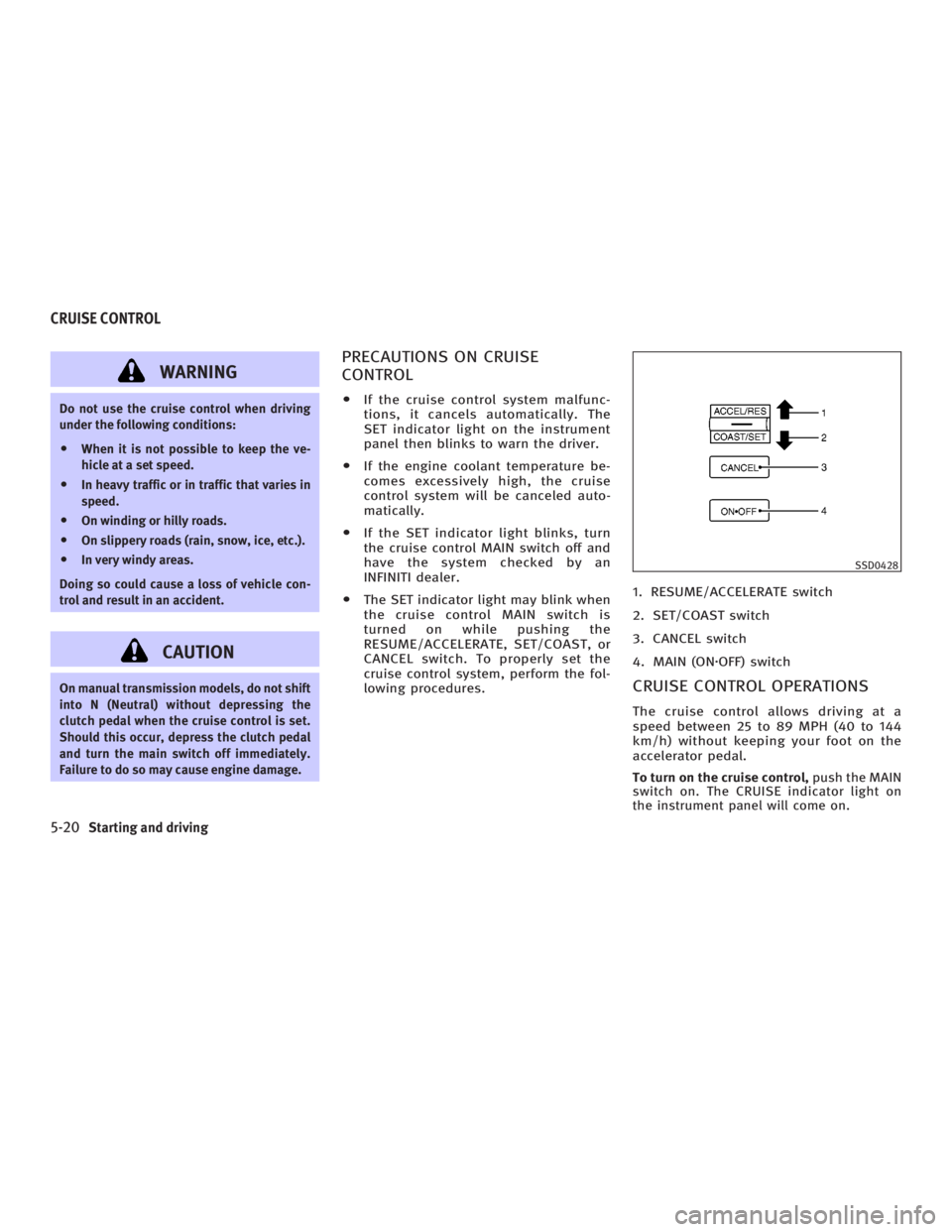
lowing procedures. 1. RESUME/ACCELERATE switch
2. SET/COAST switch
3. CANCEL switch
4. MAIN (ON z OFF) switch
CRUISE CONTROL OPERATIONS The cruise control allows driving at a
speed between 25 to 89 MPH (40 to 144
km/h) without keeping your foot on the
accelerator pedal.
To turn on the cruise control, push the MAIN
switch on. The CRUISE indicator light on
the instrument panel will come on. SSD0428
CRUISE CONTROL
5-20 Starting and driving
w 06.1.4/V35-D/V5.0
X
Page 227 of 344
The full-time all-wheel drive (AWD) system
automatically changes the driving mode. ALL-WHEEL DRIVE (AWD) WARNING
LIGHT The AWD warning light is located on the
instrument panel.
The AWD warning light comes on when
the ignition switch is turned to the ON po-
sition. It turns off soon after the engine is
started.
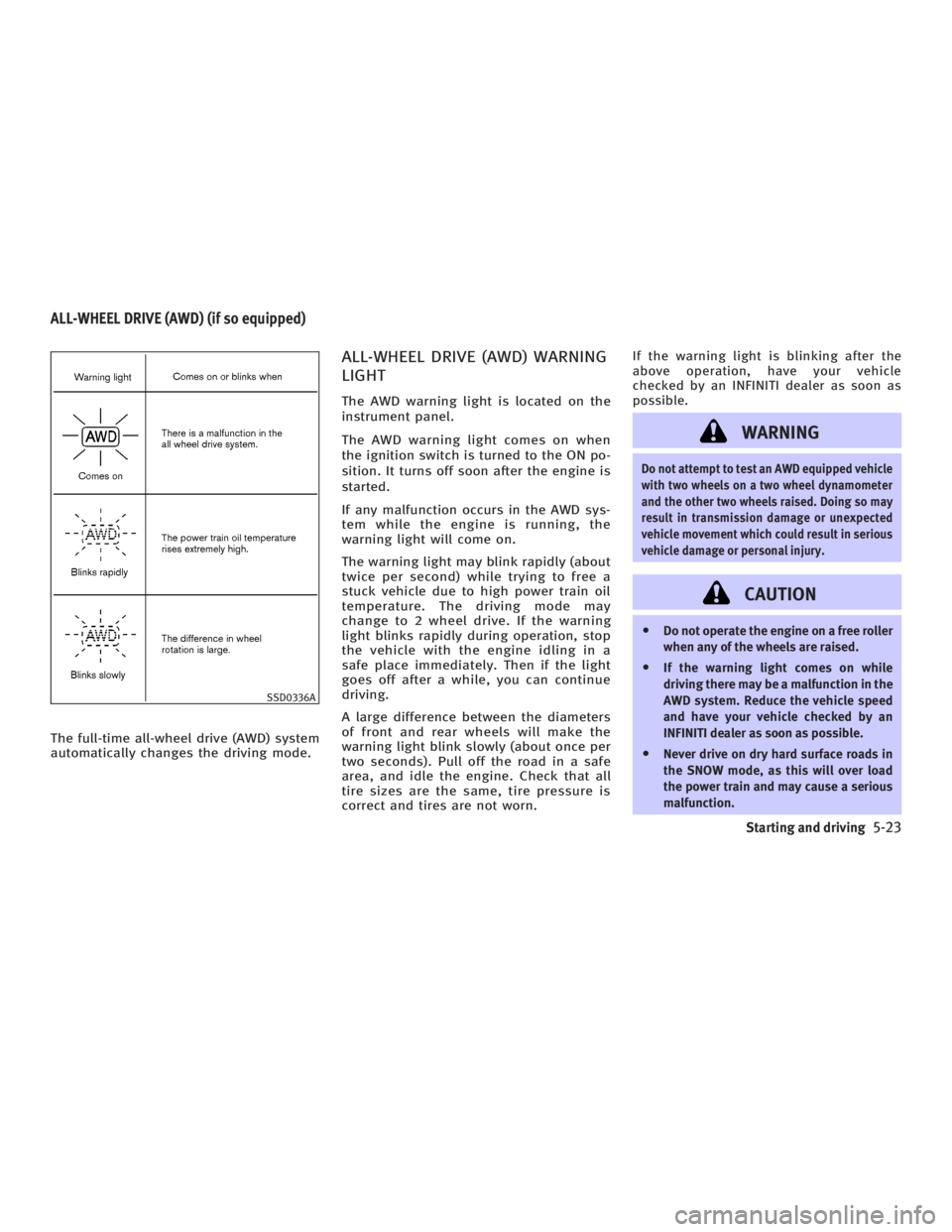
If any malfunction occurs in the AWD sys-
tem while the engine is running, the
warning light will come on.
The warning light may blink rapidly (about
twice per second) while trying to free a
stuck vehicle due to high power train oil
temperature. The driving mode may
change to 2 wheel drive. If the warning
light blinks rapidly during operation, stop
the vehicle with the engine idling in a
safe place immediately. Then if the light
goes off after a while, you can continue
driving.
A large difference between the diameters
of front and rear wheels will make the
warning light blink slowly (about once per
two seconds). Pull off the road in a safe
area, and idle the engine. Check that all
tire sizes are the same, tire pressure is
correct and tires are not worn. If the warning light is blinking after the
above operation, have your vehicle
checked by an INFINITI dealer as soon as
possible.
WARNING Do not attempt to test an AWD equipped vehicle
with two wheels on a two wheel dynamometer
and the other two wheels raised. Doing so may
result in transmission damage or unexpected
vehicle movement which could result in serious
vehicle damage or personal injury.
CAUTION O Do not operate the engine on a free roller
when any of the wheels are raised.
O If the warning light comes on while
driving there may be a malfunction in the
AWD system. Reduce the vehicle speed
and have your vehicle checked by an
INFINITI dealer as soon as possible.
O Never drive on dry hard surface roads in
the SNOW mode, as this will over load
the power train and may cause a serious
malfunction.SSD0336AALL-WHEEL DRIVE (AWD) (if so equipped)
Starting and driving
5-23
w 06.1.4/V35-D/V5.0
X
Page 228 of 344

O If the warning light remains on after the
above operation, have your vehicle
checked by an INFINITI dealer as soon as
possible.
O The power train may be damaged if you
continue driving with the warning light
blinking rapidly.
WARNING O Do not stop or park the vehicle over flam-
mable materials such as dry grass,
waste paper or rags. They may ignite and
cause a fire.
O Never leave the engine running while the
vehicle is unattended.
O Never leave children unattended inside
the vehicle. O Safe parking procedures require that
both the parking brake be set and the
transmission placed into P (Park).
Failure to do so could cause the vehicle
to move unexpectedly or roll away and
result in an accident.
O Make sure the shift lever has been
pushed as far forward as it can go and
cannot be moved without depressing the
button at the end of the lever. SD1006MA
PARKING/PARKING ON HILLS
5-24 Starting and driving
w 06.1.4/V35-D/V5.0
X