maintenance INFINITI G35 2006 User Guide
[x] Cancel search | Manufacturer: INFINITI, Model Year: 2006, Model line: G35, Model: INFINITI G35 2006Pages: 344, PDF Size: 6.81 MB
Page 141 of 344
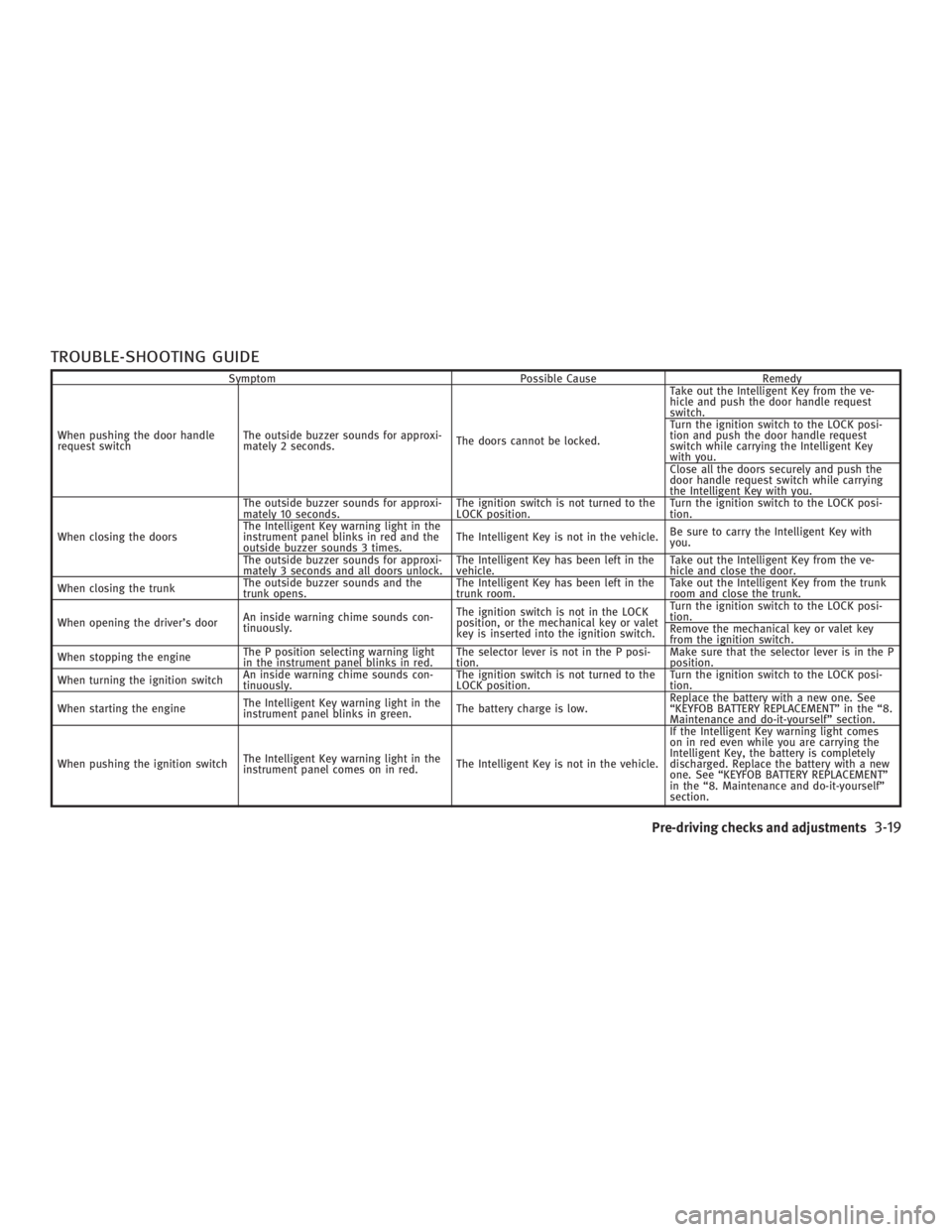
TROUBLE-SHOOTING GUIDE Symptom Possible Cause Remedy
When pushing the door handle
request switch The outside buzzer sounds for approxi-
mately 2 seconds. The doors cannot be locked. Take out the Intelligent Key from the ve-
hicle and push the door handle request
switch.
Turn the ignition switch to the LOCK posi-
tion and push the door handle request
switch while carrying the Intelligent Key
with you.
Close all the doors securely and push the
door handle request switch while carrying
the Intelligent Key with you.
When closing the doors The outside buzzer sounds for approxi-
mately 10 seconds. The ignition switch is not turned to the
LOCK position. Turn the ignition switch to the LOCK posi-
tion.
The Intelligent Key warning light in the
instrument panel blinks in red and the
outside buzzer sounds 3 times. The Intelligent Key is not in the vehicle. Be sure to carry the Intelligent Key with
you.
The outside buzzer sounds for approxi-
mately 3 seconds and all doors unlock. The Intelligent Key has been left in the
vehicle. Take out the Intelligent Key from the ve-
hicle and close the door.
When closing the trunk The outside buzzer sounds and the
trunk opens. The Intelligent Key has been left in the
trunk room. Take out the Intelligent Key from the trunk
room and close the trunk.
When opening the driver's door An inside warning chime sounds con-
tinuously. The ignition switch is not in the LOCK
position, or the mechanical key or valet
key is inserted into the ignition switch. Turn the ignition switch to the LOCK posi-
tion.
Remove the mechanical key or valet key
from the ignition switch.
When stopping the engine The P position selecting warning light
in the instrument panel blinks in red. The selector lever is not in the P posi-
tion. Make sure that the selector lever is in the P
position.
When turning the ignition switch An inside warning chime sounds con-
tinuously. The ignition switch is not turned to the
LOCK position. Turn the ignition switch to the LOCK posi-
tion.
When starting the engine The Intelligent Key warning light in the
instrument panel blinks in green. The battery charge is low. Replace the battery with a new one. See
ªKEYFOB BATTERY REPLACEMENTº in the ª8.
Maintenance and do-it-yourselfº section.
When pushing the ignition switch The Intelligent Key warning light in the
instrument panel comes on in red. The Intelligent Key is not in the vehicle. If the Intelligent Key warning light comes
on in red even while you are carrying the
Intelligent Key, the battery is completely
discharged. Replace the battery with a new
one. See ªKEYFOB BATTERY REPLACEMENTº
in the ª8. Maintenance and do-it-yourselfº
section.
Pre-driving checks and adjustments
3-19
w 06.1.4/V35-D/V5.0
X
Page 165 of 344

Trip computer information Elapsed Time, Driving Distance and Av-
erage Speed will be displayed.
To reset, use the joystick to highlight the
ª Reset º key and push the ªENTERº button
immediately before driving the vehicle.
The unit can be converted between ªUSº
and ªMetricº. See ªHow to use SETTING
buttonº later in this section. Maintenance information To set the maintenance interval for the
Engine Oil or Oil Filter, choose an item
using the joystick and push the ªENTERº
button.
You can also set to display a message to
remind you that the maintenance needs
to be performed.
The following example shows how to set
the engine oil change interval. Use the
same steps to set the other maintenance
information. 1. Reset the driving distance to the new
maintenance schedule.
2. Set the interval (mileage) of the main-
tenance schedule. To determine the
recommended maintenance interval,
refer to your ªINFINITI Service and
Maintenance Guideº.
3. To display the maintenance informa-
tion automatically when the set
trip distance is reached, highlight the
ª Interval Reminder º key with the joy-
stick and push the ªENTERº button.SAA1305 SAA1290 SAA1291
Display screen, heater, air conditioner and audio systems
4-5
w 06.1.4/V35-D/V5.0
X
Page 166 of 344
4. To return the display to the ª Mainte-
nance º screen, push the ªBACKº
button.
ªMaintenanceº display cannot be oper-
ated when the vehicle is moving. Stop the
vehicle in a safe place to see the informa-
tion.
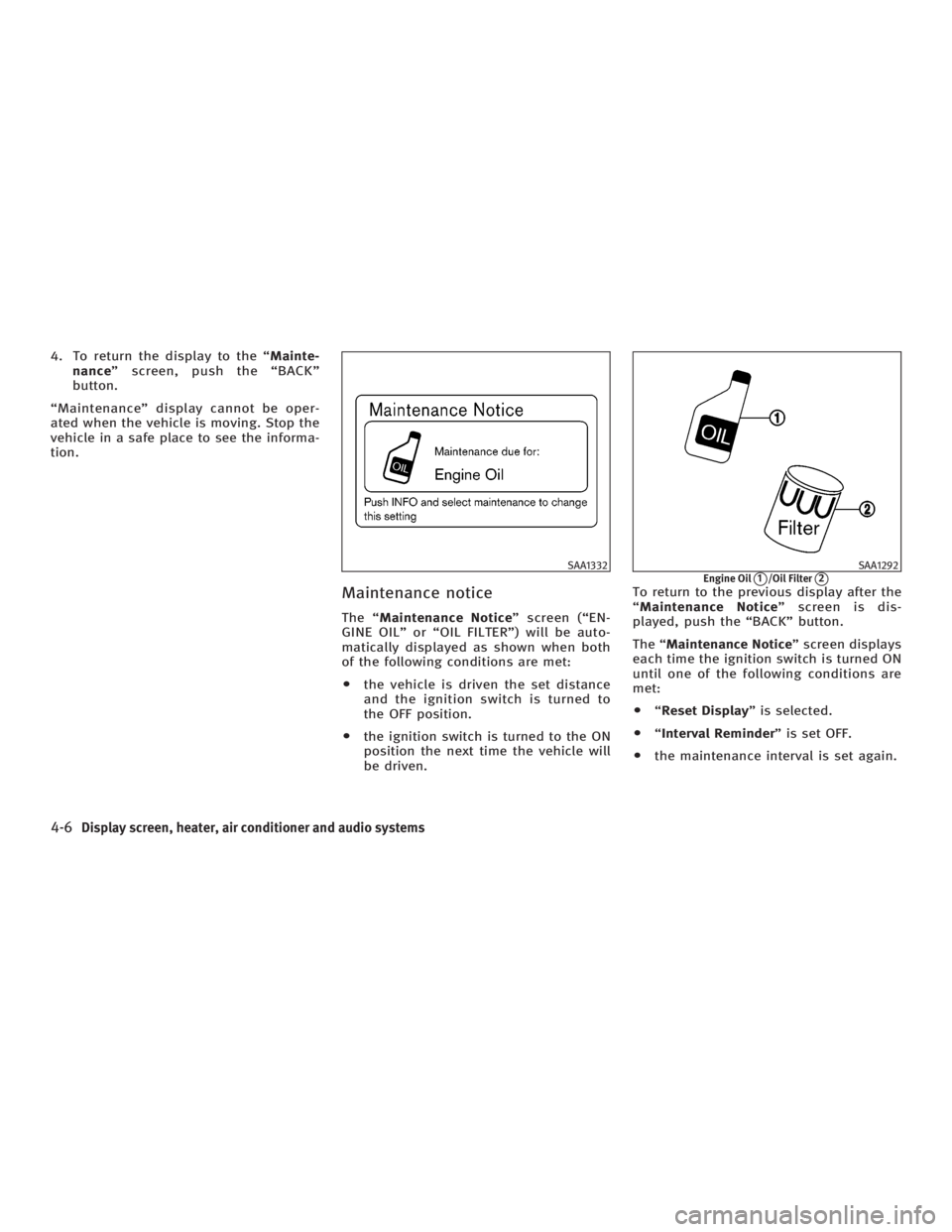
Maintenance notice The ª Maintenance Notice º screen (ªEN-
GINE OILº or ªOIL FILTERº) will be auto-
matically displayed as shown when both
of the following conditions are met:
O the vehicle is driven the set distance
and the ignition switch is turned to
the OFF position.
O the ignition switch is turned to the ON
position the next time the vehicle will
be driven. To return to the previous display after the
ª Maintenance Notice º screen is dis-
played, push the ªBACKº button.
The ª Maintenance Notice º screen displays
each time the ignition switch is turned ON
until one of the following conditions are
met:
O ª Reset Display º is selected.
O ª Interval Reminder º is set OFF.
O the maintenance interval is set again. SAA1332 SAA1292
Engine Oil
q 1
/Oil Filter
q 2
4-6 Display screen, heater, air conditioner and audio systems
w 06.1.4/V35-D/V5.0
X
Page 173 of 344

AMBIENT TEMPERATURE The outside ambient temperature will be
shown on the center display.
The ambient temperature sensor is lo-
cated in front of the radiator. The sensor
may be affected by road or engine heat,
wind direction and other driving condi-
tions. The display may differ from the ac-
tual outside temperature or the tempera-
ture displayed on various signs or bill-
boards.
OPERATING TIPS When the engine coolant temperature and
outside air temperature are low, the air
flow from the foot outlets may not operate
for a maximum of 150 seconds. However,
this is not a malfunction. After the coolant
temperature warms up, the air flow from
the foot outlets will operate normally. The sensor
q A
on the instrument panel
helps maintain a constant temperature;
do not put anything on or around this
sensor.
IN-CABIN MICROFILTER The air conditioning system is equipped
with an in-cabin microfilter which collects
dirt, pollen, dust, etc. To make sure air
conditioner heats, defogs, and ventilates
efficiently, replace the filter in accordance
with the maintenance schedule in the
INFINITI Service and maintenance guide.
To replace the filter, contact an INFINITI
dealer. The filter should be replaced if air flow de-
creases significantly or if windows fog up
easily when operating the heater or air
conditioning system.
HA1011-A
Display screen, heater, air conditioner and audio systems
4-13
w 06.1.4/V35-D/V5.0
X
Page 207 of 344

THREE WAY CATALYST The three way catalyst is an emission con-
trol device installed in the exhaust
system. Exhaust gas in the converter is
burned at high temperatures to help re-
duce pollutants.
WARNINGO The exhaust gas and the exhaust system
are very hot. Keep people, animals or
flammable materials away from the ex-
haust system components.
O Do not stop or park the vehicle over flam-
mable materials such as dry grass,
waste paper or rags. They may ignite and
cause a fire.
CAUTIONO Do not use leaded gasoline. Deposits
from leaded gasoline will seriously re- duce the three-way catalyst's ability to
help reduce exhaust pollutants.
O Keep your engine tuned up. Malfunc-
tions in the ignition, fuel injection, or
electrical systems can cause overrich
fuel flow into the three-way catalyst,
causing it to overheat. Do not keep
driving if the engine misfires, or if no-
ticeable loss of performance or other un-
usual operating conditions are detected.
Have the vehicle inspected promptly by
an INFINITI dealer.
O Avoid driving with an extremely low fuel
level. Running out of fuel could cause the
engine to misfire, damaging the
three-way catalyst.
O Do not race the engine while warming it
up.
O Do not push or tow your vehicle to start
the engine.
TIRE PRESSURE MONITORING
SYSTEM (TPMS) Each tire, including the spare (if provided),
should be checked monthly when cold and inflated to the inflation pressure recom-
mended by the vehicle manufacturer on the
vehicle placard or tire inflation pressure la-
bel. (If your vehicle has tires of a different
size than the size indicated on the vehicle
placard or tire inflation pressure label, you
should determine the proper tire inflation
pressure for those tires.)
As an added safety feature, your vehicle
has been equipped with a tire pressure
monitoring system (TPMS) that illumi-
nates a low tire pressure telltale when
one or more of your tires is significantly
under-inflated. Accordingly, when the low
tire pressure telltale illuminates, you
should stop and check your tires as soon
as possible, and inflate them to the
proper pressure. Driving on a significantly
under-inflated tire causes the tire to over-
heat and can lead to tire failure. Under-
inflation also reduces fuel efficiency and
tire tread life, and may affect the vehicle's
handling and stopping ability.
Please note that the TPMS is not a substi-
tute for proper tire maintenance, and it is
the driver's responsibility to maintain cor-
rect tire pressure, even if under-inflation
has not reached the level to trigger illumi-
nation of the TPMS low tire pressure tell-
tale.
Starting and driving
5-3
w 06.1.4/V35-D/V5.0
X
Page 214 of 344
ON (Normal operating position)
q E
:
This position turns on the ignition system
and electrical accessories.
START
q F
:
This position starts the engine. As soon
as the engine has started, release the
switch immediately. It will automatically
return to the ON position.
For important safety information, see ªIg-
nition switchº in the ª5. Starting and driv-
ingº section.
The ignition switch cannot be turned back
to the LOCK position unless the shift lever
is in P position. (It can be turned to only
q C
.)
CAUTIONDo not leave the vehicle with the ignition
switch in ACC or ON position when the en-
gine is not running for an extended period.
This can discharge the battery. INFINITI VEHICLE IMMOBILIZER
SYSTEM The INFINITI Vehicle Immobilizer System
will not allow the engine to start without
the use of the registered key.
If the engine does not start using a regis-
tered key (for example, when interference
is caused by another registered key, an
automated toll road device or an auto-
mated payment device on the key ring),
restart the engine using the following pro-
cedures:
1. Leave the ignition switch in the ON po-
sition for approximately 5 seconds.
2. Turn the ignition switch to the OFF or
LOCK position and wait approximately
10 seconds.
3. Repeat steps 1 and 2.
4. Restart the engine while holding the
device (which may have caused the in-
terference) separate from the regis-
tered key.
If this procedure allows the engine to
start, INFINITI recommends placing the
registered key on a separate key ring to
avoid interference from other devices. O Make sure the area around the vehicle
is clear.
O Maintenance items should be checked
periodically, for example, each time
you check engine oil.
O Check that all windows and lights are
clean.
O Visually inspect tires for their appear-
ance and condition. Also check tires
for proper inflation.
O Lock all doors.
O Position seat and adjust head re-
straints.
O Adjust inside and outside mirrors.
O Fasten seat belts and ask all passen-
gers to do likewise.
O Check the operation of warning lights
when the ignition key is turned to the
ON position. See ªWarning/indicator
lights and audible remindersº in the
ª2. Instruments and controlsº section.BEFORE STARTING THE ENGINE
5-10 Starting and driving
w 06.1.4/V35-D/V5.0
X
Page 226 of 344
CAUTIONDuring the first 1,200 miles (2,000 km),
follow these recommendations to obtain
maximum engine performance and ensure
the future reliability and economy of your
new vehicle. Failure to follow these recom-
mendations may result in shortened engine
life and reduced engine performance.
O Avoid driving for long periods at con-
stant speed, either fast or slow. Do
not run the engine over 4,000 rpm.
O Do not accelerate at full throttle in any
gear.
O Avoid quick starts.
O Avoid hard braking as much as pos-
sible.
O Do not tow a trailer or haul a heavy
load for the first 500 miles (800 km). O Accelerate slowly and smoothly. Main-
tain cruising speeds with a constant
accelerator position.
O Drive at moderate speeds on the high-
way. Driving at high speed will lower
fuel economy.
O Avoid unnecessary stopping and brak-
ing. Maintain a safe distance behind
other vehicles.
O Use a proper gear range which suits
road conditions. On level roads, shift
into high gear as soon as possible.
O Avoid unnecessary engine idling.
O Keep your engine tuned up.
O Follow the recommended periodic
maintenance schedule.
O Keep the tires inflated at the correct
pressure. Low pressure will increase
tire wear and waste fuel.
O Keep the front wheels in correct align-
ment. Improper alignment will cause
not only tire wear but also lower fuel
economy.
O Air conditioner operation lowers fuel
economy. Use the air conditioner only
when necessary. O When cruising at highway speeds, it is
more economical to use the air condi-
tioner and leave the windows closed
to reduce drag.
BREAK-IN SCHEDULE INCREASING FUEL ECONOMY
5-22 Starting and driving
w 06.1.4/V35-D/V5.0
X
Page 234 of 344
WARNINGThe RAS system, although a sophisticated
device, cannot prevent accidents resulting
from careless or dangerous driving tech-
niques. Ultimately the responsibility for
safety of self and others rests in the hands of
the driver. Therefore only through attentive
and careful driving methods can the RAS
system be fully appreciated and safety as-
sured. FREEING A FROZEN DOOR LOCK To prevent a door lock from freezing, apply
de-icer or glycerin to it through the key
hole. If the lock becomes frozen, heat the
key before inserting it into the key hole.
ANTI-FREEZE In the winter when it is anticipated that the
temperature will drop below 32ÉF (0ÉC),
check antifreeze to assure proper winter
protection. For additional information, see
ªEngine cooling systemº in the ª8. Mainte-
nance and do-it-yourselfº section.
BATTERY If the battery is not fully charged during
extremely cold weather conditions, the
battery fluid may freeze and damage the
battery. To maintain maximum efficiency,
the battery should be checked regularly.
For additional information, see ªBatteryº
in the ª8. Maintenance and do-it-yourselfº
section.
DRAINING OF COOLANT WATER If the vehicle is to be left outside without
antifreeze, drain the cooling system by
opening the drain plug located under the
radiator. Refill before operating the ve-
hicle. See ªEngine cooling systemº in the ª8. Maintenance and do-it-yourselfº sec-
tion for changing engine coolant.
TIRE EQUIPMENT 1. SUMMER tires are of a tread design to
provide superior performance on dry
pavement. However, the performance
of these tires will be substantially re-
duced in snowy and icy conditions. If
you operate your vehicle on snowy or
icy roads, INFINITI recommends the
use of MUD & SNOW or ALL SEASON
tires on all four wheels. Please consult
an INFINITI dealer for the tire type,
size, speed rating and availability in-
formation.
2. For additional traction on icy roads,
studded tires may be used. However,
some provinces and states prohibit
their use. Check local, state and pro-
vincial laws before installing studded
tires.
Skid and traction capabilities of
studded snow tires, on wet or dry sur-
faces, may be poorer than that of non-
studded snow tires.
3. Tire chains may be used if desired.
Make sure they are of proper size for
the tires on your vehicle and are in-COLD WEATHER DRIVING
5-30 Starting and driving
w 06.1.4/V35-D/V5.0
X
Page 243 of 344
Installing the spare tire The spare tire is designed emergency use.
See specific instructions under the
heading ªWheels and tiresº in the ª8.
Maintenance and do-it-yourselfº section.
1. Clean any mud or dirt from the surface
between the wheel and hub.
2. Carefully put the wheel on and tighten
the wheel nuts finger tight.
(Coupe models)
When replacing a front tire, make sure
the hole in the spare tire wheel is aligned with the pin on the brake
rotor.
3. With the wheel nut wrench, tighten
wheel nuts alternately and evenly until
they are tight.
4. Lower the vehicle slowly until the tire
touches the ground. Then, with the
wheel nut wrench, tighten the wheel
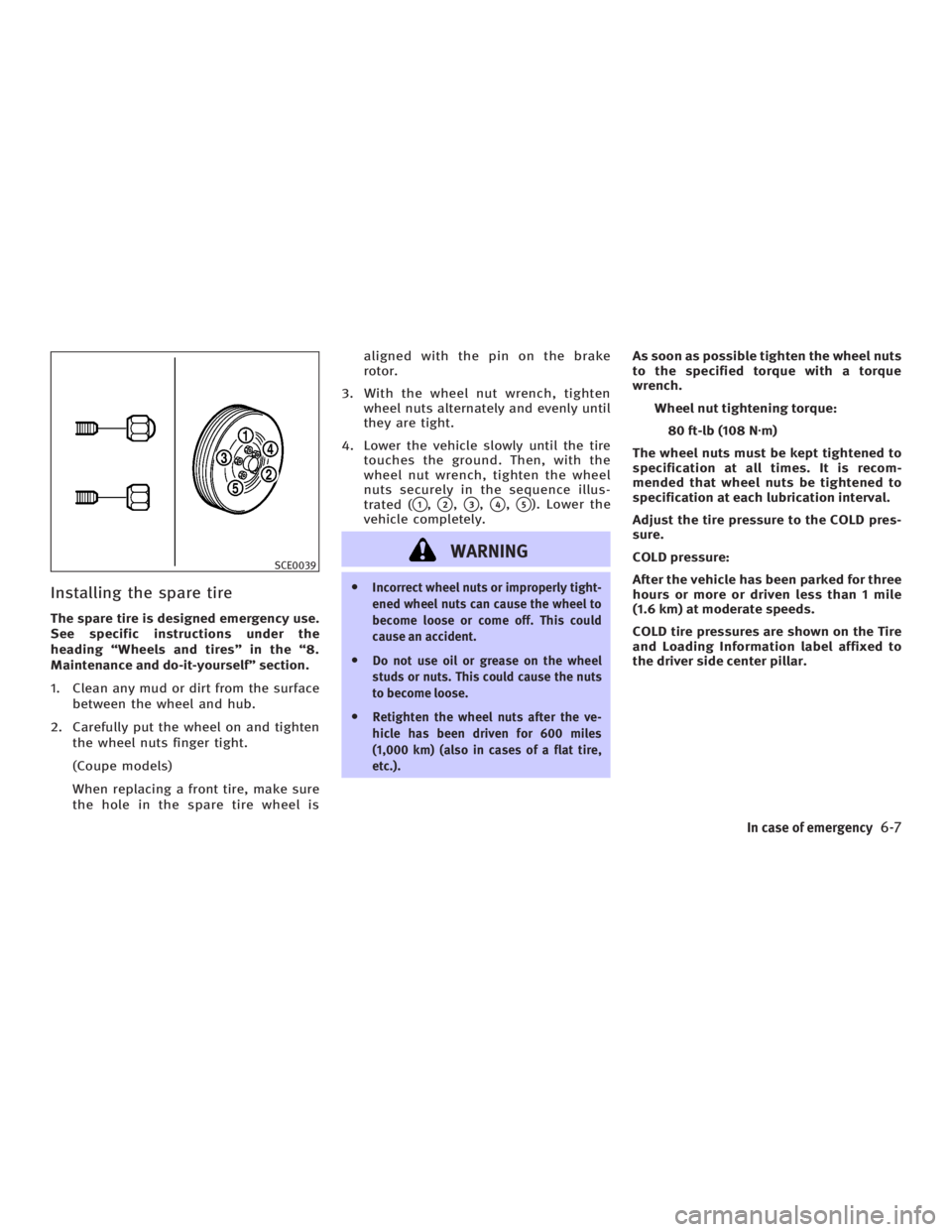
nuts securely in the sequence illus-
trated (
q 1
,
q 2
,
q 3
,
q 4
,
q 5
). Lower the
vehicle completely.
WARNING O Incorrect wheel nuts or improperly tight-
ened wheel nuts can cause the wheel to
become loose or come off. This could
cause an accident.
O Do not use oil or grease on the wheel
studs or nuts. This could cause the nuts
to become loose.
O Retighten the wheel nuts after the ve-
hicle has been driven for 600 miles
(1,000 km) (also in cases of a flat tire,
etc.). As soon as possible tighten the wheel nuts
to the specified torque with a torque
wrench.
Wheel nut tightening torque:
80 ft-lb (108 N z m)
The wheel nuts must be kept tightened to
specification at all times. It is recom-
mended that wheel nuts be tightened to
specification at each lubrication interval.
Adjust the tire pressure to the COLD pres-
sure.
COLD pressure:
After the vehicle has been parked for three
hours or more or driven less than 1 mile
(1.6 km) at moderate speeds.
COLD tire pressures are shown on the Tire
and Loading Information label affixed to
the driver side center pillar.SCE0039
In case of emergency
6-7
w 06.1.4/V35-D/V5.0
X
Page 244 of 344

5. Securely store the flat tire and jacking
equipment in the vehicle.
6. Place the spare tire cover and the
trunk floor carpeting over the dam-
aged tire.
7. Close the trunk.
WARNINGO Always make sure that the spare tire and
jacking equipment are properly secured
after use. Such items can become dangerous projectiles in an accident or
sudden stop.
O The T-type spare tire and small size
spare tire are designed for emergency
use. See ªWheels and tiresº in the ª8.
Maintenance and do-it-yourselfº sec-
tion.
If needed, Roadside Assistance is avail-
able. Please see your Warranty Information
Booklet or Roadside Assistance I.D. Card
for the toll-free number to call (U.S.) or War-
ranty Information Booklet (Canada). To start your engine with a booster bat-
tery, the instructions and precautions
below must be followed.
WARNING O If done incorrectly, jump starting can
lead to a battery explosion, resulting in
severe injury or death. It could also dam-
age your vehicle.
O Explosive hydrogen gas is always
present in the vicinity of the battery.
Keep all sparks and flames away from
the battery.
O Do not allow battery fluid to come into
contact with eyes, skin, clothing or
painted surfaces. Battery fluid is a corro-
sive sulfuric acid solution which can
cause severe burns. If the fluid should
come into contact with anything, imme-
diately flush the contacted area with wa-
ter.
O Keep battery out of the reach of children.SCE0384B
Sedan SCE0425A
Coupe JUMP STARTING
6-8 In case of emergency
w 06.1.4/V35-D/V5.0
X