steering INFINITI G35 2006 Owner's Manual
[x] Cancel search | Manufacturer: INFINITI, Model Year: 2006, Model line: G35, Model: INFINITI G35 2006Pages: 344, PDF Size: 6.81 MB
Page 158 of 344
Confirming memory storage O Turn the ignition ON and push the SET
switch. If the main memory has not
been stored, the indicator light will
come on for approximately 0.5 sec-
onds. When the memory has stored in
position, the indicator light will stay
on for approximately 5 seconds.
O If the battery cable is disconnected, or
if the fuse opens, the memory will be
canceled.
Reset the desired position using the
previous procedure.
Selecting the memorized position 1. For vehicles equipped with automatic
transmission, move the selector lever
to the P (Park) position.
For vehicles equipped with manual
transmission, move the shift lever in
the N (Neutral) position and apply the
parking brake.
2. Use one of the following methods to
move the driver's seat and the
steering wheel.
O Turn the ignition switch to the ªONº
position and push the memory switch (1 or 2) fully for at least 1
second.
O Within 45 seconds of opening the
driver's door, push the memory
switch (1 or 2) fully for at least 1
second.
The driver's seat and steering column
will move to the memorized position
with the indicator light flashing, and
then the light will stay on for approxi-
mately 5 seconds.
SYSTEM OPERATION The automatic drive positioner system will
not work or will stop operating under the
following conditions:
O when the vehicle speed is above 4
MPH (7 km/h).
O when the adjusting switch for the driv-
er's seat and steering column is
turned on while the automatic drive
positioner is operating.
O when the cancel switch (if so
equipped) is pushed to the CANCEL
side. (However, it will not be cancelled
if the switch is pushed while the seat
and steering column are returning to the previous positions (entry/exit
function).)
O when the memory switch 1 or 2 is not
pushed and held for at least 1 second.
O when the seat has already been
moved to the memorized position.
O when no seat position is stored in the
memory switch.
O when the parking brake is not applied.
Ð MT models
O when the speed is above 4 MPH (7
km/h) while the parking brake is ap-
plied. Ð MT models
To restart the drive positioner system,
move the parking brake to off and on.
O when the front seat is folded for oper-
ating the walk-in mechanism (if so
equipped).
O when the engine is started while the
automatic drive positioner is operating.
O when the AT selector lever is moved
from the P position to any other posi-
tion. (However, it will not be cancelled
if the switch is pushed while the seat
and steering column are returning to
the previous positions (entry/exit
function).)
3-36 Pre-driving checks and adjustments
w 06.1.4/V35-D/V5.0
X
Page 161 of 344

4 Display screen, heater, air conditioner and
audio systems Safety note ....................................................... 4-2
Control panel buttons Ð with navigation
system ............................................................. 4-2
Names of the components .......................... 4-2
How to use joystick and ªENTERº button ..... 4-3
How to use ªBACKº button .......................... 4-3
Setting up the start-up screen..................... 4-3
How to use ªINFOº button ........................... 4-3
How to use ªSETTINGº button ..................... 4-7
How to use the
button ........................ 4-9
Ventilators........................................................ 4-9
Heater and air conditioner (Automatic)............ 4-10
Automatic operation ................................... 4-11
Manual operation....................................... 4-12
Dual button (if so equipped) ...................... 4-12
Ambient temperature ................................. 4-13
Operating tips............................................ 4-13
In-cabin microfilter..................................... 4-13
Servicing air conditioner ................................. 4-14 Audio system .................................................. 4-14
FM radio reception ..................................... 4-15
AM radio reception .................................... 4-15
Satellite radio reception (if so equipped) ... 4-15
Audio operation precautions ...................... 4-16
FM-AM-satellite radio with compact disc
(CD) changer ............................................. 4-22
CD care and cleaning ................................ 4-27
Steering wheel switch for audio control .... 4-28
Antenna .................................................... 4-29
Car phone or CB radio ................................... 4-29
Bluetooth
Hands-Free Phone System with
INFINITI Voice Recognition .............................. 4-30
Using the system ...................................... 4-32
Control buttons ......................................... 4-34
Getting started .......................................... 4-34
List of voice commands............................. 4-36
Speaker adaptation (SA) mode .................. 4-42
Troubleshooting guide .............................. 4-44
w 06.1.13/V35-D/V5.0
X
Page 188 of 344
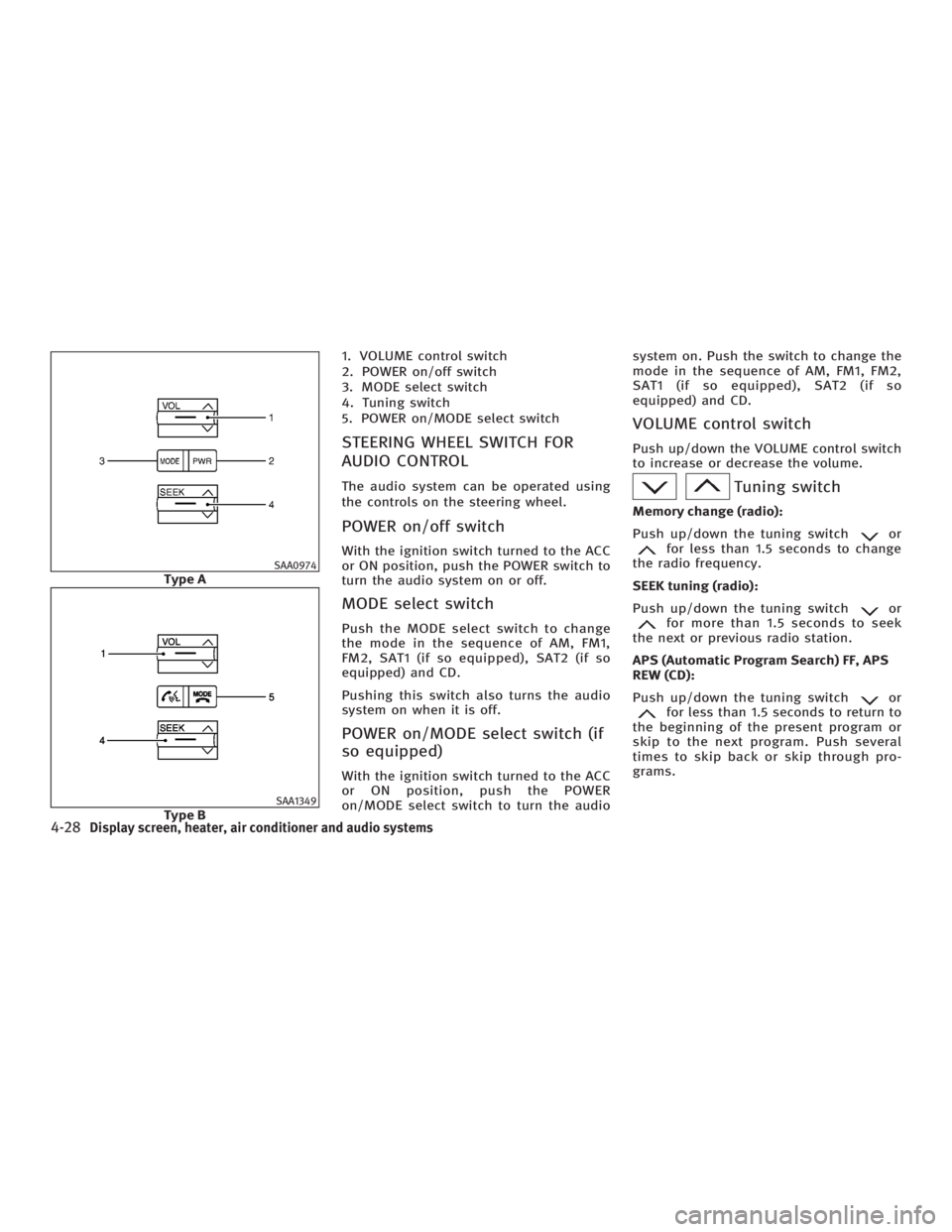
1. VOLUME control switch
2. POWER on/off switch
3. MODE select switch
4. Tuning switch
5. POWER on/MODE select switch
STEERING WHEEL SWITCH FOR
AUDIO CONTROL The audio system can be operated using
the controls on the steering wheel.
POWER on/off switch With the ignition switch turned to the ACC
or ON position, push the POWER switch to
turn the audio system on or off.
MODE select switch Push the MODE select switch to change
the mode in the sequence of AM, FM1,
FM2, SAT1 (if so equipped), SAT2 (if so
equipped) and CD.
Pushing this switch also turns the audio
system on when it is off.
POWER on/MODE select switch (if
so equipped) With the ignition switch turned to the ACC
or ON position, push the POWER
on/MODE select switch to turn the audio system on. Push the switch to change the
mode in the sequence of AM, FM1, FM2,
SAT1 (if so equipped), SAT2 (if so
equipped) and CD.
VOLUME control switch Push up/down the VOLUME control switch
to increase or decrease the volume.
Tuning switch Memory change (radio):
Push up/down the tuning switch or
for less than 1.5 seconds to change
the radio frequency.
SEEK tuning (radio):
Push up/down the tuning switch or
for more than 1.5 seconds to seek
the next or previous radio station.
APS (Automatic Program Search) FF, APS
REW (CD):
Push up/down the tuning switch or
for less than 1.5 seconds to return to
the beginning of the present program or
skip to the next program. Push several
times to skip back or skip through pro-
grams.SAA0974
Type A
SAA1349
Type B
4-28 Display screen, heater, air conditioner and audio systems
w 06.1.4/V35-D/V5.0
X
Page 193 of 344
O Speak in a natural voice without paus-
ing between words.
Giving voice commands To operate INFINITI Voice Recognition,
push and release the button located
on the steering wheel. The light on the
overhead console flashes to signal you
have entered a voice recognition (VR) ses-
sion. After the tone sounds, speak a com-
mand.
The command given is picked up by the
microphone, and voice feedback is given
when the command is accepted.
O If you need to hear the available com-
mands for the current menu again, say
ªHelpº and the system will repeat
them.
O If a command is not recognized, the
system announces, ªCommand not
recognized. Please try again.º Repeat
the command in a clear voice.
O If you want to go back to the previous
command, you can say ªGo backº or
ªCorrectionº anytime the system is
waiting for a response.
O You can cancel a command when the
system is waiting for a response by saying, ªCancelº or ªQuit.º The system
announces ªCancelº and ends the VR
session. You can also push the
button on the steering wheel at
any time. Whenever the VR session is
cancelled, a double beep is played to
indicate you have exited the system.
O If you want to adjust the volume of the
voice feedback, push the volume con-
trol switches (+ or -) on the steering
wheel while being provided with feed-
back. You can also use the radio
volume control knob.
How to say numbers
INFINITI Voice Recognition requires a cer-
tain way to speak numbers in voice com-
mands. Refer to the rules and examples
below.
O Either ªzeroº or ªohº can be used for
ª0º.
Example: 1-800-662-6200
Ð ªOne eight oh oh six six two six two
oh ohº, or
Ð ªOne eight zero zero six six two six
two oh ohº
O Words can be used for the first 4 dig-
its places only. Example: 1-800-662-6200
Ð ªOne eight hundred six six two six
two oh ohº,
Ð NOT ªOne eight hundred six six two
sixty two hundred, and
Ð NOT ªOne eight oh oh six six two
sixty two hundred.
O Numbers can be spoken in small
groups. The system will prompt you to
continuing entering digits, if desired.
Example: 1-800-662-6200
Ð ªOne eight oh ohº
The system repeats the numbers and
prompts you to enter more.
Ð ªsix six twoº
The system repeats the numbers and
prompts you to enter more.
Ð ªsix two oh ohº
O You can say ªStarº for * and ªPoundº
for # at anytime in any position of the
phone number.
Example: 1-555-1212 *123
Ð ªOne five five five one two one two
star one two threeº
Display screen, heater, air conditioner and audio systems
4-33
w 06.1.4/V35-D/V5.0
X
Page 194 of 344
NOTE:
For best results, say phone numbers as
single digits.
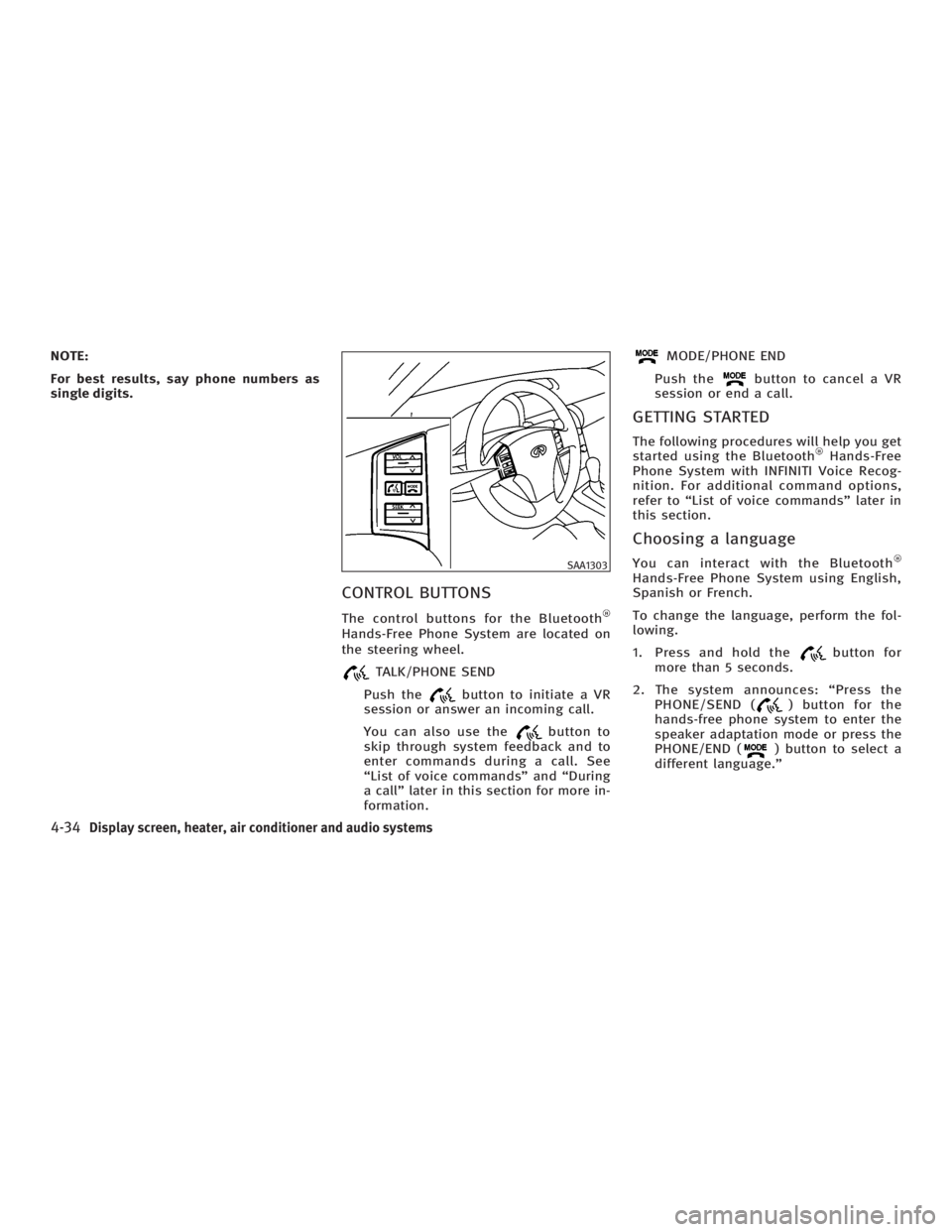
CONTROL BUTTONS The control buttons for the Bluetooth
Hands-Free Phone System are located on
the steering wheel.
TALK/PHONE SEND
Push the button to initiate a VR
session or answer an incoming call.
You can also use the button to
skip through system feedback and to
enter commands during a call. See
ªList of voice commandsº and ªDuring
a callº later in this section for more in-
formation. MODE/PHONE END
Push the button to cancel a VR
session or end a call.
GETTING STARTED The following procedures will help you get
started using the Bluetooth Hands-Free
Phone System with INFINITI Voice Recog-
nition. For additional command options,
refer to ªList of voice commandsº later in
this section.
Choosing a language You can interact with the Bluetooth
Hands-Free Phone System using English,
Spanish or French.
To change the language, perform the fol-
lowing.
1. Press and hold the button for
more than 5 seconds.
2. The system announces: ªPress the
PHONE/SEND ( ) button for the
hands-free phone system to enter the
speaker adaptation mode or press the
PHONE/END ( ) button to select a
different language.º SAA1303
4-34 Display screen, heater, air conditioner and audio systems
w 06.1.4/V35-D/V5.0
X
Page 195 of 344
3. Press the button.
For information on speaker adapta-
tion, see ªSpeaker adaptation (SA)
modeº later in this section.
4. The system announces the current lan-
guage and gives you the option to
change the language to Spanish (in
Spanish) or French (in French). Use the
following chart to select the language.
NOTE:
Note: You must press the button or
the button within 5 seconds to
change the language. Current
language Press
(TALK/PHONE
SEND)
to select Press
(MODE/PHONE
END)
to select
English Spanish French
Spanish English French
French English Spanish
5. If you decide not to change the lan-
guage, do not press either button.
After 5 seconds, the VR session will
end, and the language will not be
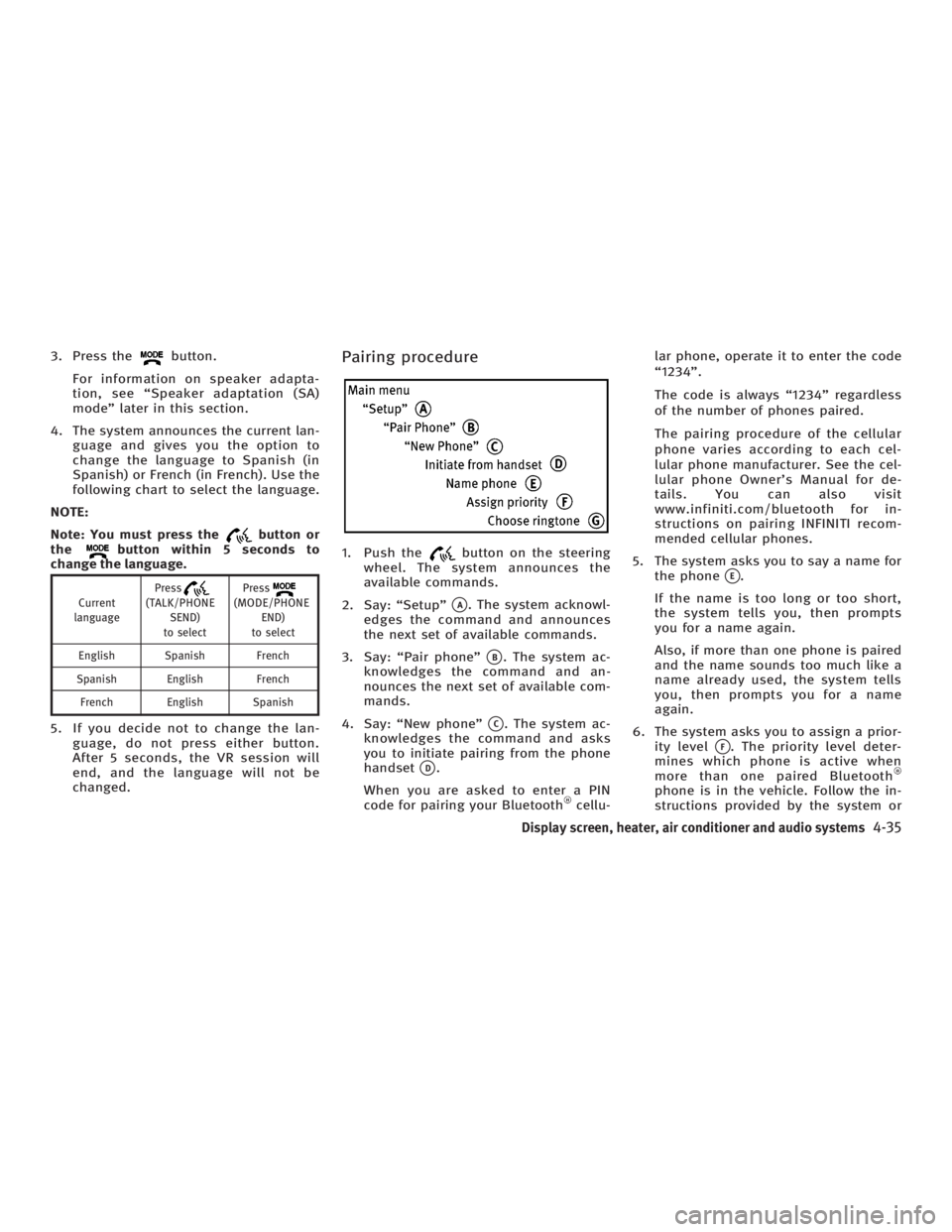
changed. Pairing procedure
1. Push the button on the steering
wheel. The system announces the
available commands.
2. Say: ªSetupº
q A
. The system acknowl-
edges the command and announces
the next set of available commands.
3. Say: ªPair phoneº
q B
. The system ac-
knowledges the command and an-
nounces the next set of available com-
mands.
4. Say: ªNew phoneº
q C
. The system ac-
knowledges the command and asks
you to initiate pairing from the phone
handset
q D
.
When you are asked to enter a PIN
code for pairing your Bluetooth cellu- lar phone, operate it to enter the code
ª1234º.
The code is always ª1234º regardless
of the number of phones paired.
The pairing procedure of the cellular
phone varies according to each cel-
lular phone manufacturer. See the cel-
lular phone Owner's Manual for de-
tails. You can also visit
www.infiniti.com/bluetooth for in-
structions on pairing INFINITI recom-
mended cellular phones.
5. The system asks you to say a name for
the phone
q E
.
If the name is too long or too short,
the system tells you, then prompts
you for a name again.
Also, if more than one phone is paired
and the name sounds too much like a
name already used, the system tells
you, then prompts you for a name
again.
6. The system asks you to assign a prior-
ity level
q F
. The priority level deter-
mines which phone is active when
more than one paired Bluetooth
phone is in the vehicle. Follow the in-
structions provided by the system or
Display screen, heater, air conditioner and audio systems
4-35
w 06.1.5/V35-D/V5.0
X
Page 196 of 344
refer to ªSetupº later in this section
for more information on changing pri-
orities.
7. The system will ask if you would like
to select a custom ring tone
q G
. Follow
the instructions provided by the
system or refer to ªSetupº later in this
section for more information on se-
lecting ringtones.
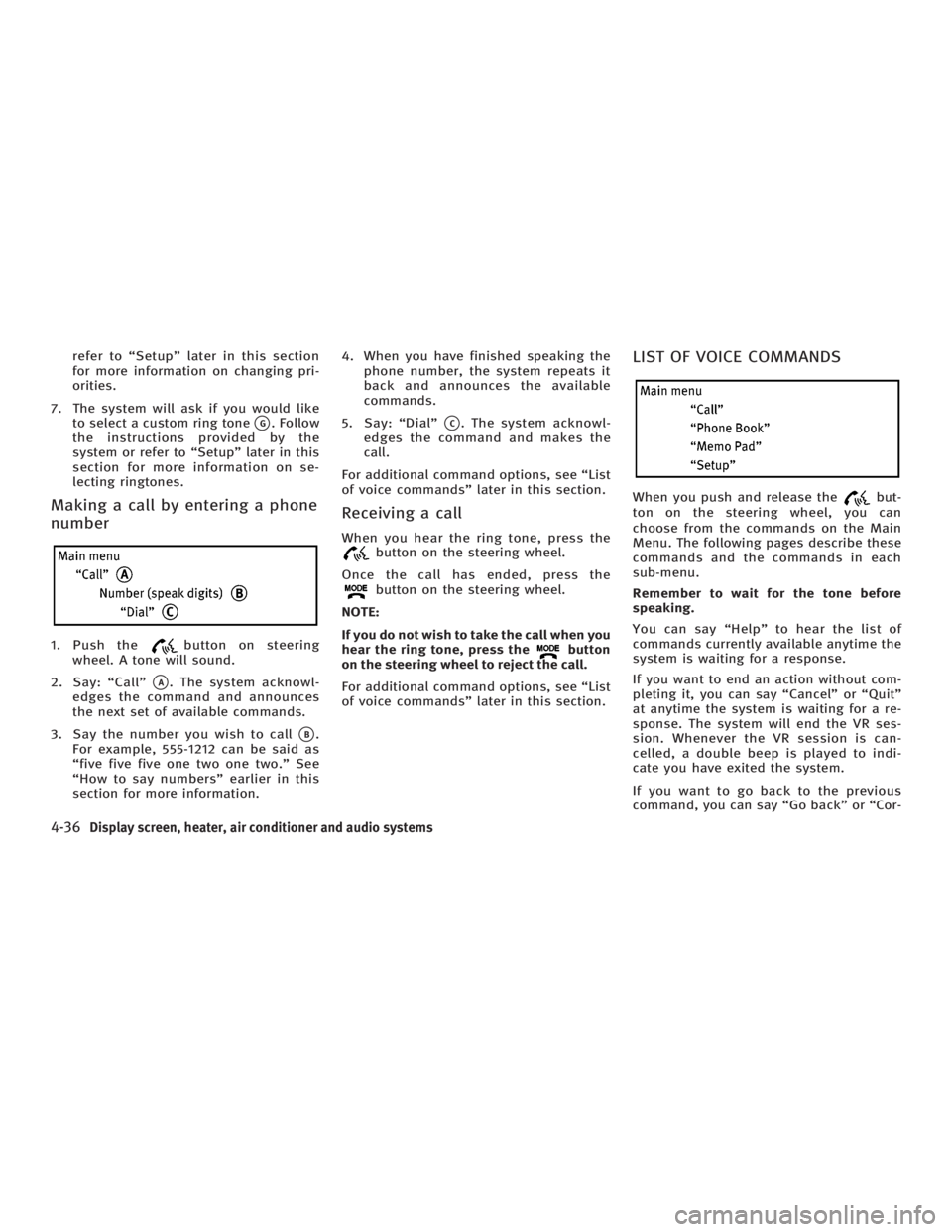
Making a call by entering a phone
number 1. Push the button on steering
wheel. A tone will sound.
2. Say: ªCallº
q A
. The system acknowl-
edges the command and announces
the next set of available commands.
3. Say the number you wish to call
q B
.
For example, 555-1212 can be said as
ªfive five five one two one two.º See
ªHow to say numbersº earlier in this
section for more information. 4. When you have finished speaking the
phone number, the system repeats it
back and announces the available
commands.
5. Say: ªDialº
q C
. The system acknowl-
edges the command and makes the
call.
For additional command options, see ªList
of voice commandsº later in this section.
Receiving a call When you hear the ring tone, press the
button on the steering wheel.
Once the call has ended, press the
button on the steering wheel.
NOTE:
If you do not wish to take the call when you
hear the ring tone, press the button
on the steering wheel to reject the call.
For additional command options, see ªList
of voice commandsº later in this section. LIST OF VOICE COMMANDS When you push and release the but-
ton on the steering wheel, you can
choose from the commands on the Main
Menu. The following pages describe these
commands and the commands in each
sub-menu.
Remember to wait for the tone before
speaking.
You can say ªHelpº to hear the list of
commands currently available anytime the
system is waiting for a response.
If you want to end an action without com-
pleting it, you can say ªCancelº or ªQuitº
at anytime the system is waiting for a re-
sponse. The system will end the VR ses-
sion. Whenever the VR session is can-
celled, a double beep is played to indi-
cate you have exited the system.
If you want to go back to the previous
command, you can say ªGo backº or ªCor-
4-36 Display screen, heater, air conditioner and audio systems
w 06.1.4/V35-D/V5.0
X
Page 197 of 344
rectionº anytime the system is waiting for
a response.
When you get used to the menus in the
system, you can talk ahead by saying
more than one command at a time. For
example, say, ªCall five five five one two
one twoº or ªMemo pad record.º
Also, when you get used to the system re-
sponses, you can skip ahead to the tone
by pressing the button on the steer-
ing wheel. However, if you press the
button when the system is waiting
for a response from you it will end the VR
session.
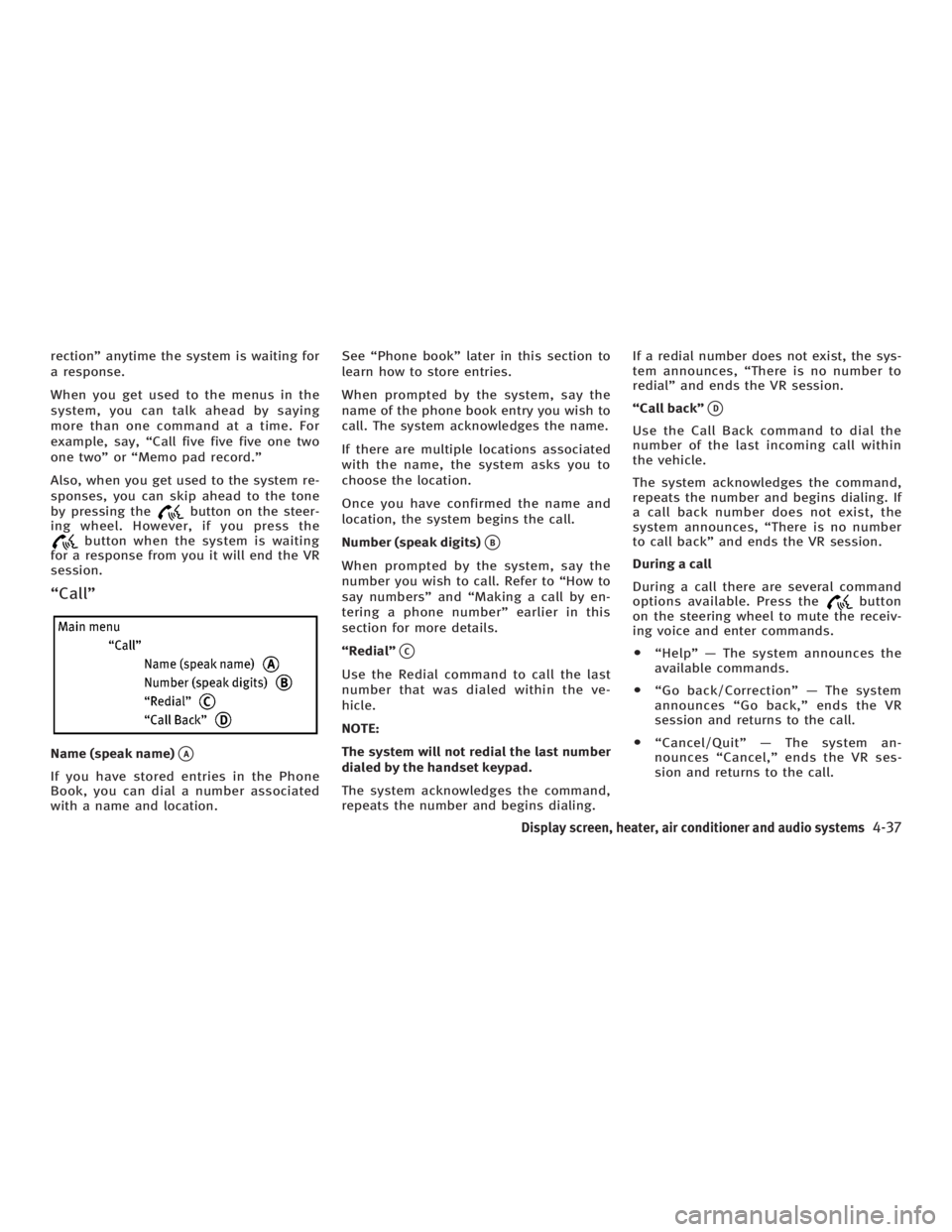
ªCallº
Name (speak name)
q A
If you have stored entries in the Phone
Book, you can dial a number associated
with a name and location. See ªPhone bookº later in this section to
learn how to store entries.
When prompted by the system, say the
name of the phone book entry you wish to
call. The system acknowledges the name.
If there are multiple locations associated
with the name, the system asks you to
choose the location.
Once you have confirmed the name and
location, the system begins the call.
Number (speak digits)
q B
When prompted by the system, say the
number you wish to call. Refer to ªHow to
say numbersº and ªMaking a call by en-
tering a phone numberº earlier in this
section for more details.
ªRedialº
q C
Use the Redial command to call the last
number that was dialed within the ve-
hicle.
NOTE:
The system will not redial the last number
dialed by the handset keypad.
The system acknowledges the command,
repeats the number and begins dialing. If a redial number does not exist, the sys-
tem announces, ªThere is no number to
redialº and ends the VR session.
ªCall backº
q D
Use the Call Back command to dial the
number of the last incoming call within
the vehicle.
The system acknowledges the command,
repeats the number and begins dialing. If
a call back number does not exist, the
system announces, ªThere is no number
to call backº and ends the VR session.
During a call
During a call there are several command
options available. Press the button
on the steering wheel to mute the receiv-
ing voice and enter commands.
O ªHelpº Ð The system announces the
available commands.
O ªGo back/Correctionº Ð The system
announces ªGo back,º ends the VR
session and returns to the call.
O ªCancel/Quitº Ð The system an-
nounces ªCancel,º ends the VR ses-
sion and returns to the call.
Display screen, heater, air conditioner and audio systems
4-37
w 06.1.4/V35-D/V5.0
X
Page 199 of 344
The system confirms the name, location
and number. The system then asks if you
would like to store another location for
the same name. If you do not wish to
store another location, the system ends
the VR session.
ªEditº
q B
Use the Edit command to alter an existing
phone book entry or to add a 2nd, 3rd or
4th phone number to an existing entry.
When prompted by the system, say the
name of the entry you wish to edit.
The system acknowledges the name and
asks you for the location you would like
to edit.
Say the name of the location. The system
acknowledges and asks you for the phone
number you would like to store with this
location.
See ªHow to say numbersº earlier in this
section for more information.
The system repeats the number and
prompts you for the next command. When
you have finished entering numbers,
choose ªStore.º
The system confirms the name, location
and number, then announces that the en- try has been stored. The system then
ends the VR session.
ªDeleteº
q C
Use the Delete command to erase one en-
try from the phone book, all entries from
the phone book, the current redial
number or the current call back number.
To delete entries from the phone book,
say a name or ªAll entriesº when
prompted by the system.
The system acknowledges the command
and asks you to confirm the deletion.
To delete the current redial number or call
back number, say ªredial numberº or ªcall
back numberº when prompted by the sys-
tem.
If a redial number or a call back number
exists, the system deletes them without
asking for confirmation.
If there is no number for the entry you are
trying to delete, the system says so and
ends the VR session.
ªList namesº
q D
Use the List Names command to hear all
the names and locations in the phone
book. The system recites the phone book en-
tries but does not include the actual
phone numbers. When the playback of
the list is complete the system ends the
VR session.
You can stop the playback of the list at
any time by pressing the button on
the steering wheel. The system ends the
VR session.
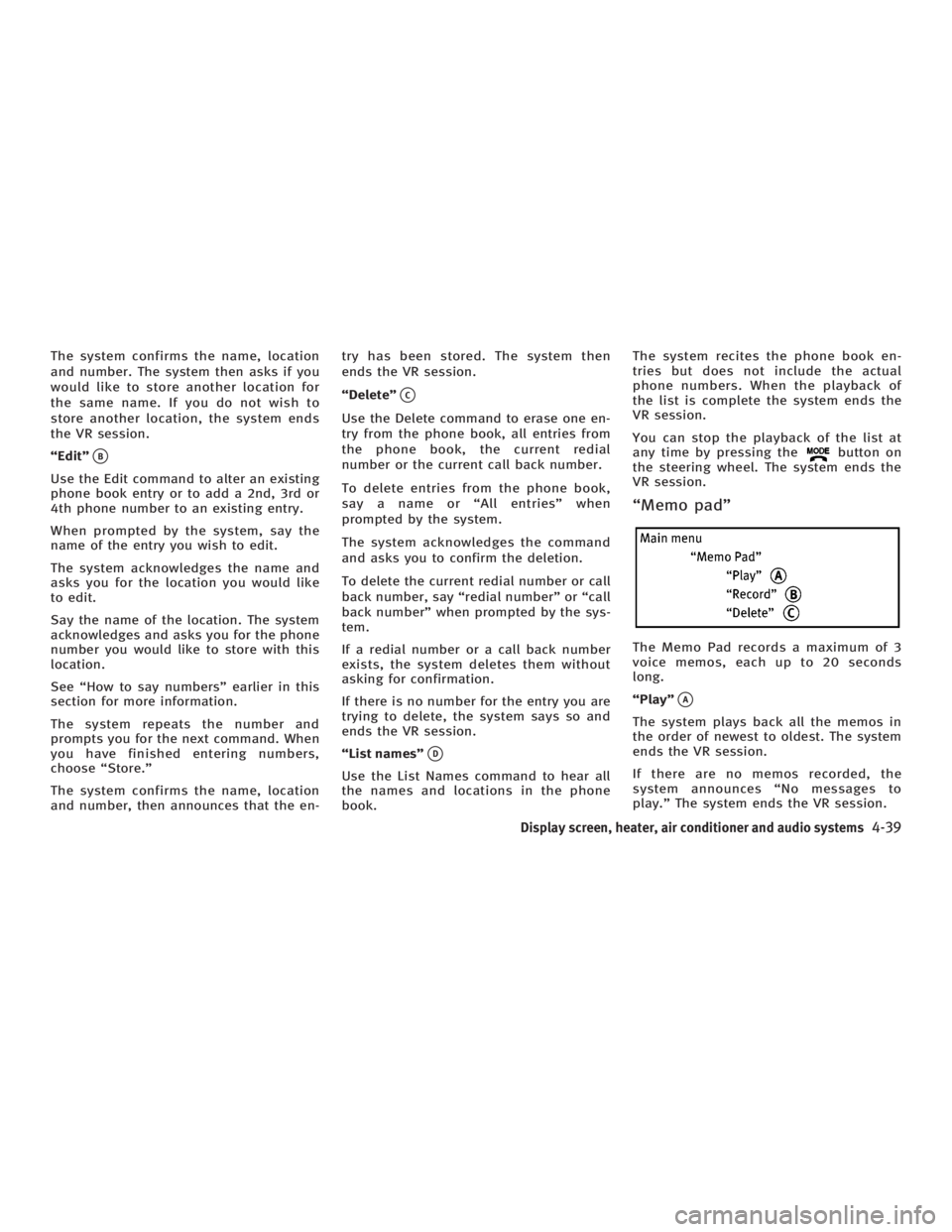
ªMemo padº
The Memo Pad records a maximum of 3
voice memos, each up to 20 seconds
long.
ªPlayº
q A
The system plays back all the memos in
the order of newest to oldest. The system
ends the VR session.
If there are no memos recorded, the
system announces ªNo messages to
play.º The system ends the VR session.
Display screen, heater, air conditioner and audio systems
4-39
w 06.1.4/V35-D/V5.0
X
Page 200 of 344
ªRecordº
q B
The system announces ªRecordingº and a
tone sounds signaling you to begin.
Speak the information you wish to record
clearly. When you are done, press the
or button on the steering
wheel.
A tone sounds and the system announces
ªMemo recorded.º Another tone sounds
to end the VR session.
If the memo pad is full, the system asks if
you wish to record over the oldest memo.
ªDeleteº
q C
The Delete command erases all memos.
The system asks you to confirm this ac-
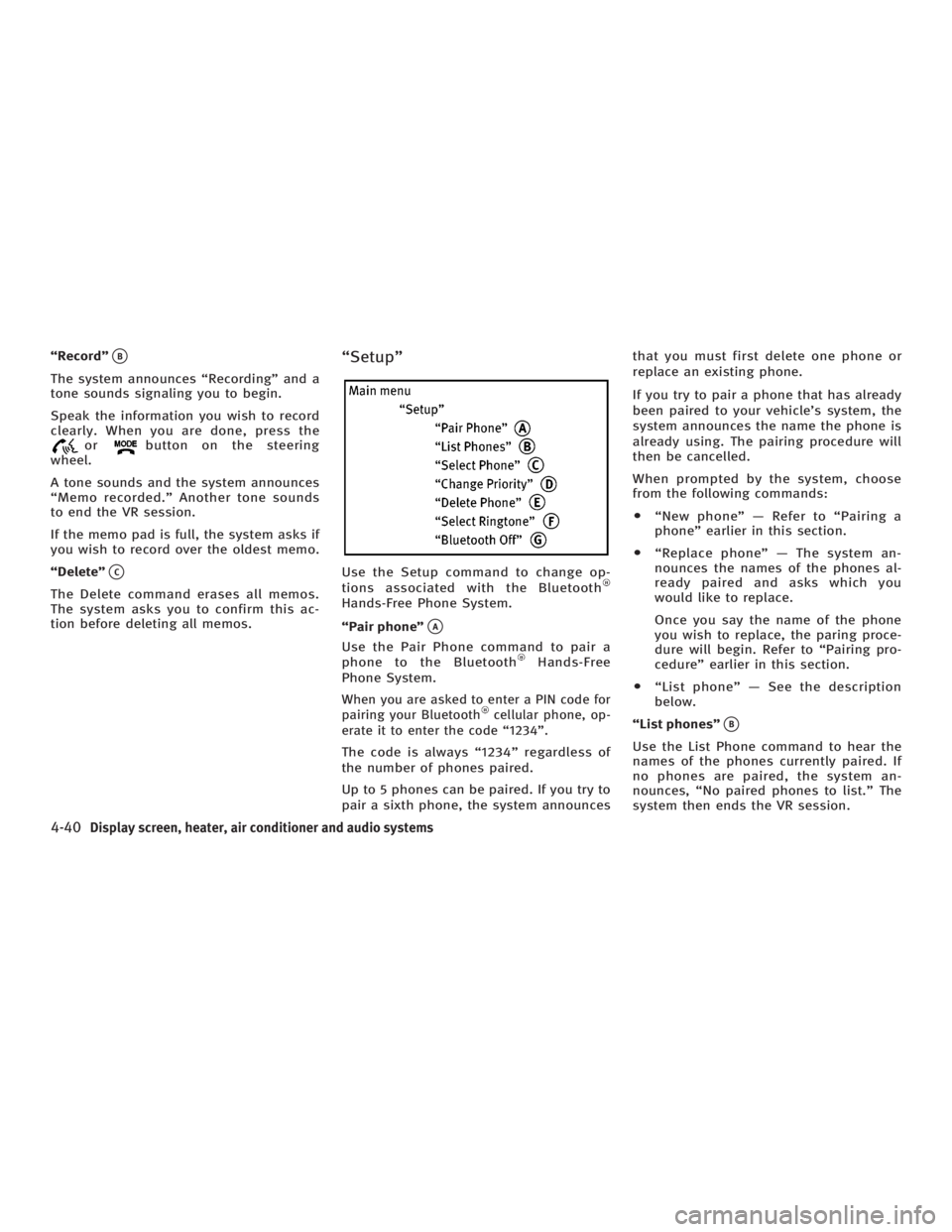
tion before deleting all memos. ªSetupº
Use the Setup command to change op-
tions associated with the Bluetooth
Hands-Free Phone System.
ªPair phoneº
q A
Use the Pair Phone command to pair a
phone to the Bluetooth Hands-Free
Phone System.
When you are asked to enter a PIN code for
pairing your Bluetooth cellular phone, op-
erate it to enter the code ª1234º.
The code is always ª1234º regardless of
the number of phones paired.
Up to 5 phones can be paired. If you try to
pair a sixth phone, the system announces that you must first delete one phone or
replace an existing phone.
If you try to pair a phone that has already
been paired to your vehicle's system, the
system announces the name the phone is
already using. The pairing procedure will
then be cancelled.
When prompted by the system, choose
from the following commands:
O ªNew phoneº Ð Refer to ªPairing a
phoneº earlier in this section.
O ªReplace phoneº Ð The system an-
nounces the names of the phones al-
ready paired and asks which you
would like to replace.
Once you say the name of the phone
you wish to replace, the paring proce-
dure will begin. Refer to ªPairing pro-
cedureº earlier in this section.
O ªList phoneº Ð See the description
below.
ªList phonesº
q B
Use the List Phone command to hear the
names of the phones currently paired. If
no phones are paired, the system an-
nounces, ªNo paired phones to list.º The
system then ends the VR session.
4-40 Display screen, heater, air conditioner and audio systems
w 06.1.4/V35-D/V5.0
X