ECO mode INFINITI G35 2006 Owner's Guide
[x] Cancel search | Manufacturer: INFINITI, Model Year: 2006, Model line: G35, Model: INFINITI G35 2006Pages: 344, PDF Size: 6.81 MB
Page 202 of 344
You can still use the Memo Pad and ac-
cess Setup.
To turn on the system again, choose the
Bluetooth On command from the Setup
command.
SPEAKER ADAPTATION (SA) MODE Speaker Adaptation allows up to two out-of
dialect users to train the system to improve
recognition accuracy. By repeating a
number of commands, the users can create
a voice model of their own voice that is
stored in the system. The system is ca-
pable of storing a different speaker adapta-
tion model for memory A and memory B.
If memory A is available, the system will
use memory A to store the model. If
memory A is in use and memory B is
available, the system will use memory B
to store the model. If both of the memory
locations are in use, the system will ask
the user to select which memory location
should be overwritten.
Training procedure The procedure for training a voice is as
follows.
1. Position the vehicle in a reasonably
quiet outdoor location. 2. Sit in the driver's seat with the engine
running, the parking brake on, and the
transmission in Park.
3. Press and hold the button for
more than 5 seconds.
4. The system announces: ªPress the
PHONE/SEND ( ) button for the
hands-free phone system to enter the
speaker adaptation mode or press the
PHONE/END ( ) button to select a
different language.º
5. Press the button.
For information on selecting a dif-
ferent language, see ªChoosing a lan-
guageº earlier in this section.
6. Voice memory A or memory B is se-
lected automatically. If both memory
locations are already in use, the
system will prompt you to overwrite
one. Follow the instructions provided
by the system.
7. When preparation is complete and you
are ready to begin, the press the
button.
8. The SA mode will be explained. Follow
the instructions provided by the
system. 9. When training is finished, the system
will tell you an adequate number of
phrases have been recorded.
10. The system will ask you to say your
name. Follow the instructions to regis-
ter your name.
11. The system will announce that
speaker adaptation has been com-
pleted and the system is ready.
The SA mode will stop if:
O The button is pressed for more
than 5 seconds in SA mode.
O The vehicle is driven during SA mode.
O The ignition switch is turned to the
OFF or LOCK position.
Training phrases During the SA mode, the system instructs
you to say the following phrases.
(The system will prompt you for each
phrase.)
O phone book new entry
O dial three oh four two nine
O delete call back number
O setup pair phone
4-42 Display screen, heater, air conditioner and audio systems
w 06.1.13/V35-D/V5.0
X
Page 204 of 344
TROUBLESHOOTING GUIDE The system should respond correctly to all voice commands without difficulty. If problems are encountered, try the following solu-
tions.
Where the solutions are listed by number, try each solution in turn, starting with number 1, until the problem is resolved. Symptom Solution
System fails to interpret the command cor-
rectly. 1. Ensure that the command is valid. See ªList of voice commandsº earlier in this section.
2. Ensure that the command is spoken after the tone.
3. Speak clearly without pausing between words and at a level appropriate to the ambient noise level in the ve-
hicle.
4. Ensure that the ambient noise level is not excessive (for example, windows open or defroster on). NOTE: If it is
too noisy to use the phone, it is likely that the voice commands will not be recognized.
5. If more than one command was said at a time, try saying the commands separately.
6. If the system consistently fails to recognize commands, the voice training procedure should be carried out to
improve the recognition response for the speaker. See ªSpeaker adaptation (SA) modeº earlier in this section.
The system consistently selects the wrong en-
try from the phone book. 1. Ensure that the phone book entry name requested matches what was originally stored. This can be confirmed
by using the ªList Namesº command. See ªPhone bookº earlier in this section.
2. Replace one of the names being confused with a new name.
4-44 Display screen, heater, air conditioner and audio systems
w 06.1.13/V35-D/V5.0
X
Page 205 of 344
5 Starting and driving Precautions when starting and driving .............. 5-2
Exhaust gas (Carbon monoxide) .................. 5-2
Three way catalyst....................................... 5-3
Tire pressure monitoring system (TPMS) ..... 5-3
Avoiding collision and rollover..................... 5-5
Drinking alcohol/drugs and driving ............. 5-5
All-wheel drive (AWD) driving safety
precautions (for AWD models) .................... 5-6
Ignition switch (except Intelligent Key
system)............................................................. 5-6
Automatic transmission ............................... 5-6
Manual transmission .................................. 5-7
Key positions .............................................. 5-8
INFINITI Vehicle Immobilizer System ............ 5-8
Ignition switch (models with the Intelligent
Key system) ...................................................... 5-9
Ignition switch positions ............................. 5-9
INFINITI Vehicle Immobilizer System .......... 5-10
Before starting the engine............................... 5-10
Starting the engine .......................................... 5-11
Driving the vehicle .......................................... 5-12
Automatic transmission.............................. 5-12
Manual transmission ................................ 5-16
Parking brake .................................................. 5-19 Cruise control ................................................. 5-20
Precautions on cruise control .................... 5-20
Cruise control operations .......................... 5-20
Break-in schedule ........................................... 5-22
Increasing fuel economy ................................. 5-22
All-wheel drive (AWD) (if so equipped) ............ 5-23
All-wheel drive (AWD) warning light ........... 5-23
Parking/parking on hills ................................. 5-24
Power steering ................................................ 5-25
Brake system .................................................. 5-26
Braking precautions .................................. 5-26
Anti-lock brake system (ABS)..................... 5-26
Vehicle Dynamic Control (VDC) system .......... 5-28
Rear active steer (RAS) system (if so
equipped) ....................................................... 5-29
Cold weather driving....................................... 5-30
Freeing a frozen door lock ......................... 5-30
Anti-freeze ................................................. 5-30
Battery ...................................................... 5-30
Draining of coolant water .......................... 5-30
Tire equipment .......................................... 5-30
Special winter equipment........................... 5-31
Driving on snow or ice ............................... 5-31
Engine block heater (if so equipped) ......... 5-32
w 06.1.13/V35-D/V5.0
X
Page 215 of 344
1. Apply the parking brake.
2. Automatic transmission:
Move the selector lever to the P or N
position. (P preferred.)
The starter is designed so that the
starter does not operate unless the se-
lector lever is in either one of the
above positions.
Manual transmission:
Move the shift lever to the N position.
Depress the clutch pedal fully to the
floor.
The starter is designed so that it does
not operate unless the clutch pedal is
fully depressed.
3. Turn the ignition switch to START (4)
to crank the engine with your foot off
the accelerator pedal. Release the key
when the engine starts.
If the engine starts, but fails to run, re-
peat the above procedure.
O If the engine is very hard to start in
extremely cold weather or when re-
starting, depress the accelerator pedal
a little (approximately 1/3 to the floor)
and while holding, crank the engine. Release the key and the accelerator
pedal when the engine starts.
O If the engine is very hard to start be-
cause it is flooded, depress the accel-
erator pedal all the way to the floor
and hold it. Crank the engine for 5 to
6 seconds. After cranking the engine,
release the accelerator pedal. Crank
the engine with your foot off the accel-
erator pedal by turning the ignition key
to the START position. Release the key
when the engine starts. If the engine
starts, but fails to run, repeat the
above procedure.
CAUTION Do not operate the starter for more than 15
seconds at a time. If the engine does not
start, turn the key off and wait 10 seconds
before cranking again, otherwise the starter
could be damaged.
4. Warm-up
Allow the engine to idle for at least 30
seconds after starting. Do not race the
engine while warming it up. Drive at
moderate speed for a short distance
first, especially in cold weather. In cold weather, keep the engine running
for a minimum o f2-3 minutes before
shutting it off. Starting and stopping
the engine over a short period of time
may make the vehicle more difficult to
start.
STARTING THE ENGINE
Starting and driving
5-11
w 06.1.4/V35-D/V5.0
X
Page 222 of 344
Push the trip odometer reset switch more
than approximately 2 seconds and then
the figure in the display will start
blinking.
Pushing the trip odometer reset switch for
less than approximately 1 second while
the figure is blinking will add the figure
by 100 rpm. If pushing for more than ap-
proximately 1 second, the figure will in-
crease by 500 rpm.
If you have not operated the trip odom-
eter reset switch for 5 seconds, the set-
ting mode will end. The display will illumi-
nate instead of blink.
If the battery cable is disconnected, the
set engine speed will be returned to the
initial figure (8,000 rpm).
Suggested up-shift speeds Shown below are suggested vehicle
speeds for shifting into a higher gear.
These suggestions relate to fuel economy
and vehicle performance. Actual up-shift
speeds will vary according to road condi-
tions, the weather and individual driving
habits. For normal acceleration in low altitude ar-
eas [less than 4,000 ft (1,219 m)]:
Gear change MPH (km/h)
1st to 2nd 8 (13)
2nd to 3rd 16 (25)
3rd to 4th 25 (40)
4th to 5th 30 (50)
5th to 6th 33 (53)
For quick acceleration in low altitude
areas or in high altitude areas [over 4,000
ft (1,219 m)]:
Gear change MPH (km/h)
1st to 2nd 15 (24)
2nd to 3rd 25 (40)
3rd to 4th 40 (64)
4th to 5th 45 (72)
5th to 6th 50 (80)
Suggested maximum speed in
each gear Downshift to a lower gear if the engine is
not running smoothly, or if you need to
accelerate.
Do not exceed the maximum suggested
speed (shown below) in any gear. For
level road driving, use the highest gear
suggested for that speed. Always observe posted speed limits, and drive according
to the road conditions, which will ensure
safe operation. Do not over-rev the engine
when shifting to a lower gear as it may
cause engine damage or loss of vehicle
control.
Gear MPH (km/h)
1st 35 (56)
2nd 60 (96)
3rd 90 (144)
4th Ð
5th Ð
6th Ð
5-18 Starting and driving
w 06.1.4/V35-D/V5.0
X
Page 226 of 344
CAUTIONDuring the first 1,200 miles (2,000 km),
follow these recommendations to obtain
maximum engine performance and ensure
the future reliability and economy of your
new vehicle. Failure to follow these recom-
mendations may result in shortened engine
life and reduced engine performance.
O Avoid driving for long periods at con-
stant speed, either fast or slow. Do
not run the engine over 4,000 rpm.
O Do not accelerate at full throttle in any
gear.
O Avoid quick starts.
O Avoid hard braking as much as pos-
sible.
O Do not tow a trailer or haul a heavy
load for the first 500 miles (800 km). O Accelerate slowly and smoothly. Main-
tain cruising speeds with a constant
accelerator position.
O Drive at moderate speeds on the high-
way. Driving at high speed will lower
fuel economy.
O Avoid unnecessary stopping and brak-
ing. Maintain a safe distance behind
other vehicles.
O Use a proper gear range which suits
road conditions. On level roads, shift
into high gear as soon as possible.
O Avoid unnecessary engine idling.
O Keep your engine tuned up.
O Follow the recommended periodic
maintenance schedule.
O Keep the tires inflated at the correct
pressure. Low pressure will increase
tire wear and waste fuel.
O Keep the front wheels in correct align-
ment. Improper alignment will cause
not only tire wear but also lower fuel
economy.
O Air conditioner operation lowers fuel
economy. Use the air conditioner only
when necessary. O When cruising at highway speeds, it is
more economical to use the air condi-
tioner and leave the windows closed
to reduce drag.
BREAK-IN SCHEDULE INCREASING FUEL ECONOMY
5-22 Starting and driving
w 06.1.4/V35-D/V5.0
X
Page 227 of 344
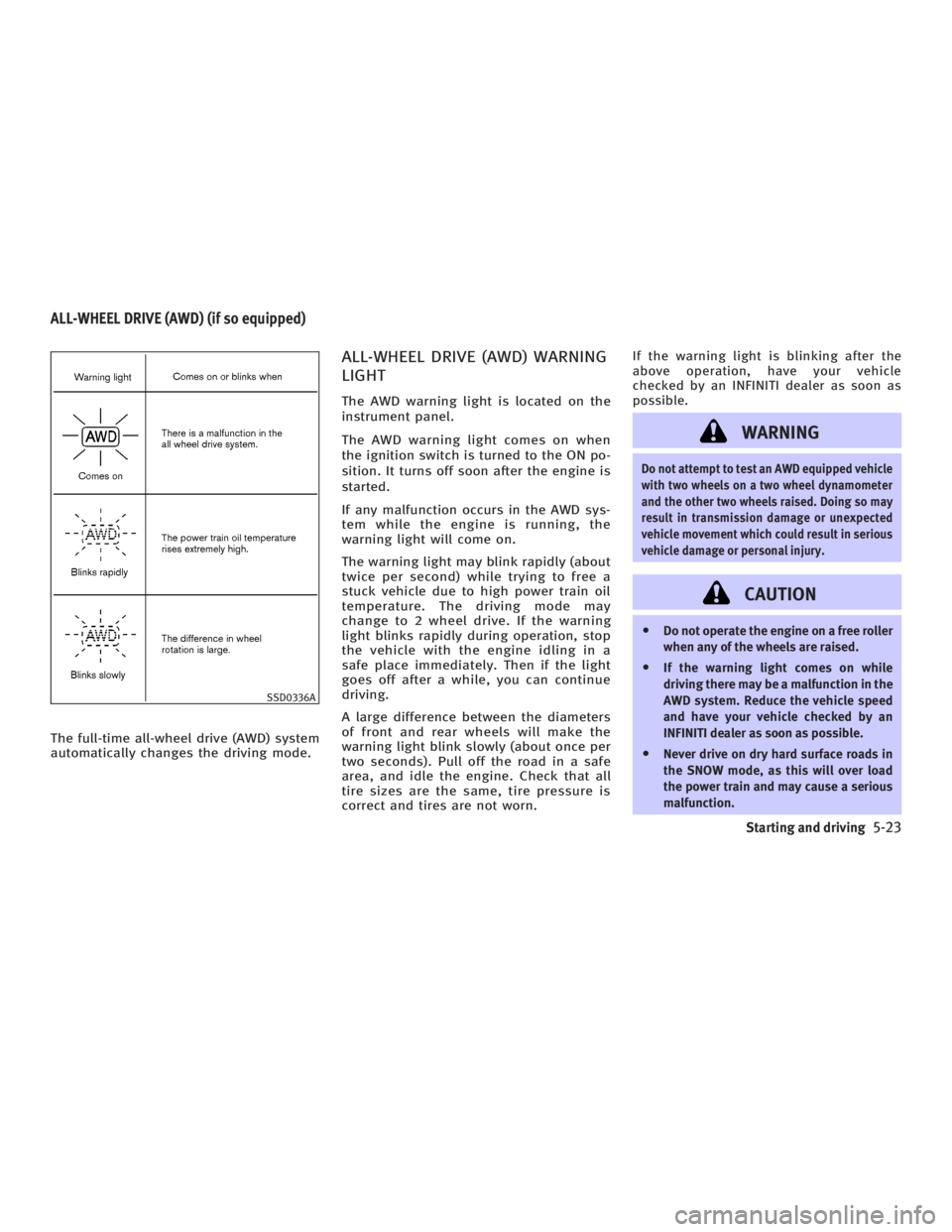
The full-time all-wheel drive (AWD) system
automatically changes the driving mode. ALL-WHEEL DRIVE (AWD) WARNING
LIGHT The AWD warning light is located on the
instrument panel.
The AWD warning light comes on when
the ignition switch is turned to the ON po-
sition. It turns off soon after the engine is
started.
If any malfunction occurs in the AWD sys-
tem while the engine is running, the
warning light will come on.
The warning light may blink rapidly (about
twice per second) while trying to free a
stuck vehicle due to high power train oil
temperature. The driving mode may
change to 2 wheel drive. If the warning
light blinks rapidly during operation, stop
the vehicle with the engine idling in a
safe place immediately. Then if the light
goes off after a while, you can continue
driving.
A large difference between the diameters
of front and rear wheels will make the
warning light blink slowly (about once per
two seconds). Pull off the road in a safe
area, and idle the engine. Check that all
tire sizes are the same, tire pressure is
correct and tires are not worn. If the warning light is blinking after the
above operation, have your vehicle
checked by an INFINITI dealer as soon as
possible.
WARNING Do not attempt to test an AWD equipped vehicle
with two wheels on a two wheel dynamometer
and the other two wheels raised. Doing so may
result in transmission damage or unexpected
vehicle movement which could result in serious
vehicle damage or personal injury.
CAUTION O Do not operate the engine on a free roller
when any of the wheels are raised.
O If the warning light comes on while
driving there may be a malfunction in the
AWD system. Reduce the vehicle speed
and have your vehicle checked by an
INFINITI dealer as soon as possible.
O Never drive on dry hard surface roads in
the SNOW mode, as this will over load
the power train and may cause a serious
malfunction.SSD0336AALL-WHEEL DRIVE (AWD) (if so equipped)
Starting and driving
5-23
w 06.1.4/V35-D/V5.0
X
Page 243 of 344
Installing the spare tire The spare tire is designed emergency use.
See specific instructions under the
heading ªWheels and tiresº in the ª8.
Maintenance and do-it-yourselfº section.
1. Clean any mud or dirt from the surface
between the wheel and hub.
2. Carefully put the wheel on and tighten
the wheel nuts finger tight.
(Coupe models)
When replacing a front tire, make sure
the hole in the spare tire wheel is aligned with the pin on the brake
rotor.
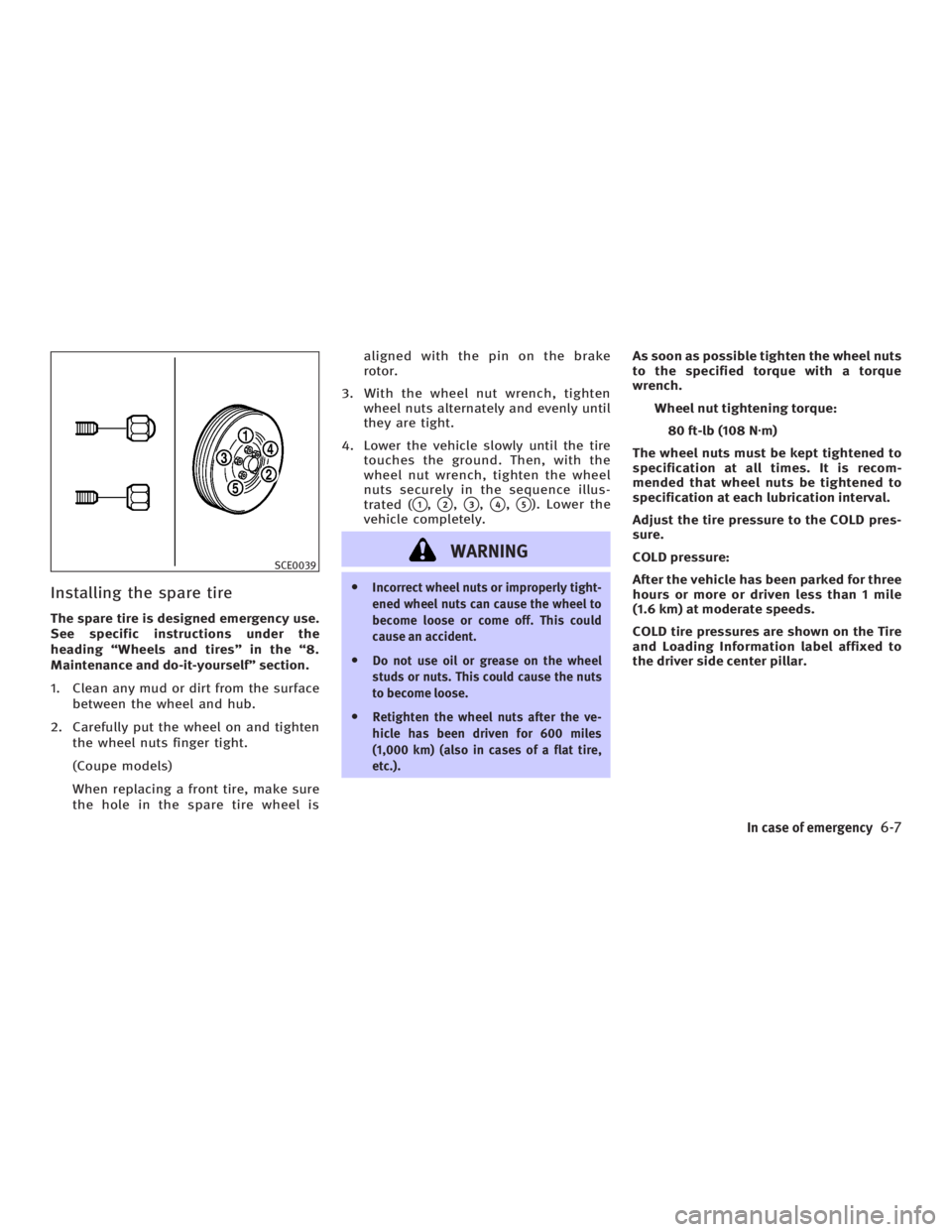
3. With the wheel nut wrench, tighten
wheel nuts alternately and evenly until
they are tight.
4. Lower the vehicle slowly until the tire
touches the ground. Then, with the
wheel nut wrench, tighten the wheel
nuts securely in the sequence illus-
trated (
q 1
,
q 2
,
q 3
,
q 4
,
q 5
). Lower the
vehicle completely.
WARNING O Incorrect wheel nuts or improperly tight-
ened wheel nuts can cause the wheel to
become loose or come off. This could
cause an accident.
O Do not use oil or grease on the wheel
studs or nuts. This could cause the nuts
to become loose.
O Retighten the wheel nuts after the ve-
hicle has been driven for 600 miles
(1,000 km) (also in cases of a flat tire,
etc.). As soon as possible tighten the wheel nuts
to the specified torque with a torque
wrench.
Wheel nut tightening torque:
80 ft-lb (108 N z m)
The wheel nuts must be kept tightened to
specification at all times. It is recom-
mended that wheel nuts be tightened to
specification at each lubrication interval.
Adjust the tire pressure to the COLD pres-
sure.
COLD pressure:
After the vehicle has been parked for three
hours or more or driven less than 1 mile
(1.6 km) at moderate speeds.
COLD tire pressures are shown on the Tire
and Loading Information label affixed to
the driver side center pillar.SCE0039
In case of emergency
6-7
w 06.1.4/V35-D/V5.0
X
Page 246 of 344

CAUTIONO Always connect positive (+) to positive
(+) and negative (þ) to body ground, not
to the battery.
O Make sure jumper cables do not touch
moving parts in the engine compartment
and that the cable clamps do not contact
any other metal.
5. Start the engine of the other vehicle
q B
and let it run for a few minutes.
6. Keep the engine speed of the other ve-
hicle
q B
at about 2,000 rpm, and start
your engine in the normal manner.
CAUTIONDo not keep the starter motor engaged for
more than 10 seconds. If the engine does not
start right away, turn the key off and wait 3
to 4 seconds before trying again. 7. After starting your engine, carefully
disconnect the negative cable and
then the positive cable.
8. Replace the vent caps (if so equipped).
Be sure to dispose of the cloth used to
cover the vent holes as it may be con-
taminated with corrosive acid. Do not attempt to start the engine by
pushing.
CAUTION Automatic transmission models cannot be
push started. Attempting to do so may cause
transmission damage.
If needed Roadside Assistance is avail-
able. Please see your Warranty Informa-
tion Booklet or Roadside Assistance I.D.
Card for the toll-free number to call (U.S.)
or Warranty Information Booklet (Canada).PUSH STARTING
6-10 In case of emergency
w 06.1.4/V35-D/V5.0
X
Page 248 of 344
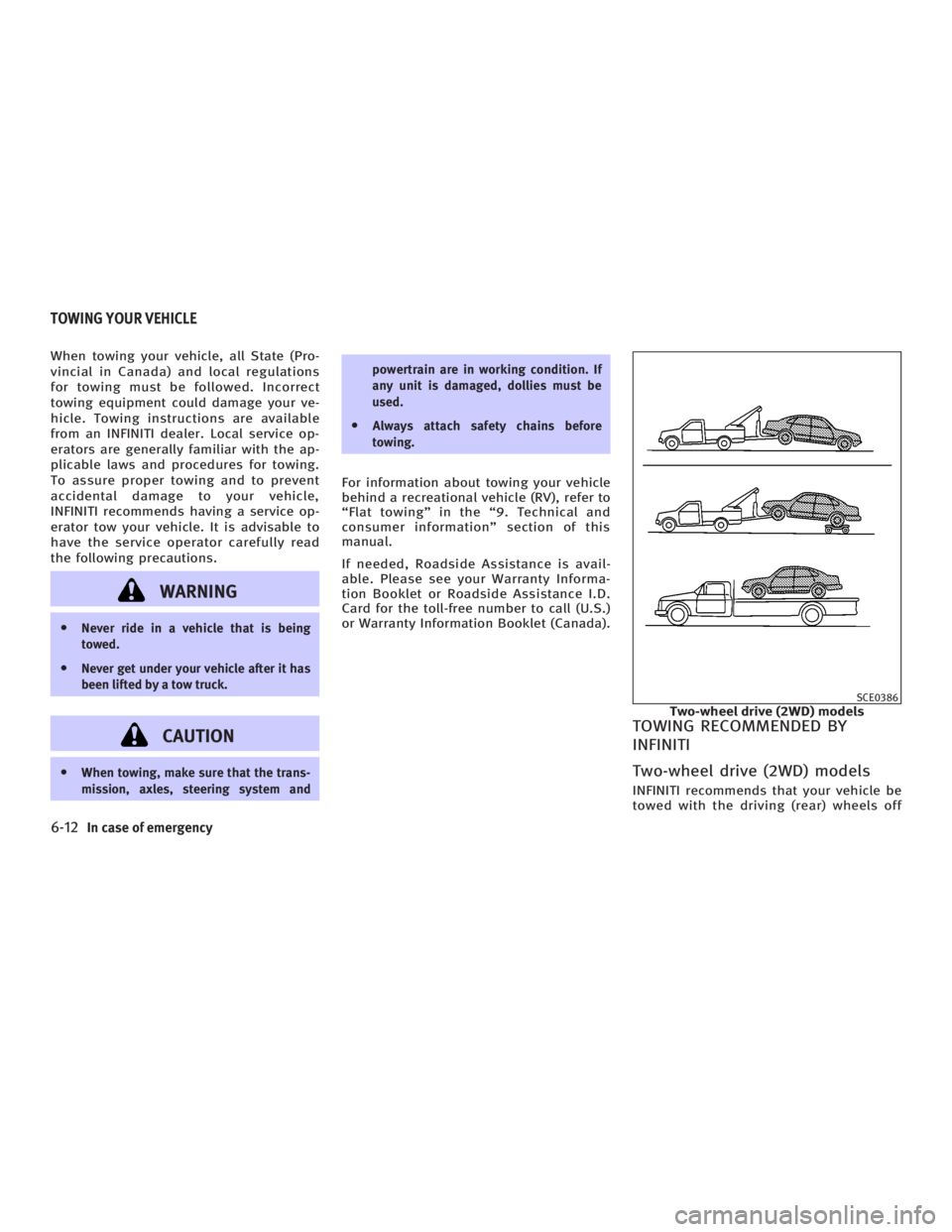
When towing your vehicle, all State (Pro-
vincial in Canada) and local regulations
for towing must be followed. Incorrect
towing equipment could damage your ve-
hicle. Towing instructions are available
from an INFINITI dealer. Local service op-
erators are generally familiar with the ap-
plicable laws and procedures for towing.
To assure proper towing and to prevent
accidental damage to your vehicle,
INFINITI recommends having a service op-
erator tow your vehicle. It is advisable to
have the service operator carefully read
the following precautions.
WARNINGO Never ride in a vehicle that is being
towed.
O Never get under your vehicle after it has
been lifted by a tow truck.
CAUTIONO When towing, make sure that the trans-
mission, axles, steering system and powertrain are in working condition. If
any unit is damaged, dollies must be
used.
O Always attach safety chains before
towing.
For information about towing your vehicle
behind a recreational vehicle (RV), refer to
ªFlat towingº in the ª9. Technical and
consumer informationº section of this
manual.
If needed, Roadside Assistance is avail-
able. Please see your Warranty Informa-
tion Booklet or Roadside Assistance I.D.
Card for the toll-free number to call (U.S.)
or Warranty Information Booklet (Canada).
TOWING RECOMMENDED BY
INFINITI
Two-wheel drive (2WD) models INFINITI recommends that your vehicle be
towed with the driving (rear) wheels off SCE0386
Two-wheel drive (2WD) modelsTOWING YOUR VEHICLE
6-12 In case of emergency
w 06.1.4/V35-D/V5.0
X