ad blue INFINITI G35 2006 Owners Manual
[x] Cancel search | Manufacturer: INFINITI, Model Year: 2006, Model line: G35, Model: INFINITI G35 2006Pages: 344, PDF Size: 6.81 MB
Page 3 of 344
CALIFORNIA PROPOSITION 65
WARNING
WARNINGEngine exhaust, some of its constituents, and
certain vehicle components contain or emit
chemicals known to the State of California to
cause cancer and birth defects or other repro-
ductive harm. In addition, certain fluids con-
tained in vehicles and certain products of
component wear contain or emit chemicals
known to the State of California to cause can-
cer and birth defects or other reproductive
harm. BLUETOOTH is a trademark
owned by Bluetooth SIG,
Inc., U.S.A. and licenced to
Xanavi Informatics Corpora-
tion.
2005 NISSAN MOTOR CO., LTD.
TOKYO, JAPANAll rights reserved. No part of this Owner's Manual may
be reproduced or stored in a retrieval system, or trans-
mitted in any form, or by any means, electronic, me-
chanical, photocopying, recording or otherwise, without
the prior written permission of Nissan Motor Co., Ltd.
w 06.1.4/V35-D/V5.0
X
Page 15 of 344

1. Headlight, fog light and turn signal
switch (P.2-21)
2. Security indicator light (P.2-19)
3. Steering wheel switch for audio control
(P.4-28) or steering wheel switch for
Bluetooth Hands-Free Phone System
(if so equipped) (P.4-30) 4. Driver's supplemental front air bag
(P.1-36)/Horn (P.2-26)
5. Meters/gauges (P.2-3)
6. Cruise control main/set switch (P.5-20)
7. Windshield wiper/washer switch
(P.2-19)
8. Center ventilator (P.4-9) 9. Center display - Compass, Air condi-
tioner, Ambient temperature, Front
passenger air bag status light (P.1-44)
10. Rear window and outside mirror de-
fogger switch (P.2-20)
11. Heater/air conditioner control (P.4-10)
12. Clock (P.2-29)
13. Navigation system* (if so equipped)
(P.4-2)
14. Passenger's supplemental front air
bag (P.1-36)
15. Upper glove box (except for Naviga-
tion system equipped models)
(P.2-35)
16. Side ventilator (P.4-9)
17. Hood lock release handle (P.3-24)
18. Trunk lid release switch (P.3-25)
19. Vehicle Dynamic Control (VDC) off
switch (P.2-28)
20. Instrument brightness control
(P.2-24)
21. Outside mirror remote control switch
(P.3-33)
22. Fuse box (P.8-27)
23. Electric steering column control (if so
equipped) (P.3-31)
24. Manual steering column control
(P.3-30)
25. Ignition switch/steering lock (P.5-6)
26. SNOW mode switch (if so equipped)
(P.2-27)
27. Audio system (P.4-14)
28. Ashtray/Cigarette lighter (P.2-30)
29. Heated seat switch (P.2-26) SSI0159INSTRUMENT PANEL
Illustrated table of contents
0-9
w 06.1.4/V35-D/V5.0
X
Page 74 of 344

1. Headlight, fog light and turn signal
switch
2. Security indicator light
3. Steering wheel switch for audio control
or steering wheel switch for Bluetooth Hands-Free Phone System
(if so equipped)
4. Driver supplemental air bag/Horn
5. Meters/gauges
6. Cruise control main/set switch
7. Windshield wiper/washer switch 8. Center ventilator
9. Center display - Compass, Air condi-
tioner, Ambient temperature, Front
passenger air bag status light
10. Rear window and outside mirror de-
fogger switch
11. Heater/air conditioner control
12. Clock
13. Navigation system* (if so equipped)
14. Passenger supplemental air bag
15. Upper glove box (except for Naviga-
tion system equipped models)
16. Side ventilator
17. Hood lock release handle
18. Trunk lid release switch
19. Vehicle Dynamic Control (VDC) off
switch
20. Instrument brightness control
21. Outside mirror remote control switch
22. Fuse box
23. Electric steering column control (if so
equipped)
24. Manual steering column control
25. Ignition switch/steering lock
26. Snow mode switch (if so equipped)
27. Audio system
28. Ashtray/Cigarette lighter
29. Heated seat switch
30. Hazard warning flasher switch
31. Glove box
*: Refer to the separate Navigation System
Owner's Manual. SSI0159INSTRUMENT PANEL
2-2 Instruments and controls
w 06.1.4/V35-D/V5.0
X
Page 81 of 344
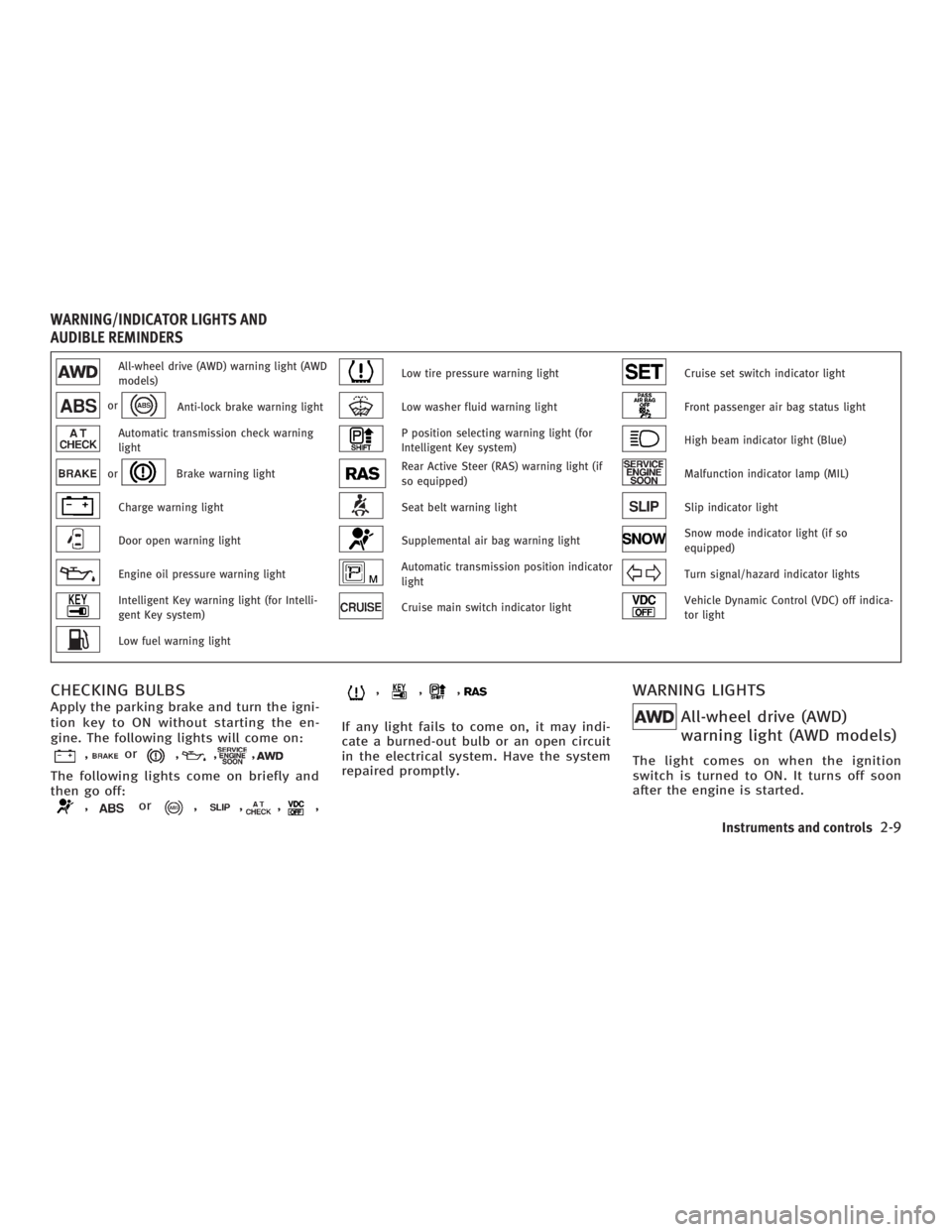
All-wheel drive (AWD) warning light (AWD
models) Low tire pressure warning light Cruise set switch indicator light
or
Anti-lock brake warning light Low washer fluid warning light Front passenger air bag status light
Automatic transmission check warning
light P position selecting warning light (for
Intelligent Key system) High beam indicator light (Blue)
or Brake warning light Rear Active Steer (RAS) warning light (if
so equipped) Malfunction indicator lamp (MIL)
Charge warning light Seat belt warning light Slip indicator light
Door open warning light Supplemental air bag warning light Snow mode indicator light (if so
equipped)
Engine oil pressure warning light Automatic transmission position indicator
light Turn signal/hazard indicator lights
Intelligent Key warning light (for Intelli-
gent Key system) Cruise main switch indicator light Vehicle Dynamic Control (VDC) off indica-
tor light
Low fuel warning light
CHECKING BULBS Apply the parking brake and turn the igni-
tion key to ON without starting the en-
gine. The following lights will come on:
, or , , ,
The following lights come on briefly and
then go off:
, or , , , , , , ,
If any light fails to come on, it may indi-
cate a burned-out bulb or an open circuit
in the electrical system. Have the system
repaired promptly.
WARNING LIGHTS
All-wheel drive (AWD)
warning light (AWD models) The light comes on when the ignition
switch is turned to ON. It turns off soon
after the engine is started.WARNING/INDICATOR LIGHTS AND
AUDIBLE REMINDERS
Instruments and controls
2-9
w 06.1.4/V35-D/V5.0
X
Page 87 of 344
Cruise set switch indicator
lightThe light comes on while the vehicle
speed is controlled by the cruise control
system. If the light blinks while the en-
gine is running, it may indicate the cruise
control system is not functioning prop-
erly. Have the system checked by an
INFINITI dealer.
Front passenger air bag
status lightThe front passenger air bag status light,
located on the center display, will be lit
and the passenger front air bag will be off
depending on how the front passenger
seat is being used.
For front passenger air bag status light
operation, see ªINFINITI advanced air bag
systemº in the ª1. Safety Ð Seats, seat
belts and supplemental restraint systemº
section of this manual.
High beam indicator light
(Blue)This light comes on when the headlight
high beam is on and goes out when the
low beam is selected. Malfunction indicator lamp
(MIL) If the malfunction indicator lamp (MIL)
comes on steady or blinks while the en-
gine is running, it may indicate a poten-
tial emission control malfunction.
The malfunction indicator lamp may also
come on steady if the fuel-filler cap is
loose or missing, or if the vehicle runs out
of fuel. Check to make sure the fuel-filler
cap is installed and closed tightly, and
that the vehicle has at least three gallons
(14 liters) of fuel in the fuel tank.
After a few driving trips, the lamp
should turn off if no other potential emis-
sion control system malfunction exists.
If this indicator lamp comes on steady for
20 seconds and then blinks for 10 sec-
onds when the engine is not running, it
indicates that the vehicle is not ready for
an emission control system inspection/
maintenance test. See ªReadiness for
inspection/maintenance (I/M) testº in the
ª9. Technical and consumer informationº
section of this manual.
Operation
The malfunction indicator lamp will come on in one of two ways:
O Malfunction indicator lamp on steady
Ð An emission control system mal-
function has been detected. Check the
fuel-filler cap. If the fuel-filler cap is
loose or missing, tighten or install the
cap and continue to drive the vehicle.
The lamp should turn off after a
few driving trips. If the lamp
does not turn off after a few driving
trips, have the vehicle inspected by an
INFINITI dealer. You do not need to
have your vehicle towed to the re-
tailer.
O Malfunction indicator lamp blinking Ð
An engine misfire has been detected
which may damage the emission con-
trol system. To reduce or avoid emis-
sion control system damage:
a) Do not drive at speeds above 45
MPH (72 km/h).
b) Avoid hard acceleration or decel-
eration.
c) Avoid steep uphill grades.
d) If possible, reduce the amount of
cargo being hauled or towed.
The malfunction indicator lamp may
stop blinking and come on steady.
Instruments and controls
2-15
w 06.1.4/V35-D/V5.0
X
Page 161 of 344

4 Display screen, heater, air conditioner and
audio systems Safety note ....................................................... 4-2
Control panel buttons Ð with navigation
system ............................................................. 4-2
Names of the components .......................... 4-2
How to use joystick and ªENTERº button ..... 4-3
How to use ªBACKº button .......................... 4-3
Setting up the start-up screen..................... 4-3
How to use ªINFOº button ........................... 4-3
How to use ªSETTINGº button ..................... 4-7
How to use the
button ........................ 4-9
Ventilators........................................................ 4-9
Heater and air conditioner (Automatic)............ 4-10
Automatic operation ................................... 4-11
Manual operation....................................... 4-12
Dual button (if so equipped) ...................... 4-12
Ambient temperature ................................. 4-13
Operating tips............................................ 4-13
In-cabin microfilter..................................... 4-13
Servicing air conditioner ................................. 4-14 Audio system .................................................. 4-14
FM radio reception ..................................... 4-15
AM radio reception .................................... 4-15
Satellite radio reception (if so equipped) ... 4-15
Audio operation precautions ...................... 4-16
FM-AM-satellite radio with compact disc
(CD) changer ............................................. 4-22
CD care and cleaning ................................ 4-27
Steering wheel switch for audio control .... 4-28
Antenna .................................................... 4-29
Car phone or CB radio ................................... 4-29
Bluetooth
Hands-Free Phone System with
INFINITI Voice Recognition .............................. 4-30
Using the system ...................................... 4-32
Control buttons ......................................... 4-34
Getting started .......................................... 4-34
List of voice commands............................. 4-36
Speaker adaptation (SA) mode .................. 4-42
Troubleshooting guide .............................. 4-44
w 06.1.13/V35-D/V5.0
X
Page 190 of 344
CAUTIONO Keep the antenna as far away as pos-
sible from the electronic control mod-
ules.
O Keep the antenna wire more than 8 in
(20 cm) away from the electronic control
system harness. Do not route the an-
tenna wire next to any harness.
O Adjust the antenna standing-wave ratio
as recommended by the manufacturer.
O Connect the ground wire from the CB
radio chassis to the body.
O For details, consult an INFINITI dealer.
WARNING O Use a phone after stopping your vehicle
in a safe location. If you have to use a
phone while driving, exercise extreme
caution at all times so full attention may
be given to vehicle operation.
O If a conversation in a moving vehicle re-
quires you to take notes, pull off the road
to a safe location and stop your vehicle
before doing so.
CAUTION To avoid draining the vehicle battery, use a
phone after starting the engine.BLUETOOTH HANDS-FREE PHONE SYSTEM
WITH INFINITI VOICE RECOGNITION
4-30 Display screen, heater, air conditioner and audio systems
w 06.1.4/V35-D/V5.0
X
Page 191 of 344
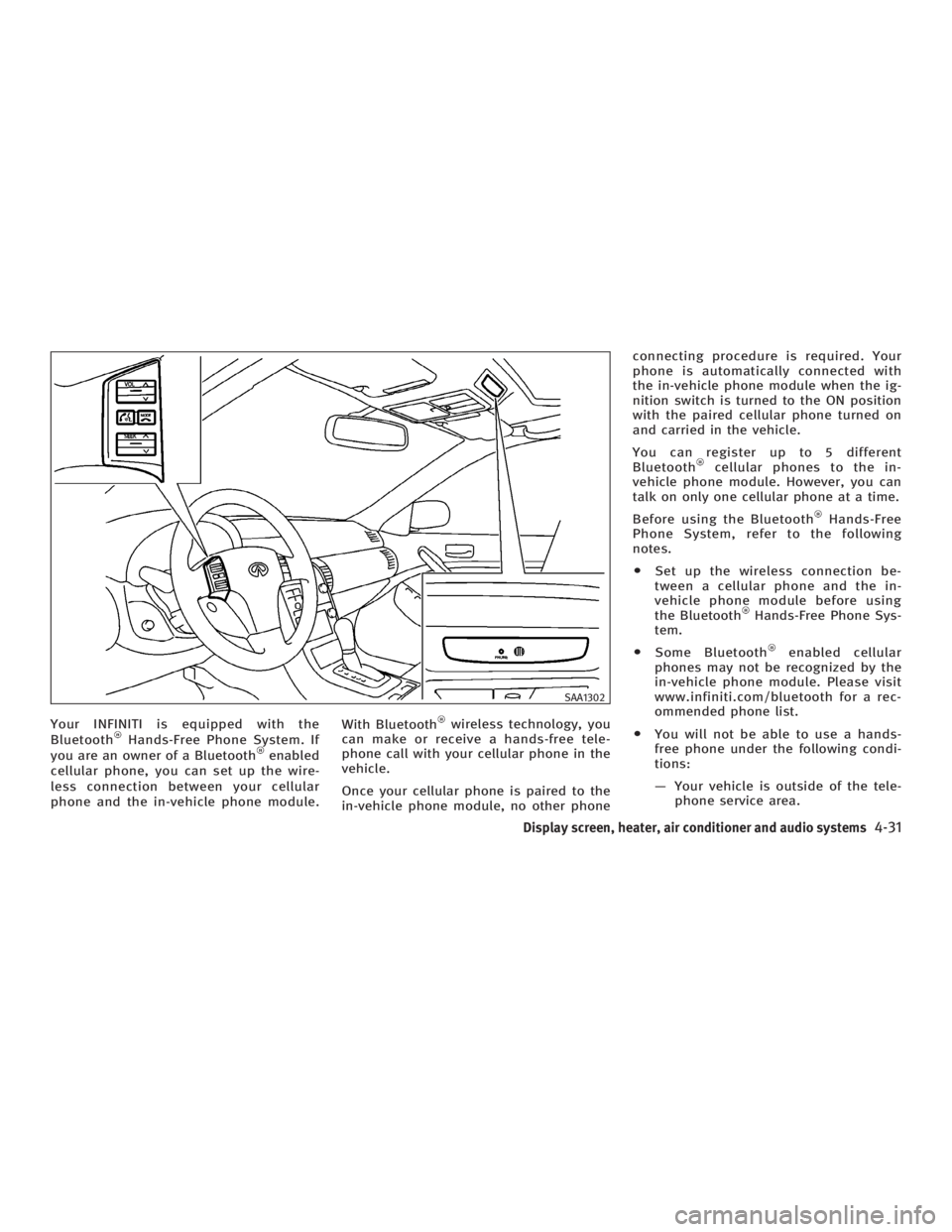
Your INFINITI is equipped with the
Bluetooth Hands-Free Phone System. If
you are an owner of a Bluetooth enabled
cellular phone, you can set up the wire-
less connection between your cellular
phone and the in-vehicle phone module. With Bluetooth wireless technology, you
can make or receive a hands-free tele-
phone call with your cellular phone in the
vehicle.
Once your cellular phone is paired to the
in-vehicle phone module, no other phone connecting procedure is required. Your
phone is automatically connected with
the in-vehicle phone module when the ig-
nition switch is turned to the ON position
with the paired cellular phone turned on
and carried in the vehicle.
You can register up to 5 different
Bluetooth cellular phones to the in-
vehicle phone module. However, you can
talk on only one cellular phone at a time.
Before using the Bluetooth Hands-Free
Phone System, refer to the following
notes.
O Set up the wireless connection be-
tween a cellular phone and the in-
vehicle phone module before using
the Bluetooth Hands-Free Phone Sys-
tem.
O Some Bluetooth enabled cellular
phones may not be recognized by the
in-vehicle phone module. Please visit
www.infiniti.com/bluetooth for a rec-
ommended phone list.
O You will not be able to use a hands-
free phone under the following condi-
tions:
Ð Your vehicle is outside of the tele-
phone service area. SAA1302
Display screen, heater, air conditioner and audio systems
4-31
w 06.1.4/V35-D/V5.0
X
Page 192 of 344
Ð Your vehicle is in an area where it
is difficult to receive radio waves;
such as in a tunnel, in an under-
ground parking garage, near a tall
building or in a mountainous area.
Ð Your cellular phone is locked to
prevent it from being dialed.
When the radio wave condition is not
ideal or ambient sound is too loud, it may
be difficult to hear the other person's
voice during a call.
Do not place the cellular phone in an area
surrounded by metal or far away from the
in-vehicle phone module to prevent tone
quality degradation and wireless connec-
tion disruption.
While a cellular phone is connected
through the Bluetooth wireless connec-
tion, the battery power of the cellular
phone may discharge quicker than usual.
If the Bluetooth Hands-Free Phone
System seems to be malfunctioning,
please refer to ªTroubleshooting guideº
later in this section. You can also visit
www.infiniti.com/bluetooth for trouble-
shooting help. Refer to the cellular phone Owner's
Manual regarding the telephone charges,
cellular phone antenna and body, etc.
This device complies with Part 15 of the
FCC Rules. Operation is subject to the fol-
lowing two conditions: (1) this device may
not cause harmful interference, and (2)
this device must accept any interference
received, including interference that may
cause undesired operation.
FCC Radiation Exposure Statement:
This equipment complies with FCC radia-
tion exposure limits set forth for an un-
controlled environment. This equipment
should be installed and operated with
minimum distance 8 inch (20 cm) be-
tween the radiator and your body. This
Transmitter must not be co-located or op-
erating in conjunction with any other an-
tenna or transmitter.
USING THE SYSTEM The INFINITI Voice Recognition system al-
lows hands-free operation of the
Bluetooth Hands-Free Phone System.
If the vehicle is in motion, some com-
mands may not be available so full atten-
tion may be given to vehicle operation. Initialization When the ignition switch is turned to the
ON position, INFINITI Voice Recognition is
initialized, which takes a few seconds.
When completed, the amber light on the
overhead console illuminates and the
system is ready to accept voice com-
mands. If the button is pushed be-
fore the initialization completes, the
system will announce ªHands-free phone
system not readyº and will not react to
voice commands.
Operating tips To get the best performance out of the
INFINITI Voice Recognition system, ob-
serve the following:
O Keep the interior of the vehicle as
quiet as possible. Close the windows
to eliminate surrounding noises
(traffic noises, vibration sounds, etc.),
which may prevent the system from
recognizing voice commands correctly.
O Wait until the tone sounds before
speaking a command. Otherwise, the
command will not be received properly.
O Start speaking a command within 5
seconds after the tone sounds.
4-32 Display screen, heater, air conditioner and audio systems
w 06.1.4/V35-D/V5.0
X
Page 194 of 344
NOTE:
For best results, say phone numbers as
single digits.
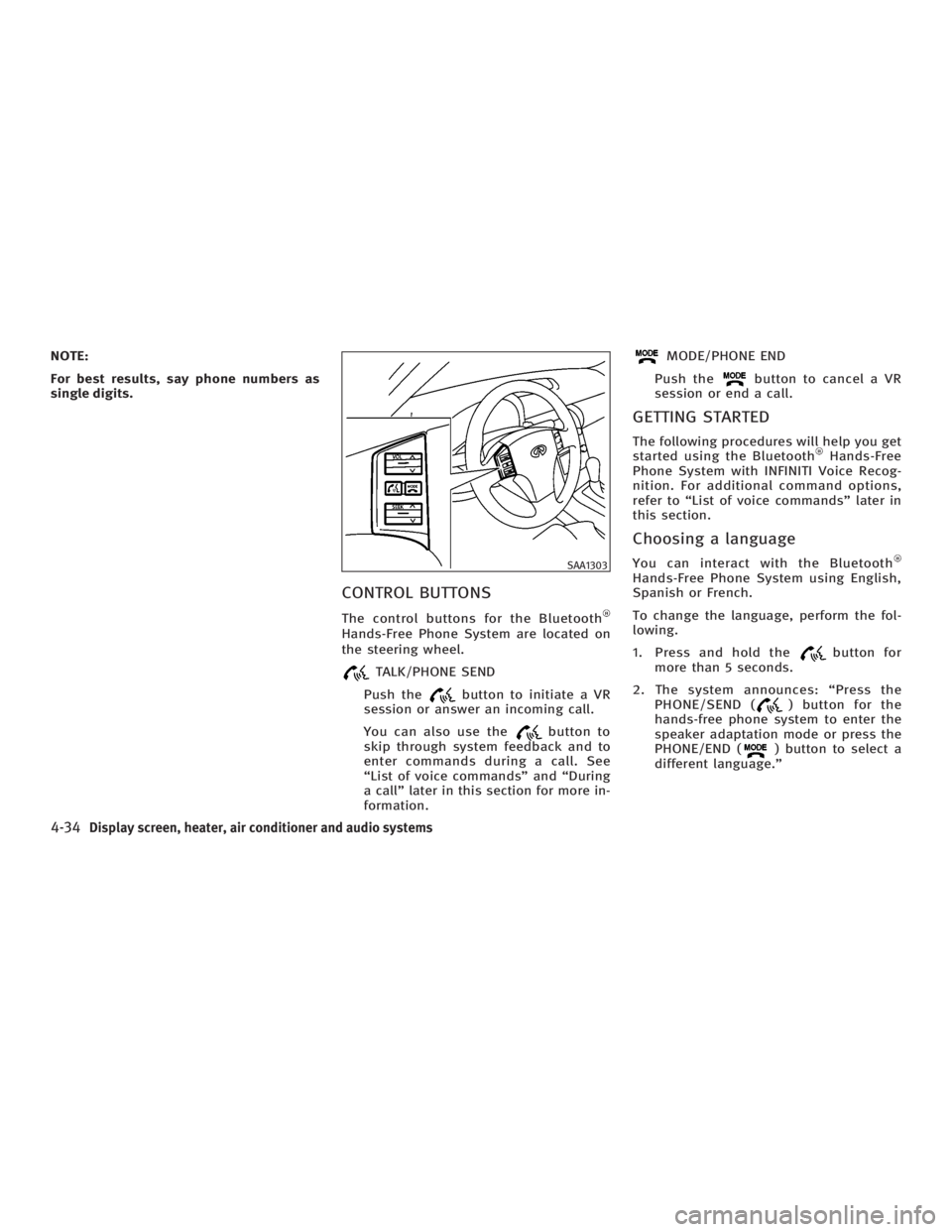
CONTROL BUTTONS The control buttons for the Bluetooth
Hands-Free Phone System are located on
the steering wheel.
TALK/PHONE SEND
Push the button to initiate a VR
session or answer an incoming call.
You can also use the button to
skip through system feedback and to
enter commands during a call. See
ªList of voice commandsº and ªDuring
a callº later in this section for more in-
formation. MODE/PHONE END
Push the button to cancel a VR
session or end a call.
GETTING STARTED The following procedures will help you get
started using the Bluetooth Hands-Free
Phone System with INFINITI Voice Recog-
nition. For additional command options,
refer to ªList of voice commandsº later in
this section.
Choosing a language You can interact with the Bluetooth
Hands-Free Phone System using English,
Spanish or French.
To change the language, perform the fol-
lowing.
1. Press and hold the button for
more than 5 seconds.
2. The system announces: ªPress the
PHONE/SEND ( ) button for the
hands-free phone system to enter the
speaker adaptation mode or press the
PHONE/END ( ) button to select a
different language.º SAA1303
4-34 Display screen, heater, air conditioner and audio systems
w 06.1.4/V35-D/V5.0
X