satellite INFINITI G35 2006 Owners Manual
[x] Cancel search | Manufacturer: INFINITI, Model Year: 2006, Model line: G35, Model: INFINITI G35 2006Pages: 344, PDF Size: 6.81 MB
Page 9 of 344
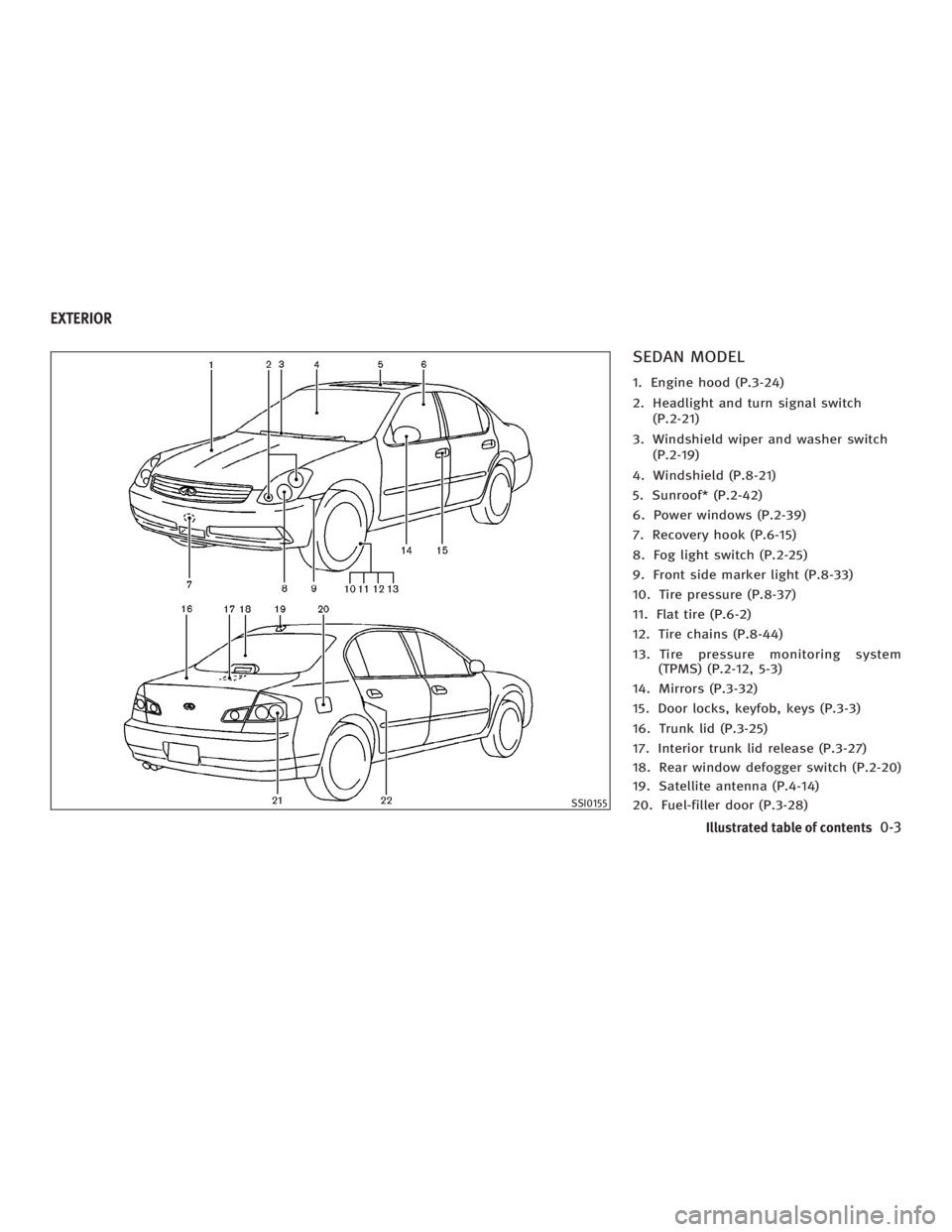
SEDAN MODEL 1. Engine hood (P.3-24)
2. Headlight and turn signal switch
(P.2-21)
3. Windshield wiper and washer switch
(P.2-19)
4. Windshield (P.8-21)
5. Sunroof* (P.2-42)
6. Power windows (P.2-39)
7. Recovery hook (P.6-15)
8. Fog light switch (P.2-25)
9. Front side marker light (P.8-33)
10. Tire pressure (P.8-37)
11. Flat tire (P.6-2)
12. Tire chains (P.8-44)
13. Tire pressure monitoring system
(TPMS) (P.2-12, 5-3)
14. Mirrors (P.3-32)
15. Door locks, keyfob, keys (P.3-3)
16. Trunk lid (P.3-25)
17. Interior trunk lid release (P.3-27)
18. Rear window defogger switch (P.2-20)
19. Satellite antenna (P.4-14)
20. Fuel-filler door (P.3-28) SSI0155EXTERIOR
Illustrated table of contents
0-3
w 06.1.4/V35-D/V5.0
X
Page 60 of 344

1. Crash zone sensor
2. Supplemental front air bag modules
3. Supplemental side air bag modules
4. Occupant classification sensor (pres-
sure sensor) 5. Supplemental curtain side-impact air
bags
6. Supplemental curtain side-impact air
bag modules
7. Diagnosis sensor unit 8. Seat belt pre-tensioner
9. Satellite sensors
10. Occupant classification system control
unit
INFINITI ADVANCED AIR BAG
SYSTEM (front seats) This vehicle is equipped with the INFINITI
advanced air bag system for the driver
and front passenger seats. This system is
designed to meet certification require-
ments under U.S. regulations. It is also
permitted in Canada. However, all of the
information, cautions and warnings in this
manual still apply and must be followed.
The driver supplemental air bag is located
in the center of the steering wheel. The
front passenger supplemental air bag is
mounted in the dashboard above the
glove box. The supplemental front air
bags are designed to inflate in higher se-
verity frontal collisions, although they
may inflate if the forces in another type of
collision are similar to those of a higher
severity frontal impact. They may not in-
flate in certain frontal collisions. Vehicle
damage (or lack of it) is not always an in-
dication of proper supplemental air bag
operation. SSS0416
Sedan
1-42 Safety Ð Seats, seat belts and supplemental restraint system
w 06.1.4/V35-D/V5.0
X
Page 69 of 344
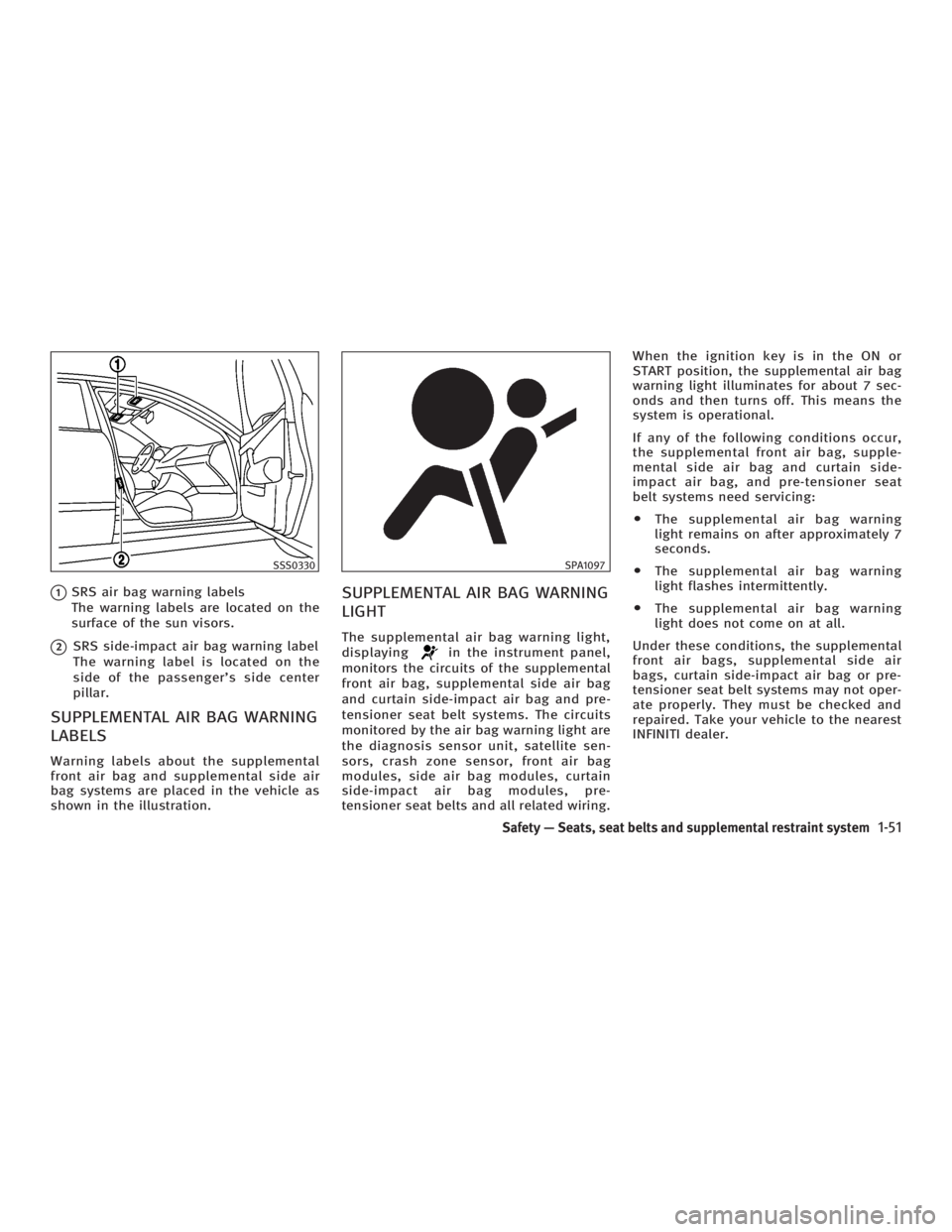
q 1
SRS air bag warning labels
The warning labels are located on the
surface of the sun visors.
q 2
SRS side-impact air bag warning label
The warning label is located on the
side of the passenger's side center
pillar.
SUPPLEMENTAL AIR BAG WARNING
LABELS Warning labels about the supplemental
front air bag and supplemental side air
bag systems are placed in the vehicle as
shown in the illustration. SUPPLEMENTAL AIR BAG WARNING
LIGHT The supplemental air bag warning light,
displaying in the instrument panel,
monitors the circuits of the supplemental
front air bag, supplemental side air bag
and curtain side-impact air bag and pre-
tensioner seat belt systems. The circuits
monitored by the air bag warning light are
the diagnosis sensor unit, satellite sen-
sors, crash zone sensor, front air bag
modules, side air bag modules, curtain
side-impact air bag modules, pre-
tensioner seat belts and all related wiring. When the ignition key is in the ON or
START position, the supplemental air bag
warning light illuminates for about 7 sec-
onds and then turns off. This means the
system is operational.
If any of the following conditions occur,
the supplemental front air bag, supple-
mental side air bag and curtain side-
impact air bag, and pre-tensioner seat
belt systems need servicing:
O The supplemental air bag warning
light remains on after approximately 7
seconds.
O The supplemental air bag warning
light flashes intermittently.
O The supplemental air bag warning
light does not come on at all.
Under these conditions, the supplemental
front air bags, supplemental side air
bags, curtain side-impact air bag or pre-
tensioner seat belt systems may not oper-
ate properly. They must be checked and
repaired. Take your vehicle to the nearest
INFINITI dealer.SSS0330 SPA1097
Safety Ð Seats, seat belts and supplemental restraint system
1-51
w 06.1.4/V35-D/V5.0
X
Page 161 of 344

4 Display screen, heater, air conditioner and
audio systems Safety note ....................................................... 4-2
Control panel buttons Ð with navigation
system ............................................................. 4-2
Names of the components .......................... 4-2
How to use joystick and ªENTERº button ..... 4-3
How to use ªBACKº button .......................... 4-3
Setting up the start-up screen..................... 4-3
How to use ªINFOº button ........................... 4-3
How to use ªSETTINGº button ..................... 4-7
How to use the
button ........................ 4-9
Ventilators........................................................ 4-9
Heater and air conditioner (Automatic)............ 4-10
Automatic operation ................................... 4-11
Manual operation....................................... 4-12
Dual button (if so equipped) ...................... 4-12
Ambient temperature ................................. 4-13
Operating tips............................................ 4-13
In-cabin microfilter..................................... 4-13
Servicing air conditioner ................................. 4-14 Audio system .................................................. 4-14
FM radio reception ..................................... 4-15
AM radio reception .................................... 4-15
Satellite radio reception (if so equipped) ... 4-15
Audio operation precautions ...................... 4-16
FM-AM-satellite radio with compact disc
(CD) changer ............................................. 4-22
CD care and cleaning ................................ 4-27
Steering wheel switch for audio control .... 4-28
Antenna .................................................... 4-29
Car phone or CB radio ................................... 4-29
Bluetooth
Hands-Free Phone System with
INFINITI Voice Recognition .............................. 4-30
Using the system ...................................... 4-32
Control buttons ......................................... 4-34
Getting started .......................................... 4-34
List of voice commands............................. 4-36
Speaker adaptation (SA) mode .................. 4-42
Troubleshooting guide .............................. 4-44
w 06.1.13/V35-D/V5.0
X
Page 174 of 344
The air conditioning system in your
INFINITI vehicle is charged with a refriger-
ant designed with the environment in
mind. This refrigerant will not harm the
earth's ozone layer. However, special
charging equipment and lubricant are re-
quired when servicing your INFINITI air
conditioner. Using improper refrigerants
or lubricants will cause severe damage to
your air conditioning system. See ªCa-
pacities and recommended fuel/
lubricantsº in the ª9. Technical and con-
sumer informationº section for air condi-
tioning system refrigerant and lubricant
recommendations.
An INFINITI dealer will be able to service
your environmentally friendly air condi-
tioning system.
WARNINGThe air conditioner system contains refriger-
ant under high pressure. To avoid personal
injury, any air conditioner service should be
done only by an experienced technician with
proper equipment. Turn the ignition switch to the ACC or ON
position and push the POWER or RADIO
button to turn on the radio. If you listen to
the radio with the engine not running, the
key should be turned to the ACC position.
Radio reception is affected by station sig-
nal strength, distance from radio trans-
mitter, buildings, bridges, mountains and
other external influences. Intermittent
changes in reception quality normally are
caused by these external influences.
Using a cellular phone in or near the ve-
hicle may influence radio reception
quality.
Radio reception Your radio system is equipped with state-
of-the-art electronic circuits to enhance
radio reception. These circuits are de-
signed to extend reception range, and to
enhance the quality of that reception.
However there are some general charac-
teristics of FM, AM and satellite radio sig-
nals that can affect radio reception
quality in a moving vehicle, even when
the finest equipment is used. These char-
acteristics are completely normal in a
given reception area, and do not indicate
any malfunction in your radio system. Remember that a moving vehicle is not
the ideal place to listen to a radio. Be-
cause of the movement, reception condi-
tions will constantly change. Buildings,
terrain, signal distance and interference
from other vehicles can work against
ideal reception. Described below are
some of the factors that can affect your
radio reception.
SERVICING AIR CONDITIONER AUDIO SYSTEM
4-14 Display screen, heater, air conditioner and audio systems
w 06.1.4/V35-D/V5.0
X
Page 175 of 344
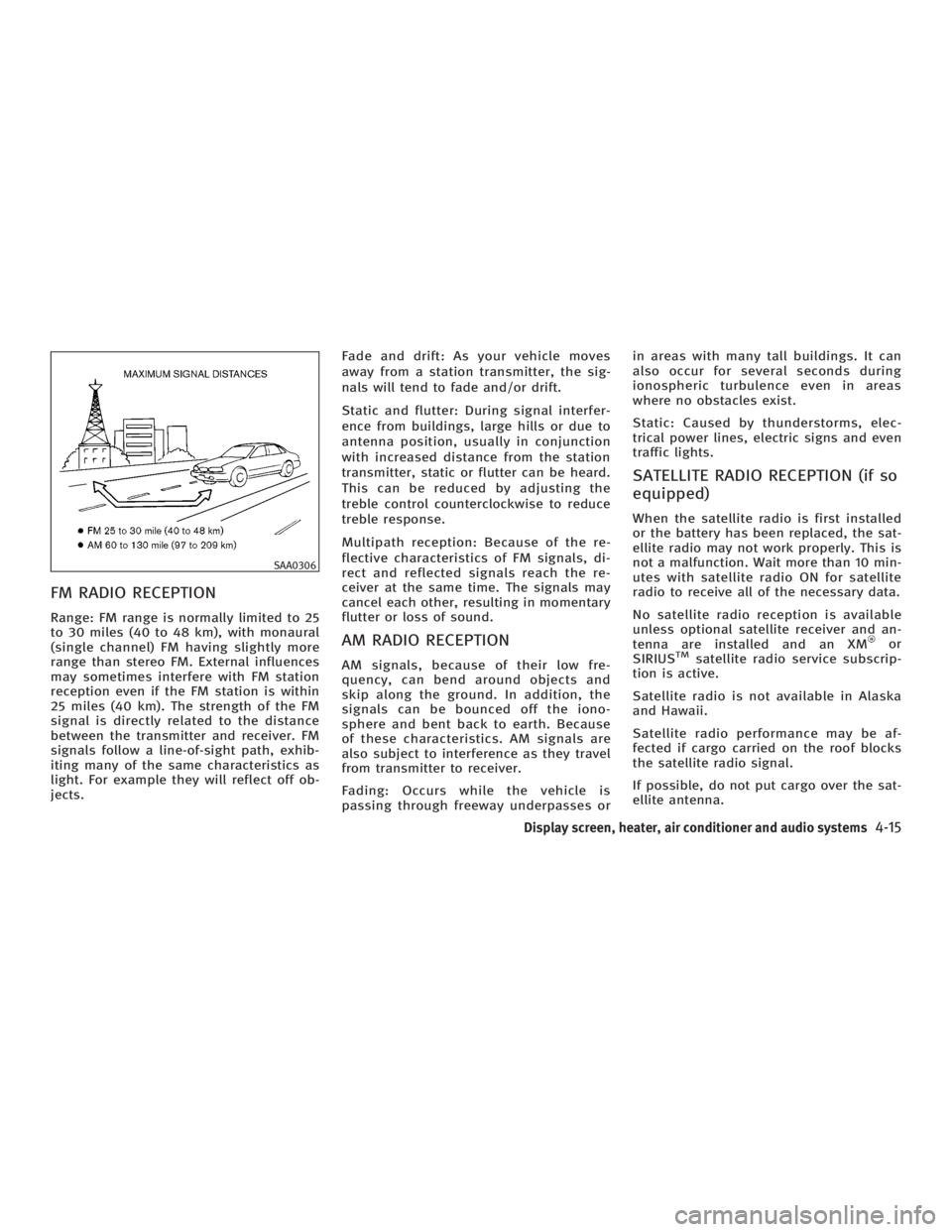
FM RADIO RECEPTION Range: FM range is normally limited to 25
to 30 miles (40 to 48 km), with monaural
(single channel) FM having slightly more
range than stereo FM. External influences
may sometimes interfere with FM station
reception even if the FM station is within
25 miles (40 km). The strength of the FM
signal is directly related to the distance
between the transmitter and receiver. FM
signals follow a line-of-sight path, exhib-
iting many of the same characteristics as
light. For example they will reflect off ob-
jects. Fade and drift: As your vehicle moves
away from a station transmitter, the sig-
nals will tend to fade and/or drift.
Static and flutter: During signal interfer-
ence from buildings, large hills or due to
antenna position, usually in conjunction
with increased distance from the station
transmitter, static or flutter can be heard.
This can be reduced by adjusting the
treble control counterclockwise to reduce
treble response.
Multipath reception: Because of the re-
flective characteristics of FM signals, di-
rect and reflected signals reach the re-
ceiver at the same time. The signals may
cancel each other, resulting in momentary
flutter or loss of sound.
AM RADIO RECEPTION AM signals, because of their low fre-
quency, can bend around objects and
skip along the ground. In addition, the
signals can be bounced off the iono-
sphere and bent back to earth. Because
of these characteristics. AM signals are
also subject to interference as they travel
from transmitter to receiver.
Fading: Occurs while the vehicle is
passing through freeway underpasses or in areas with many tall buildings. It can
also occur for several seconds during
ionospheric turbulence even in areas
where no obstacles exist.
Static: Caused by thunderstorms, elec-
trical power lines, electric signs and even
traffic lights.
SATELLITE RADIO RECEPTION (if so
equipped) When the satellite radio is first installed
or the battery has been replaced, the sat-
ellite radio may not work properly. This is
not a malfunction. Wait more than 10 min-
utes with satellite radio ON for satellite
radio to receive all of the necessary data.
No satellite radio reception is available
unless optional satellite receiver and an-
tenna are installed and an XM or
SIRIUS TM
satellite radio service subscrip-
tion is active.
Satellite radio is not available in Alaska
and Hawaii.
Satellite radio performance may be af-
fected if cargo carried on the roof blocks
the satellite radio signal.
If possible, do not put cargo over the sat-
ellite antenna.SAA0306
Display screen, heater, air conditioner and audio systems
4-15
w 06.1.4/V35-D/V5.0
X
Page 181 of 344
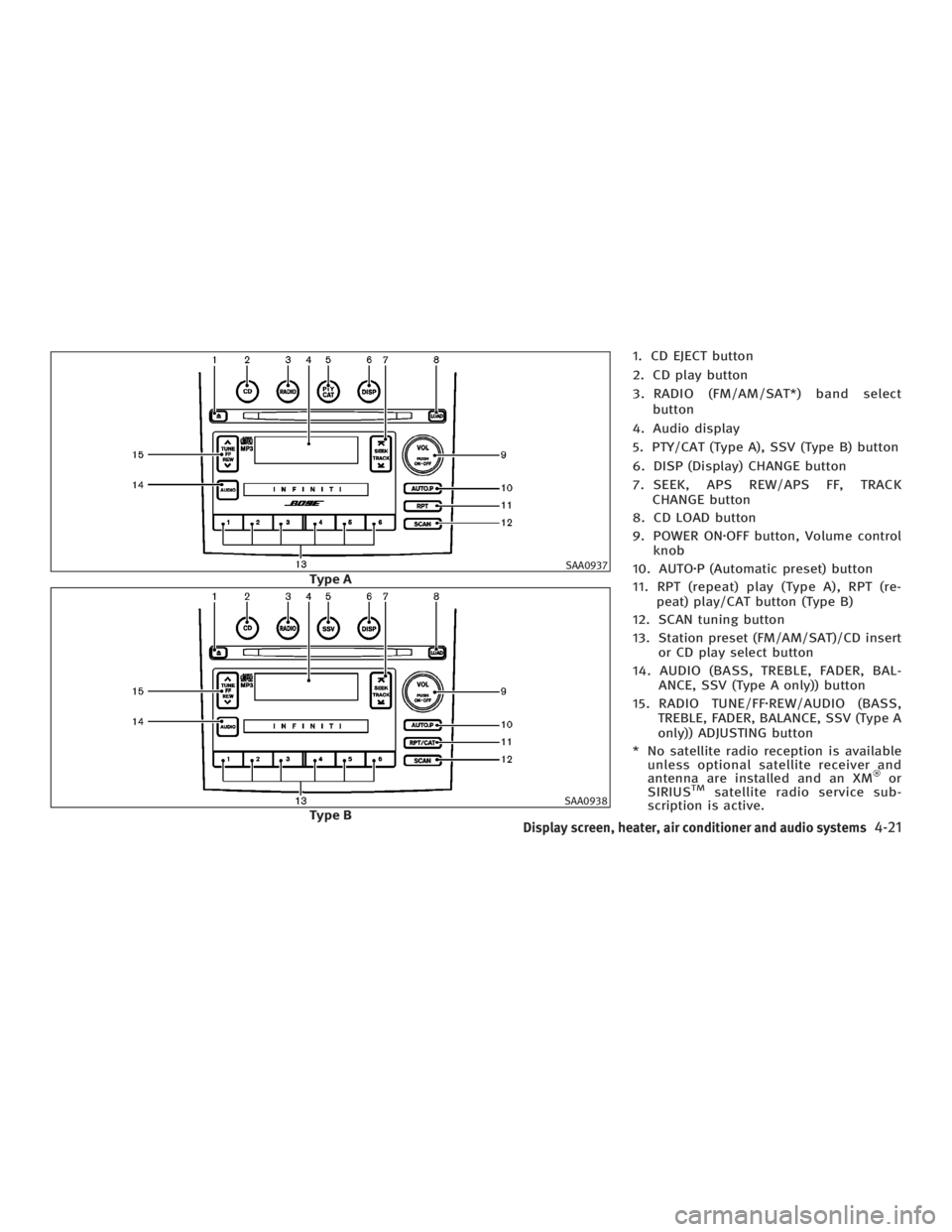
1. CD EJECT button
2. CD play button
3. RADIO (FM/AM/SAT*) band select
button
4. Audio display
5. PTY/CAT (Type A), SSV (Type B) button
6. DISP (Display) CHANGE button
7. SEEK, APS REW/APS FF, TRACK
CHANGE button
8. CD LOAD button
9. POWER ON z OFF button, Volume control
knob
10. AUTO z P (Automatic preset) button
11. RPT (repeat) play (Type A), RPT (re-
peat) play/CAT button (Type B)
12. SCAN tuning button
13. Station preset (FM/AM/SAT)/CD insert
or CD play select button
14. AUDIO (BASS, TREBLE, FADER, BAL-
ANCE, SSV (Type A only)) button
15. RADIO TUNE/FF z REW/AUDIO (BASS,
TREBLE, FADER, BALANCE, SSV (Type A
only)) ADJUSTING button
* No satellite radio reception is available
unless optional satellite receiver and
antenna are installed and an XM or
SIRIUS TM
satellite radio service sub-
scription is active. SAA0937
Type A
SAA0938
Type B
Display screen, heater, air conditioner and audio systems
4-21
w 06.1.4/V35-D/V5.0
X
Page 182 of 344
It may take some time to receive the acti-
vation signal after subscribing to the XM
or SIRIUS TM
satellite radio provider. After
receiving the activation signal, an avail-
able channel list will be automatically up-
dated in the radio. For XM , turn the igni-
tion switch from the LOCK to ACC position
to update the channel list.
Satellite radio is not available in Alaska
and Hawaii.
FM-AM-SATELLITE RADIO WITH
COMPACT DISC (CD) CHANGER
Audio main operation Head unit:
The radio has an FM diversity reception
system, which employs two antennas
printed on the rear window. This system
automatically switches to the antenna
which is receiving less interference.
The auto loudness circuit enhances the
low frequency range automatically in both
radio reception and CD playback.
POWER on/off:
Turn the ignition switch to the ACC or ON
position, and then push the POWER
on/off button while the system is off to call up the mode (radio, tape or CD) which
was playing immediately before the
system was turned off. When no CD or
tape is loaded, the radio will come on.
While the system is on, pushing the
POWER on/off button turns the system
off.
Volume control:
Turn the volume control knob to adjust
the volume.
This vehicle has Speed Sensitive control
Volume (SSV) for audio . The audio volume
changes as the driving speed changes.
AUDIO button (BASS, TREBLE, FADER,
BALANCE, SSV (Type A only)):
Push the AUDIO button to change the se-
lecting mode as follows.
BASS ! TREBLE ! FADER ! BALANCE !
SSV (Type A only) ! (Normal) ! BASS
To adjust Bass, Treble, Fader and Bal-
ance, push the AUDIO button until the de-
sired mode BASS, TREBLE, FADER or BAL-
ANCE appears in the display. Push the
TUNE
( or ) button to adjust Bass and
Treble to the desired level. Use the
or button also to adjust Fader or Balance modes. Fader adjusts the
sound level between the front and rear
speakers and Balance adjusts the sound
between the right and left speakers.
To change the SSV mode to OFF, LOW,
MID or HIGH, push the or (TUNE)
button (Type A) or push the SSV button
(Type B).
After 10 seconds, the radio, or CD display
reappears. Once the sound quality is set
to the desired level, push the AUDIO but-
ton repeatedly until the radio, or CD dis-
play appears.
DISPLAY CHANGE:
This button will work during FM radio, sat-
ellite radio (if so equipped) and CD opera-
tion. Find the detailed function in the de-
scription of each item.
FM-AM-SAT radio operation RADIO (FM/AM/SAT) band select:
Pushing the band select button will
change the band as follows:
(Without satellite radio)
AM ! FM1 ! FM2 ! AM
4-22 Display screen, heater, air conditioner and audio systems
w 06.1.4/V35-D/V5.0
X
Page 183 of 344

(With satellite radio)
AM ! FM1 ! FM2 ! SAT1 ! SAT2 ! AM
No satellite radio reception is available
unless optional satellite receiver and an-
tenna are installed and an XM or SIRI-
US TM
satellite radio service subscription
is active.
Satellite radio is not available in Alaska
and Hawaii.
When the RADIO band select button is
pushed while the ignition switch is in the
ACC or ON position, the radio will come
on at the station last played.
The last station/channel played will also
come on when the ON z OFF/VOL control
knob is pushed to ON.
If another audio source is playing when
the RADIO button is turned to ON, the
other audio source will automatically be
turned off and the last radio station
played will come on.
The FM stereo indicator ST will glow
during FM stereo reception. When the ste-
reo broadcast signal is weak, the radio
will automatically change from stereo to
monaural reception. TUNE (Tuning):
WARNING The radio should not be tuned while driving
so full attention may be given to vehicle op-
eration.
Push these buttons for manual tuning. To
move quickly through the channels, push
and hold either of the TUNE buttons down
for more than 0.5 second.
SEEK tuning:
For AM and FM radio:
Push the SEEK button or ,to
tune from high to low or low to high fre-
quencies and stops at the next broadcast-
ing station.
For satellite radio:
Push the SEEK button or to
seek channels of the next or previous cat-
egory. SCAN tuning:
Push the SCAN tuning button to tune from
low to high frequencies and stops at each
broadcasting station for 5 seconds. Push-
ing the button again during this 5 sec-
onds period will stop SCAN tuning and
the radio will remain tuned to that sta-
tion.
If the SCAN tuning button is not pushed
within 5 seconds, SCAN tuning moves to
the next station.
DISPLAY:
O By pushing the DISP button for more
than 1.5 seconds while receiving FM
radio waves, ªPS NAMEº switches be-
tween ON and OFF (Type A only).
O Pushing the DISP button will display
additional information about the satel-
lite radio broadcast (for example:
Artist name, Title).
Keep pushing the DISP button, and it
will change the information of the sat-
ellite radio broadcast to be displayed
as follows:
CH Number ! CH Name ! Artist
Name ! Song Title ! CH Number
Display screen, heater, air conditioner and audio systems
4-23
w 06.1.4/V35-D/V5.0
X
Page 184 of 344
Station memory operations:
Twelve stations/channels can be set for
the FM band (six for FM1, six for FM2),
twelve for satellite radio (six for SAT1, six
for SAT2) and six stations can be set for
the AM band.
1. Tune to the desired station using the
SEEK, SCAN or TUNE button.
2. Select the desired station/channel
and keep pushing any of the desired
station preset buttons (1 to 6) until a
beep sound is heard. (The radio mutes
when the select button is pushed.)
3. The channel indicator will then come
on and the sound will resume. Memo-
rizing is now complete.
4. Other buttons can be set in the same
manner.
If the battery cable is disconnected, or if
the fuse blows, the preset station memory
will be erased. In that case, reset the de-
sired stations.
Automatic preset:
To select the preset FM, AM, SAT or PTY
station/channel, push the AUTO.P button
for less than 1.5 seconds. To preset the FM, AM, SAT or PTY
station/channel, push the AUTO.P button
for more than 1.5 seconds.
Program type/category (Type A)
Repeat/category (Type B):
When the PTY button is pushed for more
than 1.5 seconds during FM mode, the PTY
name of the current tuned station is dis-
played (Type A only). During this time if
the PTY data code is zero, or the data is
unreadable; the display will show NONE.
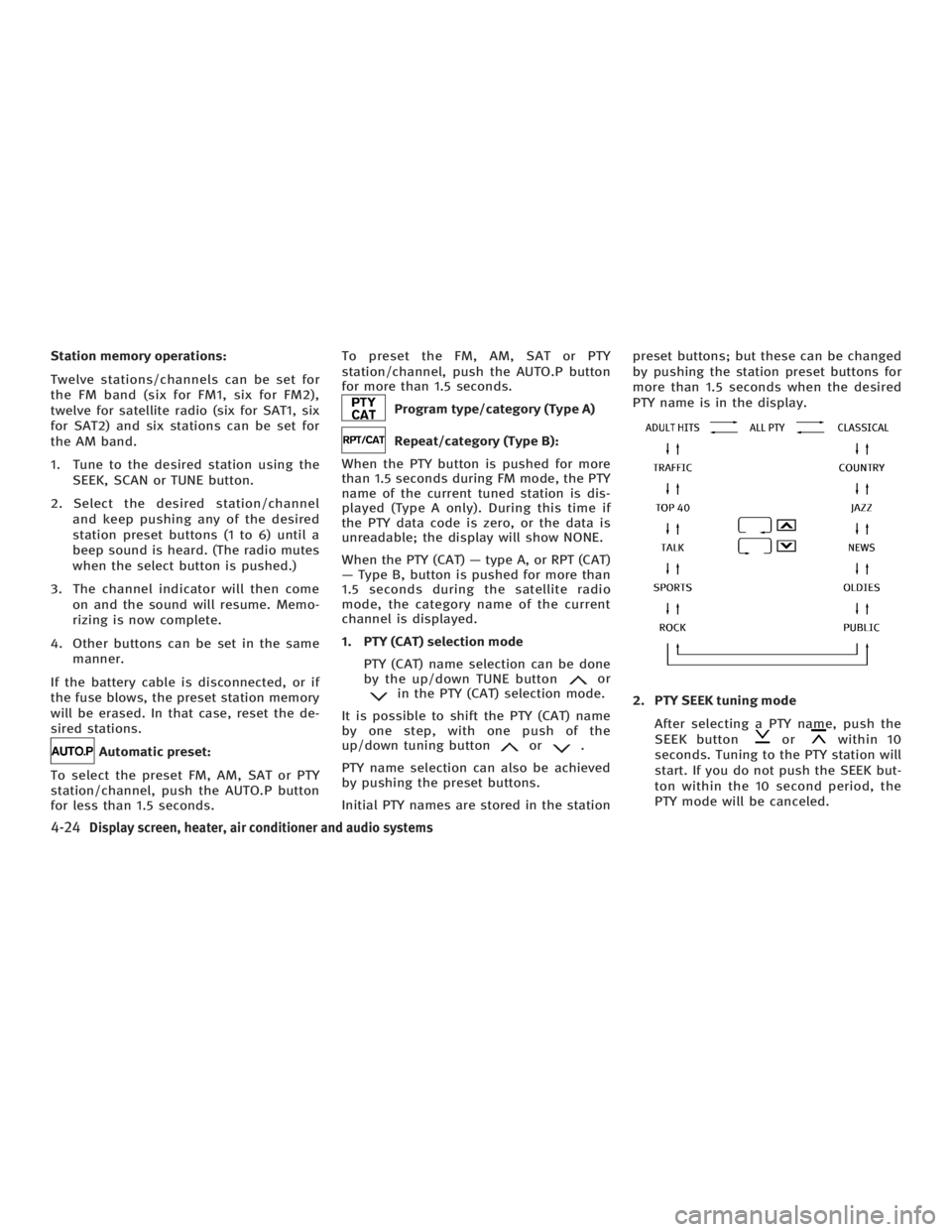
When the PTY (CAT) Ð type A, or RPT (CAT)
Ð Type B, button is pushed for more than
1.5 seconds during the satellite radio
mode, the category name of the current
channel is displayed.
1. PTY (CAT) selection mode
PTY (CAT) name selection can be done
by the up/down TUNE button or
in the PTY (CAT) selection mode.
It is possible to shift the PTY (CAT) name
by one step, with one push of the
up/down tuning button or .
PTY name selection can also be achieved
by pushing the preset buttons.
Initial PTY names are stored in the station preset buttons; but these can be changed
by pushing the station preset buttons for
more than 1.5 seconds when the desired
PTY name is in the display.
2. PTY SEEK tuning mode
After selecting a PTY name, push the
SEEK button or within 10
seconds. Tuning to the PTY station will
start. If you do not push the SEEK but-
ton within the 10 second period, the
PTY mode will be canceled.
4-24 Display screen, heater, air conditioner and audio systems
w 06.1.4/V35-D/V5.0
X