mirror INFINITI M 2010 User Guide
[x] Cancel search | Manufacturer: INFINITI, Model Year: 2010, Model line: M, Model: INFINITI M 2010Pages: 445, PDF Size: 6.15 MB
Page 154 of 445

CAUTION
cDo not store the main sun visor before stor-
ing the sub-sun visor and the extension sun
visor.
c Do not pull the sub-sun visor and the exten-
sion sun visor forcedly downward.
1. To block out glare from the front, swing
down the main sun visor
s1.
2. To block glare from the side, remove the main sun visor from the center mount and
swing it to the side
s2.
3. To block glare from the front, swing down the sub-sun visor
s3.
4. Draw out the extension sun visor
s4from
the main sun visor to block from further
glare.
INSIDE MIRROR
Adjust the height and the angle of the inside
mirror to the desired position.
SPA2447
Type A
SPA2422A
Type B
SPA2450
MIRRORS
Pre-driving checks and adjustments3-23
wÐ
Ð
05/14/09Ðpattie
X
Page 155 of 445

Automatic anti-glare type
The inside mirror is designed so that it auto-
matically changes reflection according to the
intensity of the headlights of the following
vehicle.
The anti-glare system will be automatically
turned on when the ignition switch is pushed to
the ON position.
When the anti-glare system is turned on, the
indicator light
sAwill illuminate and excessive
glare from the headlights of the vehicle behind
you will be reduced.
Type A: Push the
switchsBto make the
inside rearview mirror operate normally and the
indicator light will turn off. Push the
switch again to turn the system on.
Type B: Push the ª Cº switch
sCto make the
inside rearview mirror operate normally. The
indicator light will turn off. Push the ªIº switch
sDto turn the system on.
Do not allow any object to cover the sensors
sE
or apply glass cleaner on them. Doing so will
reduce the sensitivity of the sensor, resulting in
improper operation.
For the compass (if so equipped) operation, see
ªCOMPASSº in the ª2. Instruments and con-
trolsº section. For the HomeLink
TUniversal Transceiver opera-
tion, see ªHomeLink TUNIVERSAL TRANS-
CEIVERº in the ª2. Instruments and controlsº
section.
OUTSIDE MIRRORS
WARNING
Objects viewed in the outside mirror on the
passenger side are closer than they appear. Be
careful when moving to the right. Using only
this mirror could cause an accident. Use the
inside mirror or glance over your shoulder to
properly judge distances to other objects.
Adjusting outside mirrors
The outside mirror control switch is located at
the lower part of the instrument panel.
The outside mirror will operate only when the
ignition switch is in the ACC or ON position.
SPA2214
3-24Pre-driving checks and adjustments
wÐ
Ð
05/14/09Ðpattie
X
Page 156 of 445

Move the switch rights1or lefts2to select the
right or left side mirror, then adjust
s3using
the control switch.
Defrosting outside mirrors (if so
equipped)
The outside mirrors will be heated when the
rear window defroster switch is operated. (See
ªREAR WINDOW AND OUTSIDE MIRROR DE-
FROSTER SWITCHº in the ª2. Instruments and
controlsº section.)
Foldable outside mirrors
Fold the outside mirror by pushing it toward the
rear of the vehicle.
Reverse tilt-down feature
When backing up the vehicle, the right or left
outside mirror will turn downward automatically
to provide better rear visibility.
1. Push the ignition switch to the ON posi-
tion.
2. Move the selector lever to the R (Reverse) position.
3. Choose the right or left outside mirror by operating the outside mirror control
switch. 4. The selected outside mirror surface
moves downward.
When one of the following conditions has oc-
curred, the selected outside mirror surface will
return to its original position.
cThe selector lever is moved to any position
other than R (Reverse).
c The outside mirror control switch is set to
the center position.
c The ignition switch is pushed to the LOCK
position.
For more information regarding this feature and
how to save the R (Reverse) mirror tilt-down
adjustment in the automatic drive positioner
memory, see ªAutomatic drive positionerº later
in this section.
SPA1829
Pre-driving checks and adjustments3-25
wÐ
Ð
05/14/09Ðpattie
X
Page 158 of 445
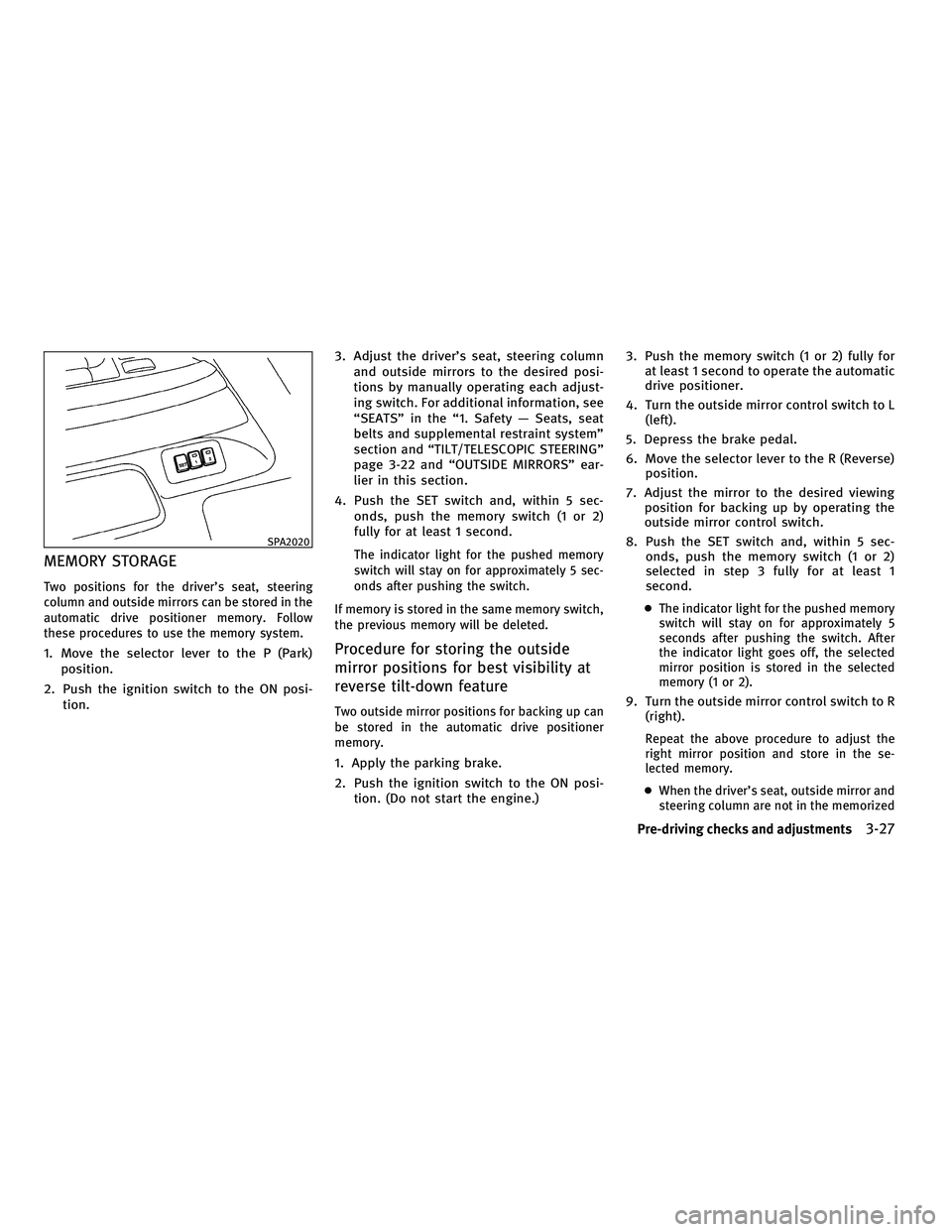
MEMORY STORAGE
Two positions for the driver's seat, steering
column and outside mirrors can be stored in the
automatic drive positioner memory. Follow
these procedures to use the memory system.
1. Move the selector lever to the P (Park)position.
2. Push the ignition switch to the ON posi- tion. 3. Adjust the driver's seat, steering column
and outside mirrors to the desired posi-
tions by manually operating each adjust-
ing switch. For additional information, see
ªSEATSº in the ª1. Safety Ð Seats, seat
belts and supplemental restraint systemº
section and ªTILT/TELESCOPIC STEERINGº
page 3-22 and ªOUTSIDE MIRRORSº ear-
lier in this section.
4. Push the SET switch and, within 5 sec- onds, push the memory switch (1 or 2)
fully for at least 1 second.
The indicator light for the pushed memory
switch will stay on for approximately 5 sec-
onds after pushing the switch.
If memory is stored in the same memory switch,
the previous memory will be deleted.
Procedure for storing the outside
mirror positions for best visibility at
reverse tilt-down feature
Two outside mirror positions for backing up can
be stored in the automatic drive positioner
memory.
1. Apply the parking brake.
2. Push the ignition switch to the ON posi- tion. (Do not start the engine.) 3. Push the memory switch (1 or 2) fully for
at least 1 second to operate the automatic
drive positioner.
4. Turn the outside mirror control switch to L (left).
5. Depress the brake pedal.
6. Move the selector lever to the R (Reverse) position.
7. Adjust the mirror to the desired viewing position for backing up by operating the
outside mirror control switch.
8. Push the SET switch and, within 5 sec- onds, push the memory switch (1 or 2)
selected in step 3 fully for at least 1
second.
cThe indicator light for the pushed memory
switch will stay on for approximately 5
seconds after pushing the switch. After
the indicator light goes off, the selected
mirror position is stored in the selected
memory (1 or 2).
9. Turn the outside mirror control switch to R
(right).
Repeat the above procedure to adjust the
right mirror position and store in the se-
lected memory.
c When the driver's seat, outside mirror and
steering column are not in the memorized
SPA2020
Pre-driving checks and adjustments3-27
wÐ
Ð
05/14/09Ðpattie
X
Page 159 of 445
position, the outside mirror will move with
the initial tilt-down angle, if the reverse
tilt-down position is stored.
Linking Intelligent Key to a stored
memory position
The Intelligent Key can be linked to a stored
memory position with the following procedure.
1. Follow the steps for storing a memoryposition.
2. While the indicator light for the memory switch being set is illuminated for 5 sec-
onds, push the
button on the Intel-
ligent Key. If the indicator light blinks, the
Intelligent Key is linked to that memory
setting.
Push the ignition switch to the LOCK position,
and push the
button on the Intelligent
Key. The driver's seat, steering wheel and out-
side mirrors will move to the memorized posi-
tion.
Confirming memory storage
c Push the ignition switch to the ON position
and push the SET switch. If the main memory
has not been stored, the indicator light will
come on for approximately 0.5 second.
When the memory has stored in position, the
indicator light will stay on for approximately
5 seconds.
c If the battery cable is disconnected, or if the
fuse opens, the memory will be canceled. In
this case, reset the desired position using
the previous procedure.
c If optional Intelligent Keys are added to your
vehicle, perform the memory storage proce-
dure to switch (1 or 2) and linking Intelligent
Key procedure to a stored memory position
again for each Intelligent Key. For additional
Intelligent Key information, see ªKEYSº ear-
lier in this section.
Selecting the memorized position
1. Move the selector lever to the P (Park)
position.
2. Use one of the following methods to move the driver's seat, steering column and
outside mirrors.
cPush the ignition switch to the ON posi-
tion and push the memory switch (1 or 2)
fully for at least 1 second.
c Within 45 seconds after opening the driv-
er's door, push the memory switch (1 or 2)
fully for at least 1 second.
The driver's seat, steering column and
outside mirrors will move to the memo-
rized position with the indicator light
flashing, and then the light will stay on for
approximately 5 seconds.
3-28Pre-driving checks and adjustments
wÐ
Ð
05/14/09Ðpattie
X
Page 160 of 445

SYSTEM OPERATION
The automatic drive positioner system will not
work or will stop operating under the following
conditions:
cWhen the vehicle speed is above 4 MPH (7
km/h).
c When the adjusting switch for the driver's
seat and steering column is turned on while
the automatic drive positioner is operating.
c When the memory switch (1 or 2) is not
pushed for at least 1 second.
c When the seat, steering column and outside
mirrors have already been moved to the
memorized position.
c When no position is stored in the memory
switch.
c When the engine is started while the auto-
matic drive positioner is operating.
c When approximately 45 seconds have
passed after the driver's door was opened
(ignition switch is not in the ON position).
c When the selector lever is moved from the P
(Park) position to any other position. (How-
ever, it will not be canceled if the switch is
pushed while the seat and steering column
are returning to the previous positions
(entry/exit function).)
Pre-driving checks and adjustments3-29
wÐ
Ð
05/14/09Ðpattie
X
Page 185 of 445
HOW TO USE DISC BUTTON (for
models without navigation system)
Push theDISCbutton to play the Compact Disc
(CD). See ªAUDIO SYSTEMº later in this section. When the selector lever is shifted into the R
(Reverse) position, the monitor display shows
the view to the rear of the vehicle.
The system is designed as an aid to the driver in
detecting large stationary objects to help avoid
damaging the vehicle. The system will not de-
tect small objects below the bumper and may
not detect objects close to the bumper or on the
ground.
WARNING
c
The rear view camera is a convenience but it
is not a substitute for proper backing up.
Always turn and check that it is safe to do so
before backing up. Always back up slowly.
c Objects viewed in the RearView Monitor dif-
fer from actual distance because a wide-
angle lens is used. Objects in the RearView
Monitor will appear visually opposite like
ones viewed in the inside and outside
mirrors.
c Make sure that the trunk is securely closed
when backing up.
c Underneath the bumper and the corner areas
of the bumper cannot be viewed on the Rear-
View Monitor because of its monitoring
range limitation. c
Do not put anything on the rear view camera.
The rear view camera is installed above the
license plate.
c When washing the vehicle with high-
pressure water, be sure not to spray it
around the camera. Otherwise, water may
enter the camera unit causing water conden-
sation on the lens, a malfunction, fire or an
electric shock.
c Do not strike the camera. It is a precision
instrument. Otherwise, it may malfunction
or cause damage resulting in a fire or an
electric shock.
CAUTION
There is a plastic cover over the camera. Do not
scratch the cover when cleaning dirt or snow
from the cover.
REARVIEW MONITOR (if so equipped)
4-22Monitor, climate, audio, phone and voice recognition systems
wÐ
Ð
05/14/09Ðpattie
X
Page 187 of 445
cWhen backing up the vehicle up a hill, ob-
jects viewed in the monitor are further than
they appear. When backing up the vehicle
down a hill, objects viewed in the monitor
are closer than they appear. Use the inside
mirror or glance over your shoulder to prop-
erly judge distances to other objects.
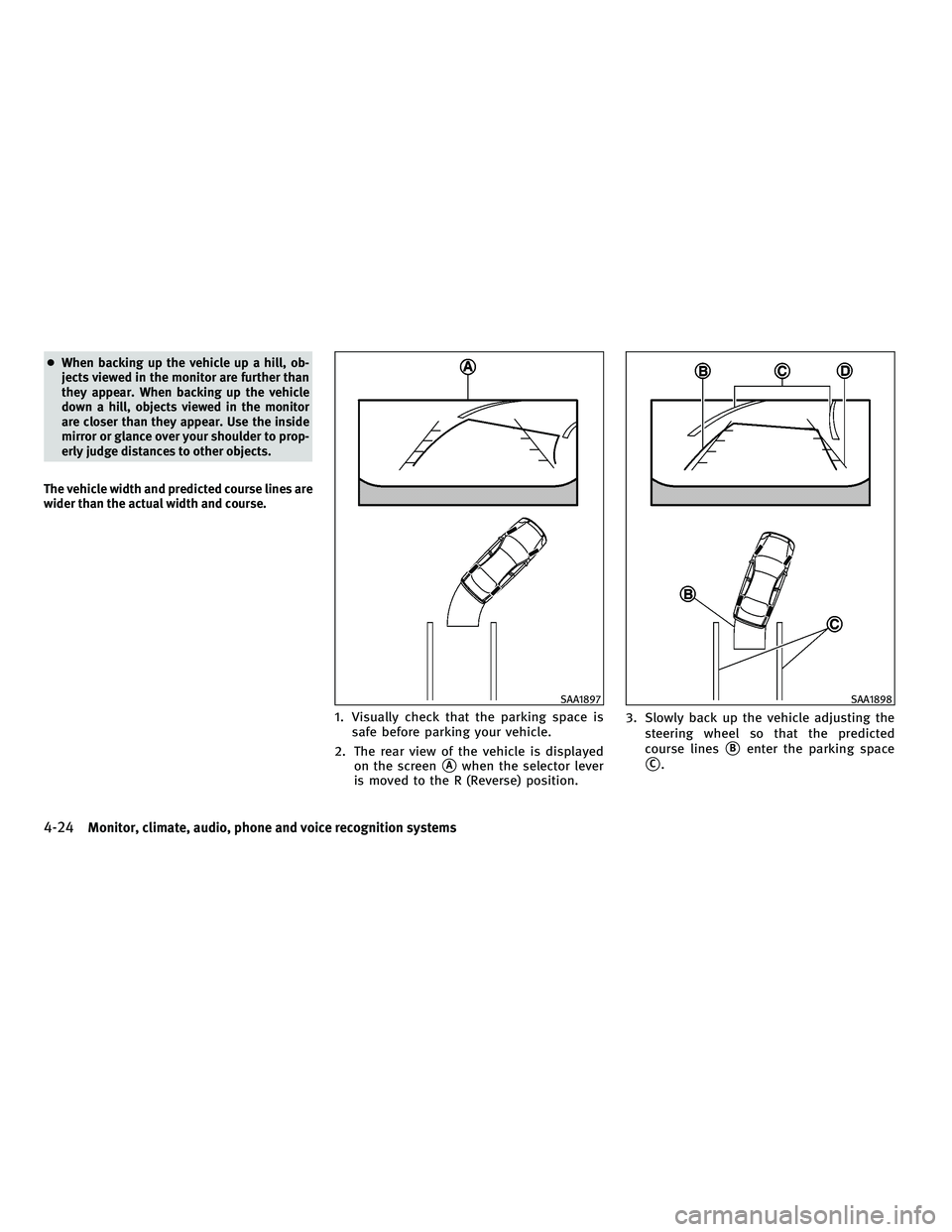
The vehicle width and predicted course lines are
wider than the actual width and course.
1. Visually check that the parking space is safe before parking your vehicle.
2. The rear view of the vehicle is displayed on the screen
sAwhen the selector lever
is moved to the R (Reverse) position. 3. Slowly back up the vehicle adjusting the
steering wheel so that the predicted
course linessBenter the parking space
sC.
SAA1897SAA1898
4-24Monitor, climate, audio, phone and voice recognition systems
wÐ
Ð
05/14/09Ðpattie
X
Page 295 of 445

To remove the Intelligent Key from the port,
push the ignition switch to the LOCK position
and push in the Intelligent Key
s2. Then the
Intelligent Key will be ejected from the port. Pull
the Intelligent Key out.
NOTE:
The Intelligent Key port does not charge the In-
telligent Key battery. If you see the low battery
indicator in the dot matrix liquid crystal display,
replace the battery as soon as possible. (See
ªBATTERY REPLACEMENTº in the ª8. Mainte-
nance and do-it-yourselfº section.)
CAUTION
c Never place anything except the Intelligent
Key in the Intelligent Key port. Doing so may
cause damage to the equipment.
c Make sure the Intelligent Key is in the cor-
rect direction when inserting it to the Intelli-
gent Key port. The engine may not start if it is
in the incorrect direction.
c Remove the Intelligent Key from the Intelli-
gent Key port after the ignition switch is
pushed to the LOCK position.
c Do not pull out the Intelligent Key from the
Intelligent Key port until the Intelligent Key
is ejected to the removal position. c
Make sure the area around the vehicle is
clear.
c Check fluid levels such as engine oil, cool-
ant, brake fluid and window washer fluid as
frequently as possible, or at least whenever
you refuel.
c Check that all windows and lights are clean.
c Visually inspect tires for their appearance
and condition. Also check tires for proper
inflation.
c Lock all doors.
c Position seat and adjust head restraints.
c Adjust inside and outside mirrors.
c Fasten seat belts and ask all passengers to
do likewise.
c Check the operation of warning lights when
the ignition switch is pushed to the ON
position. (See ªWARNING/INDICATOR LIGHTS
AND AUDIBLE REMINDERSº in the ª2. Instru-
ments and controlsº section.)
SSD0513
BEFORE STARTING THE ENGINE
5-10Starting and driving
wÐ
Ð
05/15/09Ðpattie
X
Page 308 of 445
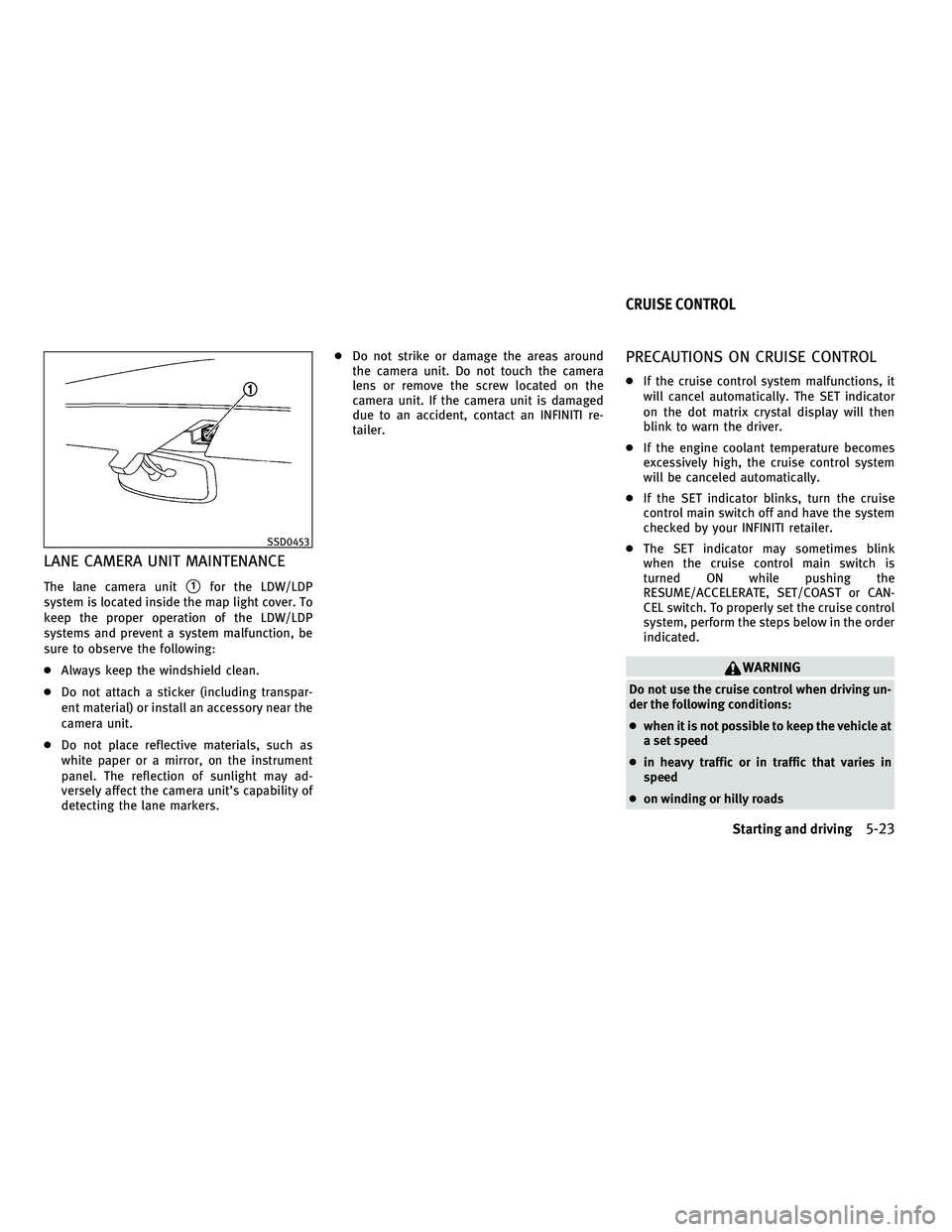
LANE CAMERA UNIT MAINTENANCE
The lane camera units1for the LDW/LDP
system is located inside the map light cover. To
keep the proper operation of the LDW/LDP
systems and prevent a system malfunction, be
sure to observe the following:
c Always keep the windshield clean.
c Do not attach a sticker (including transpar-
ent material) or install an accessory near the
camera unit.
c Do not place reflective materials, such as
white paper or a mirror, on the instrument
panel. The reflection of sunlight may ad-
versely affect the camera unit's capability of
detecting the lane markers. c
Do not strike or damage the areas around
the camera unit. Do not touch the camera
lens or remove the screw located on the
camera unit. If the camera unit is damaged
due to an accident, contact an INFINITI re-
tailer.
PRECAUTIONS ON CRUISE CONTROL
cIf the cruise control system malfunctions, it
will cancel automatically. The SET indicator
on the dot matrix crystal display will then
blink to warn the driver.
c If the engine coolant temperature becomes
excessively high, the cruise control system
will be canceled automatically.
c If the SET indicator blinks, turn the cruise
control main switch off and have the system
checked by your INFINITI retailer.
c The SET indicator may sometimes blink
when the cruise control main switch is
turned ON while pushing the
RESUME/ACCELERATE, SET/COAST or CAN-
CEL switch. To properly set the cruise control
system, perform the steps below in the order
indicated.
WARNING
Do not use the cruise control when driving un-
der the following conditions:
cwhen it is not possible to keep the vehicle at
a set speed
c in heavy traffic or in traffic that varies in
speed
c on winding or hilly roads
SSD0453
CRUISE CONTROL
Starting and driving5-23
wÐ
Ð
05/15/09Ðpattie
X