trunk INFINITI M 2010 Owner's Manual
[x] Cancel search | Manufacturer: INFINITI, Model Year: 2010, Model line: M, Model: INFINITI M 2010Pages: 445, PDF Size: 6.15 MB
Page 147 of 445

Hazard indicator and horn mode :
OperationDOOR LOCK DOOR UNLOCK TRUNK OPEN
Push door handle request switch or trunk open re- quest switch HAZARD -
twice
OUTSIDE CHIME -
twice HAZARD -
once
OUTSIDE CHIME -
once HAZARD - none
OUTSIDE CHIME -
4
times
Push
,or
button HAZARD -
twice
HORN - once HAZARD -
once
HORN - none HAZARD - none
HORN - none
Hazard indicator mode :
Operation DOOR LOCK DOOR UNLOCK TRUNK OPEN
Push door handle request switch or trunk open re- quest switch HAZARD -
twice HAZARD - none HAZARD - none
Push
,or
button HAZARD -
twice HAZARD - none HAZARD - none Switching procedure :
To switch the hazard indicator and horn opera-
tion, push the LOCK
s1and UNLOCK
s2buttons on the Intelligent Key simul-
taneously for more than 2 seconds.
c When the hazard indicator mode is set, the
hazard indicator flashes 3 times.
c When the hazard indicator and horn mode is
set, the hazard indicator flashes once and
the horn chirps once.
3-16Pre-driving checks and adjustments
wÐ
Ð
05/14/09Ðpattie
X
Page 148 of 445

1. Pull the hood lock release handles1
located below the instrument panel; the
hood will then spring up slightly.
2. Pull the lever
s2at the front of the hood
with your fingertips and raise the hood.
3. When closing the hood, slowly close the hood down to latch both the right and left
locks. Push the hood down to lock the
hood securely into place.
WARNING
cMake sure the hood is completely closed and
latched before driving. Failure to do so could
cause the hood to fly open and result in an
accident.
c If you see steam or smoke coming from the
engine compartment, to avoid injury do not
open the hood.
WARNING
cDo not drive with the trunk lid open. This
could allow dangerous exhaust gases to be
drawn into the vehicle. See ªEXHAUST GAS
(carbon monoxide)º in the ª5. Starting and
drivingº section of this manual.
c Closely supervise children when they are
around cars to prevent them from playing
and becoming locked in the trunk where they
could be seriously injured. Keep the car
locked, with the trunk closed, when not in
use, and prevent children's access to Intelli-
gent Keys.
SPA2446
HOOD TRUNK LID
Pre-driving checks and adjustments3-17
wÐ
Ð
05/14/09Ðpattie
X
Page 149 of 445

TRUNK LID RELEASE SWITCH
The trunk lid release switchsAis located on the
instrument panel.
To open the trunk lid, push the release switch
down as illustrated. To close, push the trunk lid
down.
You can open the trunk lid with Intelligent Key.
(See ªINTELLIGENT KEY SYSTEMº page 3-6.)
TRUNK OPEN REQUEST SWITCH
The trunk lid can be opened by pushing the
trunk open request switch
sAwhen the Intelli-
gent Key is within the operating range of the
trunk lock/unlock function regardless of the
inside lock knob position. (See ªINTELLIGENT
KEY SYSTEMº earlier in this section.)
OPENING WITH KEY
To open the trunk lid, insert the mechanical key
to the trunk key cylinder and turn the key to the
right side of the vehicle. To close, remove the
key and push the trunk lid down.
TRUNK OPEN BUTTON
The trunk lid can be opened by pushing the
TRUNK OPEN button
on the Intelligent
Key for more than 1 second.
SPA2120ASPA2427SPA2428
3-18Pre-driving checks and adjustments
wÐ
Ð
05/14/09Ðpattie
X
Page 150 of 445

TRUNK RELEASE POWER CANCEL
SWITCH
When the switch located inside the glove box is
in the CANCEL position
s1, the power to the
trunk lid will be canceled and the trunk lid
cannot be opened by the trunk lid release
switch, the trunk open request switch with the
Intelligent Key carried with you or the TRUNK
button on the Intelligent Key.
When you have to leave the vehicle with a valet
and want to keep your belongings safe in the
glove box and the trunk, push this switch to
CANCEL and lock the glove box with the me-
chanical key. Then leave the vehicle and the
Intelligent Key with the valet and keep the
mechanical key with you. See ªKEYSº earlier in this section.
To connect the power to the trunk lid, push the
switch to the ON
s2position.
INTERIOR TRUNK LID RELEASE
WARNING
Closely supervise children when they are
around cars to prevent them from playing and
becoming locked in the trunk where they could
be seriously injured. Keep the car locked, with
the trunk lid securely latched, when not in use,
and prevent children's access to Intelligent
Keys.
The interior trunk lid release mechanism allows
opening of the trunk lid in the event that people
become locked inside the trunk or in the event
of the loss of electrical power such as a dis-
charged battery.
SPA2429SPA2552
Pre-driving checks and adjustments3-19
wÐ
Ð
05/14/09Ðpattie
X
Page 151 of 445
Releasing inside the trunk
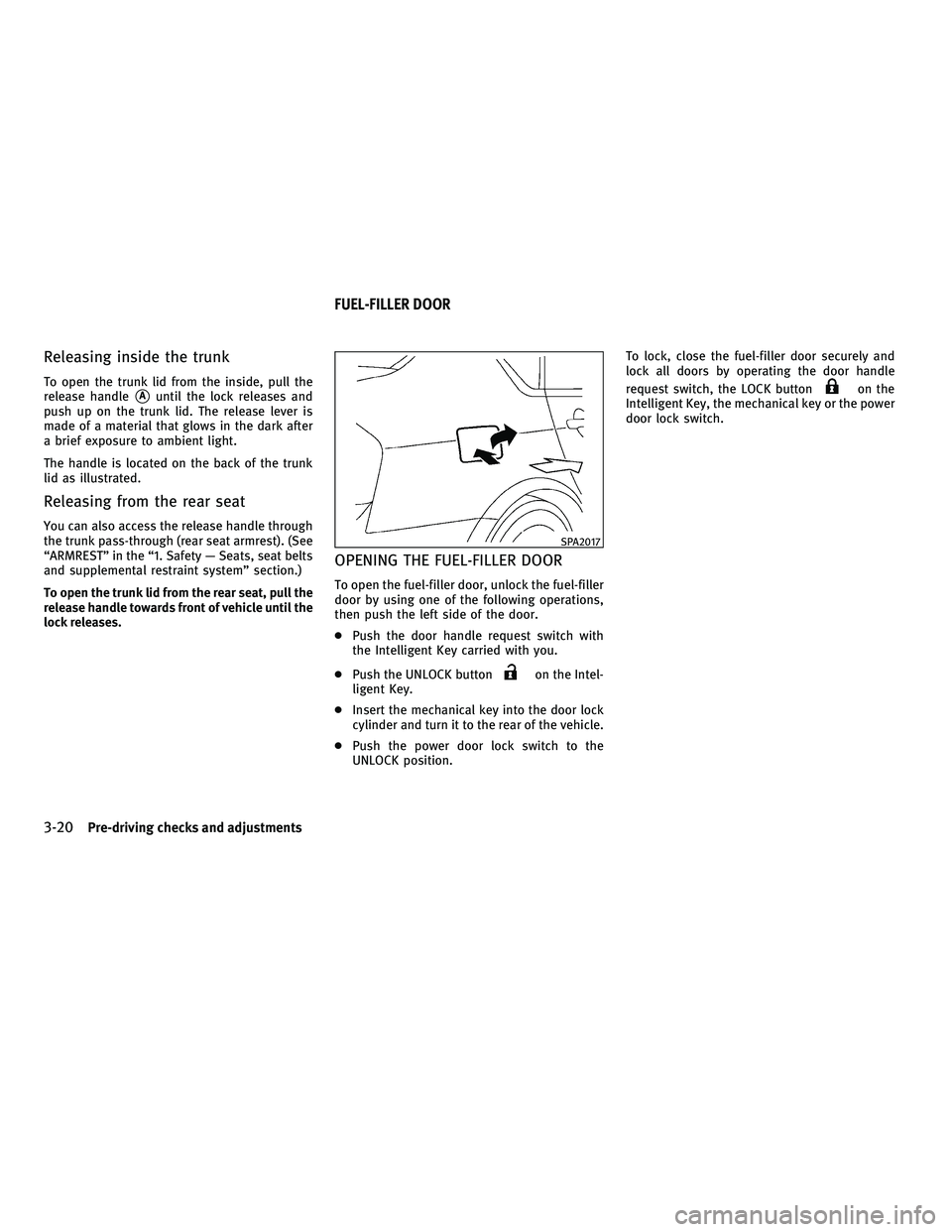
To open the trunk lid from the inside, pull the
release handle
sAuntil the lock releases and
push up on the trunk lid. The release lever is
made of a material that glows in the dark after
a brief exposure to ambient light.
The handle is located on the back of the trunk
lid as illustrated.
Releasing from the rear seat
You can also access the release handle through
the trunk pass-through (rear seat armrest). (See
ªARMRESTº in the ª1. Safety Ð Seats, seat belts
and supplemental restraint systemº section.)
To open the trunk lid from the rear seat, pull the
release handle towards front of vehicle until the
lock releases.
OPENING THE FUEL-FILLER DOOR
To open the fuel-filler door, unlock the fuel-filler
door by using one of the following operations,
then push the left side of the door.
c Push the door handle request switch with
the Intelligent Key carried with you.
c Push the UNLOCK button
on the Intel-
ligent Key.
c Insert the mechanical key into the door lock
cylinder and turn it to the rear of the vehicle.
c Push the power door lock switch to the
UNLOCK position. To lock, close the fuel-filler door securely and
lock all doors by operating the door handle
request switch, the LOCK button
on the
Intelligent Key, the mechanical key or the power
door lock switch.
SPA2017
FUEL-FILLER DOOR
3-20Pre-driving checks and adjustments
wÐ
Ð
05/14/09Ðpattie
X
Page 177 of 445

WARNING DISPLAY
The warning display will appear when one of the
following conditions occurs while driving at a
speed over 3 MPH (5 km/h).
cAny door is not securely closed. (The corre-
sponding door will be indicated on the dis-
play.)
c The trunk lid is not securely closed.
The warning display will turn off when the
vehicle speed slows down under 3 MPH (5
km/h) even if a door or trunk lid is not securely
closed yet.
Make sure to stop the vehicle and close a door
or trunk lid securely.
SAA1187
SAA1188
With navigation system
SAA1804
Without navigation system
SAA1514
4-14Monitor, climate, audio, phone and voice recognition systems
wÐ
Ð
05/14/09Ðpattie
X
Page 185 of 445
HOW TO USE DISC BUTTON (for
models without navigation system)
Push theDISCbutton to play the Compact Disc
(CD). See ªAUDIO SYSTEMº later in this section. When the selector lever is shifted into the R
(Reverse) position, the monitor display shows
the view to the rear of the vehicle.
The system is designed as an aid to the driver in
detecting large stationary objects to help avoid
damaging the vehicle. The system will not de-
tect small objects below the bumper and may
not detect objects close to the bumper or on the
ground.
WARNING
c
The rear view camera is a convenience but it
is not a substitute for proper backing up.
Always turn and check that it is safe to do so
before backing up. Always back up slowly.
c Objects viewed in the RearView Monitor dif-
fer from actual distance because a wide-
angle lens is used. Objects in the RearView
Monitor will appear visually opposite like
ones viewed in the inside and outside
mirrors.
c Make sure that the trunk is securely closed
when backing up.
c Underneath the bumper and the corner areas
of the bumper cannot be viewed on the Rear-
View Monitor because of its monitoring
range limitation. c
Do not put anything on the rear view camera.
The rear view camera is installed above the
license plate.
c When washing the vehicle with high-
pressure water, be sure not to spray it
around the camera. Otherwise, water may
enter the camera unit causing water conden-
sation on the lens, a malfunction, fire or an
electric shock.
c Do not strike the camera. It is a precision
instrument. Otherwise, it may malfunction
or cause damage resulting in a fire or an
electric shock.
CAUTION
There is a plastic cover over the camera. Do not
scratch the cover when cleaning dirt or snow
from the cover.
REARVIEW MONITOR (if so equipped)
4-22Monitor, climate, audio, phone and voice recognition systems
wÐ
Ð
05/14/09Ðpattie
X
Page 287 of 445

WARNING
cDo not leave children or adults who would
normally require the support of others alone
in your vehicle. Pets should not be left alone
either. They could accidentally injure them-
selves or others through inadvertent opera-
tion of the vehicle. Also, on hot, sunny days,
temperatures in a closed vehicle could
quickly become high enough to cause severe
or possibly fatal injuries to people or
animals.
c Closely supervise children when they are
around cars to prevent them from playing
and becoming locked in the trunk where they
could be seriously injured. Keep the car
locked, with the rear seatback and trunk lid
securely latched when not in use, and pre-
vent children's access to car keys.
EXHAUST GAS (carbon monoxide)
WARNING
cDo not breathe exhaust gases; they contain
colorless and odorless carbon monoxide.
Carbon monoxide is dangerous. It can cause
unconsciousness or death. c
If you suspect that exhaust fumes are enter-
ing the vehicle, drive with all windows fully
open, and have the vehicle inspected
immediately.
c Do not run the engine in closed spaces such
as a garage.
c Do not park the vehicle with the engine run-
ning for any extended length of time.
c Keep the trunk lid closed while driving, oth-
erwise exhaust gases could be drawn into
the passenger compartment. If you must
drive with the trunk lid open, follow these
precautions:
1. Open all the windows.
2. Set the
air recirculation to off and
the fan control to high to circulate the air.
c The exhaust system and body should be in-
spected by a qualified mechanic whenever:
± The vehicle is raised for service.
± You suspect that exhaust fumes are en- tering into the passenger compartment.
± You notice a change in the sound of the exhaust system. ± You have had an accident involving dam-
age to the exhaust system, underbody, or
rear of the vehicle.
THREE-WAY CATALYST
The three-way catalyst is an emission control
device installed in the exhaust system. Exhaust
gases in the three-way catalyst are burned at
high temperatures to help reduce pollutants.
WARNING
cThe exhaust gas and the exhaust system are
very hot. Keep people, animals or flammable
materials away from the exhaust system
components.
c Do not stop or park the vehicle over flam-
mable materials such as dry grass, waste
paper or rags. They may ignite and cause a
fire.
CAUTION
cDo not use leaded gasoline. Deposits from
leaded gasoline will seriously reduce the
three-way catalyst's ability to help reduce
exhaust pollutants.
PRECAUTIONS WHEN STARTING AND
DRIVING
5-2Starting and driving
wÐ
Ð
05/15/09Ðpattie
X
Page 293 of 445

WARNING
Do not operate the push-button ignition switch
while driving the vehicle except in an emer-
gency. (The engine will stop when the ignition
switch is pushed 3 consecutive times or the
ignition switch is pushed and held for more
than 2 seconds.) If the engine stops while the
vehicle is being driven, this could lead to a
crash and serious injury.
Before operating the push-button ignition
switch, be sure to move the selector lever to the
P (Park) position.
OPERATING RANGE FOR ENGINE
START FUNCTION
The operating range for starting the engine
inside the vehicle
s1is shown in the illustra-
tion.
c The trunk area is not included in the operat-
ing range of the engine start function.
c If the Intelligent Key is on the instrument
panel, rear parcel shelf, inside the glove box
or door pocket, it may not be possible to
start the engine.
c If the Intelligent Key is near the door or door
glass outside the vehicle, it may be possible
to start the engine. When the ignition switch is pushed without
depressing the brake pedal, the ignition switch
position will change as follows:
c
Push the center once to change to ACC.
c Push the center two times to change to ON.
c Push the center three times to return to
LOCK.
The ignition switch is equipped with an anti-
theft steering lock device.
The ignition lock is designed so that the ignition
switch position cannot be switched to LOCK
until the selector lever is moved to the P (Park)
position.
SSD0659SSD0684
PUSH-BUTTON IGNITION SWITCH
5-8Starting and driving
wÐ
Ð
05/15/09Ðpattie
X
Page 315 of 445

cWhen the snow or road spray from traveling
vehicles reduces the sensor's visibility
c When dense exhaust or other smoke (black
smoke) from vehicles reduces the sensor's
visibility
c When excessively heavy baggage is loaded
in the rear seat or the trunk of your vehicle
The ICC system is designed to automatically
check the sensor's operation within the limita-
tions of the system. When the sensor is covered
with dirt or obstructs, the system will automati-
cally be canceled. If the sensor is covered with
ice, a transparent or translucent vinyl bag, etc.,
the ICC system may not detect them. In these
instances, the vehicle-to-vehicle distance con-
trol mode may not cancel and may not be able
to maintain the selected following distance
from the vehicle ahead. Be sure to check and
clean the sensor regularly.
The vehicle-to-vehicle distance control mode is
designed to maintain a selected distance and
reduce the speed to match the slower vehicle
ahead; the system will decelerate the vehicle as
necessary. However, the ICC system can only
apply up to 25% of the vehicles total braking
power. This system should only be used when
traffic conditions allow vehicle speeds to re-
main fairly constant or when vehicle speeds
change gradually. If a vehicle moves into the traveling lane ahead or if a vehicle traveling
ahead rapidly decelerates, the distance be-
tween vehicles may become closer because the
ICC system cannot decelerate the vehicle
quickly enough. If this occurs, the ICC system
will sound a warning chime and blink the
system display to notify the driver to take
necessary action.
The system will cancel and a warning chime will
sound if the speed falls below approximately 20
MPH (32 km/h). The system will also disengage
below the 20 MPH (32 km/h) cut-off speed or
over the maximum set speed.
See ªApproach warningº later in this section.
The following items are controlled in the
vehicle-to-vehicle distance control mode:
c
When there are no vehicles traveling ahead,
the vehicle-to-vehicle distance control mode
maintains the speed set by the driver. The
set speed range is between approximately
25 and 90 MPH (40 and 144 km/h).
c When there is a vehicle traveling ahead, the
vehicle-to-vehicle distance control mode ad-
justs the speed to maintain the distance,
selected by driver, from the vehicle ahead.
The adjusting speed range is between ap-
proximately 20 MPH (32 km/h) and up to the
set speed. c
When the vehicle traveling ahead has moved
out from its lane of travel, the vehicle-to-
vehicle distance control mode accelerates
and maintains vehicle speed up to the set
speed.
The ICC system does not control vehicle speed
or warn you when you approach stationary and
slow moving vehicles. You must pay attention to
vehicle operation to maintain proper distance
from vehicles ahead when approaching toll
gates or traffic congestion.
5-30Starting and driving
wÐ
Ð
05/15/09Ðpattie
X