key INFINITI M 2012 Owners Manual
[x] Cancel search | Manufacturer: INFINITI, Model Year: 2012, Model line: M, Model: INFINITI M 2012Pages: 522, PDF Size: 3.8 MB
Page 288 of 522
perform these operations using INFINITI
Voice Recognition.
SAA2534
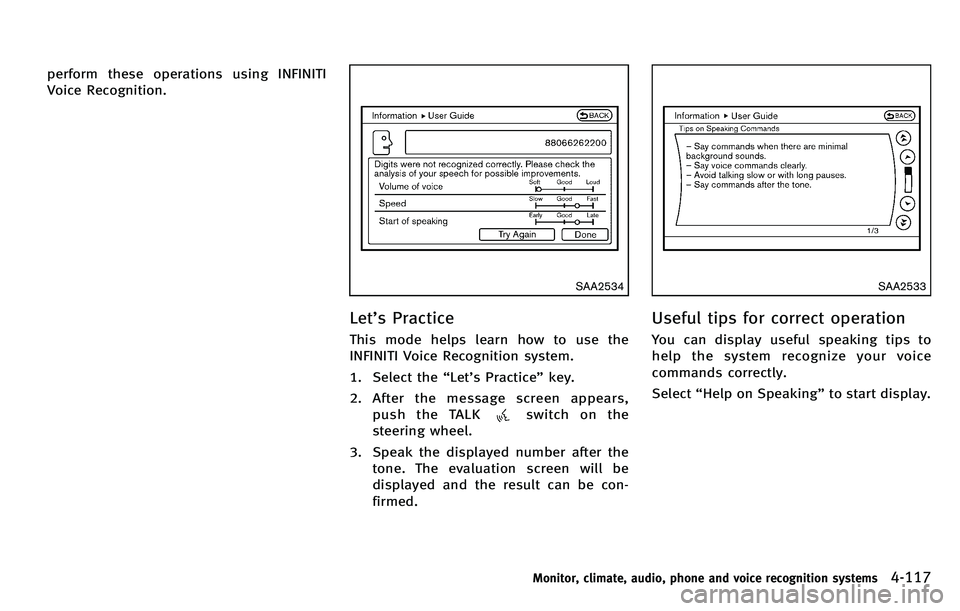
Let’s Practice
This mode helps learn how to use the
INFINITI Voice Recognition system.
1. Select the “Let ’s Practice ”key.
2. After the message screen appears, push the TALK
switch on the
steering wheel.
3. Speak the displayed number after the tone. The evaluation screen will be
displayed and the result can be con-
firmed.
SAA2533
Useful tips for correct operation
You can display useful speaking tips to
help the system recognize your voice
commands correctly.
Select “Help on Speaking ”to start display.
Monitor, climate, audio, phone and voice recognition systems4-117
Page 290 of 522
SAA2535
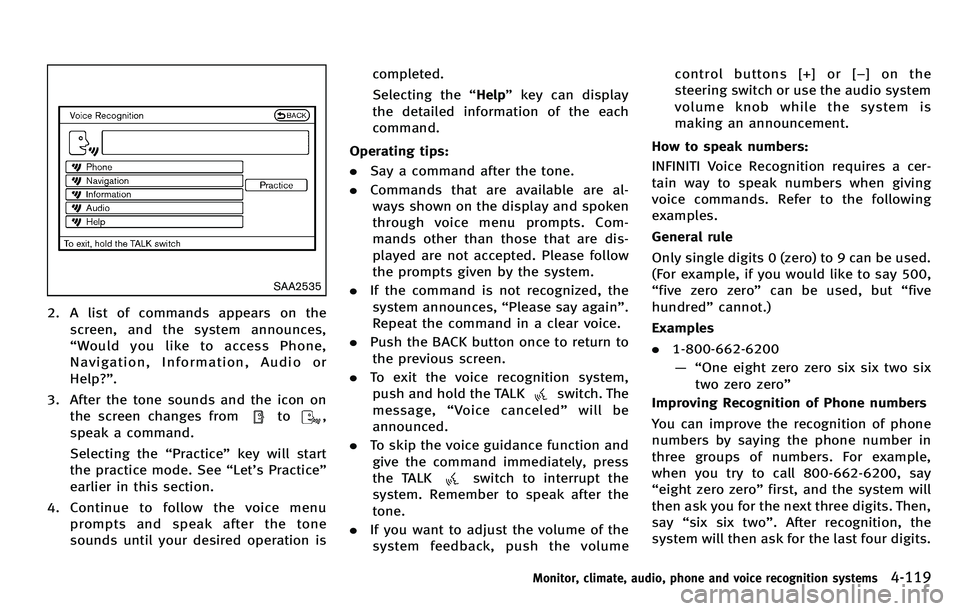
2. A list of commands appears on thescreen, and the system announces,
“Would you like to access Phone,
Navigation, Information, Audio or
Help? ”.
3. After the tone sounds and the icon on the screen changes from
to,
speak a command.
Selecting the “Practice ”key will start
the practice mode. See “Let ’s Practice ”
earlier in this section.
4. Continue to follow the voice menu prompts and speak after the tone
sounds until your desired operation is completed.
Selecting the
“Help ”key can display
the detailed information of the each
command.
Operating tips:
. Say a command after the tone.
. Commands that are available are al-
ways shown on the display and spoken
through voice menu prompts. Com-
mands other than those that are dis-
played are not accepted. Please follow
the prompts given by the system.
. If the command is not recognized, the
system announces, “Please say again ”.
Repeat the command in a clear voice.
. Push the BACK button once to return to
the previous screen.
. To exit the voice recognition system,
push and hold the TALK
switch. The
message, “Voice canceled ”will be
announced.
. To skip the voice guidance function and
give the command immediately, press
the TALK
switch to interrupt the
system. Remember to speak after the
tone.
. If you want to adjust the volume of the
system feedback, push the volume control buttons [+] or [
−]onthe
steering switch or use the audio system
volume knob while the system is
making an announcement.
How to speak numbers:
INFINITI Voice Recognition requires a cer-
tain way to speak numbers when giving
voice commands. Refer to the following
examples.
General rule
Only single digits 0 (zero) to 9 can be used.
(For example, if you would like to say 500,
“ five zero zero” can be used, but “five
hundred ”cannot.)
Examples
. 1-800-662-6200
—“ One eight zero zero six six two six
two zero zero ”
Improving Recognition of Phone numbers
You can improve the recognition of phone
numbers by saying the phone number in
three groups of numbers. For example,
when you try to call 800-662-6200, say
“ eight zero zero ”first, and the system will
then ask you for the next three digits. Then,
say “six six two ”. After recognition, the
system will then ask for the last four digits.
Monitor, climate, audio, phone and voice recognition systems4-119
Page 295 of 522
4-124Monitor, climate, audio, phone and voice recognition systems
SAA2536
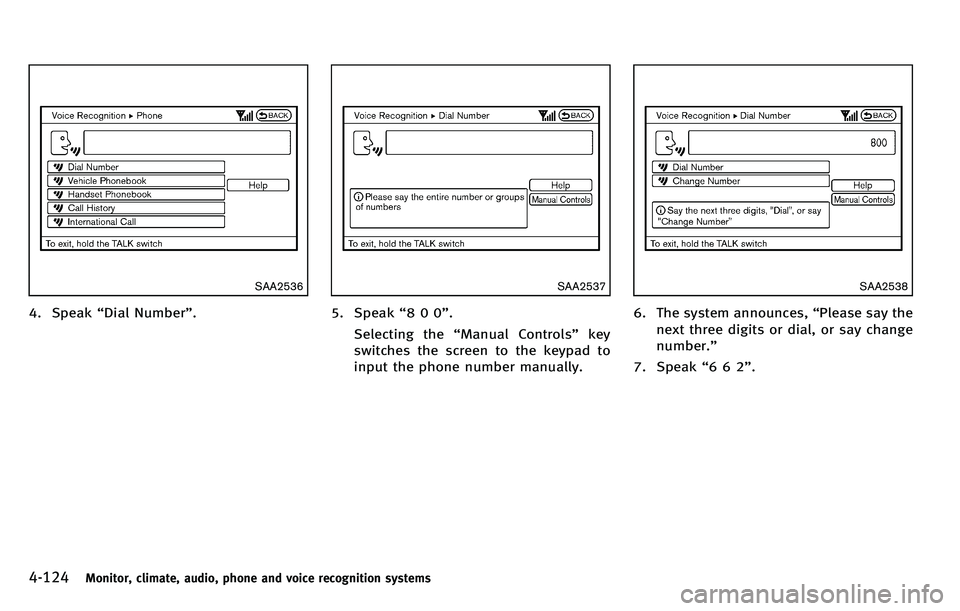
4. Speak“Dial Number” .
SAA2537
5. Speak“800 ”.
Selecting the “Manual Controls ”key
switches the screen to the keypad to
input the phone number manually.
SAA2538
6. The system announces, “Please say the
next three digits or dial, or say change
number. ”
7. Speak “662 ”.
Page 299 of 522
4-128Monitor, climate, audio, phone and voice recognition systems
SAA2529
Activating Alternate Command
Mode
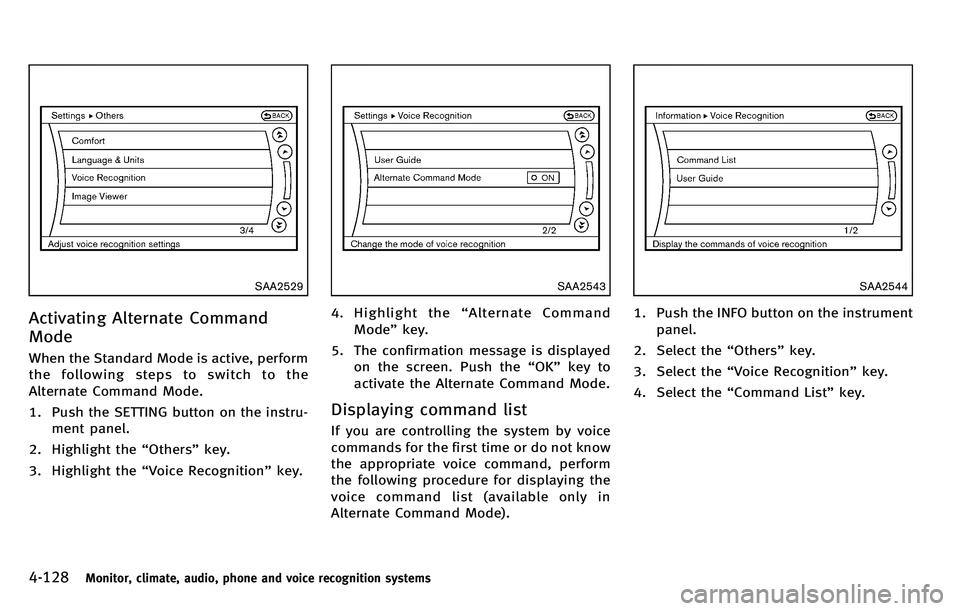
When the Standard Mode is active, perform
the following steps to switch to the
Alternate Command Mode.
1. Push the SETTING button on the instru-ment panel.
2. Highlight the “Others ”key.
3. Highlight the “Voice Recognition ”key.
SAA2543
4. Highlight the “Alternate Command
Mode ”key.
5. The confirmation message is displayed on the screen. Push the “OK ”key to
activate the Alternate Command Mode.
Displaying command list
If you are controlling the system by voice
commands for the first time or do not know
the appropriate voice command, perform
the following procedure for displaying the
voice command list (available only in
Alternate Command Mode).
SAA2544
1. Push the INFO button on the instrument
panel.
2. Select the “Others ”key.
3. Select the “Voice Recognition ”key.
4. Select the “Command List ”key.
Page 307 of 522
4-136Monitor, climate, audio, phone and voice recognition systems
SAA2547
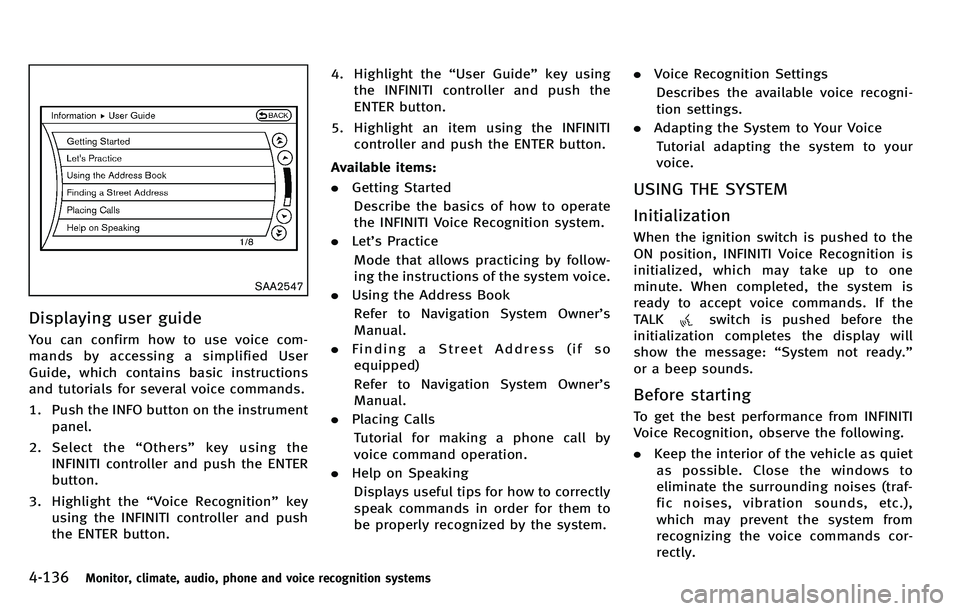
Displaying user guide
You can confirm how to use voice com-
mands by accessing a simplified User
Guide, which contains basic instructions
and tutorials for several voice commands.
1. Push the INFO button on the instrumentpanel.
2. Select the “Others ”key using the
INFINITI controller and push the ENTER
button.
3. Highlight the “Voice Recognition ”key
using the INFINITI controller and push
the ENTER button. 4. Highlight the
“User Guide ”key using
the INFINITI controller and push the
ENTER button.
5. Highlight an item using the INFINITI controller and push the ENTER button.
Available items:
. Getting Started
Describe the basics of how to operate
the INFINITI Voice Recognition system.
. Let’s Practice
Mode that allows practicing by follow-
ing the instructions of the system voice.
. Using the Address Book
Refer to Navigation System Owner ’s
Manual.
. Finding a Street Address (if so
equipped)
Refer to Navigation System Owner ’s
Manual.
. Placing Calls
Tutorial for making a phone call by
voice command operation.
. Help on Speaking
Displays useful tips for how to correctly
speak commands in order for them to
be properly recognized by the system. .
Voice Recognition Settings
Describes the available voice recogni-
tion settings.
. Adapting the System to Your Voice
Tutorial adapting the system to your
voice.
USING THE SYSTEM
Initialization
When the ignition switch is pushed to the
ON position, INFINITI Voice Recognition is
initialized, which may take up to one
minute. When completed, the system is
ready to accept voice commands. If the
TALK
switch is pushed before the
initialization completes the display will
show the message: “System not ready. ”
or a beep sounds.
Before starting
To get the best performance from INFINITI
Voice Recognition, observe the following.
. Keep the interior of the vehicle as quiet
as possible. Close the windows to
eliminate the surrounding noises (traf-
fic noises, vibration sounds, etc.),
which may prevent the system from
recognizing the voice commands cor-
rectly.
Page 310 of 522
SAA2549
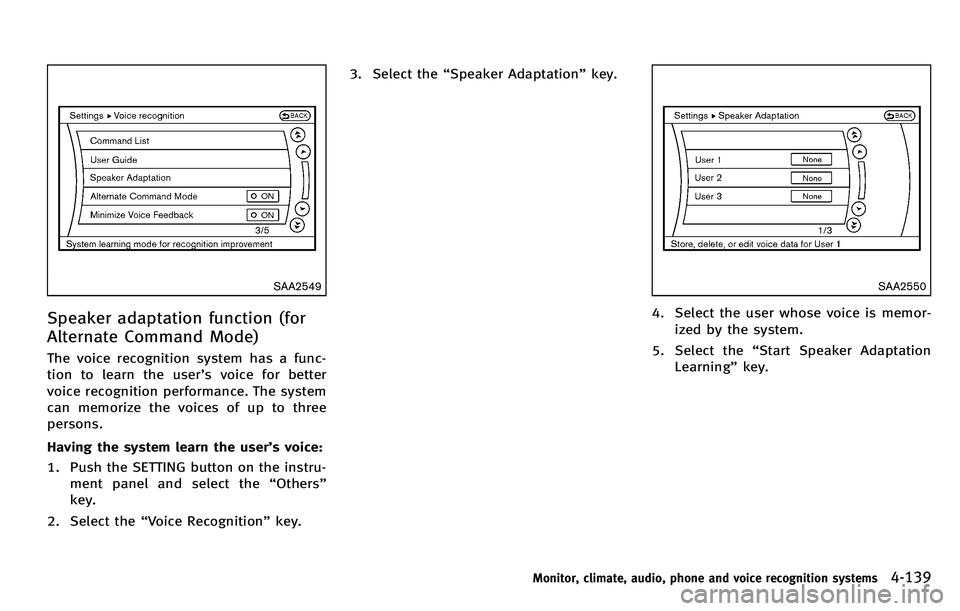
Speaker adaptation function (for
Alternate Command Mode)
The voice recognition system has a func-
tion to learn the user’s voice for better
voice recognition performance. The system
can memorize the voices of up to three
persons.
Having the system learn the user ’s voice:
1. Push the SETTING button on the instru- ment panel and select the “Others ”
key.
2. Select the “Voice Recognition ”key. 3. Select the
“Speaker Adaptation” key.
SAA2550
4. Select the user whose voice is memor-
ized by the system.
5. Select the “Start Speaker Adaptation
Learning ”key.
Monitor, climate, audio, phone and voice recognition systems4-139
Page 312 of 522
SAA2553
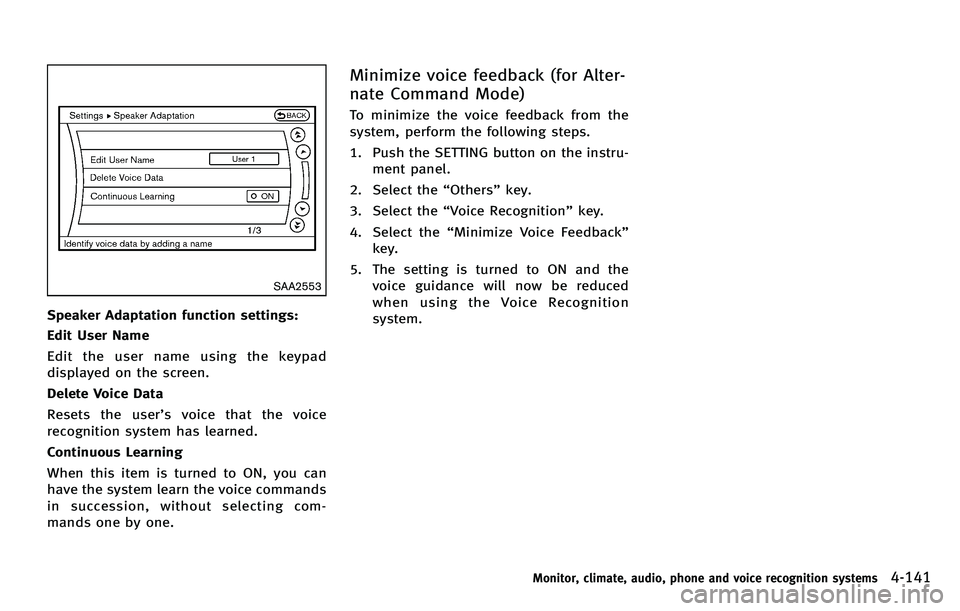
Speaker Adaptation function settings:
Edit User Name
Edit the user name using the keypad
displayed on the screen.
Delete Voice Data
Resets the user’s voice that the voice
recognition system has learned.
Continuous Learning
When this item is turned to ON, you can
have the system learn the voice commands
in succession, without selecting com-
mands one by one.
Minimize voice feedback (for Alter-
nate Command Mode)
To minimize the voice feedback from the
system, perform the following steps.
1. Push the SETTING button on the instru- ment panel.
2. Select the “Others ”key.
3. Select the “Voice Recognition ”key.
4. Select the “Minimize Voice Feedback ”
key.
5. The setting is turned to ON and the voice guidance will now be reduced
when using the Voice Recognition
system.
Monitor, climate, audio, phone and voice recognition systems4-141
Page 314 of 522

5 Starting and driving
Precautions when starting and driving ................. 5-3Exhaust gas (carbon monoxide) ....................... 5-3
Three-way catalyst........................................... 5-3
Tire Pressure Monitoring System (TPMS) ........ 5-4
Avoiding collision and rollover......................... 5-6
Off-road recovery............................................. 5-7
Rapid air pressure loss ................................... 5-7
Drinking alcohol/drugs and driving ................. 5-8
Intelligent All-Wheel Drive (AWD) driving
safety precautions ........................................... 5-8
Push-button ignition switch ................................. 5-9 Operating range for engine start function ...... 5-10
Push-button ignition switch operation ........... 5-10
Steering lock (if so equipped)........................ 5-11
Push-button ignition switch positions ............ 5-11
Emergency engine shut off ............................ 5-12
Intelligent Key battery discharge ................... 5-12
Before starting the engine ................................. 5-13
Starting the engine............................................ 5-13
Driving the vehicle ............................................. 5-14
Automatic transmission ................................. 5-14
Parking brake .................................................... 5-18
INFINITI drive mode selector............................... 5-19
Standard mode ............................................. 5-19
Sport mode ................................................... 5-19 Snow mode ................................................. 5-20
Eco mode .................................................... 5-20
Lane Departure Warning (LDW) system/Lane
Departure Prevention (LDP) system (if
so equipped)..................................................... 5-22 Lane Departure Warning (LDW) system......... 5-23
Lane Departure Prevention (LDP) system ...... 5-26
Lane camera unit maintenance .................... 5-31
Blind Spot Warning (BSW) system/Blind Spot
Intervention
TM(BSI) system (if so equipped)...... 5-31
BSW system operation ................................. 5-33
BSI system operation................................... 5-36
BSW/BSI driving situations .......................... 5-39
BSW/BSI malfunction................................... 5-44
System maintenance.................................... 5-44
Cruise control.................................................... 5-45
Precautions on cruise control....................... 5-45
Cruise control operations ............................. 5-45
Intelligent Cruise Control (ICC) system (if
so equipped)..................................................... 5-47
Selecting the vehicle-to-vehicle distance
control mode ............................................... 5-48
Vehicle-to-vehicle distance control mode...... 5-48
Precautions on vehicle-to-vehicle distance
control mode ............................................... 5-49
Page 316 of 522

WARNING
.Do not leave children or adults who
would normally require the support of
others alone in your vehicle. Pets should
not be left alone either. They could
accidentally injure themselves or others
through inadvertent operation of the
vehicle. Also, on hot, sunny days,
temperatures in a closed vehicle could
quickly become high enough to cause
severe or possibly fatal injuries to
people or animals.
. Closely supervise children when they are
around cars to prevent them from play-
ing and becoming locked in the trunk
where they could be seriously injured.
Keep the car locked, with the rear
seatback and trunk lid securely latched
when not in use, and prevent children ’s
access to car keys.
EXHAUST GAS (carbon monoxide)
WARNING
. Do not breathe exhaust gases; they
contain colorless and odorless carbon
monoxide. Carbon monoxide is danger-
ous. It can cause unconsciousness or
death.
. If you suspect that exhaust fumes are
entering the vehicle, drive with all
windows fully open, and have the
vehicle inspected immediately.
. Do not run the engine in closed spaces
such as a garage.
. Do not park the vehicle with the engine
running for any extended length of time.
. Keep the trunk lid closed while driving,
otherwise exhaust gases could be drawn
into the passenger compartment. If you
must drive with the trunk lid open,
follow these precautions:
1) Open all the windows.
2) Set the
air recirculation to off
and the fan control to high to
circulate the air. .
If electrical wiring or other cable con-
nections must pass to a trailer through
the seal on the trunk lid or the body,
follow the manufacturer’ s recommenda-
tion to prevent carbon monoxide entry
into the vehicle.
. The exhaust system and body should be
inspected by a qualified mechanic when-
ever:
—The vehicle is raised for service.
—You suspect that exhaust fumes are
entering into the passenger com-
partment.
—You notice a change in the sound of
the exhaust system.
—You have had an accident involvingdamage to the exhaust system,
underbody, or rear of the vehicle.
THREE-WAY CATALYST
The three-way catalyst is an emission
control device installed in the exhaust
system. Exhaust gases in the three-way
catalyst are burned at high temperatures to
help reduce pollutants.
Starting and driving5-3
PRECAUTIONS WHEN STARTING AND
DRIVING
Page 323 of 522

5-10Starting and driving
SSD0659
OPERATING RANGE FOR ENGINE
START FUNCTION
The Intelligent Key can only be used for
starting the engine when the Intelligent
Key is within the specified operating range.
When the Intelligent Key battery is almost
discharged or strong radio waves are
present near the operating location, the
Intelligent Key system’s operating range
becomes narrower and may not function
properly.
If the Intelligent Key is within the operating
range, it is possible for anyone, even
someone who does not carry the Intelligent Key, to push the ignition switch to start the
engine.
.
The trunk area is not included in the
operating range but the Intelligent Key
may function.
. If the Intelligent Key is placed on the
instrument panel, rear parcel shelf,
inside the glove box or door pocket,
the Intelligent Key may not function.
. If the Intelligent Key is placed near the
door or window outside the vehicle, the
Intelligent Key may function.
SSD1021
PUSH-BUTTON IGNITION SWITCH
OPERATION
When the ignition switch is pushed without
depressing the brake pedal, the ignition
switch position will change as follows:
. Push center once to change to ACC.
. Push center two times to change to ON.
. Push center three times to change to
OFF. (No position illuminates.)
. Push center four times to return to ACC.
. Open or close any door to return to
LOCK during the OFF position.