light INFINITI M 2012 Owners Manual
[x] Cancel search | Manufacturer: INFINITI, Model Year: 2012, Model line: M, Model: INFINITI M 2012Pages: 522, PDF Size: 3.8 MB
Page 409 of 522
5-96Starting and driving
SSD0471
Warning light and display
When the Preview Function is not operating
properly, a chime sounds and the system
warning light (orange) will come on.
Action to take:
If the warning light comes on, park the
vehicle in a safe place. Turn the engine off,
restart the engine and resume driving.
If the indicator stays on, it may indicate
that the Preview Function is malfunction-
ing (the brake is operative). Although the
Vehicle is still driveable under normal
conditions, have the vehicle checked at
an INFINITI retailer.
How to handle the sensor
The sensor for the Preview Function is
common with Intelligent Cruise Control and
is located below the front bumper.
To keep the Preview Function operating
properly, be sure to observe the following:
.Always keep the sensor clean. Wipe
with a soft cloth carefully so as not to
damage the sensor.
. Do not strike or damage the areas
around the sensor. Do not touch or
remove the screw located on the
sensor. Doing so could cause failure
or malfunction. If the sensor is da-
maged due to an accident, contact an
INFINITI retailer.
. Do not attach a sticker (including
transparent material) or install an
accessory near the sensor. This could
cause failure or malfunction.
ANTI-LOCK BRAKING SYSTEM (ABS)
WARNING
. The Anti-lock Braking System (ABS) is a
sophisticated device, but it cannot pre-
vent accidents resulting from careless or
dangerous driving techniques. It can
help maintain vehicle control during
braking on slippery surfaces. Remember
that stopping distances on slippery
surfaces will be longer than on normal
surfaces even with ABS. Stopping dis-
tances may also be longer on rough,
gravel or snow covered roads, or if you
are using tire chains. Always maintain a
safe distance from the vehicle in front of
you. Ultimately, the driver is responsible
for safety.
. Tire type and condition may also affect
braking effectiveness.
—When replacing tires, install the
specified size of tires on all four
wheels.
—When installing a spare tire, make
sure that it is the proper size and
type as specified on the Tire and
Loading Information label. See “Tire
Page 410 of 522
and loading information label”in
the “9. Technical and consumer
information ”section of this manual.
—For detailed information, see
“ Wheels and tires ”in the “8. Main-
tenance and do-it-yourself” section
of this manual.
The Anti-lock Braking System (ABS) con-
trols the brakes so the wheels do not lock
during hard braking or when braking on
slippery surfaces. The system detects the
rotation speed at each wheel and varies
the brake fluid pressure to prevent each
wheel from locking and sliding. By pre-
venting each wheel from locking, the
system helps the driver maintain steering
control and helps to minimize swerving
and spinning on slippery surfaces.
Using the system
Depress the brake pedal and hold it down.
Depress the brake pedal with firm steady
pressure, but do not pump the brakes. The
ABS will operate to prevent the wheels
from locking up. Steer the vehicle to avoid
obstacles.
WARNING
Do not pump the brake pedal. Doing so may
result in increased stopping distances.
Self-test feature
The ABS includes electronic sensors, elec-
tric pumps, hydraulic solenoids and a
computer. The computer has a built-in
diagnostic feature that tests the system
each time you start the engine and move
the vehicle at a low speed in forward or
reverse. When the self-test occurs, you may
hear a “clunk ”noise and/or feel a pulsa-
tion in the brake pedal. This is normal and
does not indicate a malfunction. If the
computer senses a malfunction, it switches
the ABS off and illuminates the ABS
warning light on the instrument panel.
The brake system then operates normally,
but without anti-lock assistance.
If the ABS warning light illuminates during
the self-test or while driving, have the
vehicle checked by an INFINITI retailer.
Normal operation
The ABS operates at speeds above 3 to 6
MPH (5 to 10 km/h).
When the ABS senses that one or more
wheels are close to locking up, the actuator
rapidly applies and releases hydraulic
pressure. This action is similar to pumping
the brakes very quickly. You may feel a
pulsation in the brake pedal and hear a
noise from under the hood or feel a
vibration from the actuator when it is
operating. This is normal and indicates
that the ABS is operating properly. How-
ever, the pulsation may indicate that road
conditions are hazardous and extra care is
required while driving.
Starting and driving5-97
Page 411 of 522

5-98Starting and driving
The Vehicle Dynamic Control (VDC) system
uses various sensors to monitor driver
inputs and vehicle motion. Under certain
driving conditions, the VDC system helps
to perform the following functions.
.Controls brake pressure to reduce
wheel slip on one slipping drive wheel
so power is transferred to a non
slipping drive wheel on the same axle.
. Controls brake pressure and engine
output to reduce drive wheel slip based
on vehicle speed (traction control func-
tion).
. Controls brake pressure at individual
wheels and engine output to help the
driver maintain control of the vehicle in
the following conditions:
— understeer (vehicle tends to not
follow the steered path despite
increased steering input)
— oversteer (vehicle tends to spin due
to certain road or driving condi-
tions).
The VDC system can help the driver to
maintain control of the vehicle, but it
cannot prevent loss of vehicle control in
all driving situations.
When the VDC system operates, the VDC
warning light
in the instrument panel flashes so note the following:
.
The road may be slippery or the system
may determine some action is required
to help keep the vehicle on the steered
path.
. You may feel a pulsation in the brake
pedal and hear a noise or vibration
from under the hood. This is normal
and indicates that the VDC system is
working properly.
. Adjust your speed and driving to the
road conditions.
See “Vehicle Dynamic Control (VDC) warn-
ing light” in the“2. Instruments and
controls ”section.
If a malfunction occurs in the system, the
VDC warning light
illuminates in the
instrument panel. The VDC system auto-
matically turns off.
The VDC OFF switch is used to turn off the
VDC system. The VDC off indicator
illuminates to indicate the VDC system is
off. When the VDC switch is used to turn off
the system, the VDC system still operates
to prevent one drive wheel from slipping by
transferring power to a non slipping drive
wheel. The VDC warning light
flashes if
this occurs. All other VDC functions are off,
except for rise-up and build-up and brake force distribution, and the VDC warning
light
will not flash. The VDC system is
automatically reset to on when the ignition
switch is placed in the off position then
back to the on position.
See “Vehicle Dynamic Control (VDC) warn-
ing light” in the“2. Instruments and
controls ”section and “Vehicle Dynamic
Control (VDC) off indicator light” in the“2.
Instruments and controls ”section.
The computer has a built-in diagnostic
feature that tests the system each time you
start the engine and move the vehicle
forward or in reverse at a slow speed.
When the self-test occurs, you may hear a
“ clunk ”noise and/or feel a pulsation in the
brake pedal. This is normal and is not an
indication of a malfunction.
ACTIVE TRACE CONTROL (if so
equipped)
This system senses driving based on the
driver ’s steering and acceleration/braking
patterns, and controls brake pressure at
individual wheels and engine output to
help smooth vehicle response.
When the drive mode selector switch is set
to the “SPORT ”mode, the amount of brake
control provided by active trace control is
VEHICLE DYNAMIC CONTROL (VDC) SYSTEM
Page 412 of 522
reduced.
When the VDC OFF switch is used to turn off
the VDC system, the active trace control
system is also turned off.
If the active trace control is not functioning
properly, the IBA OFF indicator light illumi-
nates in the instrument panel.
RISE-UP AND BUILD-UP
The system gradually adjusts braking
power during normal braking to help
provide an enhanced brake feel.
BRAKE FORCE DISTRIBUTION
During braking while driving through turns,
the system optimizes the distribution of
force to each of the four wheels depending
on the radius of the turn.
WARNING
.The VDC system is designed to help the
driver maintain stability but does not
prevent accidents due to abrupt steering
operation at high speeds or by careless
or dangerous driving techniques. Reduce
vehicle speed and be especially careful
when driving and cornering on slippery
surfaces and always drive carefully. .
The active trace control (if so equipped),
rise-up and build-up and brake force
distribution systems may not be effec-
tive depending on the driving condition.
Always drive carefully and attentively.
. Do not modify the vehicle ’s suspension.
If suspension parts such as shock
absorbers, struts, springs, stabilizer
bars, bushings and wheels are not
INFINITI recommended for your vehicle
or are extremely deteriorated, the VDC
system may not operate properly. This
could adversely affect vehicle handling
performance, and the VDC warning light
may illuminate.
. If brake related parts such as brake
pads, rotors and calipers are not INFINITI
recommended or are extremely deterio-
rated, the VDC system may not operate
properly and the VDC warning light
may illuminate.
. If engine control related parts are not
INFINITI recommended or are extremely
deteriorated, the VDC warning light
may illuminate.
. When driving on extremely inclined
surfaces such as higher banked corners,
the VDC system may not operate prop- erly and the VDC warning light
may
illuminate. Do not drive on these types
of roads.
. When driving on an unstable surface
such as a turntable, ferry, elevator or
ramp, the VDC warning light
may
illuminate. This is not a malfunction.
Restart the engine after driving onto a
stable surface.
. If wheels or tires other than the INFINITI
recommended ones are used, the VDC
system may not operate properly and
the VDC warning light
may illumi-
nate.
. The VDC system is not a substitute for
winter tires or tire chains on a snow
covered road.
Starting and driving5-99
Page 413 of 522

5-100Starting and driving
WARNING
.Never rely solely on the hill start assist
system to prevent the vehicle from
moving backward on a hill. Always drive
carefully and attentively. Depress the
brake pedal when the vehicle is stopped
on a steep hill. Be especially careful
when stopped on a hill on frozen or
muddy roads. Failure to prevent the
vehicle from rolling backwards may
result in a loss of control of the vehicle
and possible serious injury or death.
. The hill start assist system is not
designed to hold the vehicle at a
standstill on a hill. Depress the brake
pedal when the vehicle is stopped on a
steep hill. Failure to do so may cause the
vehicle to roll backwards and may result
in a collision or serious personal injury.
. The hill start assist system may not
prevent the vehicle from rolling back-
wards on a hill under all load or road
conditions. Always be prepared to de-
press the brake pedal to prevent the
vehicle from rolling backwards. Failure to
do so may result in a collision or serious
personal injury.
The hill start assist system automatically
keeps the brakes applied to help prevent
the vehicle from rolling backwards in the
time it takes the driver to release the brake
pedal and apply the accelerator when the
vehicle is stopped on a hill.
The hill start assist system will operate
automatically under the following condi-
tions:
.The transmission is shifted to a forward
or reverse gear.
. The vehicle is stopped completely on a
hill by applying the brake.
The maximum holding time is 2 seconds.
After 2 seconds the vehicle will begin to
roll back and the hill start assist system
will stop operating completely.
The hill start assist system will not operate
when the transmission is shifted to the N
(Neutral) or P (Park) position or on a flat
and level road. The 4 Wheel Active Steer (4WAS) system is
an electronically controlled four-wheel
steering system.
Depending on the vehicle speed and
steering angle, the angles of the front
and rear wheels are adjusted by the 4WAS
system to help improve driving perfor-
mance.
If a malfunction occurs in the system, the
4WAS function will stop but the ordinary
two-wheel steering system will operate
normally. The
“4WAS ”warning light will
illuminate. If the light illuminates while you
are driving, contact an INFINITI retailer for
repair.
The steering wheel may be slightly turned
even when driving on a straight road due to
a protection mechanism for the 4WAS
system. This is not a malfunction. The
steering wheel will return to the normal
position after the protection mechanism
deactivates.
The protection mechanism activates under
the following conditions:
. The steering wheel is operated forcibly
when it is hard to operate or the tires
are blocked by obstacles.
. The steering wheel is continuously
operated when the vehicle is parked
HILL START ASSIST SYSTEM 4 WHEEL ACTIVE STEER (4WAS) SYSTEM (if
so equipped)
Page 419 of 522

6-2In case of emergency
In the event of a roadside emergency,
Roadside Assistance Service is available to
you. Please refer to your Warranty Informa-
tion Booklet (U.S.) or Warranty & Roadside
Assistance Information Booklet (Canada)
for details.To shut off the engine in an emergency
situation, while driving perform the follow-
ing procedure:
.
Rapidly push the push-button ignition
switch 3 consecutive times, or
. Push and hold the push-button ignition
switch for more than 2 seconds.TIRE PRESSURE MONITORING SYS-
TEM (TPMS)
This vehicle is equipped with the Tire
Pressure Monitoring System (TPMS). It
monitors tire pressure of all tires except
the spare. When the low tire pressure
warning light is lit and the CHECK TIRE
PRESSURE warning appears in the dot
matrix liquid crystal display, one or more
of your tires is significantly under-inflated.
If the vehicle is being driven with low tire
pressure, the TPMS will activate and warn
you of it by the low tire pressure warning
light. This system will activate only when
the vehicle is driven at speeds above 16
MPH (25 km/h). For more details, see
“ Warning/indicator lights and audible re-
minders ”in the “2. Instruments and
controls ”section and “Tire Pressure Mon-
itoring System (TPMS) ”in the “5. Starting
and driving ”section.
WARNING
. If the low tire pressure warning light
illuminates or LOW PRESSURE informa-
tion is displayed on the monitor screen
while driving, avoid sudden steering
maneuvers or abrupt braking, reduce
ROADSIDE ASSISTANCE PROGRAM EMERGENCY ENGINE SHUT OFF FLAT TIRE
Page 420 of 522

vehicle speed, pull off the road to a safe
location and stop the vehicle as soon as
possible. Driving with under-inflated
tires may permanently damage the tires
and increase the likelihood of tire fail-
ure. Serious vehicle damage could occur
and may lead to an accident and could
result in serious personal injury. Check
the tire pressure for all four tires. Adjust
the tire pressure to the recommended
COLD tire pressure shown on the Tire
and Loading Information label to turn
the low tire pressure warning light OFF. If
the light still illuminates while driving
after adjusting the tire pressure, a tire
may be flat. If you have a flat tire,
replace it with a spare tire as soon as
possible.
. When a spare tire is mounted or a wheel
is replaced, the TPMS will not function
and the low tire pressure warning light
will flash for approximately 1 minute.
The light will remain on after 1 minute.
Contact your INFINITI retailer as soon as
possible for tire replacement and/or
system resetting.
. Replacing tires with those not originally
specified by INFINITI could affect the
proper operation of the TPMS. .
Do not inject any tire liquid or aerosol
tire sealant into the tires, as this may
cause a malfunction of the tire pressure
sensors.
CHANGING A FLAT TIRE
If you have a flat tire, follow the instruc-
tions below.
Stopping the vehicle
1. Safely move the vehicle off the road
and away from traffic.
2. Turn on the hazard warning flashers.
3. Park on a level surface and apply the parking brake. Move the selector lever
to the P (Park) position.
4. Turn off the engine.
5. Raise the hood to warn other traffic, and to signal professional road assis-
tance personnel that you need assis-
tance.
6. Have all passengers get out of the vehicle and stand in a safe place, away
from traffic and clear of the vehicle.
WARNING
. Make sure the parking brake is securely
applied and the automatic transmission
into P (Park).
. Never change tires when the vehicle is
on a slope, ice or slippery areas. This is
hazardous.
. Never change tires if oncoming traffic is
close to your vehicle. Wait for profes-
sional road assistance.
In case of emergency6-3
Page 426 of 522
SCE0886
VK56VD engine
SCE0884
VQ37VHR engine
WARNING
Always follow the instructions below. Failure
to do so could result in damage to the
charging system and cause personal injury.
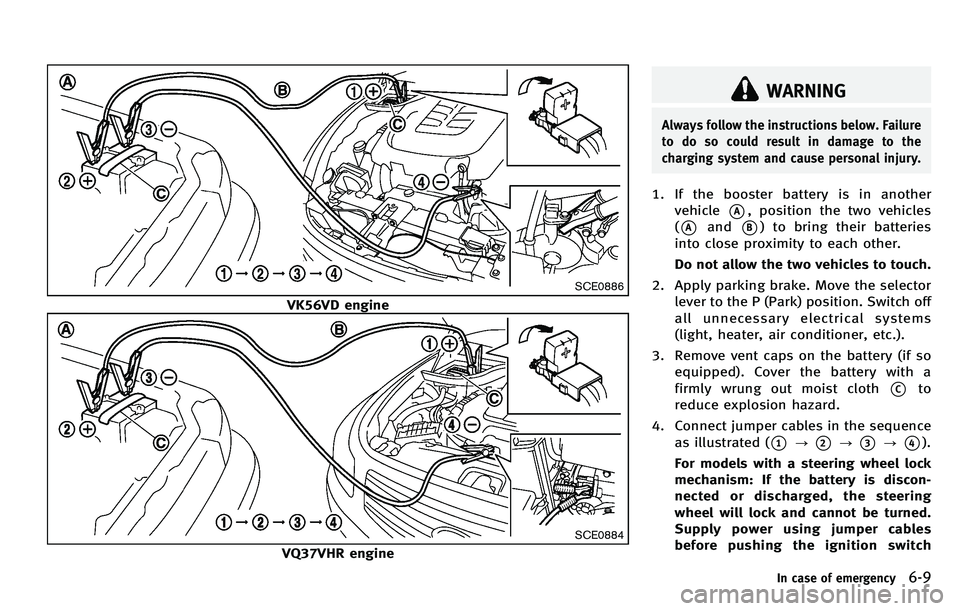
1. If the booster battery is in anothervehicle
*A, position the two vehicles
(
*Aand*B) to bring their batteries
into close proximity to each other.
Do not allow the two vehicles to touch.
2. Apply parking brake. Move the selector lever to the P (Park) position. Switch off
all unnecessary electrical systems
(light, heater, air conditioner, etc.).
3. Remove vent caps on the battery (if so equipped). Cover the battery with a
firmly wrung out moist cloth
*Cto
reduce explosion hazard.
4. Connect jumper cables in the sequence as illustrated (
*1?*2?*3?*4).
For models with a steering wheel lock
mechanism: If the battery is discon-
nected or discharged, the steering
wheel will lock and cannot be turned.
Supply power using jumper cables
before pushing the ignition switch
In case of emergency6-9
Page 435 of 522

7-2Appearance and care
In order to maintain the appearance of
your vehicle, it is important to take proper
care of it.
To protect the paint surface, wash your
vehicle as soon as you can:
.after a rainfall to prevent possible
damage from acid rain
. after driving on coastal roads
. when contaminants such as soot, bird
droppings, tree sap, metal particles or
bugs get on the paint surface
. when dust or mud builds up on the
surface
Whenever possible, store or park your
vehicle inside a garage or in a covered
area.
When it is necessary to park outside, park
in a shady area or protect the vehicle with
a body cover.
Be careful not to scratch the paint surface
when putting on or removing the body
cover.WASHING
Wash dirt off the vehicle with a wet sponge
and plenty of water. Clean the vehicle
thoroughly using a mild soap, a special
vehicle soap or general purpose dishwash-
ing liquid mixed with clean, lukewarm
(never hot) water.
CAUTION
. Do not use car washes that use acid in
the detergent. Some car washes, espe-
cially brushless ones, use some acid for
cleaning. The acid may react with some
plastic vehicle components, causing
them to crack. This could affect their
appearance, and also could cause them
not to function properly. Always check
with your car wash to confirm that acid
is not used.
. Do not wash the vehicle with strong
household soap, strong chemical deter-
gents, gasoline or solvents.
. Do not wash the vehicle in direct sun-
light or while the vehicle body is hot, as
the surface may become water-spotted.
. Avoid using tight-napped or rough
cloths, such as washing mitts. Care must be taken when removing caked-on
dirt or other foreign substances so the
paint surface is not scratched or da-
maged.
Rinse the vehicle again with plenty of clean
water.
Inside flanges, seams and folds on the
doors, hatches and hood are particularly
vulnerable to the effects of road salt.
Therefore, these areas must be regularly
cleaned. Make sure that the drain holes in
the lower edge of the door are open. Spray
water under the body and in the wheel
wells to loosen the dirt and wash away
road salt.
Avoid leaving water spots on the paint
surface by using a damp chamois to dry
the vehicle.
WAXING
Regular waxing protects the paint surface
and helps retain new vehicle appearance.
Polishing is recommended to remove built-
up wax residue and to avoid a weathered
appearance before reapplying wax.
An INFINITI retailer can assist you in
choosing the proper product.
CLEANING EXTERIOR
Page 437 of 522
7-4Appearance and care
ambient temperature.
. Rinse the wheel to completely remove
the cleaner within 15 minutes after the
cleaner is applied.
CHROME PARTS
Clean chrome parts regularly with a non-
abrasive chrome polish to maintain the
finish.
TIRE DRESSING
INFINITI does not recommend the use of
tire dressings. Tire manufacturers apply a
coating to the tires to help reduce dis-
coloration of the rubber. If a tire dressing is
applied to the tires, it may react with the
coating and form a compound. This com-
pound may come off the tire while driving
and stain the vehicle paint.
If you choose to use a tire dressing, take
the following precautions:
.Use a water-based tire dressing. The
coating on the tire dissolves more
easily with an oil-based tire dressing.
. Apply a light coat of tire dressing to
help prevent it from entering the tire
tread/grooves (where it would be diffi-
cult to remove). .
Wipe off excess tire dressing using a
dry towel. Make sure the tire dressing
is completely removed from the tire
tread/grooves.
. Allow the tire dressing to dry as
recommended by tire dressing manu-
facturer. Occasionally remove loose dust from the
interior trim, plastic parts and seats using
a vacuum cleaner or soft bristled brush.
Wipe the vinyl and leather surfaces with a
clean, soft cloth dampened in mild soap
solution, then wipe clean with a dry soft
cloth.
Regular care and cleaning is required in
order to maintain the appearance of the
leather.
Before using any fabric protector, read the
manufacturer
’s recommendations. Some
fabric protectors contain chemicals that
may stain or bleach the seat material.
Use a cloth dampened only with water, to
clean the meter and gauge lens.
WARNING
Do not use water or acidic cleaners (hot
steam cleaners) on the seat. This can
damage the seat or occupant classification
sensors. This can also affect the operation
of the air bag system and result in serious
personal injury.
CLEANING INTERIOR