seat adjustment INFINITI M 2012 Owner's Manual
[x] Cancel search | Manufacturer: INFINITI, Model Year: 2012, Model line: M, Model: INFINITI M 2012Pages: 522, PDF Size: 3.8 MB
Page 162 of 522
SPA2832
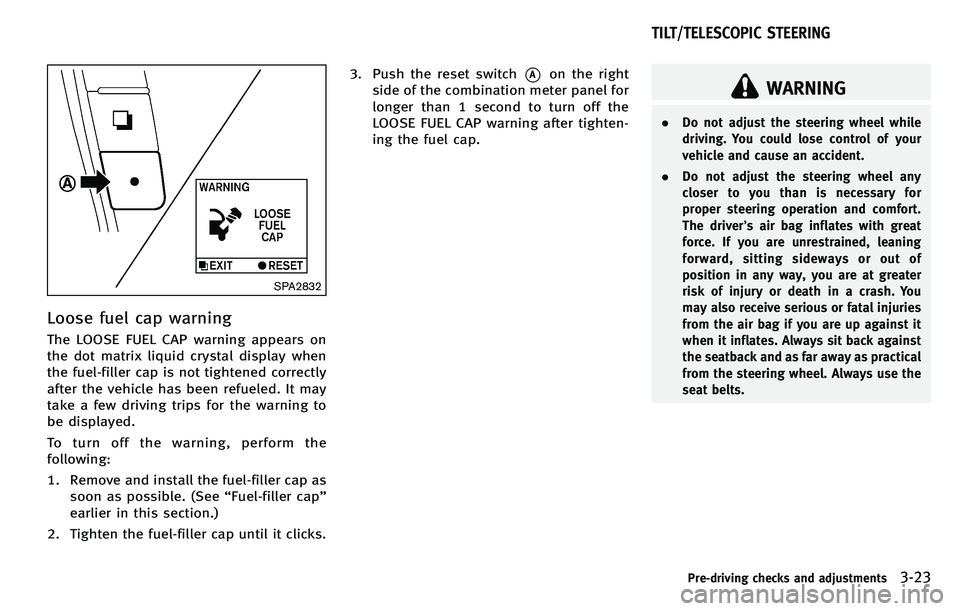
Loose fuel cap warning
The LOOSE FUEL CAP warning appears on
the dot matrix liquid crystal display when
the fuel-filler cap is not tightened correctly
after the vehicle has been refueled. It may
take a few driving trips for the warning to
be displayed.
To turn off the warning, perform the
following:
1. Remove and install the fuel-filler cap assoon as possible. (See “Fuel-filler cap ”
earlier in this section.)
2. Tighten the fuel-filler cap until it clicks. 3. Push the reset switch
*Aon the right
side of the combination meter panel for
longer than 1 second to turn off the
LOOSE FUEL CAP warning after tighten-
ing the fuel cap.
WARNING
. Do not adjust the steering wheel while
driving. You could lose control of your
vehicle and cause an accident.
. Do not adjust the steering wheel any
closer to you than is necessary for
proper steering operation and comfort.
The driver ’s air bag inflates with great
force. If you are unrestrained, leaning
forward, sitting sideways or out of
position in any way, you are at greater
risk of injury or death in a crash. You
may also receive serious or fatal injuries
from the air bag if you are up against it
when it inflates. Always sit back against
the seatback and as far away as practical
from the steering wheel. Always use the
seat belts.
Pre-driving checks and adjustments3-23
TILT/TELESCOPIC STEERING
Page 163 of 522
3-24Pre-driving checks and adjustments
SPA2737
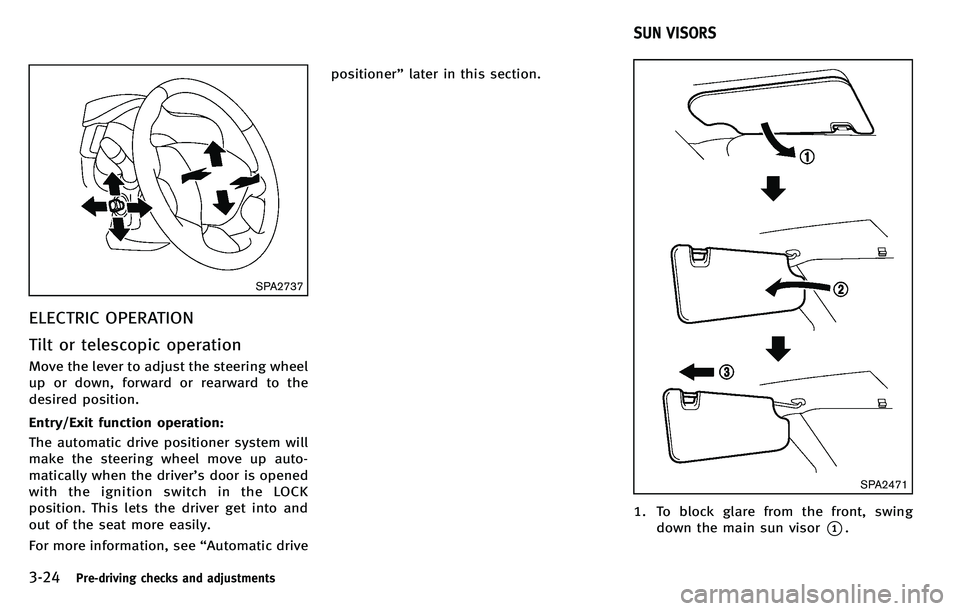
ELECTRIC OPERATION
Tilt or telescopic operation
Move the lever to adjust the steering wheel
up or down, forward or rearward to the
desired position.
Entry/Exit function operation:
The automatic drive positioner system will
make the steering wheel move up auto-
matically when the driver’s door is opened
with the ignition switch in the LOCK
position. This lets the driver get into and
out of the seat more easily.
For more information, see “Automatic drive positioner
”later in this section.
SPA2471
1. To block glare from the front, swing
down the main sun visor
*1.
SUN VISORS
Page 167 of 522

3-28Pre-driving checks and adjustments
The automatic drive positioner system has
four features:
.Entry/exit function
. Seat synchronization function
. Memory storage
. Setting memory function
ENTRY/EXIT FUNCTION
This system is designed so that the driver ’s
seat and steering column will automati-
cally move when the selector lever is in the
P (Park) position. This allows the driver to
get into and out of the driver’ s seat more
easily.
The driver ’s seat will slide backward and
the steering wheel will move up when the
driver ’s door is opened with the ignition
switch in the LOCK position.
The driver ’s seat and steering wheel will
return to the previous positions when the
ignition switch is pushed to the ACC
position.
The driver ’s seat will not return to the
previous positions if the seat or steering
adjusting switch is operated when the seat
is at the exit position.
Cancel or activate entry/exit func-
tion
The selector lever must be in the P (Park)
position with the ignition switch in the OFF
position.
The entry/exit function can be activated or
canceled by pressing and holding the SET
switch for more than 10 seconds.
The indicator lights on the memory
switches (1 and 2) will blink once when
the function is canceled, and the indicator
lights will blink twice when the function is
activated. Note that the indicator lights
may illuminate after 5 seconds while
holding the SET switch. This indicates
readiness for linking the Intelligent Key to
a stored memory position. Keep the SET
switch pressed for more than 10 seconds
to turn on or off the entry/exit function.
The entry/exit function can also be acti-
vated or canceled if the “Lift Steering
Wheel on Exit” key or“Slide Driver Seat
Back on Exit ”key is turned to ON or OFF in
the “Comfort settings ”settings. (See “Ve-
hicle information and settings ”in the “4.
Monitor, climate, audio, phone and voice
recognition systems ”section.)
Initialize entry/exit function
If the battery cable is disconnected, or if
the fuse opens, the entry/exit function will
not work though this function was set on
before. In such a case, after connecting the
battery or replacing with a new fuse, open
and close the driver ’s door more than two
times after the ignition switch is turned
from the ON position to the LOCK position.
The entry/exit function will be activated.
AUTOMATIC DRIVE POSITIONER
Page 168 of 522
SPA2792
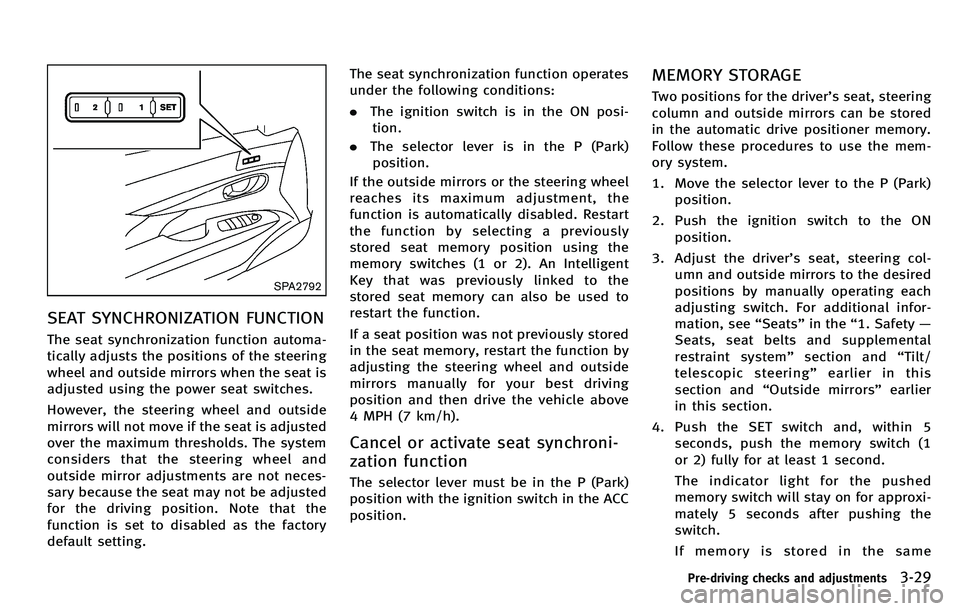
SEAT SYNCHRONIZATION FUNCTION
The seat synchronization function automa-
tically adjusts the positions of the steering
wheel and outside mirrors when the seat is
adjusted using the power seat switches.
However, the steering wheel and outside
mirrors will not move if the seat is adjusted
over the maximum thresholds. The system
considers that the steering wheel and
outside mirror adjustments are not neces-
sary because the seat may not be adjusted
for the driving position. Note that the
function is set to disabled as the factory
default setting.The seat synchronization function operates
under the following conditions:
.
The ignition switch is in the ON posi-
tion.
. The selector lever is in the P (Park)
position.
If the outside mirrors or the steering wheel
reaches its maximum adjustment, the
function is automatically disabled. Restart
the function by selecting a previously
stored seat memory position using the
memory switches (1 or 2). An Intelligent
Key that was previously linked to the
stored seat memory can also be used to
restart the function.
If a seat position was not previously stored
in the seat memory, restart the function by
adjusting the steering wheel and outside
mirrors manually for your best driving
position and then drive the vehicle above
4 MPH (7 km/h).
Cancel or activate seat synchroni-
zation function
The selector lever must be in the P (Park)
position with the ignition switch in the ACC
position.
MEMORY STORAGE
Two positions for the driver ’s seat, steering
column and outside mirrors can be stored
in the automatic drive positioner memory.
Follow these procedures to use the mem-
ory system.
1. Move the selector lever to the P (Park) position.
2. Push the ignition switch to the ON position.
3. Adjust the driver ’s seat, steering col-
umn and outside mirrors to the desired
positions by manually operating each
adjusting switch. For additional infor-
mation, see “Seats ”in the “1. Safety —
Seats, seat belts and supplemental
restraint system ”section and “Tilt/
telescopic steering ”earlier in this
section and “Outside mirrors” earlier
in this section.
4. Push the SET switch and, within 5 seconds, push the memory switch (1
or 2) fully for at least 1 second.
The indicator light for the pushed
memory switch will stay on for approxi-
mately 5 seconds after pushing the
switch.
If memory is stored in the same
Pre-driving checks and adjustments3-29
Page 169 of 522

3-30Pre-driving checks and adjustments
memory switch, the previous memory
will be deleted.
Linking Intelligent Key to a stored
memory position
The Intelligent Key can be linked to a
stored memory position with the following
procedure.
1. Follow the steps for storing a memoryposition.
2. While the indicator light for the memory switch being set is illuminated for 5
seconds, push the
button on the
Intelligent Key. If the indicator light
blinks, the Intelligent Key is linked to
that memory setting.
Push the ignition switch to the OFF posi-
tion, and then push the
button on the
Intelligent Key. The driver ’s seat, steering
wheel and outside mirrors will move to the
memorized position.
Confirming memory storage
. Push the ignition switch to the ON
position and push the SET switch. If
the main memory has not been stored,
the indicator light will come on for
approximately 0.5 second. When the
memory has stored in position, the indicator light will stay on for approxi-
mately 5 seconds.
. If the battery cable is disconnected, or if
the fuse opens, the memory will be
canceled. In this case, reset the desired
position using the previous procedure.
. If optional Intelligent Keys are added to
your vehicle, the memory storage pro-
cedure to switch 1 or 2 and linking
Intelligent Key procedure to a stored
memory position should be performed
again for each Intelligent Key. For
additional Intelligent Key information,
see “Keys ”earlier in this section.
Selecting the memorized position
1. Move the selector lever to the P (Park)
position.
2. Use one of the following methods to move the driver ’s seat, the outside
mirrors and the steering wheel.
.Push the ignition switch to the ON position and push the memory
switch (1 or 2) fully for at least 1
second.
.Within 45 seconds of opening the
driver’ s door, push the memory
switch (1 or 2) fully for at least 1
second. The driver
’s seat, steering column
and outside mirrors will move to the
memorized position with the indica-
tor light flashing, and then the light
will stay on for approximately 5
seconds.
SETTING MEMORY FUNCTION
The status of the following settings can be
linked to the Intelligent Key and the
memorized settings can be available for
each Intelligent Key.
. Climate control system
. Navigation system (if so equipped)
. Audio system
To use the memory function, lock the doors
with the Intelligent Key that is linked to the
settings.
To enable the memorized settings:
1. Carry the Intelligent Key that is linked to the settings, and unlock the doors by
pushing the driver ’s door handle re-
quest switch or UNLOCK
button on
the Intelligent Key.
2. Push the ignition switch to the “ON ”
position. “Connection with the key has
been done ”will be displayed on the
screen and the memorized settings are
available (only when a new Intelligent
Page 170 of 522

Key is used).
SYSTEM OPERATION
The automatic drive positioner system will
not work or will stop operating under the
following conditions:
.When the vehicle speed is above 4 MPH
(7 km/h).
. When the adjusting switch for the
driver ’s seat and steering column is
turned on while the automatic drive
positioner is operating.
. When the memory switch 1 or 2 is not
pushed for at least 1 second.
. When the seat, steering column and
outside mirrors have already been
moved to the memorized position.
. When no position is stored in the
memory switch.
. When the engine is started while
moving the automatic drive positioner.
. When the selector lever is moved from
the P (Park) position to any other
position. (However, it will not be
canceled if the switch is pushed while
the seat and steering column are
returning to the previous positions
(entry/exit function).) .
When the driver ’s door remains open
for more than 45 seconds and the
ignition switch is not in the ON posi-
tion.
. The seat synchronization function is
automatically disabled if the outside
mirrors or steering wheel reaches its
maximum adjustment.
. The seat synchronization function will
not operate if the seat is adjusted over
one of the following maximum thresh-
olds:
— Seat sliding: 3.0 in (76 mm)
— Seatback reclining: 9.1 degrees
— Seat lifter (rear side): 0.8 in (20 mm)
Pre-driving checks and adjustments3-31
Page 237 of 522

4-66Monitor, climate, audio, phone and voice recognition systems
CAUTION
.Only operate the DVD while the vehicle
engine is running. Operating the DVD for
extended periods of time with the
engine OFF can discharge the vehicle
battery.
. Do not allow the system to get wet.
Excessive moisture such as spilled
liquids may cause the system to mal-
function.
. While playing VIDEO-CD media, this DVD
player does not guarantee complete
functionality of all VIDEO-CD formats.
Display settings
To adjust the front display mode, push the
SETTING button while the DVD is being
played, select the “Others ”key and then
select the “Display ”key.
To adjust the display ON/OFF, brightness,
tint, color and contrast, select the “Display
Adjustment ”key and then select each key.
Then you can adjust each item using the
INFINITI controller. After changes have
been made push the BACK button to save
the setting.
SAA2497
Playing a DVD
DISC·AUX button:
Park the vehicle in a safe location for the
front seat occupants to operate the DVD
drive while watching the images.
Push the DISC·AUX button on the instru-
ment panel and turn the display to the DVD
mode.
When a DVD is loaded, it will be replayed
automatically.
The operation screen will be turned on
when the DISC·AUX button located on the
instrument panel is pushed while a DVD is being played, and it will turn off auto-
matically after a period of time. To turn it
on again, push the DISC·AUX button again.
DVD operation keys:
When the DVD is playing without the
operation screen being shown, you may
use the touch screen to select items from
the displayed video. You may also use the
INFINITI controller to select an item from
the displayed video. When the operation
screen is being shown, use the INFINITI
controller or touch screen to select an item
from the displayed menus.
PAUSE:
Select the “
”key to pause the DVD. To
resume playing the DVD, use the “PLAY ”
key.
PLAY:
Select the “
”key to start playing the
DVD, for example, after pausing the DVD.
STOP:
Select the “
”key to stop playing the
DVD.
Page 514 of 522
Engine oil and oil filter recommendation ........ 9-6
Engine oil replacement indicator .................. 2-25
Engine oil viscosity ........................................ 9-6
Engine serial number ................................... 9-12
Engine specifications ..................................... 9-8
Engine start operation indicator ................... 2-22
If your vehicle overheats .............................. 6-11
Starting the engine ...................................... 5-13
Engine coolant temperature gauge ...................... 2-8
Entry/exit function
Automatic drive positioner ........................... 3-28
Event Data Recorders (EDR) ............................... 9-23
Exhaust gas (carbon monoxide) .......................... 5-3
F
F.M.V.S.S./C.M.V.S.S. certification label ............. 9-12
Filter Air cleaner housing filter .............................. 8-22
Changing engine oil and filter ...................... 8-13
Flashers (See hazard warning flasher switch) .... 2-40
Flat tire ............................................................... 6-2
Flat towing ........................................................ 9-19
Floor mat cleaning .............................................. 7-5
Floor mat positioning aid .................................... 7-6
Fluid Automatic transmission fluid (ATF) ............... 8-16
Brake fluid ................................................... 8-17
Capacities and
recommended fuel/lubricants ........................ 9-2
Engine coolant ............................................. 8-11
Engine oil .................................................... 8-13 Power steering fluid ..................................... 8-16
Window washer fluid ................................... 8-18
FM-AM-SAT radio with Compact Disc
(CD) player ........................................................ 4-61
Fog light switch ................................................ 2-39
Forest Air
TM....................................................... 4-42
Forward Collision Warning (FCW) system ........... 5-82
Front passenger air bag and status light ........... 1-46
Front power seat adjustment ............................... 1-3
Front seat
Front seat adjustment .................................... 1-3
Front-seat active head restraints ......................... 1-7
Fuel
Capacities and
recommended fuel/lubricants ........................ 9-2
Fuel economy............................................... 5-90
Fuel economy information (display) .............. 4-12
Fuel octane rating .......................................... 9-4
Fuel recommendation ..................................... 9-4
Fuel-filler cap ............................................... 3-21
Fuel-filler door ............................................. 3-21
Gauge ............................................................ 2-9
Fuses ................................................................ 8-26
Fusible links ..................................................... 8-27
G
Garage door opener HomeLink®Universal Transceiver ................. 2-61
Gas cap ............................................................ 3-21
Gauge .......................................................... 0-9, 2-6
Engine coolant temperature gauge ................. 2-8 Fuel gauge ..................................................... 2-9
Odometer....................................................... 2-6
Speedometer ................................................. 2-6
Tachometer .................................................... 2-7
Trip computer .............................................. 2-26
General maintenance .......................................... 8-3
Glove box ......................................................... 2-50
H
Hands-free phone system Bluetooth®(models with
navigation system) ....................................... 4-89
Bluetooth
®(models without
navigation system) ..................................... 4-100
Hazard warning flasher switch .......................... 2-40
Head restraints ................................................... 1-4
Headlights Aiming control (See adaptive front lighting
system (AFS)) ............................................... 2-37
Bulb replacement ......................................... 8-31
Headlight switch .......................................... 2-35
Xenon headlights ......................................... 2-34
Headrest Adjustable headrests ..................................... 1-8
Heated seats .................................................... 2-41
Heated steering wheel ...................................... 2-40
Heater Automatic climate control ............................ 4-33
Engine block heater ................................... 5-102
Hill start assist system ................................... 5-100
HomeLink
®Universal Transceiver ...................... 2-61
10-3
Page 517 of 522

10-6
Child restraints ............................................ 1-21
Cruise control .............................................. 5-45
Lane departure warning (LDW) system ......... 5-23
Maintenance .................................................. 8-5
Seat belt usage ........................................... 1-12
Supplemental restraint system ..................... 1-39
When starting and driving .............................. 5-3
Pre-crash seat belts with comfort function ........ 1-14
Predictive course line settings .......................... 4-32
Preview function ............................................... 5-94
Preview function (for Intelligent cruise
control system) ................................................. 5-69
Preview Function warning light.......................... 2-15
Push starting .................................................... 6-10
Push-button ignition switch ....................... 5-9, 5-10
R
Radio Car phone or CB radio ................................. 4-89
FM-AM-SAT radio with Compact Disc
(CD) player ................................................... 4-61
Rain-sensing auto wiper system ........................ 2-33
Rapid air pressure loss ....................................... 5-7
Readiness for inspection/maintenance (I/M) test
(US only) .......................................................... 9-22
Rear door lock Child safety rear door lock ............................. 3-6
Rear pocket ...................................................... 2-51
Rear sunshade .................................................. 2-57 Rear window and outside mirror
defroster switch ................................................ 2-34
Rearview monitor .............................................. 4-26
Recorders
Event data ................................................... 9-23
Registering your vehicle in another country ...... 9-11
Remote keyless entry system ............................ 3-14
Reporting safety defects ................................... 9-21
Rise-up and build-up ........................................ 5-99
Roadside assistance program ............................. 6-2
Rollover .............................................................. 5-6
Roof Moonroof ..................................................... 2-56
S
Safety
Child seat belts ........................................... 1-19
Reporting safety defects .............................. 9-21
Satellite radio operation ................................... 4-62
Seat adjustment Front power seat adjustment .......................... 1-3
Front seats..................................................... 1-3
Seat belt(s)
Child safety ................................................. 1-19
Infants ......................................................... 1-20
Injured persons ........................................... 1-14
Larger children ............................................. 1-20
Precautions on seat belt usage .................... 1-12
Pre-crash seat belts with comfort function ... 1-14
Pregnant women .......................................... 1-14
Seat belt cleaning .......................................... 7-6 Seat belt extenders ...................................... 1-18
Seat belt maintenance ................................. 1-18
Seat belt warning light and chime ............... 2-15
Seat belts .................................................... 1-12
Seat belts with pretensioners ...................... 1-51
Shoulder belt height adjustment .................. 1-18
Small children ............................................. 1-20
Three-point type .......................................... 1-15
Seat(s)
Climate controlled seats .............................. 2-43
Driver-side memory ...................................... 3-28
Heated seats ............................................... 2-41
Seats ............................................................. 1-2
Security system Vehicle security system ................................ 2-29
Security system (INFINITI Vehicle Immobilizer
System)
Engine start ................................................. 2-30
Selector lever
Shift lock release ......................................... 5-18
Servicing air conditioner (See automatic
climate control) ................................................. 4-33
Servicing climate control ................................... 4-47
SETTING button ................................................. 4-16
Shift lock release, Transmission ........................ 5-18
Shifting
Automatic transmission ............................... 5-14
Shoulder belt height adjustment ....................... 1-18
SNOW mode ..................................................... 5-20
Spare tire ........................................................... 9-9
Spark plugs ...................................................... 8-21