air condition INFINITI M 2012 Owner's Guide
[x] Cancel search | Manufacturer: INFINITI, Model Year: 2012, Model line: M, Model: INFINITI M 2012Pages: 522, PDF Size: 3.8 MB
Page 308 of 522
.When the air conditioner is in the AUTO
mode, the fan speed decreases auto-
matically for easy recognition.
. Wait until a tone sounds before speak-
ing a command.
. Speak in a natural voice without paus-
ing between words.
SAA3001
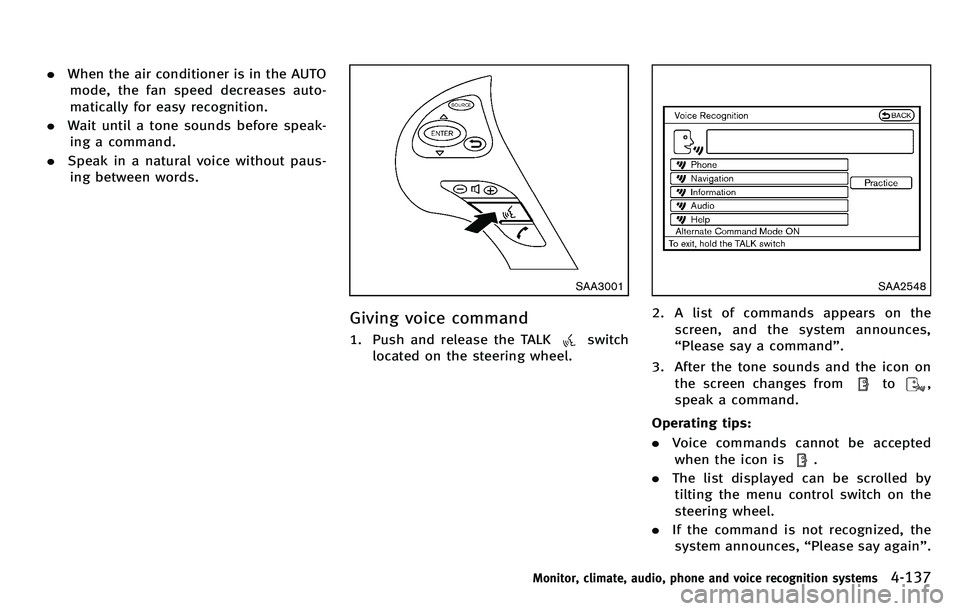
Giving voice command
1. Push and release the TALKswitch
located on the steering wheel.
SAA2548
2. A list of commands appears on the
screen, and the system announces,
“Please say a command ”.
3. After the tone sounds and the icon on the screen changes from
to,
speak a command.
Operating tips:
. Voice commands cannot be accepted
when the icon is
.
. The list displayed can be scrolled by
tilting the menu control switch on the
steering wheel.
. If the command is not recognized, the
system announces, “Please say again ”.
Monitor, climate, audio, phone and voice recognition systems4-137
Page 320 of 522
sudden steering maneuvers, because
these driving practices could cause you to
lose control of your vehicle.As with any
vehicle, a loss of control could result in a
collision with other vehicles or objects, or
cause the vehicle to rollover, particularly if
the loss of control causes the vehicle to
slide sideways. Be attentive at all times,
and avoid driving when tired. Never drive
when under the influence of alcohol or
drugs (including prescription or over-the-
counter drugs which may cause drowsi-
ness). Always wear your seat belt as
outlined in the “Seat belts ”in the “1.
Safety —Seats, seat belts and supple-
mental restraint system ”section of this
manual, and also instruct your passengers
to do so.
Seat belts help reduce the risk of injury in
collisions and rollovers. In a rollover crash,
an unbelted or improperly belted person is
significantly more likely to be injured or
killed than a person properly wearing a
seat belt.OFF-ROAD RECOVERY
If driving the right side or left side wheels
may unintentionally leave the road surface.
Maintain control of the vehicle by following
the procedure below. Please note that this
procedure is only a general guide. The
vehicle must be driven as appropriate
based on the conditions of the vehicle,
road and traffic.
1. Remain calm and do not overreact.
2. Do not apply the brakes.
3. Maintain a firm grip on the steering
wheel with both hands and try to hold a
straight course.
4. When appropriate, slowly release the accelerator pedal to gradually slow the
vehicle.
5. If there is nothing in the way, steer the vehicle to follow the road while the
vehicle speed is reduced. Do not
attempt to drive the vehicle back onto
the road surface until vehicle speed is
reduced.
6. When it is safe to do so, gradually turn the steering wheel until both tires
return to the road surface. When all
tires are on the road surface, steer the
vehicle to stay in the appropriate driving lane..If you decide that it is not safe to
return the vehicle to the road surface
based on vehicle, road or traffic
conditions, gradually slow the vehi-
cle to a stop in a safe place off the
road.
RAPID AIR PRESSURE LOSS
Rapid air pressure loss or a “blow-out ”can
occur if the tire is punctured or is damaged
due to hitting a curb or pothole. Rapid air
pressure loss can also be caused by
driving on under-inflated tires.
Rapid air pressure loss can affect the
handling and stability of the vehicle,
especially at highway speeds.
Help prevent rapid air pressure loss by
maintaining the correct air pressure and
visually inspect the tires for wear and
damage. See “Wheels and tires ”in the “8.
Maintenance and do-it-yourself ”section of
this manual.
If a tire rapidly loses air pressure or
“ blows-out ”while driving maintain control
of the vehicle by following the procedure
below. Please note that this procedure is
only a general guide. The vehicle must be
driven as appropriate based on the condi-
Starting and driving5-7
Page 321 of 522
5-8Starting and driving
tions of the vehicle, road and traffic.
WARNING
The following actions can increase the
chance of losing control of the vehicle if
there is a sudden loss of tire air pressure.
Losing control of the vehicle may cause a
collision and result in personal injury.
.The vehicle generally moves or pulls in
the direction of the flat tire.
. Do not rapidly apply the brakes.
. Do not rapidly release the accelerator
pedal.
. Do not rapidly turn the steering wheel.
1. Remain calm and do not overreact.
2. Maintain a firm grip on the steering
wheel with both hands and try to hold a
straight course.
3. When appropriate, slowly release the accelerator pedal to gradually slow the
vehicle.
4. Gradually steer the vehicle to a safe location off the road and away from
traffic if possible. 5. Lightly apply the brake pedal to gradu-
ally stop the vehicle.
6. Turn on the hazard warning flashers and either contact a roadside emer-
gency service to change the tire or see
“Changing a flat tire ”in the “6. In case
of emergency” section of this Owner ’s
Manual.
DRINKING ALCOHOL/DRUGS AND
DRIVING
WARNING
Never drive under the influence of alcohol or
drugs. Alcohol in the bloodstream reduces
coordination, delays reaction time and im-
pairs judgement. Driving after drinking
alcohol increases the likelihood of being
involved in an accident injuring yourself and
others. Additionally, if you are injured in an
accident, alcohol can increase the severity
of the injury.
INFINITI is committed to safe driving.
However, you must choose not to drive
under the influence of alcohol. Every year
thousands of people are injured or killed in
alcohol-related accidents. Although the local laws vary on what is considered to
be legally intoxicated, the fact is that
alcohol affects all people differently and
most people underestimate the effects of
alcohol.
Remember, drinking and driving don
’t mix!
And that is true for drugs, too (over-the-
counter, prescription, and illegal drugs).
Don ’t drive if your ability to operate your
vehicle is impaired by alcohol, drugs, or
some other physical condition.
INTELLIGENT ALL-WHEEL DRIVE
(AWD) DRIVING SAFETY PRECAU-
TIONS
WARNING
. Do not drive beyond the performance
capability of the tires, even with Intelli-
gent AWD engaged. Accelerating quickly,
sharp steering ma neuvers or sudden
braking may cause loss of control.
. Always use tires of the same type, size,
brand, construction (bias, bias-belted or
radial), and tread pattern on all four
wheels. Install tire chains on the rear
wheels when driving on slippery roads
and drive carefully.
Page 330 of 522

down long slopes.
M4 (4th),M3 (3rd) andM2 (2nd):
Use these positions for hill climbing or
engine braking on downhill grades.
M1 (1st):
Use this position when climbing steep hills
slowly or driving slowly through deep
snow, or for maximum engine braking on
steep downhill grades.
. Remember not to drive at high speeds
for extended periods of time in lower
than 7th gear. This reduces fuel econ-
omy.
. Moving the selector lever rapidly to the
same side twice will shift the ranges in
succession.
. In the manual shift mode, the transmis-
sion may not shift to the selected gear.
This helps maintain driving perfor-
mance and reduces the chance of
vehicle damage or loss of control.
When this situation occurs, the Auto-
matic Transmission (AT) position indi-
cator light (on the dot matrix liquid
crystal display) will blink and the
chime will sound.
. In the manual shift mode, the transmis-
sion automatically shifts down to 1st gear before the vehicle comes to a
stop. When accelerating again, it is
necessary to shift up to the desired
range.Accelerator downshift
—In D (Drive)
position —
For passing or hill climbing, fully depress
the accelerator pedal to the floor. This
shifts the transmission down into the lower
gear, depending on the vehicle speed.
Fail-safe
When the fail-safe operation occurs, note
that the transmission will be locked in any
of the forward gears according to the
condition.
If the vehicle is driven under extreme
conditions, such as excessive wheel spin-
ning and subsequent hard braking, the
fail-safe system may be activated. This will
occur even if all electrical circuits are
functioning properly. In this case, push
the ignition switch to the OFF position and
wait for 3 seconds. Then push the ignition
switch back to the ON position. The vehicle
should return to its normal operating
condition. If it does not return to its
normal operating condition, have an
INFINITI retailer check the transmission and repair if necessary.
Starting and driving5-17
Page 336 of 522
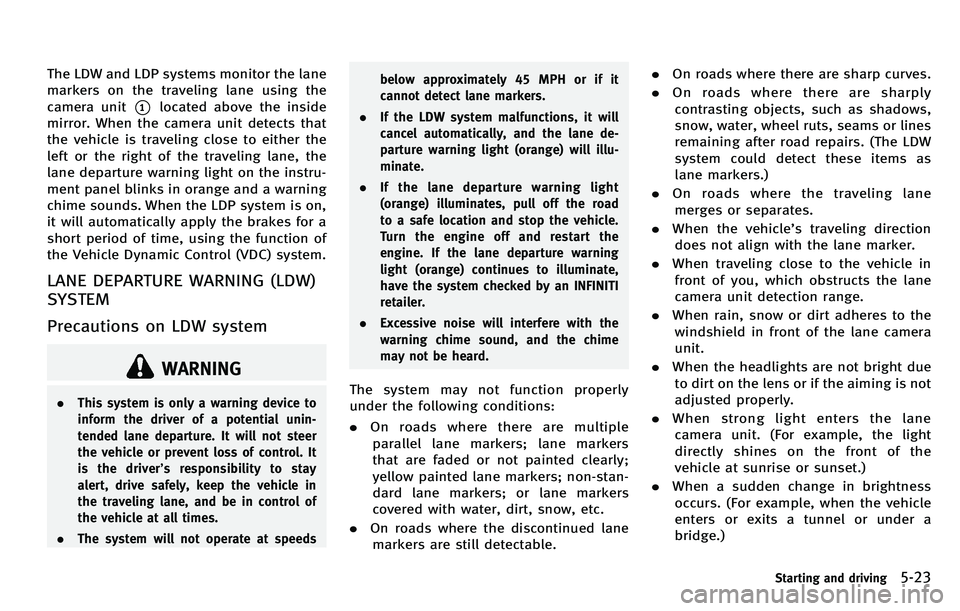
The LDW and LDP systems monitor the lane
markers on the traveling lane using the
camera unit
*1located above the inside
mirror. When the camera unit detects that
the vehicle is traveling close to either the
left or the right of the traveling lane, the
lane departure warning light on the instru-
ment panel blinks in orange and a warning
chime sounds. When the LDP system is on,
it will automatically apply the brakes for a
short period of time, using the function of
the Vehicle Dynamic Control (VDC) system.
LANE DEPARTURE WARNING (LDW)
SYSTEM
Precautions on LDW system
WARNING
. This system is only a warning device to
inform the driver of a potential unin-
tended lane departure. It will not steer
the vehicle or prevent loss of control. It
is the driver ’s responsibility to stay
alert, drive safely, keep the vehicle in
the traveling lane, and be in control of
the vehicle at all times.
. The system will not operate at speeds below approximately 45 MPH or if it
cannot detect lane markers.
. If the LDW system malfunctions, it will
cancel automatically, and the lane de-
parture warning light (orange) will illu-
minate.
. If the lane departure warning light
(orange) illuminates, pull off the road
to a safe location and stop the vehicle.
Turn the engine off and restart the
engine. If the lane departure warning
light (orange) continues to illuminate,
have the system checked by an INFINITI
retailer.
. Excessive noise will interfere with the
warning chime sound, and the chime
may not be heard.The system may not function properly
under the following conditions:
.On roads where there are multiple
parallel lane markers; lane markers
that are faded or not painted clearly;
yellow painted lane markers; non-stan-
dard lane markers; or lane markers
covered with water, dirt, snow, etc.
. On roads where the discontinued lane
markers are still detectable. .
On roads where there are sharp curves.
. On roads where there are sharply
contrasting objects, such as shadows,
snow, water, wheel ruts, seams or lines
remaining after road repairs. (The LDW
system could detect these items as
lane markers.)
. On roads where the traveling lane
merges or separates.
. When the vehicle ’s traveling direction
does not align with the lane marker.
. When traveling close to the vehicle in
front of you, which obstructs the lane
camera unit detection range.
. When rain, snow or dirt adheres to the
windshield in front of the lane camera
unit.
. When the headlights are not bright due
to dirt on the lens or if the aiming is not
adjusted properly.
. When strong light enters the lane
camera unit. (For example, the light
directly shines on the front of the
vehicle at sunrise or sunset.)
. When a sudden change in brightness
occurs. (For example, when the vehicle
enters or exits a tunnel or under a
bridge.)
Starting and driving5-23
Page 339 of 522

5-26Starting and driving
JVS0080X
3. Highlight the“Lane Departure Warning ”
key, select ON (enabled) or OFF (dis-
abled) and push the ENTER
*2button.
Temporary disabled status at high
temperature
If the vehicle is parked in direct sunlight
under high temperature conditions (over
approximately 104 8F(40 8C) and then
started, the LDW system may be deacti-
vated automatically. The lane departure
warning light (orange) will flash.
When the interior temperature is reduced,
the LDW system will resume operating
automatically and the lane departure warning light (orange) will stop flashing.
LANE DEPARTURE PREVENTION
(LDP) SYSTEM
Precautions on LDP system
WARNING
.
The LDP system will not steer the vehicle
or prevent loss of control. It is the
driver ’s responsibility to stay alert, drive
safely, keep the vehicle in the traveling
lane, and be in control of vehicle at all
times.
. The LDP system is primarily intended for
use on well-developed freeways or high-
ways. It may not detect the lane markers
in certain roads, weather or driving
conditions.
. Using the LDP system under some
conditions of road, lane marker or
weather, or when you change lanes
without using the lane change signal
could lead to an unexpected system
operation. In such conditions, you need
to correct the vehicle’ s direction with
your steering operation to avoid acci-
dents. .
When the LDP system is operating, avoid
excessive or sudden steering maneu-
vers. Otherwise, you could lose control
of the vehicle.
. The LDP system will not operate at
speeds below approximately 45 MPH
(70 km/h) or if it cannot detect lane
markers.
. The LDP system may not function
properly under the following conditions,
and do not use the LDP system:
—During bad weather (rain, fog, snow,
wind, etc.).
—When driving on slippery roads,
such as on ice or snow, etc.
—When driving on winding or uneven roads.
—When there is a lane closure due to
road repairs.
—When driving in a makeshift lane.
—When driving on roads where thelane width is too narrow.
—When driving with a tire that is notwithin normal tire conditions (for
example, tire wear, low tire pres-
sure, installation of spare tire, tire
Page 350 of 522

How to enable/disable the BSI
system using the settings menu
Perform the following steps to enable or
disable the BSI system.
1. Push the SETTING
*1button and high-
light the “Driver Assistance ”key on the
display using the INFINITI controller.
Then push the ENTER
*2button.
2. Highlight the “Dynamic Assistance Set-
tings ”key,andpushtheENTER
*2
button.
SSD1002
3. Highlight the “Blind Spot Intervention ”
key, select ON (enabled) or OFF (dis-
abled) and push the ENTER
*2button.
For the LDP and DCA systems, see “Lane
Departure Prevention (LDP) system” earlier
in this section and “Distance Control Assist
(DCA) system ”later in this section.
WARNING
. Do not use the BSI system under the
following conditions because the system
may not function properly.
—During bad weather (e.g. rain, fog,
snow, wind, etc.)
—When driving on slippery roads,such as on ice or snow, etc.
—When driving on winding or uneven roads.
—When there is a lane closure due toroad repairs.
—When driving in a makeshift lane.
—When driving on roads where the
lane width is too narrow.
—When driving with a tire that is notwithin normal tire conditions (e.g.
tire wear, low tire pressure, installa-
tion of spare tire, tire chains, non-
standard wheels).
—When the vehicle is equipped withnon-original brake parts or suspen-
sion parts.
. Excessive noise (e.g. audio system vo-
lume, open vehicle window) will interfere
with the chime sound, and it may not be
heard.
.The radar sensors may not be able to
detect and activate BSI/BSW when
Starting and driving5-37
Page 351 of 522

5-38Starting and driving
certain objects are present such as:
—Pedestrians, bicycles, animals
— Several types of vehicles such as
motorcycles
— Oncoming vehicles
— Vehicles remaining in the detection
zone when you accelerate from a
stop
(See “BSW/BSI driving situations ”
later in this section)
— A vehicle merging into an adjacent
lane at a speed approximately the
same as your vehicle
(See “BSW/BSI driving situations ”
later in this section)
— A vehicle approaching rapidly from
behind.
(See “BSW/BSI driving situations ”
later in this section)
— A vehicle which your vehicle over-
takes rapidly.
(See “BSW/BSI driving situations ”
later in this section)
. Severe weather or road spray condi-
tions may reduce the ability of the
radar to detect other vehicles.
. The radar sensors detection zone is
designed based on a standard lane
width. When driving in a wider lane, the radar sensors may not detect vehicles
in an adjacent lane. When driving in a
narrow lane, the radar sensors may
detect vehicles driving two lanes away.
. The radar sensors are designed to
ignore most stationary objects, how-
ever objects such as guardrails, walls,
foliage and parked vehicles may occa-
sionally be detected. This is a normal
operating condition.
. The camera may not detect lane mar-
kers in the following situations and the
BSI system may not operate properly.
— On roads where there are multiple
parallel lane markers; lane markers
that are faded or not painted clearly;
yellow painted lane markers; non-
standard lane markers; lane mar-
kers covered with water, dirt, snow,
etc.
— On roads where discontinued lane
markers are still detectable.
— On roads where there are sharp
curves.
— On roads where there are sharply
contrasting objects, such as sha-
dows, snow, water, wheel ruts,
seams or lines remaining after road
repairs. —
On roads where the traveling lane
merges or separates.
— When the vehicle ’s traveling direc-
tion does not align with the lane
markers.
— When traveling close to the vehicle
in front of you, which obstructs the
lane camera unit detection range.
— When rain, snow or dirt adheres to
the windshield in front of a lane
camera unit.
— When the headlights are not bright
due to dirt on the lens or if aiming is
not adjusted properly.
— When strong light enters a lane
c a mera
unit. (e.g. light directly
shines on the front of the vehicle
at sunrise or sunset.)
— When a sudden change in bright-
ness occurs. (e.g. when the vehicle
enters or exits a tunnel or under a
bridge.)
Page 364 of 522
traveling ahead. The sensor generally
detects the signals returned from the
reflectors on a vehicle ahead. Therefore, if
the sensor cannot detect the reflector on
the vehicle ahead, the ICC system may not
maintain the selected distance.
The following are some conditions in which
the sensor cannot detect the signals:
.When the reflector of the vehicle ahead
is positioned high on the vehicle
(trailer, etc.)
. When the reflector on the vehicle ahead
is missing, damaged or covered
. When the reflector of the vehicle ahead
is covered with dirt, snow and road
spray
. When the snow or road spray from
traveling vehicles reduces the sensor ’s
visibility
. When dense exhaust or other smoke
(black smoke) from vehicles reduces
the sensor ’s visibility
. When excessively heavy baggage is
loaded in the rear seat or the trunk of
your vehicle
The ICC system is designed to automati-
cally check the sensor ’s operation within
the limitations of the system. When the sensor is covered with dirt or obstructs, the
system will automatically be canceled. If
the sensor is covered with ice, a transpar-
ent or translucent vinyl bag, etc., the ICC
system may not detect them. In these
instances, the vehicle-to-vehicle distance
control mode may not cancel and may not
be able to maintain the selected following
distance from the vehicle ahead. Be sure to
check and clean the sensor regularly.
The vehicle-to-vehicle distance control
mode is designed to maintain a selected
distance and reduce the speed to match
the slower vehicle ahead; the system will
decelerate the vehicle as necessary and if
the vehicle ahead comes to a stop, the
vehicle decelerates to a standstill. How-
ever, the ICC system can only apply up to
25% of the vehicles total braking power.
This system should only be used when
traffic conditions allow vehicle speeds to
remain fairly constant or when vehicle
speeds change gradually. If a vehicle
moves into the traveling lane ahead or if
a vehicle traveling ahead rapidly decele-
rates, the distance between vehicles may
become closer because the ICC system
cannot decelerate the vehicle quickly en-
ough. If this occurs, the ICC system will
sound a warning chime and blink the
system display to notify the driver to take
necessary action.
The system will cancel and a warning
chime will sound if the speed is below
approximately 15 MPH (24 km/h) and a
vehicle is not detected ahead. The system
will also disengage when the vehicle goes
above the maximum set speed.
See
“Approach warning ”later in this
section.
The following items are controlled in the
vehicle-to-vehicle distance control mode:
. When there are no vehicles traveling
ahead, the vehicle-to-vehicle distance
control mode maintains the speed set
by the driver. The set speed range is
between approximately 20 and 90 MPH
(32 and 144 km/h).
. When there is a vehicle traveling ahead,
the vehicle-to-vehicle distance control
mode adjusts the speed to maintain the
distance, selected by driver, from the
vehicle ahead. The adjusting speed
range is up to the set speed. If the
vehicle ahead comes to a stop, the
vehicle decelerates to a standstill with-
in the limitations of the system. The
system will cancel once it judges a
Starting and driving5-51
Page 375 of 522
5-62Starting and driving
SSD0284A
NOTE:
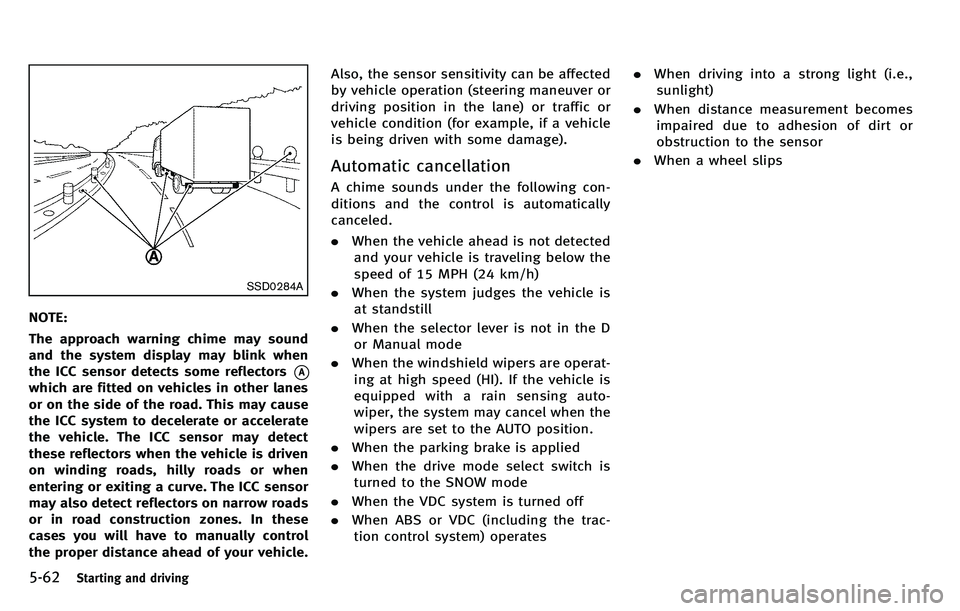
The approach warning chime may sound
and the system display may blink when
the ICC sensor detects some reflectors
*A
which are fitted on vehicles in other lanes
or on the side of the road. This may cause
the ICC system to decelerate or accelerate
the vehicle. The ICC sensor may detect
these reflectors when the vehicle is driven
on winding roads, hilly roads or when
entering or exiting a curve. The ICC sensor
may also detect reflectors on narrow roads
or in road construction zones. In these
cases you will have to manually control
the proper distance ahead of your vehicle.Also, the sensor sensitivity can be affected
by vehicle operation (steering maneuver or
driving position in the lane) or traffic or
vehicle condition (for example, if a vehicle
is being driven with some damage).
Automatic cancellation
A chime sounds under the following con-
ditions and the control is automatically
canceled.
.
When the vehicle ahead is not detected
and your vehicle is traveling below the
speed of 15 MPH (24 km/h)
. When the system judges the vehicle is
at standstill
. When the selector lever is not in the D
or Manual mode
. When the windshield wipers are operat-
ing at high speed (HI). If the vehicle is
equipped with a rain sensing auto-
wiper, the system may cancel when the
wipers are set to the AUTO position.
. When the parking brake is applied
. When the drive mode select switch is
turned to the SNOW mode
. When the VDC system is turned off
. When ABS or VDC (including the trac-
tion control system) operates .
When driving into a strong light (i.e.,
sunlight)
. When distance measurement becomes
impaired due to adhesion of dirt or
obstruction to the sensor
. When a wheel slips