brake INFINITI M 2013 Owner's Guide
[x] Cancel search | Manufacturer: INFINITI, Model Year: 2013, Model line: M, Model: INFINITI M 2013Pages: 522, PDF Size: 3.72 MB
Page 174 of 522
WARNING
.Do not disassemble or modify this
system. If you do, it may result in
accidents, fire, or electric shock.
. Do not use this system if you notice any
abnormality, such as a frozen screen or
lack of sound. Continued use of the
system may result in accident, fire or
electric shock.
. In case you notice any foreign object in
the system hardware, spill liquid on it,
or notice smoke or smell coming from it,
stop using the system immediately and
contact your nearest INFINITI retailer.
Ignoring such conditions may lead to
accidents, fire, or electric shock.
. Park the vehicle in a safe location and
apply the parking brake to view the
images on the front center display
screen.
Do not attempt to operate the system in
extreme temperature conditions [below
−48F( −208C) and above 1588F (708C)].
Operating this system under these condi-
tions may result in system malfunctions.
Monitor, climate, audio, phone and voice recognition systems4-3
SAFETY NOTE
Page 194 of 522

SAA2487
Clock settings (models with navi-
gation system)
The display as illustrated will appear when
pushing the SETTING button and selecting
the“Others” key, and then selecting the
“Clock” key.
The clock settings display cannot be
operated while driving. Stop the vehicle
in a safe place and apply the parking brake
before setting the clock.
On-screen Clock:
When this item is turned to ON, a clock is
always displayed in the upper right corner
of the screen. This clock will indicate the time almost
exactly because it is always adjusted by
the GPS system.
Clock Format (24h):
When this item is turned to ON, the 24-
hour clock is displayed. When this item is
not turned to ON, the 12-hour clock is
displayed.
Offset (hour)/(min):
Adjust the time by increasing or decreasing
per hour or per minute.
Daylight Saving Time:
Turn this item to ON for daylight saving
time application.
Time Zone:
Choose the time zone from the following
. Pacific
. Mountain
. Central
. Eastern
. Atlantic
. Newfoundland
. Hawaii
. Alaska
SAA3007
Models with navigation system
JVH0252X
Models without navigation system
Monitor, climate, audio, phone and voice recognition systems4-23
Page 196 of 522
Corner Sonar Sensitivity:
Adjust the sensitivity level of the corner
sonar higher (right) or lower (left).
Center Sonar Sensitivity:
Adjust the sensitivity level of the center
sonar higher (right) or lower (left).
SAA2491
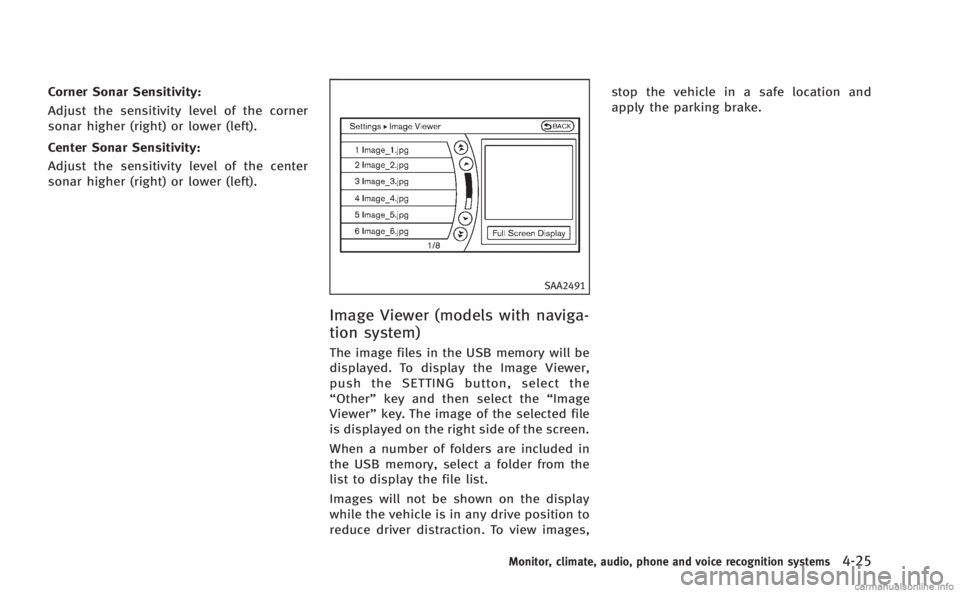
Image Viewer (models with naviga-
tion system)
The image files in the USB memory will be
displayed. To display the Image Viewer,
push the SETTING button, select the
“Other”key and then select the “Image
Viewer” key. The image of the selected file
is displayed on the right side of the screen.
When a number of folders are included in
the USB memory, select a folder from the
list to display the file list.
Images will not be shown on the display
while the vehicle is in any drive position to
reduce driver distraction. To view images, stop the vehicle in a safe location and
apply the parking brake.
Monitor, climate, audio, phone and voice recognition systems4-25
Page 200 of 522
SAA1897
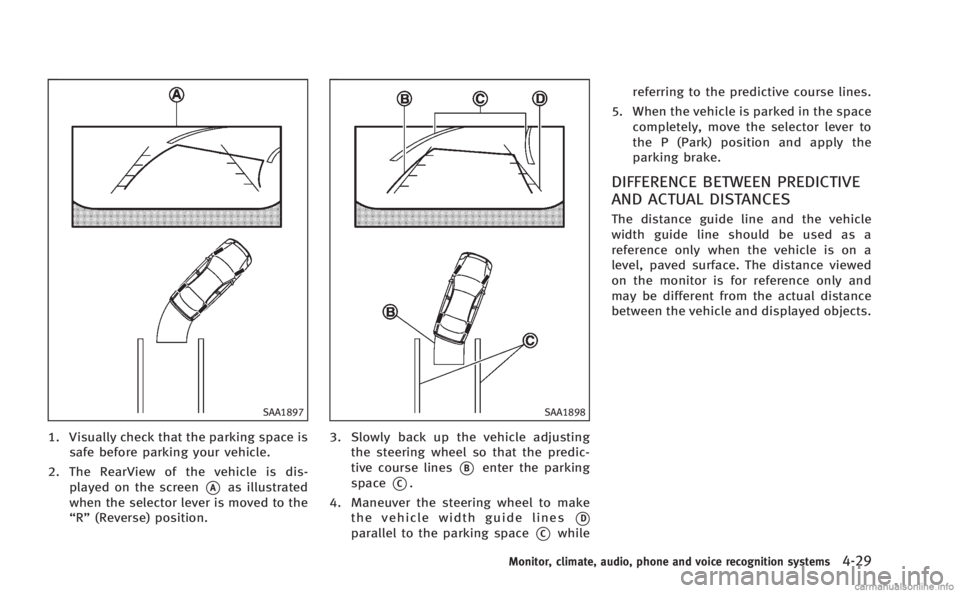
1. Visually check that the parking space issafe before parking your vehicle.
2. The RearView of the vehicle is dis- played on the screen
*Aas illustrated
when the selector lever is moved to the
“R” (Reverse) position.
SAA1898
3. Slowly back up the vehicle adjusting
the steering wheel so that the predic-
tive course lines
*Benter the parking
space
*C.
4. Maneuver the steering wheel to make the vehicle width guide lines
*D
parallel to the parking space*Cwhile referring to the predictive course lines.
5. When the vehicle is parked in the space completely, move the selector lever to
the P (Park) position and apply the
parking brake.
DIFFERENCE BETWEEN PREDICTIVE
AND ACTUAL DISTANCES
The distance guide line and the vehicle
width guide line should be used as a
reference only when the vehicle is on a
level, paved surface. The distance viewed
on the monitor is for reference only and
may be different from the actual distance
between the vehicle and displayed objects.
Monitor, climate, audio, phone and voice recognition systems4-29
Page 203 of 522
4-32Monitor, climate, audio, phone and voice recognition systems
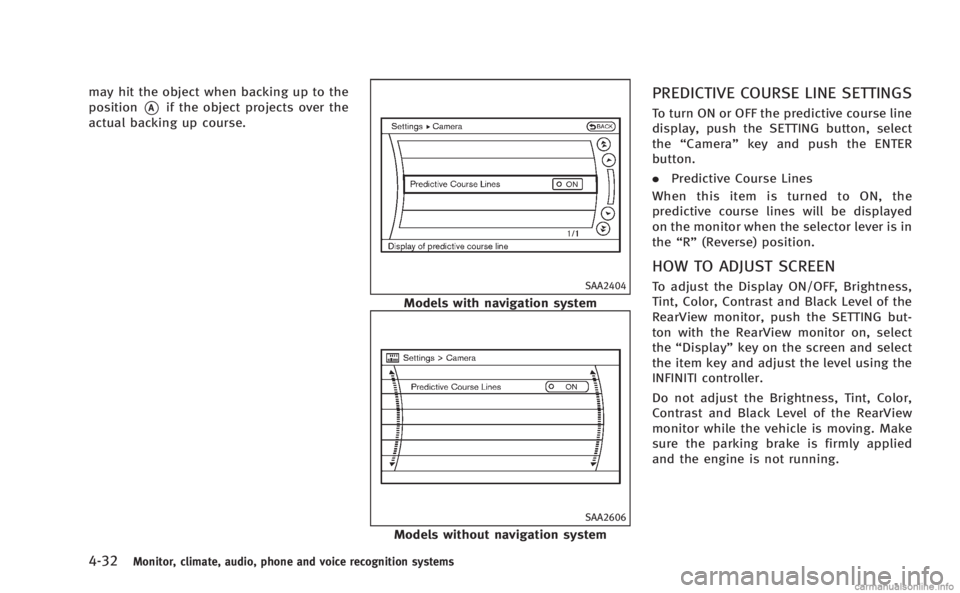
may hit the object when backing up to the
position
*Aif the object projects over the
actual backing up course.
SAA2404
Models with navigation system
SAA2606
Models without navigation system
PREDICTIVE COURSE LINE SETTINGS
To turn ON or OFF the predictive course line
display, push the SETTING button, select
the “Camera” key and push the ENTER
button.
. Predictive Course Lines
When this item is turned to ON, the
predictive course lines will be displayed
on the monitor when the selector lever is in
the “R” (Reverse) position.
HOW TO ADJUST SCREEN
To adjust the Display ON/OFF, Brightness,
Tint, Color, Contrast and Black Level of the
RearView monitor, push the SETTING but-
ton with the RearView monitor on, select
the“Display” key on the screen and select
the item key and adjust the level using the
INFINITI controller.
Do not adjust the Brightness, Tint, Color,
Contrast and Black Level of the RearView
monitor while the vehicle is moving. Make
sure the parking brake is firmly applied
and the engine is not running.
Page 281 of 522

4-110Monitor, climate, audio, phone and voice recognition systems
existing phone. If the user tries to
connect a phone that has already been
connected to the vehicle system, the
system announces the name that the
phone is already using. The connecting
procedure will then be cancelled.
The Add Phone command is not avail-
able when the vehicle is moving.
. Select Phone
Use the Select Phone command to
select a phone of lesser priority when
two or more phones connected with
Bluetooth
®Hands-Free Phone System
are in the vehicle at the same time.
The system asks the user to name the
phone and confirm the selection.
Once the selection is confirmed, the
selected phone remains active until the
ignition switch is turned OFF or a new
phone is selected.
. Delete Phone
Use the Delete Phone command to
delete a specific phone or all phones
from Bluetooth
®Hands-Free Phone
System. The system announces the
names of the phones already paired
with the system and their priority level.
The system then gives the option to
delete a specific phone, all phones or listen to the list again. Once the user
chooses to delete a phone or all
phones, the system asks the user to
confirm.
NOTE:
When the user deletes a phone, the
associated phone book for that phone will
also be deleted.
. Replace Phone
Use the Replace Phone command to
change the priority level of the active
phone.
The priority level determines which
phone is active when more than one
paired Bluetooth
®phone is in the
vehicle.
The system states the priority level of
the active phone and asks for a new
priority level (1, 2, 3, 4, 5).
If the new priority level is already being
used for another phone, the two
phones will swap priority levels.
For example, if the current priority
levels are:
Priority Level 1 = Phone A
Priority Level 2 = Phone B
Priority Level 3 = Phone C and you change the priority level of
Phone C to Level 1, then:
Priority Level 1 = Phone C
Priority Level 2 = Phone B
Priority Level 3 = Phone A
. Bluetooth
®On/Off
Use the Bluetooth®On/Off command
to turn on/off Bluetooth®Hands-Free
Phone System.
. Help
The system announces the available
commands.
VOICE ADAPTATION MODE
The Voice Adaptation mode allows up to
two users with different dialects to train
the system to improve recognition accu-
racy. By repeating a number of commands,
the users can create a voice model of their
own voice that is stored in the system. The
system is capable of storing a different
voice adaptation model for each connected
phone.
Training procedure
1. Position the vehicle in a reasonably quiet outdoor location.
2. Sit in the driver’s seat with the engine running, the parking brake on, and the
Page 312 of 522

5 Starting and driving
Precautions when starting and driving................. 5-3
Exhaust gas (carbon monoxide) ....................... 5-3
Three-way catalyst........................................... 5-4
Tire Pressure Monitoring System (TPMS).......... 5-4
Avoiding collision and rollover......................... 5-7
Off-road recovery............................................. 5-7
Rapid air pressure loss ................................... 5-7
Drinking alcohol/drugs and driving ................. 5-8
Intelligent All-Wheel Drive (AWD) driving
safety precautions ........................................... 5-8
Push-button ignition switch ................................. 5-9 Operating range for engine start function ...... 5-10
Push-button ignition switch operation ........... 5-10
Steering lock (if so equipped)........................ 5-11
Push-button ignition switch positions ............ 5-11
Emergency engine shut off ............................ 5-12
Intelligent Key battery discharge ................... 5-12
Before starting the engine ................................. 5-13
Starting the engine ............................................ 5-13
Driving the vehicle ............................................. 5-14
Automatic transmission ................................. 5-14
Parking brake .................................................... 5-19
INFINITI drive mode selector............................... 5-20
Standard mode ............................................. 5-20
Sport mode ................................................... 5-20 Snow mode ................................................. 5-21
Eco mode .................................................... 5-21
Lane Departure Warning (LDW) system/Lane
Departure Prevention (LDP) system (if
so equipped)..................................................... 5-23 Lane Departure Warning (LDW) system......... 5-24
Lane Departure Prevention (LDP) system ...... 5-27
Lane camera unit maintenance .................... 5-32
Blind Spot Warning (BSW) system/Blind Spot
Intervention
TM(BSI) system (if so equipped)...... 5-32
BSW system operation ................................. 5-34
BSI system operation................................... 5-37
BSW/BSI driving situations .......................... 5-40
BSW/BSI malfunction................................... 5-45
System maintenance.................................... 5-45
Cruise control.................................................... 5-46
Precautions on cruise control....................... 5-46
Cruise control operations ............................. 5-46
Intelligent Cruise Control (ICC) system (if
so equipped)..................................................... 5-48
Selecting the vehicle-to-vehicle distance
control mode ............................................... 5-49
Vehicle-to-vehicle distance control mode...... 5-49
Precautions on vehicle-to-vehicle distance
control mode ............................................... 5-50
Page 313 of 522
Vehicle-to-vehicle distance control
mode operation............................................. 5-51
Conventional (fixed speed) cruise
control mode ................................................. 5-66
Preview function (for Intelligent Cruise Control
system equipped models) ............................. 5-69
Distance Control Assist (DCA) system (if
so equipped) ..................................................... 5-70
Precautions on Distance Control
Assist system ................................................ 5-70
Distance Control Assist operation .................. 5-72
Forward Collision Warning (FCW) system (if
so equipped) ..................................................... 5-82 Precautions on FCW system ........................... 5-83
Intelligent Brake Assist (IBA) system (if
so equipped) ..................................................... 5-86 Precautions on IBA system ............................ 5-87
Break-in schedule .............................................. 5-90
Increasing fuel economy .................................... 5-90
Intelligent All-Wheel Drive (AWD) (if
so equipped) ..................................................... 5-90
Parking/parking on hills .................................... 5-92
Sonar system (if so equipped) ........................... 5-93 Sonar indicator.............................................. 5-94
Sonar system OFF switch ............................... 5-95
Power steering................................................... 5-95 Brake system .................................................... 5-95
Braking precautions ..................................... 5-95
Parking brake break-in................................. 5-96
Brake assist ...................................................... 5-96
Brake assist................................................. 5-96
Preview function (Intelligent Cruise Control
system equipped models) ............................ 5-96
Anti-lock Braking System (ABS) .................... 5-99
Vehicle Dynamic Control (VDC) system ............ 5-100 Active trace control (if so equipped)........... 5-101
Rise-up and build-up ................................. 5-101
Brake force distribution ............................. 5-101
Hill Start Assist system ................................... 5-102
4 Wheel Active Steer (4WAS) system (if
so equipped)................................................... 5-103
Cold weather driving ....................................... 5-103 Freeing a frozen door lock ......................... 5-103
Antifreeze .................................................. 5-103
Battery....................................................... 5-103
Draining of coolant water........................... 5-104
Tire equipment .......................................... 5-104
Special winter equipment .......................... 5-104
Driving on snow or ice ............................... 5-104
Engine block heater (if so equipped).......... 5-105
Active noise control......................................... 5-106
Page 318 of 522

AVOIDING COLLISION AND ROLL-
OVER
WARNING
Failure to operate this vehicle in a safe and
prudent manner may result in loss of control
or an accident.
Be alert and drive defensively at all times.
Obey all traffic regulations. Avoid exces-
sive speed, high speed cornering, or
sudden steering maneuvers, because
these driving practices could cause you to
lose control of your vehicle.As with any
vehicle, a loss of control could result in a
collision with other vehicles or objects, or
cause the vehicle to rollover, particularly if
the loss of control causes the vehicle to
slide sideways. Be attentive at all times,
and avoid driving when tired. Never drive
when under the influence of alcohol or
drugs (including prescription or over-the-
counter drugs which may cause drowsi-
ness). Always wear your seat belt as
outlined in the “Seat belts”in the“1.
Safety —Seats, seat belts and supple-
mental restraint system” section of this
manual, and also instruct your passengers to do so.
Seat belts help reduce the risk of injury in
collisions and rollovers.
In a rollover crash,
an unbelted or improperly belted person is
significantly more likely to be injured or
killed than a person properly wearing a
seat belt.
OFF-ROAD RECOVERY
If driving the right side or left side wheels
may unintentionally leave the road surface.
Maintain control of the vehicle by following
the procedure below. Please note that this
procedure is only a general guide. The
vehicle must be driven as appropriate
based on the conditions of the vehicle,
road and traffic.
1. Remain calm and do not overreact.
2. Do not apply the brakes.
3. Maintain a firm grip on the steering wheel with both hands and try to hold a
straight course.
4. When appropriate, slowly release the accelerator pedal to gradually slow the
vehicle.
5. If there is nothing in the way, steer the vehicle to follow the road while the
vehicle speed is reduced. Do not attempt to drive the vehicle back onto
the road surface until vehicle speed is
reduced.
6. When it is safe to do so, gradually turn the steering wheel until both tires
return to the road surface. When all
tires are on the road surface, steer the
vehicle to stay in the appropriate
driving lane..If you decide that it is not safe toreturn the vehicle to the road surface
based on vehicle, road or traffic
conditions, gradually slow the vehi-
cle to a stop in a safe place off the
road.
RAPID AIR PRESSURE LOSS
Rapid air pressure loss or a “blow-out”can
occur if the tire is punctured or is damaged
due to hitting a curb or pothole. Rapid air
pressure loss can also be caused by
driving on under-inflated tires.
Rapid air pressure loss can affect the
handling and stability of the vehicle,
especially at highway speeds.
Help prevent rapid air pressure loss by
maintaining the correct air pressure and
visually inspect the tires for wear and
damage. See “Wheels and tires” in the“8.
Starting and driving5-7
Page 319 of 522
5-8Starting and driving
Maintenance and do-it-yourself”section of
this manual.
If a tire rapidly loses air pressure or
“blows-out” while driving maintain control
of the vehicle by following the procedure
below. Please note that this procedure is
only a general guide. The vehicle must be
driven as appropriate based on the condi-
tions of the vehicle, road and traffic.
WARNING
The following actions can increase the
chance of losing control of the vehicle if
there is a sudden loss of tire air pressure.
Losing control of the vehicle may cause a
collision and result in personal injury.
. The vehicle generally moves or pulls in
the direction of the flat tire.
. Do not rapidly apply the brakes.
. Do not rapidly release the accelerator
pedal.
. Do not rapidly turn the steering wheel.
1. Remain calm and do not overreact.
2. Maintain a firm grip on the steering
wheel with both hands and try to hold a straight course.
3. When appropriate, slowly release the accelerator pedal to gradually slow the
vehicle.
4. Gradually steer the vehicle to a safe location off the road and away from
traffic if possible.
5. Lightly apply the brake pedal to gradu- ally stop the vehicle.
6. Turn on the hazard warning flashers and either contact a roadside emer-
gency service to change the tire or see
“Changing a flat tire” in the“6. In case
of emergency” section of this Owner’s
Manual.
DRINKING ALCOHOL/DRUGS AND
DRIVING
WARNING
Never drive under the influence of alcohol or
drugs. Alcohol in the bloodstream reduces
coordination, delays reaction time and im-
pairs judgement. Driving after drinking
alcohol increases the likelihood of being
involved in an accident injuring yourself and
others. Additionally, if you are injured in an accident, alcohol can increase the severity
of the injury.
INFINITI is committed to safe driving.
However, you must choose not to drive
under the influence of alcohol. Every year
thousands of people are injured or killed in
alcohol-related accidents. Although the
local laws vary on what is considered to
be legally intoxicated, the fact is that
alcohol affects all people differently and
most people underestimate the effects of
alcohol.
Remember, drinking and driving don’t mix!
And that is true for drugs, too (over-the-
counter, prescription, and illegal drugs).
Don’t drive if your ability to operate your
vehicle is impaired by alcohol, drugs, or
some other physical condition.
INTELLIGENT ALL-WHEEL DRIVE
(AWD) DRIVING SAFETY PRECAU-
TIONS
WARNING
. Do not drive beyond the performance
capability of the tires, even with Intelli-