brake INFINITI M 2013 Service Manual
[x] Cancel search | Manufacturer: INFINITI, Model Year: 2013, Model line: M, Model: INFINITI M 2013Pages: 522, PDF Size: 3.72 MB
Page 334 of 522
SSD1025
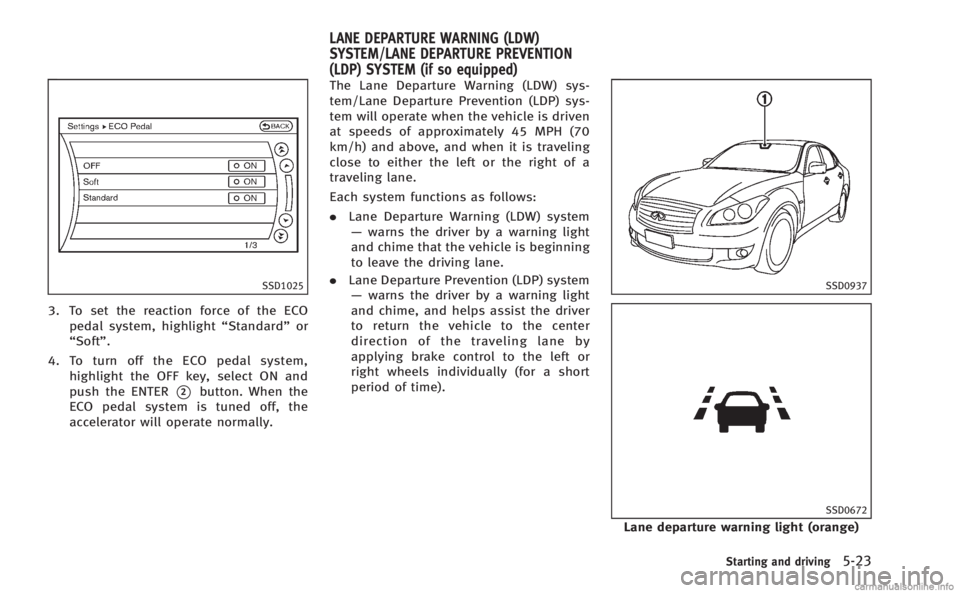
3. To set the reaction force of the ECOpedal system, highlight “Standard”or
“Soft”.
4. To turn off the ECO pedal system, highlight the OFF key, select ON and
push the ENTER
*2button. When the
ECO pedal system is tuned off, the
accelerator will operate normally. The Lane Departure Warning (LDW) sys-
tem/Lane Departure Prevention (LDP) sys-
tem will operate when the vehicle is driven
at speeds of approximately 45 MPH (70
km/h) and above, and when it is traveling
close to either the left or the right of a
traveling lane.
Each system functions as follows:
.
Lane Departure Warning (LDW) system
— warns the driver by a warning light
and chime that the vehicle is beginning
to leave the driving lane.
. Lane Departure Prevention (LDP) system
— warns the driver by a warning light
and chime, and helps assist the driver
to return the vehicle to the center
direction of the traveling lane by
applying brake control to the left or
right wheels individually (for a short
period of time).
SSD0937
SSD0672
Lane departure warning light (orange)
Starting and driving5-23
LANE DEPARTURE WARNING (LDW)
SYSTEM/LANE DEPARTURE PREVENTION
(LDP) SYSTEM (if so equipped)
Page 335 of 522

5-24Starting and driving
The LDW and LDP systems monitor the lane
markers on the traveling lane using the
camera unit
*1located above the inside
mirror. When the camera unit detects that
the vehicle is traveling close to either the
left or the right of the traveling lane, the
lane departure warning light on the instru-
ment panel blinks in orange and a warning
chime sounds. When the LDP system is on,
it will automatically apply the brakes for a
short period of time, using the function of
the Vehicle Dynamic Control (VDC) system.
LANE DEPARTURE WARNING (LDW)
SYSTEM
Precautions on LDW system
WARNING
. This system is only a warning device to
inform the driver of a potential unin-
tended lane departure. It will not steer
the vehicle or prevent loss of control. It
is the driver’ s responsibility to stay
alert, drive safely, keep the vehicle in
the traveling lane, and be in control of
the vehicle at all times.
. The system will not operate at speeds below approximately 45 MPH or if it
cannot detect lane markers.
. If the LDW system malfunctions, it will
cancel automatically, and the lane de-
parture warning light (orange) will illu-
minate.
. If the lane departure warning light
(orange) illuminates, pull off the road
to a safe location and stop the vehicle.
Turn the engine off and restart the
engine. If the lane departure warning
light (orange) continues to illuminate,
have the system checked by an INFINITI
retailer.
. Excessive noise will interfere with the
warning chime sound, and the chime
may not be heard.The system may not function properly
under the following conditions:
.On roads where there are multiple
parallel lane markers; lane markers
that are faded or not painted clearly;
yellow painted lane markers; non-stan-
dard lane markers; or lane markers
covered with water, dirt, snow, etc.
. On roads where the discontinued lane
markers are still detectable. .
On roads where there are sharp curves.
. On roads where there are sharply
contrasting objects, such as shadows,
snow, water, wheel ruts, seams or lines
remaining after road repairs. (The LDW
system could detect these items as
lane markers.)
. On roads where the traveling lane
merges or separates.
. When the vehicle’s traveling direction
does not align with the lane marker.
. When traveling close to the vehicle in
front of you, which obstructs the lane
camera unit detection range.
. When rain, snow or dirt adheres to the
windshield in front of the lane camera
unit.
. When the headlights are not bright due
to dirt on the lens or if the aiming is not
adjusted properly.
. When strong light enters the lane
camera unit. (For example, the light
directly shines on the front of the
vehicle at sunrise or sunset.)
. When a sudden change in brightness
occurs. (For example, when the vehicle
enters or exits a tunnel or under a
bridge.)
Page 336 of 522

SSD0672
Lane departure warning light (orange)
LDW system operation
The LDW system provides a lane departure
warning function when the vehicle is driven
at speeds of approximately 45 MPH (70
km/h) and above. When the vehicle
approaches either the left or the right side
of the traveling lane, a warning chime will
sound and the lane departure warning light
(orange) on the instrument panel will blink
to alert the driver.
The warning function will stop when the
vehicle returns inside of the lane markers.
The LDW system is not designed to warn
under the following conditions..
When you operate the lane change
signal and change traveling lanes in
the direction of the signal. (The LDW
system will become operable again
approximately 2 seconds after the lane
change signal is turned off.)
. When the vehicle speed lowers to less
than approximately 45 MPH (70 km/h).
. When the Blind Spot Intervention (BSI)
system activates an audible warning or
brake control.
After the above conditions have finished
and the necessary operating conditions are
satisfied, the LDW functions will resume.
SIC4335
Warning systems switch
The warning systems switch is used to turn
on and off the LDW system when it is
activated using the settings menu on the
center display. See “How to enable/disable
the LDW system using the settings menu”
later in this section.
When the warning systems switch is turned
off, the indicator
*1on the switch is off.
The indicator will also be off if the LDW, the
Blind Spot Warning (BSW) and the Forward
Collision Warning (FCW) systems are deac-
tivated.
For the BSW and FCW systems, see “Blind
Spot Warning (BSW) system/Blind Spot
Starting and driving5-25
Page 339 of 522

5-28Starting and driving
non-standard wheels).
—When the vehicle is equipped withnonoriginal brake parts or suspen-
sion parts.
. If the LDP system malfunctions, it will
cancel automatically. The lane departure
warning light (orange) on the instrument
panel will illuminate.
. If the lane departure warning light
(orange) illuminates, pull off the road
to a safe location and stop the vehicle.
Turn the engine off and restart the
engine. If the warning light (orange)
continues to illuminate, have the LDP
system checked by an INFINITI retailer.
. Excessive noise will interfere with the
warning chime sound, and the chime
may not be heard.
The functions of the LDP system (warning
and brake control assist) may or may not
operate properly under the following con-
ditions:
.On roads where there are multiple
parallel lane markers; lane markers
that are faded or not painted clearly;
yellow painted lane markers; non-stan-
dard lane markers; lane markers cov- ered with water, dirt, snow, etc.
. On roads where discontinued lane
markers are still detectable.
. On roads where there are sharp curves.
. On roads where there are sharply
contrasting objects, such as shadows,
snow, water, wheel ruts, seams or lines
remaining after road repairs. (The LDP
system could detect these items as
lane markers.)
. On roads where the traveling lane
merges or separates.
. When the vehicle’s traveling direction
does not align with the lane marker.
. When traveling close to the vehicle in
front of you, which obstructs the lane
camera unit detection range.
. When rain, snow or dirt adheres to the
windshield in front of the lane camera
unit.
. When the headlights are not bright due
to dirt on the lens or if the aiming is not
adjusted properly.
. When strong light enters the lane
camera unit. (For example, the light
directly shines on the front of the
vehicle at sunrise or sunset.) .
When a sudden change in brightness
occurs. (For example, when the vehicle
enters or exits a tunnel or under a
bridge.)
While the LDP system is operating, you
may hear a sound of brake operation. This
is normal and indicates that the LDP
system is operating properly.
Page 340 of 522

SSD0672
LDP ON indicator light (green)/ Warninglight (orange)
LDP system operation
The LDP system provides a lane departure
warning and brake control assistance when
the vehicle is driven at speeds of approxi-
mately 45 MPH (70 km/h) and above.
When the vehicle approaches either the left
or the right side of the traveling lane, a
warning chime will sound and the lane
departure warning light (orange) on the
instrument panel will blink to alert the
driver. Then, the LDP system will automa-
tically apply the brakes for a short period
of time to help assist the driver to return the vehicle to the center of the traveling
lane.
The warning and assist functions will stop
when the vehicle returns to a position
inside of the lane marker.
SSD0938
Dynamic driver assistance switch
The LDP system turns on when the dynamic
driver assistance switch on the steering
wheel is pushed when the “Lane Departure
Prevention” is enabled in the settings
menu on the center display. The LDP ON
indicator light (green) on the instrument
panel illuminates when the LDP system is
turned on.
Starting and driving5-29
Page 342 of 522
.When you operate the lane change
signal and change the traveling lanes
in the direction of the signal. (The LDP
system will be deactivated for approxi-
mately 2 seconds after the lane change
signal is turned off.)
. When the vehicle speed lowers to less
than approximately 45 MPH (70 km/h).
. When the BSI system activates an
audible warning or brake control.
After the above conditions have finished
and the necessary operating conditions are
satisfied, the warning and assist functions
will resume.
Condition B:
The assist function of the LDP system is not
designed to work under the following
conditions (warning is still functional):
. When the brake pedal is depressed.
. When the steering wheel is turned as
far as necessary for the vehicle to
change lanes.
. When the accelerator pedal is de-
pressed while the brake control assist
is provided.
. When the Intelligent Cruise Control (ICC)
approach warning occurs. .
When the hazard warning flashers are
operated.
. When driving on a curve at high speed.
After the above conditions have finished
and the necessary operating conditions are
satisfied, the LDP brake control assist
function will resume.
Condition C:
Under the following conditions, a beep will
sound and the LDP system will be canceled
automatically. The LDP ON indicator light
will blink in green, and the LDP system
cannot be activated:
. When the VDC system (except TCS
function) or ABS operates.
. When the VDC system is turned off.
. When the drive mode select switch is
turned to the SNOW mode.
Action to take:
When the above conditions no longer exist,
turn off the LDP system. Push the dynamic
driver assistance switch again to turn the
LDP system back on.
Temporary disabled status at high tem-
perature:
If the vehicle is parked in direct sunlight
under high temperature conditions (over approximately 1048F (408C)) and then the
LDP system is turned on, the LDP system
may be deactivated automatically. The lane
departure warning light (orange) will blink.
Action to take:
When the above conditions no longer exist,
turn off the LDP system. Push the dynamic
driver assistance switch again to turn the
LDP system back on.
Starting and driving5-31
Page 344 of 522

SSD1027
The BSW system uses radar sensors*1
installed near the rear bumper to detect
other vehicles beside your vehicle in an
adjacent lane. In addition to the radar
sensors, the BSI system uses a camera
*2
installed behind the windshield to monitor
the lane markers of your traveling lane.
SSD1030
Detection zone
The radar sensors can detect vehicles on
either side of your vehicle within the
detection zone shown as illustrated. This
detection zone starts from the outside
mirror of your vehicle and extends approxi-
mately 10 ft (3.0 m) behind the rear
bumper, and approximately 10 ft (3.0 m)
sideways.
The BSW system operates above approxi-
mately 20 MPH (32 km/h). If the radar
sensors detects vehicles in the detection
zone, the BSW/BSI indicator light illumi-
nates. If the driver then activates the turn
signal, a chime will sound twice and the
BSW/BSI indicator light will flash. The BSI system operates above approxi-
mately 37 MPH (60 km/h). If the system
detects a vehicle in the detection zone and
your vehicle is approaching the lane
marker, the BSI system provides an audi-
ble warning (three times), flashes the
BSW/BSI indicator light and slightly ap-
plies the brakes for a short period of time
on one side to help return the vehicle back
to the traveling lane. The BSI system
provides an audible warning and turns on
or flashes the BSW/BSI indicator light even
if the BSW system is off.WARNING
.
The BSW and BSI systems are not a
replacement for proper driving procedure
and are not designed to prevent contact
with vehicles or objects. When changing
lanes, always use the side and rear
mirrors and turn and look in the direc-
tion you will move to ensure it is safe to
change lanes. Never rely solely on the
BSW or BSI system.
. Using the BSI system under some road,
lane marker or weather conditions could
lead to improper system operation. Al-
ways rely on your own steering and
Starting and driving5-33
Page 345 of 522

5-34Starting and driving
braking operation to avoid accidents.
. The BSW and BSI systems may not
provide a warning or brake control for
vehicles that pass through the detection
zone quickly.
SSD1028
BSW/BSI indicator light
BSW SYSTEM OPERATION
If the radar sensors detect vehicles in the
detection zone, the BSW/BSI indicator
light located inside the outside mirrors
illuminates. If the turn signal is then
activated, the BSW/BSI indicator light
flashes and a chime sounds twice. The
indicator light continues to flash until the
detected vehicles leave the detection zone.
The BSW/BSI indicator lights illuminate for
a few seconds when the ignition switch is
pushed to the ON position.
The brightness of the BSW/BSI indicator
lights is adjusted automatically depending on the brightness of the ambient light.
A chime sounds if the radar sensors have
already detected vehicles when the driver
activates the turn signal. If a vehicle comes
into the detection zone after the driver
activates the turn signal, then only the
BSW/BSI indicator light flashes and no
chime sounds. (See
“BSW/BSI driving
situations” later in this section.)
Page 348 of 522

SSD0938
Dynamic driver assistance switch
BSI SYSTEM OPERATION
If the radar sensors detect vehicles in the
detection zone, the BSW/BSI indicator
light located inside the outside mirrors
illuminates. If your vehicle is approaching
a lane marker, the BSW/BSI indicator light
flashes and an audible warning will sound
three times. Then the system applies the
brakes on one side of the vehicle for a
short period of time to help return the
vehicle back to the center of the lane. BSI
operates regardless of turn signal usage.NOTE:
.
Warning and brake control will only be
activated if the BSW/BSI indicator light
is already illuminated when your vehi-
cle approaches a lane marker. If
another vehicle comes into the detec-
tion zone after your vehicle has
crossed a lane marker, no warning or
brake control will be activated. (See
“BSW/BSI driving situations” later in
this section.)
. The BSI system is typically activated
earlier than the Lane Departure Pre-
vention (LDP) system when your vehi-
cle is approaching a lane marker.
The BSI system turns on when the dynamic
driver assistance switch on the steering
wheel is pushed when the “Blind Spot
Intervention” is enabled in the settings
menu on the center display. The BSI ON
indicator light (green) on the instrument
panel illuminates when the BSI system is
turned on.
The BSI system provides an audible warn-
ing and flashes the indicator light when
BSI is activated even if the BSW system is
off.
SSD0939
With navigation system
SSD1001
Starting and driving5-37
Page 349 of 522

5-38Starting and driving
How to enable/disable the BSI
system using the settings menu
Perform the following steps to enable or
disable the BSI system.
1. Push the SETTING
*1button and high-
light the “Driver Assistance” key on the
display using the INFINITI controller.
Then push the ENTER
*2button.
2. Highlight the “Dynamic Assistance Set-
tings” key, and push the ENTER
*2
button.
SSD1002
3. Highlight the “Blind Spot Intervention”
key, select ON (enabled) or OFF (dis-
abled) and push the ENTER
*2button.
For the LDP and DCA systems, see “Lane
Departure Prevention (LDP) system” earlier
in this section and “Distance Control Assist
(DCA) system” later in this section.
WARNING
.Do not use the BSI system under the
following conditions because the system
may not function properly.
—During bad weather (for example, rain, fog, snow, wind, etc.)
—When driving on slippery roads,
such as on ice or snow, etc.
—When driving on winding or uneven roads.
—When there is a lane closure due to
road repairs.
—When driving in a makeshift lane.
—When driving on roads where thelane width is too narrow.
—When driving with a tire that is notwithin normal tire conditions (for
example, tire wear, low tire pressure,
installation of spare tire, tire chains,
non-standard wheels).
—When the vehicle is equipped withnon-original brake parts or suspen-
sion parts.
. Excessive noise (for example, audio
system volume, open vehicle window)
will interfere with the chime sound, and
it may not be heard.
.The radar sensors may not be able to
detect and activate BSI/BSW when
certain objects are present such as: