radio INFINITI M 2013 Owner's Guide
[x] Cancel search | Manufacturer: INFINITI, Model Year: 2013, Model line: M, Model: INFINITI M 2013Pages: 522, PDF Size: 3.72 MB
Page 269 of 522
4-98Monitor, climate, audio, phone and voice recognition systems
.Immediately after the ignition switch is
pushed to the “ON”position, it may be
impossible to receive a call for a short
period of time.
. Do not place the cellular phone in an
area surrounded by metal or far away
from the in-vehicle phone module to
prevent tone quality degradation and
wireless connection disruption.
. While a cellular phone is connected
through the Bluetooth
®wireless con-
nection, the battery power of the
cellular phone may discharge quicker
than usual.
. If the Bluetooth
®Hands-Free Phone
System seems to be malfunctioning,
please contact an INFINITI retailer.
. Some cellular phones or other devices
may cause interference or a buzzing
noise to come from the audio system
speakers. Storing the device in a
different location may reduce or elim-
inate the noise.
. Refer to the cellular phone Owner’s
Manual regarding the telephone pairing
procedure specific to your phone,
battery charging, cellular phone anten-
na, etc. .
The antenna display on the monitor will
not coincide with the antenna display
of some cellular phones.
. Keep the interior of the vehicle as quiet
as possible to hear the caller ’s voice
clearly as well as to minimize its
echoes.
. If reception between callers is unclear,
adjusting the incoming or outgoing call
volume may improve the clarity.
. This wireless hands free car kit is based
on Bluetooth
®technology,
— Frequency: 2402 MHz - 2480 MHz
— Output Power: 4,14dBm E.I.R.P
— Modulation: FHSS GFSK 8DPSK, p/
4DQPSK
— Number of Channel: 79
— This wireless equipment can’tbe
used for any services related to
safety because there is the possibi-
lity of radio interference.
REGULATORY INFORMATION
FCC Regulatory information
. CAUTION: To maintain compliance with
FCC’s RF exposure guidelines, use only
the supplied antenna. Unauthorized
antenna, modification, or attachments
could damage the transmitter and may
violate FCC regulations.
. Operation is subject to the following
two conditions:
1) this device may not cause interfer- ence and
2) this device must accept any inter- ference, including interference that
may cause undesired operation of
the device
IC Regulatory information
.Operation is subject to the following
two conditions: (1) this device may not
cause interference, and (2) this device
must accept any interference, including
interference that may cause undesired
operation of the device.
. This Class B digital apparatus meets all
requirements of the Canadian Interfer-
ence-Causing Equipment Regulations.
Page 290 of 522
CommandAction
Previous Destinations Sets a route to a previous destination.
.Information Command:
Command Action
Fuel Economy Displays fuel economy information.
Maintenance Displays maintenance information.
Traffic Information Turns the traffic information system ON and OFF.
Where am I? Displays your current location.
.
Audio Command:
Command Action
AM Turns to the AM band, selecting the station last played.
FM Turns to the FM band, selecting the station last played.
XM Turns to the SiriusXM Satellite Radio band, selecting the channel last played.
CD Starts to play a CD.
.General Commands
Command Action
Go back Corrects the last recognition result to return to the previous screen
Exit Cancels Voice Recognition
Monitor, climate, audio, phone and voice recognition systems4-119
Page 301 of 522

4-130Monitor, climate, audio, phone and voice recognition systems
Audio Commands:
CommandAction
CD Starts to play a CD.
FM Turns to the FM band, selecting the station last played.
AM Turns to the AM band, selecting the station last played.
XM Turns to the SiriusXM Satellite Radio band, selecting the channel last played.
USB Turns on the USB memory.
Bluetooth Audio Turns on the Bluetooth
®audio player.
Page 317 of 522
5-6Starting and driving
result in serious personal injury. Check
the tire pressure for all four tires. Adjust
the tire pressure to the recommended
COLD tire pressure shown on the Tire
and Loading Information label to turn
the low tire pressure warning light OFF. If
the light still illuminates while driving
after adjusting the tire pressure, a tire
may be flat. If you have a flat tire,
replace it with a spare tire as soon as
possible. (See“Flat tire”in the“6. In
case of emergency” section for changing
a flat tire.)
. When a spare tire is mounted or a wheel
is replaced, the TPMS will not function
and the low tire pressure warning light
will flash for approximately 1 minute.
The light will remain on after 1 minute.
Contact your INFINITI retailer as soon as
possible for tire replacement and/or
system resetting.
. Replacing tires with those not originally
specified by INFINITI could affect the
proper operation of the TPMS.
. Do not inject any tire liquid or aerosol
tire sealant into the tires, as this may
cause a malfunction of the tire pressure
sensors.CAUTION
.The TPMS may not function properly
when the wheels are equipped with tire
chains or the wheels are buried in snow.
. Do not place metalized film or any metal
parts (antenna, etc.) on the windows.
This may cause poor reception of the
signals from the tire pressure sensors,
and the TPMS will not function properly.
Some devices and transmitters may tem-
porarily interfere with the operation of the
TPMS and cause the low tire pressure
warning light to illuminate. Some exam-
ples are:
.Facilities or electric devices using simi-
lar radio frequencies are near the
vehicle.
. If a transmitter set to similar frequen-
cies is being used in or near the
vehicle.
. If a computer (or similar equipment) or
a DC/AC converter is being used in or
near the vehicle. FCC Notice:
For USA:
This device complies with Part 15 of the
FCC Rules. Operation is subject to the
following two conditions: (1) This device
may not cause harmful interference, and
(2) this device must accept any interfer-
ence received, including interference that
may cause undesired operation.
NOTE:
Changes or modifications not expressly
approved by the party responsible for
compliance could void the user’s authority
to operate the equipment.
For Canada:
This device complies with RSS-210 of
Industry Canada. Operation is subject to
the following two conditions: (1) this
device may not cause interference, and
(2) this device must accept any interfer-
ence, including interference that may
cause undesired operation of the device.
Page 321 of 522

5-10Starting and driving
SSD0659
OPERATING RANGE FOR ENGINE
START FUNCTION
The Intelligent Key can only be used for
starting the engine when the Intelligent
Key is within the specified operating range.
When the Intelligent Key battery is almost
discharged or strong radio waves are
present near the operating location, the
Intelligent Key system’s operating range
becomes narrower and may not function
properly.
If the Intelligent Key is within the operating
range, it is possible for anyone, even
someone who does not carry the Intelligent Key, to push the ignition switch to start the
engine.
.
The trunk area is not included in the
operating range but the Intelligent Key
may function.
. If the Intelligent Key is placed on the
instrument panel, rear parcel shelf,
inside the glove box or door pocket,
the Intelligent Key may not function.
. If the Intelligent Key is placed near the
door or window outside the vehicle, the
Intelligent Key may function.
SSD1021
PUSH-BUTTON IGNITION SWITCH
OPERATION
When the ignition switch is pushed without
depressing the brake pedal, the ignition
switch position will change as follows:
. Push center once to change to ACC.
. Push center two times to change to ON.
. Push center three times to change to
OFF. (No position illuminates.)
. Push center four times to return to ACC.
. Open or close any door to return to
LOCK during the OFF position.
Page 322 of 522

If the battery of the vehicle is discharged,
the push-button ignition switch cannot be
turned from the LOCK position.
Some indicators and warnings for opera-
tion are displayed on the dot matrix liquid
crystal display between the speedometer
and tachometer. (See“Dot matrix liquid
crystal display” in the“2. Instruments and
controls” section.)
The ignition lock is designed so that the
ignition switch position cannot be switched
to LOCK until the selector lever is moved to
the P (Park) position.
When the ignition switch cannot be pushed
toward the LOCK position, proceed as
follows:
1. Move the selector lever into the P (Park) position.
2. Push the ignition switch to the OFF position. The ignition switch position
indicator will not illuminate.
3. Open the door. The ignition switch will change to the LOCK position.
The selector lever can be moved from the P
(Park) position if the ignition switch is in
the ON position and the brake pedal is
depressed.STEERING LOCK (if so equipped)
In order for the steering wheel to be
locked, it must be turned about 1/8 of a
right or left turn from the straight up
position.
To lock the steering wheel, push the
ignition switch to the OFF position. To
unlock the steering wheel, push the
ignition switch. If the steering lock release
malfunction indicator appears on the dot
matrix liquid crystal display, push the
push-button ignition switch again while
lightly turning the steering wheel right
and left. (See “Dot matrix liquid crystal
display” in the“2. Instruments and con-
trols” section.)
PUSH-BUTTON IGNITION SWITCH
POSITIONS
LOCK (Normal parking position)
The ignition switch can only be locked in
this position.
The ignition switch will be unlocked when
it is pushed to the ACC position while
carrying the Intelligent Key.
ACC (Accessories)
This position activates electrical acces-
sories such as the radio, when the engine
is not running.
ON (Normal operating position)
This position turns on the ignition system
and electrical accessories.
OFF
The engine can be turned off in this
position.
The ignition lock is designed so that the
ignition switch cannot be switched to the
LOCK position until the selector lever is
moved to the P (Park) position.
CAUTION
Do not leave the vehicle with the push-
button ignition switch in ACC or ON posi-
tions when the engine is not running for an
extended period. This can discharge the
battery.
Starting and driving5-11
Page 356 of 522
BSW/BSI MALFUNCTION
When the BSW/BSI systems malfunction,
they will be turned off automatically, a
beep will sound and the BSW/BSI system
warning light (orange) will illuminate.
Action to take:
Stop the vehicle in a safe location, turn the
engine off and restart the engine.
If the warning light (orange) continues to
illuminate, have the BSW/BSI systems
checked by an INFINITI retailer.
SSD1027
SYSTEM MAINTENANCE
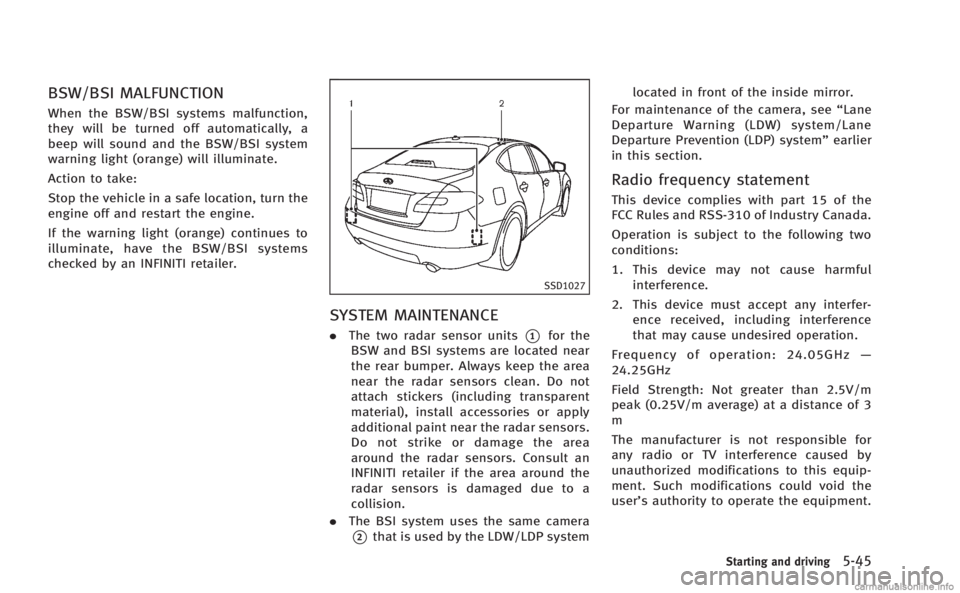
.The two radar sensor units*1for the
BSW and BSI systems are located near
the rear bumper. Always keep the area
near the radar sensors clean. Do not
attach stickers (including transparent
material), install accessories or apply
additional paint near the radar sensors.
Do not strike or damage the area
around the radar sensors. Consult an
INFINITI retailer if the area around the
radar sensors is damaged due to a
collision.
. The BSI system uses the same camera
*2that is used by the LDW/LDP system located in front of the inside mirror.
For maintenance of the camera, see “Lane
Departure Warning (LDW) system/Lane
Departure Prevention (LDP) system” earlier
in this section.
Radio frequency statement
This device complies with part 15 of the
FCC Rules and RSS-310 of Industry Canada.
Operation is subject to the following two
conditions:
1. This device may not cause harmful interference.
2. This device must accept any interfer- ence received, including interference
that may cause undesired operation.
Frequency of operation: 24.05GHz —
24.25GHz
Field Strength: Not greater than 2.5V/m
peak (0.25V/m average) at a distance of 3
m
The manufacturer is not responsible for
any radio or TV interference caused by
unauthorized modifications to this equip-
ment. Such modifications could void the
user’s authority to operate the equipment.
Starting and driving5-45
Page 436 of 522
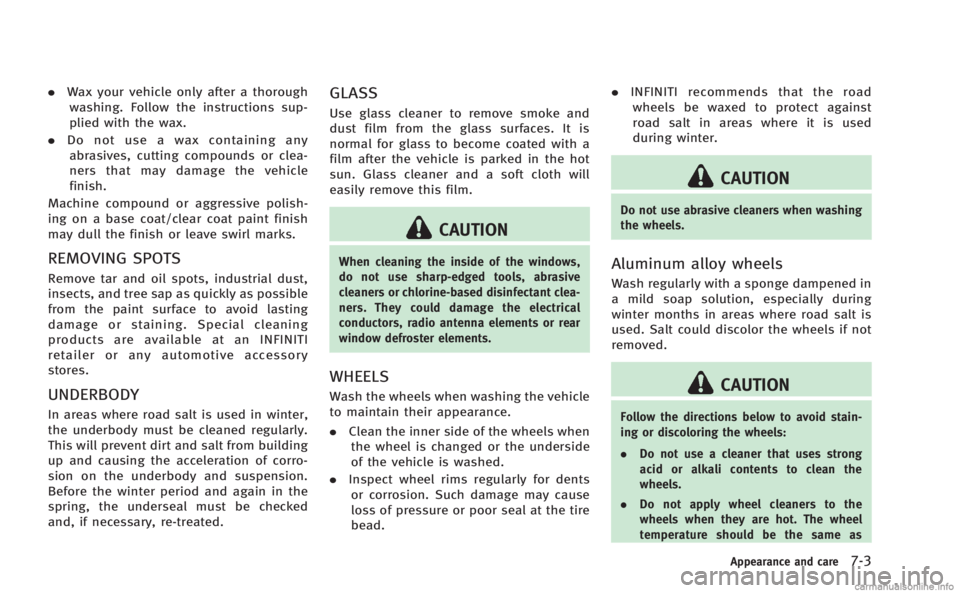
.Wax your vehicle only after a thorough
washing. Follow the instructions sup-
plied with the wax.
. Do not use a wax containing any
abrasives, cutting compounds or clea-
ners that may damage the vehicle
finish.
Machine compound or aggressive polish-
ing on a base coat/clear coat paint finish
may dull the finish or leave swirl marks.
REMOVING SPOTS
Remove tar and oil spots, industrial dust,
insects, and tree sap as quickly as possible
from the paint surface to avoid lasting
damage or staining. Special cleaning
products are available at an INFINITI
retailer or any automotive accessory
stores.
UNDERBODY
In areas where road salt is used in winter,
the underbody must be cleaned regularly.
This will prevent dirt and salt from building
up and causing the acceleration of corro-
sion on the underbody and suspension.
Before the winter period and again in the
spring, the underseal must be checked
and, if necessary, re-treated.
GLASS
Use glass cleaner to remove smoke and
dust film from the glass surfaces. It is
normal for glass to become coated with a
film after the vehicle is parked in the hot
sun. Glass cleaner and a soft cloth will
easily remove this film.
CAUTION
When cleaning the inside of the windows,
do not use sharp-edged tools, abrasive
cleaners or chlorine-based disinfectant clea-
ners. They could damage the electrical
conductors, radio antenna elements or rear
window defroster elements.
WHEELS
Wash the wheels when washing the vehicle
to maintain their appearance.
. Clean the inner side of the wheels when
the wheel is changed or the underside
of the vehicle is washed.
. Inspect wheel rims regularly for dents
or corrosion. Such damage may cause
loss of pressure or poor seal at the tire
bead. .
INFINITI recommends that the road
wheels be waxed to protect against
road salt in areas where it is used
during winter.
CAUTION
Do not use abrasive cleaners when washing
the wheels.
Aluminum alloy wheels
Wash regularly with a sponge dampened in
a mild soap solution, especially during
winter months in areas where road salt is
used. Salt could discolor the wheels if not
removed.
CAUTION
Follow the directions below to avoid stain-
ing or discoloring the wheels:
. Do not use a cleaner that uses strong
acid or alkali contents to clean the
wheels.
. Do not apply wheel cleaners to the
wheels when they are hot. The wheel
temperature should be the same as
Appearance and care7-3
Page 512 of 522
10 Index
Number
4 Wheel Active Steer (4WAS) system ............... 5-103
4 Wheel Active Steer (4WAS) warning light ....... 2-13
A
ABS (Anti-lock Braking System) ......................... 5-99
Active noise control ........................................ 5-106
Adjustable headrests .......................................... 1-8
Air bag systemFront-seat mounted side-impact supplemental
air bag system ............................................. 1-49
Roof-mounted curtain side-impact supplemental
air bag system ............................................. 1-49
Air bag warning labels ...................................... 1-52
Air bag warning light ............................... 1-52, 2-16
Air cleaner housing filter ................................... 8-22
Air conditioner Air conditioner specification label ................ 9-13
Air conditioning system refrigerant and
lubricant recommendations ............................ 9-7
Automatic climate control ............................ 4-34
In-cabin microfilter ....................................... 4-48
Air filter In-cabin microfilter ....................................... 4-48
Alarm
How to stop alarm (see vehicle
security system) ........................................... 2-30
Alcohol, drugs and driving .................................. 5-8
Antenna ............................................................ 4-85 Anti-lock Braking System (ABS) ......................... 5-99
Appearance care
Exterior appearance care ................................ 7-2
Interior appearance care ................................ 7-4
Armrest ............................................................. 1-10
Ashtrays (See cigarette lighter and ashtrays) .... 2-47
Audible reminders ............................................ 2-19
Audio operation precautions ............................. 4-49
Audio system .................................................... 4-49 Steering wheel audio controls ...................... 4-84
Auto closure ..................................................... 3-20
Autolight system ............................................... 2-35
Automatic
Automatic climate control .................. 4-37, 4-41
Automatic transmission fluid (ATF) ............... 8-16
Climate control ............................................ 4-34
Driving with automatic transmission ............ 5-14
Automatic door locks .......................................... 3-6
Automatic drive positioner ................................ 3-28
Automatic moonroof.......................................... 2-56
Automatic seat positioner ................................. 3-28
Average fuel consumption and speed ................ 2-27
Avoiding collision and rollover ............................ 5-7
B
Battery .............................................................. 8-19 Battery replacement, Intelligent Key ............... 3-2
Battery saver system ................................... 2-37
Intelligent Key .............................................. 8-29 Variable voltage control system ................... 8-20
Before starting the engine ................................ 5-13
Belts (See drive belts) ....................................... 8-21
Blind Spot Intervention (BSI) ON
indicator light ................................................... 2-17
Bluetooth
®hands-free phone system
(models with navigation system) ....................... 4-86
Bluetooth
®hands-free phone system
(models without navigation system) .................. 4-97
Bluetooth
®streaming audio ............................. 4-76
Brake
Anti-lock Braking System (ABS) .................... 5-99
Brake fluid ................................................... 8-17
Brake force distribution ............................. 5-101
Brake system ............................................... 5-95
Parking brake operation ............................... 5-19
Brake warning light ........................................... 2-11
Break-in schedule ............................................. 5-90
Brightness control Display ON/OFF button ................................ 4-10
Bulb check/instrument panel ............................ 2-10
Bulb replacement .............................................. 8-31
C
Cabin air filter ................................................... 4-48
Capacities and recommended fuel/lubricants ...... 9-2
Car phone or CB radio ...................................... 4-86
Card holder ....................................................... 2-51
Page 514 of 522
Engine oil and oil filter recommendation ........ 9-6
Engine oil replacement indicator .................. 2-25
Engine oil viscosity ........................................ 9-7
Engine serial number ................................... 9-12
Engine specifications ..................................... 9-8
Engine start operation indicator ................... 2-22
If your vehicle overheats .............................. 6-11
Starting the engine ...................................... 5-13
Engine coolant temperature gauge ...................... 2-8
Entry/exit function
Automatic drive positioner ........................... 3-28
Event Data Recorders (EDR) ............................... 9-23
Exhaust gas (carbon monoxide) .......................... 5-3
F
F.M.V.S.S./C.M.V.S.S. certification label ............. 9-12
Filter Air cleaner housing filter .............................. 8-22
Changing engine oil and filter ...................... 8-13
Flashers (See hazard warning flasher switch) .... 2-40
Flat tire ............................................................... 6-2
Flat towing ........................................................ 9-19
Floor mat cleaning .............................................. 7-5
Floor mat positioning aid .................................... 7-6
Fluid Automatic transmission fluid (ATF) ............... 8-16
Brake fluid ................................................... 8-17
Capacities and
recommended fuel/lubricants ........................ 9-2
Engine coolant ............................................. 8-11
Engine oil .................................................... 8-13 Power steering fluid ..................................... 8-16
Window washer fluid ................................... 8-18
FM-AM-SAT radio with Compact Disc
(CD) player ........................................................ 4-64
Fog light switch ................................................ 2-40
Forest Air
TM....................................................... 4-43
Forward Collision Warning (FCW) system ........... 5-82
Front passenger air bag and status light ........... 1-46
Front power seat adjustment ............................... 1-3
Front seat Front seat adjustment .................................... 1-3
Front-seat active head restraints ......................... 1-7
Fuel
Capacities and
recommended fuel/lubricants ........................ 9-2
Fuel economy............................................... 5-90
Fuel economy information (display) .............. 4-12
Fuel octane rating .......................................... 9-4
Fuel recommendation ..................................... 9-4
Fuel-filler cap ............................................... 3-22
Fuel-filler door ............................................. 3-22
Gauge ............................................................ 2-9
Fuses ................................................................ 8-26
Fusible links ..................................................... 8-27
G
Garage door opener
HomeLink®Universal Transceiver ................. 2-61
Gas cap ............................................................ 3-22
Gauge .......................................................... 0-9, 2-6
Engine coolant temperature gauge ................. 2-8 Fuel gauge ..................................................... 2-9
Odometer....................................................... 2-7
Speedometer ................................................. 2-7
Tachometer .................................................... 2-8
Trip computer .............................................. 2-26
General maintenance .......................................... 8-3
Glove box ......................................................... 2-50
H
Hands-free phone system Bluetooth®(models with
navigation system) ....................................... 4-86
Bluetooth
®(models without
navigation system) ....................................... 4-97
Hazard warning flasher switch .......................... 2-40
Head restraints ................................................... 1-4
Headlights Aiming control (See adaptive front lighting
system (AFS)) ............................................... 2-37
Bulb replacement ......................................... 8-31
Headlight switch .......................................... 2-35
Xenon headlights ......................................... 2-34
Headrest Adjustable headrests ..................................... 1-8
Heated seats .................................................... 2-42
Heated steering wheel ...................................... 2-41
Heater
Automatic climate control ............................ 4-34
Engine block heater ................................... 5-105
Hill start assist system ................................... 5-102
HomeLink
®Universal Transceiver ...................... 2-61
10-3