display INFINITI M-HEV 2013 Owners Manual
[x] Cancel search | Manufacturer: INFINITI, Model Year: 2013, Model line: M-HEV, Model: INFINITI M-HEV 2013Pages: 530, PDF Size: 3.71 MB
Page 346 of 530

SSD1024
Drive mode select switch
Four driving modes can be selected by
using the drive mode selector switch,
STANDARD, SPORT, ECO and SNOW. Select
the STANDARD mode for normal driving.
NOTE:
When the drive mode select switch selects
a mode, the mode may not switch quickly.
This is not a malfunction.
STANDARD MODE
Recommended for normal driving. Turn the
drive mode select switch to the
position. “STANDARD” appears in the
vehicle information display for 2 seconds.
SPORT MODE
Adjusts the engine and transmission
points to enhance performance. If the
vehicle is equipped with the active trace
control system, the amount of brake
control provided by active trace control is
reduced. (See “Vehicle Dynamic Control
(VDC) system” later in this section.) Turn
the drive mode select switch to the SPORT
position. “SPORT”appears in the vehicle
information display for 2 seconds.
NOTE:
In the SPORT mode, fuel economy may be
reduced.
SNOW MODE
Used on snowy roads or slippery areas.
When the SNOW mode is activated, engine
output is controlled to avoid wheel spin.
Turn the SNOW mode off for normal
driving. Turn the drive mode select switch
to the SNOW position. “SNOW”appears in
the vehicle information display for 2 seconds.
ECO MODE
Adjusts engine and transmission points to
enhance fuel economy.
NOTE:
Selecting this drive mode will not neces-
sarily improve fuel economy as many
driving factors influence its effectiveness.
Operation
Turn the drive mode select switch to the
ECO position.
“ECO”appears in the vehicle
information display for 2 seconds and the
ECO drive indicator light illuminates on the
instrument panel.
When the accelerator pedal is depressed
within the range of economy drive, the ECO
drive indicator light illuminates in green.
When the accelerator pedal is depressed
above the range of economy drive, the
color of the ECO drive indicator light
changes to orange. For ECO pedal system
equipped models see “ECO pedal system”
later in this section.
The ECO drive indicator light will not
illuminate in the following cases:
. When the selector lever is in the R
(Reverse) position.
Starting and driving5-19
INFINITI DRIVE MODE SELECTOR
Page 348 of 530
SSD0939
SSD1001
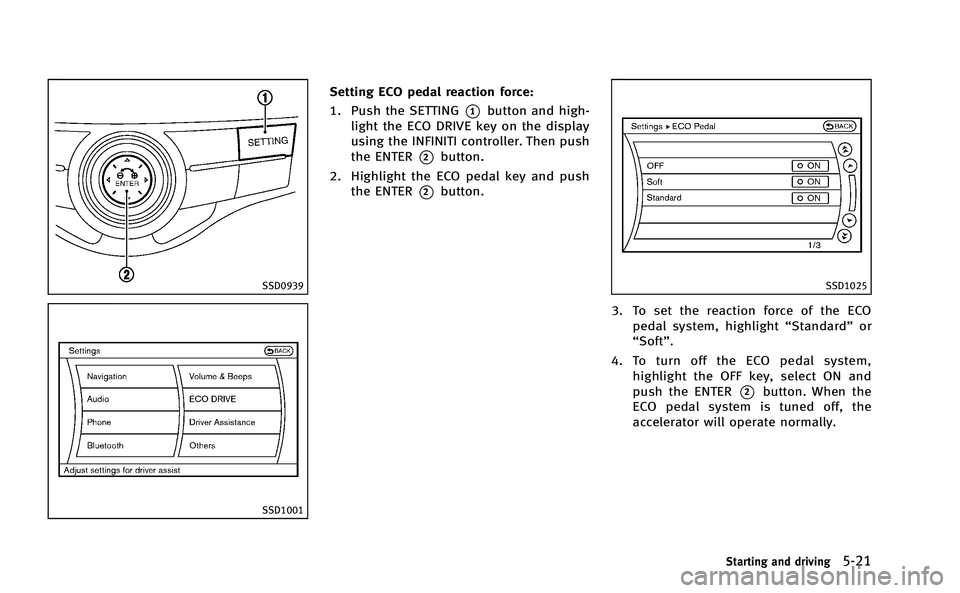
Setting ECO pedal reaction force:
1. Push the SETTING
*1button and high-
light the ECO DRIVE key on the display
using the INFINITI controller. Then push
the ENTER
*2button.
2. Highlight the ECO pedal key and push the ENTER
*2button.
SSD1025
3. To set the reaction force of the ECOpedal system, highlight “Standard”or
“Soft”.
4. To turn off the ECO pedal system, highlight the OFF key, select ON and
push the ENTER
*2button. When the
ECO pedal system is tuned off, the
accelerator will operate normally.
Starting and driving5-21
Page 351 of 530
5-24Starting and driving
.When you operate the lane change
signal and change traveling lanes in
the direction of the signal. (The LDW
system will become operable again
approximately 2 seconds after the lane
change signal is turned off.)
. When the vehicle speed lowers to less
than approximately 45 MPH (70 km/h).
. When the Blind Spot Intervention (BSI)
system activates an audible warning or
brake control.
After the above conditions have finished
and the necessary operating conditions are
satisfied, the LDW functions will resume.
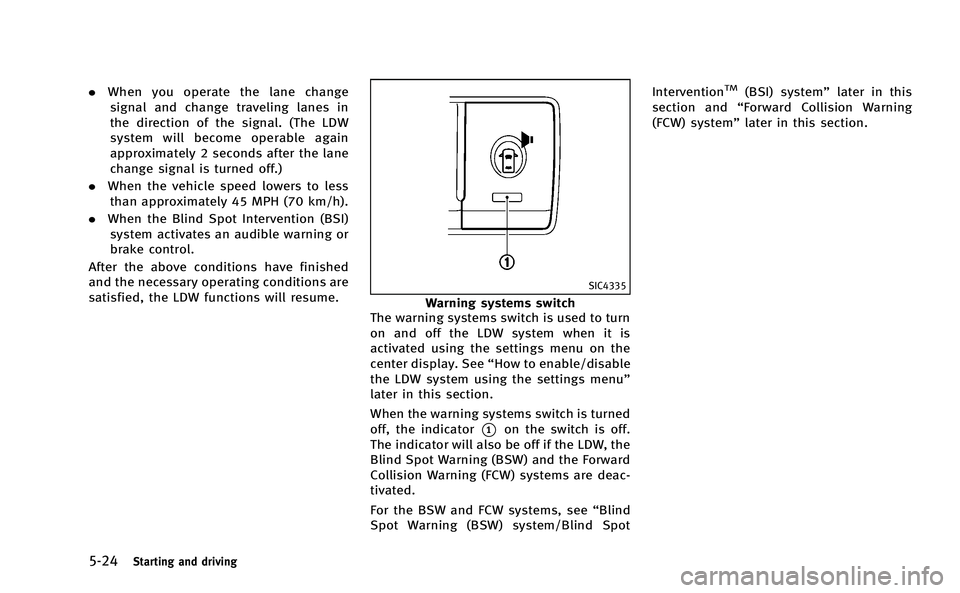
SIC4335
Warning systems switch
The warning systems switch is used to turn
on and off the LDW system when it is
activated using the settings menu on the
center display. See “How to enable/disable
the LDW system using the settings menu”
later in this section.
When the warning systems switch is turned
off, the indicator
*1on the switch is off.
The indicator will also be off if the LDW, the
Blind Spot Warning (BSW) and the Forward
Collision Warning (FCW) systems are deac-
tivated.
For the BSW and FCW systems, see “Blind
Spot Warning (BSW) system/Blind Spot Intervention
TM(BSI) system”
later in this
section and “Forward Collision Warning
(FCW) system” later in this section.
Page 352 of 530

SSD0939
With navigation system
SSD1001
How to enable/disable the LDW
system using the settings menu
Perform the following steps to enable or
disable the LDW system.
1. Push the SETTING
*1button and high-
light the “Driver Assistance” key on the
display using the INFINITI controller.
Then push the ENTER
*2button.
2. Highlight the “Driver Assistance Warn-
ings” key, and push the ENTER
*2
button.
JVS0080X
3. Highlight the “Lane Departure Warning”
key, select ON (enabled) or OFF (dis-
abled) and push the ENTER
*2button.
Temporary disabled status at high
temperature
If the vehicle is parked in direct sunlight
under high temperature conditions (over
approximately 1048 F (408C) and then
started, the LDW system may be deacti-
vated automatically. The lane departure
warning light (orange) will flash.
When the interior temperature is reduced,
the LDW system will resume operating
automatically and the lane departure
Starting and driving5-25
Page 355 of 530

5-28Starting and driving
the vehicle to the center of the traveling
lane.
The warning and assist functions will stop
when the vehicle returns to a position
inside of the lane marker.
SSD0938
Dynamic driver assistance switch
The LDP system turns on when the dynamic
driver assistance switch on the steering
wheel is pushed when the “Lane Departure
Prevention” is enabled in the settings
menu on the center display. The LDP ON
indicator light (green) on the instrument
panel illuminates when the LDP system is
turned on.
SSD0939
With navigation system
SSD1001
Page 356 of 530
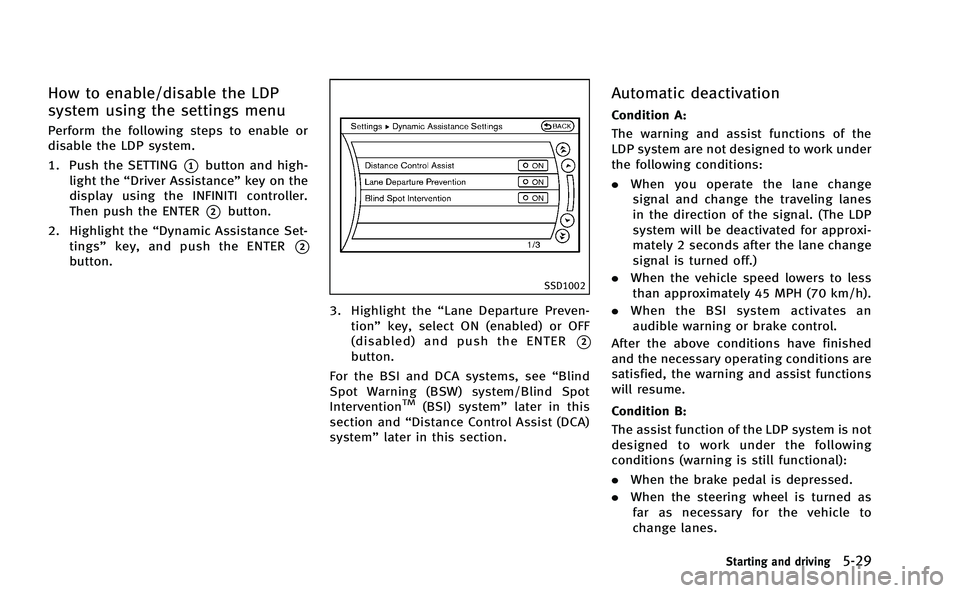
How to enable/disable the LDP
system using the settings menu
Perform the following steps to enable or
disable the LDP system.
1. Push the SETTING
*1button and high-
light the “Driver Assistance” key on the
display using the INFINITI controller.
Then push the ENTER
*2button.
2. Highlight the “Dynamic Assistance Set-
tings” key, and push the ENTER
*2
button.
SSD1002
3. Highlight the “Lane Departure Preven-
tion” key, select ON (enabled) or OFF
(disabled) and push the ENTER
*2
button.
For the BSI and DCA systems, see “Blind
Spot Warning (BSW) system/Blind Spot
Intervention
TM(BSI) system” later in this
section and “Distance Control Assist (DCA)
system” later in this section.
Automatic deactivation
Condition A:
The warning and assist functions of the
LDP system are not designed to work under
the following conditions:
.When you operate the lane change
signal and change the traveling lanes
in the direction of the signal. (The LDP
system will be deactivated for approxi-
mately 2 seconds after the lane change
signal is turned off.)
. When the vehicle speed lowers to less
than approximately 45 MPH (70 km/h).
. When the BSI system activates an
audible warning or brake control.
After the above conditions have finished
and the necessary operating conditions are
satisfied, the warning and assist functions
will resume.
Condition B:
The assist function of the LDP system is not
designed to work under the following
conditions (warning is still functional):
. When the brake pedal is depressed.
. When the steering wheel is turned as
far as necessary for the vehicle to
change lanes.
Starting and driving5-29
Page 360 of 530
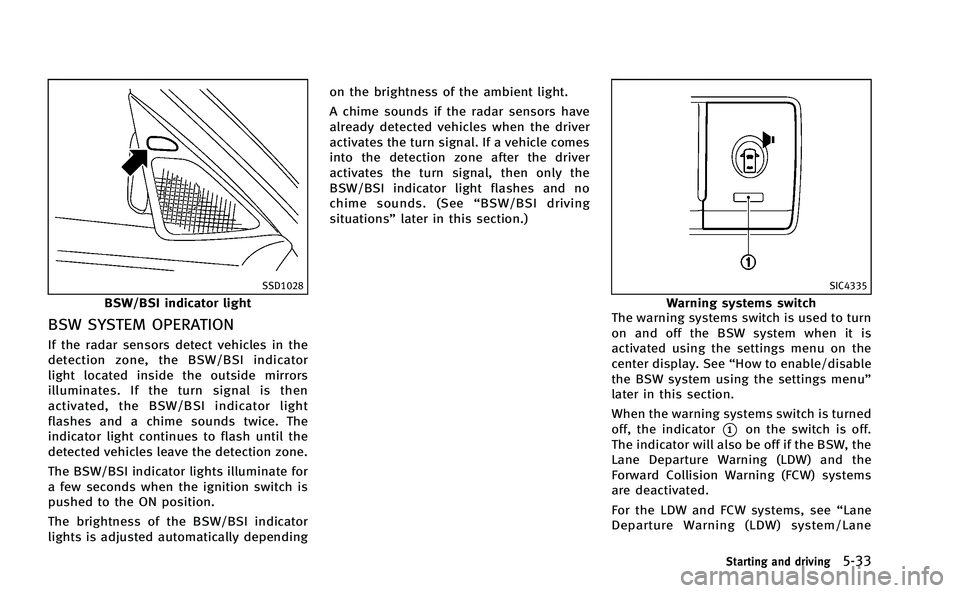
SSD1028
BSW/BSI indicator light
BSW SYSTEM OPERATION
If the radar sensors detect vehicles in the
detection zone, the BSW/BSI indicator
light located inside the outside mirrors
illuminates. If the turn signal is then
activated, the BSW/BSI indicator light
flashes and a chime sounds twice. The
indicator light continues to flash until the
detected vehicles leave the detection zone.
The BSW/BSI indicator lights illuminate for
a few seconds when the ignition switch is
pushed to the ON position.
The brightness of the BSW/BSI indicator
lights is adjusted automatically dependingon the brightness of the ambient light.
A chime sounds if the radar sensors have
already detected vehicles when the driver
activates the turn signal. If a vehicle comes
into the detection zone after the driver
activates the turn signal, then only the
BSW/BSI indicator light flashes and no
chime sounds. (See
“BSW/BSI driving
situations” later in this section.)
SIC4335
Warning systems switch
The warning systems switch is used to turn
on and off the BSW system when it is
activated using the settings menu on the
center display. See “How to enable/disable
the BSW system using the settings menu”
later in this section.
When the warning systems switch is turned
off, the indicator
*1on the switch is off.
The indicator will also be off if the BSW, the
Lane Departure Warning (LDW) and the
Forward Collision Warning (FCW) systems
are deactivated.
For the LDW and FCW systems, see “Lane
Departure Warning (LDW) system/Lane
Starting and driving5-33
Page 361 of 530
5-34Starting and driving
Departure Prevention (LDP) system”earlier
in this section and “Forward Collision
Warning (FCW) system” later in this sec-
tion.
SSD0939
SSD1001
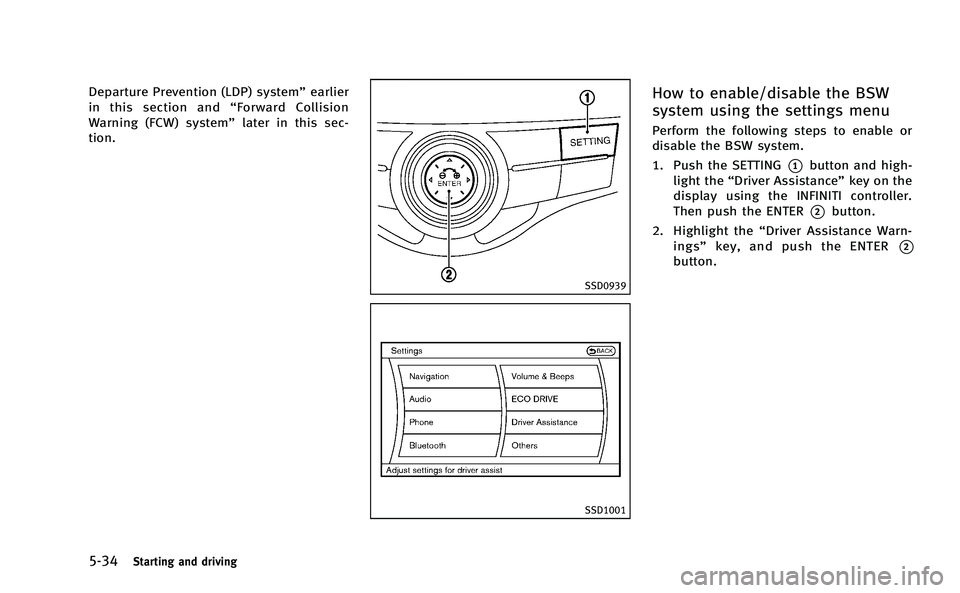
How to enable/disable the BSW
system using the settings menu
Perform the following steps to enable or
disable the BSW system.
1. Push the SETTING
*1button and high-
light the “Driver Assistance” key on the
display using the INFINITI controller.
Then push the ENTER
*2button.
2. Highlight the “Driver Assistance Warn-
ings” key, and push the ENTER
*2
button.
Page 363 of 530

5-36Starting and driving
NOTE:
.Warning and brake control will only be
activated if the BSW/BSI indicator light
is already illuminated when your vehi-
cle approaches a lane marker. If
another vehicle comes into the detec-
tion zone after your vehicle has
crossed a lane marker, no warning or
brake control will be activated. (See
“BSW/BSI driving situations” later in
this section.)
. The BSI system is typically activated
earlier than the Lane Departure Pre-
vention (LDP) system when your vehi-
cle is approaching a lane marker.
The BSI system turns on when the dynamic
driver assistance switch on the steering
wheel is pushed when the “Blind Spot
Intervention” is enabled in the settings
menu on the center display. The BSI ON
indicator light (green) on the instrument
panel illuminates when the BSI system is
turned on.
The BSI system provides an audible warn-
ing and flashes the indicator light when
BSI system is activated even if the BSW
system is off.
SSD0939
With navigation system
SSD1001
How to enable/disable the BSI
system using the settings menu
Perform the following steps to enable or
disable the BSI system.
1. Push the SETTING
*1button and high-
light the “Driver Assistance” key on the
display using the INFINITI controller.
Then push the ENTER
*2button.
2. Highlight the “Dynamic Assistance Set-
tings” key, and push the ENTER
*2
button.
Page 371 of 530

5-44Starting and driving
SSD1027
SYSTEM MAINTENANCE
.The two radar sensor units*1for the
BSW and BSI systems are located near
the rear bumper. Always keep the area
near the radar sensors clean. Do not
attach stickers (including transparent
material), install accessories or apply
additional paint near the radar sensors.
Do not strike or damage the area
around the radar sensors. Consult an
INFINITI retailer if the area around the
radar sensors is damaged due to a
collision.
. The BSI system uses the same camera
*2that is used by the LDW/LDP system located in front of the inside mirror.
For maintenance of the camera, see “Lane
Departure Warning (LDW) system/Lane
Departure Prevention (LDP) system” earlier
in this section.
Radio frequency statement
This device complies with part 15 of the
FCC Rules and RSS-310 of Industry Canada.
Operation is subject to the following two
conditions:
1. This device may not cause harmful interference.
2. This device must accept any interfer- ence received, including interference
that may cause undesired operation.
Frequency of operation: 24.05GHz —
24.25GHz
Field Strength: Not greater than 2.5V/m
peak (0.25V/m average) at a distance of 3
m
The manufacturer is not responsible for
any radio or TV interference caused by
unauthorized modifications to this equip-
ment. Such modifications could void the
user’s authority to operate the equipment.
PRECAUTIONS ON CRUISE CONTROL
. If the cruise control system malfunc-
tions, it will cancel automatically. The
SET indicator on the dot matrix crystal
display will then blink to warn the
driver.
. If the engine coolant temperature be-
comes excessively high, the cruise
control system will be canceled auto-
matically.
. If the SET indicator blinks, turn the
cruise control main switch off and have
the system checked by your INFINITI
retailer.
. The SET indicator may sometimes blink
when the cruise control main switch is
turned ON while pushing the ACCELER-
ATE/RESUME, COAST/SET or CANCEL
switch. To properly set the cruise
control system, perform the steps
below in the order indicated.
WARNING
Do not use the cruise control when driving
under the following conditions:
. when it is not possible to keep the
vehicle at a set speed
CRUISE CONTROL