display INFINITI M-HEV 2013 Owners Manual
[x] Cancel search | Manufacturer: INFINITI, Model Year: 2013, Model line: M-HEV, Model: INFINITI M-HEV 2013Pages: 530, PDF Size: 3.71 MB
Page 278 of 530
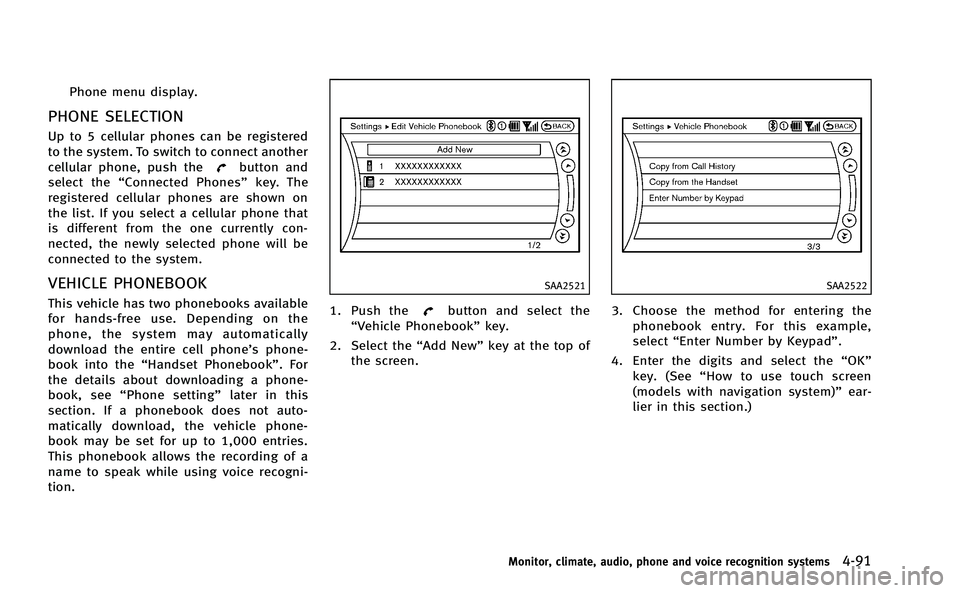
Phone menu display.
PHONE SELECTION
Up to 5 cellular phones can be registered
to the system. To switch to connect another
cellular phone, push the
button and
select the “Connected Phones” key. The
registered cellular phones are shown on
the list. If you select a cellular phone that
is different from the one currently con-
nected, the newly selected phone will be
connected to the system.
VEHICLE PHONEBOOK
This vehicle has two phonebooks available
for hands-free use. Depending on the
phone, the system may automatically
download the entire cell phone’s phone-
book into the “Handset Phonebook”. For
the details about downloading a phone-
book, see “Phone setting” later in this
section. If a phonebook does not auto-
matically download, the vehicle phone-
book may be set for up to 1,000 entries.
This phonebook allows the recording of a
name to speak while using voice recogni-
tion.
SAA2521
1. Push thebutton and select the
“Vehicle Phonebook” key.
2. Select the “Add New”key at the top of
the screen.
SAA2522
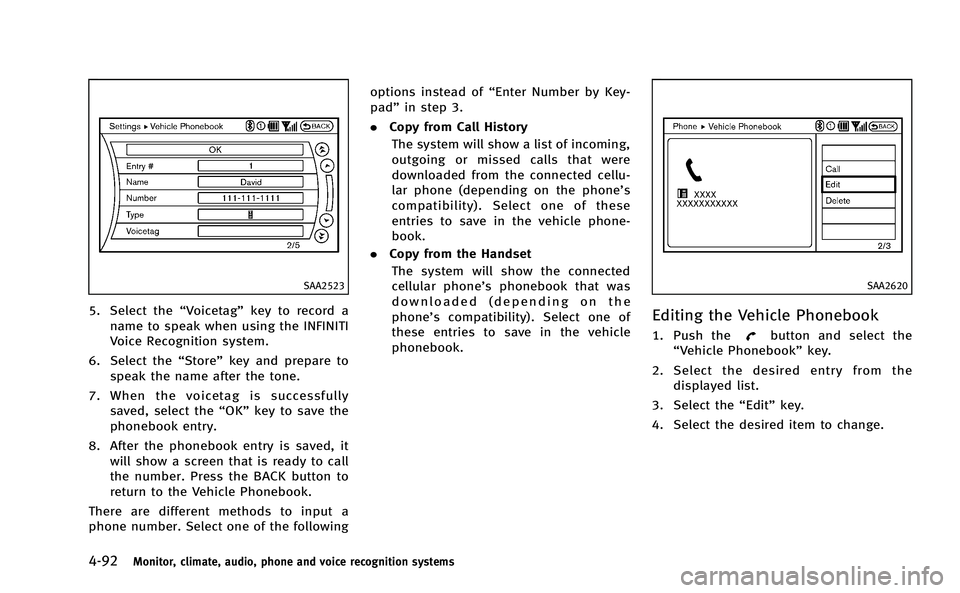
3. Choose the method for entering the
phonebook entry. For this example,
select “Enter Number by Keypad”.
4. Enter the digits and select the “OK”
key. (See “How to use touch screen
(models with navigation system)” ear-
lier in this section.)
Monitor, climate, audio, phone and voice recognition systems4-91
Page 279 of 530
4-92Monitor, climate, audio, phone and voice recognition systems
SAA2523
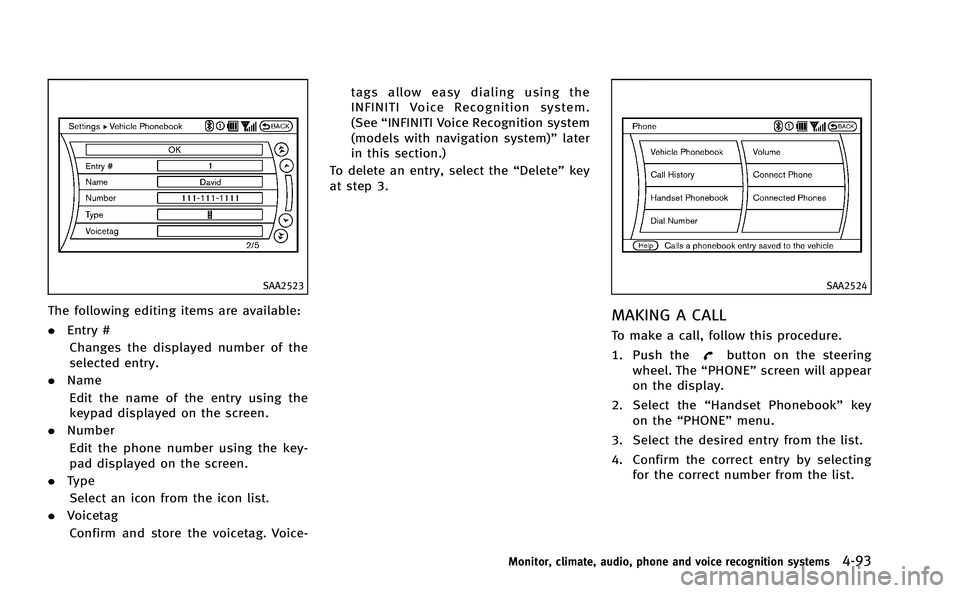
5. Select the“Voicetag”key to record a
name to speak when using the INFINITI
Voice Recognition system.
6. Select the “Store”key and prepare to
speak the name after the tone.
7. When the voicetag is successfully saved, select the “OK”key to save the
phonebook entry.
8. After the phonebook entry is saved, it will show a screen that is ready to call
the number. Press the BACK button to
return to the Vehicle Phonebook.
There are different methods to input a
phone number. Select one of the following options instead of
“Enter Number by Key-
pad” in step 3.
. Copy from Call History
The system will show a list of incoming,
outgoing or missed calls that were
downloaded from the connected cellu-
lar phone (depending on the phone’s
compatibility). Select one of these
entries to save in the vehicle phone-
book.
. Copy from the Handset
The system will show the connected
cellular phone’s phonebook that was
downloaded (depending on the
phone’s compatibility). Select one of
these entries to save in the vehicle
phonebook.
SAA2620
Editing the Vehicle Phonebook
1. Push thebutton and select the
“Vehicle Phonebook” key.
2. Select the desired entry from the displayed list.
3. Select the “Edit”key.
4. Select the desired item to change.
Page 280 of 530
SAA2523
The following editing items are available:
.Entry #
Changes the displayed number of the
selected entry.
. Name
Edit the name of the entry using the
keypad displayed on the screen.
. Number
Edit the phone number using the key-
pad displayed on the screen.
. Type
Select an icon from the icon list.
. Voicetag
Confirm and store the voicetag. Voice- tags allow easy dialing using the
INFINITI Voice Recognition system.
(See
“INFINITI Voice Recognition system
(models with navigation system)” later
in this section.)
To delete an entry, select the “Delete”key
at step 3.
SAA2524
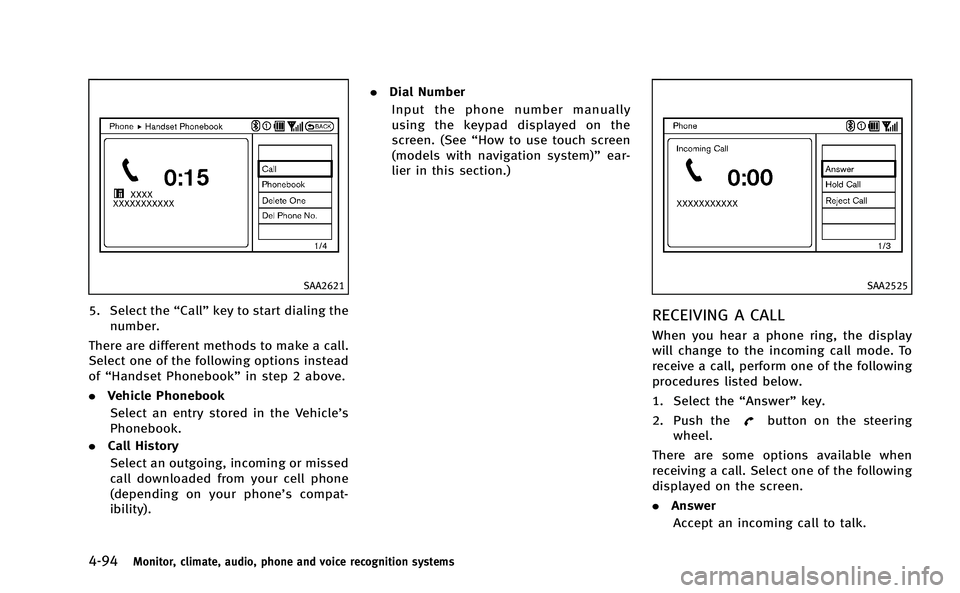
MAKING A CALL
To make a call, follow this procedure.
1. Push the
button on the steering
wheel. The “PHONE”screen will appear
on the display.
2. Select the “Handset Phonebook” key
on the “PHONE” menu.
3. Select the desired entry from the list.
4. Confirm the correct entry by selecting for the correct number from the list.
Monitor, climate, audio, phone and voice recognition systems4-93
Page 281 of 530
4-94Monitor, climate, audio, phone and voice recognition systems
SAA2621
5. Select the“Call”key to start dialing the
number.
There are different methods to make a call.
Select one of the following options instead
of “Handset Phonebook” in step 2 above.
. Vehicle Phonebook
Select an entry stored in the Vehicle’s
Phonebook.
. Call History
Select an outgoing, incoming or missed
call downloaded from your cell phone
(depending on your phone’s compat-
ibility). .
Dial Number
Input the phone number manually
using the keypad displayed on the
screen. (See “How to use touch screen
(models with navigation system)” ear-
lier in this section.)
SAA2525
RECEIVING A CALL
When you hear a phone ring, the display
will change to the incoming call mode. To
receive a call, perform one of the following
procedures listed below.
1. Select the “Answer”key.
2. Push the
button on the steering
wheel.
There are some options available when
receiving a call. Select one of the following
displayed on the screen.
. Answer
Accept an incoming call to talk.
Page 282 of 530
.Hold Call
Put an incoming call on hold.
. Reject Call
Reject an incoming call.
To finish the call, perform one of the
following procedures listed below.
1. Select the “Hang up”key.
2. Push the
button on the steering
wheel.
SAA3587
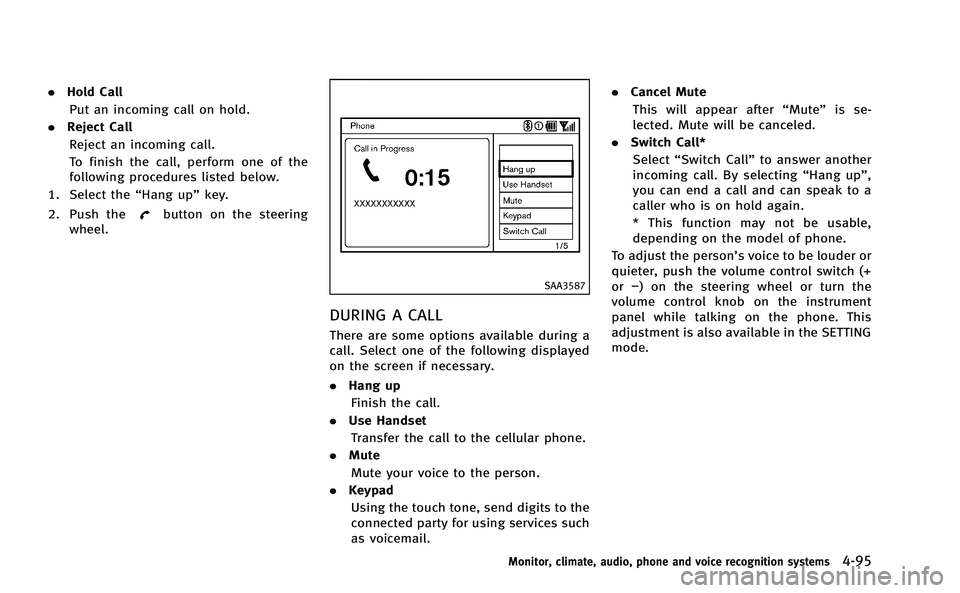
DURING A CALL
There are some options available during a
call. Select one of the following displayed
on the screen if necessary.
. Hang up
Finish the call.
. Use Handset
Transfer the call to the cellular phone.
. Mute
Mute your voice to the person.
. Keypad
Using the touch tone, send digits to the
connected party for using services such
as voicemail. .
Cancel Mute
This will appear after “Mute”is se-
lected. Mute will be canceled.
. Switch Call*
Select “Switch Call” to answer another
incoming call. By selecting “Hang up”,
you can end a call and can speak to a
caller who is on hold again.
* This function may not be usable,
depending on the model of phone.
To adjust the person’s voice to be louder or
quieter, push the volume control switch (+
or −) on the steering wheel or turn the
volume control knob on the instrument
panel while talking on the phone. This
adjustment is also available in the SETTING
mode.
Monitor, climate, audio, phone and voice recognition systems4-95
Page 286 of 530

person’s voice during a call.
. Immediately after the ignition switch is
pushed to the “ON”position, it may be
impossible to receive a call for a short
period of time.
. Do not place the cellular phone in an
area surrounded by metal or far away
from the in-vehicle phone module to
prevent tone quality degradation and
wireless connection disruption.
. While a cellular phone is connected
through the Bluetooth
®wireless con-
nection, the battery power of the
cellular phone may discharge quicker
than usual.
. If the Bluetooth
®Hands-Free Phone
System seems to be malfunctioning,
please contact an INFINITI retailer.
. Some cellular phones or other devices
may cause interference or a buzzing
noise to come from the audio system
speakers. Storing the device in a
different location may reduce or elim-
inate the noise.
. Refer to the cellular phone Owner’s
Manual regarding the telephone pairing
procedure specific to your phone,
battery charging, cellular phone anten-
na, etc. .
The antenna display on the monitor will
not coincide with the antenna display
of some cellular phones.
. Keep the interior of the vehicle as quiet
as possible to hear the caller ’s voice
clearly as well as to minimize its
echoes.
. If reception between callers is unclear,
adjusting the incoming or outgoing call
volume may improve the clarity.
. This wireless hands free car kit is based
on Bluetooth
®technology,
— Frequency: 2402 MHz - 2480 MHz
— Output Power: 4,14dBm E.I.R.P
— Modulation: FHSS GFSK 8DPSK, p/
4DQPSK
— Number of Channel: 79
— This wireless equipment can’tbe
used for any services related to
safety because there is the possibi-
lity of radio interference.
REGULATORY INFORMATION
FCC Regulatory information
. CAUTION: To maintain compliance with
FCC’s RF exposure guidelines, use only
the supplied antenna. Unauthorized
antenna, modification, or attachments
could damage the transmitter and may
violate FCC regulations.
. Operation is subject to the following
two conditions:
1) this device may not cause interfer- ence and
2) this device must accept any inter- ference, including interference that
may cause undesired operation of
the device
IC Regulatory information
.Operation is subject to the following
two conditions: (1) this device may not
cause interference, and (2) this device
must accept any interference, including
interference that may cause undesired
operation of the device.
. This Class B digital apparatus meets all
requirements of the Canadian Interfer-
ence-Causing Equipment Regulations.
Monitor, climate, audio, phone and voice recognition systems4-99
Page 290 of 530
2. The system replies“please say a
command after the beep. Available
commands are: Call, Phonebook, Re-
cent Calls, Connect Phone or Help”.
3. Give your instructions to the system by saying: “Dial John” for example (“John”
must have been previously set as a
voice tag for John’s phone number) or
“Dial One” if John is classified as one in
the phonebook.
If the system cannot understand your
command, repeat it according to the
recommendations mentioned in “How
to speak commands” earlier in this
section.
4. If the given name (voice tag) is correct, the phone system will dial the number
registered for “John”.
INFO
To end the voice command phase at any
stage of the procedure, push the
switch once in order to activate the cancel
command.
Manual command selection:
Commands can be selected manually.
While the commands are displayed on the
screen, select a command by operating the
Tune switch, and then push the
button. Once a command is manually
selected, the voice command function is
cancelled. To return to voice command
mode, push the
button to cancel the
current operation, and then perform the
first procedure of voice command.
Monitor, climate, audio, phone and voice recognition systems4-103
Page 291 of 530

4-104Monitor, climate, audio, phone and voice recognition systems
List of voice commands:
COMMANDACTION
“Call/Dial”“
“Call/Dial”“ Redial” Dials the last number.
“Call”“ Number”“
“Phonebook”“
“Phonebook”“ List Names” Displays all the names in the phonebook.
“Phonebook”“ Transfer Entry” Transfers the phonebook data to the system.
“Phonebook”“ Delete Entry” Deletes the phonebook registered in the system.
“Connect Phone”“ Add Phone” Connects a cellular phone to the system.
“Connect Phone”“ Select Phone” Selects a registered cellular phone.
“Connect Phone”“ Delete Phone” Deletes a registered cellular phone.
“Connect Phone”“ Bluetooth Off” Turns the Bluetooth
®connection off.
“Connect Phone”“ Replace Phone” Changes the registered order of the cellular phones.
“Connect Phone”“ Delete Phone”“All Phones” Deletes all registered cellular phones.
“Connect Phone”“ Delete Phone”“List Phones” Selects a registered cellular phone and deletes it.
Page 299 of 530

4-112Monitor, climate, audio, phone and voice recognition systems
and the transmission in Park.
3. Press the
button.
4. Speak: “Help”. The system acknowl-
edges the command and announces
the next set of available commands.
5. Speak: "Voice Adaptation". The system acknowledges the command and dis-
plays the voice adaptation mode
screen.
6. Voice memory A or memory B is selected automatically. If both memory
locations are already in use, the system
will prompt you to overwrite one.
Follow the instructions provided by
the system.
7. When preparation is complete and you are ready to begin, press the
button.
8. The voice adaptation mode will be explained. Follow the instructions pro-
vided by the system.
9. When training is finished, the system will tell you an adequate number of
phrases have been recorded.
10. The system will ask you to say your name. Follow the instructions to regis-
ter your name. 11. The system will announce that voice
adaptation has been completed and
the system is ready.
The voice adaptation mode will stop if:
. The
button is pressed in voice
adaptation mode.
. The vehicle is driven during voice
adaptation mode.
. The ignition switch is turned to the OFF
or LOCK position. INFINITI Voice Recognition allows hands-
free operation of the Phone, Navigation,
Information and Audio systems in one of
two modes, Standard Mode or Alternate
Command Mode.
In Standard Mode, commands that are
available are always shown on the display
and announced by the system. You can
complete your desired operation by simply
following the prompts given by the system.
(See
“INFINITI Voice Recognition standard
mode” later in this section for details.)
For advanced operation, you can use the
Alternate Command Mode. (See “INFINITI
Voice Recognition alternate command
mode” later in this section for details.)
When this mode is active, an expanded list
of commands can be spoken after pushing
the TALK
switch, and the voice
command menu prompts are turned off.
Review the expanded command list, which
is available when this mode is active. Note
that in this mode the recognition success
rate may be affected as the number of
available commands and the ways of
speaking each command are increased.
To switch one mode to another, see each
mode description later in this section.
To improve the recognition success rate
INFINITI VOICE RECOGNITION SYSTEM
(models with navigation system)
Page 300 of 530

when Alternate Command Mode is active,
try using the Speaker Adaptation Function
available in that mode. Otherwise, it is
recommended that Alternate Command
Mode be turned off and Standard Mode
be used for the best recognition perfor-
mance.
For the voice commands for the navigation
system, refer to the Navigation System
Owner’s Manual of your vehicle.
INFINITI VOICE RECOGNITION STAN-
DARD MODE
The following section is applicable when
the Standard Mode is activated.
The Standard Mode enables you to com-
plete the desired operation by simply
following the prompts that appear on the
display and also are announced by the
system.SAA3008
Activating Standard Mode
When the Alternate Command Mode is
active, perform the following steps to
switch to the Standard Mode.
1. Push the SETTING button on the instru-ment panel.
2. Select the “Others”key.
3. Select the “Voice Recognition” key.
SAA2530
4. Select the“Alternate Command Mode”
key.
5. The indicator turns off and the Stan- dard Mode activates.
Displaying user guide
If you use the INFINITI Voice Recognition
system for the first time or you do not
know how to operate it, you can display
the User Guide for confirmation.
You can confirm how to use voice com-
mands by accessing a simplified User
Guide, which contains basic instructions
and tutorials for several voice commands.
Monitor, climate, audio, phone and voice recognition systems4-113