phone INFINITI M-HEV 2013 Owners Manual
[x] Cancel search | Manufacturer: INFINITI, Model Year: 2013, Model line: M-HEV, Model: INFINITI M-HEV 2013Pages: 530, PDF Size: 3.71 MB
Page 323 of 530
4-136Monitor, climate, audio, phone and voice recognition systems
Repeat the command in a clear voice.
. Push the BACK button once to return to
the previous screen.
. If you want to cancel the command,
push and hold the TALK
switch for
1 second. The message “Voice can-
celed” will be announced.
. To skip the voice guidance function and
give the command immediately, press
the TALK
switch to interrupt the
system. Remember to speak after the
tone.
. If you want to adjust the volume of the
system feedback, push the volume
control switch (+ or −) on the steering
wheel or use the audio system volume
knob while the system is making an
announcement.
How to speak numbers:
INFINITI Voice Recognition requires a cer-
tain way to speak numbers when giving
voice commands. Refer to the following
examples.
General rule
Only single digits 0 (zero) to 9 can be used.
(For example, if you would like to say 500,
“five zero zero” can be used, but “five
hundred” cannot. Phone numbers
Speak phone numbers according to the
following examples:
.
1-800-662-6200
—“ Dial one eight zero zero six six two
six two zero zero.”
Note 1: For the best voice recognition
phone dialing results, say phone numbers
as single digits.
Note 2: You cannot say 555-6000 as “five
five five six thousands” .
Note 3: When speaking a house number,
speak the number “0”as“zero”. If the
letter “o (Oh)” is included in the house
number, it will not be recognized as the
number “0 (zero)” even if you speak “oh”
instead of “zero”. Please speak “zero”for
the number “0 (zero)”,“oh”for the letter
“o (oh)”.
Send digits using dial tone: . Press the TALK
switch during a
phone call.
. The menu will be launched and you will
be provided with the following gui-
dance: "Please say the digits to dial".
. After guidance, say the digits of the
number you want to send. After this, the digits that have been recognized
will be read out.
. If you press the ENTER button on the
steering wheel or on the INFINITI con-
troller, the selected digits will be sent.
Page 324 of 530

SAA2549
Speaker adaptation function (for
Alternate Command Mode)
The voice recognition system has a func-
tion to learn the user’s voice for better
voice recognition performance. The system
can memorize the voices of up to three
persons.
Having the system learn the user’s voice:
1. Push the SETTING button on the instru- ment panel and select the “Others”
key.
2. Select the “Voice Recognition” key.
3. Select the “Speaker Adaptation” key.
SAA2550
4. Select the user whose voice is memor-
ized by the system.
5. Select the “Start Speaker Adaptation
Learning” key.
SAA2551
6. Select a category to be learned by the
system from the following list.
.Phone Commands.Navigation Commands.Information Commands.Audio Commands.Help Commands
The voice commands in the category
are displayed.
7. Select a voice command and then push the ENTER button.
The voice recognition system starts.
Monitor, climate, audio, phone and voice recognition systems4-137
Page 325 of 530
4-138Monitor, climate, audio, phone and voice recognition systems
SAA2552
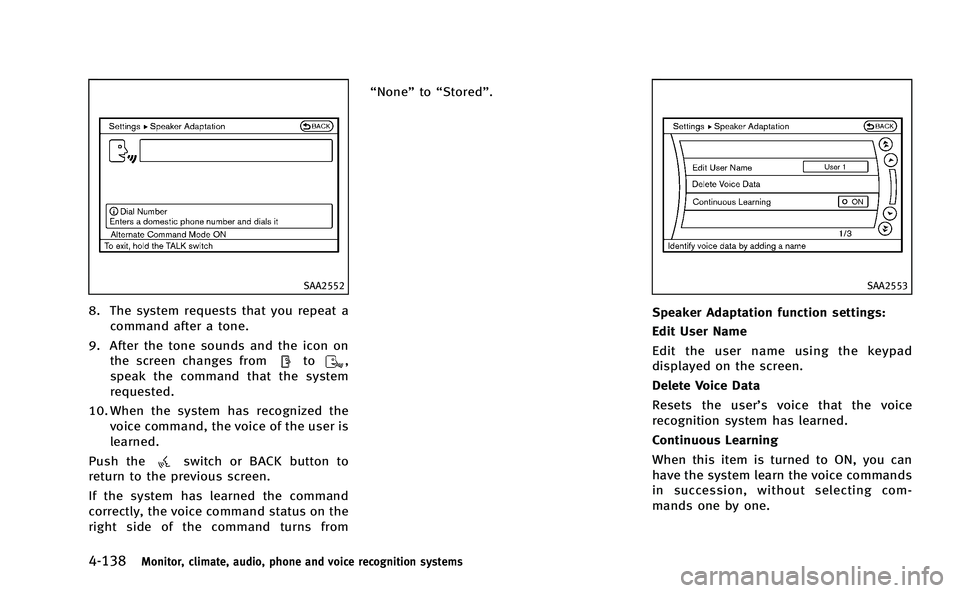
8. The system requests that you repeat acommand after a tone.
9. After the tone sounds and the icon on the screen changes from
to,
speak the command that the system
requested.
10. When the system has recognized the voice command, the voice of the user is
learned.
Push the
switch or BACK button to
return to the previous screen.
If the system has learned the command
correctly, the voice command status on the
right side of the command turns from “None”
to“Stored”.
SAA2553
Speaker Adaptation function settings:
Edit User Name
Edit the user name using the keypad
displayed on the screen.
Delete Voice Data
Resets the user’ s voice that the voice
recognition system has learned.
Continuous Learning
When this item is turned to ON, you can
have the system learn the voice commands
in succession, without selecting com-
mands one by one.
Page 326 of 530

Minimize voice feedback (for Alter-
nate Command Mode)
To minimize the voice feedback from the
system, perform the following steps.
1. Push the SETTING button on the instru-ment panel.
2. Select the “Others”key.
3. Select the “Voice Recognition” key.
4. Select the “Minimize Voice Feedback”
key.
5. The setting is turned to ON and the voice guidance will now be reduced
when using the Voice Recognition
system.
Monitor, climate, audio, phone and voice recognition systems4-139
Page 327 of 530

4-140Monitor, climate, audio, phone and voice recognition systems
TROUBLESHOOTING GUIDE
The system should respond correctly to all voice commands without difficulty. If problems are encountered, follow the solutions given in
this guide for the appropriate error.
Where the solutions are listed by number, try each solution in turn, starting with number one, until the problem is resolved.
Symptom/error messageSolution
The system fails to interpret the command correctly. 1. Ensure that the command format is valid, see“Command List”earlier in this section.
2. Speak clearly without pausing between words and at a level appropriate to the ambient noise level.
3. Ensure that the ambient noise level is not excessive, for example, windows open or defrost on.
NOTE:
If it is too noisy to use the phone, it is likely that voice commands will not be recognized.
4. If optional words of the command have been omitted, then the command should be tried with these in place.
The system consistently selects the wrong voicetag in
the phonebook. 1. Ensure that the voicetag requested matches what was originally stored. (See
“Bluetooth
®Hands-Free Phone
System (models with navigation system)” earlier in this section; page 4-88.)
2. Replace one of the voicetags being confused with a different voicetag.
Page 332 of 530

and it is the driver’s responsibility to
maintain correct tire pressure, even if
under-inflation has not reached the level
to trigger illumination of the TPMS low tire
pressure telltale.
Your vehicle has also been equipped with a
TPMS malfunction indicator to indicate
when the system is not operating properly.
The TPMS malfunction indicator is com-
bined with the low tire pressure telltale.
When the system detects a malfunction,
the telltale will flash for approximately one
minute and then remain continuously
illuminated. This sequence will continue
upon subsequent vehicle start-ups as long
as the malfunction exists. When the mal-
function indicator is illuminated, the sys-
tem may not be able to detect or signal low
tire pressure as intended. TPMS malfunc-
tions may occur for a variety of reasons,
including the installation of replacement or
alternate tires or wheels on the vehicle that
prevent the TPMS from functioning prop-
erly. Always check the TPMS malfunction
telltale after replacing one or more tires or
wheels on your vehicle to ensure that the
replacement or alternate tires and wheels
allow the TPMS to continue to function
properly.Additional information
. The TPMS does not monitor the tire
pressure of the spare tire.
. The TPMS will activate only when the
vehicle is driven at speeds above 16
MPH (25 km/h). Also, this system may
not detect a sudden drop in tire
pressure (for example a flat tire while
driving).
. The low tire pressure warning light does
not automatically turn off when the tire
pressure is adjusted. After the tire is
inflated to the recommended pressure,
the vehicle must be driven at speeds
above 16 MPH (25 km/h) to activate the
TPMS and turn off the low tire pressure
warning light. Use a tire pressure gauge
to check the tire pressure.
. The CHECK TIRE PRESSURE warning
appears in the dot matrix liquid crystal
display when the low tire pressure
warning light is illuminated and low
tire pressure is detected. The CHECK
TIRE PRESSURE warning turns off when
the low tire pressure warning light
turns off. The CHECK TIRE PRESSURE
warning does not appear if the tire
pressure warning light illuminates to
indicate a TPMS malfunction. .
Tire pressure rises and falls depending
on the heat caused by the vehicle’s
operation and the outside temperature.
Low outside temperature can lower the
temperature of the air inside the tire
which can cause a lower tire inflation
pressure. This may cause the low tire
pressure warning light to illuminate. If
the warning light illuminates in low
ambient temperature, check the tire
pressure for all four tires.
. You can also check the pressure of all
tires (except the spare tire) on the
display screen. The order of the tire
pressure figures displayed on the
screen does not correspond with the
actual order of the tire position. See
“TIRE PRESSURE information” in the“4.
Monitor, climate, audio, phone and
voice recognition systems” section.
For additional information, see “Low tire
pressure warning light” in the“2. Instru-
ments and controls” section and“Tire
Pressure Monitoring System (TPMS) ”in
the “6. In case of emergency” section.
Starting and driving5-5
Page 340 of 530

1. Apply the parking brake.
2. Move the shift selector to P (Park)position.
The INFINITI Direct Response Hybrid
TM
System is designed not to operate if
the shift selector is not in the P (Park)
position.
3. Depress the brake pedal and push the ignition switch to start the hybrid
system. The READY to drive indicator
light will illuminate on the meter.
When starting the hybrid system at
very low outside temperatures, the
READY to drive indicator light will flash
and it may take longer for the READY to
drive indicator light to illuminate.
. The hybrid system may not start even
with the READY to drive indicator light
illuminated. Once the READY to drive
indicator light is illuminated you may
begin driving the vehicle.
. You may hear a sound in the engine
compartment when the brake pedal is
depressed with the hybrid system off.
This does not indicate a problem.
NOTE:
Care should be taken to avoid situations
that can lead to potential 12-volt battery discharge and potential no-start condi-
tions such as:
1.
Installation or extended use of electro-
nic accessories that consume 12-volt
battery power when the engine is not
running (Phone chargers, GPS, DVD
players, etc.)
2. Vehicle is not driven regularly and/or
only driven short distances.
In these cases, the 12-volt battery may
need to be charged to maintain 12-volt
battery health.
AUTOMATIC TRANSMISSION
The automatic transmission in your vehicle
is electronically controlled by a transmis-
sion control module to produce maximum
efficiency and smooth operation.
Shown on the following pages are the
recommended operating procedures for
this transmission. Follow these procedures
for maximum vehicle performance and
driving enjoyment.
Starting the vehicle
After starting the INFINITI Direct Response
HybridTMSystem, fully depress the foot
brake pedal and push the selector lever
button before shifting the selector lever to
the R (Reverse), N (Neutral), D (Drive) or
Manual shift mode position. Be sure the
vehicle is fully stopped before attempting
to shift the selector lever.
This automatic transmission model is
designed so that the foot brake pedal
must be depressed before shifting from P
(Park) to any drive position while the
ignition switch position is ON.
The selector lever cannot be moved out of
the P (Park) position and into any of the
other gear positions if the ignition switch
is pushed to the LOCK, OFF or ACC
Starting and driving5-13
STARTING THE INFINITI DIRECT RESPONSE
HYBRIDTMSYSTEM DRIVING THE VEHICLE
Page 419 of 530

5-92Starting and driving
the tone will sound continuously.
Keep the corner/center sonar (located on
the bumper fascia) free from snow, ice and
large accumulations of dirt (do not clean
the sonar with sharp objects). If the sonar
is covered, it will affect the accuracy of the
sonar system.
The sensitivity level of the corner/center
sonar can be adjusted (higher or lower) in
the SONAR setting display. (See“How to
use SETTING button” in the“Monitor,
climate, audio, phone and voice recogni-
tion systems” for the“Sonar” settings.)
SSD0928
*1Rear view monitor display
*ACorner sonar indicator
*BCenter sonar indicator
SONAR INDICATOR
With the “Sonar Display” key ON in the
“Sonar” settings, when the corner/center
sonar detects obstacles near the bumper, a
tone will sound and the sonar indicator will
appear in the center display. When the rear
view monitor is displayed, the sonar
indicator will appear in the upper corner
of the display
*1.
The sonar indicators
*Aand*Bindicate
the position of the object and the distance to the object with its color and rate of
blinking.
When an object is detected, the indicator
(green) appears and blinks (the tone
sounds intermittently). When the vehicle
moves closer to the object, the color of the
indicator turns yellow and the rate of
blinking increases (the rate of the tone
increases). When the bumper is very close
to the object, less than 11.8 in (30 cm)
away, the indicator stops blinking and
turns red (the tone sounds continuously).
When the rear view monitor is displayed,
the colors of the sonar indicator and the
distance guide lines in the rear view
indicate different distances to the object.
The sonar indicator can be turned off in the
SONAR setting display. (See
“How to use
SETTING button” in the“Monitor, climate,
audio, phone and voice recognition sys-
tems” for the “Sonar” settings.) When the
sonar indicator is off, only a tone sounds
when the sonar detects obstacles.
Page 430 of 530

depending on outside temperatures, to
properly warm the engine coolant. Use
an appropriate timer to turn the engine
block heater on.
6. Before turning the hybrid system ON, unplug and properly store the cord to
keep it away from moving parts.
WARNING
. Do not use your engine block heater with
an ungrounded electrical system or a 2-
pronged adapter. You can be seriously
injured by an electrical shock if you use
an ungrounded connection.
. Disconnect and properly store the en-
gine block heater cord before turning the
hybrid system ON. Damage to the cord
could result in an electrical shock and
can cause serious injury.
. Use a heavy-duty 3-wire, 3-pronged
extension cord rated for at least 10A.
Plug the extension cord into a Ground
Fault Interrupt (GFI) protected, grounded
110-VAC outlet. Failure to use the proper
extension cord or a grounded outlet can
result in a fire or electrical shock and
cause serious personal injury.
SAA3004
This system uses microphones*1located
inside the vehicle to detect engine boom-
ing sound. The system then automatically
produces a muted engine booming sound
through the speakers
*2and woofer*3(if
so equipped) to reduce engine booming sound.
NOTE:
To operate the active noise control system
properly:
.
Do not cover the speakers or woofer.
Starting and driving5-103
ACTIVE NOISE CONTROL
Page 431 of 530

5-104Starting and driving
.Do not cover the microphones.
. Do not change or modify speakers
including the woofer and any audio
related parts such as the amplifier.
. Do not make any modification including
sound deadening or modifications
around the microphones or speakers.