wheel INFINITI M-HEV 2013 User Guide
[x] Cancel search | Manufacturer: INFINITI, Model Year: 2013, Model line: M-HEV, Model: INFINITI M-HEV 2013Pages: 530, PDF Size: 3.71 MB
Page 86 of 530

2 Instruments and controls
Cockpit................................................................ 2-3
Instrument panel ................................................. 2-5
Meters and gauges .............................................. 2-6
Speedometer and odometer ............................ 2-7
Tachometer...................................................... 2-8
Assist charge gauge ........................................ 2-8
Fuel gauge ...................................................... 2-8
Warning/indicator lights and
audible reminders ............................................. 2-10 Checking bulbs.............................................. 2-11
Warning lights ............................................... 2-11
Indicator lights .............................................. 2-17
Audible reminders ......................................... 2-20
Dot matrix liquid crystal display ........................ 2-21 Operational indicators ................................... 2-24
Maintenance indicators ................................. 2-27
Trip computer ................................................ 2-29
Security systems ............................................... 2-33 Vehicle Security System ................................ 2-34
INFINITI Vehicle Immobilizer System .............. 2-35
Windshield wiper and washer switch ................. 2-36 Rain-sensing auto wiper system .................... 2-38
Rear window and outside mirror
defroster switch ................................................. 2-39
Headlight and turn signal switch ....................... 2-39 Xenon headlights......................................... 2-39
Headlight switch .......................................... 2-40
Turn signal switch........................................ 2-44
Fog light switch ........................................... 2-44
Hazard warning flasher switch .......................... 2-45
Heated steering wheel (if so equipped) ............. 2-45
Horn ................................................................. 2-46
Heated seats (if so equipped) ........................... 2-46
Climate controlled seats (if so equipped) .......... 2-48
Warning systems switch (if so equipped) .......... 2-49
Intelligent Brake Assist (IBA) OFF switch (if
so equipped)..................................................... 2-49
Vehicle Dynamic Control (VDC) OFF switch ......... 2-50
Clock................................................................. 2-51 Adjusting the time ....................................... 2-51
Power outlet ..................................................... 2-51
Cigarette lighter and ashtrays ........................... 2-52 Front............................................................ 2-52
Rear............................................................. 2-53
Storage ............................................................. 2-53
Cup holders ................................................. 2-53
Sunglasses holder ...................................... 2-54
Glove box .................................................... 2-55
Console box................................................. 2-55
Card holder.................................................. 2-56
Page 88 of 530
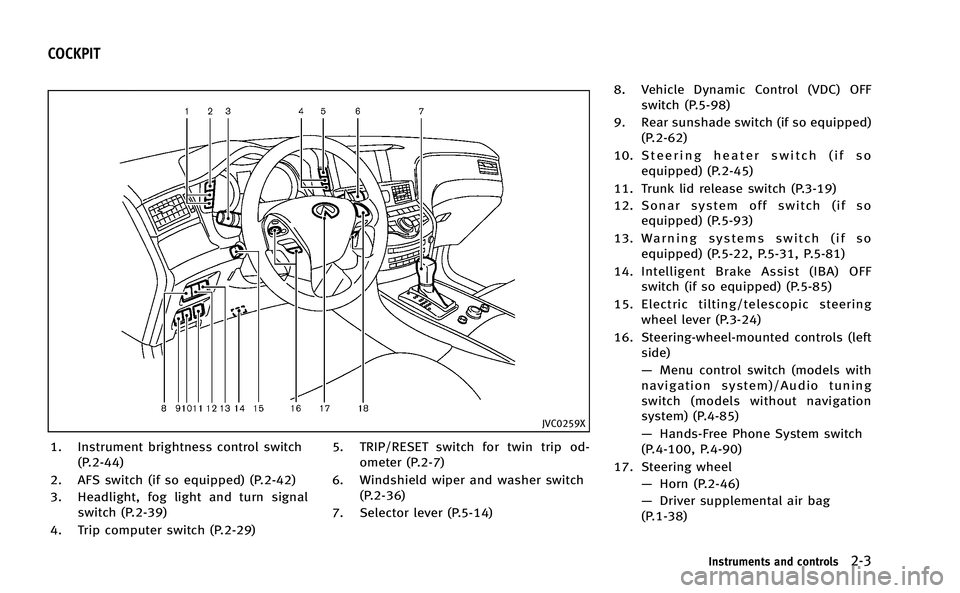
JVC0259X
1. Instrument brightness control switch(P.2-44)
2. AFS switch (if so equipped) (P.2-42)
3. Headlight, fog light and turn signal switch (P.2-39)
4. Trip computer switch (P.2-29) 5. TRIP/RESET switch for twin trip od-
ometer (P.2-7)
6. Windshield wiper and washer switch (P.2-36)
7. Selector lever (P.5-14) 8. Vehicle Dynamic Control (VDC) OFF
switch (P.5-98)
9. Rear sunshade switch (if so equipped) (P.2-62)
10. Steering heater switch (if so equipped) (P.2-45)
11. Trunk lid release switch (P.3-19)
12. Sonar system off switch (if so equipped) (P.5-93)
13. Warning systems switch (if so equipped) (P.5-22, P.5-31, P.5-81)
14. Intelligent Brake Assist (IBA) OFF switch (if so equipped) (P.5-85)
15. Electric tilting/telescopic steering wheel lever (P.3-24)
16. Steering-wheel-mounted controls (left side)
—Menu control switch (models with
navigation system)/Audio tuning
switch (models without navigation
system) (P.4-85)
— Hands-Free Phone System switch
(P.4-100, P.4-90)
17. Steering wheel —Horn (P.2-46)
— Driver supplemental air bag
(P.1-38)
Instruments and controls2-3
COCKPIT
Page 89 of 530
2-4Instruments and controls
—Heated steering wheel (if so
equipped) (P.2-45)
18. Steering-wheel-mounted controls (right side)
—Cruise control switches (P.5-44)
— Intelligent Cruise Control (ICC)
switches (if so equipped) (P.5-46)
— Dynamic driver assistance switch
(if so equipped) (P.5-22, P.5-31,
P.5-68)
Page 99 of 530

2-14Instruments and controls
by warranty. Turn off the engine as soon as
it is safe to do so.
High temperature warning
light
When the ignition switch is in the ON
position, the high temperature warning
light illuminates and then turns off. This
indicates that the high temperature sensor
in the engine coolant system is opera-
tional.
CAUTION
If the high temperature warning light
illuminates when the ignition switch is in
the ON position, it may indicate the engine
temperature is extremely high.
Stop the vehicle safety as soon as possible.
If the vehicle is overheated, continuing
vehicle operation may seriously damage
the engine. (See “If your vehicle overheats”
in the “6. In case of emergency” section for
the immediate action required.)
Hybrid EPS (Electrical Power
Steering) warning light
When the ignition switch is in the ON
position, the Hybrid EPS (Electrical Power
Steering) warning light illuminates. After
starting the hybrid system, the Hybrid EPS
warning light turns off. This indicates that
the electrical power steering system is
operational.
If the Hybrid EPS warning light illuminates
while the hybrid system is running, it may
indicates the Hybrid EPS system is not
functioning properly and may need servi-
cing. Have the Hybrid EPS system checked
by an INFINITI retailer.
When the Hybrid EPS warning light illumi-
nates with the hybrid system running, the
power assist to the steering will cease
operation but you will still have control of
the vehicle. At this time, greater steering
efforts are required to operate the steering
wheel, especially in sharp turns and at low
speeds. However, if the steering wheel
operation is still performed, the Hybrid EPS
may stop and the Hybrid EPS warning light
will illuminate. Place the ignition switch in
the OFF position. For a while after it
refrains from the steering wheel control,
the temperature of the Hybrid EPS system will go down and the power assist level will
return to normal after starting the hybrid
system. The Hybrid EPS warning light will
go off.
Intelligent Cruise Control (ICC)
system warning light (orange; if so
equipped)
This light comes on if there is a malfunc-
tion in the Intelligent Cruise Control (ICC)
system.
If the warning light comes on, park the
vehicle in a safe place. Stop the hybrid
system, restart the hybrid system, resume
driving and set the ICC system again.
If it is not possible to set the system or the
indicator stays on, it may indicate that the
system is malfunctioning. Although the
vehicle is still driveable under normal
conditions, have the vehicle checked at
an INFINITI retailer.
Lane departure warning light
(orange; if so equipped)
When the ignition switch is pushed to the
ON position, the light will come on in
orange, turn green, and then turn off. This
indicates that the Lane Departure Warning
(LDW) and Lane Departure Prevention (LDP)
Page 101 of 530

2-16Instruments and controls
stop the vehicle as soon as possible.
Driving with under-inflated tires may
permanently damage the tires and in-
crease the likelihood of tire failure.
Serious vehicle damage could occur
and may lead to an accident and could
result in serious personal injury. Check
the tire pressure for all four tires. Adjust
the tire pressure to the recommended
COLD tire pressure shown on the Tire
and Loading Information label to turn
the low tire pressure warning light OFF. If
the light still illuminates while driving
after adjusting the tire pressure, a tire
may be flat. If you have a flat tire,
replace it with a spare tire as soon as
possible.
. When a spare tire is mounted or a wheel
is replaced, the TPMS will not function
and the low tire pressure warning light
will flash for approximately 1 minute.
The light will remain on after the 1
minute. Contact your INFINITI retailer as
soon as possible for tire replacement
and/or system resetting.
. Replacing tires with those not originally
specified by INFINITI could affect the
proper operation of the TPMS.CAUTION
.The TPMS is not a substitute for the
regular tire pressure check. Be sure to
check the tire pressure regularly.
. If the vehicle is being driven at speeds of
less than 16 MPH (25 km/h), the TPMS
may not operate correctly.
. Be sure to install the specified size of
tires to the four wheels correctly.
Master warning light
When the ignition switch is in the ON
position, the master warning light illumi-
nates if any of the following are displayed
on the dot matrix liquid crystal display:
.No key warning
. Low fuel warning
. Low washer fluid warning
. Parking brake release warning
. Door/trunk open warning
. Loose fuel cap warning
. Check tire pressure warning
. Intelligent Key system warning
. SHIFT “P”warning .
Hybrid system over heat warning
See “Dot matrix liquid crystal display” later
in this section.
Preview Function warning light
(orange; if so equipped)
The light comes on if there is a malfunction
in the Brake Assist (with Preview Function)
system.
If the warning light comes on, park the
vehicle in a safe place. Stop the hybrid
system, restart the hybrid system, then
resume driving.
If the indicator stays on, it may indicate
that the system is malfunctioning.
Although the vehicle is still driveable
under normal conditions, have the vehicle
checked at an INFINITI retailer.
Seat belt warning light and
chime
The light and chime remind you to fasten
seat belts. The light illuminates whenever
the ignition switch is pushed to the ON
position, and will remain illuminated until
the driver’s seat belt is fastened. At the
same time, the chime will sound for about
6 seconds unless the driver’s seat belt is
securely fastened.
Page 109 of 530

2-24Instruments and controls
OPERATIONAL INDICATORS
1. Hybrid system start operation
indicator
This indicator appears when the selector
lever is in the P (Park) position.
This indicator means that the hybrid
system will start by pushing the ignition
switch with the brake pedal depressed. You
can start the hybrid system directly from
any ignition switch position.
2. Steering lock release malfunc-
tion indicator (if so equipped)
This indicator appears when the steering
wheel cannot be released from the LOCK
position.
If this indicator appears, push the push-
button ignition switch while lightly turning
the steering wheel right and left.
3. NO KEY warning
This warning appears in either of the
following conditions.
No key inside the vehicle:
The warning appears when the door is
closed with the Intelligent Key left outside
the vehicle and the ignition switch in the
ACC or ON position. Make sure that theIntelligent Key is inside the vehicle.
Unregistered Intelligent Key:
The warning appears when the ignition
switch is pushed from the LOCK position
and the Intelligent Key cannot be recog-
nized by the system. You cannot start the
hybrid system with an unregistered key.
Use the registered Intelligent Key.
See “Intelligent Key system” in the“3. Pre-
driving checks and adjustments” section
for more details.
4. SHIFT “P”warning
This will be displayed in the following
conditions.
.When the selector lever is in any
position except P (Park) and the push
button ignition switch has been placed
in the OFF position from the ON
position.
. When the selector lever is operated
while the READY to drive indicator light
is flashing.
. The driver’s door is opened with the
shift selector in “N”,“D”or“R”.
. When the vehicle cannot be driven
because the hybrid system temperature
has become too high. .
When the selector lever is in the “N”
position and level of remaining charge
in the Litium-ion (Li-ion) battery is low.
. When the engine stops due to sudden
deceleration on a cold winter day.
. If a malfunction occurs in a situation
other than those described above and
the engine cannot start automatically.
When this warning appears, place the
selector lever in the P (Park) position.
When the Shift “P”warning appears, a
buzzer will sound.
This will turn off in the following condi-
tions.
. When the selector lever has been
placed in the P (Park) position.
. When the push button ignition switch
has been pushed to ON.
5. “PUSH” warning
This warning appears when the selector
lever is moved to the P (Park) position with
the ignition switch in the ACC position after
the SHIFT “P”warning appears.
To push the ignition switch to the OFF
position, perform the following procedure:
. SHIFT “P”warning ?(Move the selec-
tor lever to “P”)?PUSH warning ?
Page 112 of 530

“Intelligent Cruise Control (ICC) system”in
the “5. Starting and driving” section.)
20. Distance Control Assist (DCA)
system switch indicator (if so
equipped)
The indicator is displayed when the Dis-
tance Control Assist (DCA) system switch is
pushed on. When the switch is pushed
again, the indicator disappears. While the
indicator is displayed, the DCA system is
operational. (See“Distance Control Assist
(DCA) system” in the“5. Starting and
driving” section.)
21. INFINITI Drive Mode Selector
indicator
When a driving mode is selected, the
selected mode indicator is displayed for
approximately 2 seconds.
.STANDARD
. SPORT
. ECO
. SNOW
(See “INFINITI drive mode selector” in the
“5. Starting and driving” section.)
SIC4325
MAINTENANCE INDICATORS
1. Engine oil replacement indicator
This indicator appears when the customer
set time comes for changing the engine oil.
You can set or reset the distance for
changing the engine oil. (See “Trip compu-
ter” later in this section.)
2. Oil filter replacement indicator
This indicator appears when the customer
set time comes for replacing the oil filter.
You can set or reset the distance for
replacing the oil filter. (See “Trip compu-
ter” later in this section.)
3. Tire replacement indicator
This indicator appears when the customer
set distance comes for replacing tires. You
can set or reset the distance for replacing
tires. (See “Trip computer” later in this
section.)
WARNING
The tire replacement indicator is not a
substitute for regular tire checks, including
tire pressure checks. See “Changing wheels
and tires” in the“8. Maintenance and do-it-
Instruments and controls2-27
Page 127 of 530

2-42Instruments and controls
.Never leave the light switch on when the
hybrid system is not running for a
periods of time even if the headlights
turn off automatically.
Daytime running light system (Ca-
nada only)
The daytime running lights automatically
illuminate when the hybrid system is
started with the parking brake released.
The daytime running lights operate with
the headlight switch in the OFF position or
in the
position. Turn the headlight
switch to theposition for full illumina-
tion when driving at night.
If the parking brake is applied before the
hybrid system is started, the daytime
running lights do not illuminate. The day-
time running lights illuminate once the
parking brake is released. The daytime
running lights will remain on until the
ignition switch is pushed to the OFF
position.
Adaptive Front lighting System
(AFS) (if so equipped)
The Adaptive Front lighting System (AFS)
will automatically adjust the headlights (low beam) toward the turning direction to
improve the driver’s view. When the head-
light switch is ON and the driver operates
the steering wheel in a turn, the AFS
system will be activated.
The AFS will operate:
.
Right-side headlight
— When the headlight switch is ON
— When the selector lever is in any
position other than P (Park) or R
(Reverse)
— When the steering wheel is turned
clockwise
. Left-side headlight
— When the headlight switch is ON
— When the selector lever is in any
position other than P (Park) or R
(Reverse)
— When the vehicle is driven at a
speed above 16 MPH (25km/h).
However, when the vehicle’s speed
decreases below 3 MPH (5 km/h) it
will stop.
— When the steering wheel is turned
counterclockwise
SIC4333
To turn the AFS off, push the AFS switch.
(The AFS OFF indicator light will illuminate.)
Push the switch again to turn the system
on again.
AFS will also adjust the headlight to a
proper axis automatically, depending on
the number of occupants in the vehicle, the
load the vehicle is carrying and the road
conditions.
If the AFS OFF indicator light blinks after
the ignition switch has been pushed to the
ON position, this may indicate that the AFS
is not functioning properly. Have the
system checked by an INFINITI retailer.
When the hybrid system is started, the
Page 130 of 530
SIC2574
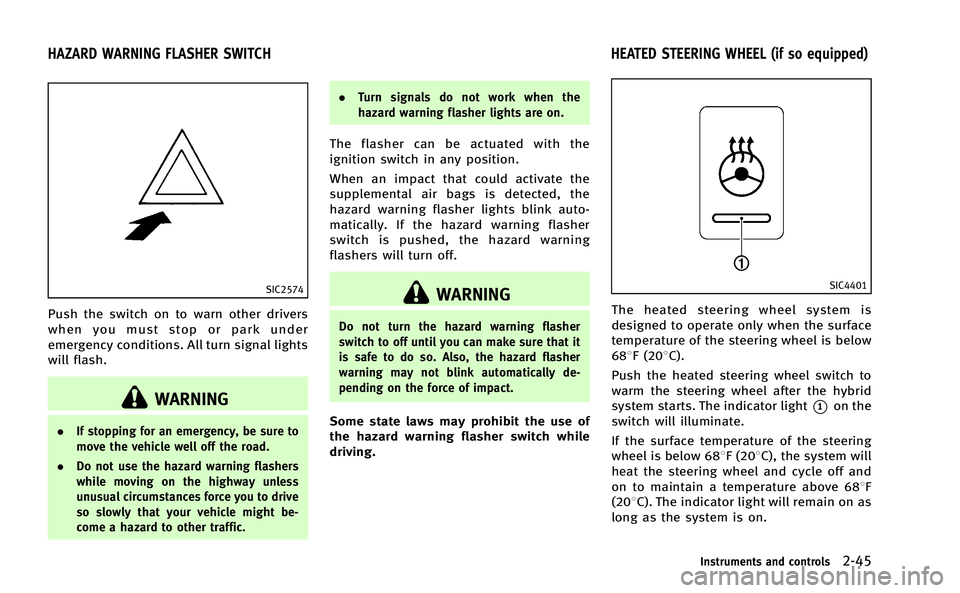
Push the switch on to warn other drivers
when you must stop or park under
emergency conditions. All turn signal lights
will flash.
WARNING
.If stopping for an emergency, be sure to
move the vehicle well off the road.
. Do not use the hazard warning flashers
while moving on the highway unless
unusual circumstances force you to drive
so slowly that your vehicle might be-
come a hazard to other traffic. .
Turn signals do not work when the
hazard warning flasher lights are on.
The flasher can be actuated with the
ignition switch in any position.
When an impact that could activate the
supplemental air bags is detected, the
hazard warning flasher lights blink auto-
matically. If the hazard warning flasher
switch is pushed, the hazard warning
flashers will turn off.
WARNING
Do not turn the hazard warning flasher
switch to off until you can make sure that it
is safe to do so. Also, the hazard flasher
warning may not blink automatically de-
pending on the force of impact.
Some state laws may prohibit the use of
the hazard warning flasher switch while
driving.
SIC4401
The heated steering wheel system is
designed to operate only when the surface
temperature of the steering wheel is below
688F (208C).
Push the heated steering wheel switch to
warm the steering wheel after the hybrid
system starts. The indicator light
*1on the
switch will illuminate.
If the surface temperature of the steering
wheel is below 688F (208C), the system will
heat the steering wheel and cycle off and
on to maintain a temperature above 688F
(208C). The indicator light will remain on as
long as the system is on.
Instruments and controls2-45
HAZARD WARNING FLASHER SWITCH HEATED STEERING WHEEL (if so equipped)
Page 131 of 530
2-46Instruments and controls
Push the switch again to turn the heated
steering wheel system off manually. The
indicator light will turn off.
NOTE:
If the surface temperature of the steering
wheel is above 688F (208C) when the
switch is turned on, the system will not
heat the steering wheel. This is not a
malfunction.
SIC4332
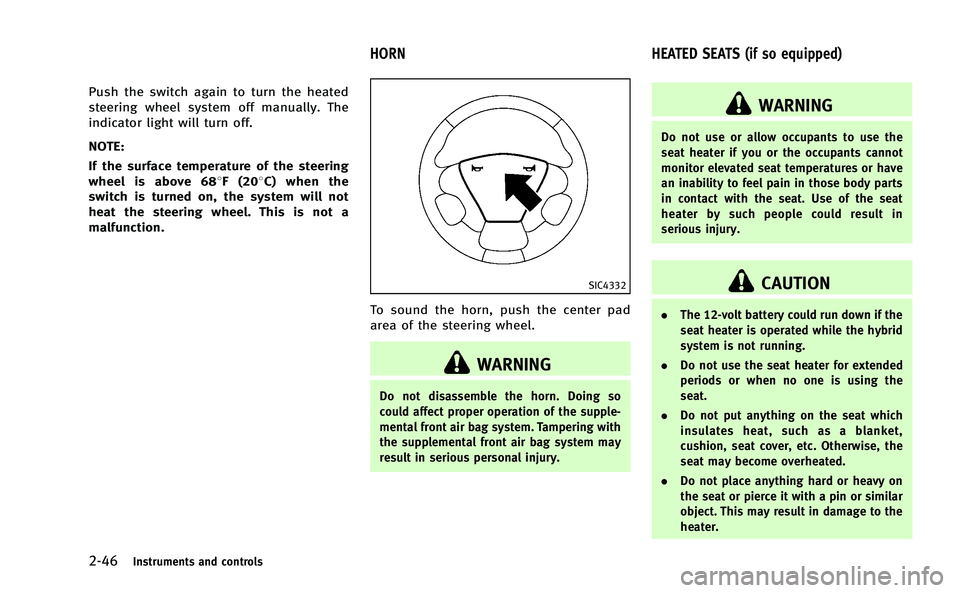
To sound the horn, push the center pad
area of the steering wheel.
WARNING
Do not disassemble the horn. Doing so
could affect proper operation of the supple-
mental front air bag system. Tampering with
the supplemental front air bag system may
result in serious personal injury.
WARNING
Do not use or allow occupants to use the
seat heater if you or the occupants cannot
monitor elevated seat temperatures or have
an inability to feel pain in those body parts
in contact with the seat. Use of the seat
heater by such people could result in
serious injury.
CAUTION
. The 12-volt battery could run down if the
seat heater is operated while the hybrid
system is not running.
. Do not use the seat heater for extended
periods or when no one is using the
seat.
. Do not put anything on the seat which
insulates heat, such as a blanket,
cushion, seat cover, etc. Otherwise, the
seat may become overheated.
. Do not place anything hard or heavy on
the seat or pierce it with a pin or similar
object. This may result in damage to the
heater.
HORN HEATED SEATS (if so equipped)