seats INFINITI M-HEV 2013 Repair Manual
[x] Cancel search | Manufacturer: INFINITI, Model Year: 2013, Model line: M-HEV, Model: INFINITI M-HEV 2013Pages: 530, PDF Size: 3.71 MB
Page 132 of 530
.Any liquid spilled on the heated seat
should be removed immediately with a
dry cloth.
. When cleaning the seat, never use
gasoline, thinner, or any similar materi-
als.
. If any malfunctions are found or the
heated seat does not operate, turn the
switch off and have the system checked
by an INFINITI retailer.
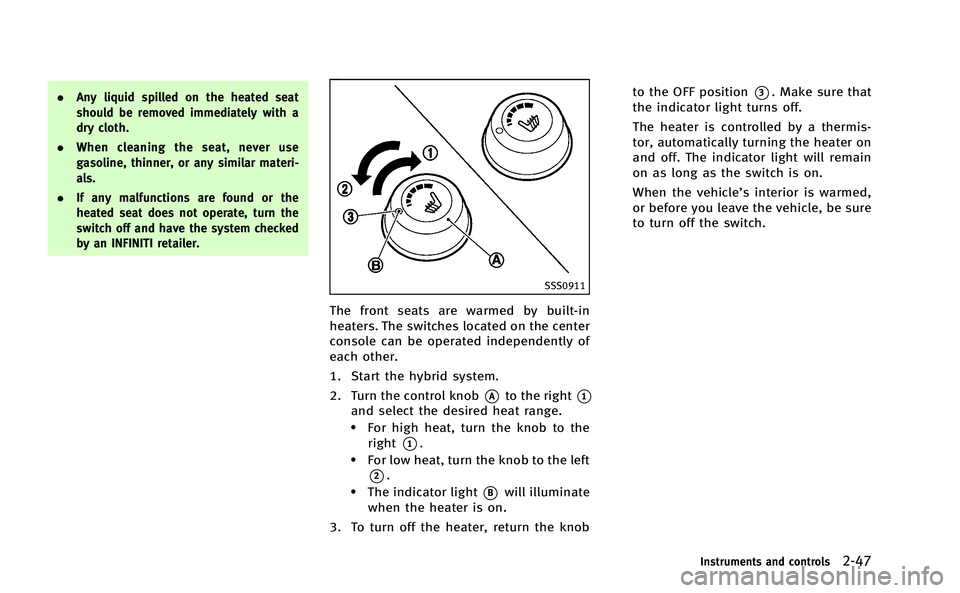
SSS0911
The front seats are warmed by built-in
heaters. The switches located on the center
console can be operated independently of
each other.
1. Start the hybrid system.
2. Turn the control knob
*Ato the right*1
and select the desired heat range..For high heat, turn the knob to the
right
*1..For low heat, turn the knob to the left
*2..The indicator light*Bwill illuminate
when the heater is on.
3. To turn off the heater, return the knob to the OFF position
*3. Make sure that
the indicator light turns off.
The heater is controlled by a thermis-
tor, automatically turning the heater on
and off. The indicator light will remain
on as long as the switch is on.
When the vehicle’s interior is warmed,
or before you leave the vehicle, be sure
to turn off the switch.
Instruments and controls2-47
Page 133 of 530
2-48Instruments and controls
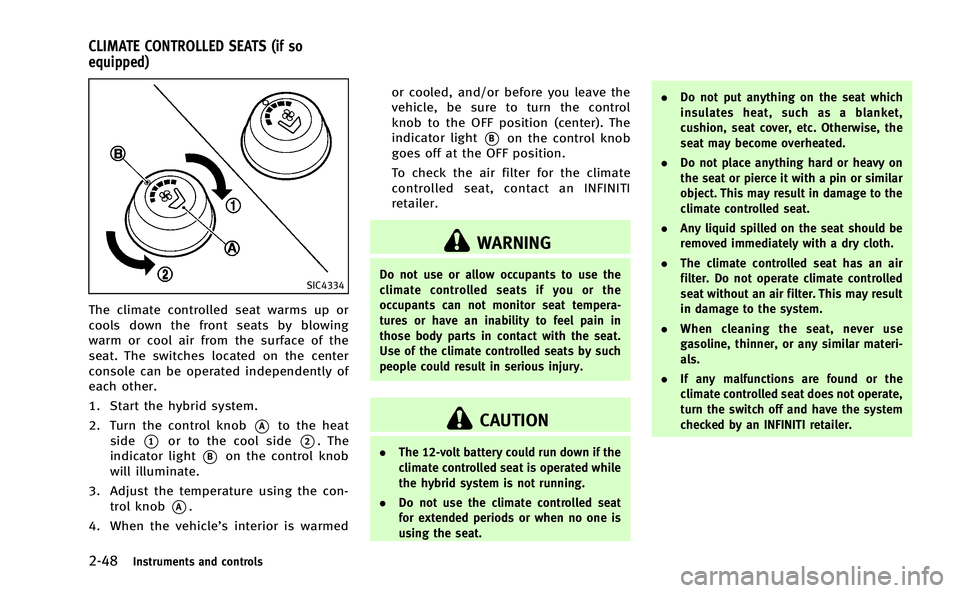
SIC4334
The climate controlled seat warms up or
cools down the front seats by blowing
warm or cool air from the surface of the
seat. The switches located on the center
console can be operated independently of
each other.
1. Start the hybrid system.
2. Turn the control knob
*Ato the heat
side
*1or to the cool side*2. The
indicator light
*Bon the control knob
will illuminate.
3. Adjust the temperature using the con- trol knob
*A.
4. When the vehicle’s interior is warmed or cooled, and/or before you leave the
vehicle, be sure to turn the control
knob to the OFF position (center). The
indicator light
*Bon the control knob
goes off at the OFF position.
To check the air filter for the climate
controlled seat, contact an INFINITI
retailer.
WARNING
Do not use or allow occupants to use the
climate controlled seats if you or the
occupants can not monitor seat tempera-
tures or have an inability to feel pain in
those body parts in contact with the seat.
Use of the climate controlled seats by such
people could result in serious injury.
CAUTION
. The 12-volt battery could run down if the
climate controlled seat is operated while
the hybrid system is not running.
. Do not use the climate controlled seat
for extended periods or when no one is
using the seat. .
Do not put anything on the seat which
insulates heat, such as a blanket,
cushion, seat cover, etc. Otherwise, the
seat may become overheated.
. Do not place anything hard or heavy on
the seat or pierce it with a pin or similar
object. This may result in damage to the
climate controlled seat.
. Any liquid spilled on the seat should be
removed immediately with a dry cloth.
. The climate controlled seat has an air
filter. Do not operate climate controlled
seat without an air filter. This may result
in damage to the system.
. When cleaning the seat, never use
gasoline, thinner, or any similar materi-
als.
. If any malfunctions are found or the
climate controlled seat does not operate,
turn the switch off and have the system
checked by an INFINITI retailer.
CLIMATE CONTROLLED SEATS (if so
equipped)
Page 185 of 530

3-30Pre-driving checks and adjustments
The seat synchronization function operates
under the following conditions:
.The ignition switch is in the ON posi-
tion.
. The selector lever is in the P (Park)
position.
If the outside mirrors or the steering wheel
reaches its maximum adjustment, the
function is automatically disabled. Restart
the function by selecting a previously
stored seat memory position using the
memory switches (1 or 2). An Intelligent
Key that was previously linked to the
stored seat memory can also be used to
restart the function.
If a seat position was not previously stored
in the seat memory, restart the function by
adjusting the steering wheel and outside
mirrors manually for your best driving
position and then drive the vehicle above
4 MPH (7 km/h).
Cancel or activate seat synchroni-
zation function
The selector lever must be in the P (Park)
position with the ignition switch in the ACC
position.
MEMORY STORAGE
Two positions for the driver’s seat, steering
column and outside mirrors can be stored
in the automatic drive positioner memory.
Follow these procedures to use the mem-
ory system.
1. Move the selector lever to the P (Park) position.
2. Push the ignition switch to the ON position.
3. Adjust the driver’s seat, steering col- umn and outside mirrors to the desired
positions by manually operating each
adjusting switch. For additional infor-
mation, see “Seats”in the“1. Safety —
Seats, seat belts and supplemental
restraint system” section and“Tilt/
telescopic steering” earlier in this
section and “Outside mirrors” earlier
in this section.
4. Push the SET switch and, within 5 seconds, push the memory switch (1
or 2) fully for at least 1 second.
The indicator light for the pushed
memory switch will stay on for approxi-
mately 5 seconds after pushing the
switch.
If memory is stored in the same memory switch, the previous memory
will be deleted.
Linking Intelligent Key to a stored
memory position
The Intelligent Key can be linked to a
stored memory position with the following
procedure.
1. Follow the steps for storing a memory
position.
2. While the indicator light for the memory switch being set is illuminated for 5
seconds, push the
button on the
Intelligent Key. If the indicator light
blinks, the Intelligent Key is linked to
that memory setting.
Push the ignition switch to the OFF posi-
tion, and then push the
button on the
Intelligent Key. The driver’s seat, steering
wheel and outside mirrors will move to the
memorized position.
Confirming memory storage
. Push the ignition switch to the ON
position and push the SET switch. If
the main memory has not been stored,
the indicator light will come on for
approximately 0.5 second. When the
memory has stored in position, the
Page 242 of 530
not issued.
. Modifying or disassembling is prohib-
ited.
. Dolby digital is manufactured under
license from Dolby Laboratories, Inc.
. Dolby and the double D mark “
”are
trademarks of Dolby Laboratories, Inc.
. DTS and DTS 2.0 “
”are registered
trademarks of DTS, Inc.
. DTS and DTS Digital Surround “
”are
registered trademarks of Digital Theater
Systems, Inc.
Parental level (parental control):
DVDs with the parental control setting can
be played with this system. Please use
your own judgement to set the parental
control with the system.
Disc selection:
The following disc formats can be played
with the DVD drive.
. DVD-VIDEO
. VIDEO-CD
. CD-DA (Conventional Compact Disc)
. DTS-CD
USB (Universal Serial Bus)
WARNING
Do not connect or disconnect the USB device
while driving. Doing so can be a distraction.
If distracted you could lose control of your
vehicle and cause an accident or serious
injury.
NOTE:
.Do not force the USB device into the
USB port. Inserting the USB device
tilted or up-side-down into the port
may damage the USB device and the
port. Make sure that the USB device is
connected correctly into the USB port.
. Do not grab the USB port cover (if so
equipped) when pulling the USB device
out of the port. This could damage the
port and the cover.
. Do not leave the USB cable in a place
where it can be pulled unintentionally.
Pulling the cable may break the wire,
USB device or the port.
The vehicle is not equipped with a USB
memory (flash drive). Customers should
prepare USB devices as necessary. This system cannot be used to format USB
devices. To format a USB device, use a
personal computer.
In some countries, the USB device for the
front seats plays only sound without
images for regulatory reasons, even when
the vehicle is parked.
This system supports various USB memory
devices, USB hard drives and iPod
®
players. Some USB devices may not be
supported by this system.
.
Partitioned USB devices may not be
played correctly.
. Some characters used in other lan-
guages (Chinese, Japanese, etc.) are
not displayed properly on the vehicle
center screen. Using English language
characters with a USB device is recom-
mended.
General notes for USB use:
. The USB device may not function when
the passenger compartment tempera-
ture is extremely high. Lower the
temperature before use.
. During cold weather or rainy days, the
player may malfunction due to humid-
ity. If this occurs, remove the USB
device and dehumidify or ventilate the
Monitor, climate, audio, phone and voice recognition systems4-55
Page 334 of 530
For Canada:
This device complies with RSS-210 of
Industry Canada. Operation is subject to
the following two conditions: (1) this
device may not cause interference, and
(2) this device must accept any interfer-
ence, including interference that may
cause undesired operation of the device.
AVOIDING COLLISION AND ROLL-
OVER
WARNING
Failure to operate this vehicle in a safe and
prudent manner may result in loss of control
or an accident.
Be alert and drive defensively at all times.
Obey all traffic regulations. Avoid exces-
sive speed, high speed cornering, or
sudden steering maneuvers, because
these driving practices could cause you to
lose control of your vehicle.As with any
vehicle, a loss of control could result in a
collision with other vehicles or objects, or
cause the vehicle to rollover, particularly if
the loss of control causes the vehicle to
slide sideways. Be attentive at all times, and avoid driving when tired. Never drive
when under the influence of alcohol or
drugs (including prescription or over-the-
counter drugs which may cause drowsi-
ness). Always wear your seat belt as
outlined in the
“Seat belts”in the“1.
Safety —Seats, seat belts and supple-
mental restraint system” section of this
manual, and also instruct your passengers
to do so.
Seat belts help reduce the risk of injury in
collisions and rollovers. In a rollover crash,
an unbelted or improperly belted person is
significantly more likely to be injured or
killed than a person properly wearing a
seat belt.
OFF-ROAD RECOVERY
While driving, the right side or left side
wheels may unintentionally leave the road
surface. If this occurs, maintain control of
the vehicle by following the procedure
below. Please note that this procedure is
only a general guide. The vehicle must be
driven as appropriate based on the condi-
tions of the vehicle, road and traffic.
1. Remain calm and do not overreact.
2. Do not apply the brakes. 3. Maintain a firm grip on the steering
wheel with both hands and try to hold a
straight course.
4. When appropriate, slowly release the accelerator pedal to gradually slow the
vehicle.
5. If there is nothing in the way, steer the vehicle to follow the road while the
vehicle speed is reduced. Do not
attempt to drive the vehicle back onto
the road surface until vehicle speed is
reduced.
6. When it is safe to do so, gradually turn the steering wheel until both tires
return to the road surface. When all
tires are on the road surface, steer the
vehicle to stay in the appropriate
driving lane..If you decide that it is not safe toreturn the vehicle to the road surface
based on vehicle, road or traffic
conditions, gradually slow the vehi-
cle to a stop in a safe place off the
road.
Starting and driving5-7
Page 451 of 530

7-4Appearance and care
ambient temperature.
. Rinse the wheel to completely remove
the cleaner within 15 minutes after the
cleaner is applied.
CHROME PARTS
Clean chrome parts regularly with a non-
abrasive chrome polish to maintain the
finish.
TIRE DRESSING
INFINITI does not recommend the use of
tire dressings. Tire manufacturers apply a
coating to the tires to help reduce dis-
coloration of the rubber. If a tire dressing is
applied to the tires, it may react with the
coating and form a compound. This com-
pound may come off the tire while driving
and stain the vehicle paint.
If you choose to use a tire dressing, take
the following precautions:
.Use a water-based tire dressing. The
coating on the tire dissolves more
easily with an oil-based tire dressing.
. Apply a light coat of tire dressing to
help prevent it from entering the tire
tread/grooves (where it would be diffi-
cult to remove). .
Wipe off excess tire dressing using a
dry towel. Make sure the tire dressing
is completely removed from the tire
tread/grooves.
. Allow the tire dressing to dry as
recommended by tire dressing manu-
facturer. Occasionally remove loose dust from the
interior trim, plastic parts and seats using
a vacuum cleaner or soft bristled brush.
Wipe the vinyl and leather surfaces with a
clean, soft cloth dampened in mild soap
solution, then wipe clean with a dry soft
cloth.
Regular care and cleaning is required in
order to maintain the appearance of the
leather.
Before using any fabric protector, read the
manufacturer’
s recommendations. Some
fabric protectors contain chemicals that
may stain or bleach the seat material.
Use a cloth dampened only with water, to
clean the meter and gauge lens.
WARNING
Do not use water or acidic cleaners (hot
steam cleaners) on the seat. This can
damage the seat or occupant classification
sensors. This can also affect the operation
of the air bag system and result in serious
personal injury.
CLEANING INTERIOR
Page 454 of 530
SAI0051
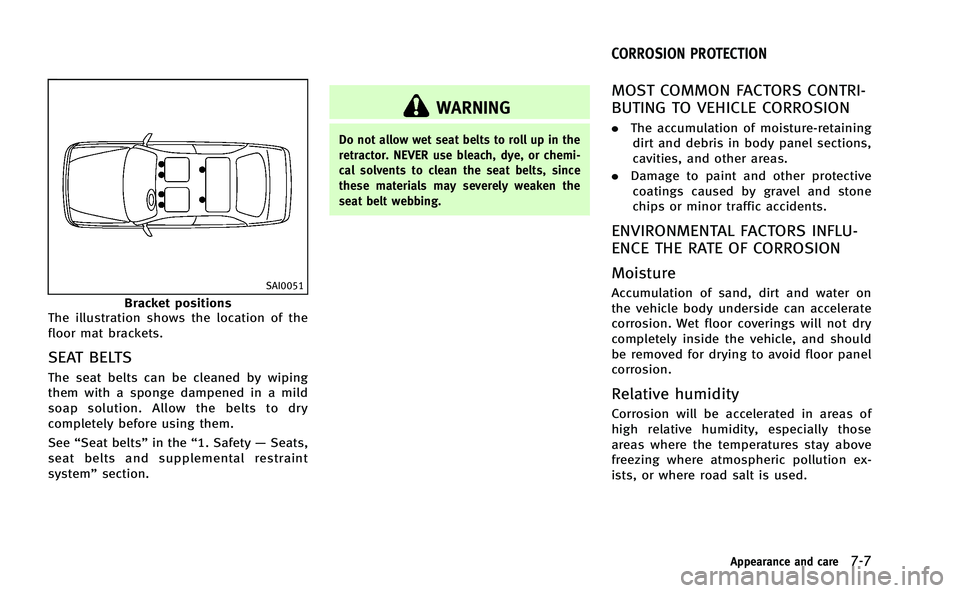
Bracket positions
The illustration shows the location of the
floor mat brackets.
SEAT BELTS
The seat belts can be cleaned by wiping
them with a sponge dampened in a mild
soap solution. Allow the belts to dry
completely before using them.
See “Seat belts” in the“1. Safety —Seats,
seat belts and supplemental restraint
system” section.
WARNING
Do not allow wet seat belts to roll up in the
retractor. NEVER use bleach, dye, or chemi-
cal solvents to clean the seat belts, since
these materials may severely weaken the
seat belt webbing.
MOST COMMON FACTORS CONTRI-
BUTING TO VEHICLE CORROSION
.The accumulation of moisture-retaining
dirt and debris in body panel sections,
cavities, and other areas.
. Damage to paint and other protective
coatings caused by gravel and stone
chips or minor traffic accidents.
ENVIRONMENTAL FACTORS INFLU-
ENCE THE RATE OF CORROSION
Moisture
Accumulation of sand, dirt and water on
the vehicle body underside can accelerate
corrosion. Wet floor coverings will not dry
completely inside the vehicle, and should
be removed for drying to avoid floor panel
corrosion.
Relative humidity
Corrosion will be accelerated in areas of
high relative humidity, especially those
areas where the temperatures stay above
freezing where atmospheric pollution ex-
ists, or where road salt is used.
Appearance and care7-7
CORROSION PROTECTION
Page 459 of 530

8-4Maintenance and do-it-yourself
Accelerator pedal:Check the pedal for
smooth operation and make sure the pedal
does not catch or require uneven effort.
Keep the floor mat away from the pedal.
Automatic transmission P (Park) mechan-
ism: On a fairly steep hill, check that your
vehicle is held securely with the selector
lever in the P (Park) position without
applying any brakes.
Brake pedal: Check the pedal for smooth
operation. If the brake pedal suddenly
goes down further than normal, the pedal
feels spongy or the vehicle seems to take
longer to stop, see an INFINITI retailer
immediately. Keep the floor mat away from
the pedal.
Brakes: Check that the brakes do not pull
the vehicle to one side when applied.
Parking brake: Check the parking brake
operation regularly. The vehicle should be
securely held on a fairly steep hill with only
the parking brake applied. If the parking
brake needs adjusted, see an INFINITI
retailer.
Seat belts: Check that all parts of the seat
belt system (for example, buckles, an-
chors, adjuster and retractors) operate
properly and smoothly, and are installed securely. Check the belt webbing for cuts,
fraying, wear or damage.
Seats:
Check seat position controls such as
seat adjusters, seatback recliner, etc. to
ensure they operate smoothly and that all
latches lock securely in every position.
Check that the head restraints move up
and down smoothly and that the locks (if
so equipped) hold securely in all latched
positions.
Steering wheel: Check for changes in the
steering conditions, such as excessive free
play, hard steering or strange noises.
Warning lights and chimes: Make sure that
all warning lights and chimes are operating
properly.
Windshield defroster: Check that the air
comes out of the defroster outlets properly
and in sufficient quantity when operating
the heater or air conditioner.
Windshield wiper and washer*: Check that
the wipers and washer operate properly
and that the wipers do not streak.
Under the hood and vehicle
The maintenance items listed here should
be checked periodically (for example, each
time you check the engine oil or refuel). 12-volt battery*:
Check the fluid level in
each cell. It should be between the MAX
and MIN lines. Vehicles operated in high
temperatures or under severe condition
require frequent checks of the battery fluid
level.
NOTE:
Care should be taken to avoid situations
that can lead to potential 12-volt battery
discharge and potential no-start condi-
tions such as:
1. Installation or extended use of electro-
nic accessories that consume 12-volt
battery power when the engine is not
running (Phone chargers, GPS, DVD
players, etc.)
2. Vehicle is not driven regularly and/or
only driven short distances.
In these cases, the 12-volt battery may
need to be charged to maintain 12-volt
battery health.
Brake fluid level*: Make sure that the
brake fluid level is between the MAX and
MIN lines on the reservoir.
Engine coolant level*: Check the coolant
level when the engine is cold.
Engine drive belts*: Make sure that no belt
Page 510 of 530
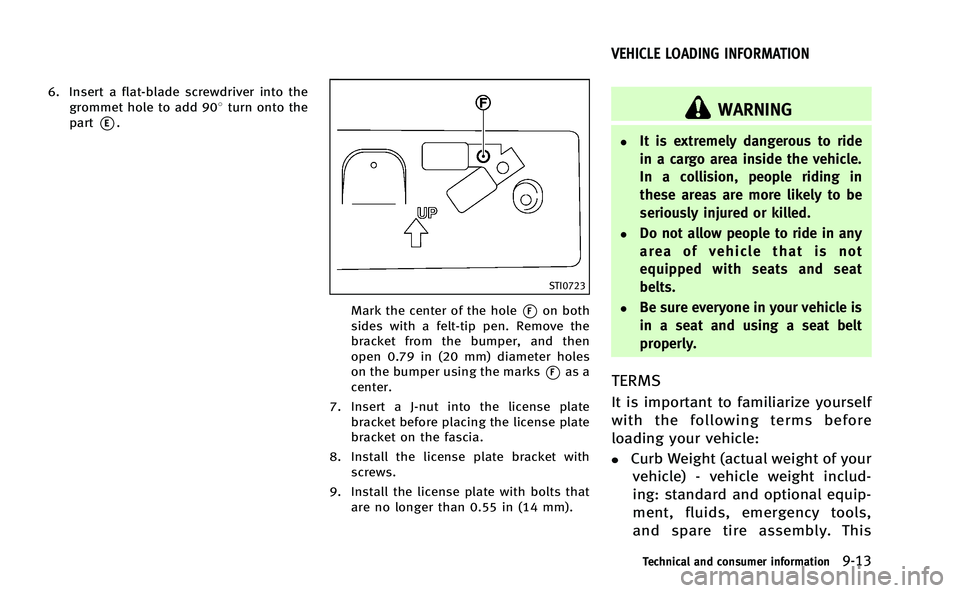
6. Insert a flat-blade screwdriver into thegrommet hole to add 908 turn onto the
part
*E.
STI0723
Mark the center of the hole*Fon both
sides with a felt-tip pen. Remove the
bracket from the bumper, and then
open 0.79 in (20 mm) diameter holes
on the bumper using the marks
*Fas a
center.
7. Insert a J-nut into the license plate bracket before placing the license plate
bracket on the fascia.
8. Install the license plate bracket with screws.
9. Install the license plate with bolts that are no longer than 0.55 in (14 mm).
WARNING
.It is extremely dangerous to ride
in a cargo area inside the vehicle.
In a collision, people riding in
these areas are more likely to be
seriously injured or killed.
.Do not allow people to ride in any
area of vehicle that is not
equipped with seats and seat
belts.
.Be sure everyone in your vehicle is
in a seat and using a seat belt
properly.
TERMS
It is important to familiarize yourself
with the following terms before
loading your vehicle:
.Curb Weight (actual weight of your
vehicle) - vehicle weight includ-
ing: standard and optional equip-
ment, fluids, emergency tools,
and spare tire assembly. This
Technical and consumer information9-13
VEHICLE LOADING INFORMATION
Page 520 of 530
10 Index
Number
12-volt battery charge warning light ................. 2-11
A
ABS (Anti-lock Braking System) ......................... 5-97
Accelerator downshift - In D (Drive) position - ... 5-16
Active noise control ........................................ 5-103
Active trace control ........................................... 5-99
Adaptive front lighting system (AFS) .................. 2-42
Adjustable headrests .......................................... 1-8
Advanced air bag system .................................. 1-43
Aiming control, Adaptive front lighting
system (AFS) ..................................................... 2-42
Air bag system
Advanced air bag system ............................. 1-43
Front passenger air bag and status light ...... 1-45
Front-seat mounted side-impact
supplemental air bag system ....................... 1-48
Roof-mounted curtain side-impact
supplemental air bag system ....................... 1-48
Air bag warning labels ...................................... 1-51
Air bag warning light ............................... 1-51, 2-17
Air cleaner housing filter ................................... 8-20
Air conditioner Air conditioner service ................................. 4-48
Air conditioner specification label ................ 9-11
Air conditioning system refrigerant and
lubricant recommendations .................. 4-48, 9-7
Automatic climate control ............................ 4-34 In-cabin microfilter ....................................... 4-48
Operation (See automatic climate control) .... 4-34
Air filter In-cabin microfilter ....................................... 4-48
Air vent ............................................................... 7-5
Alarm How to stop alarm (see vehicle
security system) ........................................... 2-35
Alcohol, drugs and driving .................................. 5-8
Antenna ............................................................ 4-87
Anti-lock Braking System (ABS) ......................... 5-97
Anti-lock braking system (ABS) warning light .... 2-11
Appearance care Exterior appearance care ................................ 7-2
Interior appearance care ................................ 7-4
Approaching Vehicle Sound for Pedestrians
(VSP) system .................................. Hybrid System-9
Armrest ............................................................. 1-10
Ashtrays (See cigarette lighter and ashtrays) .... 2-52
Assist charge gauge ................. Hybrid System-5, 2-8
Audible reminders ............................................ 2-20
Audio operation precautions ............................. 4-49
Audio system .................................................... 4-49
Steering wheel audio controls ...................... 4-85
Auto closure ..................................................... 3-20
Autolight system ............................................... 2-40
Automatic Automatic climate control .................. 4-37, 4-41
Automatic transmission fluid (ATF) ............... 8-15
Climate control ............................................ 4-34 Door locks ..................................................... 3-6
Drive positioner ........................................... 3-28
Driving with automatic transmission ............ 5-13
Seat positioner ............................................ 3-28
Automatic moonroof.......................................... 2-60
Average fuel consumption and speed ................ 2-31
Avoiding collision and rollover ............................ 5-7
B
Battery .............................................................. 8-18
Battery replacement, Intelligent Key ............... 3-2
Battery saver system ................................... 2-41
Intelligent Key .............................................. 8-26
Before starting the INFINITI Direct Response
Hybrid
TMSystem ............................................... 5-12
Blind Spot Intervention (BSI) ON
indicator light ................................................... 2-18
Blind Spot Warning (BSW) system/Blind Spot
Intervention
TM(BSI) system ............................... 5-31
Blind Spot Warning (BSW)/Blind Spot
Intervention (BSI) system warning light ............. 2-11
Bluetooth
®hands-free phone system
(models with navigation system) ....................... 4-88
Bluetooth
®hands-free phone system
(models without navigation system) .................. 4-98
Booster seats .................................................... 1-35
Brake Anti-lock Braking System (ABS) .................... 5-97
Brake fluid ................................................... 8-16