warning INFINITI Q50 2014 Owner's Manual
[x] Cancel search | Manufacturer: INFINITI, Model Year: 2014, Model line: Q50, Model: INFINITI Q50 2014Pages: 394, PDF Size: 1.99 MB
Page 184 of 394
RAPID AIR PRESSURE LOSS
Rapid air pressure loss or a“blow-out”can
occur if the tire is punctured or is damaged
due to hitting a curb or pothole. Rapid air
pressure loss can also be caused by
driving on under-inflated tires.
Rapid air pressure loss can affect the
handling and stability of the vehicle,
especially at highway speeds.
Help prevent rapid air pressure loss by
maintaining the correct air pressure and
visually inspect the tires for wear and
damage. See “Wheels and tires” (P.8-29) of
this manual.
If a tire rapidly loses air pressure or
“blows-out” while driving maintain control
of the vehicle by following the procedure
below. Please note that this procedure is
only a general guide. The vehicle must be
driven as appropriate based on the condi-
tions of the vehicle, road and traffic.
WARNING
The following actions can increase the
chance of losing control of the vehicle if
there is a sudden loss of tire air pressure.
Losing control of the vehicle may cause a collision and result in personal injury.
.
The vehicle generally moves or pulls in
the direction of the flat tire.
. Do not rapidly apply the brakes.
. Do not rapidly release the accelerator
pedal.
. Do not rapidly turn the steering wheel.
1. Remain calm and do not overreact.
2. Maintain a firm grip on the steering
wheel with both hands and try to hold a
straight course.
3. When appropriate, slowly release the accelerator pedal to gradually slow the
vehicle.
4. Gradually steer the vehicle to a safe location off the road and away from
traffic if possible.
5. Lightly apply the brake pedal to gradu- ally stop the vehicle.
6. Turn on the hazard warning flashers and either contact a roadside emer-
gency service to change the tire or see
“Changing a flat tire” (P.6-4) of this
Owner’s Manual.
DRINKING ALCOHOL/DRUGS AND
DRIVING
WARNING
Never drive under the influence of alcohol or
drugs. Alcohol in the bloodstream reduces
coordination, delays reaction time and im-
pairs judgement. Driving after drinking
alcohol increases the likelihood of being
involved in an accident injuring yourself and
others. Additionally, if you are injured in an
accident, alcohol can increase the severity
of the injury.
INFINITI is committed to safe driving.
However, you must choose not to drive
under the influence of alcohol. Every year
thousands of people are injured or killed in
alcohol-related accidents. Although the
local laws vary on what is considered to
be legally intoxicated, the fact is that
alcohol affects all people differently and
most people underestimate the effects of
alcohol.
Remember, drinking and driving don ’t mix!
And that is true for drugs, too (over-the-
counter, prescription, and illegal drugs).
Starting and driving5-9
Page 185 of 394
5-10Starting and driving
Don’t drive if your ability to operate your
vehicle is impaired by alcohol, drugs, or
some other physical condition.
INTELLIGENT ALL-WHEEL DRIVE
(AWD) DRIVING SAFETY PRECAU-
TIONS (AWD models)
WARNING
.Do not drive beyond the performance
capability of the tires, even with Intelli-
gent AWD engaged. Accelerating quickly,
sharp steering maneuvers or sudden
braking may cause loss of control.
. Always use tires of the same type, size,
brand, construction (bias, bias-belted or
radial), and tread pattern on all four
wheels. Install tire chains on the rear
wheels when driving on slippery roads
and drive carefully.
. This vehicle is not designed for off-road
(rough road) use. Do not drive on sandy
or muddy roads that tires may get stuck
in.
. For AWD equipped vehicles, do not
attempt to raise two wheels off the
ground and shift the transmission to any D (Drive) or R (Reverse) position with
the engine running. Doing so may result
in drivetrain damage or unexpected
vehicle movement which could result in
serious vehicle damage or personal
injury.
. Do not attempt to test an AWD equipped
vehicle on a 2-wheel dynamometer (such
as the dynamometers used by some
states for emissions testing), or similar
equipment even if the other two wheels
are raised off the ground. Make sure you
inform test facility personnel that your
vehicle is equipped with AWD before it is
placed on a dynamometer. Using the
wrong test equipment may result in
drivetrain damage or unexpected vehicle
movement which could result in serious
vehicle damage or personal injury.
. When a wheel is off the ground due to an
unlevel surface, do not spin the wheel
excessively.
WARNING
Do not operate the push-button ignition
switch while driving the vehicle except in an
emergency. (The engine will stop when the
ignition switch is pushed 3 consecutive
times or the ignition switch is pushed and
held for more than 2 seconds.) If the engine
stops while the vehicle is being driven, this
could lead to a crash and serious injury.
Before operating the push-button ignition
switch, be sure to move the shift lever to
the P (Park) position.
PUSH-BUTTON IGNITION SWITCH
Page 187 of 394

5-12Starting and driving
If the battery of the vehicle is discharged,
the push-button ignition switch cannot be
turned from the LOCK position.
Some indicators and warnings for opera-
tion are displayed in the vehicle informa-
tion display between the speedometer and
tachometer. (See“Vehicle information dis-
play” (P.2-20).)
The ignition lock is designed so that the
ignition switch position cannot be switched
to LOCK until the shift lever is moved to the
P (Park) position.
When the ignition switch cannot be pushed
toward the LOCK position, proceed as
follows:
1. Move the shift lever into the P (Park) position.
2. Push the ignition switch to the OFF position. The ignition switch position
indicator will not illuminate.
3. Open the door. The ignition switch will change to the LOCK position.
The shift lever can be moved from the P
(Park) position if the ignition switch is in
the ON position and the brake pedal is
depressed.PUSH-BUTTON IGNITION SWITCH
POSITIONS
LOCK (Normal parking position)
The ignition switch can only be locked in
this position.
The ignition switch will be unlocked when
it is pushed to the ACC position while
carrying the Intelligent Key.
ACC (Accessories)
This position activates electrical acces-
sories such as the radio, when the engine
is not running.
ON (Normal operating position)
This position turns on the ignition system
and electrical accessories.
OFF
The engine can be turned off in this
position.
The ignition lock is designed so that the
ignition switch cannot be switched to the
LOCK position until the shift lever is moved
to the P (Park) position.
CAUTION
Do not leave the vehicle with the push-
button ignition switch in ACC or ON posi-
tions when the engine is not running for an
extended period. This can discharge the
battery.
EMERGENCY ENGINE SHUT OFF
To shut off the engine in an emergency
situation while driving, perform the follow-
ing procedure:
. Rapidly push the push-button ignition
switch 3 consecutive times in less than
1.5 seconds, or
. Push and hold the push-button ignition
switch for more than 2 seconds.
Page 188 of 394

JVS0264X
INTELLIGENT KEY BATTERY DIS-
CHARGE
If the battery of the Intelligent Key is
discharged, or environmental conditions
interfere with the Intelligent Key operation,
start the engine according to the following
procedure:
1. Move the shift lever to the P (Park)position.
2. Firmly apply the foot brake.
3. Touch the ignition switch with the Intelligent Key as illustrated. (A chime
will sound.) 4. Push the ignition switch while depres-
sing the brake pedal within 10 seconds
after the chime sounds. The engine will
start.
After step 3 is performed, when the
ignition switch is pushed without depres-
sing the brake pedal, the ignition switch
position will change to ACC.
NOTE:
. When the ignition switch is pushed to
the ACC or ON position or the engine is
started by the above procedures, the
Intelligent Key battery discharge indi-
cator appears in the vehicle informa-
tion display even if the Intelligent Key
is inside the vehicle. This is not a
malfunction. To turn off the Intelligent
Key battery discharge indicator, touch
the ignition switch with the Intelligent
Key again.
. If the Intelligent Key battery discharge
indicator appears, replace the battery
as soon as possible. (See “Intelligent
Key battery replacement” (P.8-24).).
Make sure the area around the vehicle
is clear.
. Check fluid levels such as engine oil,
coolant, brake fluid and window
washer fluid as frequently as possible,
or at least whenever you refuel.
. Check that all windows and lights are
clean.
. Visually inspect tires for their appear-
ance and condition. Also check tires for
proper inflation.
. Lock all doors.
. Position seat and adjust head re-
straints.
. Adjust inside and outside mirrors.
. Fasten seat belts and ask all passen-
gers to do likewise.
. Check the operation of warning lights
when the ignition switch is pushed to
the ON position. (See “Warning/indica-
tor lights and audible reminders” (P.2-
12).)
Starting and driving5-13
BEFORE STARTING THE ENGINE
Page 190 of 394
AUTOMATIC TRANSMISSION
The automatic transmission in your vehicle
is electronically controlled by a transmis-
sion control module to produce maximum
efficiency and smooth operation.
Shown on the following pages are the
recommended operating procedures for
this transmission. Follow these procedures
for maximum vehicle performance and
driving enjoyment.
Starting the vehicle
After starting the engine, fully depress the
foot brake pedal and push the shift lever
button before shifting the shift lever to the
R (Reverse), N (Neutral), D (Drive) or
Manual shift mode position. Be sure the
vehicle is fully stopped before attempting
to shift the shift lever.
This Automatic Transmission (AT) model is
designed so that the foot brake pedal
must be depressed before shifting from P
(Park) to any drive position while the
ignition switch is in the ON position.
The shift lever cannot be moved out of the
P (Park) position and into any of the other
gear positions if the ignition switch is
pushed to the LOCK, OFF or ACC position.1. Keep the foot brake pedal depressed
and push the shift lever button to shift
into a driving gear.
2. Release the parking brake and foot brake, then gradually start the vehicle
in motion.
WARNING
. Do not depress the accelerator pedal
while shifting from P (Park) or N
(Neutral) to R (Reverse), D (Drive) or
manual shift mode. Always depress the
brake pedal until shifting is completed.
Failure to do so could cause you to lose
control and have an accident.
. Cold engine idle speed is high, so use
caution when shifting into a forward or
reverse gear before the engine has
warmed up.
. Never shift to P (Park) or R (Reverse)
while vehicle is moving forward. Never
shift to P (Park) or D (Drive) while vehicle
is moving rearward. Failure to do so
could cause you to lose control and have
an accident.
CAUTION
.When stopping the vehicle on an uphill
grade, do not hold the vehicle by
depressing the accelerator pedal. The
foot brake should be used for this
purpose.
. Do not downshift abruptly on slippery
roads. This may cause a loss of control.
. Except in an emergency, do not shift to
the N (Neutral) position while driving.
Coasting with the transmission in the N
(Neutral) position may cause serious
damage to the transmission.
Starting and driving5-15
DRIVING THE VEHICLE
Page 191 of 394
5-16Starting and driving
JVS0186X
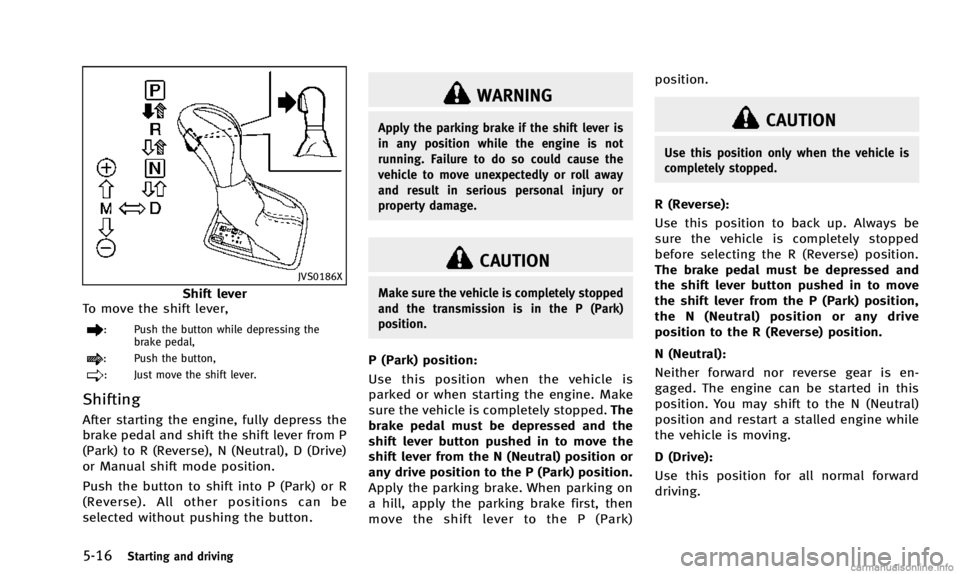
Shift lever
To move the shift lever,
: Push the button while depressing the brake pedal,
: Push the button,
: Just move the shift lever.
Shifting
After starting the engine, fully depress the
brake pedal and shift the shift lever from P
(Park) to R (Reverse), N (Neutral), D (Drive)
or Manual shift mode position.
Push the button to shift into P (Park) or R
(Reverse). All other positions can be
selected without pushing the button.
WARNING
Apply the parking brake if the shift lever is
in any position while the engine is not
running. Failure to do so could cause the
vehicle to move unexpectedly or roll away
and result in serious personal injury or
property damage.
CAUTION
Make sure the vehicle is completely stopped
and the transmission is in the P (Park)
position.
P (Park) position:
Use this position when the vehicle is
parked or when starting the engine. Make
sure the vehicle is completely stopped. The
brake pedal must be depressed and the
shift lever button pushed in to move the
shift lever from the N (Neutral) position or
any drive position to the P (Park) position.
Apply the parking brake. When parking on
a hill, apply the parking brake first, then
move the shift lever to the P (Park) position.
CAUTION
Use this position only when the vehicle is
completely stopped.
R (Reverse):
Use this position to back up. Always be
sure the vehicle is completely stopped
before selecting the R (Reverse) position.
The brake pedal must be depressed and
the shift lever button pushed in to move
the shift lever from the P (Park) position,
the N (Neutral) position or any drive
position to the R (Reverse) position.
N (Neutral):
Neither forward nor reverse gear is en-
gaged. The engine can be started in this
position. You may shift to the N (Neutral)
position and restart a stalled engine while
the vehicle is moving.
D (Drive):
Use this position for all normal forward
driving.
Page 195 of 394

5-20Starting and driving
—When the navigation system cannot
accurately detect the location of the
vehicle.
— When the vehicle is driving on a
roadway that is not recognized by
the navigation system.
— When the actual roadway differs
from the map information on the
navigation system due to road con-
struction, traffic lane obstructions,
etc.
. The NAVI Shift Control may not operate
properly in the following situations:
— If the vehicle’s transmission, engine,
and/or navigation system, and/or
GPS is malfunctioning.
— If the vehicle speed is higher than
74 MPH (120 km/h) or lower than
19 MPH (30 km/h) and/or transmis-
sion gear is outside the operating
range of the system.
— When the vehicle is driving on a
freeway.
— When the vehicle is driving on a
gentle curve
— When the vehicle is driving with the
shift lever except in the D (Drive)
position.
JVS0246X
How to enable/disable the NAVI Shift
Control:
Perform the following steps to enable or
disable the NAVI shift control.
1. Push the MENU button
*1and touch
[Settings] on the lower display.
2. Touch [Drive Mode Enhancement Set- tings].
3. Touch [Navi Shift Control] and select the ON (enabled) or OFF (disabled).
WARNING
. Be sure the parking brake is fully
released before driving. Failure to do so
can cause brake failure and lead to an
accident.
. Do not release the parking brake from
outside the vehicle.
. Do not use the gear shift in place of the
parking brake. When parking, be sure
the parking brake is fully engaged.
. Do not leave children unattended in a
vehicle. They could release the parking
brake and cause an accident.
PARKING BRAKE
Page 196 of 394

SPA2331
To apply:Fully depress the parking brake
pedal
*1.
To release:
1. Firmly apply the foot brake
*2.
2. Depress the parking brake pedal
*1and the parking brake will be released.
3. Before driving, be sure the brake warning light goes out.
JVS0189X
INFINITI Drive Mode Selector
JVS0191M
Five driving modes can be selected by
using the INFINITI Drive Mode Selector
(PERSONAL, SPORT, STANDARD, ECO and
SNOW).
NOTE:
When the INFINITI Drive Mode Selector
selects a mode, the mode may not switch
immediately. This is not a malfunction.
The current mode is displayed in the
vehicle information display.
To change the mode, push the INFINITI
Drive Mode Selector up or down. The mode
list will appear on the upper display and
you can select the mode.
PERSONAL ÛSPORT ÛSTANDARD ÛECO
Û SNOW
NOTE:
The mode list will be turned off in
approximately 5 seconds after the mode
is selected.
STANDARD MODE
Allows for optimum driving according to
the driving conditions.
This mode will be selected first each time
the engine is started.
Starting and driving5-21
INFINITI DRIVE MODE SELECTOR
Page 201 of 394
5-26Starting and driving
PRECAUTIONS ON ACTIVE LANE
CONTROL
WARNING
.Active Lane Control will not always steer
the vehicle to keep it in the lane. It is not
designed to prevent loss of control. It is
the driver’s responsibility to stay alert,
drive safely, keep the vehicle in the
traveling lane, and be in control of
vehicle at all times.
. Active Lane Control is primarily intended
for use on well-developed freeways or
highways. It may not detect the lane
markers for certain roads, weather or
driving conditions.
. Using Active Lane Control under some
conditions of road, lane marker or
weather, or if you attempt to change
lanes without using the lane change
signal could lead to an unexpected
system operation. In such conditions,
you need to correct the vehicle’s direc-
tion with your steering operation to
avoid accidents.
. When Active Lane Control is operating,
avoid excessive or sudden steering maneuvers. Otherwise, you could lose
control of the vehicle.
. Active Lane Control will not operate at
speeds below approximately 45 MPH (70
km/h) or if it cannot detect lane markers.
. Active Lane Control may not operate
properly under the following conditions,
and do not use Active Lane Control:
—During bad weather (rain, fog, snow,
wind, etc.).
—When driving on slippery roads,such as on ice or snow, etc.
—When driving on winding or uneven roads.
—When there is a lane closure due toroad repairs.
—When driving in a makeshift lane.
—When driving on roads where the
lane width is too narrow.
—When driving with a tire that is notwithin normal tire conditions (for
example, tire wear, low tire pressure,
installation of spare tire, tire chains,
non-standard wheels).
—When the vehicle is equipped withnon-original steering parts or sus- pension parts.
. If Active Lane Control malfunctions, it
will cancel automatically. The chassis
control warning will appear in the
vehicle information display.
. If the chassis control warning appears,
pull off the road to a safe location and
stop the vehicle. Turn the engine off and
restart the engine. If the chassis control
warning continues to illuminate, have
Active Lane Control checked by an
INFINITI retailer.
The functions of Active Lane Control may or
may not operate properly under the follow-
ing conditions:
.On roads where there are multiple
parallel lane markers; lane markers
that are faded or not painted clearly;
yellow painted lane markers; non-stan-
dard lane markers; lane markers cov-
ered with water, dirt, snow, etc.
. On roads where discontinued lane
markers are still detectable.
. On roads where there are sharp curves.
. On roads where there are sharply
contrasting objects, such as shadows,
snow, water, wheel ruts, seams or lines
Page 204 of 394

NOTE:
If the Lane Departure Prevention (LDP)
system setting is OFF, Active Lane Control
cannot be operated. To use Active Lane
Control, set the LDP system to ON.
AUTOMATIC DEACTIVATION
Active Lane Control is not designed to
operate under the following conditions:
.When the Vehicle Dynamic Control
(VDC) system (except TCS function) or
ABS operates.
. When you operate the lane change
signal and change the traveling lanes
in the direction of the signal. (Active
Lane Control is deactivated for approxi-
mately 2 seconds after the lane change
signal is turned off.)
. When the vehicle speed lowers to less
than approximately 45 MPH (70 km/h).
. When the hazard warning flashers are
operated.
After the above conditions have finished
and the operating conditions are satisfied
again, Active Lane Control will resume
operation.
Temporary disabled status at high
temperature
If the vehicle is parked in direct sunlight
under high temperature conditions (over
approximately 1048 F (408C)) and then
Active Lane Control is turned on, Active
Lane Control may be deactivated automa-
tically. The high cabin temperature mes-
sage will appear in the vehicle information
display.
Action to take:
When the above conditions no longer exist,
push the dynamic driver assistance switch
again to turn Active Lane Control back on.
SSD0453
LANE CAMERA UNIT MAINTENANCE
The lane camera unit*1for Active Lane
Control is located above the inside mirror.
To keep the proper operation of Active Lane
Control and prevent a system malfunction,
be sure to observe the following:
. Always keep the windshield clean.
. Do not attach a sticker (including
transparent material) or install an
accessory near the camera unit.
. Do not place reflective materials, such
as white paper or a mirror, on the
instrument panel. The reflection of
sunlight may adversely affect the cam-
Starting and driving5-29