warning INFINITI Q50 2014 Repair Manual
[x] Cancel search | Manufacturer: INFINITI, Model Year: 2014, Model line: Q50, Model: INFINITI Q50 2014Pages: 394, PDF Size: 1.99 MB
Page 102 of 394

29. Driver assist system indicator
(if so equipped)
This indicator shows the status of the
following systems.
.Lane Departure Warning (LDW)
. Lane Departure Prevention (LDP)
. Blind Spot Warning (BSW)
. Blind Spot Intervention
TM(BSI)
. Distance Control Assist (DCA)
. Forward emergency braking
. Predictive forward collision warning
For more details, see “Lane Departure
Warning (LDW) system/Lane Departure
Prevention (LDP) system” (P.5-30),“Blind
Spot Warning (BSW) system/Blind Spot
Intervention
TM(BSI) system” (P.5-37),“Dis-
tance Control Assist (DCA) system” (P.5-
79), “Forward emergency braking system”
(P.5-89) and “Predictive forward collision
warning system” (P.5-94).
The figure and color of this indicator will
change depending on the conditions of the
above systems. (In each section, the name
of this indicator is referred to as, “driver
assist system lane indicator” ,“driver
assist system blind spot indicator” or
“driver assist system forward indicator ”
depending on the systems.)
30. INFINITI Drive Mode Selector
indicator
When a driving mode is selected using the
INFINITI Drive Mode Selector, the selected
mode indicator is displayed.
. PERSONAL
. SPORT
. STANDARD
. ECO
. SNOW
(See “INFINITI Drive Mode Selector” (P.5-
21).)
31. Automatic Transmission (AT)
position indicator
This indicator shows the automatic shift
position.
In the manual shift mode, when the
transmission does not shift to the selected
gear due to a transmission protection
mode, the AT position indicator will blink
and a chime will sound.
See “Automatic transmission” (P.5-15) for
further details.
JVI0681M
INDICATORS FOR MAINTENANCE
For setting the indicators for maintenance,
see the Infiniti InTouch Owner’s Manual.
Instruments and controls2-25
Page 103 of 394
2-26Instruments and controls
1. Engine oil and filter replacement
indicator
This indicator appears when the customer
set time comes for changing the engine oil
and filter. You can set or reset the distance
for changing the engine oil and filter.
2. Tire replacement indicator
This indicator appears when the customer
set distance comes for replacing tires. You
can set or reset the distance for replacing
tires.
WARNING
The tire replacement indicator is not a
substitute for regular tire checks, including
tire pressure checks. See“Changing wheels
and tires” (P.8-38). Many factors including
tire inflation, alignment, driving habits and
road conditions affect tire wear and when
tires should be replaced. Setting the tire
replacement indicator for a certain driving
distance does not mean your tires will last
that long. Use the tire replacement indicator
as a guide only and always perform regular
tire checks. Failure to perform regular tire
checks, including tire pressure checks could
result in tire failure. Serious vehicle damage could occur and may lead to a collision,
which could result in serious personal injury
or death.
3. Other indicator
This indicator appears when the customer
set time comes for replacing items other
than the engine oil, oil filter and tires. You
can set or reset the distance for replacing
the items.
Page 105 of 394

2-28Instruments and controls
JVI0642X
TRIP COMPUTER
Switches for the trip computer are located
on the right side of the steering wheel. To
operate the trip computer, push the
switches as shown above.
Each time the
orswitch is pushed,
the display will change.
The display items for trip computer are
changed on the lower display. For details,
see the Infiniti InTouch Owner’s Manual.
1. Current fuel consumption and
average fuel consumption (MPG, l
(liter)/100 km or km/l)
Current fuel consumption:
The current fuel consumption mode shows
the current fuel consumption.
Average fuel consumption:
The average fuel consumption mode shows
the average fuel consumption since the
last reset. Resetting is done by pushing the
orswitch for longer than 1
second.
The average fuel consumption is also reset
on the lower display. See the Infiniti
InTouch Owner’s Manual.
The display is updated every 30 seconds.
At about the first 1/3 mile (500 m) after a
reset, the display shows “——”.
2. Average speed (MPH or km/h)
The average speed mode shows the
average vehicle speed since the last reset.
Resetting is done by pushing the
orswitch for longer than 1 second.
The display is updated every 30 seconds.
The first 30 seconds after a reset, the
display shows “——”.
3. Elapsed time and trip odometer
(mile or km)
Elapsed time:
The elapsed time mode shows the time
since the last reset. Resetting is done by
pushing the
orswitch for longer
than 1 second. (The trip odometer is also
reset at the same time.)
Trip odometer:
The trip odometer mode shows the total
distance the vehicle has been driven since
the last reset. Resetting is done by pushing
the
orswitch for longer than 1
second. (The elapsed time is also reset at
the same time.)
4. Distance to empty (dte —mile or
km)
The distance to empty (dte) mode provides
you with an estimation of the distance that
can be driven before refueling. The dte is
constantly being calculated, based on the
amount of fuel in the fuel tank and the
actual fuel consumption.
The display is updated every 30 seconds.
The dte mode includes a low range warning
feature. If the fuel level is low, the warning
is displayed on the screen.
Page 106 of 394

When the fuel level drops even lower, the
dte display will change to“——”.
. If the amount of fuel added is small, the
display just before the ignition switch
is pushed to the OFF position may
continue to be displayed.
. When driving uphill or rounding curves,
the fuel in the tank shifts, which may
momentarily change the display.
5. Navigation (if so equipped)
When the route guidance is set in the
navigation system, this item shows the
navigation route information.
For more details, see the Infiniti InTouch
Owner’s Manual.
6. Audio
The audio mode shows the status of audio
information.
For more details, see the Infiniti InTouch
Owner’s Manual.
7. Driving aids (if so equipped)
The driving aids mode shows the operating
condition for the following systems.
. Lane Departure Warning (LDW)
. Lane Departure Prevention (LDP) .
Blind Spot Warning (BSW)
. Blind Spot Intervention
TM(BSI)
. Distance Control Assist (DCA)
. Forward emergency braking
. Predictive forward collision warning
For more details, see “Lane Departure
Warning (LDW) system/Lane Departure
Prevention (LDP) system” (P.5-30),“Blind
Spot Warning/Blind Spot Intervention
TM/
Back-up Collision Intervention systems”
(P.5-37), “Distance Control Assist (DCA)
system” (P.5-79), “Forward emergency
braking system” (P.5-89) and“Predictive
forward collision warning system” (P.5-94).
8. Tire pressure
The tire pressure mode shows the pressure
of all four tires while the vehicle is driven.
When the“Tire Pressure Low - Add Air” or
“Flat Tire - Visit dealer” warning appears,
the display can be switched to the tire
pressure mode by pushing the
orswitch.
The tire pressure unit can be changed in
the [TPMS setting] under the [Settings]
menu on the lower display. (See the Infiniti
InTouch Owner’s Manual.)
9. Chassis control
When Active Lane Control (if so equipped)
or the active trace control system is
operated, it shows the operating condition.
See “Active Lane Control” (P.5-24) and
“Active trace control” (P.5-110) for more
details.
10. Warning check
The present warnings are displayed. If no
warning is present, “No Warning”is dis-
played.
Instruments and controls2-29
Page 110 of 394

SIC2045
Security indicator light
The security indicator light is located on
the meter panel. It indicates the status of
the INFINITI Vehicle Immobilizer System.
The light blinks after the ignition switch
was in the LOCK, ACC or OFF position. This
function indicates the security systems
equipped on the vehicle are operational.
If the INFINITI Vehicle Immobilizer System
is malfunctioning, this light will remain on
while the ignition switch is in the ON
position.If the light still remains on and/or the
engine will not start, see an INFINITI
retailer for INFINITI Vehicle Immobilizer
System service as soon as possible.
Please bring all Intelligent Keys that you
have when visiting an INFINITI retailer for
service.
WARNING
In freezing temperatures the washer solu-
tion may freeze on the windshield and
obscure your vision which may lead to an
accident. Warm windshield with the defros-
ter before you wash the windshield.
CAUTION
.
Do not operate the washer continuously
for more than 30 seconds.
. Do not operate the washer if the
reservoir tank is empty.
. Do not fill the window washer reservoir
tank with washer fluid concentrates at
full strength. Some methyl alcohol
based washer fluid concentrates may
permanently stain the grille if spilled
while filling the window washer reser-
voir tank.
. Pre-mix washer fluid concentrates with
water to the manufacturer’ s recom-
mended levels before pouring the fluid
into the window washer reservoir tank.
Do not use the window washer reservoir
Instruments and controls2-33
WINDSHIELD WIPER AND WASHER SWITCH
Page 115 of 394
2-38Instruments and controls
SIC3269
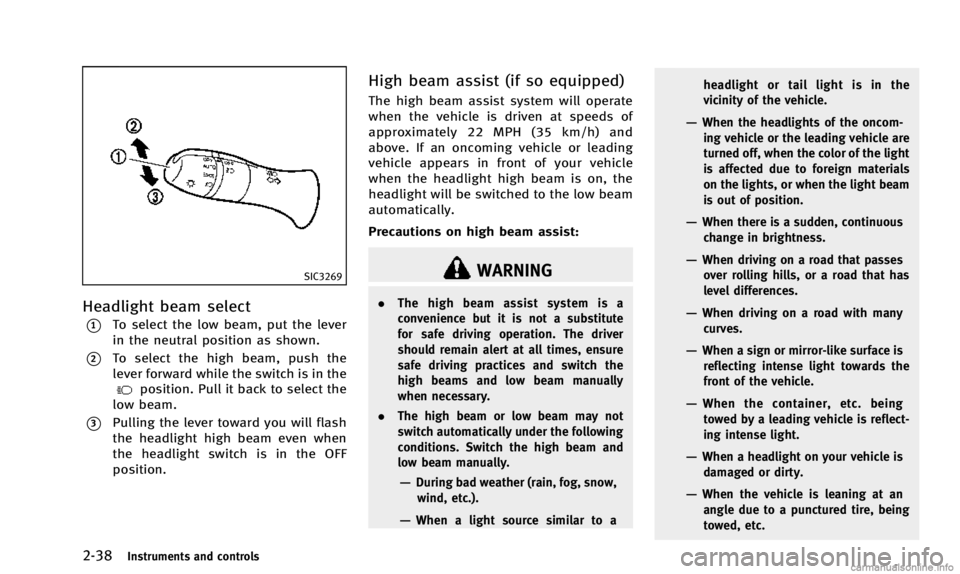
Headlight beam select
*1To select the low beam, put the lever
in the neutral position as shown.
*2To select the high beam, push the
lever forward while the switch is in the
position. Pull it back to select the
low beam.
*3Pulling the lever toward you will flash
the headlight high beam even when
the headlight switch is in the OFF
position.
High beam assist (if so equipped)
The high beam assist system will operate
when the vehicle is driven at speeds of
approximately 22 MPH (35 km/h) and
above. If an oncoming vehicle or leading
vehicle appears in front of your vehicle
when the headlight high beam is on, the
headlight will be switched to the low beam
automatically.
Precautions on high beam assist:
WARNING
. The high beam assist system is a
convenience but it is not a substitute
for safe driving operation. The driver
should remain alert at all times, ensure
safe driving practices and switch the
high beams and low beam manually
when necessary.
. The high beam or low beam may not
switch automatically under the following
conditions. Switch the high beam and
low beam manually.
—During bad weather (rain, fog, snow,
wind, etc.).
—When a light source similar to a headlight or tail light is in the
vicinity of the vehicle.
—When the headlights of the oncom-
ing vehicle or the leading vehicle are
turned off, when the color of the light
is affected due to foreign materials
on the lights, or when the light beam
is out of position.
—When there is a sudden, continuouschange in brightness.
—When driving on a road that passesover rolling hills, or a road that has
level differences.
—When driving on a road with many
curves.
—When a sign or mirror-like surface isreflecting intense light towards the
front of the vehicle.
—When the container, etc. beingtowed by a leading vehicle is reflect-
ing intense light.
—When a headlight on your vehicle is
damaged or dirty.
—When the vehicle is leaning at anangle due to a punctured tire, being
towed, etc.
Page 117 of 394
2-40Instruments and controls
JVI0670X
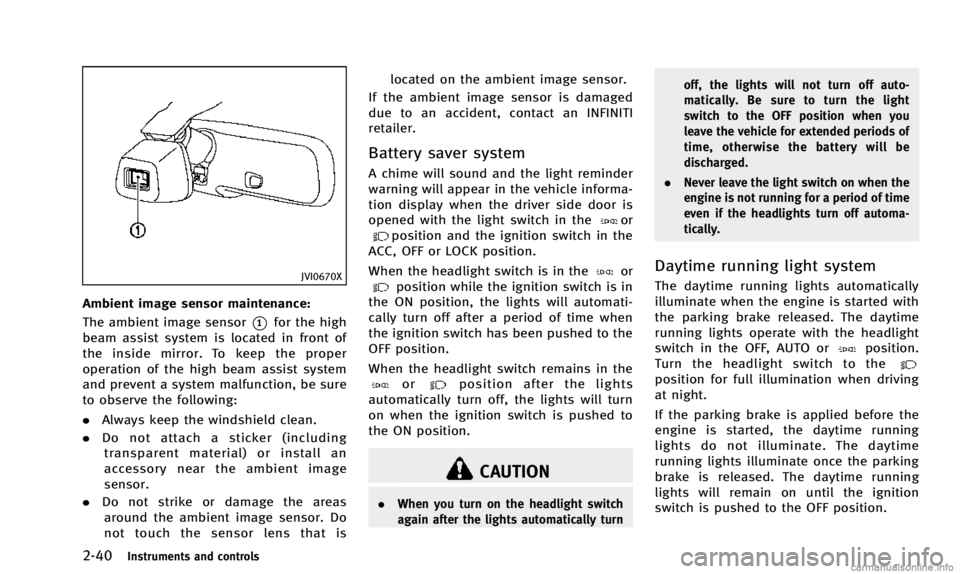
Ambient image sensor maintenance:
The ambient image sensor
*1for the high
beam assist system is located in front of
the inside mirror. To keep the proper
operation of the high beam assist system
and prevent a system malfunction, be sure
to observe the following:
. Always keep the windshield clean.
. Do not attach a sticker (including
transparent material) or install an
accessory near the ambient image
sensor.
. Do not strike or damage the areas
around the ambient image sensor. Do
not touch the sensor lens that is located on the ambient image sensor.
If the ambient image sensor is damaged
due to an accident, contact an INFINITI
retailer.
Battery saver system
A chime will sound and the light reminder
warning will appear in the vehicle informa-
tion display when the driver side door is
opened with the light switch in the
orposition and the ignition switch in the
ACC, OFF or LOCK position.
When the headlight switch is in the
orposition while the ignition switch is in
the ON position, the lights will automati-
cally turn off after a period of time when
the ignition switch has been pushed to the
OFF position.
When the headlight switch remains in the
orposition after the lights
automatically turn off, the lights will turn
on when the ignition switch is pushed to
the ON position.
CAUTION
. When you turn on the headlight switch
again after the lights automatically turn off, the lights will not turn off auto-
matically. Be sure to turn the light
switch to the OFF position when you
leave the vehicle for extended periods of
time, otherwise the battery will be
discharged.
. Never leave the light switch on when the
engine is not running for a period of time
even if the headlights turn off automa-
tically.
Daytime running light system
The daytime running lights automatically
illuminate when the engine is started with
the parking brake released. The daytime
running lights operate with the headlight
switch in the OFF, AUTO or
position.
Turn the headlight switch to the
position for full illumination when driving
at night.
If the parking brake is applied before the
engine is started, the daytime running
lights do not illuminate. The daytime
running lights illuminate once the parking
brake is released. The daytime running
lights will remain on until the ignition
switch is pushed to the OFF position.
Page 118 of 394

WARNING
When the daytime running light system is
active, tail lights on your vehicle are not on.
It is necessary at dusk to turn on your
headlights. Failure to do so could cause an
accident injuring yourself and others.
Adaptive Front lighting System
(AFS) (if so equipped)
The Adaptive Front lighting System (AFS)
will automatically adjust the headlights
(low beam) toward the turning direction to
improve the driver’s view. When the head-
light switch is ON and the driver operates
the steering wheel in a turn, the AFS
system will be activated.
The AFS will operate:
.when the headlight switch is ON.
. when the shift lever is in any position
other than P (Park) or R (Reverse).
. when the vehicle is driven at above 3
MPH (5 km/h) for the left-side head-
light. Note that the right-side low beam
headlight will swivel but the left-side
headlight will not swivel when the
vehicle is below 3 MPH (5 km/h) and the steering wheel is turned.
AFS will also adjust the headlight to a
proper axis automatically, depending on
the number of occupants in the vehicle, the
load the vehicle is carrying and the road
conditions.
If the AFS warning appears in the vehicle
information display after the ignition
switch has been pushed to the ON posi-
tion, this may indicate that the AFS is not
functioning properly. Have the system
checked by an INFINITI retailer. When the
engine is started, the headlights will
vibrate to check the system condition. This
is not a malfunction.JVI0644X
JVI0661M
Instruments and controls2-41
Page 120 of 394
JVI0645X
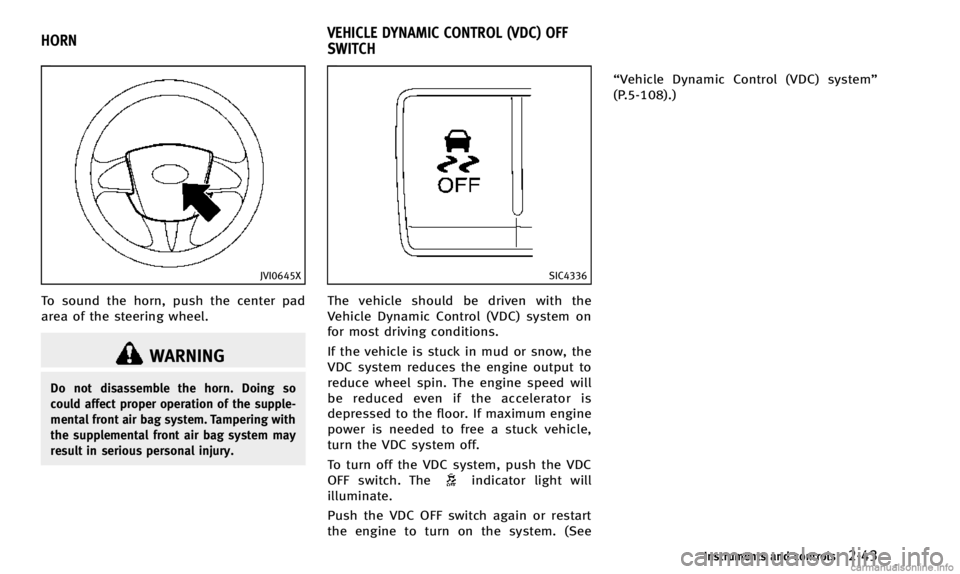
To sound the horn, push the center pad
area of the steering wheel.
WARNING
Do not disassemble the horn. Doing so
could affect proper operation of the supple-
mental front air bag system. Tampering with
the supplemental front air bag system may
result in serious personal injury.
SIC4336
The vehicle should be driven with the
Vehicle Dynamic Control (VDC) system on
for most driving conditions.
If the vehicle is stuck in mud or snow, the
VDC system reduces the engine output to
reduce wheel spin. The engine speed will
be reduced even if the accelerator is
depressed to the floor. If maximum engine
power is needed to free a stuck vehicle,
turn the VDC system off.
To turn off the VDC system, push the VDC
OFF switch. The
indicator light will
illuminate.
Push the VDC OFF switch again or restart
the engine to turn on the system. (See “Vehicle Dynamic Control (VDC) system”
(P.5-108).)
Instruments and controls2-43
HORN
VEHICLE DYNAMIC CONTROL (VDC) OFF
SWITCH
Page 123 of 394

2-46Instruments and controls
JVI0715X
SOFT BOTTLE HOLDER
CAUTION
.Do not use bottle holder for any other
objects that could be thrown about in
the vehicle and possibly injure people
during sudden braking or an accident.
. Do not use bottle holder for open liquid
containers.
JVI0651X
SUNGLASSES HOLDER
WARNING
Keep the sunglasses holder closed while
driving to prevent an accident.
To open the sunglasses holder, push the
holder.
CAUTION
.Do not use for anything other than
glasses.
. Do not leave glasses in the sunglasses
holder while parking in direct sunlight.
The heat may damage the glasses.