brake INFINITI Q50 2014 Service Manual
[x] Cancel search | Manufacturer: INFINITI, Model Year: 2014, Model line: Q50, Model: INFINITI Q50 2014Pages: 394, PDF Size: 1.99 MB
Page 254 of 394
The Distance Control Assist (DCA) system
brakes and moves the accelerator pedal
upward according to the distance from and
the relative speed of the vehicle ahead to
help assist the driver to maintain a
following distance.
WARNING
.Always drive carefully and attentively
when using the DCA system. Read and
understand the Owner’s Manual thor-
oughly before using the DCA system. To
avoid serious injury or death, do not rely
on the system to prevent accidents or to
control the vehicle’s speed in emergency
situations. Do not use the DCA system
except in appropriate road and traffic
conditions.
. If the vehicle ahead comes to a stop, the
vehicle decelerates to a standstill within
the limitations of the system. The
system will cancel once it judges that
the vehicle has come to a standstill with
a warning chime. To prevent the vehicle
from moving, the driver must depress
the brake pedal.
. The DCA system will not apply brake
control while the driver’s foot is on the accelerator pedal.
JVS0235X
PRECAUTIONS ON DCA SYSTEM
The system is intended to assist the driver
to keep a following distance from the
vehicle ahead traveling in the same lane
and direction.
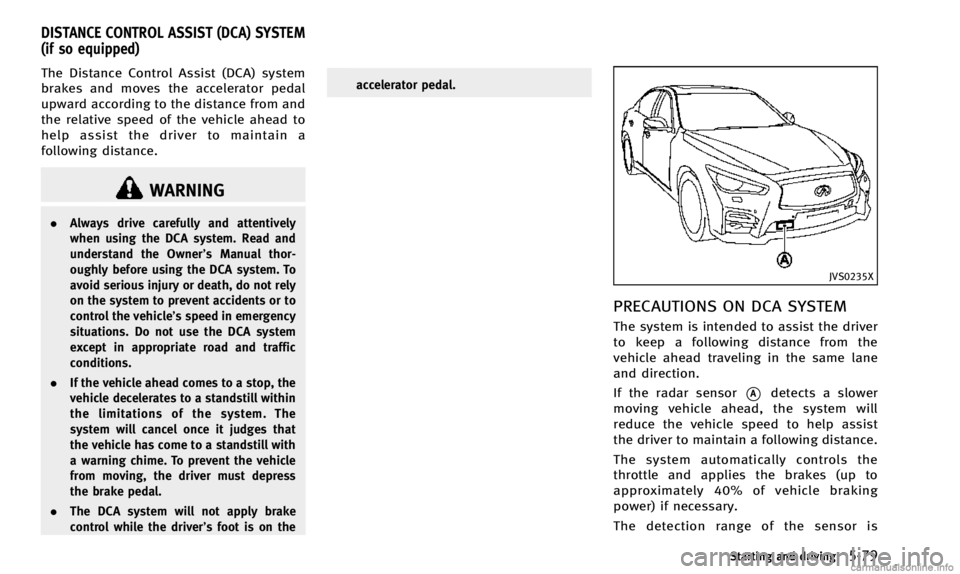
If the radar sensor
*Adetects a slower
moving vehicle ahead, the system will
reduce the vehicle speed to help assist
the driver to maintain a following distance.
The system automatically controls the
throttle and applies the brakes (up to
approximately 40% of vehicle braking
power) if necessary.
The detection range of the sensor is
Starting and driving5-79
DISTANCE CONTROL ASSIST (DCA) SYSTEM
(if so equipped)
Page 255 of 394
5-80Starting and driving
approximately 650 ft (200 m) ahead.
WARNING
.This system is only an aid to assist the
driver and is not a collision warning or
avoidance device. It is the driver’ s
responsibility to stay alert, drive safely
and be in control of the vehicle at all
times.
. This system will not adapt automatically
to road conditions. Do not use the
system on roads with sharp curves, or
on icy roads, in heavy rain or in fog.
The radar sensor will not detect the
following objects:
.Stationary and slow moving vehicles
. Pedestrians or objects in the roadway
. Oncoming vehicles in the same lane
. Motorcycles traveling offset in the travel
lane
WARNING
. As there is a performance limit to the
distance control function, never rely solely on the DCA system. This system
does not correct careless, inattentive or
absent-minded driving, or overcome
poor visibility in rain, fog, or other bad
weather. Decelerate the vehicle speed by
depressing the brake pedal, depending
on the distance to the vehicle ahead and
the surrounding circumstances in order
to maintain a safe distance between
vehicles.
. The system may not detect the vehicle in
front of you in certain road or weather
conditions. To avoid accidents, never use
the DCA system under the following
conditions:
—On roads with sharp curves
—On slippery road surfaces such as
on ice or snow, etc.
—During bad weather (rain, fog, snow,etc.)
—When rain, snow or dirt adhere tothe system sensor
—On steep downhill roads (frequentbraking may result in overheating
the brakes)
—On repeated uphill and downhillroads .
In some road or traffic conditions, a
vehicle or object can unexpectedly come
into the sensor detection zone and cause
automatic braking. You may need to
control the distance from other vehicles
using the accelerator pedal. Always stay
alert and avoid using the DCA system
when it is not recommended in this
section.
Page 256 of 394

JVS0235X
DCA SYSTEM OPERATION
Always pay attention to the operation of
the vehicle and be ready to manually
decelerate to maintain the proper following
distance. The Distance Control Assist (DCA)
system may not be able to decelerate the
vehicle under some circumstances.
The DCA system uses a sensor
*Alocated
behind the lower grille of the front bumper
to detect vehicles traveling ahead.
The following are some conditions in which
the sensor cannot detect the signals:
. When the snow or road spray from
traveling vehicles reduces the sensor’s visibility
. When excessively heavy baggage is
loaded in the rear seat or the luggage
room of your vehicle
The DCA system is designed to automati-
cally check the sensor’s operation. When
the sensor area of the front bumper is
covered with dirt or is obstructed, the
system will automatically be canceled. If
the sensor area is covered with ice, a
transparent or translucent vinyl bag, etc.,
the DCA system may not detect them. In
these instances, the DCA system may not
be able to decelerate the vehicle properly.
Be sure to check and clean the sensor area
regularly.
The DCA system is designed to help assist
the driver to maintain a following distance
from the vehicle ahead. The system will
decelerate as necessary and if the vehicle
ahead comes to a stop, the vehicle
decelerates to a standstill. However, the
DCA system can only apply up to approxi-
mately 40% of the vehicles total braking
power. If a vehicle moves into the traveling
lane ahead or if a vehicle traveling ahead
rapidly decelerates, the distance between
vehicles may become closer because the
DCA system cannot decelerate the vehicle quickly enough. If this occurs, the DCA
system will sound a warning chime and
blink the system display to notify the driver
to take necessary action.
See
“Approach warning” (P.5-86).
This system only brakes and moves the
accelerator pedal upward to help assist the
driver to maintain a following distance
from the vehicle ahead. Acceleration
should be operated by the driver.
The DCA system does not control vehicle
speed or warn you when you approach
stationary and slow moving vehicles. You
must pay attention to vehicle operation to
maintain proper distance from vehicles
ahead.
Starting and driving5-81
Page 260 of 394
.When the INFINITI Drive Mode Selector
is turned to the SNOW mode (To use the
DCA system, turn the INFINITI Drive
Mode Selector to a mode other than the
SNOW mode, then turn on the dynamic
driver assistance switch.)
For details about the INFINITI Drive
Mode Selector, see “INFINITI Drive
Mode Selector” (P.5-21).
. When the VDC system is off (To use the
DCA system, turn on the VDC, then
push the dynamic driver assistance
switch.)
For details about the VDC system, see
“Vehicle Dynamic Control (VDC) sys-
tem” (P.5-108).
. When ABS or VDC (including the trac-
tion control system) is operating
When the Conventional (fixed speed) cruise
control mode is operating, the DCA system
will not operate. (To use the DCA system,
turn the Conventional (fixed speed) cruise
control mode off, then push the dynamic
driver assistance switch.)
For details about the Conventional (fixed
speed) cruise control mode, see “Intelli-
gent Cruise Control (ICC) system” (P.5-58).
When the engine is turned off, the DCA
system is automatically turned off.
JVS0244X
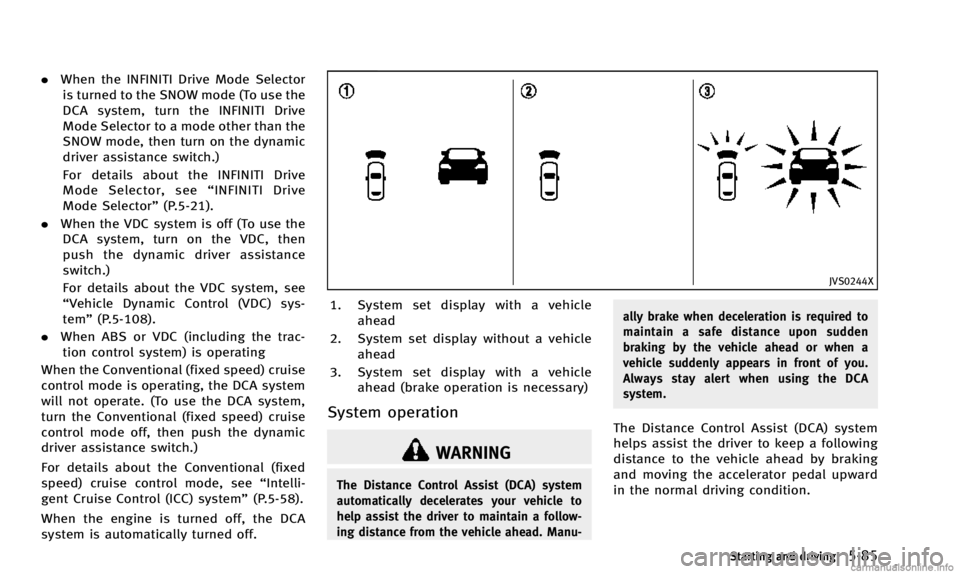
1. System set display with a vehicle ahead
2. System set display without a vehicle ahead
3. System set display with a vehicle ahead (brake operation is necessary)
System operation
WARNING
The Distance Control Assist (DCA) system
automatically decelerates your vehicle to
help assist the driver to maintain a follow-
ing distance from the vehicle ahead. Manu- ally brake when deceleration is required to
maintain a safe distance upon sudden
braking by the vehicle ahead or when a
vehicle suddenly appears in front of you.
Always stay alert when using the DCA
system.
The Distance Control Assist (DCA) system
helps assist the driver to keep a following
distance to the vehicle ahead by braking
and moving the accelerator pedal upward
in the normal driving condition.
Starting and driving5-85
Page 261 of 394

5-86Starting and driving
When a vehicle ahead is detected:
The vehicle ahead detection indicator
comes on.
When the vehicle approaches a vehicle
ahead:
.If the driver’ s foot is not on the
accelerator pedal, the system activates
the brakes to decelerate smoothly as
necessary. If the vehicle ahead comes
to a stop, the vehicle decelerates to a
standstill within the limitations of the
system.
. If the driver’s foot is on the accelerator
pedal, the system moves the accelera-
tor pedal upward to assist the driver to
release the accelerator pedal.
When brake operation by the driver is
required:
The system alerts the driver by a warning
chime and blinking the vehicle ahead
detection indicator. If the driver’s foot is
on the accelerator pedal after the warning,
the system moves the accelerator pedal
upward to assist the driver to switch to the
brake pedal. The stop lights of the vehicle come on
when braking is performed by the DCA
system.
When the brake operates, a noise may be
heard. This is not a malfunction.
WARNING
.
When the vehicle ahead detection in-
dicator is not illuminated, the system
will not control or warn the driver.
. Depending on the position of the accel-
erator pedal, the system may not be able
to assist the driver to release the
accelerator pedal appropriately.
. If the vehicle ahead comes to a stand-
still, the vehicle decelerates to a stand-
still within the limitations of the system.
The system will release brake control
with a warning chime once it judges the
vehicle is at a standstill. To prevent the
vehicle from moving, the driver must
depress the brake pedal. (The system
will resume control automatically once
the system reaches 3 MPH (5 km/h)).
Overriding the system:
The following driver’s operation overrides
the system operation.
.When the driver depresses the accel-
erator pedal even further while the
system is moving the accelerator pedal
upward, the DCA system control of the
accelerator pedal is canceled.
. When the driver’s foot is on the accel-
erator pedal, the brake control by the
system is not operated.
. When the driver’s foot is on the brake
pedal, neither the brake control nor the
alert by the system operates.
. When the Intelligent Cruise Control (ICC)
system is set, the DCA system will be
cancelled.
Approach warning
If your vehicle comes closer to the vehicle
ahead due to rapid deceleration of that
vehicle or if another vehicle cuts in, the
system warns the driver with the chime
and DCA system display. Decelerate by
depressing the brake pedal to maintain a
safe vehicle distance if:
. The chime sounds.
. The vehicle ahead detection indicator
blinks.
Page 265 of 394

5-90Starting and driving
JVS0312X
1. Driver assist system forward indicator
2. Vehicle ahead detection indicator
SYSTEM OPERATION
The forward emergency braking system will
function when your vehicle is driven at
speeds above approximately 3 MPH (5
km/h).
If a risk of a forward collision is detected,
the forward emergency braking system will
provide the first warning to the driver by
flashing the driver assist system forward
indicator (orange) and the vehicle ahead
detection indicator (orange), and providing
an audible warning. In addition, theforward emergency braking system pushes
the accelerator pedal up. If the driver
releases the accelerator pedal, then the
system applies partial braking.
If the driver applies the brakes quickly and
forcefully after the warning, and the
forward emergency braking system detects
that there is still the possibility of a
forward collision, the system will automa-
tically increase the braking force.
If a forward collision is imminent and the
driver does not take action, the forward
emergency braking system issues the
second visual (red) and audible warning
and automatically applies harder braking.NOTE:
The vehicle’s stop lights come on when
braking is performed by the forward
emergency braking system.
Depending on vehicle speed and distance
to the vehicle ahead, as well as driving and
roadway conditions, the system may help
the driver avoid a forward collision or may
help mitigate the consequences if a colli-
sion should one be unavoidable.
If the driver is handling the steering wheel,
accelerating or braking, the forward emer-
gency braking system will function later or
will not function.
The automatic braking will cease under the
following conditions:
.
When the steering wheel is turned as
far as necessary to avoid a collision.
. When the accelerator pedal is de-
pressed.
. When there is no longer a vehicle
detected ahead.
If the forward emergency braking system
has stopped the vehicle, the vehicle will
remain at a standstill for approximately 2
seconds before the brakes are released.
Page 274 of 394

CAUTION
During the first 1,200 miles (2,000 km),
follow these recommendations to obtain
maximum engine performance and ensure
the future reliability and economy of your
new vehicle.
Failure to follow these recommendations
may result in shortened engine life and
reduced engine performance.
.Avoid driving for long periods at con-
stant speed, either fast or slow. Do not
run the engine over 4,000 rpm.
. Do not accelerate at full throttle in any
gear.
. Avoid quick starts.
. Avoid hard braking as much as possi-
ble. Follow these easy-to-use Fuel Efficient
Driving Tips to help you achieve the most
fuel economy from your vehicle.
1. Use smooth accelerator and brake
pedal application.
.Avoid rapid starts and stops..Use smooth, gentle accelerator andbrake application whenever possi-
ble.
.Maintain constant speed while com-muting and coast whenever possi-
ble.
2. Maintain constant speed.
.Look ahead to try and anticipate and minimize stops.
.Synchronizing your speed with traf-fic lights allows you to reduce your
number of stops.
.Maintaining a steady speed can
minimize red light stops and im-
prove fuel efficiency.
3. Use air conditioning (A/C) at higher vehicle speeds.
.Below 40 MPH (64 km/h), it is moreefficient to open windows to cool the
vehicle due to reduced engine load.
.Above 40 MPH (64 km/h), it is moreefficient to use A/C to cool the
vehicle due to increased aerody- namic drag.
.Recirculating the cool air in the cabin
when the A/C is on reduces cooling
load.
4. Drive at economical speeds and dis- tances.
.Observing the speed limit and not
exceeding 60 MPH (97 km/h) (where
legally allowed) can improve fuel
efficiency due to reduced aerody-
namic drag.
.Maintaining a safe following dis-tance behind other vehicles reduces
unnecessary braking.
.Safely monitoring traffic to antici- pate changes in speed permits
reduced braking and smooth accel-
eration changes.
.Select a gear range suitable to road
conditions.
5. Use cruise control.
.Using cruise control during highway driving helps maintain a steady
speed.
.Cruise control is particularly effec-tive in providing fuel savings when
driving on flat terrains.
Starting and driving5-99
BREAK-IN SCHEDULE FUEL EFFICIENT DRIVING TIPS
Page 278 of 394

SD1006MA
WARNING
.Do not stop or park the vehicle over
flammable materials such as dry grass,
waste paper or rags. They may ignite and
cause a fire.
. Never leave the engine running while the
vehicle is unattended.
. Do not leave children unattended inside
the vehicle. They could unknowingly
activate switches or controls. Unat-
tended children could become involved
in serious accidents. .
Safe parking procedures require that
both the parking brake be applied and
the transmission placed into P (Park).
Failure to do so could cause the vehicle
to move unexpectedly or roll away and
result in an accident.
. Make sure the automatic transmission
shift lever has been pushed as far
forward as it can go and cannot be
moved without depressing the foot
brake pedal.
1. Firmly apply the parking brake. 2. Move the shift lever to the P (Park)
position.
3. To help prevent the vehicle from rolling into the street when parked on a
sloping drive way, it is a good practice
to turn the wheels as illustrated.
.HEADED DOWNHILL WITH CURB:*1
Turn the wheels into the curb and
move the vehicle forward until the
curb side wheel gently touches the
curb.
.HEADED UPHILL WITH CURB:*2
Turn the wheels away from the curb
and move the vehicle back until the
curb side wheel gently touches the
curb.
.HEADED UPHILL OR DOWNHILL, NOCURB:
*3
Turn the wheels toward the side of
the road so the vehicle will move
away from the center of the road if it
moves.
4. Push the ignition switch to the OFF position.
Starting and driving5-103
PARKING/PARKING ON HILLS
Page 281 of 394
5-106Starting and driving
BRAKING PRECAUTIONS
The brake system has two separate hy-
draulic circuits. If one circuit malfunctions,
you will still have braking at two wheels.
Vacuum assisted brakes
The brake booster aids braking by using
engine vacuum. If the engine stops, you
can stop the vehicle by depressing the
brake pedal. However, greater foot pres-
sure on the brake pedal will be required to
stop the vehicle and the stopping distance
will be longer.
Using the brakes
Avoid resting your foot on the brake pedal
while driving. This will cause overheating
of the brakes, wearing out the brake and
pads faster and reduce gas mileage.
To help save the brakes and to prevent the
brakes from overheating, reduce speed
and downshift to a lower gear before going
down a slope or long grade. Overheated
brakes may reduce braking performance
and could result in loss of vehicle control.
WARNING
.While driving on a slippery surface, be
careful when braking, accelerating or
downshifting. Abrupt braking or accel-
erating could cause the wheels to skid
and result in an accident.
. If the engine is not running or is turned
off while driving, the power assist for
the brakes will not work. Braking will be
harder.
Wet brakes
When the vehicle is washed or driven
through water, the brakes may get wet.
As a result, your braking distance will be
longer and the vehicle may pull to one side
during braking.
To dry brakes, drive the vehicle at a safe
speed while lightly tapping the brake pedal
to heat-up the brakes. Do this until the
brakes return to normal. Avoid driving the
vehicle at high speeds until the brakes
function correctly.
PARKING BRAKE BREAK-IN
Break in the parking brake shoes whenever
the stopping effect of the parking brake is
weakened or whenever the parking brake
shoes and/or drums/rotors are replaced,
in order to assure the best braking
performance.
This procedure is described in the vehicle
service manual and can be performed by
an INFINITI retailer.
BRAKE SYSTEM
Page 282 of 394
BRAKE ASSIST
When the force applied to the brake pedal
exceeds a certain level, the Brake Assist is
activated generating greater braking force
than a conventional brake booster even
with light pedal force.
WARNING
The Brake Assist is only an aid to assist
braking operation and is not a collision
warning or avoidance device. It is the
driver’s responsibility to stay alert, drive
safely and be in control of the vehicle at all
times.
ANTI-LOCK BRAKING SYSTEM (ABS)
WARNING
.The Anti-lock Braking System (ABS) is a
sophisticated device, but it cannot pre-
vent accidents resulting from careless or
dangerous driving techniques. It can
help maintain vehicle control during
braking on slippery surfaces. Remember
that stopping distances on slippery
surfaces will be longer than on normal surfaces even with ABS. Stopping dis-
tances may also be longer on rough,
gravel or snow covered roads, or if you
are using tire chains. Always maintain a
safe distance from the vehicle in front of
you. Ultimately, the driver is responsible
for safety.
. Tire type and condition may also affect
braking effectiveness.
—When replacing tires, install the
specified size of tires on all four
wheels.
—When installing a spare tire, make sure that it is the proper size and
type as specified on the Tire and
Loading Information label. See “Tire
and loading information label” (P.9-
13) of this manual.
—For detailed information, see “Wheels and tires” (P.8-29) of this
manual.
The Anti-lock Braking System (ABS) con-
trols the brakes so the wheels do not lock
during hard braking or when braking on
slippery surfaces. The system detects the
rotation speed at each wheel and varies
the brake fluid pressure to prevent each wheel from locking and sliding. By pre-
venting each wheel from locking, the
system helps the driver maintain steering
control and helps to minimize swerving
and spinning on slippery surfaces.
Using the system
Depress the brake pedal and hold it down.
Depress the brake pedal with firm steady
pressure, but do not pump the brakes. The
ABS will operate to prevent the wheels
from locking up. Steer the vehicle to avoid
obstacles.
WARNING
Do not pump the brake pedal. Doing so may
result in increased stopping distances.
Self-test feature
The ABS includes electronic sensors, elec-
tric pumps, hydraulic solenoids and a
computer. The computer has a built-in
diagnostic feature that tests the system
each time you start the engine and move
the vehicle at a low speed in forward or
reverse. When the self-test occurs, you may
hear a
“clunk” noise and/or feel a pulsa-
Starting and driving5-107
BRAKE ASSIST