air condition INFINITI Q50 2020 User Guide
[x] Cancel search | Manufacturer: INFINITI, Model Year: 2020, Model line: Q50, Model: INFINITI Q50 2020Pages: 468, PDF Size: 2.18 MB
Page 78 of 468
1-58Safety — Seats, seat belts and supplemental restraint system
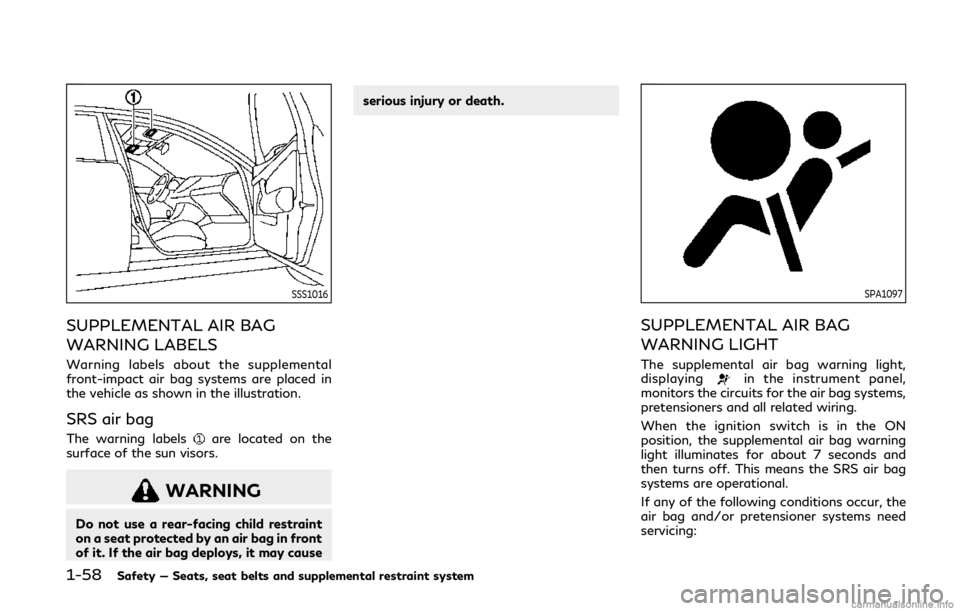
SSS1016
SUPPLEMENTAL AIR BAG
WARNING LABELS
Warning labels about the supplemental
front-impact air bag systems are placed in
the vehicle as shown in the illustration.
SRS air bag
The warning labelsare located on the
surface of the sun visors.
WARNING
Do not use a rear-facing child restraint
on a seat protected by an air bag in front
of it. If the air bag deploys, it may cause serious injury or death.
SPA1097
SUPPLEMENTAL AIR BAG
WARNING LIGHT
The supplemental air bag warning light,
displayingin the instrument panel,
monitors the circuits for the air bag systems,
pretensioners and all related wiring.
When the ignition switch is in the ON
position, the supplemental air bag warning
light illuminates for about 7 seconds and
then turns off. This means the SRS air bag
systems are operational.
If any of the following conditions occur, the
air bag and/or pretensioner systems need
servicing:
Page 79 of 468
.The supplemental air bag warning light
remains on after approximately 7 sec-
onds.
. The supplemental air bag warning light
flashes intermittently.
. The supplemental air bag warning light
does not come on at all.
Under these conditions, the air bag or
pretensioner systems may not operate prop-
erly. They must be checked and repaired. It is
recommended you visit an INFINITI retailer
for this service.
WARNING
If the supplemental air bag warning light
is on, it could mean that the front air
bag, side air bag, curtain air bag and/or
pretensioner systems will not operate in
an accident. To help avoid injury to
yourself or others, have your vehicle
checked as soon as possible. It is recom-
mended you visit an INFINITI retailer for
this service.
REPAIR AND REPLACEMENT
PROCEDURE
The front air bags, side air bags, curtain air
bags and pretensioners are designed to
activate on a one-time-only basis. As a
reminder, unless it is damaged, the supple-
mental air bag warning light will remain
illuminated after inflation has occurred.
These systems should be repaired and/or
replaced as soon as possible. It is recom-
mended you visit an INFINITI retailer for this
service.
When maintenance work is required on the
vehicle, the front air bags, side air bags,
curtain air bags, pretensioners and related
parts should be pointed out to the person
conducting the maintenance. The ignition
switch should always be in the LOCK
position when working under the hood or
inside the vehicle.
WARNING
. Once a front air bag, side air bag, or
curtain air bag has inflated, the air
bag module will not function again
and must be replaced. Additionally,
the activated pretensioner must also
be replaced. The air bag module and
pretensioner should be replaced. It is recommended you visit an INFINITI
retailer for this service. However, the
air bag module and pretensioner
system cannot be repaired.
. The front air bag, side air bag, curtain
air bag and the pretensioner system
should be inspected if there is any
damage to the front end or side
portion of the vehicle. It is recom-
mended you visit an INFINITI retailer
for this service.
. If you need to dispose of the supple-
mental air bag or pretensioner or
scrap the vehicle, it is recommended
you visit an INFINITI retailer. Correct
supplemental air bag and seat belt
pretensioner system disposal proce-
dures are set forth in the appropriate
INFINITI Service Manual. Incorrect
disposal procedures could cause per-
sonal injury.
. If there is an impact to your vehicle
from any direction, your Occupant
Classification Sensor (OCS) should be
checked by an INFINITI retailer to
verify it is still functioning correctly.
The OCS should be checked even if no
air bags deploy as a result of the
impact. Failure to verify proper OCS
function may result in an improper air
bag deployment resulting in injury or
Safety — Seats, seat belts and supplemental restraint system1-59
Page 88 of 468
2-8Instruments and controls
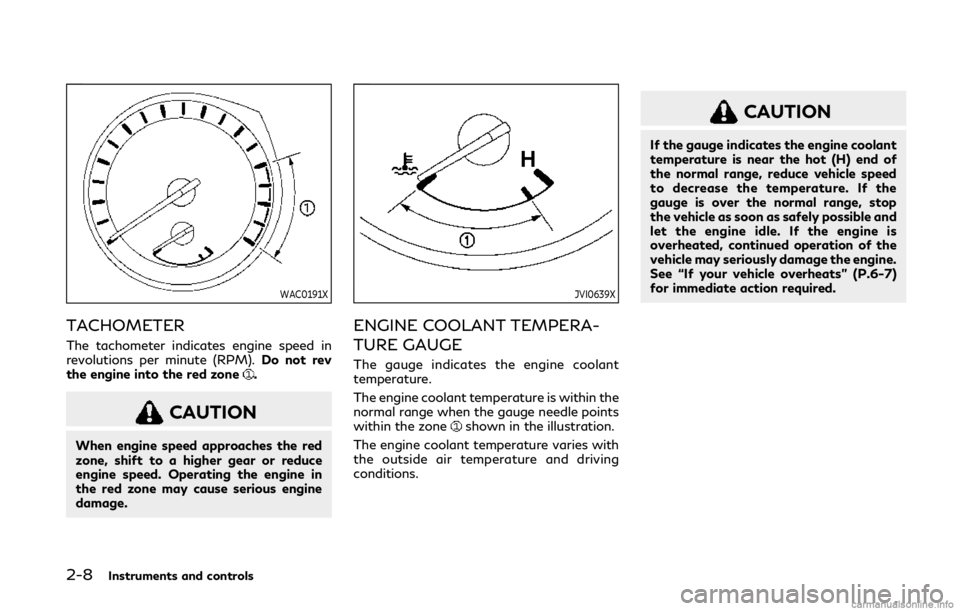
WAC0191X
TACHOMETER
The tachometer indicates engine speed in
revolutions per minute (RPM).Do not rev
the engine into the red zone
.
CAUTION
When engine speed approaches the red
zone, shift to a higher gear or reduce
engine speed. Operating the engine in
the red zone may cause serious engine
damage.
JVI0639X
ENGINE COOLANT TEMPERA-
TURE GAUGE
The gauge indicates the engine coolant
temperature.
The engine coolant temperature is within the
normal range when the gauge needle points
within the zone
shown in the illustration.
The engine coolant temperature varies with
the outside air temperature and driving
conditions.
CAUTION
If the gauge indicates the engine coolant
temperature is near the hot (H) end of
the normal range, reduce vehicle speed
to decrease the temperature. If the
gauge is over the normal range, stop
the vehicle as soon as safely possible and
let the engine idle. If the engine is
overheated, continued operation of the
vehicle may seriously damage the engine.
See “If your vehicle overheats” (P.6-7)
for immediate action required.
Page 95 of 468
driver’s seat belt is fastened. At the same
time, the chime will sound for about 6
seconds unless the driver’s seat belt is
securely fastened.
The seat belt warning light for the front
passenger will illuminate if the seat belt is
not fastened when the front passenger’s
seat is occupied.
See “Seat belts” (P.1-12) for precautions on
seat belt usage.
Supplemental air bag warning
light
After pushing the ignition switch to the ON
position, the supplemental air bag warning
light will illuminate. The supplemental air bag
warning light will turn off after about 7
seconds if the supplemental front air bag
and supplemental side air bag, curtain side-
impact air bag systems and/or pretensioner
seat belt are operational.
If any of the following conditions occur, the
supplemental front air bag, supplemental
side air bag, supplemental curtain side-
impact air bag and pretensioner seat belt
needs servicing.
. The supplemental air bag warning light
remains on after approximately 7 sec-
onds. .
The supplemental air bag warning light
flashes intermittently.
. The supplemental air bag warning light
does not come on at all.
It is recommended you visit an INFINITI
retailer for these services.
Unless checked and repaired, the Supple-
mental Restraint Systems and/or the pre-
tensioner seat belt may not function
properly.
For additional information, see “Supplemen-
tal restraint system” (P.1-40).WARNING
If the supplemental air bag warning light
is on, it could mean that the front air
bag, side air bag, curtain air bag systems
and/or pretensioner seat belt will not
operate in an accident. To help avoid
injury to yourself or others, have your
vehicle checked. It is recommended you
visit an INFINITI retailer for this service.
Vehicle Dynamic Control
(VDC) warning light
When the ignition switch is in the ON
position, the Vehicle Dynamic Control
(VDC) warning light illuminates and then turns off.
The light will blink when the VDC system or
the traction control system is operating, thus
alerting the driver that the vehicle is nearing
its traction limits. The road surface may be
slippery.
When the VDC warning light illuminates
when the VDC system is turned on, this light
alerts the driver to the fact that the VDC
system’s fail-safe mode is operating, for
example the VDC, active trace control func-
tion, Brake Force Distribution or hill start
assist system may not be functioning prop-
erly. Have the system checked. It is recom-
mended you visit an INFINITI retailer for this
service. If a malfunction occurs in the
system, the VDC system function will be
canceled but the vehicle is still driveable. For
additional information, see “Vehicle Dynamic
Control (VDC) system” (P.5-129).
INDICATOR LIGHTS
ECO drive indicator light
When the ignition switch is placed in the ON
position, the light will come on and then turn
off.
When the INFINITI Drive Mode Selector is
turned to the ECO mode, the ECO drive
indicator light will illuminate, blink or remain
off depending on the accelerator pedal
Instruments and controls2-15
Page 101 of 468

reaches the empty (0) position.
There is a small reserve of fuel remaining in
the tank when the fuel gauge reaches the
empty (0) position.
11. Low washer fluid warning
This warning appears when the washer tank
fluid is at a low level. Add washer fluid as
necessary. (See “Window washer fluid” (P.8-
10).)
12. Door/trunk open warning
This warning appears if any of the doors
and/or the trunk lid are open or not closed
securely. The vehicle icon indicates which
door or the trunk lid is open on the display.
13. Intelligent Key system warning
This warning appears if there is a malfunc-
tion in the Intelligent Key system.
If this warning appears while the engine is
stopped, the engine cannot be started. If this
warning appears while the engine is running,
the vehicle can be driven. However, in these
cases, have the system checked as soon as
possible. It is recommended you visit an
INFINITI retailer for this service.
14. Loose Fuel Cap warning
This warning appears when the fuel-filler
cap is not tightened correctly after thevehicle has been refueled. (See “Fuel-filler
cap” (P.3-25).)
15. Tire Pressure Low - Add Air
warning
This warning appears when the low tire
pressure warning light in the meter illumi-
nates and low tire pressure is detected. The
warning appears each time the ignition
switch is placed in the ON position as long
as the low tire pressure warning light
remains illuminated. If this warning appears,
stop the vehicle and adjust the pressure to
the recommended COLD tire pressure
shown on the Tire and Loading Information
label. (See “Low tire pressure warning light”
(P.2-12) and “Tire Pressure Monitoring
System (TPMS)” (P.5-5).)
16. Flat Tire - Visit dealer warning
(if so equipped)
This warning appears when the low tire
pressure warning light in the meter illumi-
nates and one or more flat tires are detected
while driving. A chime also sounds for
approximately 10 seconds. (See “Low tire
pressure warning light” (P.2-12) and “Tire
Pressure Monitoring System (TPMS)” (P.5-
5).)
17. Low oil pressure warning
This warning appears if low engine oil
pressure is detected. If the warning appears
during normal driving, pull off the road in a
safe area, stop the engine immediately and
call an INFINITI retailer or other authorized
repair shop.
The low oil pressure warning is not designed
to indicate a low oil level. Use the dipstick to
check the oil level. (See “Engine oil” (P.8-7).)
18. All-Wheel Drive (AWD) warning
(if so equipped)
This warning appears when the Intelligent
All-Wheel Drive (AWD) system is not func-
tioning properly while the engine is running.
The displayed message will vary depending
on the condition of the AWD system mal-
function. (See “Intelligent All-Wheel Drive
(AWD)” (P.5-121).)
19. Extended storage fuse warning
(if so equipped)
This warning may appear if the extended
storage fuse switch is not pushed in
(switched on). When this warning appears,
push in (switch on) the extended storage
fuse switch to turn off the warning. For
more information, see “Extended storage
fuse switch” (P.8-19).
Instruments and controls2-21
Page 107 of 468

on the lower display. See the INFINITI
InTouchTMOwner’s Manual.
The display is updated every 30 seconds. At
about the first 1/3 mile (500 m) after a
reset, the display shows “——”.
5. Navigation (if so equipped)
When the route guidance is set in the
navigation system, this item shows the
navigation route information.
For more details, see the INFINITI In-
Touch
TMOwner’s Manual.
6. Audio
The audio mode shows the status of audio
information.
For more details, see the INFINITI In-
Touch
TMOwner’s Manual.
7. Driving aids
The driving aids mode shows the operating
condition for the following systems (if so
equipped).
. Lane Departure Warning (LDW)
. Lane Departure Prevention (LDP)
. Blind Spot Warning (BSW)
. Blind Spot Intervention
®(BSI)
. Distance Control Assist (DCA)
. Forward Emergency Braking (FEB) .
Predictive Forward Collision Warning
(PFCW)
For more details, see “Lane Departure
Warning (LDW)/Lane Departure Prevention
(LDP)” (P.5-33), “Blind Spot Warning
(BSW)” (P.5-40), “Blind Spot Intervention
®
(BSI)” (P.5-48), “Distance Control Assist
(DCA)” (P.5-92), “Forward Emergency Brak-
ing (FEB)” (P.5-103) and “Predictive For-
ward Collision Warning (PFCW)” (P.5-110).
8. Tire pressure
The tire pressure mode shows the pressure
of all four tires while the vehicle is driven.
When the “Tire Pressure Low - Add Air” or
“Flat Tire - Visit dealer” (if so equipped)
warning appears, the display can be
switched to the tire pressure mode by
pushing the
orswitch.
The tire pressure unit can be changed in the
[TPMS setting] under the [Settings] menu
on the lower display. (See the INFINITI
InTouch
TMOwner’s Manual.)
NOTE:
After the ignition switch is placed in the ON
position, it may take a period of time for the
tire pressure to be displayed while the
vehicle is driven. Depending on the radio
wave circumstance, tire pressure may not
correctly be displayed.
9. Chassis control
When Active Lane Control (if so equipped) or
the active trace control system is operated, it
shows the operating condition. See “Active
Lane Control” (P.5-25) and “Active trace
control” (P.5-130) for more details.
10. Oil control system
Engine oil information informs the distance
to oil change.
Distance to oil change:
The distance to oil change is displayed if the
distance to oil change comes to be less than
940 miles (1,500 km).
Oil replacement indicator:
When the set mileage approaches, the
engine oil replacement indicator will appear
on the display. After the oil is changed, reset
the oil control system by pushing the
orswitch for longer than 1 second.
The oil change interval cannot be adjusted
manually. The distance to oil change interval
is calculated depending on the driving con-
ditions and set automatically by the oil
control system.
Instruments and controls2-27
Page 108 of 468

2-28Instruments and controls
CAUTION
If the oil replacement indicator is dis-
played, change the engine oil as soon as
possible. Operating your vehicle with
deteriorated oil can damage the engine.
Warning check
The present warnings are displayed. If no
warning is present, “No Warning” is dis-
played.
JVI0679M
CLOCK AND OUTSIDE AIR TEM-
PERATURE
The clockand outside air temperatureare displayed on the upper side of the vehicle
information display.
Clock
The clock can be adjusted on the lower
display. See the INFINITI InTouchTMOwn-
er’s Manual.
Outside air temperature (°F or °C)
The outside air temperature is displayed in °F
or °C in the range of −22 to 131°F (−30 to
55°C). The outside temperature sensor is located in
front of the radiator. The sensor may be
affected by road or engine heat, wind
directions and other driving conditions. The
display may differ from the actual outside
temperature or the temperature displayed
on various signs or billboards.
Page 121 of 468
SIC3272
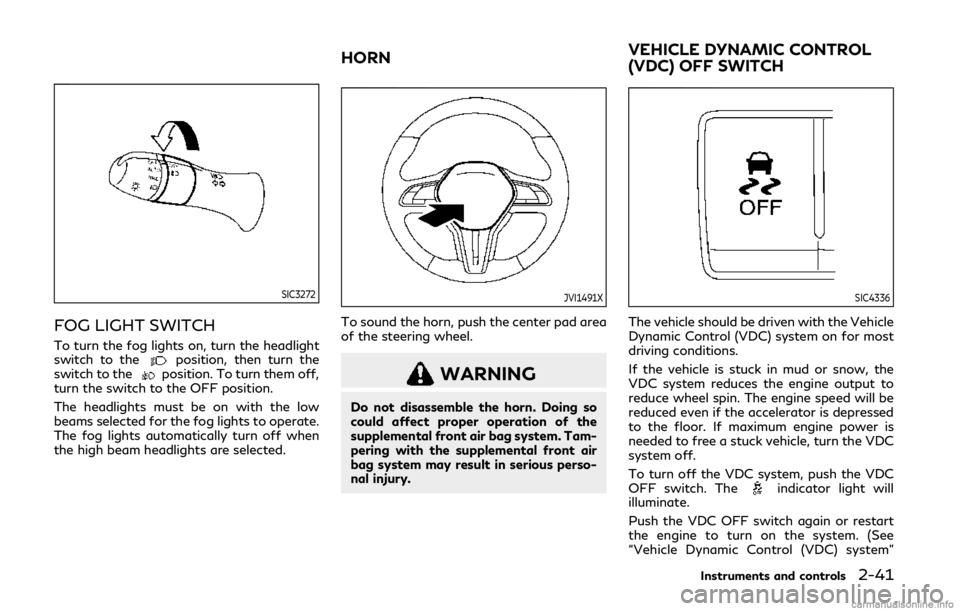
FOG LIGHT SWITCH
To turn the fog lights on, turn the headlight
switch to theposition, then turn the
switch to theposition. To turn them off,
turn the switch to the OFF position.
The headlights must be on with the low
beams selected for the fog lights to operate.
The fog lights automatically turn off when
the high beam headlights are selected.
JVI1491X
To sound the horn, push the center pad area
of the steering wheel.
WARNING
Do not disassemble the horn. Doing so
could affect proper operation of the
supplemental front air bag system. Tam-
pering with the supplemental front air
bag system may result in serious perso-
nal injury.
SIC4336
The vehicle should be driven with the Vehicle
Dynamic Control (VDC) system on for most
driving conditions.
If the vehicle is stuck in mud or snow, the
VDC system reduces the engine output to
reduce wheel spin. The engine speed will be
reduced even if the accelerator is depressed
to the floor. If maximum engine power is
needed to free a stuck vehicle, turn the VDC
system off.
To turn off the VDC system, push the VDC
OFF switch. The
indicator light will
illuminate.
Push the VDC OFF switch again or restart
the engine to turn on the system. (See
“Vehicle Dynamic Control (VDC) system”
Instruments and controls2-41
HORN VEHICLE DYNAMIC CONTROL
(VDC) OFF SWITCH
Page 125 of 468

.Avoid using power outlet when the
air conditioner, headlights or rear
window defroster is on.
. This power outlet is not designed for
use with a cigarette lighter unit.
. Push the plug in as far as it will go. If
good contact is not made, the plug
may overheat or the internal tem-
perature fuse may blow.
. Before inserting or disconnecting a
plug, be sure the electrical accessory
being used is turned OFF.
. When not in use, be sure to close the
cap. Do not allow water or any liquid
to contact the outlet.CUP HOLDERS
CAUTION
.Avoid abrupt starting and braking
when the cup holder is being used to
prevent spilling the drink. If the liquid
is hot, it can scald you or your
passenger.
. Use only soft cups in the cup holder.
Hard objects can injure you in an
accident.
JVI0649X
Front
JVI0650X
Rear
Instruments and controls2-45
STORAGE
Page 133 of 468

will automatically open or close all the way.
To stop the roof, push the switch once more
while it is opening or closing.
Operating moonroof with Intelli-
gent Key (if so equipped)
The moonroof can be opened by pushing the
UNLOCK button on the Intelligent Key. This
function will not operate while the moonroof
timer is activated or when the moonroof
need to be initialized. For details about the
Intelligent Key button usage, see “How to
use remote keyless entry system” (P.3-16).
Opening:
To open the sunroof, push the UNLOCK
button on the Intelligent Key for about 3
seconds after the door is unlocked.
To stop opening, release the
button.
Auto reverse function
WARNING
There are some small distances immedi-
ately before the closed position which
cannot be detected. Make sure that all
passengers have their hands, etc., inside
the vehicle before closing the moonroof.If the control unit detects something caught
in the moonroof when it is closing, the
moonroof will be immediately opened.
The auto reverse function can be activated
when the moonroof is closed by automatic
operation when the ignition switch is in the
ON position or for about 45 seconds after
the ignition switch is pushed to the OFF
position.
If the moonroof cannot be closed automa-
tically when the auto reverse function
activates due to a malfunction, push and
hold the moonroof switch to the close
position
.
Depending on the environment or driving
conditions, the auto reverse function may
be activated if an impact or load similar to
something being caught in the moonroof
occurs.
If the moonroof does not operate
If the moonroof does not operate properly,
perform the following procedure to initialize
the moonroof operation system.
1. If the moonroof is open, close it fully by repeatedly pushing the moonroof switch
to the close position
to tilt the moon-
roof up.
2. Push and hold the switch to the close position
. 3. Release the moonroof switch after the
moonroof moves slightly up and down.
4. Push and hold the switch to the open position
to fully tilt the moonroof
down.
5. Check if the moonroof switch operates normally.
If the moonroof does not operate properly
after performing the procedure above, have
your moonroof checked and repaired. It is
recommended you visit an INFINITI retailer
for this service.
Instruments and controls2-53