air condition INFINITI Q50 2020 Service Manual
[x] Cancel search | Manufacturer: INFINITI, Model Year: 2020, Model line: Q50, Model: INFINITI Q50 2020Pages: 468, PDF Size: 2.18 MB
Page 271 of 468
.The radar sensors may not be able to
detect and activate BSI when certain
objects are present such as:
— Pedestrians, bicycles, animals.
— Vehicles such as motorcycles, low height vehicles, or high ground
clearance vehicles.
— Vehicles remaining in the detec- tion zone when you accelerate
from a stop.
— Oncoming vehicles.
— A vehicle merging into an adja- cent lane at a speed approxi-
mately the same as your vehicle.
— A vehicle approaching rapidly from behind.
— A vehicle which your vehicle over- takes rapidly.
— A vehicle that passes through the detection zone quickly.
. The radar sensor’s detection zone is
designed based on a standard lane
width. When driving in a wider lane,
the radar sensors may not detect
vehicles in an adjacent lane. When
driving in a narrow lane, the radar
sensors may detect vehicles driving
two lanes away. .
The radar sensors are designed to
ignore most stationary objects, how-
ever objects such as guardrails, walls,
foliage and parked vehicles may oc-
casionally be detected. This is a
normal operation condition.
. The camera may not detect lane
markers in the following situations
and the BSI system may not operate
properly.
— On roads where there are multi- ple parallel lane markers; lane
markers that are faded or not
painted clearly; yellow painted
lane markers; nonstandard lane
markers; lane markers covered
with water, dirt, snow, etc.
— On roads where discontinued lane markers are still detectable.
— On roads where there are sharp curves.
— On roads where there are sharply contrasting objects, such as sha-
dows, snow, water, wheel ruts,
seams or lines remaining after
road repairs.
— On roads where the traveling lane merges or separates. — When the vehicle’s traveling di-
rection does not align with the
lane markers.
— When traveling close to the ve- hicle in front of you, which ob-
structs the lane camera unit
detection range.
— When rain, snow or dirt adheres to the windshield in front of a lane
camera unit.
— When the headlights are not bright due to dirt on the lens or
if aiming is not adjusted properly.
— When strong light enters a lane camera unit. (For example: light
directly shines on the front of the
vehicle at sunrise or sunset.)
— When a sudden change in bright- ness occurs. (For example: when
the vehicle enters or exits a tunnel
or under a bridge.)
. Do not use the BSI system under the
following conditions because the sys-
tem may not function properly.
— During bad weather. (For exam- ple: rain, fog, snow, etc.)
— When driving on slippery roads, such as on ice or snow, etc.
Starting and driving5-53
Page 272 of 468

5-54Starting and driving
— When driving on winding or un-even roads.
— When there is a lane closure due to road repairs.
— When driving in a makeshift or temporary lane.
— When driving on roads where the lane width is too narrow.
— When driving with a tire that is not within normal tire conditions
(for example, tire wear, low tire
pressure, installation of spare tire,
tire chains, non-standard wheels).
— When the vehicle is equipped with non-original steering parts or sus-
pension parts.
. Excessive noise (for example, audio
system volume, open vehicle window)
will interfere with the chime sound,
and it may not be heard.BSI DRIVING SITUATIONS
Indicator on
Indicator off
Indicator flashing
JVS0737X
Illustration 1 – Approaching from behind
Another vehicle approaching from
behind
Illustration 1: The side indicator light illumi-
nates if a vehicle enters the detection zone
from behind in an adjacent lane.
Page 292 of 468

5-74Starting and driving
JVS1123X
The system is intended to enhance the
operation of the vehicle when following a
vehicle traveling in the same lane and
direction.
If the radar sensor
detects a slower
moving vehicle ahead, the system will reduce
the vehicle speed so that your vehicle
follows the vehicle in front at the selected
distance.
The system automatically controls the throt-
tle and applies the brakes (up to approxi-
mately 40% of vehicle braking power) if
necessary.
The detection range of the sensor is approxi-
mately 650 ft (200 m) ahead.
Vehicle-to-vehicle distance control
mode operation
The vehicle-to-vehicle distance control
mode is designed to maintain a selected
distance and reduce the speed to match the
slower vehicle ahead; the system will de-
celerate the vehicle as necessary and if the
vehicle ahead comes to a stop, the vehicle
decelerates to a standstill. However, the ICC
system can only apply up to approximately
40% of the vehicle’s total braking power.
This system should only be used when traffic
conditions allow vehicle speeds to remain
fairly constant or when vehicle speeds
change gradually. If a vehicle moves into
the traveling lane ahead or if a vehicle
traveling ahead rapidly decelerates, the
distance between vehicles may become
closer because the ICC system cannot
decelerate the vehicle quickly enough. If this
occurs, the ICC system will sound a warning
chime and blink the system display to notify
the driver to take necessary action.
The system will cancel and a warning chime
will sound if the speed is below approxi-
mately 15 MPH (24 km/h) and a vehicle is
not detected ahead. The system will also
disengage when the vehicle goes above the
maximum set speed.
See “Approach warning” (P.5-81). The following items are controlled in the
vehicle-to-vehicle distance control mode:
.
When there are no vehicles traveling
ahead, the vehicle-to-vehicle distance
control mode maintains the speed set
by the driver. The set speed range is
between approximately 20 and 90 MPH
(32 and 144 km/h).
. When there is a vehicle traveling ahead,
the vehicle-to-vehicle distance control
mode adjusts the speed to maintain the
distance, selected by driver, from the
vehicle ahead. The adjusting speed range
is up to the set speed. If the vehicle
ahead comes to a stop, the vehicle
decelerates to a standstill within the
limitations of the system. The system
will cancel once it judges a standstill with
a warning chime.
. When the vehicle traveling ahead has
moved out from its lane of travel, the
vehicle-to-vehicle distance control mode
accelerates and maintains vehicle speed
up to the set speed.
The ICC system does not control vehicle
speed or warn you when you approach
stationary and slow moving vehicles. You
must pay attention to vehicle operation to
maintain proper distance from vehicles
ahead when approaching toll gates or traffic
congestion.
Page 300 of 468
5-82Starting and driving
control the proper distance ahead of your
vehicle.
Also, the sensor sensitivity can be affected
by vehicle operation (steering maneuver or
driving position in the lane) or traffic or
vehicle condition (for example, if a vehicle is
being driven with some damage).
Automatic cancellation
A chime sounds under the following condi-
tions and the control is automatically can-
celed.
.When the vehicle ahead is not detected
and your vehicle is traveling below the
speed of 15 MPH (24 km/h)
. When the system judges the vehicle is at
standstill
. When the shift lever is not in the D
position or Manual mode
. When the parking brake is applied
. When the INFINITI Drive Mode Selector
is turned to the SNOW mode
. When the VDC system is turned off
. When ABS or VDC (including the traction
control system) operates
. When distance measurement becomes
impaired due to adhesion of dirt or
obstruction to the sensor
. When a wheel slips .
When the radar signal is temporarily
interrupted
Vehicle-to-vehicle distance control
mode limitations
WARNING
Listed below are the system limitations
for the ICC system. Failure to operate
the vehicle in accordance with these
system limitations could result in serious
injury or death.
. The system is primarily intended for
use on straight, dry, open roads with
light traffic. It is not advisable to use
the system in city traffic or con-
gested areas.
. This system will not adapt automati-
cally to road conditions. This system
should be used in evenly flowing
traffic. Do not use the system on
roads with sharp curves, or on icy
roads, in heavy rain or in fog.
. As there is a performance limit to the
distance control function, never rely
solely on the ICC system. This system
does not correct careless, inattentive
or absent-minded driving, or over-
come poor visibility in rain, fog, or other bad weather. Decelerate the
vehicle speed by depressing the brake
pedal, depending on the distance to
the vehicle ahead and the surround-
ing circumstances in order to main-
tain a safe distance between vehicles.
. If the vehicle ahead comes to a stop,
the vehicle decelerates to a standstill
within the limitations of the system.
The system will cancel once it judges
that the vehicle has come to a
standstill and sound a warning chime.
To prevent the vehicle from moving,
the driver must depress the brake
pedal.
. Always pay attention to the opera-
tion of the vehicle and be ready to
manually control the proper follow-
ing distance. The vehicle-to-vehicle
distance control mode of the ICC
system may not be able to maintain
the selected distance between vehi-
cles (following distance) or selected
vehicle speed under some circum-
stances.
. The system may not detect the
vehicle in front of you in certain road
or weather conditions. To avoid ac-
cidents, never use the ICC system
under the following conditions:
Page 337 of 468

could cause failure or malfunction.
. Do not alter, remove or paint the front
bumper. It is recommended you contact
an INFINITI retailer before customizing
or restoring the front bumper.
FCC Notice:
For USA:
This device complies with Part 15 of the
FCC Rules. Operation is subject to the
following two conditions:
1. This device may not cause harmful
interference, and
2. This device must accept any interfer-
ence received, including interference
that may cause undesired operation.
FCC Warning
Changes or modification not expressly ap-
proved by the party responsible for com-
pliance could void the user’s authority to
operate the equipment.
For Canada:
This device complies with Industry Canada
licence-exempt RSS standard(s). Operation
is subject to the following two conditions:
1. This device may not cause interference,
and
2. This device must accept any interfer-
ence, including interference that may
cause undesired operation of the device.
CAUTION
During the first 1,200 miles (2,000 km),
follow these recommendations to obtain
maximum engine performance and en-
sure the future reliability and economy
of your new vehicle.
Failure to follow these recommendations
may result in shortened engine life and
reduced engine performance.
. Avoid driving for long periods at constant
speed, either fast or slow. Do not run the
engine over 4,000 rpm.
. Do not accelerate at full throttle in any
gear.
. Avoid quick starts.
. Avoid hard braking as much as possible. Follow these easy-to-use Fuel Efficient
Driving Tips to help you achieve the most
fuel economy from your vehicle.
1. Use smooth accelerator and brake pedal
application.
.Avoid rapid starts and stops..Use smooth, gentle accelerator andbrake application whenever possible.
.Maintain constant speed while com-muting and coast whenever possible.
2. Maintain constant speed.
.Look ahead to try and anticipate and minimize stops.
.Synchronizing your speed with traffic
lights allows you to reduce your
number of stops.
.Maintaining a steady speed can mini-mize red light stops and improve fuel
efficiency.
3. Use air conditioning (A/C) at higher vehicle speeds.
.Below 40 MPH (64 km/h), it is moreefficient to open windows to cool the
vehicle due to reduced engine load.
.Above 40 MPH (64 km/h), it is moreefficient to use A/C to cool the
vehicle due to increased aerodynamic
drag.
.Recirculating the cool air in the cabinwhen the A/C is on reduces cooling
load.
Starting and driving5-119
BREAK-IN SCHEDULE FUEL EFFICIENT DRIVING TIPS
Page 358 of 468

6-2In case of emergency
SIC2574
Push the switch on to warn other drivers
when you must stop or park under emer-
gency conditions. All turn signal lights will
flash.
WARNING
.If stopping for an emergency, be sure
to move the vehicle well off the road.
. Do not use the hazard warning
flashers while moving on the highway
unless unusual circumstances force
you to drive so slowly that your
vehicle might become a hazard to
other traffic. .
Turn signals do not work when the
hazard warning flasher lights are on.
The flasher can be actuated with the ignition
switch in any position.
When an impact that could activate the
supplemental air bags is detected, the
hazard warning flasher lights blink automa-
tically. If the hazard warning flasher switch is
pushed, the hazard warning flashers will turn
off.
WARNING
Do not turn the hazard warning flasher
switch to off until you can make sure
that it is safe to do so. Also, the hazard
flasher warning may not blink automa-
tically depending on the force of impact.
Some state laws may prohibit the use of the
hazard warning flasher switch while driving. In the event of a roadside emergency,
Roadside Assistance Service is available to
you. Please refer to your Warranty Informa-
tion Booklet (U.S.) or Warranty & Roadside
Assistance Information Booklet (Canada) for
details.
HAZARD WARNING FLASHER SWITCHROADSIDE ASSISTANCE PROGRAM
Page 360 of 468
6-4In case of emergency
for approximately 1 minute. The light
will remain on after 1 minute. Have
your tires replaced and/or TPMS
system reset as soon as possible. It
is recommended you visit an INFINITI
retailer for these services.
. Replacing tires with those not origin-
ally specified by INFINITI could affect
the proper operation of the TPMS.
. Do not inject any tire liquid or aerosol
tire sealant into the tires, as this may
cause a malfunction of the tire pres-
sure sensors.
RUN-FLAT TIRES (if so equipped)
Run-flat tires are those tires that can be
used temporarily if they are punctured. See
“Run-flat tires” (P.8-32).
Also, refer to “Important Tire Safety Infor-
mation” (US) or “Tire Safety Information”
(Canada) in the INFINITI Warranty Informa-
tion Booklet.
WARNING
.Although you can continue driving
with a punctured run-flat tire, re-
member that vehicle handling stabi-
lity is reduced, which could lead to an accident and personal injury. Also,
driving a long distance at high speeds
may damage the tires.
. Do not drive at speeds above 50
MPH (80 km/h) and do not drive
more than approximately 93 miles
(150 km) with a punctured run-flat
tire. The actual distance the vehicle
can be driven on a flat tire depends on
outside temperature, vehicle load,
road conditions and other factors.
. Drive safely at reduced speeds. Avoid
hard cornering or braking, which may
cause you to lose control of the
vehicle.
. If you detect any unusual sounds or
vibrations while driving with a punc-
tured run-flat tire, pull off the road
to a safe location and stop the vehicle
as soon as possible. The tire may be
seriously damaged and need to be
replaced.
CAUTION
.Never install tire chains on a punctu-
red run-flat tire, as this could damage
your vehicle. .
Avoid driving over any projection or
pothole, as the clearance between
the vehicle and the ground is smaller
than normal.
. Do not enter an automated car wash
with a punctured run-flat tire.
. It is recommended you have the
punctured tire inspected by an
INFINITI retailer or other authorized
repair shop. Replace the tire as soon
as possible if the tire is seriously
damaged.
If you have a flat tire and have to stop the
vehicle, follow the instructions below.
1. Safely move the vehicle off the road and away from traffic.
2. Turn on the hazard warning flashers.
3. Park on a level surface and apply the parking brake. Move the shift lever to the
P (Park) position.
4. Turn off the engine.
5. Raise the hood to warn other traffic, and to signal professional road assistance
personnel that you need assistance.
6. Have all passengers get out of the vehicle and stand in a safe place, away
from traffic and clear of the vehicle.
For the tire removing procedure, see “Jack-
Page 362 of 468

6-6In case of emergency
JVE0282X
WARNING
Always follow the instructions below.
Failure to do so could result in damage to
the charging system and cause personal
injury.1. If the booster battery is in another
vehicle
, position the two vehiclesandto bring the batteries into close
proximity to each other.
CAUTION
. Do not allow the two vehicles to
touch.
2. Apply parking brake. Move the shift lever to the P (Park) position. Switch off all
unnecessary electrical systems (light,
heater, air conditioner, etc.).
3. Remove vent caps on the battery (if so equipped). Cover the battery with a
firmly wrung out moist cloth
to reduce
explosion hazard.
4. Connect jumper cables in the sequence as illustrated (
???).
CAUTION
.Always connect positive (+) to posi-
tive (+) and negative (−) to body
ground (as illustrated) − not to the
battery.
. Make sure the jumper cables do not
touch moving parts in the engine
compartment and that clamps do
not contact any other metal.
5. Start the engine of the booster vehicle
and let it run for a few minutes.
Page 389 of 468
JUMP STARTING
If jump starting is necessary, see “Jump
starting” (P.6-5). If the engine does not start
by jump starting, the battery may have to be
replaced. It is recommended you visit an
INFINITI retailer for this service.CAUTION
.Do not ground accessories directly to
the battery terminal. Doing so will
bypass the variable voltage control
system and the vehicle battery may
not charge completely.
. Use electrical accessories with the
engine running to avoid discharging
the vehicle battery.
The variable voltage control system mea-
sures the amount of electrical discharge
from the battery and controls voltage gen-
erated by the generator.
JVM0655X
1. Water pump
2. Alternator
3. Drive belt auto-tensioner
4. Crankshaft pulley
5. Air conditioner compressor
WARNING
Be sure the ignition switch is in the OFF
or LOCK position before servicing drive
belts. The engine could rotate unexpect-
edly.
1. Visually inspect each belt for signs of unusual wear, cuts, fraying or looseness.
Do-it-yourself8-13
VARIABLE VOLTAGE CONTROL SYSTEMDRIVE BELTS
Page 394 of 468
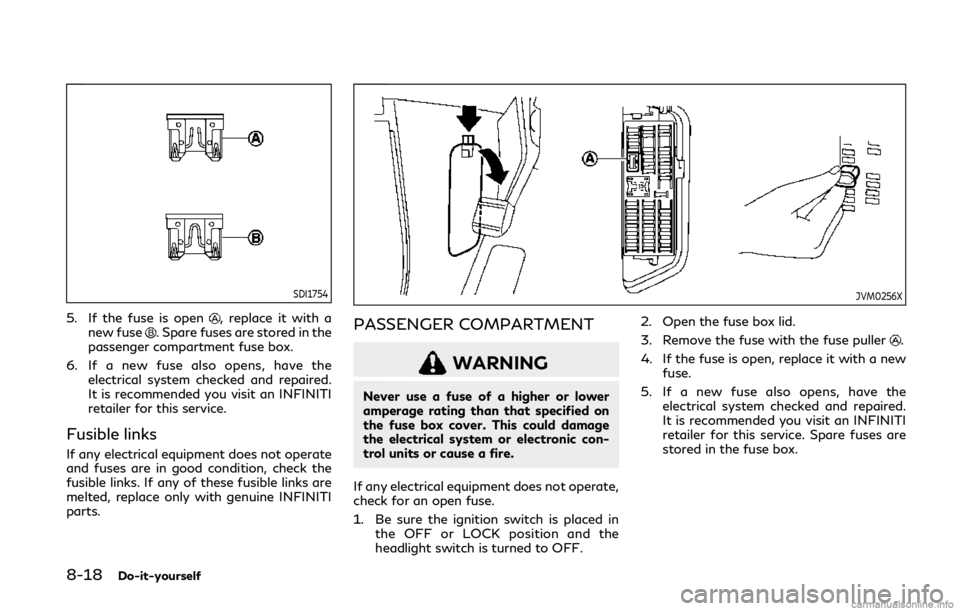
8-18Do-it-yourself
SDI1754
5. If the fuse is open, replace it with a
new fuse. Spare fuses are stored in the
passenger compartment fuse box.
6. If a new fuse also opens, have the electrical system checked and repaired.
It is recommended you visit an INFINITI
retailer for this service.
Fusible links
If any electrical equipment does not operate
and fuses are in good condition, check the
fusible links. If any of these fusible links are
melted, replace only with genuine INFINITI
parts.
JVM0256X
PASSENGER COMPARTMENT
WARNING
Never use a fuse of a higher or lower
amperage rating than that specified on
the fuse box cover. This could damage
the electrical system or electronic con-
trol units or cause a fire.
If any electrical equipment does not operate,
check for an open fuse.
1. Be sure the ignition switch is placed in the OFF or LOCK position and the
headlight switch is turned to OFF. 2. Open the fuse box lid.
3. Remove the fuse with the fuse puller
.
4. If the fuse is open, replace it with a new fuse.
5. If a new fuse also opens, have the electrical system checked and repaired.
It is recommended you visit an INFINITI
retailer for this service. Spare fuses are
stored in the fuse box.