water INFINITI Q50 2020 Owners Manual
[x] Cancel search | Manufacturer: INFINITI, Model Year: 2020, Model line: Q50, Model: INFINITI Q50 2020Pages: 468, PDF Size: 2.17 MB
Page 74 of 468

1-54Safety — Seats, seat belts and supplemental restraint system
ger seat, the vehicle should be checked
as soon as possible. It is recommended
you visit an INFINITI retailer for this
service.
Other supplemental front-impact
air bag precautions
WARNING
.Do not place any objects on the
steering wheel pad or on the instru-
ment panel. Also, do not place any
objects between any occupant and
the steering wheel or instrument
panel. Such objects may become
dangerous projectiles and cause in-
jury if the front air bags inflate.
. Do not place objects with sharp edges
on the seat. Also, do not place heavy
objects on the seat that will leave
permanent impressions in the seat.
Such objects can damage the seat or
occupant classification sensors
(weight sensors). This can affect the
operation of the air bag system and
result in serious personal injury.
. Do not use water or acidic cleaners
(hot steam cleaners) on the seat. This
can damage the seat or occupant
classification sensors. This can also affect the operation of the air bag
system and result in serious personal
injury.
. Immediately after inflation, several
front air bag system components will
be hot. Do not touch them; you may
severely burn yourself.
. No unauthorized changes should be
made to any components or wiring of
the air bag system. This is to prevent
accidental inflation of the supple-
mental air bag or damage to the
supplemental air bag system.
. Do not make unauthorized changes
to your vehicle’s electrical system,
suspension system or front end struc-
ture. This could affect proper opera-
tion of the front air bag system.
. Tampering with the air bag system
may result in serious personal injury.
Tampering includes changes to the
steering wheel and the instrument
panel assembly by placing material
over the steering wheel pad and
above the instrument panel or by
installing additional trim material
around the air bag system.
. Removing or modifying the front
passenger seat may affect the func-
tion of the air bag system and result
in serious personal injury. .
Modifying or tampering with the
front passenger seat may result in
serious personal injury. For example,
do not change the front seats by
placing material on the seat cushion
or by installing additional trim mate-
rial, such as seat covers, on the seat
that is not specifically designed to
assure proper air bag operation.
Additionally, do not stow any objects
under the front passenger seat or the
seat cushion and seatback. Such
objects may interfere with the proper
operation of the occupant classifica-
tion sensors.
. No unauthorized changes should be
made to any components or wiring of
the seat belt system. This may affect
the front air bag system. Tampering
with the seat belt system may result
in serious personal injury.
. It is recommended you visit an
INFINITI retailer for work on and
around the front air bag. It is also
recommended you visit an INFINITI
retailer for installation of electrical
equipment. The Supplemental Re-
straint System (SRS) wiring har-
nesses* should not be modified or
disconnected. Unauthorized electrical
test equipment and probing devices
should not be used on the air bag
Page 86 of 468

2-6Instruments and controls
JVC0428X
1. Tachometer* (P.2-8)
2. Warning and indicator lights (P.2-10)
3. Speedometer* (P.2-7)
4. Engine coolant temperature gauge*(P.2-8)
5. Vehicle information display (P.2-18)/ Odometer/twin trip odometer (P.2-7)
6. Fuel gauge* (P.2-9)
*: The needle indicators may move slightly
after the ignition switch is placed in the
OFF position. This is not a malfunction.
CAUTION
. For cleaning, use a soft cloth, dam-
pened with water. Never use a rough
cloth, alcohol, benzine, thinner or any
kind of solvent or paper towel with a
chemical cleaning agent. They will
scratch or cause discoloration to the
lens.
. Do not spray any liquid such as water
on the meter lens. Spraying liquid
may cause the system to malfunction.
METERS AND GAUGES
Page 111 of 468

SIC2045
Security indicator light
The security indicator light is located on the
meter panel. It indicates the status of the
INFINITI Vehicle Immobilizer System.
The light blinks after the ignition switch was
in the LOCK, ACC or OFF position. This
function indicates the security systems
equipped on the vehicle are operational.
If the INFINITI Vehicle Immobilizer System is
malfunctioning, this light will remain on
while the ignition switch is in the ON
position.
If the light still remains on and/or the
engine will not start, seek service for the
INFINITI Vehicle Immobilizer System assoon as possible. Please bring all registered
keys that you have. It is recommended you
visit an INFINITI retailer for this service.
WARNING
In freezing temperatures the washer
solution may freeze on the windshield
and obscure your vision which may lead
to an accident. Warm windshield with
the defroster before you wash the wind-
shield.
CAUTION
.
Do not operate the washer continu-
ously for more than 30 seconds.
. Do not operate the washer if the
reservoir tank is empty.
. Do not fill the window washer re-
servoir tank with washer fluid con-
centrates at full strength. Some
methyl alcohol based washer fluid
concentrates may permanently stain
the grille if spilled while filling the
window washer reservoir tank.
. Pre-mix washer fluid concentrates
with water to the manufacturer’s
recommended levels before pouring
the fluid into the window washer
reservoir tank. Do not use the win-
dow washer reservoir tank to mix the
Instruments and controls2-31
WIPER AND WASHER SWITCH
Page 112 of 468

2-32Instruments and controls
washer fluid concentrate and water.
JVI0738X
The windshield wiper and washer operates
when the ignition switch is in the ON
position.
Push the lever down to operate the wiper at
the following speed:
AUTO — see “Rain-sensing auto wiper
system” (P.2-33).
LO — continuous low speed operation
HI — continuous high speed operation
MIST — one sweep operation of the
wiper
Pull the lever toward you
to operate the
washer. Then the wiper will also operate
several times. Pulling up the wiper arm:
The wiper arm should be in the up position
when replacing the windshield wiper blades.
To replace the windshield wiper blades,
follow the procedure below:
1. When the ignition switch is ON or within
60 seconds after placing the ignition
switch from the ON to OFF position,
place the windshield wiper and washer
lever into the OFF position.
2. Rapidly lift the lever
upwards twice
within 0.5 seconds. This action will cause
the wipers to automatically take the
service position.
To return the wiper arm, place the wiper arm
in the down position and operate the wiper
switch once.
CAUTION
Do not operate the windshield wiper
while the wiper arm is pulled up. The
wiper arm may be damaged.
Wiper drip wipe system:
The wiper will also operate once about 3
seconds after the washer and wiper are
operated. This operation is to wipe washer
fluid that has dripped on the windshield.
Page 113 of 468

JVI0739X
RAIN-SENSING AUTO WIPER
SYSTEM
The rain-sensing auto wiper system can
automatically turn on the wipers and adjust
the wiper speed depending on the rainfall
and the vehicle speed by using the rain
sensor located on the upper part of the
windshield.
To set the rain-sensing auto wiper system,
push the lever down to the AUTO position
. The wiper will sweep once while the
ignition switch is in the ON position.
The rain sensor sensitivity level can be
adjusted by turning the knob toward
(High) or toward(Low). .
High — High sensitive operation
. Low — Low sensitive operation
To turn the rain-sensing auto wiper system
off, push up the lever to the OFF position, or
pull down the lever to the LO or HI position.
CAUTION
Do not touch the rain sensor and around
it when the wiper switch is in the AUTO
position and the ignition switch is in the
ON position. The wipers may operate
unexpectedly and cause to an injury or
may damage a wiper.
. The rain-sensing auto wipers are in-
tended for use during rain. If the switch
is left in the AUTO position, the wipers
may operate unexpectedly when dirt,
fingerprints, oil film or insects are stuck
on or around the sensor. The wipers may
also operate when exhaust gas or
moisture affect the rain sensor.
. The rain-sensing auto wipers may not
operate if rain does not hit the rain
sensor even if it is raining.
. When the windshield glass is coated
with water repellent, the speed of the
rain-sensing auto wipers may be higher
even though the amount of the rainfall is
small. .
Be sure to turn off the rain-sensing auto
wiper system when you use a car wash.
. Using genuine wiper blades is recom-
mended for proper operation of the
rain-sensing auto wiper system. (See
“Windshield wiper blades” (P.8-15) for
wiper blade replacement.)
Instruments and controls2-33
Page 125 of 468

.Avoid using power outlet when the
air conditioner, headlights or rear
window defroster is on.
. This power outlet is not designed for
use with a cigarette lighter unit.
. Push the plug in as far as it will go. If
good contact is not made, the plug
may overheat or the internal tem-
perature fuse may blow.
. Before inserting or disconnecting a
plug, be sure the electrical accessory
being used is turned OFF.
. When not in use, be sure to close the
cap. Do not allow water or any liquid
to contact the outlet.CUP HOLDERS
CAUTION
.Avoid abrupt starting and braking
when the cup holder is being used to
prevent spilling the drink. If the liquid
is hot, it can scald you or your
passenger.
. Use only soft cups in the cup holder.
Hard objects can injure you in an
accident.
JVI0649X
Front
JVI0650X
Rear
Instruments and controls2-45
STORAGE
Page 132 of 468
2-52Instruments and controls
WARNING
.In an accident you could be thrown
from the vehicle through an open
moonroof. Always use seat belts
and child restraints.
. Do not allow anyone to stand up or
extend any portion of their body out
of the moonroof opening while the
vehicle is in motion or while the
moonroof is closing.
CAUTION
.Remove water drops, snow, ice or
sand from the moonroof before
opening.
. Do not place any heavy object on the
moonroof or surrounding area.
POWER MOONROOF
The moonroof only operates when the
ignition switch is in the ON position.
The moonroof is operational for about 45
seconds, even if the ignition switch is pushed
to the OFF position. If the driver’s door or
the passenger’s door is opened during this
period of about 45 seconds, power to the
moonroof is canceled.
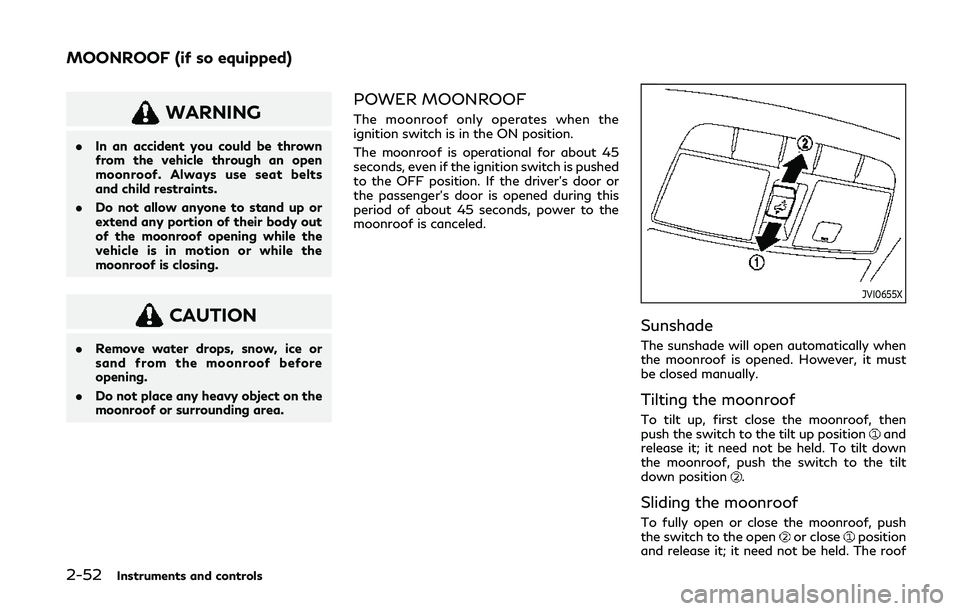
JVI0655X
Sunshade
The sunshade will open automatically when
the moonroof is opened. However, it must
be closed manually.
Tilting the moonroof
To tilt up, first close the moonroof, then
push the switch to the tilt up positionand
release it; it need not be held. To tilt down
the moonroof, push the switch to the tilt
down position
.
Sliding the moonroof
To fully open or close the moonroof, push
the switch to the openor closeposition
and release it; it need not be held. The roof
MOONROOF (if so equipped)
Page 143 of 468

— The Intelligent Key is water re-sistant; however, wetting may
damage the Intelligent Key. If the
Intelligent Key gets wet, immedi-
ately wipe until it is completely
dry.
— Do not bend, drop or strike it against another object.
— If the outside temperature is below 14°F (−10°C), the battery
of the Intelligent Key may not
function properly.
— Do not place the Intelligent Key for an extended period in a place
where temperatures exceed
140°F (60°C).
— Do not change or modify the Intelligent Key.
— Do not use a magnet key holder.
— Do not place the Intelligent Key near an electric appliance such as
a television set or personal com-
puter.
— Do not allow the Intelligent Key to come into contact with water
or salt water, and do not wash it
in a washing machine. This could
affect the system function. .
If an Intelligent Key is lost or stolen,
INFINITI recommends erasing the ID
code of that Intelligent Key. This will
prevent the Intelligent Key from un-
authorized use to unlock the vehicle.
For information regarding the eras-
ing procedure, it is recommended you
visit an INFINITI retailer.
WAD0069X
Mechanical key
To remove the mechanical key, release the
lock knob at the back of the Intelligent Key.
To install the mechanical key, firmly insert it
into the Intelligent Key until the lock knob
returns to the lock position.
Use the mechanical key to lock or unlock the
driver’s door, glove box and trunk pass-
through lid if equipped with a key cylinder.
See “Doors” (P.3-4), “Glove box” (P.2-47)
and “Trunk pass-through” (P.1-7).
Pre-driving checks and adjustments3-3
Page 147 of 468

CAUTION
.Be sure to carry the Intelligent Key
with you when operating the vehicle.
. Never leave the Intelligent Key in the
vehicle when you leave the vehicle.
The Intelligent Key is always communicating
with the vehicle as it receives radio waves.
The Intelligent Key system transmits weak
radio waves. Environmental conditions may
interfere with the operation of the Intelligent
Key system under the following operating
conditions.
. When operating near a location where
strong radio waves are transmitted, such
as a TV tower, power station and broad-
casting station.
. When in possession of wireless equip-
ment, such as a cellular telephone,
transceiver, and CB radio.
. When the Intelligent Key is in contact
with or covered by metallic materials.
. When any type of radio wave remote
control is used nearby.
. When the Intelligent Key is placed near
an electric appliance such as a personal
computer. .
When the vehicle is parked near a parking
meter.
In such cases, correct the operating condi-
tions before using the Intelligent Key func-
tion or use the mechanical key.
Although the life of the battery varies
depending on the operating conditions, the
battery’s life is approximately 2 years. If the
battery is discharged, replace it with a new
one.
When the Intelligent Key battery is almost
discharged, see “Intelligent Key battery dis-
charge” (P.5-14) to start the engine.
Since the Intelligent Key is continuously
receiving radio waves, if the key is left near
equipment which transmits strong radio
waves, such as signals from a TV and
personal computer, the battery life may
become shorter.
For information regarding replacement of a
battery, see “Intelligent Key battery replace-
ment” (P.8-19).
As many as 4 Intelligent Keys can be
registered and used with one vehicle. For
information about the purchase and use of
additional Intelligent Keys, contact an
INFINITI retailer.
CAUTION
. Do not allow the Intelligent Key,
which contains electrical compo-
nents, to come into contact with
water or salt water. This could affect
the system function.
. Do not drop the Intelligent Key.
. Do not strike the Intelligent Key
sharply against another object.
. Do not change or modify the Intelli-
gent Key.
. Wetting may damage the Intelligent
Key. If the Intelligent Key gets wet,
immediately wipe until it is comple-
tely dry.
. Do not place the Intelligent Key for
an extended period in an area where
temperatures exceed 140°F (60°C).
. If the outside temperature is below
14°F (−10°C), the battery of the
Intelligent Key may not function
properly.
. Do not attach the Intelligent Key
with a key holder that contains a
magnet.
. Do not place the Intelligent Key near
equipment that produces a magnetic
field, such as a TV, audio equipment
Pre-driving checks and adjustments3-7
Page 149 of 468

WAD0070X
DOOR LOCKS/UNLOCKS PRE-
CAUTION
.Do not push the door handle request
switch with the Intelligent Key held in
your hand as illustrated. The close dis-
tance to the door handle will cause the
Intelligent Key system to have difficulty
recognizing that the Intelligent Key is
outside the vehicle.
. Within 2 seconds after the door are
locked using the door handle request
switch, make sure that the doors have
been securely locked by operating the
door handles. If you keep holding the
door handle for more than 2 seconds
after locking the doors using the door handle request switch, the door will be
unlocked.
. To prevent the Intelligent Key from being
left inside the vehicle or the trunk, make
sure you carry the key with you and then
lock the doors or the trunk.
. The Intelligent Key system (opening/
closing doors with the door handle
request switch or one touch unlock
sensor) can be set to remain inactive.
(See the INFINITI InTouch
TMOwner’s
Manual.)
. The door cannot be unlocked using one
touch unlock operation after locking the
door within 2 seconds. To unlock the
door, release the one touch unlock
sensor once and touch it again.
. If a large amount of water runs down on
the door handle (for example, when
washing the vehicle or in a heavy rain),
the door may unlock if the Intelligent Key
is within the range of operation. To
prevent the door from being unlocked,
the Intelligent Key should be away from
the vehicle more than 7 ft (2 m).
. Do not hold and pull the door handle
quickly. The door will be unlocked but will
not open. Release the door handle once
and pull it again to open the door.
. If you pull the door handle with your
gloved hand, the one touch unlock
operation may not function.
WAD0071X
INTELLIGENT KEY OPERATION
You can lock or unlock the doors without
taking the key out from your pocket or bag.
Pre-driving checks and adjustments3-9