air condition INFINITI Q50 HYBRID 2014 Infiniti Intouch
[x] Cancel search | Manufacturer: INFINITI, Model Year: 2014, Model line: Q50 HYBRID, Model: INFINITI Q50 HYBRID 2014Pages: 274, PDF Size: 1.43 MB
Page 37 of 274

3. Heater and air conditioner
3-6
mode is on, the indicator light is on.
When the auto recirculation mode is
turned on, the air recirculation and
fresh air modes will alternate auto-
matically.
“Advanced Climate Control Sys-
tem”(page 3-7)
*17[A/C]:
Touch to turn on/off the A/C mode.
Turn on the A/C mode for effective
cooling and dehumidifying. When the
A/C mode is on, the indicator light is
on.
INFO:
The heater and air conditioning system settings
can be linked and memorized for each of the
Intelligent Keys.
“Fully customizable digital environment”
(page 8-28)
AUTOMATIC CLIMATE CONTROL SYSTEM
AUTOMATIC OPERATION
Cooling and/or dehumidified heat-
ing (AUTO)
This mode can be used all year round. The
system works automatically to control the
inside temperature, air flow distribution
and fan speed after the preferred tempera-
ture is set manually.
1. Push
button will illuminate and “AUTO”will
be displayed on the CLIMATE screen.)
2. Push <
>and <>on the driver’s
side to set the desired temperature.
. The temperature of the passenger
compartment will be maintained auto-
matically. Air flow distribution and fan
speed will also be controlled automa-
tically.
. When the DUAL mode is turned on, you
can individually set the driver’s and
front passenger side temperatures by
pushing <
>and <>on the corre-
sponding side. To turn on the DUAL
mode, touch [DUAL] on the lower dis-
play (“AUTO” will be displayed on the lower display). To disable the front
passenger side temperature control,
touch [DUAL] and turn off the DUAL
mode.
INFO:
A visible mist may be seen coming from the
ventilators in hot, humid conditions as the air is
cooled rapidly. This does not indicate a mal-
function.
Heating (A/C off)
The air conditioner does not activate in this
mode. When you need to heat only, use
this mode.
1. Touch [A/C] on the lower display. The
A/C indicator will turn off.
2. Push <
>and <>on the driver’s
side to set the desired temperature.
INFO:
.
When set the AUTO mode, the temperature
of the passenger compartment will be
maintained automatically. Air flow distribu-
tion and fan speed are also controlled
automatically.
Page 38 of 274
.Do not set the temperature lower than the
outside air temperature. Otherwise, the
system may not work properly.
.This mode is not recommended if the
windows fog up.
Dehumidified defrosting or defog-
ging
1. Push<>. The indicator light on the
button will illuminate.
2. Push <
>and <>on the driver’s
side to set the desired temperature.
INFO:
.
To quickly remove ice from the outside of
the windows, set the fan speed to the
maximum.
.As soon as possible after the windshield is
clean, push
mode.
.When <>is pushed, the air conditioner
will automatically be turned on at outside
temperatures above 238F( −58C) to defog
the windshield, and the air recirculate mode
will automatically be turned off.
Outside air is drawn into the passenger
compartment to improve the defogging performance.
ADVANCED CLIMATE CONTROL SYS-
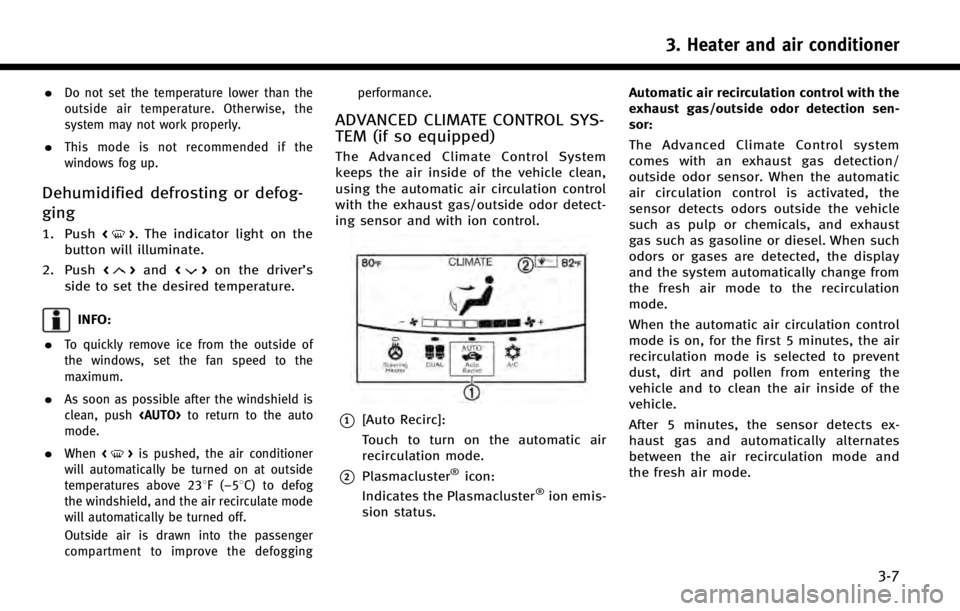
TEM (if so equipped)
The Advanced Climate Control System
keeps the air inside of the vehicle clean,
using the automatic air circulation control
with the exhaust gas/outside odor detect-
ing sensor and with ion control.
*1[Auto Recirc]:
Touch to turn on the automatic air
recirculation mode.
*2Plasmacluster®icon:
Indicates the Plasmacluster®ion emis-
sion status. Automatic air recirculation control with the
exhaust gas/outside odor detection sen-
sor:
The Advanced Climate Control system
comes with an exhaust gas detection/
outside odor sensor. When the automatic
air circulation control is activated, the
sensor detects odors outside the vehicle
such as pulp or chemicals, and exhaust
gas such as gasoline or diesel. When such
odors or gases are detected, the display
and the system automatically change from
the fresh air mode to the recirculation
mode.
When the automatic air circulation control
mode is on, for the first 5 minutes, the air
recirculation mode is selected to prevent
dust, dirt and pollen from entering the
vehicle and to clean the air inside of the
vehicle.
After 5 minutes, the sensor detects ex-
haust gas and automatically alternates
between the air recirculation mode and
the fresh air mode.
3. Heater and air conditioner
3-7
Page 39 of 274
3. Heater and air conditioner
3-8
INFO:
The automatic air recirculation mode can be
activated under the following conditions.
.The air flow control is not in the windshield
defrosting mode (the indicator light on
<
> is turned off).
.The outside temperature is approximately
32 8F(0 8C) or above.
Ion control:
The Advanced Climate Control system unit
generates highly concentrated Plasmaclus-
ter
®ions into the air blown from the
ventilators to reduce odor absorbed into
the interior trim and to suppress airborne
bacteria. The high-density Plasmacluster
®
ions also have a proven skin moisture
preserving effect.
The Plasmacluster
®icon on the CLIMATE
screen indicates the status of the Plas-
macluster
®ion emission from the system
and changes with the amount of the air
flow.
OPERATING TIPS
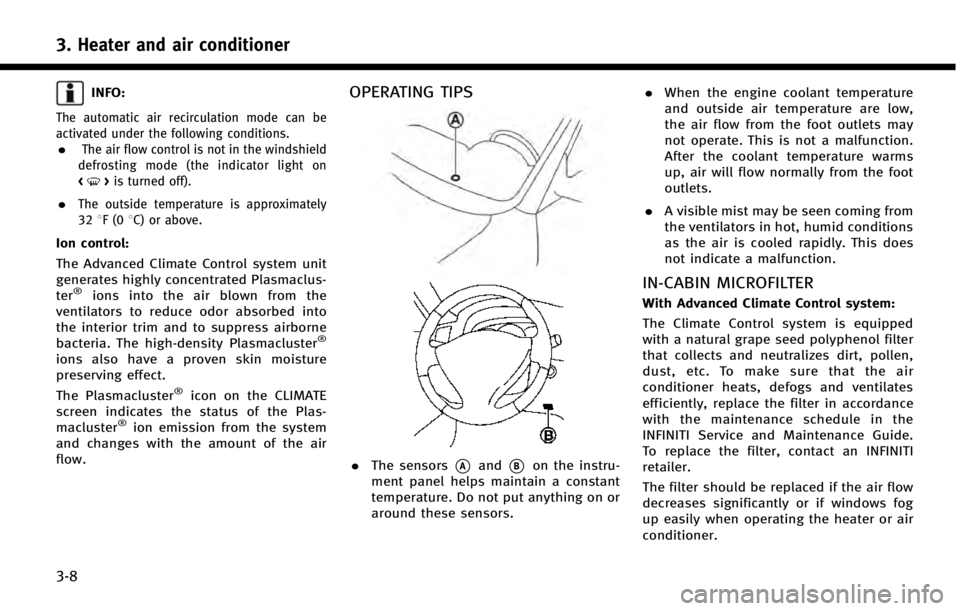
. The sensors*Aand*Bon the instru-
ment panel helps maintain a constant
temperature. Do not put anything on or
around these sensors. .
When the engine coolant temperature
and outside air temperature are low,
the air flow from the foot outlets may
not operate. This is not a malfunction.
After the coolant temperature warms
up, air will flow normally from the foot
outlets.
. A visible mist may be seen coming from
the ventilators in hot, humid conditions
as the air is cooled rapidly. This does
not indicate a malfunction.
IN-CABIN MICROFILTER
With Advanced Climate Control system:
The Climate Control system is equipped
with a natural grape seed polyphenol filter
that collects and neutralizes dirt, pollen,
dust, etc. To make sure that the air
conditioner heats, defogs and ventilates
efficiently, replace the filter in accordance
with the maintenance schedule in the
INFINITI Service and Maintenance Guide.
To replace the filter, contact an INFINITI
retailer.
The filter should be replaced if the air flow
decreases significantly or if windows fog
up easily when operating the heater or air
conditioner.
Page 40 of 274

Without Advanced Climate Control system:
The Climate Control system is equipped
with an in-cabin microfilter that collects
dirt, pollen, dust, allergens (such as
pollen, tick shells), etc. To make sure that
the air conditioner heats, defogs and
ventilates efficiently, replace the filter in
accordance with the maintenance schedule
in the INFINITI Service and Maintenance
Guide. To replace the filter, contact an
INFINITI retailer.The filter should be replaced if the air flow
decreases significantly or if windows fog
up easily when operating the heater or air
conditioner.
SERVICING HEATER AND AIR CON-
DITIONER
The heating and air conditioning system in
your INFINITI is charged with a refrigerant
designed with the environment in mind.
This refrigerant will not harm the earth’s
ozone layer. However, special charging
equipment and lubricant are required when
servicing your INFINITI air conditioner.
Using improper refrigerants or lubricants
will cause severe damage to your Climate
Control system. Refer to Vehicle Owner’s
Manual for heating and air conditioning system refrigerant and lubricant recom-
mendations.
Your INFINITI retailer will be able to service
your environmentally friendly heater and
air conditioning system.
WARNING!
The system contains refrigerant under high
pressure. To avoid personal injury, any air
conditioner service should be done only by
an experienced technician with the proper
equipment.
HEATED SEATS (if so equipped)
WARNING!
Do not use or allow occupants to use the seat
heater if you or the occupants cannot
monitor elevated seat temperatures or have
an inability to feel pain in those body parts in
contact with the seat. Use of the seat heater
by such people could result in serious injury.
CAUTION!
.
The battery could run down if the seat
heater is operated while the engine or
the hybrid system is not running.
. Do not use the seat heater for extended
periods or when no one is using the seat.
. Do not put anything on the seat which
insulates heat, such as a blanket, cush-
ion, seat cover, etc. Otherwise, the seat
may become overheated.
. Do not place anything hard or heavy on
the seat or pierce it with a pin or similar
object. This may result in damage to the
heater.
3. Heater and air conditioner
3-9
Page 41 of 274
3. Heater and air conditioner
3-10
.Any liquid spilled on the heated seat
should be removed immediately with a
dry cloth.
. When cleaning the seat, never use gaso-
line, thinner, or any similar materials.
. If any malfunctions are found or the
heated seat does not operate, turn the
switch off and have the system checked
by an INFINITI retailer.
The front seats are warmed by built-in
heaters. The seat heating system of driver’s
seat and front passenger seat can be
operated independently.
Operation with buttons:
Each time <
>is pushed, the seat heating
mode will change in the following order.
AUTO ?High ?Medium ?Low ?OFF
When seat heating system is activated, the
indicator light on <
>will illuminate. Operation with touch screen:
Touch [
] on the lower display and select
an item from [AUTO], [High], [Medium],
[Low] or [OFF].
AUTO mode setting:
When in the AUTO mode, the seat heating
will turn on/off automatically according to
the conditions such as the temperature
inside the vehicle compartment. Depend-
ing on the conditions, the seat heating will
not turn on even if AUTO is selected. The
settings for the seat heating AUTO mode
can be changed.
“Heater and air conditioner settings”
(page 3-11)
HEATED STEERING-WHEEL (if so
equipped)
WARNING!
Do not use or allow occupants to come into
contact with the heated steering-wheel if you
or the occupants cannot monitor elevated
steering-wheel temperatures or have an
inability to feel pain in those body parts in
contact. Use of the heated steering-wheel by
such people could result in serious injuries.
CAUTION!
. The battery could run down if the
steering-wheel heater is operated while
the engine or the hybrid system is not
running.
. Do not use the steering-wheel heater for
extended periods of time as it may cause
burns and overheating.
. Any liquid spilled on the steering-wheel
should be removed immediately with a
dry cloth.
. When cleaning the steering-wheel, never
use gasoline, thinner, or any similar
Page 42 of 274
![INFINITI Q50 HYBRID 2014 Infiniti Intouch materials.
. If any malfunctions are found or the
steering-wheel heater does not operate,
turn the switch off and have the system
checked by an INFINITI retailer.
Touch [Steering Heater] on the CLIMAT](/img/42/34966/w960_34966-41.png "INFINITI Q50 HYBRID 2014 Infiniti Intouch materials.
. If any malfunctions are found or the
steering-wheel heater does not operate,
turn the switch off and have the system
checked by an INFINITI retailer.
Touch [Steering Heater] on the CLIMAT")
materials.
. If any malfunctions are found or the
steering-wheel heater does not operate,
turn the switch off and have the system
checked by an INFINITI retailer.
Touch [Steering Heater] on the CLIMATE
screen to turn on/off the steering-wheel
heating manually. The steering-wheel heat-
ing will turn on and will turn off auto-
matically after 30 minutes. When the
steering-wheel heating is turned on, the
indicator above [Steering Heater] will turn
on.
If the surface temperature of the steering-
wheel is above the temperature within
which the system is designed to operate,
the system will not heat the steering-
wheel. This is not a malfunction.
Automatic steering-wheel heating can be
turned on/off from the climate control
settings screen.
“Heater and air conditioner settings”
(page 3-11)
REAR WINDOW AND OUTSIDE MIRROR
DEFROSTER
CAUTION!
When cleaning the inner side of the rear
window, be careful not to scratch or damage
the rear window defroster.
To defog/defrost the rear window glass
and outside mirrors, start the engine or the
hybrid system and push <
>. The indi-
cator light on the button will illuminate.
Push the button again to turn off the
defroster.
The defroster will automatically turn off in
approximately 15 minutes.
HEATER AND AIR CONDITIONER SET-
TINGS
Heater and air conditioner settings can be
changed on the screen.
1. Push
Page 43 of 274

3. Heater and air conditioner
3-12
Otherwise, the Climate Control system
will stop activating with the deactiva-
tion of the engine as part of the Idle
Stop function.
. Steering Heater Auto Settings (if so
equipped)
The automatic control mode for steer-
ing-wheel heating can be turned on/off.
When this item is turned on, the
steering-wheel heating will turn on
automatically if the temperature inside
the vehicle compartment is low at the
time when the ignition switch is turned
on. Regardless of the temperature, the
steering-wheel heating will turn off
after 30 minutes.
If the steering-wheel heater is turned
on/off manually by touching [Steering
Heater] on the CLIMATE screen, the
automatic steering heating control
mode will be canceled and will return
to the manual mode.
INFO:
If the surface temperature of the steering-wheel
is above the temperature within which the
system is designed to operate, the system will
not heat the steering-wheel. This is not a malfunction.
Page 82 of 274

.When the radio wave condition is not
ideal or ambient sound is too loud, it
may be difficult to hear the other
person’s voice during a call.
. Immediately after the ignition switch is
pushed to the “ON”position, it may be
impossible to receive a call for a short
period of time.
. Do not place the cellular phone in an
area surrounded by metal or far away
from the in-vehicle phone module to
prevent tone quality degradation and
wireless connection disruption.
. While a cellular phone is connected
through the Bluetooth
®wireless con-
nection, the battery power of the
cellular phone may discharge quicker
than usual.
. If the Bluetooth
®Hands-Free Phone
System seems to be malfunctioning,
please visit www.infinitiusa.com/blue-
tooth for troubleshooting help.
. Some cellular phones or other devices
may cause interference or a buzzing
noise to come from the audio system
speakers. Storing the device in a
different location may reduce or elim-
inate the noise. .
Refer to the cellular phone Owner’s
Manual regarding the telephone pairing
procedure specific to your phone,
battery charging, cellular phone anten-
na, etc.
. The antenna display on the monitor
may not coincide with the antenna
display of some cellular phones.
. The battery display on the monitor may
not coincide with the battery display of
some cellular phones.
. Keep the interior of the vehicle as quiet
as possible to hear the caller ’s voice
clearly as well as to minimize its
echoes.
. If reception between callers is unclear,
adjusting the incoming or outgoing call
volume may improve the clarity.
. The microphone is located near the
map light.
PHONE
Connecting Bluetooth Hands-free
Phone
A cellular phone device must be connected
to the Bluetooth Hands-free phone system
before operation. Up to 5 cellular phones
can be connected to the system.
“Connecting Bluetooth®device ”
(page 2-21)
Phone selection
Select one of the connected devices for
operation.
1. Push
Page 134 of 274
WARNING!
.Radio waves could adversely affect elec-
tric medical equipment. individuals who
use a pacemaker should contact the
device manufacturer regarding any pos-
sible effects before using the system.
. The TCU antenna is installed inside the
upper central part of the instrument
panel. An occupant should not get any
closer to the antenna than specified by
the pacemaker manufacturer. The radio
waves from the TCU antenna may ad-
versely affect the operation of the pace-
maker while using the Infiniti Connection
service.
CAUTION!
Please note that the Automatic Collision
Notification service and Emergency Call
function cannot be used in the following
conditions:
. The vehicle moves outside the Infiniti
Connection service area and connection
with the TCU (Telematics Control Unit) is
affected. .
The vehicle is in a location with poor
signal reception such as a tunnel, under-
ground parking, behind a building or in a
mountainous area.
. It may not be possible to make an
emergency call in all accidents or emer-
gencies, or if you are in a location
without reception.
INFO:
.
Infiniti Connection features are dependent
upon subscription enrollment and the tele-
matics device being in operative condition,
cellular connectivity, navigation map data
and GPS satellite signal reception. Terms
and conditions of the Infiniti Connection
Subscription Agreement apply.
.Enrollment is required in order to receive
Infiniti Connection services. The services
that can be received vary depending on
the plan in which you are enrolled.
.All services can be used free of charge for
the first year of ownership.
.After the first year, use of the service will no
longer be free of charge. The services that
can be received vary depending on the plan to which you subscribe.
.Laws in some jurisdictions may restrict the
use of
“Text-to-Speech.” Check local regula-
tions before using this feature.
Infiniti Connection services may be up-
dated. The latest detailed information is
available on the following websites or from
the support line.
Infiniti Connection website:
www.infiniticonnection.com (for U.S.)
https://canada.infiniticonnection.com
(for Canada)
Infiniti Connection support line:
1-800-334-7858 (for U.S.)
1-855-892-7418 (for Canada)
. Automatic Collision Notification:
The TCU (Telematics Control Unit) gen-
erates a signal automatically to the
Infiniti Connection Response Center in
the case of an accident severe enough
to trigger one of the vehicle’s air bags.
Upon the signal, a Response Specialist
receives the vehicle location and cus-
tomer information and notifies the
proper authorities in accordance with
established policies and procedures.
8. Information and settings
8-11
Page 149 of 274
![INFINITI Q50 HYBRID 2014 Infiniti Intouch 8. Information and settings
8-26
Step 1Step 2 Setting item Result
Push <Menu> [Settings] [Clock Setting] Set the Clock to your preferred settings.
“Clock settings”(page 2-20)
[Infiniti Connection]](/img/42/34966/w960_34966-148.png "INFINITI Q50 HYBRID 2014 Infiniti Intouch 8. Information and settings
8-26
Step 1Step 2 Setting item Result
Push <Menu> [Settings] [Clock Setting] Set the Clock to your preferred settings.
“Clock settings”(page 2-20)
[Infiniti Connection]")
8. Information and settings
8-26
Step 1Step 2 Setting item Result
Push