automatic transmission INFINITI Q50-HYBRID 2018 Owners Manual
[x] Cancel search | Manufacturer: INFINITI, Model Year: 2018, Model line: Q50-HYBRID, Model: INFINITI Q50-HYBRID 2018Pages: 442, PDF Size: 2.9 MB
Page 11 of 442

Hybrid System-4Hybrid System Overview
delivered to an INFINITI retailer to
have the Li-ion battery pack and high
voltage parts such as the inverter,
including the wiring harness, re-
moved prior to painting. Li-ion bat-
tery packs exposed to heat in the
paint booth will experience capacity
loss. Damaged Li-ion battery packs
may also pose safety risks to un-
trained mechanics and repair person-
nel.The emergency shut-off system is activated
and the high-voltage system automatically
turns off in the following conditions:
.
Front and side collisions in which the air
bags are deployed.
. Certain rear collisions.
. Certain INFINITI Direct Response Hy-
brid
®System malfunctions
For the above collisions and the certain
hybrid system malfunctions, the READY to
drive indicator light will turn off. See “Warn-
ing lights, indicator lights and audible re-
minders” (P.2-9).
The emergency shut-off activates for the
above collisions to minimize risk of an event
that could cause injury or an accident. If the
emergency shut-off system activates, the
hybrid system may not switch to READY to
drive position. If this occurs, it is recom-
mended that you contact an INFINITI re-
tailer. Even if the ignition switch is switched
to READY to drive position, the system may
shut-off suddenly. Therefore, drive cau-
tiously to the nearest INFINITI retailer or
contact an INFINITI retailer as soon as
possible. To start the INFINITI Direct Response
Hybrid
®System:
1. Depress the brake pedal and place the ignition switch in the ON position when
the transmission is in the P (Park) or N
(Neutral) position (P is recommended).
(For more details, see “Push-button
ignition switch” (P.5-11).)
2. The READY to drive indicator light
flashes, then turns illuminated. (The
hybrid system switched to the READY
to drive mode when the indicator light
illuminates.)
When the READY to drive indicator light
illuminates, the vehicle can be driven,
even if the gasoline engine is not running.
NOTE:
The gasoline engine starts and stops auto-
matically. It may stop during low speed
driving, deceleration or when the vehicle is
stopped.
The gasoline engine may automatically run
in the following conditions:
. The level of remaining charge in the
Lithium ion (Li-ion) battery is low. The
engine runs to charge the Li-ion battery
and to provide power to the drive the
vehicle.
. The temperature of the engine coolant is
low.
EMERGENCY SHUT-OFF SYSTEMOPERATION OF THE INFINITI DIRECT
RESPONSE HYBRID®SYSTEM
Page 18 of 442

HYBRID VEHICLE CHARACTER-
ISTICS
WARNING
.When you leave your vehicle, be sure
to place the ignition switch in the
OFF position.
. Be sure to put the transmission in the
P (Park) position because the vehicle
can move when the READY to drive
indicator light is on even if the gaso-
line engine is not running. When the
READY to drive indicator light is on,
do not leave your vehicle in a shift
position other than the P (Park)
position. The vehicle will creep and
start abruptly if the accelerator pedal
is depressed by mistake. This may
cause serious injury or death.
CAUTION
If the vehicle is parked for a long period
of time, the battery discharges gradu-
ally. To avoid this occurrence, drive the
vehicle for approximately 30 minutes at
least once every two to three months.
Otherwise, the Lithium ion (Li-ion) bat- tery may be damaged. If the Li-ion
battery is completely discharged and
the hybrid system cannot be activated,
it is recommended that you contact an
INFINITI retailer.
High voltage parts and harnesses on the
hybrid vehicles emit approximately the same
amount of electromagnetic waves as the
conventional gasoline-powered vehicles or
home electronic appliances despite of their
electromagnetic shieldings. Unwanted noise
may occur in the reception of a mobile two-
way radio.
Charging the Li-ion battery while driving is
important. The vehicle cannot run if the Li-
ion battery is discharged. When in the N
(Neutral), D (Drive) or R (Reverse) position,
and while the accelerator pedal or the brake
pedal is not depressed, the Li-ion battery
does not recharge. Leaving the transmission
in the N (Neutral), D (Drive) or R (Reverse)
position, and while the accelerator pedal or
the brake pedal is not depressed for an
extended period of time (for example, when
the shift lever is in the D (Drive) position and
the vehicle is stopped only by the parking
brake), may discharge the Li-ion battery and
the hybrid system may automatically be
turned off.
JVO0114X
An air ventis located on the right and left
sides between the rear seat and rear door to
cool the Li-ion battery and DC/DC conver-
ter. If the vent is covered, the Li-ion battery
or DC/DC converter will overheat resulting
in reduced output performance of the hybrid
system. See “Lithium-ion (Li-ion) battery
and DC/DC converter air vent” (P.7-5).
Hybrid System OverviewHybrid System-11
Page 103 of 442

2-18Instruments and controls
the brake pad, the sound will always be
heard even if the brake pedal is not
depressed. Have the brakes checked as soon
as possible if the warning sound is heard.
JVI0641X
The vehicle information displayis located
between the tachometer and the speed-
ometer, and it displays the warnings and
information. The following items are also
displayed if the vehicle is equipped with
them:
. Automatic Transmission (AT)
— “Driving the vehicle” (P.5-15)
. All-Wheel Drive (AWD)
— “Intelligent All-Wheel Drive (AWD)” (P.5-123)
. Cruise control
— “Cruise control” (P.5-70)
. Intelligent Cruise Control (ICC)
— “Intelligent Cruise Control (ICC)” (P.5- 72) .
Active Lane Control
— “Active Lane Control” (P.5-24)
. Lane Departure Warning (LDW)/Lane
Departure Prevention (LDP)
— “Lane Departure Warning (LDW)/ Lane Departure Prevention (LDP)”
(P.5-32)
. Blind Spot Warning (BSW)
— “Blind Spot Warning (BSW)” (P.5-39)
. Blind Spot Intervention
®(BSI)
— “Blind Spot Intervention®(BSI)” (P.5-
47)
. Back-up Collision Intervention (BCI)
— “Back-up Collision Intervention (BCI)” (P.5-59)
. Distance Control Assist (DCA)
— “Distance Control Assist (DCA)” (P.5- 93)
. Forward Emergency Braking (FEB)
— “Forward Emergency Braking (FEB)” (P.5-104)
. Predictive Forward Collision Warning
(PFCW)
— “Predictive Forward Collision Warning
(PFCW)” (P.5-112)
. Active trace control
— “Active trace control” (P.5-132)
. Intelligent Key system
— “Intelligent Key system” (P.3-6)
VEHICLE INFORMATION DISPLAY
Page 109 of 442

2-24Instruments and controls
See “Conventional (fixed speed) cruise con-
trol mode” (P.5-89) for details.
33. Intelligent Cruise Control (ICC)
system ON indicator (if so
equipped)
This indicator shows the Intelligent Cruise
Control (ICC) system status. The status is
shown by the color. (See “Intelligent Cruise
Control (ICC)” (P.5-72).)
34. Driver assist system indicator
This indicator shows the status of the
following systems.
.Lane Departure Warning (LDW) (if so
equipped)
. Lane Departure Prevention (LDP) (if so
equipped)
. Blind Spot Warning (BSW)
. Blind Spot Intervention
®(BSI) (if so
equipped)
. Distance Control Assist (DCA) (if so
equipped)
. Forward Emergency Braking (FEB)
. Predictive Forward Collision Warning
(PFCW)
For more details, see “Lane Departure
Warning (LDW)/Lane Departure Prevention
(LDP)” (P.5-32), “Blind Spot Warning
(BSW)” (P.5-39), “Blind Spot Intervention
®
(BSI)” (P.5-47), “Distance Control Assist
(DCA)” (P.5-93), “Forward Emergency Brak-
ing (FEB)” (P.5-104) and “Predictive For-
ward Collision Warning (PFCW)” (P.5-112).
The figure and color of this indicator will
change depending on the conditions of the
above systems. (In each section, the name of
this indicator is referred to as, “driver assist
system lane indicator”, “driver assist system
blind spot indicator” or “driver assist system
forward indicator” depending on the sys-
tems.)
35. INFINITI Drive Mode Selector
indicator
When a driving mode is selected using the
INFINITI Drive Mode Selector, the selected
mode indicator is displayed.
. PERSONAL
. SPORT
. STANDARD
. ECO
. SNOW
(See “INFINITI Drive Mode Selector” (P.5-
21).)
36. Automatic Transmission (AT)
position indicator
This indicator shows the automatic shift
position. In the manual shift mode, when the trans-
mission does not shift to the selected gear
due to a transmission protection mode, the
AT position indicator will blink and a chime
will sound.
See “Automatic transmission” (P.5-15) for
further details.
Page 146 of 442

4. At the receiver located on the garagedoor opener motor in the garage, locate
the “learn” or “smart” button (the name
and color of the button may vary by
manufacturer but it is usually located
near where the hanging antenna wire is
attached to the unit). If there is difficulty
locating the button, reference the garage
door opener’s manual.
5. Press and release the “learn” or “smart” button.
NOTE:
Once the button is pressed, you have
approximately 30 seconds to initiate the
next step.
6. Return to the vehicle and firmly press and hold the programmed HomeLink
®
button for two seconds and release.
Repeat the “press/hold/release” se-
quence up to 3 times to complete the
programming process. HomeLink
®
should now activate your rolling code
equipped device.
7. If you have any questions or are having difficulty programming your HomeLink
®
buttons, refer to the HomeLink®web
site at: www.homelink.com or call 1-
800-355-3515.
PROGRAMMING HomeLink®FOR
CANADIAN CUSTOMERS AND
GATE OPENERS
Canadian radio-frequency laws require
transmitter signals to “time-out” (or quit)
after several seconds of transmission –
which may not be long enough for
HomeLink
®to pick up the signal during
programming. Similar to this Canadian law,
some U.S. gate operators are designed to
“time-out” in the same manner.
If you live in Canada or you are having
difficulties programming a gate operator or
garage door opener by using the “Program-
ming HomeLink
®” procedures, replace “Pro-
gramming HomeLink®” Step 2 with the
following:
NOTE:
When programming a garage door opener,
etc., unplug the device during the “cycling”
process to prevent possible damage to the
garage door opener components.
Step 2: Using both hands, simultaneously
press and hold the desired HomeLink
®
button and the hand-held transmitter but-
ton. During programming, your hand-held
transmitter may automatically stop trans-
mitting. Continue to press and hold the
desired HomeLink
®button while you press
and re-press (“cycle”) your hand-held trans- mitter every two seconds until the frequency
signal has been learned. The HomeLink
®
indicator light will flash slowly and then
rapidly after several seconds upon success-
ful programming.
DO NOTrelease until the
HomeLink
®indicator light flashes slowly and
then rapidly. When the indicator light flashes
rapidly, both buttons may be released. The
rapid flashing indicates successful program-
ming.
Proceed with “Programming HomeLink
®”
step 3 to complete.
Remember to plug the device back in when
programming is completed.
OPERATING THE HomeLink®
UNIVERSAL TRANSCEIVER
The HomeLink®Universal Transceiver, after
it is programmed, can be used to activate the
programmed device. To operate, simply
press and release the appropriate pro-
grammed HomeLink
®Universal Transceiver
button. The amber indicator light will illumi-
nate while the signal is being transmitted.
For convenience, the hand-held transmitter
of the device may also be used at any time.
Instruments and controls2-61
Page 164 of 442

LOG-IN FUNCTION
After setting up the user information, the
system will automatically recognize the user
upon turning on the vehicle.
There will be a personalized welcome greet-
ing and screen prompt to log-in.
This feature allows 4 drivers to use their
own registration, drive mode, driving posi-
tion, air conditioner, and auto settings and
memorizes these custom settings.
The log-in user can be changed on the
welcome greeting screen or the User List
screen. For more details, see the Infiniti
InTouch Owner’s Manual.
The log-in function is linked to the following
items:
.Meter
. Audio
. Navigation system display
. Navigation settings
. Air conditioner
. Automatic drive positioner
. Engine/Transmission
. Steering
. Active trace control
. Driver assistance*
. Body Control Module (BCM)
*: except for the Forward Emergency Brak-
ing (FEB) systemWARNING
The Intelligent Key transmits radio
waves when the buttons are pushed.
The FAA advises that the radio waves
may affect aircraft navigation and com-
munication systems. Do not operate the
Intelligent Key while on an airplane.
Make sure the buttons are not operated
unintentionally when the unit is stored
during a flight.
It is possible to lock/unlock all doors and
fuel-filler door, open the trunk lid, activate
the panic alarm and open the windows by
pushing the buttons on the Intelligent Key
from outside the vehicle.
Before locking the doors, make sure the
Intelligent Key is not left in the vehicle.
The remote keyless entry function can
operate at a distance of approximately 33
ft (10 m) from the vehicle. (The effective
distance depends upon the conditions
around the vehicle.)
As many as 4 Intelligent Keys can be used
with one vehicle. For information concerning
the purchase and use of additional Intelli-
gent Keys, contact an INFINITI retailer.
The buttons on the Intelligent Key will not operate when:
.
the distance between the Intelligent Key
and the vehicle is over 33 ft (10 m).
. the Intelligent Key battery is discharged.
After locking with the remote keyless entry
function, pull the door handle to make sure
the doors are securely locked. (Perform this
confirmation within 2 seconds after the
doors are locked.)
The LOCK/UNLOCK operating range varies
depending on the environment. To securely
operate the lock and unlock buttons, ap-
proach the vehicle to about 3 ft (1 m) from
the door.
Pre-driving checks and adjustments3-15
REMOTE KEYLESS ENTRY SYSTEM
Page 186 of 442

5 Starting and driving
Precautions when starting and driving ....................... 5-4Exhaust gas (carbon monoxide) .............................. 5-4
Three-way catalyst ..................................................... 5-5
Tire Pressure Monitoring System (TPMS) ............ 5-5
Avoiding collision and rollover ................................. 5-9
Off-road recovery ....................................................... 5-9
Rapid air pressure loss ............................................... 5-9
Drinking alcohol/drugs and driving ...................... 5-10
Intelligent All-Wheel Drive (AWD) driving
safety precautions (AWD models) ........................ 5-10
Push-button ignition switch ......................................... 5-11 Operating range for hybrid system
start function .............................................................. 5-11
Push-button ignition switch operation ............... 5-12
Push-button ignition switch positions ................. 5-12
Emergency hybrid system shut off ....................... 5-13
Intelligent Key battery discharge .......................... 5-13
Before starting the INFINITI Direct Response
Hybrid
®System ................................................................ 5-14
Starting the INFINITI Direct Response
Hybrid
®System ................................................................ 5-14
Remote start ............................................................... 5-15
Driving the vehicle ........................................................... 5-15
Automatic transmission ........................................... 5-15
Parking brake .................................................................. 5-20 INFINITI Drive Mode Selector .................................... 5-21
STANDARD mode ................................................... 5-21
SPORT mode ............................................................ 5-21
SNOW mode ............................................................. 5-21
ECO mode ................................................................. 5-21
PERSONAL mode ................................................... 5-23
Active Lane Control (if so equipped) ........................ 5-24 Active Lane Control operation ............................ 5-26
Turning Active Lane Control ON/OFF ............. 5-27
How to enable/disable Active
Lane Control ............................................................. 5-28
Active Lane Control limitations ........................... 5-29
System temporarily unavailable .......................... 5-30
System malfunction ............................................... 5-30
System maintenance ............................................... 5-31
Lane Departure Warning (LDW)/Lane Departure
Prevention (LDP) (if so equipped) .............................. 5-32 LDW system operation .......................................... 5-33
How to enable/disable the LDW system ......... 5-34
LDP system operation ............................................ 5-34
Turning the LDP system ON/OFF ..................... 5-35
How to enable/disable the LDP system ........... 5-36
LDW/LDP system limitations .............................. 5-36
System temporarily unavailable ........................... 5-37
System malfunction ................................................ 5-38
Page 200 of 442

battery power when the hybrid system
is not running (Phone chargers, GPS,
DVD players, etc.)
2. Vehicle is not driven regularly and/or
only driven short distances.
In these cases, the 12-volt battery may
need to be charged to maintain 12-volt
battery health.
REMOTE START
Vehicles started with the remote engine
start function require the ignition switch to
be placed in the ON position before the shift
lever can be moved from the P (Park)
position. To place the ignition switch in the
ON position, perform the following steps:
1. Make sure that the Intelligent Key is on you.
2. Depress the brake pedal.
3. Push the ignition switch once to the ON position.
For additional information about the remote
engine start function, see “Remote engine
start” (P.3-19).
AUTOMATIC TRANSMISSION
The automatic transmission in your vehicle is
electronically controlled by a transmission
control module to produce maximum effi-
ciency and smooth operation.
Shown on the following pages are the
recommended operating procedures for this
transmission. Follow these procedures for
maximum vehicle performance and driving
enjoyment.
Starting the vehicle
After starting the INFINITI Direct Response
Hybrid®System, fully depress the foot brake
pedal and push the shift lever button before
shifting the shift lever to the R (Reverse), N
(Neutral), D (Drive) or Manual shift mode
position. Be sure the vehicle is fully stopped
before attempting to shift the shift lever.
This Automatic Transmission (AT) model is
designed so that the foot brake pedal must
be depressed before shifting from P (Park)
to any drive position while the ignition
switch is in the ON position.
The shift lever cannot be moved out of the P
(Park) position and into any of the other
gear positions if the ignition switch is
pushed to the LOCK, OFF or ACC position.
1. Keep the foot brake pedal depressed and push the shift lever button to shift into a driving gear.
2. Release the parking brake and foot brake, then gradually start the vehicle in
motion.
WARNING
.Do not depress the accelerator pedal
while shifting from P (Park) or N
(Neutral) to R (Reverse), D (Drive) or
manual shift mode. Always depress
the brake pedal until shifting is
completed. Failure to do so could
cause you to lose control and have
an accident.
. Cold engine idle speed is high, so use
caution when shifting into a forward
or reverse gear before the engine has
warmed up.
. Never shift to either P (Park) or R
(Reverse) position while the vehicle is
moving forward and P (Park) or D
(Drive) position while the vehicle is
moving reversing. This could cause an
accident or damage the transmission.
. Do not downshift abruptly on slip-
pery roads. This may cause a loss of
control.
Starting and driving5-15
DRIVING THE VEHICLE
Page 202 of 442
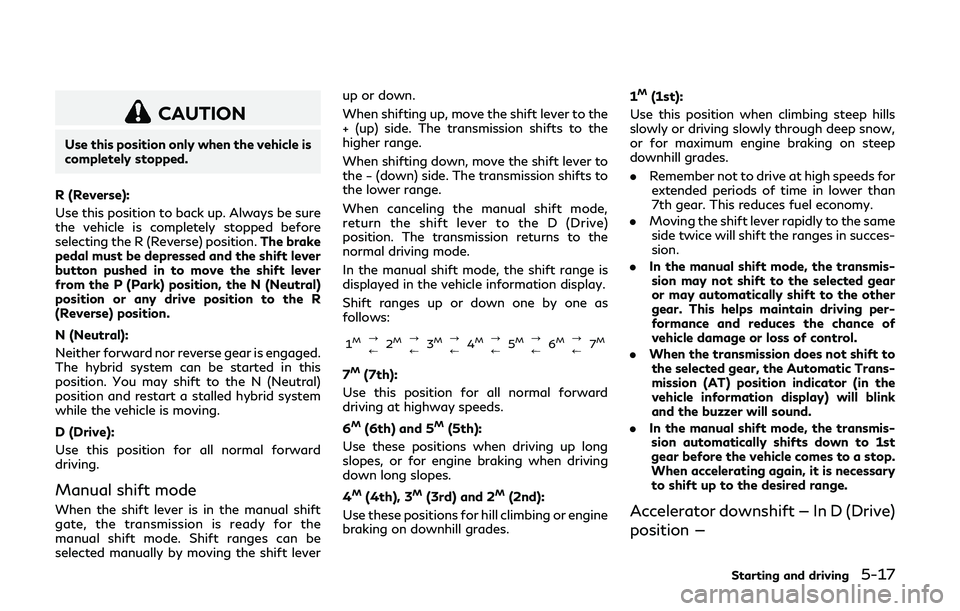
CAUTION
Use this position only when the vehicle is
completely stopped.
R (Reverse):
Use this position to back up. Always be sure
the vehicle is completely stopped before
selecting the R (Reverse) position. The brake
pedal must be depressed and the shift lever
button pushed in to move the shift lever
from the P (Park) position, the N (Neutral)
position or any drive position to the R
(Reverse) position.
N (Neutral):
Neither forward nor reverse gear is engaged.
The hybrid system can be started in this
position. You may shift to the N (Neutral)
position and restart a stalled hybrid system
while the vehicle is moving.
D (Drive):
Use this position for all normal forward
driving.
Manual shift mode
When the shift lever is in the manual shift
gate, the transmission is ready for the
manual shift mode. Shift ranges can be
selected manually by moving the shift lever up or down.
When shifting up, move the shift lever to the
+ (up) side. The transmission shifts to the
higher range.
When shifting down, move the shift lever to
the − (down) side. The transmission shifts to
the lower range.
When canceling the manual shift mode,
return the shift lever to the D (Drive)
position. The transmission returns to the
normal driving mode.
In the manual shift mode, the shift range is
displayed in the vehicle information display.
Shift ranges up or down one by one as
follows:
1M?
/
2M?
/3M?
/4M?
/ 5M?
/6M?
/ 7M
7M(7th):
Use this position for all normal forward
driving at highway speeds.
6
M(6th) and 5M(5th):
Use these positions when driving up long
slopes, or for engine braking when driving
down long slopes.
4
M(4th), 3M(3rd) and 2M(2nd):
Use these positions for hill climbing or engine
braking on downhill grades. 1
M(1st):
Use this position when climbing steep hills
slowly or driving slowly through deep snow,
or for maximum engine braking on steep
downhill grades.
.
Remember not to drive at high speeds for
extended periods of time in lower than
7th gear. This reduces fuel economy.
. Moving the shift lever rapidly to the same
side twice will shift the ranges in succes-
sion.
. In the manual shift mode, the transmis-
sion may not shift to the selected gear
or may automatically shift to the other
gear. This helps maintain driving per-
formance and reduces the chance of
vehicle damage or loss of control.
. When the transmission does not shift to
the selected gear, the Automatic Trans-
mission (AT) position indicator (in the
vehicle information display) will blink
and the buzzer will sound.
. In the manual shift mode, the transmis-
sion automatically shifts down to 1st
gear before the vehicle comes to a stop.
When accelerating again, it is necessary
to shift up to the desired range.
Accelerator downshift — In D (Drive)
position —
Starting and driving5-17
Page 203 of 442
5-18Starting and driving
For passing or hill climbing, fully depress the
accelerator pedal to the floor. This shifts the
transmission down into the lower gear,
depending on the vehicle speed.
Fail-safe
When the fail-safe operation occurs, note
that the transmission will be locked in any of
the forward gears according to the condi-
tion.
If the vehicle is driven under extreme
conditions, such as excessive wheel spinning
and subsequent hard braking, the fail-safe
system may be activated. This will occur
even if all electrical circuits are functioning
properly. In this case, push the ignition
switch to the OFF position and wait for 3
seconds. Then push the ignition switch back
to the ON position. The vehicle should
return to its normal operating condition. If
it does not return to its normal operating
condition, have the transmission checked
and repaired, if necessary. It is recom-
mended you visit an INFINITI retailer for
this service.
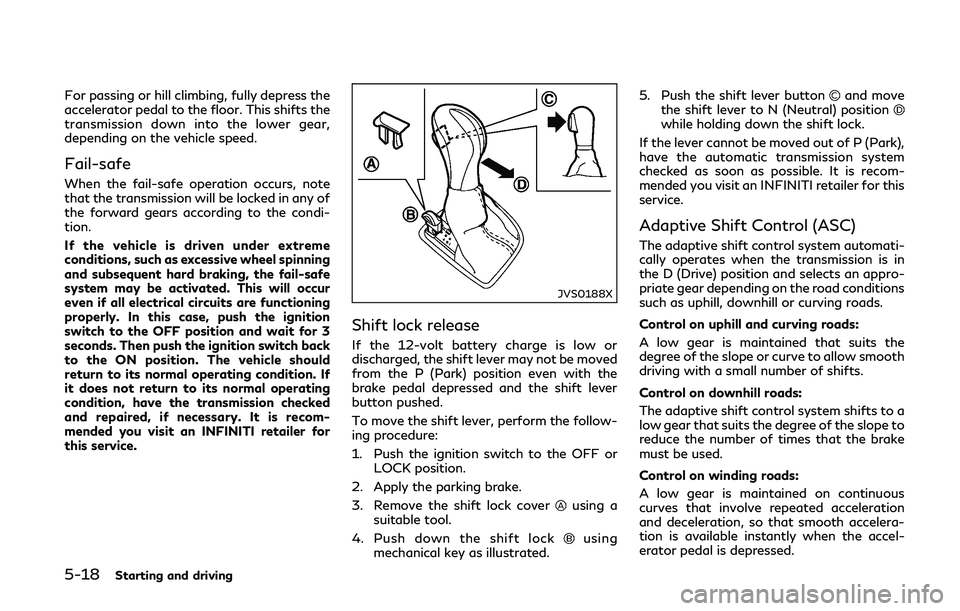
JVS0188X
Shift lock release
If the 12-volt battery charge is low or
discharged, the shift lever may not be moved
from the P (Park) position even with the
brake pedal depressed and the shift lever
button pushed.
To move the shift lever, perform the follow-
ing procedure:
1. Push the ignition switch to the OFF orLOCK position.
2. Apply the parking brake.
3. Remove the shift lock cover
using a
suitable tool.
4. Push down the shift lock
using
mechanical key as illustrated. 5. Push the shift lever button
and move
the shift lever to N (Neutral) position
while holding down the shift lock.
If the lever cannot be moved out of P (Park),
have the automatic transmission system
checked as soon as possible. It is recom-
mended you visit an INFINITI retailer for this
service.
Adaptive Shift Control (ASC)
The adaptive shift control system automati-
cally operates when the transmission is in
the D (Drive) position and selects an appro-
priate gear depending on the road conditions
such as uphill, downhill or curving roads.
Control on uphill and curving roads:
A low gear is maintained that suits the
degree of the slope or curve to allow smooth
driving with a small number of shifts.
Control on downhill roads:
The adaptive shift control system shifts to a
low gear that suits the degree of the slope to
reduce the number of times that the brake
must be used.
Control on winding roads:
A low gear is maintained on continuous
curves that involve repeated acceleration
and deceleration, so that smooth accelera-
tion is available instantly when the accel-
erator pedal is depressed.