ESP INFINITI Q60 2014 User Guide
[x] Cancel search | Manufacturer: INFINITI, Model Year: 2014, Model line: Q60, Model: INFINITI Q60 2014Pages: 466, PDF Size: 3.2 MB
Page 213 of 466

4-44Monitor, climate, audio, phone and voice recognition systems
.Improperly plugging in the iPod®may
cause a checkmark to be displayed on
and off (flickering). Always make sure
that the iPod
®is connected properly.
. An iPod nano®(1st Generation) may
remain in fast forward or rewind mode
if it is connected during a seek opera-
tion. In this case, please manually reset
the iPod
®.
. An iPod nano®(2nd Generation) will
continue to fast-forward or rewind if it
is disconnected during a seek opera-
tion.
. An incorrect song title may appear when
the Play Mode is changed while using
an iPod nano
®(2nd Generation)
. Audiobooks may not play in the same
order as they appear on an iPod
®.
. Large video files cause slow responses
in an iPod
®. The vehicle center display
may momentarily black out, but will
soon recover.
. If an iPod
®automatically selects large
video files while in the shuffle mode,
the vehicle center display may momen-
tarily black out, but will soon recover.
Compressed Audio Files (MP3/
WMA/AAC)
Explanation of terms:
. MP3 —MP3 is short for Moving Pictures
Experts Group Audio Layer 3. MP3 is
the most well known compressed
digital audio file format. This format
allows for near “CD quality”sound, but
at a fraction of the size of normal audio
files. MP3 conversion of an audio track
can reduce the file size by approxi-
mately a 10:1 ratio (Sampling: 44.1
kHz, Bit rate: 128 kbps) with virtually
no perceptible loss in quality. The
compression reduces certain parts of
sound that seem inaudible to most
people.
. WMA —Windows Media Audio (WMA) is
a compressed audio format created by
Microsoft as an alternative to MP3. The
WMA codec offers greater file compres-
sion than the MP3 codec, enabling
storage of more digital audio tracks in
the same amount of space when
compared to MP3s at the same level
of quality.
. AAC/M4A —Advanced Audio Coding
(AAC) is a lossy audio compression
format. Audio files that have been encoded with AAC are generally smaller
in size and deliver a higher quality of
sound than MP3.
. Bit rate —Bit rate denotes the number
of bits per second used by a digital
music file. The size and quality of a
compressed digital audio file is deter-
mined by the bit rate used when
encoding the file.
. Sampling frequency —Sampling fre-
quency is the rate at which the samples
of a signal are converted from analog to
digital (A/D conversion) per second.
. Multisession —Multisession is one of
the methods for writing data to media.
Writing data once to the media is called
a single session, and writing more than
once is called a multisession.
. ID3/WMA Tag —The ID3/WMA tag is the
part of the encoded MP3 or WMA file
that contains information about the
digital music file such as song title,
artist, album title, encoding bit rate,
track time duration, etc. ID3 tag in-
formation is displayed on the Album/
Artist/Track title line on the display.
* Windows
®and Windows Media®are
registered trademarks or trademarks of
Microsoft Corporation in the United States
Page 229 of 466

4-60Monitor, climate, audio, phone and voice recognition systems
Hide: Hide the operation key.
Title Menu (DVD-VIDEO):
Some menus specific to each disc will be
shown. For details, see the instructions on
the disc.
Title Search (DVD-VIDEO, DVD-VR):
The scene with the specified title will be
displayed each time the “+”side or “−”
side is selected.
Group Search (VIDEO CD):
A scene in the specified group will be
displayed each time the “+”side or “−”
side is selected.
10 Key Search (DVD-VIDEO, VIDEO-CD,CD-
DA, DVD-VR):
Select the “10 Key Search” key to open the
number entry screen. Input the number to
be searched and select the “OK”key. The
specified Title/Chapter or Group/Track will
be played.
Select No. (VIDEO-CD):
Select the “Select No.” key to open the
number entry screen. Input the number to
be searched and select the “OK”key. The
specified scene will be played. Angle (DVD-VIDEO):
If the DVD contains different angles (such
as moving images), the current image
angle can be switched to another one.
Select the “Angle” key. The angle will
change each time the “+”side or “−”side
is selected.
Angle Mark (DVD-VIDEO):
When this item is turned on, an angle mark
will be shown on the bottom of the screen
if the scene can be seen from a different
angle.
Menu Skip (DVD-VIDEO):
DVD menus are automatically configured
and the contents will be played directly
when the “Menu Skip” key is turned on.
Note that some discs may not be played
directly even if this item is turned on.
CM Skip (DVD-VIDEO):
Select the “CM Skip” key. Choose the
setting time from 15, 30 or 60 seconds by
selecting the “+”side or “−”side.
DRC (DVD-VIDEO, DVD-VR):
DRC (Dynamic Range Compression) auto-
matically adjusts the soundtrack volume
level to
maintain a more even sound to the
speakers. DVD Language (DVD-VIDEO, VIDEO-CD):
Select the
“DVD Language” key to open the
number entry screen. Input the number
corresponding to the preferred language
and select the “OK”key. The DVD top menu
language will be changed to the one
specified.
Display:
To adjust the image quality of the screen,
select the preferred adjustment items.
Audio:
Select the preferred language for audio.
Subtitle (DVD-VIDEO, DVD-VR):
Select the preferred language for subtitles.
Display Mode (DVD-VIDEO, VIDEO-CD, DVD-
VR):
Select from the “Full”,“Wide”, “Normal” or
“Cinema” modes.
Title List (DVD-VR):
Select the preferred title from the list.
Play Mode:
Select the preferred play mode.
PG/PL Mode (DVD-VR):
Select the “PG”or“PL” mode.
Page 255 of 466
4-86Monitor, climate, audio, phone and voice recognition systems
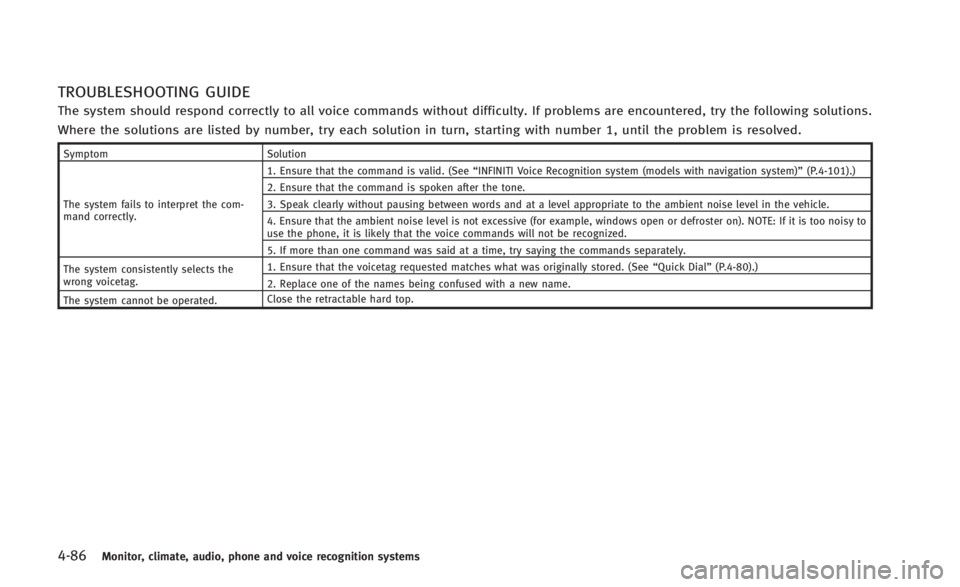
TROUBLESHOOTING GUIDE
The system should respond correctly to all voice commands without difficulty. If problems are encountered, try the following solutions.
Where the solutions are listed by number, try each solution in turn, starting with number 1, until the problem is resolved.
SymptomSolution
The system fails to interpret the com-
mand correctly. 1. Ensure that the command is valid. (See
“INFINITI Voice Recognition system (models with navigation system)” (P.4-101).)
2. Ensure that the command is spoken after the tone.
3. Speak clearly without pausing between words and at a level appropriate to the ambient noise level in the vehicle.
4. Ensure that the ambient noise level is not excessive (for example, windows open or defroster on). NOTE: If it is too noisy to
use the phone, it is likely that the voice commands will not be recognized.
5. If more than one command was said at a time, try saying the commands separately.
The system consistently selects the
wrong voicetag. 1. Ensure that the voicetag requested matches what was originally stored. (See
“Quick Dial”(P.4-80).)
2. Replace one of the names being confused with a new name.
The system cannot be operated. Close the retractable hard top.
Page 260 of 466
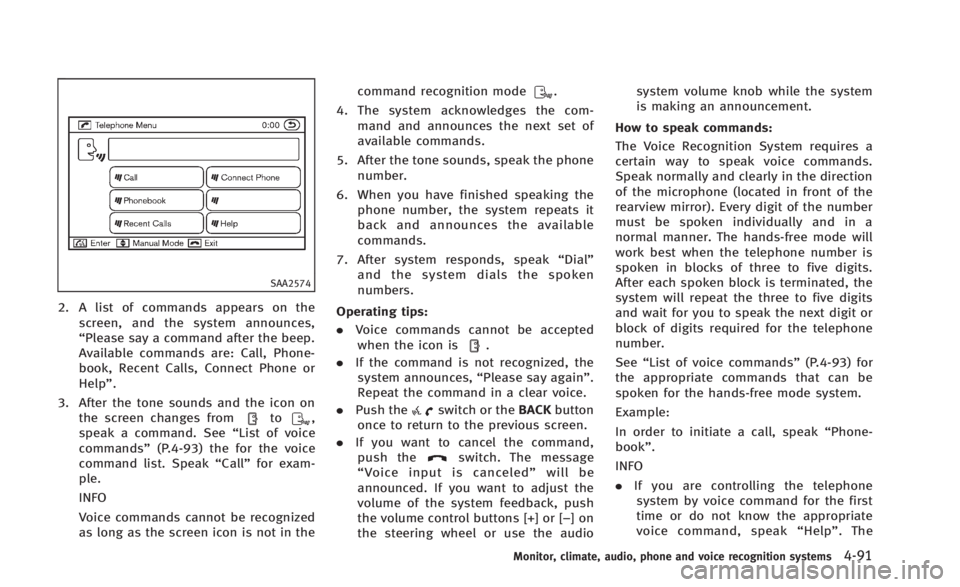
SAA2574
2. A list of commands appears on thescreen, and the system announces,
“Please say a command after the beep.
Available commands are: Call, Phone-
book, Recent Calls, Connect Phone or
Help”.
3. After the tone sounds and the icon on the screen changes from
to,
speak a command. See “List of voice
commands” (P.4-93) the for the voice
command list. Speak “Call”for exam-
ple.
INFO
Voice commands cannot be recognized
as long as the screen icon is not in the command recognition mode
.
4. The system acknowledges the com- mand and announces the next set of
available commands.
5. After the tone sounds, speak the phone number.
6. When you have finished speaking the phone number, the system repeats it
back and announces the available
commands.
7. After system responds, speak “Dial”
and the system dials the spoken
numbers.
Operating tips:
. Voice commands cannot be accepted
when the icon is
.
. If the command is not recognized, the
system announces, “Please say again”.
Repeat the command in a clear voice.
. Push the
switch or the BACKbutton
once to return to the previous screen.
. If you want to cancel the command,
push the
switch. The message
“ Voice input is canceled” will be
announced. If you want to adjust the
volume of the system feedback, push
the volume control buttons [+] or [−]on
the steering wheel or use the audio system volume knob while the system
is making an announcement.
How to speak commands:
The Voice Recognition System requires a
certain way to speak voice commands.
Speak normally and clearly in the direction
of the microphone (located in front of the
rearview mirror). Every digit of the number
must be spoken individually and in a
normal manner. The hands-free mode will
work best when the telephone number is
spoken in blocks of three to five digits.
After each spoken block is terminated, the
system will repeat the three to five digits
and wait for you to speak the next digit or
block of digits required for the telephone
number.
See “List of voice commands” (P.4-93) for
the appropriate commands that can be
spoken for the hands-free mode system.
Example:
In order to initiate a call, speak “Phone-
book”.
INFO
. If you are controlling the telephone
system by voice command for the first
time or do not know the appropriate
voice command, speak “Help” . The
Monitor, climate, audio, phone and voice recognition systems4-91
Page 261 of 466
4-92Monitor, climate, audio, phone and voice recognition systems
system announces the available com-
mands.
. When you speak numbers, you can
speak both “zero”or“oh” for“0”.
Personal vocabulary (voicetags):
Voice Recognition System is equipped with
the function called “voicetags”, which can
be associated with the phone number and
name in the phonebook. Using the voice
tag will automatically generate a speed
dial to the registered number.
See “Phonebook registration” (P.4-95).
You can call the identified number using
the following command: “Dial”followed by
the voice tag.
Dialling a name with a voice tag:
It is possible to call up a name via a voice
tag instead of a number, provided the
name and number of your correspondent
has been previously stored in the phone-
book.
Dial via a voice tag, according to the
following procedure.
1. Push the
switch.
2. The system replies “please say a
command after the beep. Available
commands are: Call, Phonebook, Re- cent Calls, Connect Phone or Help”.
3. Give your instructions to the system by saying: “Dial John” for example (“John”
must have been previously set as a
voice tag for John’s phone number) or
“Dial One” if John is classified as one in
the phonebook.
If the system cannot understand your
command, repeat it according to the
recommendations mentioned in “How
to speak commands” (P.4-91).
4. If the given name (voice tag) is correct, the phone system will dial the number
registered for “John”.
INFO
To end the voice command phase at any
stage of the procedure, push the
switch once in order to activate the cancel
command.
Page 298 of 466
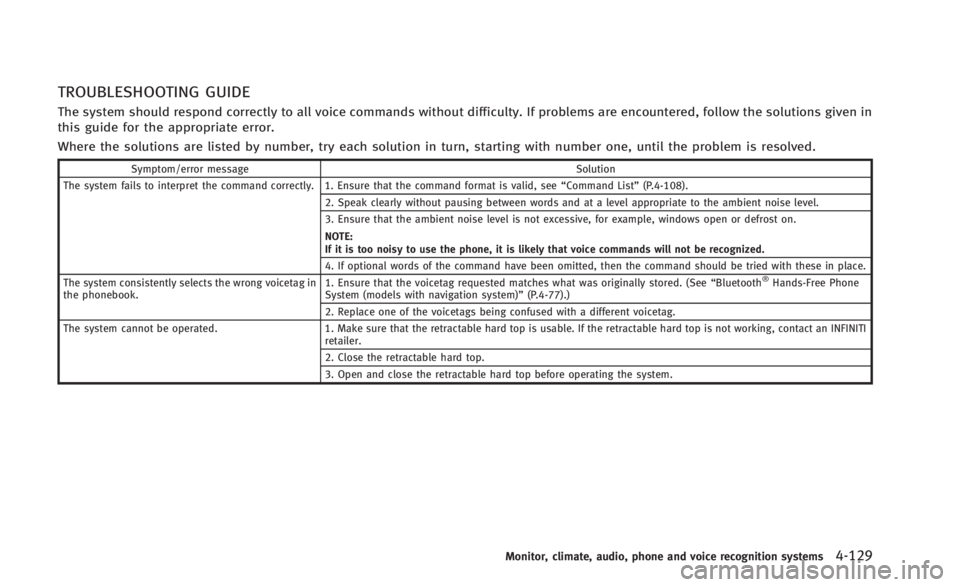
TROUBLESHOOTING GUIDE
The system should respond correctly to all voice commands without difficulty. If problems are encountered, follow the solutions given in
this guide for the appropriate error.
Where the solutions are listed by number, try each solution in turn, starting with number one, until the problem is resolved.
Symptom/error messageSolution
The system fails to interpret the command correctly. 1. Ensure that the command format is valid, see “Command List”(P.4-108).
2. Speak clearly without pausing between words and at a level appropriate to the ambient noise level.
3. Ensure that the ambient noise level is not excessive, for example, windows open or defrost on.
NOTE:
If it is too noisy to use the phone, it is likely that voice commands will not be recognized.
4. If optional words of the command have been omitted, then the command should be tried with these in place.
The system consistently selects the wrong voicetag in
the phonebook. 1. Ensure that the voicetag requested matches what was originally stored. (See
“Bluetooth
®Hands-Free Phone
System (models with navigation system)” (P.4-77).)
2. Replace one of the voicetags being confused with a different voicetag.
The system cannot be operated. 1. Make sure that the retractable hard top is usable. If the retractable hard top is not working, contact an INFINITI
retailer.
2. Close the retractable hard top.
3. Open and close the retractable hard top before operating the system.
Monitor, climate, audio, phone and voice recognition systems4-129
Page 303 of 466

5-4Starting and driving
THREE-WAY CATALYST
The three-way catalyst is an emission
control device installed in the exhaust
system. Exhaust gases in the three-way
catalyst are burned at high temperatures to
help reduce pollutants.
WARNING
.The exhaust gas and the exhaust system
are very hot. Keep people, animals or
flammable materials away from the
exhaust system components.
. Do not stop or park the vehicle over
flammable materials such as dry grass,
waste paper or rags. They may ignite and
cause a fire.
CAUTION
.Do not use leaded gasoline. Deposits
from leaded gasoline seriously reduce
the three-way catalyst’s ability to help
reduce exhaust pollutants.
. Keep your engine tuned up. Malfunctions
in the ignition, fuel injection, or elec-
trical systems can cause overrich fuel flow into the three-way catalyst, causing
it to overheat. Do not keep driving if the
engine misfires, or if noticeable loss of
performance or other unusual operating
conditions are detected. Have the vehicle
inspected promptly by an INFINITI retai-
ler.
. Avoid driving with an extremely low fuel
level. Running out of fuel could cause
the engine to misfire, damaging the
three-way catalyst.
. Do not race the engine while warming it
up.
. Do not push or tow your vehicle to start
the engine.
TIRE PRESSURE MONITORING SYS-
TEM (TPMS)
Each tire, including the spare (if provided),
should be checked monthly when cold and
inflated to the inflation pressure recom-
mended by the vehicle manufacturer on the
vehicle placard or tire inflation pressure
label. (If your vehicle has tires of a different
size than the size indicated on the vehicle
placard or tire inflation pressure label, you
should determine the proper tire inflation
pressure for those tires.) As an added safety feature, your vehicle
has been equipped with a Tire Pressure
Monitoring System (TPMS) that illuminates
a low tire pressure telltale when one or
more of your tires is significantly under-
inflated. Accordingly, when the low tire
pressure telltale illuminates, you should
stop and check your tires as soon as
possible, and inflate them to the proper
pressure. Driving on a significantly under-
inflated tire causes the tire to overheat and
can lead to tire failure. Under-inflation also
reduces fuel efficiency and tire tread life,
and may affect the vehicle’s handling and
stopping ability.
Please note that the TPMS is not a
substitute for proper tire maintenance,
and it is the driver’
s responsibility to
maintain correct tire pressure, even if
under-inflation has not reached the level
to trigger illumination of the TPMS low tire
pressure telltale.
Your vehicle has also been equipped with a
TPMS malfunction indicator to indicate
when the system is not operating properly.
The TPMS malfunction indicator is com-
bined with the low tire pressure telltale.
When the system detects a malfunction,
the telltale will flash for approximately one
Page 305 of 466

5-6Starting and driving
illuminates while driving after adjusting
the tire pressure, a tire may be flat. If
you have a flat tire, replace it with a
spare tire as soon as possible. (See“Flat
tire” (P.6-3) for changing a flat tire.)
. When a spare tire is mounted or a wheel
is replaced, the TPMS will not function
and the low tire pressure warning light
will flash for approximately 1 minute.
The light will remain on after 1 minute.
Contact your INFINITI retailer as soon as
possible for tire replacement and/or
system resetting.
. Replacing tires with those not originally
specified by INFINITI could affect the
proper operation of the TPMS.
. Do not inject any tire liquid or aerosol
tire sealant into the tires, as this may
cause a malfunction of the tire pressure
sensors (for models not equipped with
the emergency tire puncture repair kit).
. If you used the Emergency Tire Sealant
to repair a minor tire puncture, your
INFINITI retailer will also need to replace
the TPMS sensor in addition to repairing
or replacing the tire (for models
equipped with the emergency tire punc-
ture repair kit). .
INFINITI recommends using only NISSAN
Genuine Emergency Tire Sealant pro-
vided with your vehicle. Other tire
sealants may damage the valve stem
seal which can cause the tire to lose air
pressure (for models equipped with the
emergency tire puncture repair kit).
CAUTION
.The TPMS may not function properly
when the wheels are equipped with tire
chains or the wheels are buried in snow.
. Do not place metalized film or any metal
parts (antenna, etc.) on the windows.
This may cause poor reception of the
signals from the tire pressure sensors,
and the TPMS will not function properly.
Some devices and transmitters may tem-
porarily interfere with the operation of the
TPMS and cause the low tire pressure
warning light to illuminate. Some exam-
ples are:
.Facilities or electric devices using simi-
lar radio frequencies are near the
vehicle. .
If a transmitter set to similar frequen-
cies is being used in or near the
vehicle.
. If a computer (or similar equipment) or
a DC/AC converter is being used in or
near the vehicle.
FCC Notice:
For USA:
This device complies with Part 15 of the
FCC Rules. Operation is subject to the
following two conditions: (1) This device
may not cause harmful interference, and
(2) this device must accept any interfer-
ence received, including interference that
may cause undesired operation.
Note: Changes or modifications not ex-
pressly approved by the party responsible
for compliance could void the user’ s
authority to operate the equipment.
For Canada:
This device complies with RSS-210 of
Industry Canada. Operation is subject to
the following two conditions: (1) this
device may not cause interference, and
(2) this device must accept any interfer-
ence, including interference that may
cause undesired operation of the device.
Page 306 of 466

AVOIDING COLLISION AND ROLL-
OVER
WARNING
Failure to operate this vehicle in a safe and
prudent manner may result in loss of control
or an accident.
Be alert and drive defensively at all times.
Obey all traffic regulations. Avoid exces-
sive speed, high speed cornering, or
sudden steering maneuvers, because
these driving practices could cause you to
lose control of your vehicle.As with any
vehicle, a loss of control could result in a
collision with other vehicles or objects, or
cause the vehicle to rollover, particularly if
the loss of control causes the vehicle to
slide sideways. Be attentive at all times,
and avoid driving when tired. Never drive
when under the influence of alcohol or
drugs (including prescription or over-the-
counter drugs which may cause drowsi-
ness). Always wear your seat belt as
outlined in the “Seat belts”(P.1-11) of this
manual, and also instruct your passengers
to do so. Seat belts help reduce the risk of injury in
collisions and rollovers.
In a rollover crash,
an unbelted or improperly belted person is
significantly more likely to be injured or
killed than a person properly wearing a
seat belt.
OFF-ROAD RECOVERY
While driving, the right side or left side
wheels may unintentionally leave the road
surface. If this occurs, maintain control of
the vehicle by following the procedure
below. Please note that this procedure is
only a general guide. The vehicle must be
driven as appropriate based on the condi-
tions of the vehicle, road and traffic.
1. Remain calm and do not overreact.
2. Do not apply the brakes.
3. Maintain a firm grip on the steering wheel with both hands and try to hold a
straight course.
4. When appropriate, slowly release the accelerator pedal to gradually slow the
vehicle.
5. If there is nothing in the way, steer the vehicle to follow the road while the
vehicle speed is reduced. Do not
attempt to drive the vehicle back onto the road surface until vehicle speed is
reduced.
6. When it is safe to do so, gradually turn the steering wheel until both tires
return to the road surface. When all
tires are on the road surface, steer the
vehicle to stay in the appropriate
driving lane..If you decide that it is not safe toreturn the vehicle to the road surface
based on vehicle, road or traffic
conditions, gradually slow the vehi-
cle to a stop in a safe place off the
road.
RAPID AIR PRESSURE LOSS
Rapid air pressure loss or a “blow-out”can
occur if the tire is punctured or is damaged
due to hitting a curb or pothole. Rapid air
pressure loss can also be caused by
driving on under-inflated tires.
Rapid air pressure loss can affect the
handling and stability of the vehicle,
especially at highway speeds.
Help prevent rapid air pressure loss by
maintaining the correct air pressure and
visually inspect the tires for wear and
damage. See “Wheels and tires” (P.8-30) of
this manual.
Starting and driving5-7
Page 312 of 466

otherwise the starter could be damaged.
4.Warm-up
Allow the engine to idle for at least 30
seconds after starting. Do not race the
engine while warming it up. Drive at
moderate speed for a short distance
first, especially in cold weather. In cold
weather, keep the engine running for a
minimum of 2 - 3 minutes before
shutting it off. Starting and stopping
the engine over a short period of time
may make the vehicle more difficult to
start.
When racing the engine up to 4,000
rpm or more under no load condition,
the engine will enter the fuel cut mode.
5. To stop the engine, shift the shift lever to the P (Park) position (AT model) or
move the shift lever to the N (Neutral)
position (MT model), and push the
ignition switch to the OFF position.
NOTE:
Care should be taken to avoid situations
that can lead to potential battery dis-
charge and potential no-start conditions
such as: 1.
Installation or extended use of electro-
nic accessories that consume battery
power when the engine is not running
(Phone chargers, GPS, DVD players,
etc.)
2. Vehicle is not driven regularly and/or
only driven short distances.
In these cases, the battery may need to be
charged to maintain battery health.
AUTOMATIC TRANSMISSION
7 speed automatic transmission
The automatic transmission in your vehicle
is electronically controlled by a transmis-
sion control module to produce maximum
efficiency and smooth operation.
Shown on the following pages are the
recommended operating procedures for
this transmission. Follow these procedures
for maximum vehicle performance and
driving enjoyment.
Starting the vehicle
After starting the engine, fully depress the
foot brake pedal and push the shift lever
button before shifting the shift lever to the
R (Reverse), N (Neutral), D (Drive), DS (Drive
Sport) or Manual shift mode position. Be
sure the vehicle is fully stopped before
attempting to shift the shift lever.
This automatic transmission model is
designed so that the foot brake pedal
must be depressed before shifting from P
(Park) to any drive position while the
ignition switch position is ON.
Starting and driving5-13
DRIVING THE VEHICLE