reset INFINITI Q60 2014 Owner's Manual
[x] Cancel search | Manufacturer: INFINITI, Model Year: 2014, Model line: Q60, Model: INFINITI Q60 2014Pages: 466, PDF Size: 3.2 MB
Page 321 of 466
5-22Starting and driving
.in heavy traffic or in traffic that varies in
speed
. on winding or hilly roads
. on slippery roads (rain, snow, ice, etc.)
. in very windy areas
Doing so could cause a loss of vehicle
control and result in an accident.
CAUTION
On manual transmission models, do not
shift into N (Neutral) without depressing the
clutch pedal when the cruise control is set.
Should this occur, depress the clutch pedal
and turn the main switch off immediately.
Failure to do so may cause engine damage.SSD0600
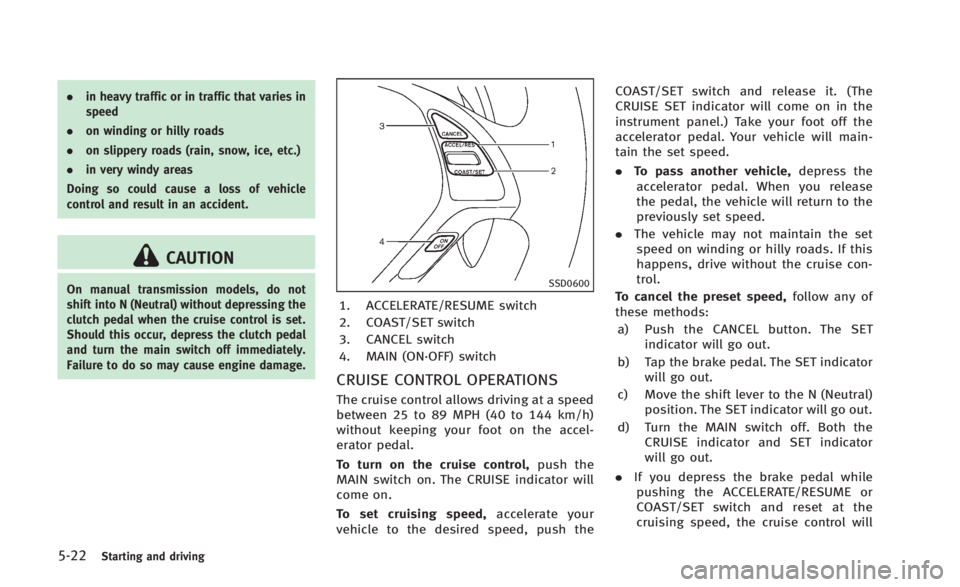
1. ACCELERATE/RESUME switch
2. COAST/SET switch
3. CANCEL switch
4. MAIN (ON·OFF) switch
CRUISE CONTROL OPERATIONS
The cruise control allows driving at a speed
between 25 to 89 MPH (40 to 144 km/h)
without keeping your foot on the accel-
erator pedal.
To turn on the cruise control, push the
MAIN switch on. The CRUISE indicator will
come on.
To set cruising speed, accelerate your
vehicle to the desired speed, push the COAST/SET switch and release it. (The
CRUISE SET indicator will come on in the
instrument panel.) Take your foot off the
accelerator pedal. Your vehicle will main-
tain the set speed.
.
To pass another vehicle, depress the
accelerator pedal. When you release
the pedal, the vehicle will return to the
previously set speed.
. The vehicle may not maintain the set
speed on winding or hilly roads. If this
happens, drive without the cruise con-
trol.
To cancel the preset speed, follow any of
these methods:
a) Push the CANCEL button. The SET indicator will go out.
b) Tap the brake pedal. The SET indicator will go out.
c) Move the shift lever to the N (Neutral) position. The SET indicator will go out.
d) Turn the MAIN switch off. Both the CRUISE indicator and SET indicator
will go out.
. If you depress the brake pedal while
pushing the ACCELERATE/RESUME or
COAST/SET switch and reset at the
cruising speed, the cruise control will
Page 322 of 466
disengage. Turn the MAIN switch off
once and then turn it on again.
. The cruise control will automatically
cancel if the vehicle slows more than
8 MPH (12 km/h) below the set speed.
. If you depress the clutch pedal (Manual
Transmission models) or move the shift
lever to N (Neutral) position (Automatic
Transmission models), the cruise con-
trol will be canceled.
To reset at a faster cruising speed, use one
of the following methods:
. Depress the accelerator pedal. When
the vehicle attains the desired speed,
push and release the COAST/SET
switch.
. Push and hold the ACCELERATE/RE-
SUME switch. When the vehicle attains
the speed you desire, release the
switch.
. Push, then quickly release the ACCEL-
ERATE/RESUME switch. Each time you
do this, the set speed will increase by
about 1 MPH (1.6 km/h).
To reset at a slower cruising speed, use
one of the following methods:
. Lightly tap the brake pedal. When the
vehicle attains the desired speed, push the COAST/SET switch and release it.
. Push and hold the COAST/SET switch.
Release the switch when the vehicle
slows down to the desired speed.
. Push, then quickly release the COAST/
SET switch. Each time you do this, the
set speed will decrease by about 1 MPH
(1.6 km/h).
To resume the preset speed, push and
release the ACCELERATE/RESUME switch.
The vehicle will resume the last set
cruising speed when the vehicle speed is
over 25 MPH (40 km/h). The Intelligent Cruise Control (ICC) system
automatically maintains a selected dis-
tance from the vehicle traveling in front of
you according to that vehicle’s speed (up
to the set speed), or at the set speed when
the road ahead is clear.
The ICC function can be set to one of two
cruise control modes:
.
Vehicle-to-vehicle distance control
mode:
For maintaining a selected distance
between your vehicle and the vehicle
in front of you up to the preset speed.
. Conventional (fixed speed) cruise con-
trol mode:
For cruising at a preset speed.
WARNING
. Always drive carefully and attentively
when using either cruise control mode.
Read and understand the Owner’s Man-
ual thoroughly before using the cruise
control. To avoid serious injury or death,
do not rely on the system to prevent
accidents or to control the vehicle’ s
speed in emergency situations. Do not
use cruise control except in appropriate
road and traffic conditions.
Starting and driving5-23
INTELLIGENT CRUISE CONTROL (ICC)
SYSTEM (if so equipped)
Page 333 of 466
5-34Starting and driving
SSD0614
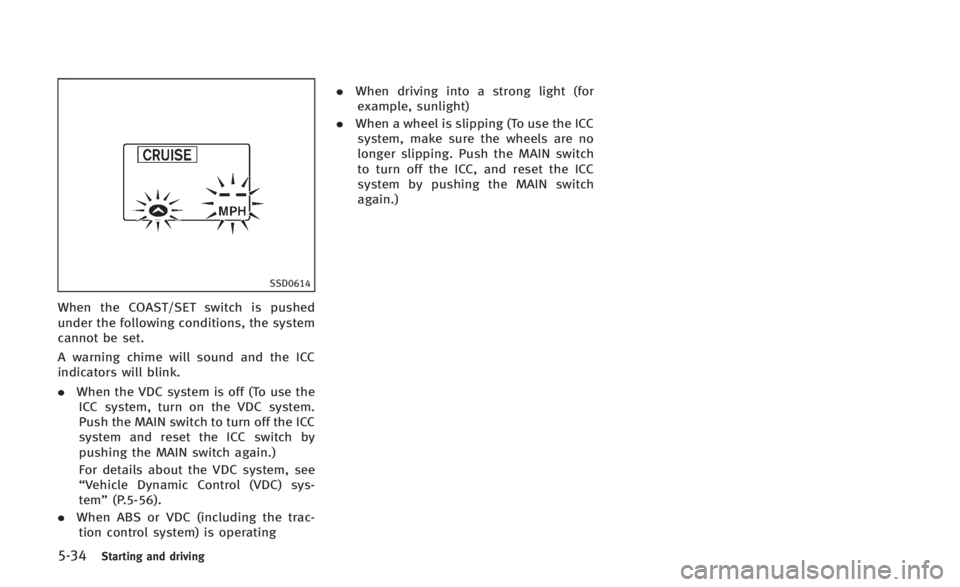
When the COAST/SET switch is pushed
under the following conditions, the system
cannot be set.
A warning chime will sound and the ICC
indicators will blink.
.When the VDC system is off (To use the
ICC system, turn on the VDC system.
Push the MAIN switch to turn off the ICC
system and reset the ICC switch by
pushing the MAIN switch again.)
For details about the VDC system, see
“Vehicle Dynamic Control (VDC) sys-
tem” (P.5-56).
. When ABS or VDC (including the trac-
tion control system) is operating .
When driving into a strong light (for
example, sunlight)
. When a wheel is slipping (To use the ICC
system, make sure the wheels are no
longer slipping. Push the MAIN switch
to turn off the ICC, and reset the ICC
system by pushing the MAIN switch
again.)
Page 335 of 466
5-36Starting and driving
the ICC system is in operation, the system
controls the distance to that vehicle.
SSD0611
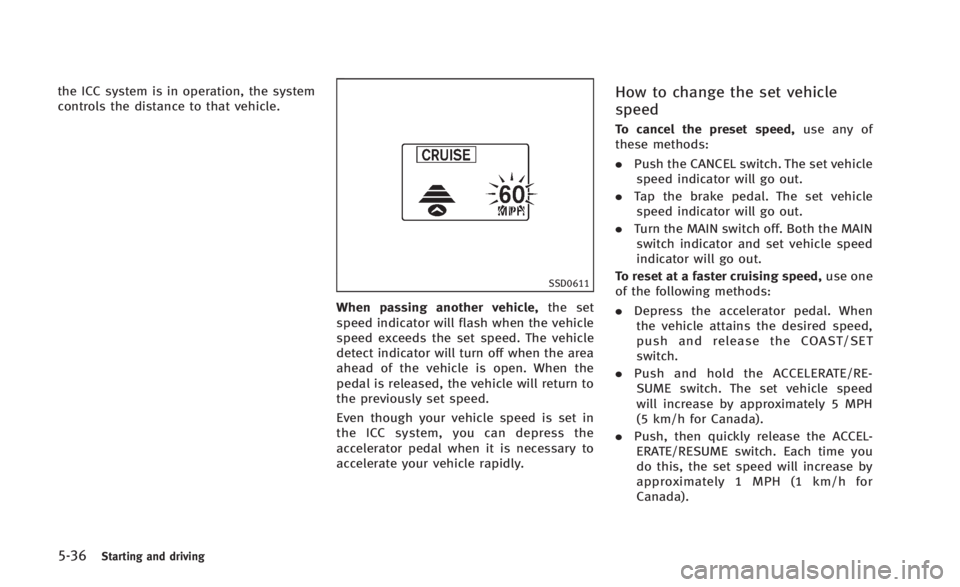
When passing another vehicle,the set
speed indicator will flash when the vehicle
speed exceeds the set speed. The vehicle
detect indicator will turn off when the area
ahead of the vehicle is open. When the
pedal is released, the vehicle will return to
the previously set speed.
Even though your vehicle speed is set in
the ICC system, you can depress the
accelerator pedal when it is necessary to
accelerate your vehicle rapidly.
How to change the set vehicle
speed
To cancel the preset speed, use any of
these methods:
. Push the CANCEL switch. The set vehicle
speed indicator will go out.
. Tap the brake pedal. The set vehicle
speed indicator will go out.
. Turn the MAIN switch off. Both the MAIN
switch indicator and set vehicle speed
indicator will go out.
To reset at a faster cruising speed, use one
of the following methods:
. Depress the accelerator pedal. When
the vehicle attains the desired speed,
push and release the COAST/SET
switch.
. Push and hold the ACCELERATE/RE-
SUME switch. The set vehicle speed
will increase by approximately 5 MPH
(5 km/h for Canada).
. Push, then quickly release the ACCEL-
ERATE/RESUME switch. Each time you
do this, the set speed will increase by
approximately 1 MPH (1 km/h for
Canada).
Page 336 of 466
To reset at a slower cruising speed,use
one of the following methods:
. Lightly tap the brake pedal. When the
vehicle attains the desired speed, push
the COAST/SET switch and release it.
. Push and hold the COAST/SET switch.
The set vehicle speed will decrease by
approximately 5 MPH (5 km/h for
Canada).
. Push, then quickly release the COAST/
SET switch. Each time you do this, the
set speed will decrease by approxi-
mately 1 MPH (1 km/h for Canada).
To resume the preset speed, push and
release the ACCELERATE/RESUME switch.
The vehicle will resume the last set
cruising speed when the vehicle speed is
over 25 MPH (40 km/h).
SSD0612
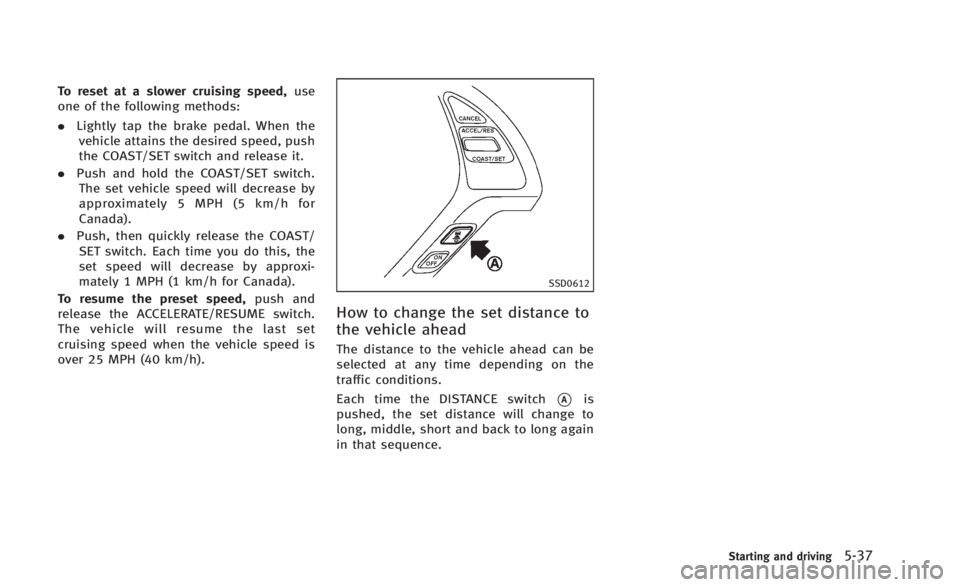
How to change the set distance to
the vehicle ahead
The distance to the vehicle ahead can be
selected at any time depending on the
traffic conditions.
Each time the DISTANCE switch
*Ais
pushed, the set distance will change to
long, middle, short and back to long again
in that sequence.
Starting and driving5-37
Page 343 of 466
5-44Starting and driving
set your desired cruising speed. Pushing
the MAIN switch again will turn the system
completely off.
When the ignition switch is pushed to the
OFF position, the system is also automati-
cally turned off. To use the Intelligent
Cruise Control again, quickly push and
release the MAIN switch (vehicle-to-vehicle
distance control mode) or push and hold it
(conventional cruise control mode) again to
turn it on.
CAUTION
To avoid accidentally engaging cruise con-
trol, make sure to turn the MAIN switch off
when not using the Intelligent Cruise Con-
trol system.
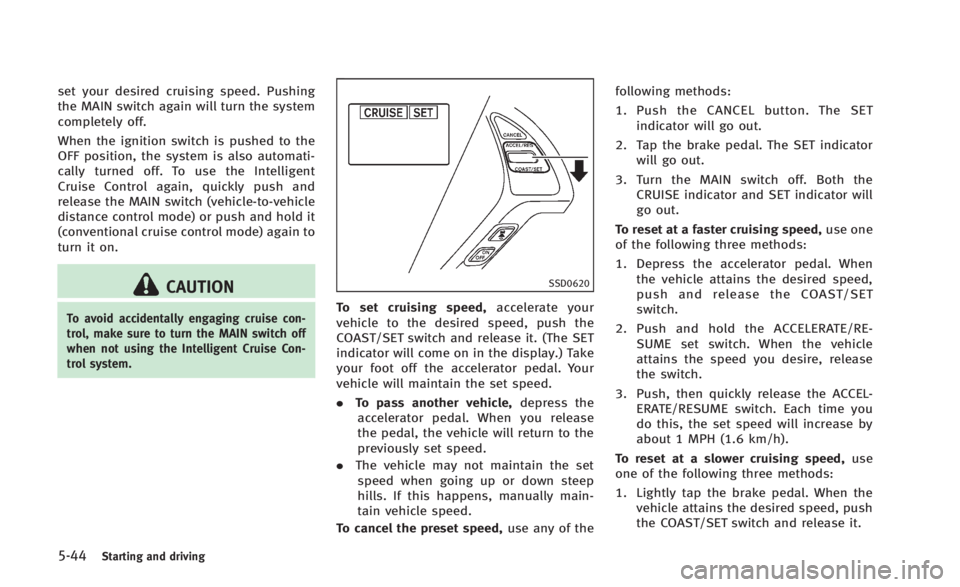
SSD0620
To set cruising speed,accelerate your
vehicle to the desired speed, push the
COAST/SET switch and release it. (The SET
indicator will come on in the display.) Take
your foot off the accelerator pedal. Your
vehicle will maintain the set speed.
. To pass another vehicle, depress the
accelerator pedal. When you release
the pedal, the vehicle will return to the
previously set speed.
. The vehicle may not maintain the set
speed when going up or down steep
hills. If this happens, manually main-
tain vehicle speed.
To cancel the preset speed, use any of thefollowing methods:
1. Push the CANCEL button. The SET
indicator will go out.
2. Tap the brake pedal. The SET indicator will go out.
3. Turn the MAIN switch off. Both the CRUISE indicator and SET indicator will
go out.
To reset at a faster cruising speed, use one
of the following three methods:
1. Depress the accelerator pedal. When the vehicle attains the desired speed,
push and release the COAST/SET
switch.
2. Push and hold the ACCELERATE/RE- SUME set switch. When the vehicle
attains the speed you desire, release
the switch.
3. Push, then quickly release the ACCEL- ERATE/RESUME switch. Each time you
do this, the set speed will increase by
about 1 MPH (1.6 km/h).
To reset at a slower cruising speed, use
one of the following three methods:
1. Lightly tap the brake pedal. When the vehicle attains the desired speed, push
the COAST/SET switch and release it.
Page 344 of 466

2. Push and hold the COAST/SET switch.Release the switch when the vehicle
slows down to the desired speed.
3. Push, then quickly release the COAST/ SET switch. Each time you do this, the
set speed will decrease by about 1 MPH
(1.6 km/h).
To resume the preset speed, push and
release the ACCELERATE/RESUME switch.
The vehicle will resume the last set
cruising speed when the vehicle speed is
over 25 MPH (40 km/h).
Automatic cancellation
A chime sounds under the following con-
ditions and the control is automatically
canceled.
. When the vehicle slows down more
than 8 MPH (13 km/h) below the set
speed
. When the vehicle speed falls below
approximately 20 MPH (32 km/h)
. When the shift lever is not in the D
(Drive), DS (Drive Sport) or manual shift
mode
. When the VDC operates (including the
traction control system)
. When a tire slips
SSD0621
Warning light
When the system is not operating properly,
the chime sounds and the system warning
light (orange) will come on.
Action to take:
If the warning light comes on, park the
vehicle in a safe place. Turn the engine off,
restart the engine, resume driving and then
perform the setting again.
If it is not possible to set or the indicator
stays on, it may indicate that the system is
malfunctioning. Although the vehicle is
still driveable under normal conditions,
have the vehicle checked at an INFINITI retailer.
PREVIEW FUNCTION (for Intelligent
Cruise Control system equipped
models)
The ICC system with the preview function
identifies the need to apply emergency
braking by sensing the vehicle ahead in
the same lane and the distance to the
vehicle ahead and relative speed from it, it
applies the brake pre-pressure before the
driver depresses the brake pedal and helps
improve brake response by reducing pedal
free play.
For more details, see
“Brake assist”(P.5-
53).
Starting and driving5-45
Page 356 of 466
flashes so note the following:
.The road may be slippery or the system
may determine some action is required
to help keep the vehicle on the steered
path.
. You may feel a pulsation in the brake
pedal and hear a noise or vibration
from under the hood. This is normal
and indicates that the VDC system is
working properly.
. Adjust your speed and driving to the
road conditions.
See “Vehicle Dynamic Control (VDC) warn-
ing light” (P.2-15).
If a malfunction occurs in the system, the
VDC warning light
illuminates in the
instrument panel. The VDC system auto-
matically turns off.
The VDC OFF switch is used to turn off the
VDC system. The VDC off indicator
illuminates to indicate the VDC system is
off. When the VDC switch is used to turn off
the system, the VDC system still operates
to prevent one drive wheel from slipping by
transferring power to a non slipping drive
wheel. The VDC warning light
flashes if
this occurs. All other VDC functions are off,
and the VDC warning light
will not
flash. The VDC system is automatically reset to on when the ignition switch is
placed in the off position then back to the
on position.
See
“Vehicle Dynamic Control (VDC) warn-
ing light” (P.2-15) and “Vehicle Dynamic
Control (VDC) off indicator light” (P.2-16).
The computer has a built-in diagnostic
feature that tests the system each time you
start the engine and move the vehicle
forward or in reverse at a slow speed.
When the self-test occurs, you may hear a
“clunk” noise and/or feel a pulsation in the
brake pedal. This is normal and is not an
indication of a malfunction.
WARNING
. The VDC system is designed to help the
driver maintain stability but does not
prevent accidents due to abrupt steering
operation at high speeds or by careless
or dangerous driving techniques. Reduce
vehicle speed and be especially careful
when driving and cornering on slippery
surfaces and always drive carefully.
. Do not modify the vehicle’s suspension.
If suspension parts such as shock
absorbers, struts, springs, stabilizer bars, bushings and wheels are not
INFINITI recommended for your vehicle
or are extremely deteriorated, the VDC
system may not operate properly. This
could adversely affect vehicle handling
performance, and the VDC warning light
may illuminate.
. If brake related parts such as brake
pads, rotors and calipers are not INFINITI
recommended or are extremely deterio-
rated, the VDC system may not operate
properly and the VDC warning light
may illuminate.
. If engine control related parts are not
INFINITI recommended or are extremely
deteriorated, the VDC warning light
may illuminate.
. When driving on extremely inclined
surfaces such as higher banked corners,
the VDC system may not operate prop-
erly and the VDC warning light
may
illuminate. Do not drive on these types
of roads.
. When driving on an unstable surface
such as a turntable, ferry, elevator or
ramp, the VDC warning light
may
illuminate. This is not a malfunction.
Restart the engine after driving onto a
Starting and driving5-57
Page 362 of 466

To shut off the engine in an emergency
situation while driving, perform the follow-
ing procedure:
.Rapidly push the push-button ignition
switch 3 consecutive times in less than
1.5 seconds, or
. Push and hold the push-button ignition
switch for more than 2 seconds.TIRE PRESSURE MONITORING SYS-
TEM (TPMS)
This vehicle is equipped with the Tire
Pressure Monitoring System (TPMS). It
monitors tire pressure of all tires except
the spare. When the low tire pressure
warning light is lit and the CHECK TIRE
PRESSURE warning appears on the dot
matrix crystal display, one or more of your
tires is significantly under-inflated. If the
vehicle is being driven with low tire
pressure, the TPMS will activate and warn
you of it by the low tire pressure warning
light. This system will activate only when
the vehicle is driven at speeds above 16
MPH (25 km/h). For more details, see
“Warning/indicator lights and audible re-
minders” (P.2-10) and “Tire Pressure Mon-
itoring System (TPMS)” (P.5-4).
WARNING
.If the low tire pressure warning light
illuminates while driving, avoid sudden
steering maneuvers or abrupt braking,
reduce vehicle speed, pull off the road to
a safe location and stop the vehicle as
soon as possible. Driving with under-
inflated tires may permanently damage the tires and increase the likelihood of
tire failure. Serious vehicle damage
could occur and may lead to an accident
and could result in serious personal
injury. Check the tire pressure for all
four tires. Adjust the tire pressure to the
recommended COLD tire pressure shown
on the Tire and Loading Information
label to turn the low tire pressure
warning light OFF. If the light still
illuminates while driving after adjusting
the tire pressure, a tire may be flat. If
you have a flat tire, replace it with a
spare tire as soon as possible.
. When a spare tire is mounted or a wheel
is replaced, the TPMS will not function
and the low tire pressure warning light
will flash for approximately 1 minute.
The light will remain on after 1 minute.
Contact your INFINITI retailer as soon as
possible for tire replacement and/or
system resetting.
. Replacing tires with those not originally
specified by INFINITI could affect the
proper operation of the TPMS.
. Do not inject any tire liquid or aerosol
tire sealant into the tires, as this may
cause a malfunction of the tire pressure
sensors (for models not equipped with
In case of emergency6-3
EMERGENCY ENGINE SHUT OFF FLAT TIRE
Page 428 of 466
.If the wheels are changed for any
reason, always replace with wheels
which have the same off-set dimension.
Wheels of a different off-set could cause
premature tire wear, degrade vehicle
handling characteristics and/or interfer-
ence with the brake discs/drums. Such
interference can lead to decreased brak-
ing efficiency and/or early brake pad/
shoe wear. See “Wheels and tires” (P.9-
9) of this manual for wheel off-set
dimensions.
. When a spare tire is mounted or a wheel
is replaced, the TPMS will not function
and the low tire pressure warning light
will flash for approximately 1 minute.
The light will remain on after 1 minute.
Contact your INFINITI retailer as soon as
possible for tire replacement and/or
system resetting.
. Replacing tires with those not originally
specified by INFINITI could affect the
proper operation of the TPMS.
. Do not install a damaged or deformed
wheel or tire even if it has been repaired.
Such wheels or tires could have struc-
tural damage and could fail without
warning. .
The use of retread tire is not recom-
mended.
. For additional information regarding
tires, refer to “Important Tire Safety
Information” (US) or“Tire Safety Infor-
mation” (Canada) in the Warranty Infor-
mation Booklet.
Wheel balance
Unbalanced wheels may affect vehicle
handling and tire life. Even with regular
use, wheels can get out of balance. There-
fore, they should be balanced as required.
Wheel balance service should be per-
formed with the wheels off the vehicle.
Spin balancing the wheels on the vehicle
could lead to mechanical damage.
For additional information regarding tires,
refer to “Important Tire Safety Information”
(US) or “Tire Safety Information” (Canada)
in the INFINITI Warranty Information Book-
let.
Care of wheels
. Wash the wheels when washing the
vehicle to maintain their appearance.
. Clean the inner side of the wheels when
the wheel is changed or the underside of the vehicle is washed.
. Do not use abrasive cleaners when
washing the wheels.
. Inspect wheel rims regularly for dents
or corrosion. Such damage may cause
loss of pressure or poor seal at the tire
bead.
. INFINITI recommends that the road
wheels be waxed to protect against
road salt in areas where it is used
during winter.
Spare tire (TEMPORARY USE ONLY
(T-type) spare tire) (if so equipped)
Observe the following precautions if the T-
type spare tire must be used, otherwise
your vehicle could be damaged or involved
in an accident.
WARNING
. The T-type spare tire should be used for
emergency use. It should be replaced
with the standard tire at the first
opportunity to avoid possible tire or
differential damage.
. Drive carefully while the TEMPORARY
USE ONLY spare tire is installed. Avoid
Maintenance and do-it-yourself8-39