wheel INFINITI Q60 2014 Service Manual
[x] Cancel search | Manufacturer: INFINITI, Model Year: 2014, Model line: Q60, Model: INFINITI Q60 2014Pages: 466, PDF Size: 3.2 MB
Page 307 of 466

5-8Starting and driving
If a tire rapidly loses air pressure or
“blows-out”while driving maintain control
of the vehicle by following the procedure
below. Please note that this procedure is
only a general guide. The vehicle must be
driven as appropriate based on the condi-
tions of the vehicle, road and traffic.
WARNING
The following actions can increase the
chance of losing control of the vehicle if
there is a sudden loss of tire air pressure.
Losing control of the vehicle may cause a
collision and result in personal injury.
. The vehicle generally moves or pulls in
the direction of the flat tire.
. Do not rapidly apply the brakes.
. Do not rapidly release the accelerator
pedal.
. Do not rapidly turn the steering wheel.
1. Remain calm and do not overreact.
2. Maintain a firm grip on the steering
wheel with both hands and try to hold a
straight course. 3. When appropriate, slowly release the
accelerator pedal to gradually slow the
vehicle.
4. Gradually steer the vehicle to a safe location off the road and away from
traffic if possible.
5. Lightly apply the brake pedal to gradu- ally stop the vehicle.
6. Turn on the hazard warning flashers and either contact a roadside emer-
gency service to change the tire or see
“Changing flat tire (for models with
spare tire)” (P.6-4) of this Owner’ s
Manual.
DRINKING ALCOHOL/DRUGS AND
DRIVING
WARNING
Never drive under the influence of alcohol or
drugs. Alcohol in the bloodstream reduces
coordination, delays reaction time and im-
pairs judgement. Driving after drinking
alcohol increases the likelihood of being
involved in an accident injuring yourself and
others. Additionally, if you are injured in an
accident, alcohol can increase the severity of the injury.
INFINITI is committed to safe driving.
However, you must choose not to drive
under the influence of alcohol. Every year
thousands of people are injured or killed in
alcohol-related accidents. Although the
local laws vary on what is considered to
be legally intoxicated, the fact is that
alcohol affects all people differently and
most people underestimate the effects of
alcohol.
Remember, drinking and driving don’t mix!
And that is true for drugs, too (over-the-
counter, prescription, and illegal drugs).
Don’t drive if your ability to operate your
vehicle is impaired by alcohol, drugs, or
some other physical condition.
Page 316 of 466

.In the manual shift mode, the transmis-
sion automatically shifts down to 1st
gear before the vehicle comes to a
stop. When accelerating again, it is
necessary to shift up to the desired
range.
Accelerator downshift —In D (Drive)
position —
For passing or hill climbing, fully depress
the accelerator pedal to the floor. This
shifts the transmission down into the lower
gear, depending on the vehicle speed.
Fail-safe
When the fail-safe operation occurs, note
that the transmission will be locked in any
of the forward gears according to the
condition.
If the vehicle is driven under extreme
conditions, such as excessive wheel spin-
ning and subsequent hard braking, the
fail-safe system may be activated. This will
occur even if all electrical circuits are
functioning properly. In this case, push
the ignition switch to the OFF position and
wait for 3 seconds. Then push the ignition
switch back to the ON position. The vehicle
should return to its normal operating
condition. If it does not return to its normal operating condition, have an
INFINITI retailer check the transmission
and repair if necessary.
SSD0598
Shift lock release
If the battery charge is low or discharged,
the shift lever may not be moved from the P
(Park) position even with the brake pedal
depressed and the shift lever button
pushed.
To move the shift lever, perform the
following procedure:
1. Push the ignition switch to the OFF or
LOCK position.
2. Apply the parking brake.
3. Remove the shift lock cover
*Ausing a
suitable tool.
Starting and driving5-17
Page 330 of 466
SSD0605
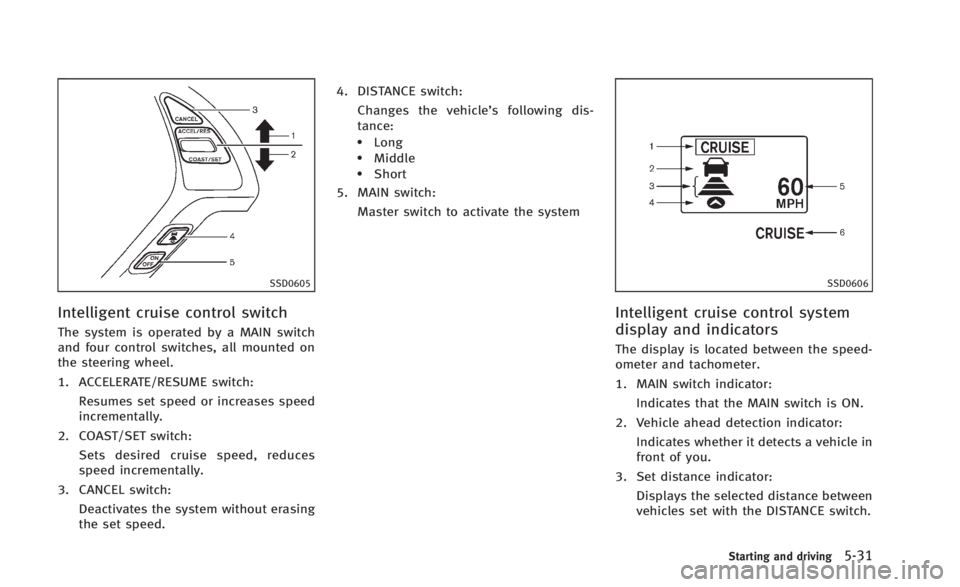
Intelligent cruise control switch
The system is operated by a MAIN switch
and four control switches, all mounted on
the steering wheel.
1. ACCELERATE/RESUME switch:Resumes set speed or increases speed
incrementally.
2. COAST/SET switch: Sets desired cruise speed, reduces
speed incrementally.
3. CANCEL switch:
Deactivates the system without erasing
the set speed. 4. DISTANCE switch:
Changes the vehicle’s following dis-
tance:
.Long.Middle.Short
5. MAIN switch:
Master switch to activate the system
SSD0606
Intelligent cruise control system
display and indicators
The display is located between the speed-
ometer and tachometer.
1. MAIN switch indicator: Indicates that the MAIN switch is ON.
2. Vehicle ahead detection indicator: Indicates whether it detects a vehicle in
front of you.
3. Set distance indicator: Displays the selected distance between
vehicles set with the DISTANCE switch.
Starting and driving5-31
Page 333 of 466
5-34Starting and driving
SSD0614
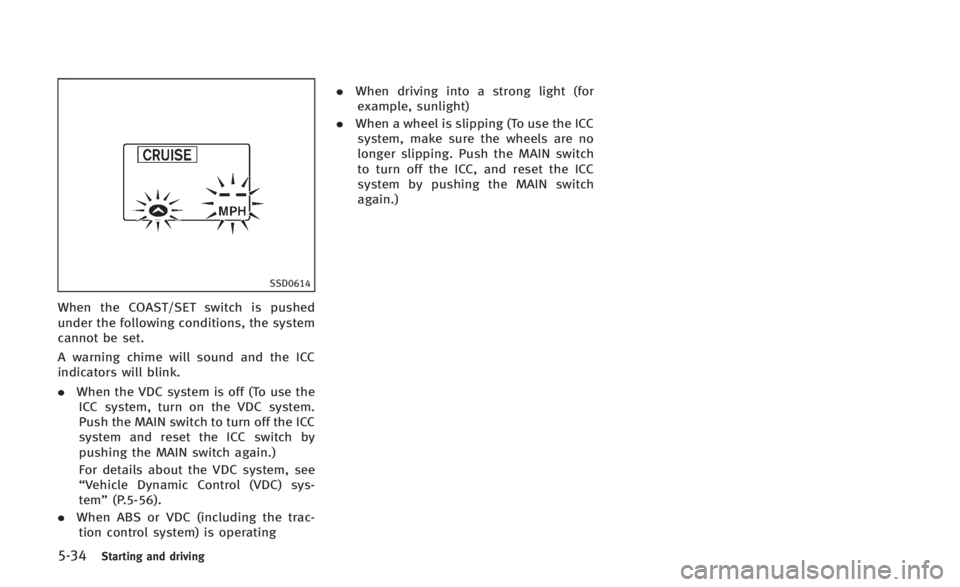
When the COAST/SET switch is pushed
under the following conditions, the system
cannot be set.
A warning chime will sound and the ICC
indicators will blink.
.When the VDC system is off (To use the
ICC system, turn on the VDC system.
Push the MAIN switch to turn off the ICC
system and reset the ICC switch by
pushing the MAIN switch again.)
For details about the VDC system, see
“Vehicle Dynamic Control (VDC) sys-
tem” (P.5-56).
. When ABS or VDC (including the trac-
tion control system) is operating .
When driving into a strong light (for
example, sunlight)
. When a wheel is slipping (To use the ICC
system, make sure the wheels are no
longer slipping. Push the MAIN switch
to turn off the ICC, and reset the ICC
system by pushing the MAIN switch
again.)
Page 346 of 466
6. Plan for the shortest route..Utilize a map or navigation system todetermine the best route to save
time.
7. Avoid idling.
.Shutting off your engine when safe for stops exceeding 30-60 seconds
saves fuel and reduces emissions.
8. Buy an automated pass for toll roads.
.Automated passes permit drivers to use special lanes to maintain cruis-
ing speed through the toll and avoid
stopping and starting.
9. Winter warm up.
.Limit idling time to minimize impact to fuel economy.
.Vehicles typically need no more than30 seconds of idling at start-up to
effectively circulate the engine oil
before driving.
.Your vehicle will reach its ideal
operating temperature more quickly
while driving versus idling.
10. Keeping your vehicle cool.
.Park your vehicle in a covered
parking area or in the shade when-
ever possible.
.When entering a hot vehicle, open- ing the windows will help to reduce
the inside temperature faster, result-
ing in reduced demand on your A/C
system. .
Keep your engine tuned up.
. Follow the recommended scheduled
maintenance.
. Keep the tires inflated to the correct
pressure. Low tire pressure increases
tire wear and lowers fuel economy.
. Keep the wheels in correct alignment.
Improper alignment increases tire wear
and lowers fuel economy.
. Use the recommended viscosity engine
oil. (See “Engine oil and oil filter
recommendation” (P.9-6).)
Starting and driving5-47
INCREASING FUEL ECONOMY
Page 347 of 466
5-48Starting and driving
SD1006MA
WARNING
.Do not stop or park the vehicle over
flammable materials such as dry grass,
waste paper or rags. They may ignite and
cause a fire.
. Never leave the engine running while the
vehicle is unattended.
. Do not leave children unattended inside
the vehicle. They could unknowingly
activate switches or controls. Unat-
tended children could become involved
in serious accidents. .
Safe parking procedures require that
both the parking brake be applied and
the transmission placed into P (Park) for
Automatic Transmission (AT) model or in
an appropriate gear for Manual Trans-
mission (MT) model. Failure to do so
could cause the vehicle to move un-
expectedly or roll away and result in an
accident.
. Make sure the automatic transmission
shift lever has been pushed as far
forward as it can go and cannot be
moved without depressing the foot
brake pedal.
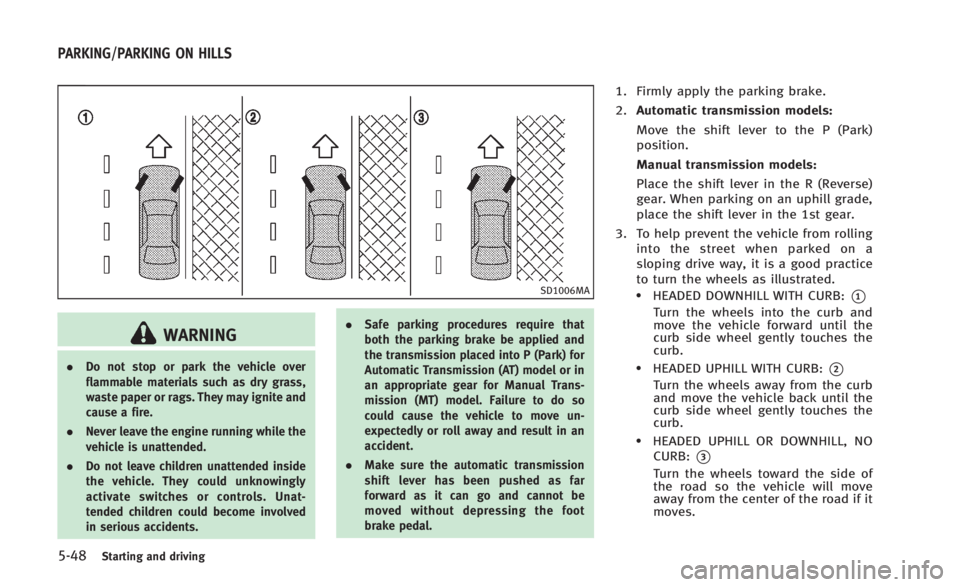
1. Firmly apply the parking brake.
2.Automatic transmission models:
Move the shift lever to the P (Park)
position.
Manual transmission models:
Place the shift lever in the R (Reverse)
gear. When parking on an uphill grade,
place the shift lever in the 1st gear.
3. To help prevent the vehicle from rolling into the street when parked on a
sloping drive way, it is a good practice
to turn the wheels as illustrated.
.HEADED DOWNHILL WITH CURB:*1
Turn the wheels into the curb and
move the vehicle forward until the
curb side wheel gently touches the
curb.
.HEADED UPHILL WITH CURB:*2
Turn the wheels away from the curb
and move the vehicle back until the
curb side wheel gently touches the
curb.
.HEADED UPHILL OR DOWNHILL, NOCURB:
*3
Turn the wheels toward the side of
the road so the vehicle will move
away from the center of the road if it
moves.
PARKING/PARKING ON HILLS
Page 351 of 466
5-52Starting and driving
BRAKING PRECAUTIONS
The brake system has two separate hy-
draulic circuits. If one circuit malfunctions,
you will still have braking at two wheels.
Vacuum assisted brakes
The brake booster aids braking by using
engine vacuum. If the engine stops, you
can stop the vehicle by depressing the
brake pedal. However, greater foot pres-
sure on the brake pedal will be required to
stop the vehicle and the stopping distance
will be longer.
When the brake pedal is depressed slowly
and firmly, you may hear a clicking noise
and feel a slight pulsation. This is normal
and indicates that the Brake Assist System
is operating.
Wet brakes
When the vehicle is washed or driven
through water, the brakes may get wet.
As a result, your braking distance will be
longer and the vehicle may pull to one side
during braking.
To dry brakes, drive the vehicle at a safe
speed while lightly tapping the brake pedal
to heat-up the brakes. Do this until the
brakes return to normal. Avoid driving thevehicle at high speeds until the brakes
function correctly.
PARKING BRAKE BREAK-IN
Break in the parking brake shoes whenever
the stopping effect of the parking brake is
weakened or whenever the parking brake
shoes and/or drums/rotors are replaced,
in order to assure the best braking
performance.
This procedure is described in the vehicle
service manual and can be performed by
an INFINITI retailer.
Using the brakes
Avoid resting your foot on the brake pedal
while driving. This will cause overheating
of the brakes, wearing out the brake and
pads faster and reduce gas mileage.
To help save the brakes and to prevent the
brakes from overheating, reduce speed
and downshift to a lower gear before going
down a slope or long grade. Overheated
brakes may reduce braking performance
and could result in loss of vehicle control.
WARNING
.
While driving on a slippery surface, be
careful when braking, accelerating or
downshifting. Abrupt braking or accel-
erating could cause the wheels to skid
and result in an accident.
. If the engine is not running or is turned
off while driving, the power assist for
the brakes will not work. Braking will be
harder.
BRAKE SYSTEM
Page 354 of 466

How to handle the sensor
The sensor for the Preview Function is
common with Intelligent Cruise Control and
is located below the front bumper.
To keep the Preview Function operating
properly, be sure to observe the following:
.Always keep the sensor clean. Wipe
with a soft cloth carefully so as not to
damage the sensor.
. Do not strike or damage the areas
around the sensor. Do not touch or
remove the screw located on the
sensor. Doing so could cause failure
or malfunction. If the sensor is da-
maged due to an accident, contact an
INFINITI retailer.
. Do not attach a sticker (including
transparent material) or install an
accessory near the sensor. This could
cause failure or malfunction.
ANTI-LOCK BRAKING SYSTEM (ABS)
WARNING
. The Anti-lock Braking System (ABS) is a
sophisticated device, but it cannot pre-
vent accidents resulting from careless or
dangerous driving techniques. It can
help maintain vehicle control during
braking on slippery surfaces. Remember
that stopping distances on slippery
surfaces will be longer than on normal
surfaces even with ABS. Stopping dis-
tances may also be longer on rough,
gravel or snow covered roads, or if you
are using tire chains. Always maintain a
safe distance from the vehicle in front of
you. Ultimately, the driver is responsible
for safety.
. Tire type and condition may also affect
braking effectiveness.
—When replacing tires, install the
specified size of tires on all four
wheels.
—When installing a spare tire, make
sure that it is the proper size and
type as specified on the Tire and
Loading Information label. See “Tireand Loading Information label”
(P.9-
13) of this manual.
—For detailed information, see “Wheels and tires” (P.8-30) of this
manual.
The Anti-lock Braking System (ABS) con-
trols the brakes so the wheels do not lock
during hard braking or when braking on
slippery surfaces. The system detects the
rotation speed at each wheel and varies
the brake fluid pressure to prevent each
wheel from locking and sliding. By pre-
venting each wheel from locking, the
system helps the driver maintain steering
control and helps to minimize swerving
and spinning on slippery surfaces.
Using the system
Depress the brake pedal and hold it down.
Depress the brake pedal with firm steady
pressure, but do not pump the brakes. The
ABS will operate to prevent the wheels
from locking up. Steer the vehicle to avoid
obstacles.
Starting and driving5-55
Page 355 of 466

5-56Starting and driving
WARNING
Do not pump the brake pedal. Doing so may
result in increased stopping distances.
Self-test feature
The ABS includes electronic sensors, elec-
tric pumps, hydraulic solenoids and a
computer. The computer has a built-in
diagnostic feature that tests the system
each time you start the engine and move
the vehicle at a low speed in forward or
reverse. When the self-test occurs, you may
hear a“clunk” noise and/or feel a pulsa-
tion in the brake pedal. This is normal and
does not indicate a malfunction. If the
computer senses a malfunction, it switches
the ABS off and illuminates the ABS
warning light on the instrument panel.
The brake system then operates normally,
but without anti-lock assistance.
If the ABS warning light illuminates during
the self-test or while driving, have the
vehicle checked by an INFINITI retailer.
Normal operation
The ABS operates at speeds above 3 to 6
MPH (5 to 10 km/h).
When the ABS senses that one or more
wheels are close to locking up, the actuator
rapidly applies and releases hydraulic
pressure. This action is similar to pumping
the brakes very quickly. You may feel a
pulsation in the brake pedal and hear a
noise from under the hood or feel a
vibration from the actuator when it is
operating. This is normal and indicates
that the ABS is operating properly. How-
ever, the pulsation may indicate that road
conditions are hazardous and extra care is
required while driving. The Vehicle Dynamic Control (VDC) system
uses various sensors to monitor driver
inputs and vehicle motion. Under certain
driving conditions, the VDC system helps
to perform the following functions.
.
Controls brake pressure to reduce
wheel slip on one slipping drive wheel
so power is transferred to a non
slipping drive wheel on the same axle.
. Controls brake pressure and engine
output to reduce drive wheel slip based
on vehicle speed (traction control func-
tion).
. Controls brake pressure at individual
wheels and engine output to help the
driver maintain control of the vehicle in
the following conditions:
— understeer (vehicle tends to not
follow the steered path despite
increased steering input)
— oversteer (vehicle tends to spin due
to certain road or driving condi-
tions).
The VDC system can help the driver to
maintain control of the vehicle, but it
cannot prevent loss of vehicle control in
all driving situations.
When the VDC system operates, the VDC
warning light
in the instrument panel
VEHICLE DYNAMIC CONTROL (VDC) SYSTEM
Page 356 of 466
flashes so note the following:
.The road may be slippery or the system
may determine some action is required
to help keep the vehicle on the steered
path.
. You may feel a pulsation in the brake
pedal and hear a noise or vibration
from under the hood. This is normal
and indicates that the VDC system is
working properly.
. Adjust your speed and driving to the
road conditions.
See “Vehicle Dynamic Control (VDC) warn-
ing light” (P.2-15).
If a malfunction occurs in the system, the
VDC warning light
illuminates in the
instrument panel. The VDC system auto-
matically turns off.
The VDC OFF switch is used to turn off the
VDC system. The VDC off indicator
illuminates to indicate the VDC system is
off. When the VDC switch is used to turn off
the system, the VDC system still operates
to prevent one drive wheel from slipping by
transferring power to a non slipping drive
wheel. The VDC warning light
flashes if
this occurs. All other VDC functions are off,
and the VDC warning light
will not
flash. The VDC system is automatically reset to on when the ignition switch is
placed in the off position then back to the
on position.
See
“Vehicle Dynamic Control (VDC) warn-
ing light” (P.2-15) and “Vehicle Dynamic
Control (VDC) off indicator light” (P.2-16).
The computer has a built-in diagnostic
feature that tests the system each time you
start the engine and move the vehicle
forward or in reverse at a slow speed.
When the self-test occurs, you may hear a
“clunk” noise and/or feel a pulsation in the
brake pedal. This is normal and is not an
indication of a malfunction.
WARNING
. The VDC system is designed to help the
driver maintain stability but does not
prevent accidents due to abrupt steering
operation at high speeds or by careless
or dangerous driving techniques. Reduce
vehicle speed and be especially careful
when driving and cornering on slippery
surfaces and always drive carefully.
. Do not modify the vehicle’s suspension.
If suspension parts such as shock
absorbers, struts, springs, stabilizer bars, bushings and wheels are not
INFINITI recommended for your vehicle
or are extremely deteriorated, the VDC
system may not operate properly. This
could adversely affect vehicle handling
performance, and the VDC warning light
may illuminate.
. If brake related parts such as brake
pads, rotors and calipers are not INFINITI
recommended or are extremely deterio-
rated, the VDC system may not operate
properly and the VDC warning light
may illuminate.
. If engine control related parts are not
INFINITI recommended or are extremely
deteriorated, the VDC warning light
may illuminate.
. When driving on extremely inclined
surfaces such as higher banked corners,
the VDC system may not operate prop-
erly and the VDC warning light
may
illuminate. Do not drive on these types
of roads.
. When driving on an unstable surface
such as a turntable, ferry, elevator or
ramp, the VDC warning light
may
illuminate. This is not a malfunction.
Restart the engine after driving onto a
Starting and driving5-57